Frappe Helpdesk is a free, open source customer support & success project written in Vue and released under AGPL-3.0. It has 3,382 GitHub stars, 944 forks and 159 open issues, and was last pushed 15 hours ago. On this registry it ranks #5 of 17 tracked projects in Customer Support & Success, with 5 head-to-head comparisons available. It gained 11 stars over the last 6 tracked days.

What is Frappe Helpdesk?

What it is

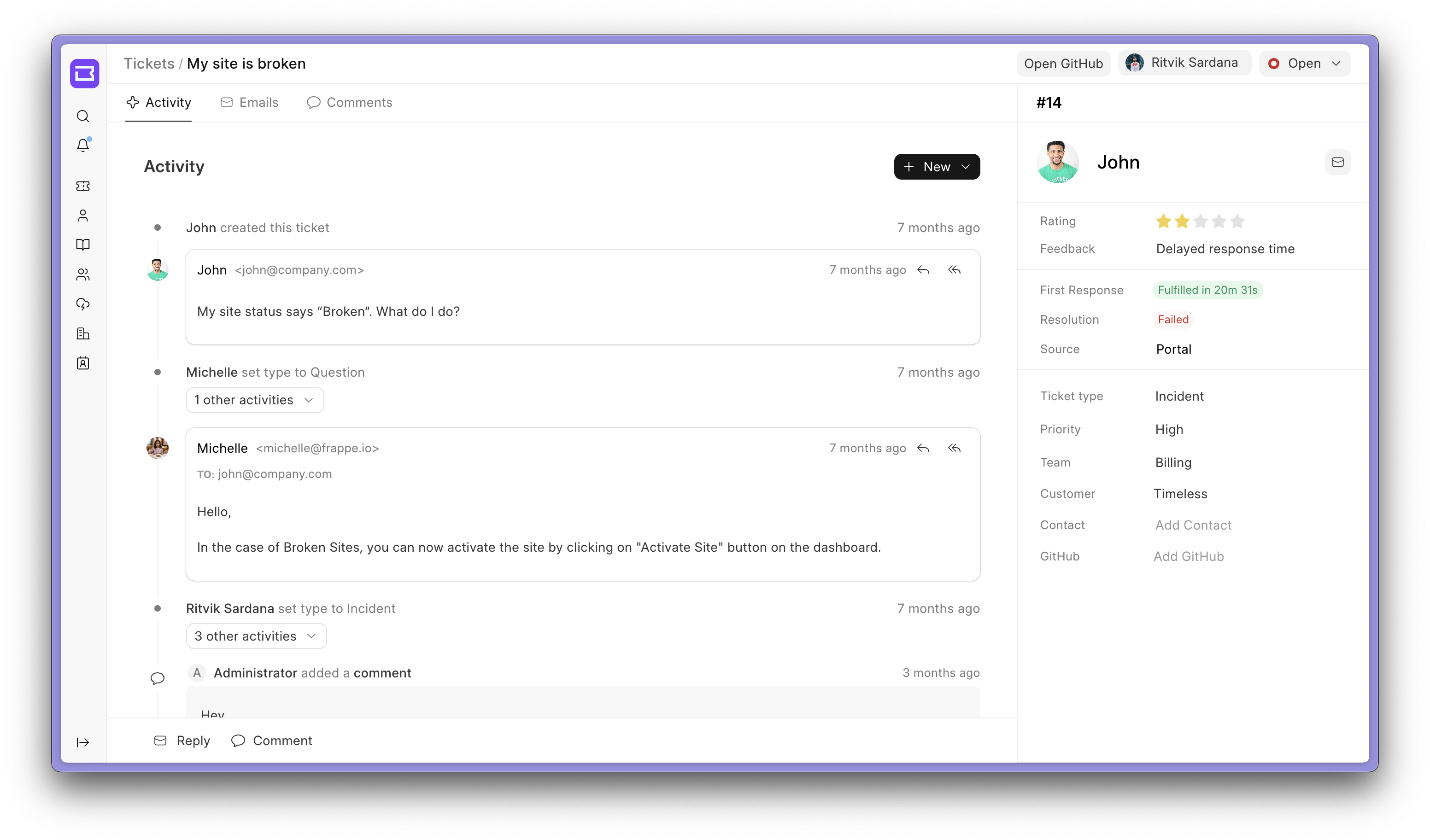
Frappe Helpdesk is an open-source ticketing system for customer support. It lives in the Frappe ecosystem, using the Frappe Framework in Python and JavaScript, the Frappe UI library, and Vue3. The project is licensed under AGPL-3.0 and provides agent and customer portals, issue tracking, knowledge base articles, SLAs, assignment rules, and saved replies.

The concrete problem it addresses is managing customer support issues. The README says the team built it because the ERPNext support module was not very good in UI and UX, and they wanted a tool that could integrate with existing systems and be customized as needed. It aims to make ticket submission, routing, response tracking, and article search easier for support teams and customers.

Key capabilities

  • It provides agent and customer portal views, so staff can manage tickets while customers submit issues.
  • Customizable SLAs let teams set and track response-time targets.
  • Assignment Rules support automatic ticket assignment based on priority, issue type, or workload.
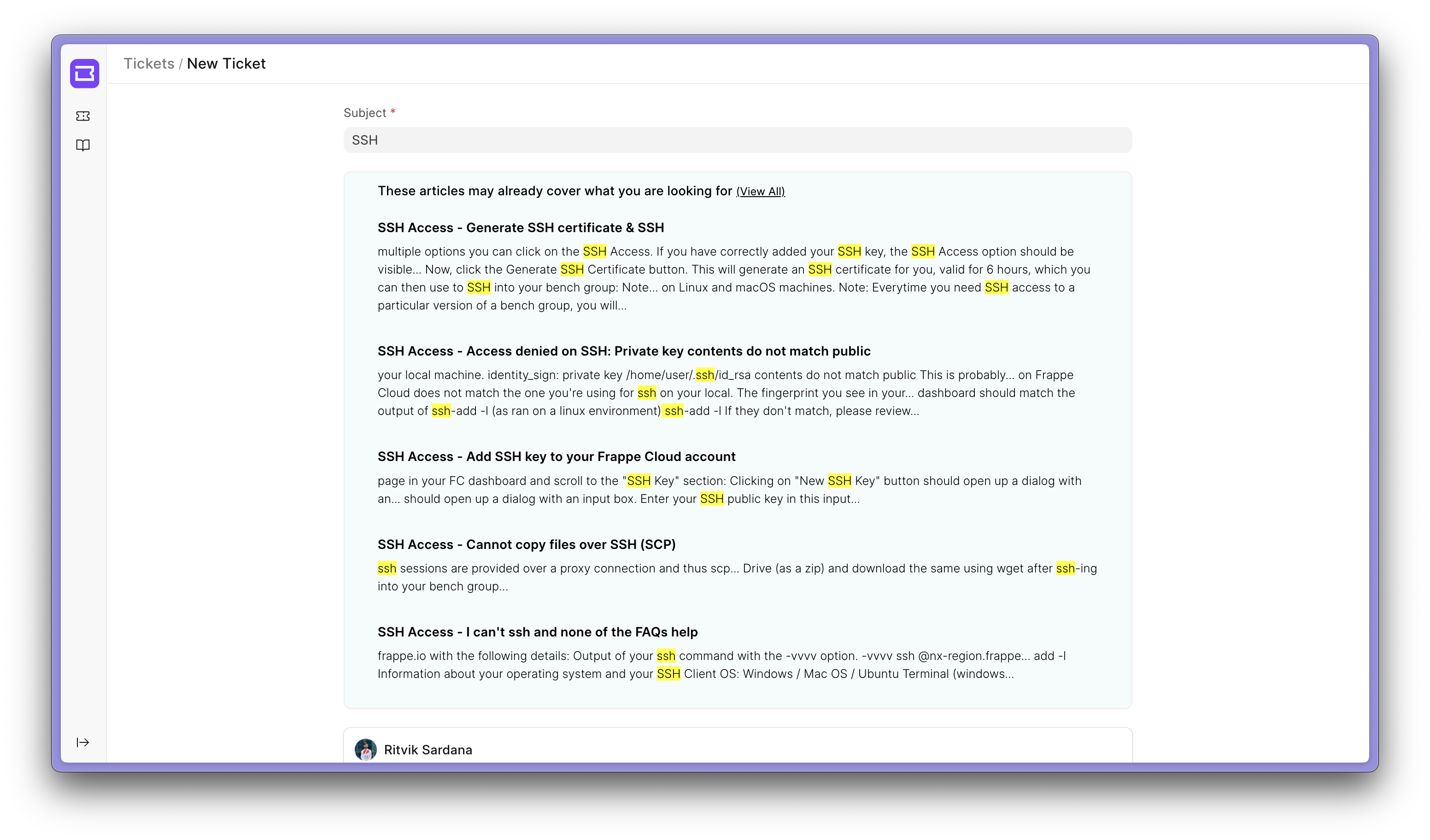
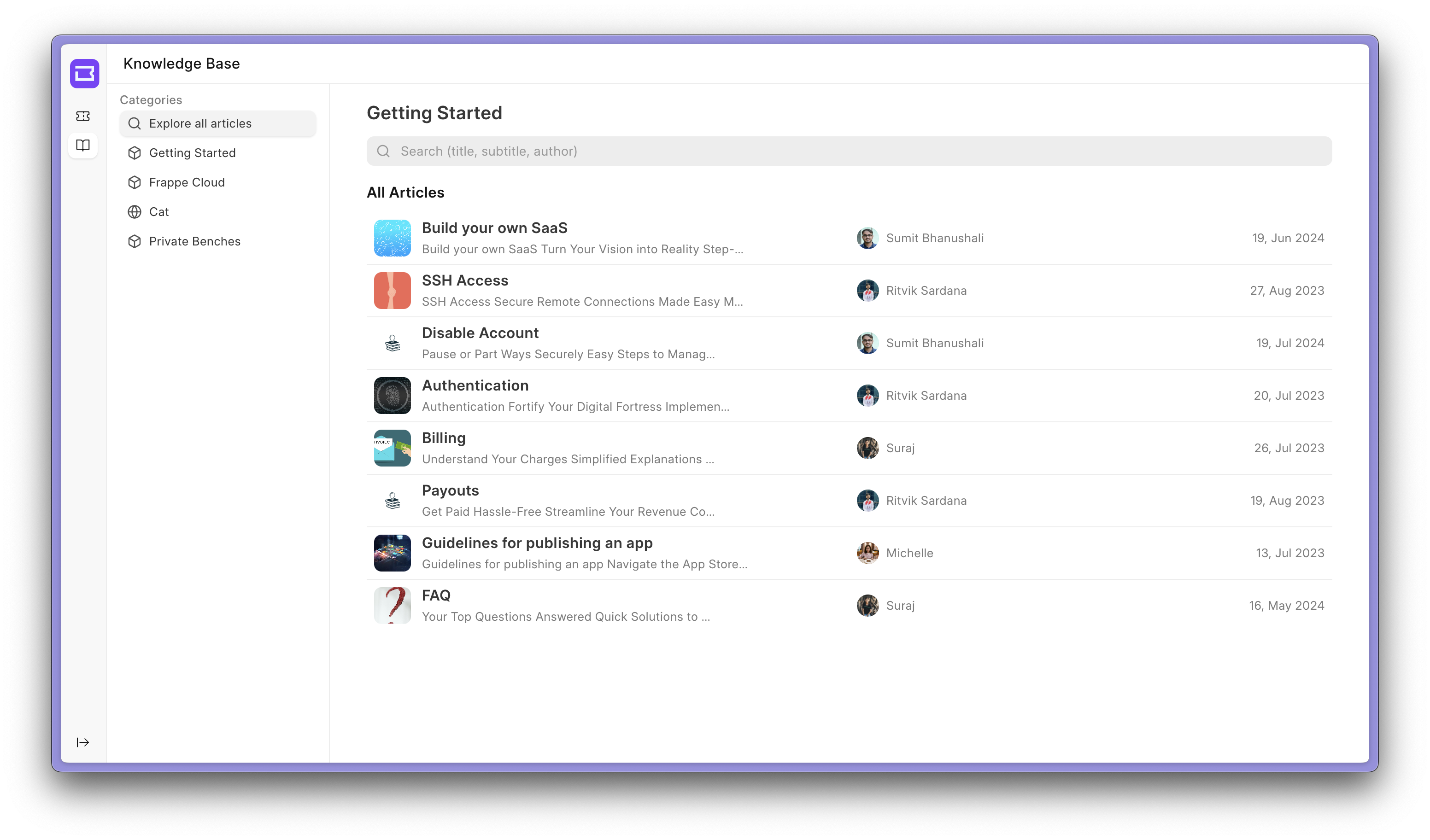
  • The Knowledge Base lets teams create and manage help articles, and advanced search recommends relevant articles to customers.
  • Saved Replies provide pre-written responses for common queries, supporting quick and consistent communication.
  • It is built on the Frappe Framework and Frappe UI, combining Python, JavaScript, TypeScript, and Vue3.
  • Production use can run through Frappe Cloud managed hosting or self-hosting with the easy-install script and Docker-based development setup.

Who uses it and how

  • Support teams use the agent list view and ticket workflow to review, assign, and respond to issues.
  • Customers use the customer portal to submit queries and search knowledge base articles.
  • Teams use SLAs and assignment rules to route tickets by priority, issue type, or workload and monitor response times.
  • Support agents use saved replies to handle common questions consistently.
  • Developers and self-hosters use Docker Compose or a local bench setup for development, and easy-install or Frappe Cloud for production.

Getting started

For production, use Frappe Cloud or run easy-install.py deploy with ghcr.io/frappe/helpdesk, stable, the helpdesk app, and your sitename. For development, download the Docker Compose file and init.sh, run docker compose up -d, then open http://helpdesk.localhost:8000/helpdesk with Administrator/admin, or use bench locally.

When to use it — and when not to

Choose Frappe Helpdesk when you need an AGPL-3.0 ticketing system inside the Frappe ecosystem and can operate a Python and Vue application. The topic list points to Help Scout, but the facts do not describe migration or feature parity. Avoid it if you need a mature registry entry, because the repository is new, shows zero contributors, and has 159 open issues, while self-hosting requires operating the Frappe deployment stack.

project readme (upstream, from github) — read inline

Frappe Helpdesk

Customer Service, Made Simple and Effective

GitHub release (latest by date) codecov

teableio%2Fteable | Trendshift


Website - Documentation

Frappe Helpdesk

Frappe Helpdesk is an 100% open-source Ticket Management tool which helps you streamline your company's support, offers an easy setup, clean user interface, and automation tools to resolve customer queries efficiently.

Motivation

Managing issues from our customers was a big challenge for us. We were using the ERPNext support module which was not very good in UI and the UX was also not good. We wanted to have a tool that can be easily integrated with our existing system and can be customized as per our needs. So we decided to build Frappe Helpdesk.

Key Features

  • Agent and Customer Portal Views: Dual portals for agents and customers to simplify issue submission and management.

  • Customizable SLAs: Discover how you can set and track SLAs for better response times.

  • Assignment Rules: Custom auto-assignment of tickets based on priority, issue type, or workload.

  • Knowledge Base: Learn how to create and manage help articles to empower users and reduce tickets.

  • Saved Replies: Pre-written replies for common queries to ensure quick and consistent communication.

View Screenshots

Agent List View
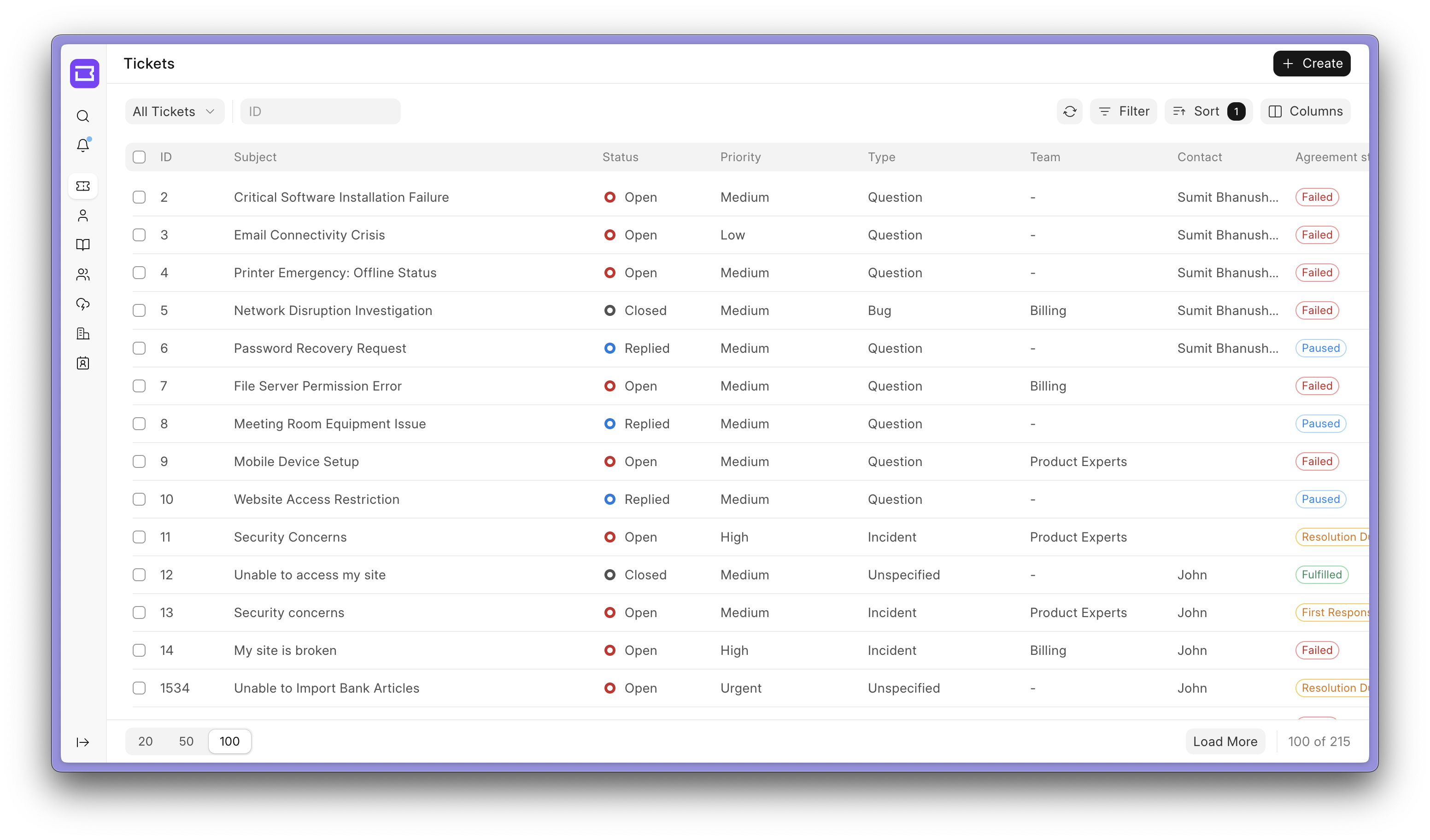
Agent List View

Upload articles and let your customer solve their queries through the Knowledge Base.

Knowledge Base

With advanced search, your customers will be recommended relevant articles regarding their issue.

Article Search


Under the Hood

  • Frappe Framework: A full-stack web application framework written in Python and Javascript.

  • Frappe UI: A Vue-based UI library, to provide a modern user interface.

Production Setup

Managed Hosting

You can try Frappe Cloud, a simple, user-friendly and sophisticated open-source platform to host Frappe applications with peace of mind.

It takes care of installation, setup, upgrades, monitoring, maintenance and support of your Frappe deployments. It is a fully featured developer platform with an ability to manage and control multiple Frappe deployments.

Try on Frappe Cloud
</a>

Self Hosting

Follow these steps to set up Frappe Helpdesk in production:

Step 1: Download the easy install script

wget https://frappe.io/easy-install.py

Step 2: Run the deployment command

python3 ./easy-install.py deploy \
    --project=helpdesk_prod_setup \
    --email=your_email.example.com \
    --image=ghcr.io/frappe/helpdesk \
    --version=stable \
    --app=helpdesk \
    --sitename subdomain.domain.tld

Replace the following parameters with your values:

  • your_email.example.com: Your email address
  • subdomain.domain.tld: Your domain name where Helpdesk will be hosted

The script will set up a production-ready instance of Frappe Helpdesk with all the necessary configurations in about 5 minutes.

Development Setup

Docker

You need Docker, docker-compose and git setup on your machine. Refer Docker documentation. After that, follow below steps:

Step 1: Setup folder and download the required files

mkdir frappe-helpdesk
cd frappe-helpdesk

# Download the docker-compose file
wget -O docker-compose.yml https://raw.githubusercontent.com/frappe/helpdesk/develop/docker/docker-compose.yml

# Download the setup script
wget -O init.sh https://raw.githubusercontent.com/frappe/helpdesk/develop/docker/init.sh

Step 2: Run the container and daemonize it

docker compose up -d

Step 3: The site http://helpdesk.localhost:8000/helpdesk should now be available. The default credentials are:

  • Username: Administrator
  • Password: admin

Local

To setup the repository locally follow the steps mentioned below:

  1. Install bench and setup a frappe-bench directory by following the Installation Steps
  2. Start the server by running bench start
  3. In a separate terminal window, create a new site by running bench new-site helpdesk.test
  4. Map your site to localhost with the command bench --site helpdesk.test add-to-hosts
  5. Get the Telephony app. Run bench get-app https://github.com/frappe/telephony
  6. Get the Helpdesk app. Run bench get-app https://github.com/frappe/helpdesk
  7. Run bench --site helpdesk.test install-app helpdesk.
  8. Run bench build --app helpdesk
  9. Now open the URL http://helpdesk.test:8000/helpdesk in your browser, you should see the app running

For Frontend Development

  1. Open a new terminal session and cd into frappe-bench/apps/helpdesk/desk, and run the following commands:
    yarn install
    yarn dev or yarn dev --host helpdesk.test
    
  2. Now, you can access the site on vite dev server at http://helpdesk.test:8080

Note: You'll find all the code related to Helpdesk's frontend inside frappe-bench/apps/helpdesk/desk

Compatibility matrix

Helpdesk Branch Compatible Frappe Framework Version
main version-15
main version-16
develop develop branch

Learn and connect

Contributing

  1. Issue Guidelines
  2. Report Security Vulnerabilities
  3. Pull Request Requirements
  4. Translations


Frappe Technologies
</a>

Frequently asked questions

Is Frappe Helpdesk free to use?

Frappe Helpdesk is open source under the AGPL-3.0 licence. There is no licence fee and no seat count — you can self-host it or, where the project offers one, pay a vendor for a managed version instead.

What does Frappe Helpdesk do?

Open-source ticketing system for streamlined support

What is Frappe Helpdesk written in?

Frappe Helpdesk is primarily written in Vue. Its source is publicly available at https://github.com/frappe/helpdesk, and it has 3,382 GitHub stars.