



Fastest SQL pipeline engine for stream processing, analytics, observability and AI





What's Timeplus Proton
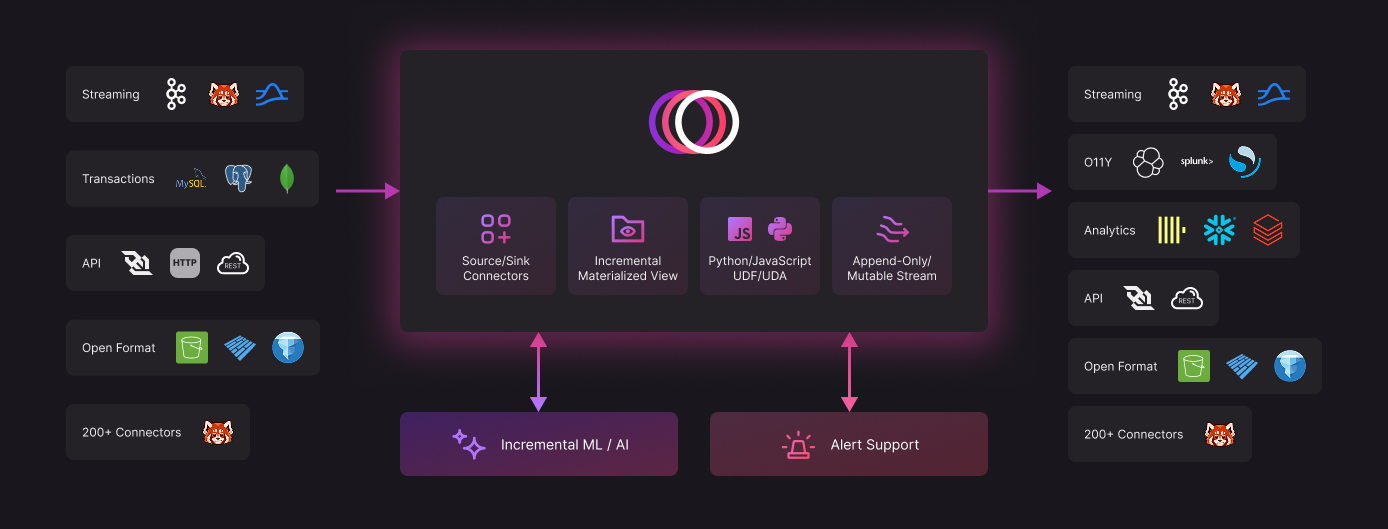
🚀 The fastest SQL pipeline engine in a single C++ binary, for stream processing, analytics, observability and AI. A simple, fast and efficient alternative to ksqlDB and Apache Flink, powered by ClickHouse engine.
🔥 SQL for everything : Native source/sink (Kafka, ClickHouse, MySQL, Postgres, MongoDB, S3/Iceberg, OpenSearch etc.), Streaming ingestion, Multi-stream JOINs, Incremental Materialized Views, Alerting, Tasks, UDF in Python/JS etc.
⚡ No JVM. No ZooKeeper. Zero dependencies. Just speed, control and scale.
Get started in seconds
curl https://install.timeplus.com/oss | sh
Why Timeplus Proton
Apache Flink or ksqlDB alternative. Timeplus Proton provides powerful stream processing functionalities, such as streaming ETL, tumble/hop/session windows, watermarks, incremental materialized views maintenance, CDC and data revision processing. In contrast to pure stream processors, it also stores queryable analytical/row based materialized views within Proton itself for use in analytics dashboards and applications.
Fast. Timeplus Proton is written in C++, with optimized performance through SIMD. For example, on an Apple MacBookPro with M2 Max, Timeplus Proton can deliver 90 million EPS, 4 millisecond end-to-end latency, and high cardinality aggregation with 1 million unique keys.
Lightweight. Timeplus Proton is a single binary (\ [!NOTE]
You can also integrate Timeplus Proton with Python/Java/Go SDK, REST API, or BI plugins. Please check Integrations
In the proton client, you can write SQL to create External Stream for Kafka or External Table for ClickHouse.
For example, you can read from AWS MSK and write the data to ClickHouse for the following SQL:
-- Read from AWS MSK using IAM Role
CREATE EXTERNAL STREAM aws_msk_stream (
  device string,
  temperature float
)
SETTINGS
    type='kafka',
    brokers='prefix.kafka.us-west-2.amazonaws.com:9098',
    topic='topic',
    security_protocol='SASL_SSL',
    sasl_mechanism='AWS_MSK_IAM';

-- Write to ClickHouse
CREATE EXTERNAL TABLE ch_aiven
SETTINGS type='clickhouse',
            address='abc.aivencloud.com:28851',
            user='avnadmin',
            password='..',
            secure=true,
            table='events';

-- Setup a long-running materialized view to write aggregated data to ClickHouse
CREATE MATERIALIZED VIEW mv_msk2ch INTO ch_aiven AS
SELECT window_start as timestamp, device, avg(temperature) as avg_temperature
FROM tumble(aws_msk_stream, 10s) GROUP BY window_start, device;
If you don't have immediate access to Kafka or ClickHouse, you can also run the following SQL to generate random data:
-- Create a stream with random data
CREATE RANDOM STREAM devices(
  device string default 'device'||to_string(rand()%4),
  temperature float default rand()%1000/10);

-- Run the streaming SQL
SELECT device, count(*), min(temperature), max(temperature)
FROM devices GROUP BY device;
You should see data like the following:
┌─device──┬─count()─┬─min(temperature)─┬─max(temperature)─┐
│ device0 │    2256 │                0 │             99.6 │
│ device1 │    2260 │              0.1 │             99.7 │
│ device3 │    2259 │              0.3 │             99.9 │
│ device2 │    2225 │              0.2 │             99.8 │
└─────────┴─────────┴──────────────────┴──────────────────┘
What's next
To see more examples of using Timeplus Proton, check out the examples folder.
To access more features, such as sources, sinks, dashboards, alerts, and data lineage, try Timeplus Enterprise locally.
What features are available with Timeplus Proton versus Timeplus Enterprise?
| Timeplus Proton | Timeplus Enterprise | |
|---|---|---|
| Deployment |
|
|
| Data sources |
|
|
| Data destinations (sinks) |
|
|
| Support |
|
|
Integrations
The following drivers are available:
- https://github.com/timeplus-io/proton-java-driver JDBC and other Java clients
- https://github.com/timeplus-io/proton-go-driver
- https://github.com/timeplus-io/proton-python-driver
Integrations with other systems:
- ClickHouse https://docs.timeplus.com/proton-clickhouse-external-table
- Docker and Testcontainers https://docs.timeplus.com/tutorial-testcontainers-java
- Sling https://docs.timeplus.com/sling
- Grafana https://github.com/timeplus-io/proton-grafana-source
- Homebrew https://github.com/timeplus-io/homebrew-timeplus
- dbt https://github.com/timeplus-io/dbt-proton
Documentation
We publish full documentation for Timeplus Proton at docs.timeplus.com alongside documentation for Timeplus Enterprise.
We also have a FAQ for detailing how we chose Apache License 2.0, how Timeplus Proton is related to ClickHouse, and more.
Contributing
We welcome your contributions! If you are looking for issues to work on, try looking at the issue list.
Please see the wiki for more details, and BUILD.md to compile Timeplus Proton in different platforms.
Adding a Company Logo
If you are using Timeplus Proton and would like your company logo displayed on our Home page, please email info@timeplus.com with your request.
Need help?
Please use GitHub Discussions to share your feedbacks or questions for Timeplus Proton.
For filing bugs, suggesting improvements, or requesting new features, open GitHub Issues.
To connect with Timeplus engineers or inquire about Timeplus Enterprise, join our Timeplus Community Slack.
Licensing
Proton uses Apache License 2.0. See details in the LICENSE.