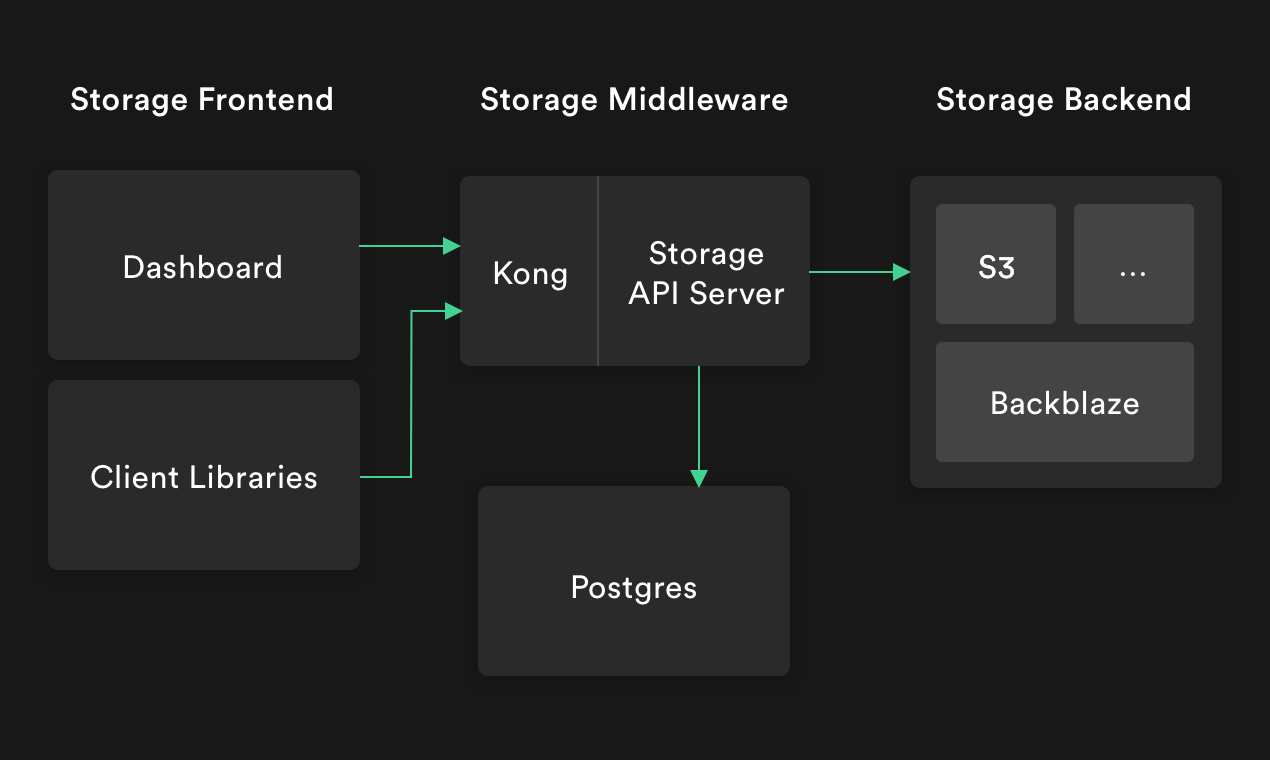
Supabase Storage is a lightweight, S3-compatible object storage service written in TypeScript that keeps its metadata in Postgres, and it is built for teams that want object storage whose access rules are expressed as database policies rather than as a separate permission layer.
What it is
Supabase Storage Engine is an open-source object storage service, licensed under Apache-2.0 and written in TypeScript. It speaks several protocols — HTTP/REST, TUS resumable upload, an S3-compatible API and an Iceberg REST Catalog — and uses Postgres as its datastore for storing metadata instead of keeping that metadata inside the storage backend. Authorization rules are written as Postgres Row Level Security policies, and the service integrates with S3-compatible storages for the underlying objects. Its topic list reflects that scope: object-storage, postgres, s3, tus, iceberg, gotrue and vector.
The concrete problem it addresses is the split between object bytes and object permissions. It occupies the position an S3-compatible object store would occupy in an application stack, but bucket and object records live in the same Postgres database the rest of the application already uses, so access decisions are made by Row Level Security policies rather than by a separate identity and policy system maintained alongside the database. The project documents its own reasoning for building a new object storage service in a linked Supabase blog post, and the README describes the result as lightweight and performant.
Key capabilities
- Multi-protocol access to the same storage layer: HTTP/REST, TUS Resumable Upload, an S3 Compatible API, and an Iceberg REST Catalog.
- Metadata, including bucket and object records, is stored in Postgres rather than in the storage backend.
- Authorization is expressed as Postgres Row Level Security policies, so permissions are managed with the database.
- Integration with S3-compatible storage backends for the object data itself.
- A documented bucket API:
POST /bucket with a JSON body such as { "name": "avatars" } creates a bucket, and GET /bucket returns the list of buckets, authenticated with a bearer token.
- A published OpenAPI specification at
supabase.github.io/storage, alongside storage guides and a client library.
- Local development tooling:
npm run infra:restart starts Postgres and PostgREST in Docker, npm run dev runs the server on port 5000, and npm test, npm run lint and npm run lint:fix cover testing and code quality.
Who uses it and how
- Teams already running Supabase or Postgres, who link to the storage guides and client library from the project homepage to add file uploads and downloads to an existing database-backed application.
- Applications that need resumable uploads for large files, using the TUS protocol rather than a single-shot HTTP request.
- Analysts and data engineers working with Iceberg table formats, who can point clients at the implemented Iceberg REST Catalog endpoint.
- Self-hosters and contributors running the service locally, where the README's Docker-based infrastructure command provides Postgres and PostgREST without manual setup.
- Existing S3 tooling, which can be aimed at the S3-compatible API instead of being rewritten.
Getting started
Copy .env.sample to .env and .env.test.sample to .env.test, then run npm run infra:restart to bring up Postgres and PostgREST locally via Docker and npm run dev to start the storage server at http://localhost:5000/. Hosted and production guidance is deferred to the Supabase documentation linked from the project homepage.
How it compares
No paid products this project replaces are listed in the facts, and no directly comparable peer tool is named either; on the evidence available it stands alone in this registry. The only other systems named are the ones it works with — Postgres, PostgREST and S3-compatible storage backends — rather than alternatives to it.
When to use it — and when not to
A self-hoster must operate Postgres for metadata, an S3-compatible backend for the objects themselves, and, for local development, PostgREST in Docker, so this is not a drop-in service without a database to run. Teams that want a fully managed object store with no SQL policy model, or that have no Postgres in their stack, should look elsewhere. The README excerpt is development-focused and provides no production deployment instructions, and the repository carries 66 open issues, so prospective operators should expect to lean on the external Supabase guides and the issue tracker.