PsiTransfer is a simple, open source, self-hosted file sharing service written in JavaScript under the BSD-2-Clause licence, intended for individuals and teams that want to send large files without accounts, logins or a paid provider.
What it is
PsiTransfer is a self-hosted web application for sharing files, presented by its authors as an open source alternative to paid services such as Dropbox and WeTransfer. It sits in the Node.js ecosystem, is written in JavaScript, and is distributed both as the Docker image psitrax/psitransfer and as a Node.js application run from a precompiled release or built from source. The project's topics place it among file-sharing, pastebin, transfer-files and upload tools.
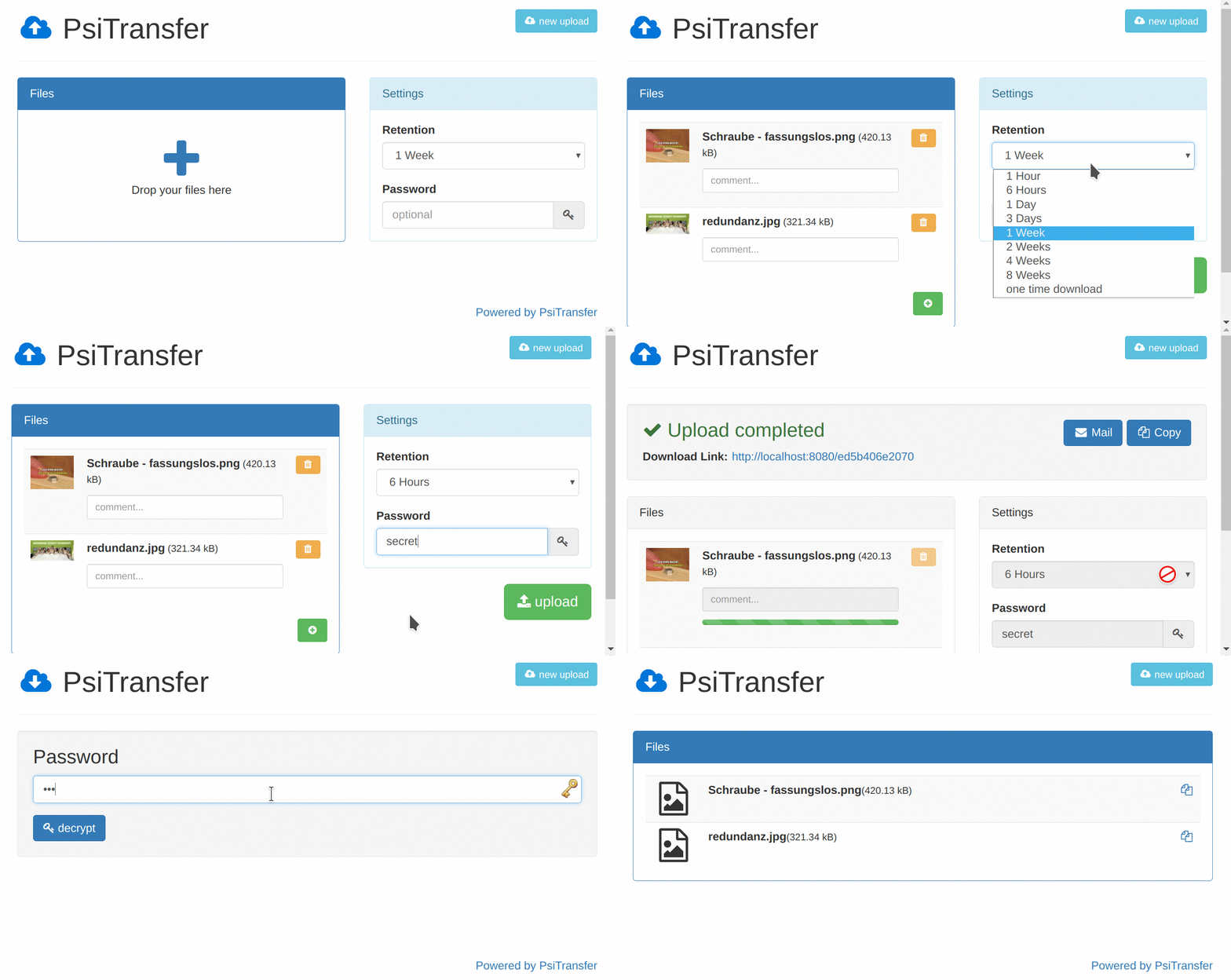
The concrete problem it solves is the third-party transfer link. Rather than uploading a file to somebody else's service and accepting that provider's retention rules and pricing, an operator runs PsiTransfer on their own host and hands out a bucket URL. A bucket can carry an expire time or be limited to one-time downloads, its download list can be password protected with AES, and recipients open a mobile friendly, responsive interface. Streamed uploads and downloads mean many and very big files can pass through.
Key capabilities
- Resumable uploads and downloads are implemented over the tus.io protocol, so interrupted transfers can continue instead of restarting.
- Files are streamed, which lets a single instance accept many and very big files.
- Buckets support an expire time and one-time downloads, and the download list can be password protected with AES.
- All files in a bucket can be downloaded together as a zip or tar.gz archive; the ZIP download does not support resumable transfer.
- A modal-style file preview lets recipients inspect files before downloading.
- The frontend is built from lightweight Vue applications that gzip to less than 100k and are mobile friendly and responsive.
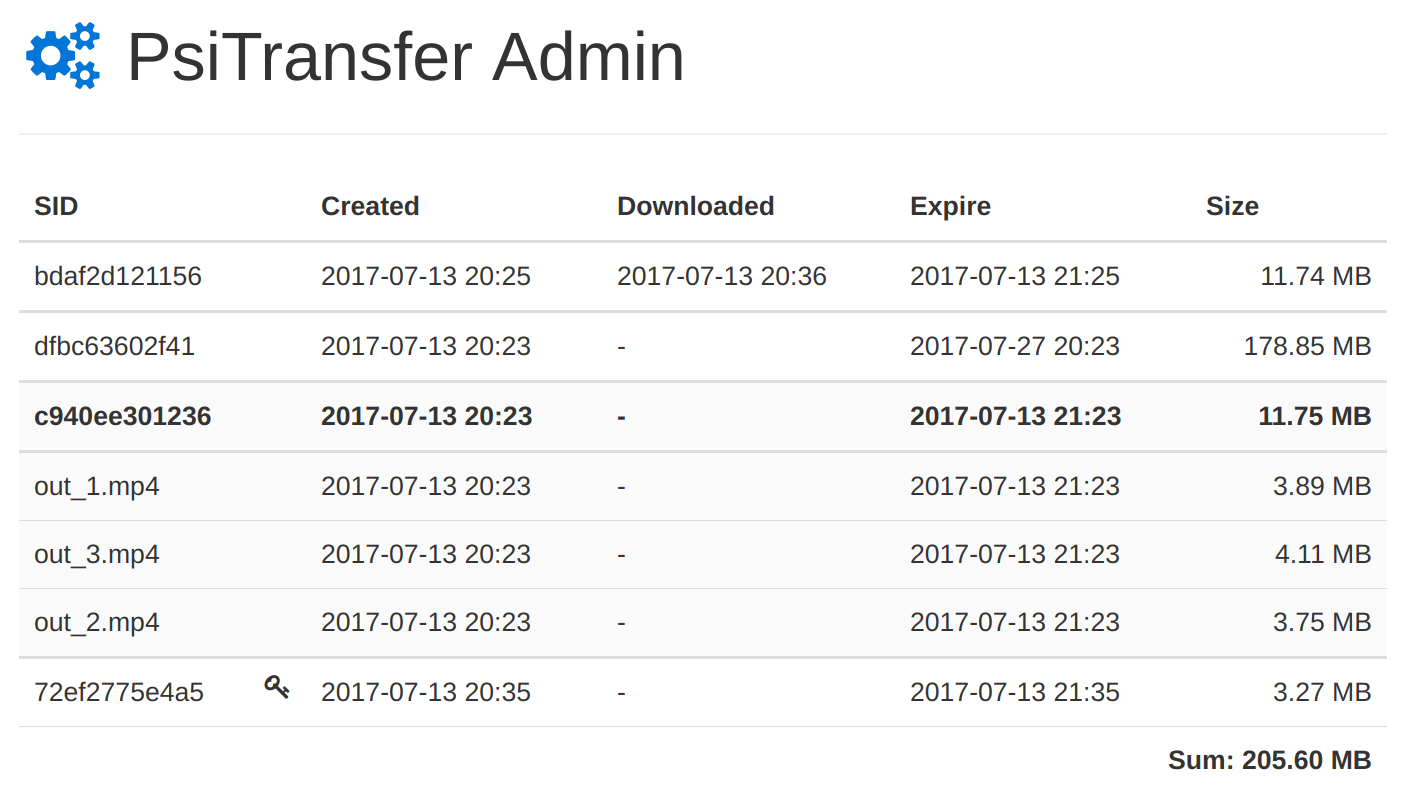
- An /admin page lists bucket information, stays disabled until the adminPass configuration value is set, and buckets can be addressed by explicit named IDs using the sid= query parameter.
Who uses it and how
- Individuals and small teams wanting WeTransfer-style links without a subscription run the Docker image on port 3000 with a /data volume mounted from the host.
- Operators reachable from the internet block unwanted uploads with PSITRANSFER_UPLOAD_PASS and protect the admin area with PSITRANSFER_ADMIN_PASS.
- Administrators who need visibility into stored buckets unlock the /admin page by configuring adminPass.
- Organisations wanting their own branding edit public/pug/upload.pug and download.pug, keeping the "Powered by PsiTransfer" footnote.
- Developers diagnosing an instance start it with DEBUG=psitransfer:* to obtain debug output.
Getting started
The fastest route is the official Docker image: docker run -p 0.0.0.0:3000:3000 -e PSITRANSFER_ADMIN_PASS=secret -v $PWD/data:/data psitrax/psitransfer, with the data volume chowned to UID 1000 and an image tag such as latest, 2 or a pinned version. A precompiled release can instead be run on Node.js 12 or newer with NODE_ENV=production npm install and npm start, or built from source by compiling the frontend in the app directory first.
How it compares
PsiTransfer names Dropbox and WeTransfer as the paid services it replaces. Those are proprietary, vendor-hosted products sold on subscription, whereas PsiTransfer is BSD-2-Clause licensed and self-hosted, so files stay on storage the operator controls and no per-transfer fee applies. The burden shifts accordingly: the operator supplies the host, the Node.js runtime and the ongoing maintenance rather than paying a provider.
When to use it — and when not to
A self-hoster must run a Node.js process, version 12 or newer for precompiled releases, provide a writable data directory owned by UID 1000 for the Docker volume, and set an admin password plus an upload password if the instance is exposed. It is not the right choice for anyone needing end-to-end encryption of payloads, because the README states there is none yet, and the download-all-as-ZIP feature does not support resumable transfer. With 109 open issues in the repository, operators should expect to track upstream releases and keep the instance patched.
project readme (upstream, from github) — read inline
PsiTransfer









Simple open source self-hosted file sharing solution.
It's an alternative to paid services like Dropbox, WeTransfer.
- No accounts, no logins
- Mobile friendly responsive interface
- Supports many and very big files (Streams ftw)
- Resumable up- and downloads (tus.io)
- Set an expire-time for your upload bucket
- One-time downloads
- Download all files as zip/tar.gz archive
- Modal-style file preview
- Requires Node >=7.4 or use
--harmony-async-await flag
- Password protected download list (AES)
/admin Page lists bucket information, Screenshot (disabled until you set adminPass config value)- Lightweight Vue based frontend apps. Gzipped (on by default) less than 100k
- Explicit named bucket IDs with query param
sid=
See the blog posts about PsiTransfer: https://psi.cx/tags/PsiTransfer/ and checkout the
Documentation
Quickstart
Docker
$ docker run -p 0.0.0.0:3000:3000 -e PSITRANSFER_ADMIN_PASS=secret -v $PWD/data:/data psitrax/psitransfer
# data volume needs UID 1000
$ sudo chown -R 1000 $PWD/data
Specify the version by using image tags e.g.:
latest: corresponds to master branch2: latest stable 2.x.x1.1: latest stable 1.1.x1.0.0: exact version
Manual, precompiled
# Be sure to have NodeJS >= 12
$ node -v
v12.4.0

# Download and extract latest release package from
# https://github.com/psi-4ward/psitransfer/releases

# Install dependencies and start the app
$ NODE_ENV=production npm install
$ npm start
Manual, from source
# Compile the frontend apps
$ cd app
$ npm install
$ npm run build

# Install dependencies
$ cd ..
$ npm install
$ npm start
Configuration
There are some configs in config.js like port and data-dir.
You can:
- Edit the
config.js (not recommend)
- Add a
config.production.js where production is the value from NODE_ENV
See config.dev.js
- Define environment Variables like
PSITRANSFER_UPLOAD_DIR to set the upload directory
- To secure your PsiTransfer if exposed to the internet from unwanted, non authorized uploads use the
PSITRANSFER_UPLOAD_PASS environment variable
Customization
public/pug/upload.pug and download.pug are kept simple.
You can alter these files and add your logo and styles.
Please keep a footnote like Powered by PsiTransfer :)
Debug
Psitransfer uses debug:
DEBUG=psitransfer:* npm start
Side notes
- There is no (end-to-end) payload encryption (yet).
Download all as ZIP does not support resuming the download.
:star2: Contribution is highly welcome :metal:
Want to say thanks and buy me a beer?
License
BSD