SmartDNS is a local DNS server, written in C and licensed under GPL-3.0, that accepts DNS queries from local clients, asks multiple upstream DNS servers, and returns the IP address with the fastest measured access speed — built for self-hosters, router owners, and network operators who want faster name resolution and stronger privacy.
What it is
SmartDNS runs as a DNS server on a machine inside the local network. It accepts queries from devices such as PCs and phones, forwards them to several upstream DNS servers at once, collects the returned list of IP addresses for the requested domain, measures which of those addresses is reachable fastest from the local network, and hands only the fastest result back to the client. It belongs to the OpenWrt and router-firmware ecosystem, with packages available for standard Linux systems such as the Raspberry Pi, OpenWrt firmware builds, Asus stock firmware, and WSL on Windows.
The concrete problem it solves is slow resolution caused by upstream DNS servers returning a geographically or topologically distant address. The README contrasts it directly with DNSmasq's all-servers behaviour: DNSmasq returns results from all upstream servers, while SmartDNS returns the fastest one. The README's own sample shows a query against Ali DNS (223.5.5.5) yielding addresses answered in roughly 24–31 ms, versus a SmartDNS-returned address answered in roughly 6 ms. Its secondary purpose is privacy through encrypted transports (DoT, DoH, DoQ, DoH3) and ad filtering through explicit domain-to-IP mapping.
Key capabilities
- Supports UDP, TCP, DoT, DoH, DoQ and DoH3 for both querying and serving, including queries on non-53 ports, and upstream queries through
socks5 or HTTP proxies.
- Runs multiple virtual DNS servers, each with its own port, rules, and set of clients.
- Controls clients independently by MAC address or IP address, which the README names as a basis for parental control.
- Returns the fastest IP from the domain's address list rather than the first or all addresses.
- Specifies IP addresses for particular domains, used for ad filtering and blocking malicious sites.
- Performs high-performance domain suffix matching: the README states filtering 200,000 records takes under 1 ms.
- Splits domains across different upstream DNS servers with
iptable and nftable, and writes failed speed-test results into ipset and nftset sets.
- Handles IPv4 and IPv6 dual stack, A and AAAA records, dual-stack speed optimisation, disabling of IPv6 AAAA resolution, and DNS64 translation.
- Caches results and uses multithreaded asynchronous IO to keep resource use low.
Who uses it and how
- Router owners running OpenWrt, who install smartdns from the official software sources of mainstream router systems.
- Users of Asus stock router firmware, where SmartDNS is supported natively.
- Raspberry Pi and standard Linux users who run it as a LAN resolver, as shown by the
raspberrypi shell prompt in the README's comparison.
- Windows users running it inside WSL, since the README lists WSL support alongside Linux.
- Households and small networks using per-client MAC and IP rules for parental control and domain-level filtering.
Getting started
Install from the official software sources of mainstream router systems, or use the provided package/build-pkg.sh script, which builds LuCI, Debian, OpenWrt and Optware packages. Usage documentation lives at the project site, https://pymumu.github.io/smartdns.
How it compares
The README positions SmartDNS against DNSmasq, specifically the all-servers mode: DNSmasq returns upstream answers as a group, whereas SmartDNS measures and returns only the fastest reachable address. The stubby topic places it next to other local encrypted-DNS stub resolvers, and its DoT, DoH, DoQ and DoH3 support overlaps that space. Unlike a hosted DNS service, it stays on the operator's own hardware under GPL-3.0, so resolution data does not leave the local network except toward the chosen upstream servers.
When to use it — and when not to
Choose SmartDNS when there is a Linux box, router, or OpenWrt device that can run a permanent local resolver, and when returning the fastest address matters more than running the simplest possible setup. It is not for anyone who wants a managed or hosted DNS service, since the operator supplies the host, the upstream servers, and the proxy or encrypted-transport configuration. The README is Chinese-first with an English ReadMe_en.md, the repository carries 320 open issues, and deployment details for the additional upstream transports must come from the separate documentation site rather than the README.
project readme (upstream, from github) — read inline
SmartDNS
English
 SmartDNS 是一个运行在本地的 DNS 服务器,它接受来自本地客户端的 DNS 查询请求,然后从多个上游 DNS 服务器获取 DNS 查询结果,并将访问速度最快的结果返回给客户端,以此提高网络访问速度。
SmartDNS 同时支持指定特定域名 IP 地址,并高性匹配,可达到过滤广告的效果; 支持DOT,DOH,DOQ,DOH3,更好的保护隐私。
SmartDNS 是一个运行在本地的 DNS 服务器,它接受来自本地客户端的 DNS 查询请求,然后从多个上游 DNS 服务器获取 DNS 查询结果,并将访问速度最快的结果返回给客户端,以此提高网络访问速度。
SmartDNS 同时支持指定特定域名 IP 地址,并高性匹配,可达到过滤广告的效果; 支持DOT,DOH,DOQ,DOH3,更好的保护隐私。
与 DNSmasq 的 all-servers 不同,SmartDNS 返回的是访问速度最快的解析结果。
支持树莓派、OpenWrt、华硕路由器原生固件和 Windows 系统等。
使用指导
SmartDNS官网:https://pymumu.github.io/smartdns
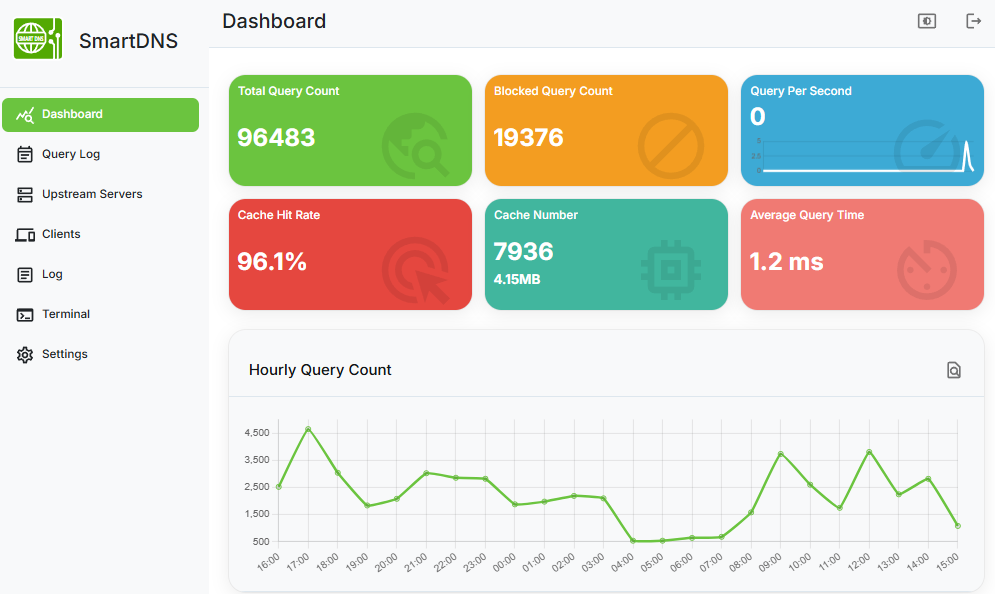
软件效果展示
仪表盘
速度对比
阿里 DNS
使用阿里 DNS 查询百度IP,并检测结果。
$ nslookup www.baidu.com 223.5.5.5
Server:         223.5.5.5
Address:        223.5.5.5#53

Non-authoritative answer:
www.baidu.com   canonical name = www.a.shifen.com.
Name:   www.a.shifen.com
Address: 180.97.33.108
Name:   www.a.shifen.com
Address: 180.97.33.107

$ ping 180.97.33.107 -c 2
PING 180.97.33.107 (180.97.33.107) 56(84) bytes of data.
64 bytes from 180.97.33.107: icmp_seq=1 ttl=55 time=24.3 ms
64 bytes from 180.97.33.107: icmp_seq=2 ttl=55 time=24.2 ms

--- 180.97.33.107 ping statistics ---
2 packets transmitted, 2 received, 0% packet loss, time 1001ms
rtt min/avg/max/mdev = 24.275/24.327/24.380/0.164 ms
pi@raspberrypi:~/code/smartdns_build $ ping 180.97.33.108 -c 2
PING 180.97.33.108 (180.97.33.108) 56(84) bytes of data.
64 bytes from 180.97.33.108: icmp_seq=1 ttl=55 time=31.1 ms
64 bytes from 180.97.33.108: icmp_seq=2 ttl=55 time=31.0 ms

--- 180.97.33.108 ping statistics ---
2 packets transmitted, 2 received, 0% packet loss, time 1001ms
rtt min/avg/max/mdev = 31.014/31.094/31.175/0.193 ms
SmartDNS
使用 SmartDNS 查询百度 IP,并检测结果。
$ nslookup www.baidu.com
Server:         192.168.1.1
Address:        192.168.1.1#53

Non-authoritative answer:
www.baidu.com   canonical name = www.a.shifen.com.
Name:   www.a.shifen.com
Address: 14.215.177.39

$ ping 14.215.177.39 -c 2
PING 14.215.177.39 (14.215.177.39) 56(84) bytes of data.
64 bytes from 14.215.177.39: icmp_seq=1 ttl=56 time=6.31 ms
64 bytes from 14.215.177.39: icmp_seq=2 ttl=56 time=5.95 ms

--- 14.215.177.39 ping statistics ---
2 packets transmitted, 2 received, 0% packet loss, time 1001ms
rtt min/avg/max/mdev = 5.954/6.133/6.313/0.195 ms
从对比看出,SmartDNS 找到了访问 www.baidu.com 最快的 IP 地址,比阿里 DNS 速度快了 5 倍。
特性
多虚拟DNS服务器
支持多个虚拟DNS服务器,不同虚拟DNS服务器不同的端口,规则,客户端。
多 DNS 上游服务器
支持配置多个上游 DNS 服务器,并同时进行查询,即使其中有 DNS 服务器异常,也不会影响查询。
支持每个客户端独立控制
支持基于MAC,IP地址控制客户端使用不同查询规则,可实现家长控制等功能。
返回最快 IP 地址
支持从域名所属 IP 地址列表中查找到访问速度最快的 IP 地址,并返回给客户端,提高网络访问速度。
支持多种查询协议
支持 UDP、TCP、DOT、DOH、DOQ 和 DOH3 查询及服务,以及非 53 端口查询;支持通过socks5,HTTP代理查询;
特定域名 IP 地址指定
支持指定域名的 IP 地址,达到广告过滤效果、避免恶意网站的效果。
域名高性能后缀匹配
支持域名后缀匹配模式,简化过滤配置,过滤 20 万条记录时间 < 1ms。
域名分流
支持域名分流,不同类型的域名向不同的 DNS 服务器查询,支持iptable和nftable更好的分流;支持测速失败的情况下设置域名结果到对应ipset和nftset集合。
Windows / Linux 多平台支持
支持标准 Linux 系统(树莓派)、OpenWrt 系统各种固件和华硕路由器原生固件。同时还支持 WSL(Windows Subsystem for Linux,适用于 Linux 的 Windows 子系统)。
支持 IPv4、IPv6 双栈
支持 IPv4 和 IPV 6网络,支持查询 A 和 AAAA 记录,支持双栈 IP 速度优化,并支持完全禁用 IPv6 AAAA 解析。
支持DNS64
支持DNS64转换。
高性能、占用资源少
多线程异步 IO 模式,cache 缓存查询结果。
主流系统官方支持
主流路由系统官方软件源安装smartdns。
架构

- SmartDNS 接收本地网络设备的DNS 查询请求,如 PC、手机的查询请求;
- 然后将查询请求发送到多个上游 DNS 服务器,可支持 UDP 标准端口或非标准端口查询,以及 TCP 查询;
- 上游 DNS 服务器返回域名对应的服务器 IP 地址列表,SmartDNS 则会检测从本地网络访问速度最快的服务器 IP;
- 最后将访问速度最快的服务器 IP 返回给本地客户端。
编译
捐赠
如果你觉得此项目对你有帮助,请捐助我们,使项目能持续发展和更加完善。
PayPal 贝宝

AliPay 支付宝

WeChat Pay 微信支付

开源声明
SmartDNS 基于 GPL V3 协议开源。