
profiler is a free, open source frameworks & platforms project written in TypeScript and released under MPL-2.0. It has 1,536 GitHub stars, 496 forks and 862 open issues, and was last pushed 10 hours ago. On this registry it ranks #92 of 111 tracked projects in Frameworks & Platforms, with 5 head-to-head comparisons available.

What is profiler?

Firefox Profiler is an open-source web application for visualizing performance profiles recorded from Firefox and other profilers, built for developers and Mozilla engineers who need to diagnose slow pages, scripts, and browser behaviour.

What it is

Firefox Profiler is a client-side web application, written in TypeScript with React and Redux, that renders performance data recorded by the Gecko Profiler as an interactive visual timeline of frames, stacks, and activity. It is developed by Mozilla to help make Firefox fast for its users and to help make sites and applications faster across the web, and it is published under the MPL v2 licence, which requires sharing modifications while permitting combination with code under other licences. The interface runs entirely in the browser, so profile data is processed and displayed on the client rather than being sent through a server-side analysis layer.

The specific problem it addresses is that raw performance recordings are hard to interpret: the profiler turns a recorded profile into a navigable visualization so a developer can see where time is spent during a session. It consumes profiles produced by the Gecko Profiler, but it is not limited to Firefox's own output — it can visualize data from any profiler able to output in JSON, which makes the tool a general front end for profiles in that format rather than a single-purpose browser panel.

Key capabilities

  • Consumes performance profiles recorded from the Gecko Profiler and visualizes them as interactive timeline data.
  • Accepts JSON output from any profiler able to produce profiles in JSON, not only Firefox recordings.
  • Runs entirely client-side as a web application, with all visualization handled in the browser.
  • Is built on React and Redux and written in TypeScript, so the state of the analysis view is managed through a Redux store.
  • Is tested with assistive technology including NVDA on Windows (Firefox and Chrome), VoiceOver on macOS (Chrome), and Orca on Linux (Firefox).
  • Ships end-user documentation at profiler.firefox.com/docs/ plus developer documentation, per-folder README.md files, a CONTRIBUTING.md, and a CODE_OF_CONDUCT.md.
  • Provides a Matrix discussion channel, #profiler:mozilla.org, for questions and community support.

Who uses it and how

  • Mozilla developers use it to investigate Firefox performance and make the browser faster for millions of users, which is the stated purpose of the project.
  • Web developers open profiler.firefox.com to record and view performance profiles of their own sites and applications, following the recording instructions published on the site.
  • Contributors run the app locally with Yarn 1 (Classic) and TypeScript, or develop it online in a pre-configured GitHub Codespaces workspace.
  • Users who employ screen readers can work with the interface through the tested NVDA, VoiceOver, and Orca combinations, and are asked to file bugs for problems with other assistive technologies.
  • Analysts working with third-party profilers feed the app their JSON output rather than recording through the Gecko Profiler.

Getting started

The hosted application is available immediately at https://profiler.firefox.com/, and for local development you clone git@github.com:firefox-devtools/profiler.git, then run yarn install and yarn start with Yarn 1 (Classic) version 1.10 or newer, installed via npm install -g yarn.

How it compares

The README names no competing profiling or analysis tools, so there is no feature or licence basis here for a direct comparison; the one related tool it names, the Gecko Profiler, is its primary data source rather than a rival. It therefore stands alone in this registry as a visualization front end for JSON performance profiles.

When to use it — and when not

A self-hoster must operate only the web application itself through the Yarn build, since the interface runs entirely client-side and the README mentions no database, storage, or SMTP services to maintain. It should not be chosen by anyone who needs a profiler that records data on its own, because it is explicitly a consumer and visualizer of profiles produced elsewhere, and its value depends on a compatible profiler outputting JSON. The project also carries 862 open issues, which suggests a substantial unfixed backlog that users may encounter.

project readme (upstream, from github) — read inline

Firefox Profiler

Matrix

The Firefox Profiler visualizes performance data recorded from web browsers. It is a tool designed to consume performance profiles from the Gecko Profiler but can visualize data from any profiler able to output in JSON. The interface is a web application built using React and Redux and runs entirely client-side.

Mozilla develops this tool to help make Firefox silky smooth and fast for millions of its users, and to help make sites and apps faster across the web.
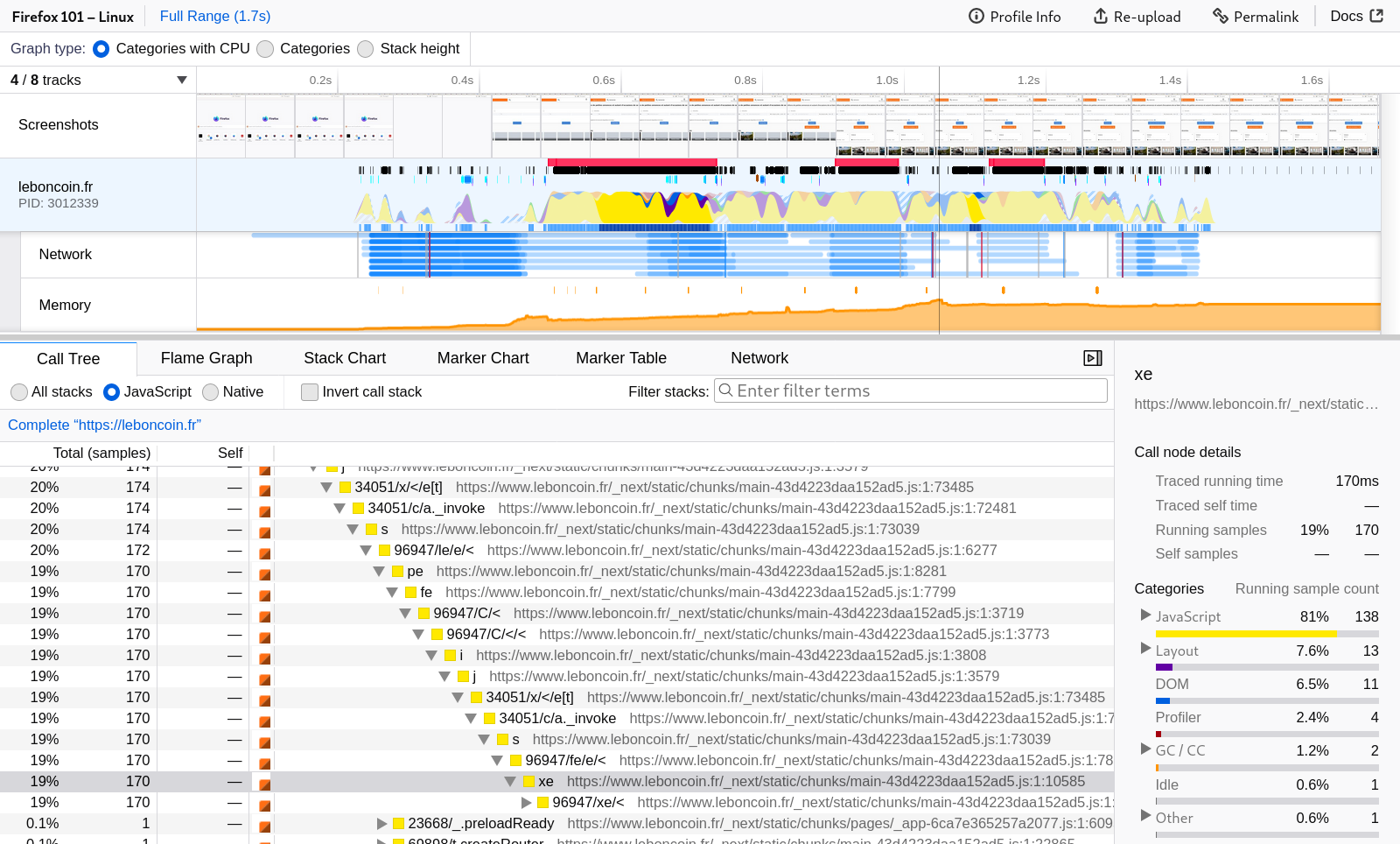
Screenshot of the Firefox Profiler

Usage

Visit profiler.firefox.com :rocket:

This project is live on https://profiler.firefox.com/. The website includes instructions on how to get going to start recording and viewing performance profiles.

Accessibility: Assistive technology support

The Profiler was tested with recent versions of the following assistive technology:

NVDA (Windows) on Firefox and Chrome browsers
VoiceOver (Mac OS X) on Chrome
Orca (Linux) on Firefox

If you experience problems using any of the above technologies, please file a bug.

If you would like to help us test on other assistive technologies or improve the existing code, we would love your contributions!

Development

You will need a recent enough version of Yarn 1 (Classic), version 1.10 is known to work correctly. You can install it using npm install -g yarn. Please refer to its documentation for other possible install procedures.

To download and build the Firefox Profiler web app run:

git clone git@github.com:firefox-devtools/profiler.git
cd profiler
yarn install
yarn start

This project uses TypeScript.

You can also develop the Firefox Profiler online in a pre-configured development environment using GitHub Codespaces.

Please look at our GitHub Codespaces documentation for more information.

For more detailed information on getting started contributing. We have plenty of docs available to get you started.

Contributing Find out in detail how to get started and get your local development environment configured.
Code of Conduct We want to create an open and inclusive community, we have a few guidelines to help us out.
Developer Documentation Want to know how this whole thing works? Get started here.
Source Files Dive into the inner workings of the code. Most folders have a README.md providing more information.
End-User Documentation These docs are customized for actual users of the profiler, not just folks contributing.
GitHub Codespaces documentation Start here if you want to set up a workspace on GitHub Codespaces.

Discussion

Say hello on Matrix in the Firefox Profiler channel (#profiler:mozilla.org).

License

MPL v2 is designed to encourage contributors to share modifications they make to the code, while still allowing them to combine the code with code under other licenses (open or proprietary) with minimal restrictions.

We are very grateful to the zlib compression library (Jean-loup Gailly, Mark Adler and team) for their contribution to the project.

Frequently asked questions

Is profiler free to use?

profiler is open source under the MPL-2.0 licence. There is no licence fee and no seat count — you can self-host it or, where the project offers one, pay a vendor for a managed version instead.

What does profiler do?

Firefox Profiler — Web app for Firefox performance analysis

What is profiler written in?

profiler is primarily written in TypeScript. Its source is publicly available at https://github.com/firefox-devtools/profiler, and it has 1,536 GitHub stars.