ORYX




Oryx(SRS Stack), is an all-in-one, out-of-the-box, and open-source video solution for creating online video services, including live streaming and WebRTC, on the cloud or through self-hosting.
Note: We renamed the project from SRS Stack to Oryx, because we only need a new name for AI assistant to identify SRS and SRS Stack. AI assistant is confused with SRS and SRS Stack.
Oryx makes it easy for you to create an online video service. It is made using Go, Reactjs, SRS, FFmpeg, and WebRTC. It supports protocols like RTMP, WebRTC, HLS, HTTP-FLV, and SRT. It offers features like authentication, streaming on multiple platforms, recording, transcoding, virtual live events, automatic HTTPS, and an easy-to-use HTTP Open API.
Oryx is built on SRS, FFmpeg, React.js, and Go, with Redis included, and integrates OpenAI services. It is a media solution designed for various useful scenarios.
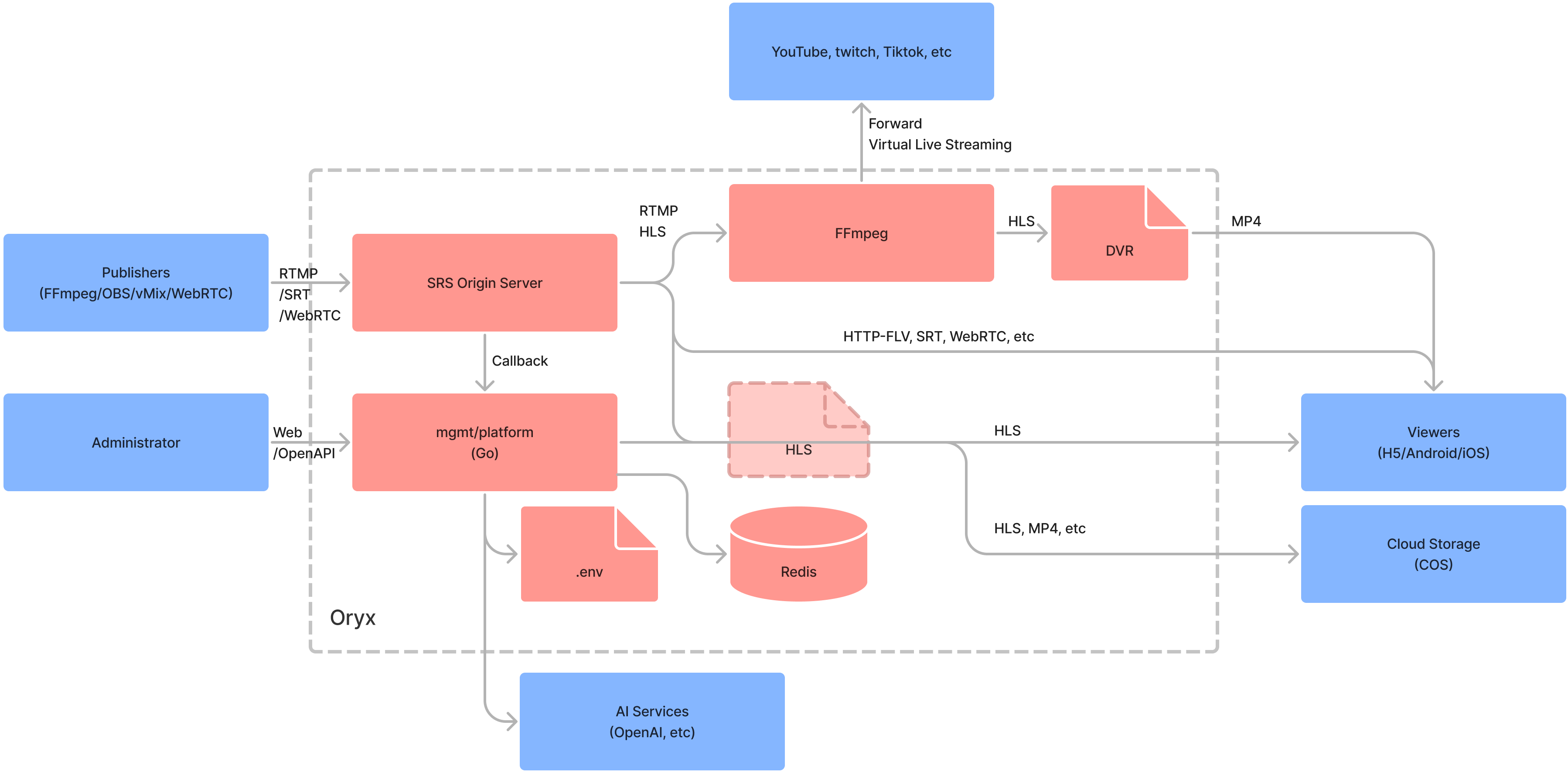
Note: For more details on the Oryx, please visit the following link.
Usage
Run Oryx in one docker, then open http://localhost in browser:
docker run --restart always -d -it --name oryx -v $HOME/data:/data \
  -p 80:2022 -p 443:2443 -p 1935:1935 -p 8000:8000/udp -p 10080:10080/udp \
  ossrs/oryx:5
Important: Remember to mount the
/datavolume to avoid losing data when the container restarts. For instance, if you mount/datato$HOME/data, all data will be stored in the$HOME/datafolder. Be sure to modify this according to your desired directory.
Important: To use WebRTC WHIP in a browser, avoid using localhost or 127.0.0.1. Instead, use a private IP (e.g., https://192.168.3.85), a public IP (e.g., https://136.12.117.13), or a domain (e.g., https://your-domain.com). To set up HTTPS, refer to this post.
Note: In China, use
registry.cn-hangzhou.aliyuncs.com/ossrs/oryx:5to accelerate the Docker pull process and ensure the proper language is set.
The ports used for Oryx:
80/tcp: The HTTP port, you can also use2022instead, such as-p 2022:2022etc.443/tcp: The HTTPS port, you can also use2443instead, such as-p 2443:2443etc.1935/tcp: The RTMP port, to support publish stream by RTMP to Oryx.8000/udp: The WebRTC UDP port, to transport WebRTC media data like RTP packets.10080/udp: The SRT UDP port, to support publish stream via SRT protocol.
You have the option to modify the volumes for Oryx and direct them to different directories.
/dataThe global data directory..well-knownThe directory for Let's Encrypt ACME challenge.configThe .env for password, srs/redis/nginx/prometheus config, and SSL files.dvrThe dvr storage directory, save dvr files.legoThe LEGO Let's Encrypt ACME challenge directory.recordThe record storage directory, save record files.redisThe redis data directory, the publish secret and record configuration.signalsThe signals storage directory, save signal files.uploadThe upload storage directory, save upload files.vliveThe storage directory for virtual live, save video files.transcriptThe storage directory for transcription, save transcription files.nginx-cacheThe storage directory for nginx cache, save cache files.srs-s3-bucketThe mount directory for AWS S3 compatible storage.
You can use environment variables to modify the settings.
MGMT_PASSWORD: The mgmt administrator password.REACT_APP_LOCALE: The i18n config for ui,enorzh, default toen.
Note: The
MGMT_PASSWORDis also saved in/data/config/.env, you can modify it by yourself.
To access additional environment variables, please refer to the Environments section.
Sponsor
Would you like additional assistance from us? By becoming a sponsor or backer of SRS, we can provide you with the support you need:
- Backer: $5 per month, online text chat support through Discord.
- Sponsor: $100 per month, online meeting support, 1 meeting per month in 1 hour.
Please visit OpenCollective to become a backer or sponsor, and send us a direct message on Discord. We are currently providing support to the developers listed below:
We at SRS aim to establish a non-profit, open-source community that assists developers worldwide in creating your own high-quality streaming and RTC platforms to support your businesses.
FAQ
Tutorials
- Getting Started: Blog, EN, CN.
- Support WordPress Plugin: Blog, EN, CN or WordPress Plugin.
- Support Automatic HTTPS: Blog, EN, CN.
- Support aaPanel to install on any linux: Blog, EN, CN.
- Support DVR to local disk: Blog, EN, CN.
- Support Virtual Live Streaming: CN.
- Support Stream IP Camera: Blog, EN, CN.
- Support build small HLS deliver CDN by Nginx.
- Support Live Streaming: CN.
- Support Realtime SRT Streaming: CN.
- Support DVR to Tencent Cloud Storage or VoD: CN.
- Support Typecho Plugin: CN.
- Support live stream transcoding: Blog, EN, CN.
- Support transcription for converting speech to text: Blog, EN, CN.
- Support AI assistant for live room: Blog, EN, CN
- Support video dubbing for multiple languages: Blog, EN, CN
- Support OCR for video stream: Blog, EN, CN
Other more use scenarios is on the way, please read this post.
Features
The features that we're developing:
- A mgmt support authentication and automatic updates.
- Run SRS in docker, query status by docker and SRS API.
- Support publish by RTMP/WebRTC, play by RTMP/HTTP-FLV/HLS/WebRTC.
- SRS container use docker logs
json-fileand rotate for logging. - Support high-resolution and realtime(200~500ms) live streaming by SRT.
- Run SRS hooks in docker, to callback by SRS server.
- Support publish by SRT, play by RTMP/HTTP-FLV/HLS/WebRTC/SRT.
- Change redis port and use randomly password.
- Support integrity with tencent cloud VoD.
- Support restreaming to multiple platforms.
- Support WordPress Plugin: SrsPlayer.
- Support aaPanel to install on any linux.
- Support DVR to local disk.
- Support upgrade to latest version manually.
- Support HTTPS by let's encrypt with LEGO.
- Support virtual live streaming, covert file or other resource to live.
- Support self-host HLS CDN, to serve 10k+ viewers.
- Support Typecho Plugin: Typecho-Plugin-SrsPlayer.
- Support DVR to TencentCloud storage.
- Support pull RTSP from IP Camera and stream to YouTube/Twitch/Facebook.
- Support live streaming transcoding by FFmpeg, see #2869.
- Support transcription for converting speech to text.
- Support AI assistant for live room.
- Support video dubbing for multiple languages.
- Support limit the streaming duration to limit the fee.
- Support GB28181 by SRS 5.0 container.
- Support WebRTC face to face chat, see #2857.
- Support WebRTC video chat room, see #2924.
- Support a set of tools for developer, see #2891.
- Collect logs of mgmt and containers together.
- Stop, restart and upgrade containers.
- Support logrotate to manage the logs.
- Enhance prometheus API with authentication.
- Integrate with prometheus and node-exporter.
License
Oryx is an open-source project, licensed under the MIT license.
We also used the following open-source projects:
- FFmpeg: A complete, cross-platform solution to record, convert and stream audio and video.
- Redis: Redis is an in-memory data store used by millions of developers as a cache, vector database, document database, streaming engine, and message broker.
- youtube-dl: Command-line program to download videos from YouTube.com and other video sites.
Other frameworks we used:
- Reactjs: The library for web and native user interfaces.
- Go: Build simple, secure, scalable systems with Go.
Developer
For development, please refer to the Environments about the API and architecture.
2022.11