landscape is a free, open source networking & connectivity project written in Rust and released under GPL-3.0. It has 1,558 GitHub stars, 121 forks and 29 open issues, and was last pushed 2 hours ago. On this registry it ranks #36 of 39 tracked projects in Networking & Connectivity, with 5 head-to-head comparisons available.

What is landscape?

Landscape is an open-source router platform that configures a standard Linux distribution as a router by steering traffic by domain rather than IP alone, built in Rust with eBPF and aimed at self-hosters who want policy routing on hardware and distributions they already control.

What it is

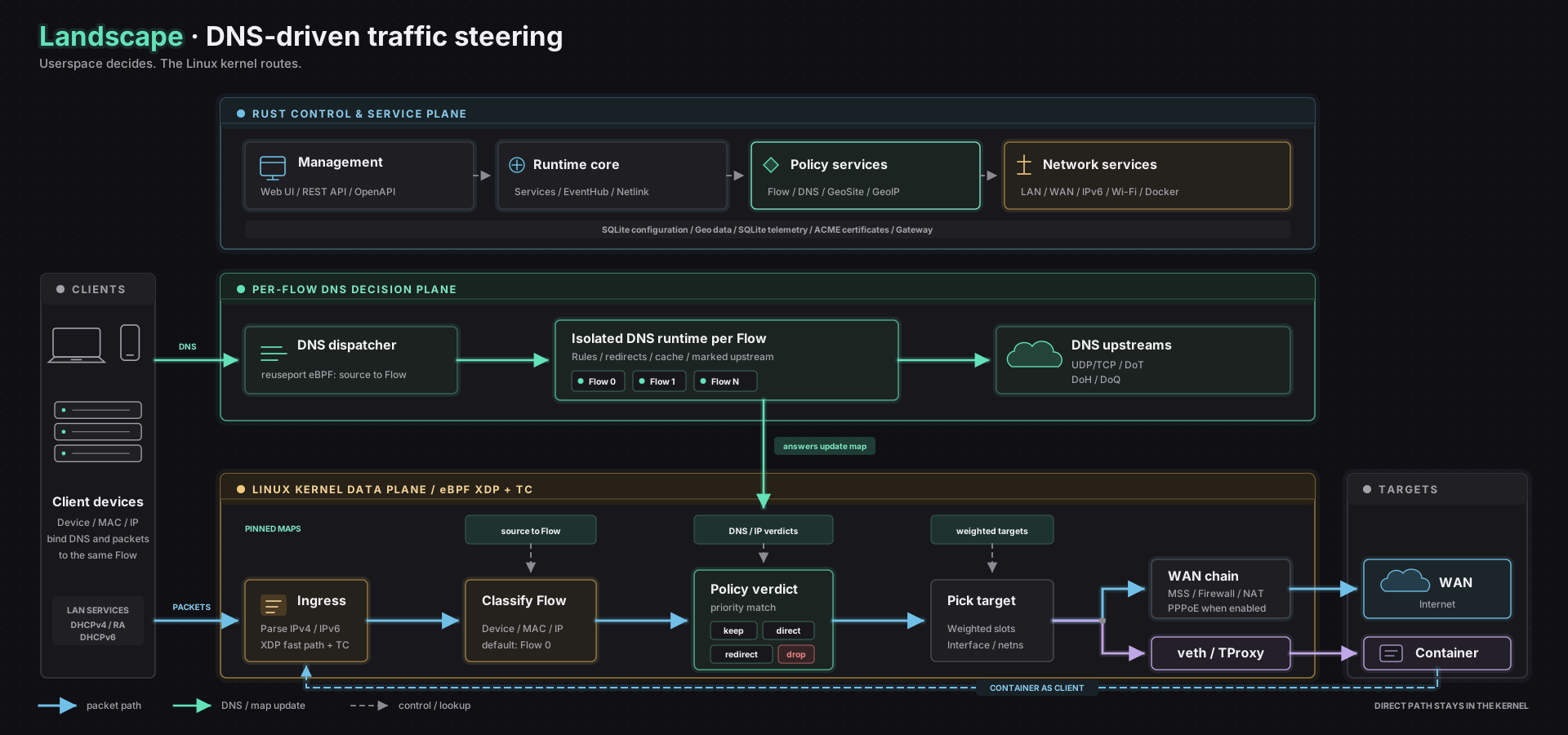
Landscape is a routing stack that turns a general-purpose Linux machine into a policy router. It splits the work into two planes. The DNS plane runs in userspace: a flow is a policy group that devices join by IP address or MAC address, and each flow gets its own isolated Hickory DNS server with an independent cache, its own upstream (UDP, DoH, DoT or DoQ) and its own rules. The data plane runs in the kernel: XDP and TC hooks read per-flow eBPF maps and steer packets at wire speed, so matching traffic follows the flow's policy while everything else passes straight through.

The concrete problem it solves is that on Linux, steering traffic by domain usually means stacking DNS interception, marking rules and iptables or nftables chains, then reconciling them whenever a DNS answer changes. Landscape replaces that arrangement with a single loop: DNS results populate eBPF flow maps, and the kernel enforces steering with no userspace datapath and no iptables. It lives in the Linux networking ecosystem and targets the home-router and homelab niche, where the alternative is hand-assembled nftables and dnsmasq configuration.

Key capabilities

  • DNS-driven traffic steering via eBPF, where DNS answers populate per-flow kernel maps consumed at XDP and TC hooks.
  • Per-flow DNS isolation, giving each flow an independent cache, upstream and rule set with no cross-flow leaks.
  • Fine-grained NAT: a stricter-than-symmetric policy by default, with per-domain and per-IP full-cone NAT exceptions.
  • Packet redirection into Docker containers for flows that match, extensible with any TProxy-compatible program.
  • Geo database management with support for the DAT and TXT formats.
  • A full REST API, so everything exposed in the web UI is scriptable, documented at /api/docs.
  • Single-directory upgrades and downgrades, where a new binary is dropped in and configuration auto-migrates.

Who uses it and how

  • Homelab and small-network operators running Debian, Arch or openSUSE who want their existing distribution to act as the router rather than flashing dedicated firmware.
  • Networks that need full-cone NAT for BitTorrent and private-tracker traffic on specific domains or addresses while keeping strict NAT everywhere else.
  • Operators routing selected flows into Docker-hosted transparent proxies, where per-flow policies mean one container failing affects only the traffic routed through it.
  • Administrators who prefer to drive configuration from scripts and automation against the REST API instead of clicking through the UI.
  • Hosts running Linux kernel 6.9 or newer with BTF and BPF enabled, with the web server started under root as a systemd service.

Getting started

Download the landscape-webserver binary for your architecture and the separately released static.zip from GitHub Releases, extract the frontend assets to /root/.landscape-router/static, and run ./landscape-webserver as root; it starts without a pre-created configuration file and can be initialised through landscape_init.toml if preferred. The management interface listens on HTTPS port 6443 at https://landscape.local:6443, with documentation at https://landscape.whileaway.dev/.

How it compares

No comparable projects or paid products are named in the material available for this registry entry, so Landscape stands alone here among the infrastructure and networking tools catalogued. Readers evaluating it should treat it as a distinct option rather than a drop-in substitute for another listed tool.

When to use it — and when not to

Choose Landscape when a Linux host with kernel 6.9 or newer, BTF and BPF enabled, and root privileges is available, and when domain-level steering with per-flow DNS isolation is worth operating yourself. Do not choose it on non-Linux kernels such as FreeBSD or macOS, which are explicitly unsupported, or if running the router process as root is unacceptable. Two practical frictions are worth noting: the backend binary and the frontend static.zip are released separately, so upgrades require fetching both, and the default credentials of root / root must be changed immediately after first start.

project readme (upstream, from github) — read inline

License: GPL v3

Landscape routes traffic by domain—not just IP. Each flow gets its own DNS server.

DNS answers populate kernel eBPF maps. Packets are steered at XDP/TC.

No userspace datapath. No iptables.

Built with Rust / eBPF.

简体中文 | English | Documentation

Screenshot
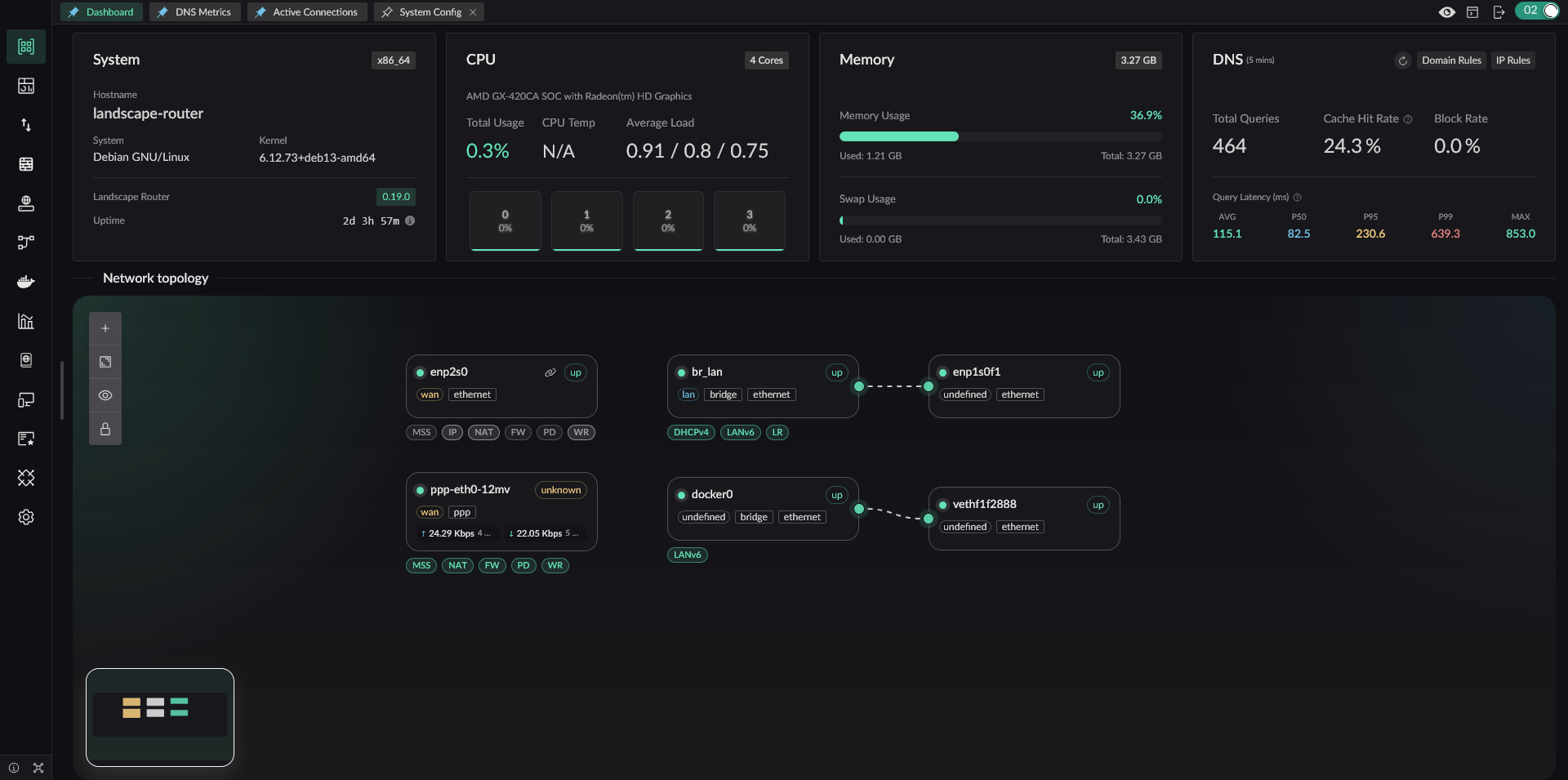
Landscape Web UI

Architecture

Landscape separates traffic steering into two planes:

DNS plane (userspace). A flow is a policy group that devices join by IP or MAC. Each flow gets its own isolated Hickory DNS server with independent cache, upstream (UDP/DoH/DoT/DoQ), and rules. DNS answers populate per-flow eBPF maps in the kernel.

Data plane (kernel). XDP and TC hooks read these maps to steer packets at wire speed. Packets matching a flow are steered according to its policy. Everything else passes through directly — no userspace context switch.

DNS results → eBPF flow maps → TC/XDP in-kernel steering → interface routing

DNS plane decides. Kernel enforces.

Core Features

  • DNS-driven traffic steering via eBPF — DNS answers populate per-flow kernel maps
  • Fine-grained NAT — a stricter-than-symmetric NAT policy by default, with per-domain/IP full-cone NAT exceptions (details)
  • Per-flow DNS isolation — independent cache and upstream per flow, no cross-flow leaks
  • Redirect packets matching a flow into Docker containers — extend with any TProxy-compatible program
  • Geo database management — DAT and TXT format support
  • Full REST API — everything in the UI is scriptable

Why Landscape

Standard Linux, no lock-in. Debian, Arch, openSUSE. Your distro, your rules.

Upgrade without fear. Single directory. Drop in a new binary, config auto-migrates. Downgrade works too.

NAT that fits your LAN. Full-cone NAT for BT/PT where needed, strict NAT everywhere else — domain/IP-level control, no blanket rules.

One failure, one victim. Per-flow DNS and traffic policies. A container goes down? Only the traffic routed through it is affected.

Quick Start

Prerequisites

  • Linux kernel ≥ 6.9 with BTF/BPF enabled, root privileges; non-Linux kernels (FreeBSD, macOS) are not supported
  • Docker (optional, for container redirection)

1. Create the config directory

mkdir -p /root/.landscape-router

2. Download the release assets

  • From Releases (backend binary and frontend static assets are released separately)
    • Download static.zip
    • Download the landscape-webserver binary for your architecture
  • Extract it to /root/.landscape-router/static (this is the default path, but it can be customized)

3. Start Landscape

Run as root:

./landscape-webserver

Defaults: config at /root/.landscape-router, HTTPS on port 6443, user/pass root / root.

Landscape can start directly without any pre-created configuration file. If you want to initialize it through landscape_init.toml, see the configuration guide on the documentation site.

You can check more options with ./landscape-webserver --help.

4. Open the management interface

  • http://landscape.local:6300 automatically redirects to HTTPS
  • https://landscape.local:6443 opens the Web UI
  • https://landscape.local:6443/api/docs opens the REST API docs

Run as a systemd Service

After confirming that the service is running correctly, you can configure it as a systemd service:

[Unit]
Description=Landscape Router

[Service]
ExecStart=/root/landscape-webserver
Restart=always
User=root
LimitMEMLOCK=infinity

[Install]
WantedBy=multi-user.target

Replace ExecStart with the actual path to your binary.

Development

Build guide: BUILD.md | BUILD.zh.md

License

If you have suggestions or run into a problem, please open an issue.

Frequently asked questions

Is landscape free to use?

landscape is open source under the GPL-3.0 licence. There is no licence fee and no seat count — you can self-host it or, where the project offers one, pay a vendor for a managed version instead.

What does landscape do?

The goal is to make it easier to configure your favorite Linux distribution as a router. Built with Rust and eBPF.

What is landscape written in?

landscape is primarily written in Rust. Its source is publicly available at https://github.com/ThisSeanZhang/landscape, and it has 1,558 GitHub stars.