inql is a free, open source threat detection & response project written in Kotlin and released under Apache-2.0. It has 1,811 GitHub stars, 188 forks and 29 open issues, and was last pushed 18 days ago. On this registry it ranks #30 of 36 tracked projects in Threat Detection & Response, with 5 head-to-head comparisons available.

What is inql?

InQL is an open-source Burp Suite extension for advanced GraphQL testing, built by Doyensec for penetration testers, bug bounty hunters, and security teams who need to analyse GraphQL endpoints from inside the Burp proxy they already use.

What it is

InQL is a security testing extension that turns Burp Suite into a working environment for GraphQL assessments. It is written in Kotlin, released under the Apache-2.0 licence, and maintained by Doyensec, the security research firm behind the project's homepage. The current line is InQL v6.1.2, and the repository carries roughly 1,811 stars and 188 forks, with a user interface organised around three primary components: the Scanner, the Batch Queries tab, and the Engine Fingerprinting tab. It is catalogued in this registry under Security & Privacy / Threat Detection & Response, with topics spanning GraphQL security, penetration testing, bug bounty tooling, security auditing, and API documentation.

The concrete problem it addresses is that GraphQL does not behave like a conventional REST API. A GraphQL service exposes a single endpoint whose behaviour is defined by a schema, so testers cannot simply enumerate routes and fire requests at each one; they have to discover the schema, reason about the query and mutation surface, and then construct requests that exercise it. InQL places that work inside Burp Suite rather than beside it, with the Scanner described as the core of the tool, where a GraphQL endpoint can be analysed directly, alongside batch query handling and fingerprinting of the target engine. It lives in the Burp Suite extension ecosystem and replaces the ad-hoc, hand-assembled GraphQL request handling that testers would otherwise perform manually while proxying traffic.

Key capabilities

  • A Scanner tab, described in the README as the core of InQL, used to analyse a GraphQL endpoint.
  • A Batch Queries tab for working with GraphQL requests as a group rather than one at a time.
  • An Engine Fingerprinting tab that identifies the GraphQL engine behind the endpoint being tested.
  • Intuitive vulnerability detection aimed at GraphQL-specific weaknesses.
  • Customisable scans, so the testing run can be tuned rather than fixed.
  • Seamless Burp integration, so the extension operates within the existing proxy workflow instead of as a separate tool.
  • Apache-2.0 licensed source in Kotlin, with tagged releases published on GitHub alongside a development branch that runs ahead of master.

Who uses it and how

  • Penetration testers running GraphQL assessments, who use the Scanner to analyse a target endpoint as part of an authorised engagement.
  • Bug bounty hunters, reflected in the project's bug bounty and bug bounty tool topics, who need to move quickly from endpoint discovery to query construction.
  • Security auditors and security teams performing audits, who use fingerprinting and customised scans to characterise a GraphQL service.
  • Teams documenting GraphQL APIs, indicated by the api-documentation-tool topic, who need visibility into a schema while working in Burp.
  • Contributors and integrators: the repository is open to outside work through Help Wanted and Good First Issue labels, with 29 open issues at the time of writing.

Getting started

InQL is installed as a Burp Suite extension; the README identifies the current release line as InQL v6.1.2 and the repository publishes versioned releases through GitHub, so the extension is obtained from the project's releases and added to Burp Suite. Development itself happens on the dev branch, which is maintained ahead of master.

How it compares

The facts provided name no paid or proprietary products that InQL replaces, and no directly comparable tools are named either, so it stands alone in this registry. Within its own ecosystem its role is complementary rather than competitive: it extends Burp Suite, which remains the host application the tester supplies.

When to use it — and when not to

InQL is the right choice for a tester who already works in Burp Suite and needs GraphQL-specific capability there; it is a poor fit for anyone who does not use Burp, since the extension has no documented standalone workflow. It is a testing and auditing tool for authorised security work, not a runtime defence for protecting a live GraphQL API in production. Honest limitations to weigh: the README is concise and the supplied material documents the three interface tabs rather than a full command-line surface, there are 29 open issues, and the dev branch carries commits ahead of master, so the newest work may reach that branch before it reaches a tagged release.

project readme (upstream, from github) — read inline

InQL v6.1.2 - Burp Extension for Advanced GraphQL Testing


Doyensec Research Island GitHub GitHub release (latest by date) GitHub Release Date dev branch ahead by GitHub contributors GitHub issues by-label GitHub issues by-label

:rocket: Introduction

Welcome to InQL, an open-source GraphQL testing tool. This tool provides features designed to enhance your GraphQL testing experience, making it more efficient and effective.

We appreciate your trust in InQL. Happy testing!

:star2: Key Features

The InQL user interface is equipped with three primary components: the Scanner, the Batch Queries, and the Engine Fingerprinting tab

:mag_right: Scanner
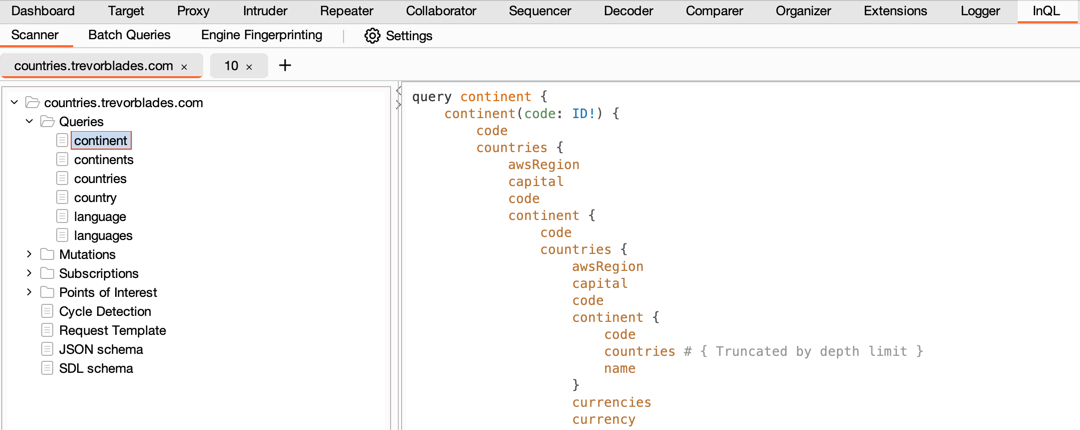
Scanner

The Scanner is the core of InQL, where you can analyze a GraphQL endpoint or a local introspection schema file. It auto-generates all possible queries, mutations, and subscriptions, organizing them into a structured view for your analysis.

:white_check_mark: Customizable Scans

InQL offers the flexibility to customize your scans. Adjust the depth of generated queries or the number of spaces used for indentation. You can also perform 'Points of Interest' scans to detect potential vulnerabilities in the GraphQL schema.

:white_check_mark: Points of Interest Analysis

After running a Points of Interest scan, you are presented with a rich data set covering a variety of potential vulnerabilities. You can enable or disable these categories according to your needs.

:white_check_mark: Circular References Detection

InQL implements circular reference detection. After analyzing the schema, it displays potentially vulnerable queries in the scanner results view.

:white_check_mark: Enhanced Interactions with Burp

InQL seamlessly integrates with Burp, enabling you to generate queries directly from any GraphQL request in Burp. You can also send auto-generated queries to other Burp tools for further analysis.

:white_check_mark: Custom Headers

You have the ability to set custom headers per domain, with the domain list auto-populated from observed traffic.

:crossed_swords: Batch Queries

The Batch Queries tab lets you run batch GraphQL attacks, which can be useful for circumventing poorly implemented rate limits.

:memo: Burp's Native Message Editors

Burp's native message editors now come with an additional 'GraphQL (InQL)' tab, providing an efficient way to view and modify GraphQL requests. It also supports schema highlighting for better readability.

:crossed_swords: GraphiQL and GraphQL Voyager

InQL now implements GraphiQL and GraphQL Voyager servers. You can send the analysed schame into them to enhance the analysis even further!

:point_up: Engine Fingerprinting

This tab allows you to scan a GraphQL URL to retrieve information about the backend server technology.

:construction: Schema Bruteforcer

This scanner is designed to recreate the schema when introspection is disabled. It is based on Clairvoyance CLI tool, using regex pattern matching to discover schema details.

:arrow_down: Installation

To successfully install InQL, ensure you meet the following requirements:

Burp:

  • Support is only provided for the most recent version of Burp.
  • Compatible with both "Professional" and "Community" editions.

Java:

  • The Montoya API needs Java 17 or later.

:computer: Building the InQL extension from git

  1. Install Java 17+, for example in Debian-based distros:
$ sudo apt install -y openjdk-17-jdk
$ java --version
openjdk 17.0.6 2023-01-17
  1. Install our build tool - Taskfile:
$ # Mac OS & Homebrew:
$ brew install go-task
$ # Debian
$ sudo apt install -y task
  1. Clone the repo and pull submodules:
$ git clone https://github.com/doyensec/inql
$ cd inql
$ # Optionally, checkout dev branch (might be broken / unstable!)
$ git checkout dev
  1. Build the InQL extension:
$ task all

This should produce a file named InQL.jar or similar in the root of the repo. Load it into Burp as a Java extension.

Development environment

If you want to contribute to the project, no special environment is needed. You can simply re-build the project every time you implement a change.

To speed up the work on the code, you might want to auto-rebuild the extension whenever you make a change. Just run kotlin task with the --watch / -w flag and you're good to go:

$ task kotlin -w

:handshake: Contributing

InQL thrives on community contributions. Whether you're a developer, researcher, designer, or bug hunter, your expertise is invaluable to us. We welcome bug reports, feedback, and pull requests. Your participation helps us continue to improve InQL, making it a stronger tool for the community.

Interactions are best carried out through the Github issue tracker, but you can also reach us on social media (@Doyensec). We look forward to hearing from you!

:busts_in_silhouette: Contributors

A special thanks to our contributors. Your dedication and commitment have been instrumental in making InQL what it is today.

Current:

Historical:

This project was made with support of Doyensec.

Doyensec Research

Frequently asked questions

Is inql free to use?

inql is open source under the Apache-2.0 licence. There is no licence fee and no seat count — you can self-host it or, where the project offers one, pay a vendor for a managed version instead.

What does inql do?

InQL is a robust, open-source Burp Suite extension for advanced GraphQL testing, offering intuitive vulnerability detection, customizable scans, and seamless Bu

What is inql written in?

inql is primarily written in Kotlin. Its source is publicly available at https://github.com/doyensec/inql, and it has 1,811 GitHub stars.