hestiacp is a free, open source networking & connectivity project written in Shell and released under GPL-3.0. It has 4,503 GitHub stars, 945 forks and 146 open issues, and was last pushed 22 hours ago. On this registry it ranks #22 of 26 tracked projects in Networking & Connectivity, with 5 head-to-head comparisons available.

What is hestiacp?

Hestia Control Panel is a GPL-3.0, shell-based control panel that gives Linux server administrators a web and command-line interface for deploying and managing web domains, mail accounts, DNS zones, and databases on Debian and Ubuntu servers.

What it is

Hestia Control Panel is an open-source control panel published at hestiacp.com under the GPL-3.0 licence. It is written in Shell and sits in the Infrastructure & Operations / Networking & Connectivity category of this registry. The project gives administrators a web and command-line interface for deploying and managing web domains, mail accounts, DNS zones, and databases from one central dashboard. Its stack combines Apache2 and NGINX with PHP-FPM, multiple PHP versions from 5.6 through 8.5 with 8.5 as the default, a Bind DNS server, POP/IMAP/SMTP mail services with anti-virus, anti-spam, and webmail components, MariaDB/MySQL and/or PostgreSQL databases, Let's Encrypt SSL support, and a firewall. It supports Debian 13, 12, and 11, and Ubuntu 26.04 LTS, 24.04 LTS, and 22.04 LTS.

The concrete problem it solves is the manual deployment and configuration of individual components and services. Instead of installing and wiring together a web server, PHP-FPM, DNS, mail, databases, SSL certificates, and firewall rules by hand, an administrator uses the Hestia dashboard or command line. It therefore replaces component-by-component setup on a fresh Linux server within the Debian and Ubuntu ecosystem, and it does not support 32-bit operating systems.

Key capabilities

  • Web and command-line interfaces for deploying and managing web domains, mail accounts, DNS zones, and databases from one central dashboard.
  • Apache2 and NGINX with PHP-FPM, plus PHP versions from 5.6 to 8.5, with 8.5 as the default.
  • A Bind DNS server with clustering capabilities.
  • POP/IMAP/SMTP mail services with anti-virus, anti-spam, and webmail through ClamAV, SpamAssassin, Sieve, and Roundcube.
  • MariaDB/MySQL and/or PostgreSQL databases.
  • Let's Encrypt SSL support, including wildcard certificates.
  • A firewall with brute-force attack detection and IP lists using iptables, fail2ban, and ipset.

Who uses it and how

  • Linux server administrators who manage web domains, mail accounts, DNS zones, and databases without configuring each component by hand.
  • Operators of KVM- or LXC-based virtual private servers; the README warns that OpenVZ 7 or lower may have DNS and firewall issues.
  • Deployments that need DNS clustering through the Bind server.
  • Administrators running fresh installations of Debian 13, 12, or 11, or Ubuntu 26.04 LTS, 24.04 LTS, or 22.04 LTS, on 64-bit systems.
  • Administrators who prefer automatic updates enabled by default and managed through Server Settings > Updates.

Getting started

Install Hestia Control Panel as root or a super-user on a fresh supported Debian or Ubuntu installation by downloading the installer with wget https://raw.githubusercontent.com/hestiacp/hestiacp/release/install/hst-install.sh and running bash hst-install.sh; bash hst-install.sh -h lists flags for a custom installation. Updates are enabled automatically by default and can be managed under Server Settings > Updates or applied manually with apt-get update and apt-get upgrade.

How it compares

No list of paid products is provided in the facts, and no similar control panel is named there, so Hestia Control Panel stands alone in this registry. The supplied facts establish its GPL-3.0 licence and its self-hosted model on Debian and Ubuntu, where the administrator operates the full server stack; that is the only basis for comparison the facts support.

When to use it — and when not to

A self-hoster must operate the full stack Hestia deploys: Apache2 and NGINX with PHP-FPM, Bind DNS, POP/IMAP/SMTP mail with ClamAV, SpamAssassin, Sieve, and Roundcube, MariaDB/MySQL and/or PostgreSQL, Let's Encrypt certificates, and a firewall using iptables, fail2ban, and ipset. It should not be chosen by administrators who cannot start from a fresh, supported 64-bit Debian or Ubuntu installation, by anyone relying on OpenVZ 7 or lower for DNS and firewall stability, or by users who expect a fully managed service, since the README assumes prior Linux server knowledge. The repository also carries 146 open issues, so users should expect to rely on the documentation and forum for support.

project readme (upstream, from github) — read inline

Hestia Control Panel
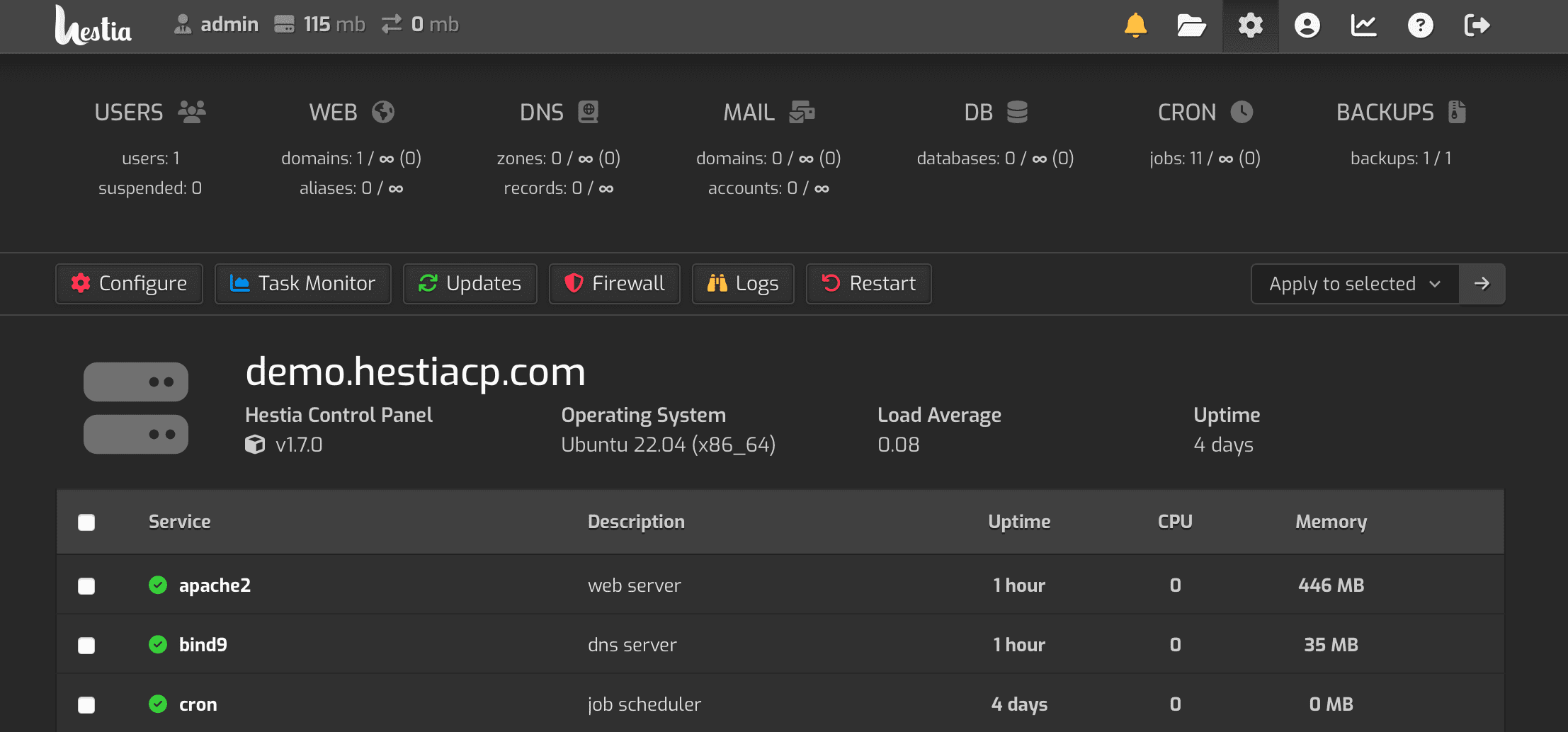
HestiaCP Web Interface screenshot

Lightweight and powerful control panel for the modern web

Latest stable release: Version 1.10.5 | View Changelog

HestiaCP.com | Documentation | Forum

Lint Status Gurubase

Welcome!

Hestia Control Panel is designed to provide administrators an easy to use web and command line interface, enabling them to quickly deploy and manage web domains, mail accounts, DNS zones, and databases from one central dashboard without the hassle of manually deploying and configuring individual components or services.

Donate

paypal

Bitcoin : bc1q48jt5wg5jaj8g9zy7c3j03cv57j2m2u5anlutu
Ethereum : 0xfF3Dd2c889bd0Ff73d8085B84A314FC7c88e5D51
Binance: bnb1l4ywvw5ejfmsgjdcx8jn5lxj7zsun8ktfu7rh8
Smart Chain: 0xfF3Dd2c889bd0Ff73d8085B84A314FC7c88e5D51

Project infrastructure is partly provided by infrahost.

Features and Services

  • Apache2 and NGINX with PHP-FPM
  • Multiple PHP versions (5.6 - 8.5, 8.5 as default)
  • DNS Server (Bind) with clustering capabilities
  • POP/IMAP/SMTP mail services with Anti-Virus, Anti-Spam, and Webmail (ClamAV, SpamAssassin, Sieve, Roundcube)
  • MariaDB/MySQL and/or PostgreSQL databases
  • Let's Encrypt SSL support with wildcard certificates
  • Firewall with brute-force attack detection and IP lists (iptables, fail2ban, and ipset).

Supported platforms and operating systems

  • Debian: 13, 12, 11
  • Ubuntu: 26.04 LTS, 24.04 LTS, 22.04 LTS

NOTES:

  • Hestia Control Panel does not support 32 bit operating systems!
  • Hestia Control Panel in combination with OpenVZ 7 or lower might have issues with DNS and/or firewall. If you use a Virtual Private Server we strongly advice you to use something based on KVM or LXC!

Installing Hestia Control Panel

  • NOTE: You must install Hestia Control Panel on top of a fresh operating system installation to ensure proper functionality.

While we have taken every effort to make the installation process and the control panel interface as friendly as possible (even for new users), it is assumed that you will have some prior knowledge and understanding in the basics how to set up a Linux server before continuing.

Step 1: Log in

To start the installation, you will need to be logged in as root or a user with super-user privileges. You can perform the installation either directly from the command line console or remotely via SSH:

ssh [email protected]

Step 2: Download

Download the installation script for the latest release:

wget https://raw.githubusercontent.com/hestiacp/hestiacp/release/install/hst-install.sh

If the download fails due to an SSL validation error, please be sure you've installed the ca-certificate package on your system - you can do this with the following command:

apt-get update && apt-get install ca-certificates

Step 3: Run

To begin the installation process, simply run the script and follow the on-screen prompts:

bash hst-install.sh

You will receive a welcome email at the address specified during installation (if applicable) and on-screen instructions after the installation is completed to log in and access your server.

Custom installation

You may specify a number of various flags during installation to only install the features in which you need. To view a list of available options, run:

bash hst-install.sh -h

Alternatively, You can use which allows you to easily generate the installation command via GUI.

How to upgrade an existing installation

Automatic Updates are enabled by default on new installations of Hestia Control Panel and can be managed from Server Settings > Updates. To manually check for and install available updates, use the apt package manager:

apt-get update
apt-get upgrade

Issues & Support Requests

  • If you encounter a general problem while using Hestia Control Panel and need help, please visit our forum to search for potential solutions or post a new thread where community members can assist.
  • Bugs and other reproducible issues should be filed via GitHub by creating a new issue report so that our developers can investigate further. Please note that requests for support will be redirected to our forum.

IMPORTANT: We cannot provide support for requests that do not describe the troubleshooting steps that have already been performed, or for third-party applications not related to Hestia Control Panel (such as WordPress). Please make sure that you include as much information as possible in your forum posts or issue reports!

Contributions

If you would like to contribute to the project, please read our Contribution Guidelines for a brief overview of our development process and standards.

Copyright

"Hestia Control Panel", "HestiaCP", and the Hestia logo are original copyright of hestiacp.com and the following restrictions apply:

You are allowed to:

  • use the names "Hestia Control Panel", "HestiaCP", or the Hestia logo in any context directly related to the application or the project. This includes the application itself, local communities and news or blog posts.

You are not allowed to:

  • sell or redistribute the application under the name "Hestia Control Panel", "HestiaCP", or similar derivatives, including the use of the Hestia logo in any brand or marketing materials related to revenue generating activities,
  • use the names "Hestia Control Panel", "HestiaCP", or the Hestia logo in any context that is not related to the project,
  • alter the name "Hestia Control Panel", "HestiaCP", or the Hestia logo in any way.

License

Hestia Control Panel is licensed under GPL v3 license, and is based on the VestaCP project.

Frequently asked questions

Is hestiacp free to use?

hestiacp is open source under the GPL-3.0 licence. There is no licence fee and no seat count — you can self-host it or, where the project offers one, pay a vendor for a managed version instead.

What does hestiacp do?

Hestia Control Panel | A lightweight and powerful control panel for the modern web.

What is hestiacp written in?

hestiacp is primarily written in Shell. Its source is publicly available at https://github.com/hestiacp/hestiacp, and it has 4,503 GitHub stars.
