
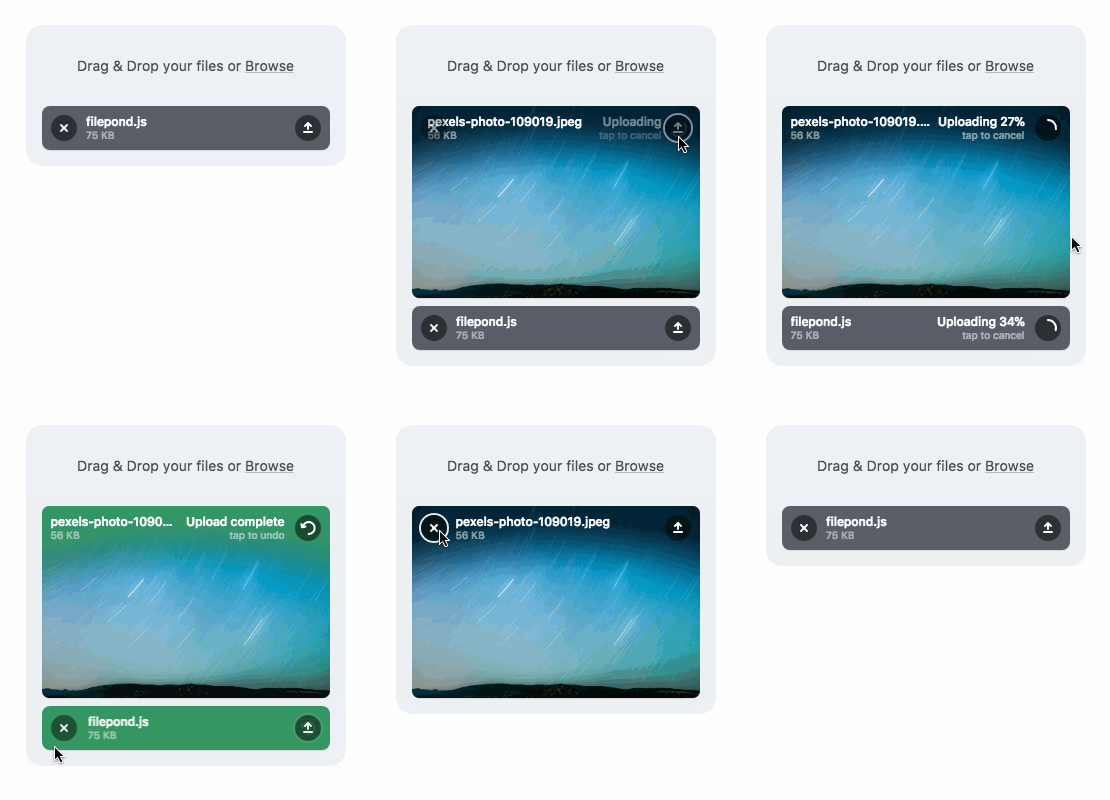
A JavaScript library that can upload anything you throw at it, optimizes images for faster uploads, and offers a great, accessible, silky smooth user experience.





FilePond adapters are available for React, Vue, Angular, Svelte, and jQuery
FilePond v5 Alpha version now available for testing
Documentation • Discord • Examples

Buy me a Coffee • Use FilePond with Pintura • Dev updates
Core Features
- Accepts directories, files, blobs, local URLs, remote URLs and Data URIs.
- Drop files, select on filesystem, copy and paste files, or add files using the API.
- Async uploads with AJAX, supports chunk uploads, can encode files as base64 data and send along form post.
- Accessible, tested with AT software like VoiceOver and JAWS, navigable by Keyboard.
- Image optimization, automatic image resizing, cropping, filtering, and fixes EXIF orientation.
- Responsive, automatically scales to available space, is functional on both mobile and desktop devices.
Also need Image Editing?
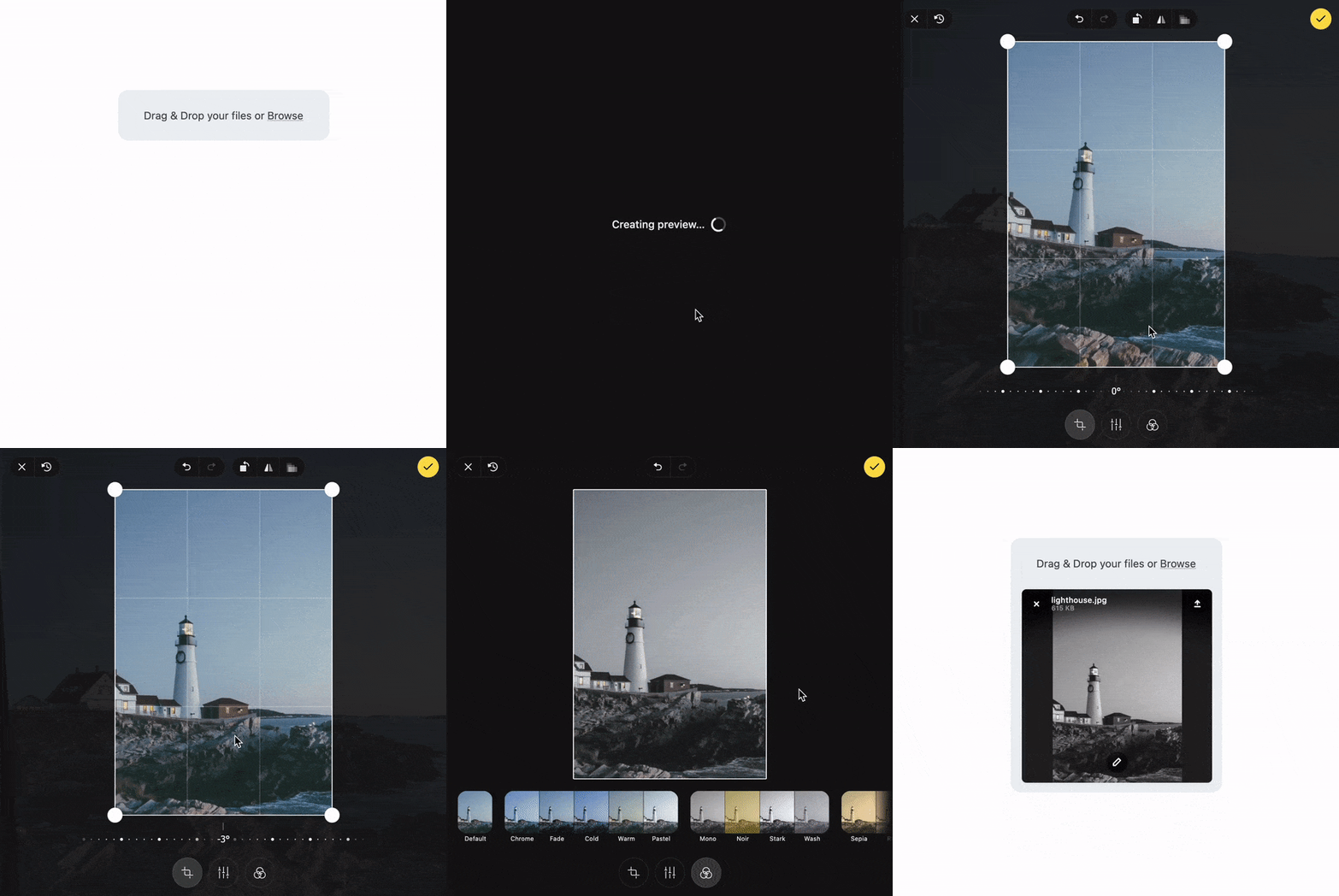
Pintura the modern JavaScript Image Editor is what you're looking for. Pintura supports setting crop aspect ratios, resizing, rotating, cropping, and flipping images. Above all, it integrates beautifully with FilePond.
Live Demos
Plugins
- File encode
- File rename
- File size validation
- File type validation
- File metadata
- File poster
- Image editor
- Image size validation
- Image preview
- Image crop
- Image filter
- Image resize
- Image transform
- Image EXIF orientation
- Image overlay (nielsboogaard/filepond-plugin-image-overlay)
- Media preview (nielsboogaard/filepond-plugin-media-preview)
- Media preview + PDF preview (ErnestBrandi/filepond-plugin-media-preview)
- Get file (nielsboogaard/filepond-plugin-get-file)
- Zip Directory Uploads (tzsk/filepond-plugin-zipper)
- PDF Preview (Adri-Glez/filepond-plugin-pdf-preview)
- PDF Convert (alexandreDavid/filepond-plugin-pdf-convert)
Adapters
- React
- Vue
- Svelte
- jQuery
- Angular
- Angular 1 (johnnyasantoss/angularjs-filepond)
- Blazor (soenneker/soenneker.blazor.filepond)
- Ember (alexdiliberto/ember-filepond)
Backend
- PHP
- Django (ImperialCollegeLondon/django-drf-filepond)
- Laravel (Sopamo/laravel-filepond)
- Laravel (Albert221/laravel-filepond)
- SilverStripe (lekoala/silverstripe-filepond)
- Ruby on Rails (Code-With-Rails/filepond-rails)
Quick Start
Install using npm:
npm install filepond
Then import in your project:
import * as FilePond from 'filepond';

// Create a multi file upload component
const pond = FilePond.create({
    multiple: true,
    name: 'filepond',
});

// Add it to the DOM
document.body.appendChild(pond.element);
Or get it from a CDN:
<!DOCTYPE html>
<html>
    <head>
        <title>FilePond from CDN</title>

        <!-- Filepond stylesheet -->
        <link href="https://unpkg.com/filepond/dist/filepond.css" rel="stylesheet" />
    </head>
    <body>
        <!-- We'll transform this input into a pond -->
        <input type="file" class="filepond" />

        <!-- Load FilePond library -->
        <script src="https://unpkg.com/filepond/dist/filepond.js"></script>

        <!-- Turn all file input elements into ponds -->
        <script>
            FilePond.parse(document.body);
        </script>
    </body>
</html>
Internationalization
The locale folder contains different language files, PR's are welcome, you can use locale files like this:
import pt_BR from 'filepond/locale/pt-br.js';

FilePond.setOptions(pt_BR);
Contributing
At the moment test coverage is not great, it's around 65%. To accept pull requests the tests need to be better, any help to improve them is very much appreciated.
Tests are based on Jest and can be run with npm run test
To build the library run npm run build
Publications
- Using FilePond with NodeJS
- Applying Watermarks to Images with FilePond
- Generating Image Thumbnails in the Browser using JavaScript and FilePond
- How to upload files with Vue and FilePond
- Smooth file uploading with React and FilePond
- 5 interesting technical challenges I faced while building FilePond
- Image uploads with Laravel and FilePond
- Integrating FilePond with Ember
- FilePond launch day post-mortem
- FilePond on ProductHunt
Browser Compatibility
FilePond is compatible with a wide range of desktop and mobile browsers, the oldest explicitly supported browser is IE11, for best cross browser support add FilePond Polyfill and Babel polyfill to your project.
FilePond uses BrowserStack for compatibility testing.

License
Please don't remove or change the disclaimers in the source files
MIT License
Copyright (c) 2020 PQINA | Rik Schennink
Permission is hereby granted, free of charge, to any person obtaining a copy of this software and associated documentation files (the "Software"), to deal in the Software without restriction, including without limitation the rights to use, copy, modify, merge, publish, distribute, sublicense, and/or sell copies of the Software, and to permit persons to whom the Software is furnished to do so, subject to the following conditions:
The above copyright notice and this permission notice shall be included in all copies or substantial portions of the Software.
THE SOFTWARE IS PROVIDED "AS IS", WITHOUT WARRANTY OF ANY KIND, EXPRESS OR IMPLIED, INCLUDING BUT NOT LIMITED TO THE WARRANTIES OF MERCHANTABILITY, FITNESS FOR A PARTICULAR PURPOSE AND NONINFRINGEMENT. IN NO EVENT SHALL THE AUTHORS OR COPYRIGHT HOLDERS BE LIABLE FOR ANY CLAIM, DAMAGES OR OTHER LIABILITY, WHETHER IN AN ACTION OF CONTRACT, TORT OR OTHERWISE, ARISING FROM, OUT OF OR IN CONNECTION WITH THE SOFTWARE OR THE USE OR OTHER DEALINGS IN THE SOFTWARE.