
Twake Drive is a free, open source file management & sync project written in JavaScript and released under AGPL-3.0. It has 982 GitHub stars, 163 forks and 128 open issues, and was last pushed 7 hours ago. On this registry it ranks #11 of 12 tracked projects in File Management & Sync, with 5 head-to-head comparisons available.

What is Twake Drive?

Twake Drive is an AGPL-3.0, JavaScript file management application that runs on the Cozy stack and gives individuals and teams a self-hosted alternative to Google Drive for storing, organising, and sharing files.

What it is

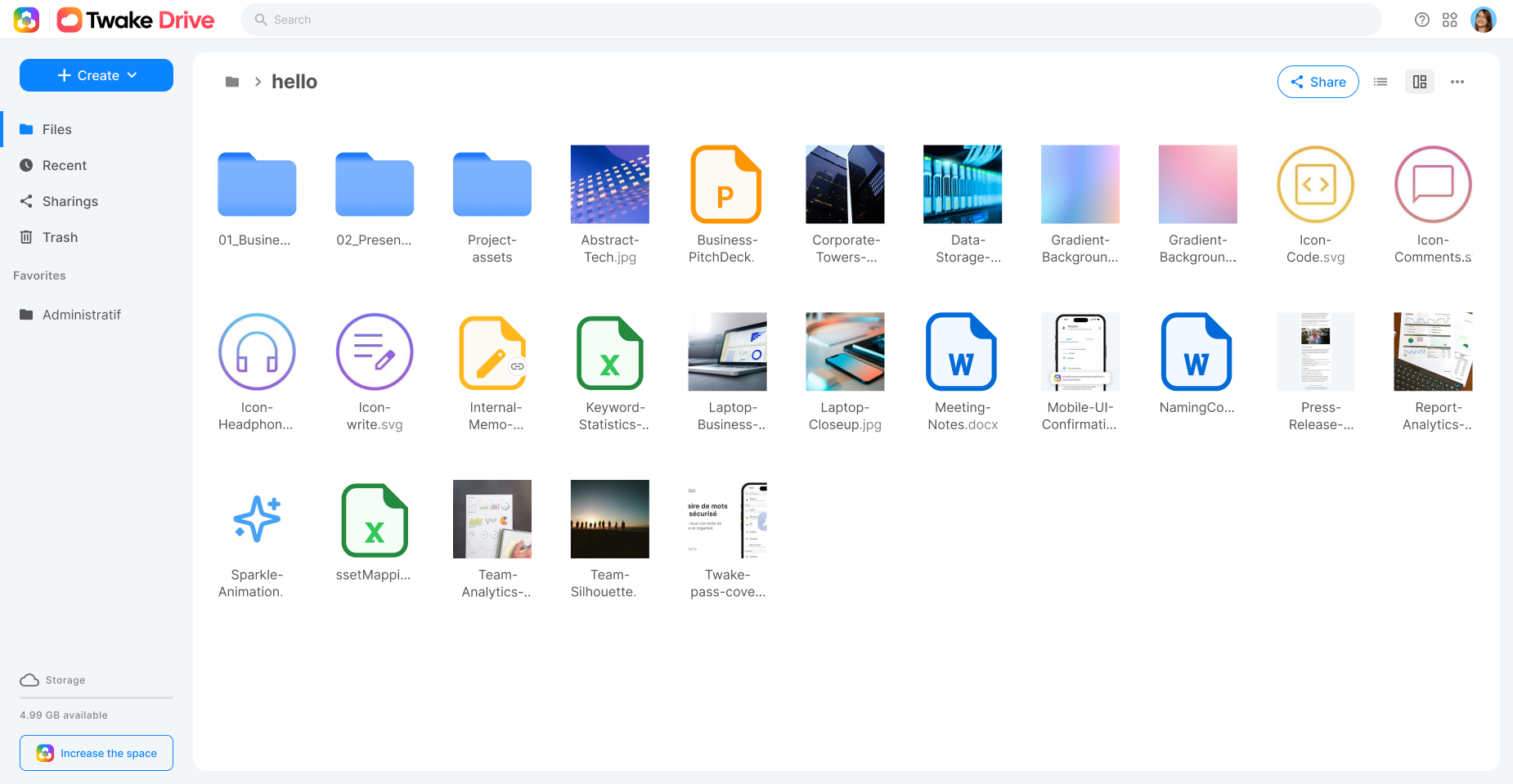
Twake Drive is an open-source file storage and synchronisation application whose stated purpose is to serve as the open-source alternative to Google Drive. It provides the familiar furniture of a cloud drive: a file tree, upload of files and folders, sharing of files and folders through URLs, and search across stored content. It is written in JavaScript and published under the AGPL-3.0 licence from the linagora organisation on GitHub, with the hosted project page at twake-drive.com.

The specific thing it replaces is a proprietary hosted drive service. Twake Drive does not ship as a standalone binary or a single server process; it is an application that runs inside the Cozy ecosystem and is served by the cozy-stack backend, which handles the storage layer, the routing, and the mail path that sharing depends on. For a team that wants file storage under its own operational control, that architecture is the point: the drive application is the interface, and cozy-stack is the substrate beneath it.

Key capabilities

  • File tree navigation for browsing stored folders and documents.
  • Upload of individual files and of whole folders.
  • Sharing of files and folders via URLs.
  • Search across files and folders.
  • Cozy-to-Cozy sharing, in which a user shares a folder by entering another user's email address and that recipient accepts the sharing from a link delivered by mail.
  • A standard set of npm scripts covering watch, lint, test, and build, with the Node version pinned by .nvmrc.
  • An interface built on the shared cozy-ui frontend library used across the Twake React applications, which can be linked locally with yarn link cozy-ui during development.

Who uses it and how

  • Teams that want file storage, upload, sharing, and search running on infrastructure they operate, with cozy-stack handling the backend.
  • Developers building or hacking on the application, who run yarn watch alongside cozy-stack serve --appdir drive:/ /twake-drive/build/drive and reach the app at http://drive.cozy.localhost:8080/#/folder.
  • Developers who prefer a containerised loop, running the cozy/cozy-app-dev image with the build directory mounted at /data/cozy-app/drive and reaching the app at http://drive.cozy.tools:8080.
  • Teams testing the sharing workflow locally, who run MailHog and start the stack with --mail-disable-tls --mail-port 1025 so that every sharing invitation email is captured rather than delivered, allowing addresses such as bob@cozy to be used freely.
  • Frontend developers working across the Twake React applications, who clone cozy-ui and link it into their project to develop against the shared component library.

Getting started

The README documents a development installation: clone https://github.com/linagora/twake-drive.git, set the Node version indicated in .nvmrc, and run yarn install. The application is then built with yarn build or run with yarn watch and served by the Cozy stack, either through the cozy-stack serve --appdir command or inside the cozy/cozy-app-dev Docker container.

How it compares

Twake Drive is positioned by its own README as the open-source alternative to Google Drive, and the contrast runs along licence and control. Google Drive is a proprietary, vendor-operated service, while Twake Drive is published under the AGPL-3.0 and is served from a cozy-stack instance that the operator runs, so the files and the mail path behind sharing sit on infrastructure the operator controls. That shifts the cost model as well: there is no per-seat subscription in the application itself, but the operator supplies the server, the storage, and the maintenance the hosted alternative would otherwise absorb.

When to use it — and when not to

Self-hosting Twake Drive means operating more than the app: it requires a cozy-stack instance, a Node and Yarn toolchain, and, if the sharing invitation flow is to be exercised or used, a working mail path such as MailHog in development. Anyone looking for a binary to install and forget, or a documented production deployment path, should look elsewhere, because the README is written for contributors and treats cozy-stack as a given rather than explaining how to run it in production. The repository also carries 128 open issues, and although the tagline and GitHub description promise end-to-end encryption, the README itself does not describe the encryption model, so a buyer should verify that claim against the code before relying on it.

project readme (upstream, from github) — read inline

Twake Drive

The open-source alternative to Google Drive.
Learn more »

Website | Issues

About
What's Drive?

Twake Drive makes your file management easy. Main features are:

  • File tree
  • Files and folders upload.
  • Files and folders sharing (via URLs)
  • Files and folders search

Getting Started

:pushpin: Note: Yarn is the official Node package manager of Twake Drive. Don't hesitate to install Yarn

Install

Starting the Drive app requires you to setup a dev environment.

You can then clone the app repository and install dependencies:

$ git clone https://github.com/linagora/twake-drive.git
$ cd twake-drive
$ yarn install

:pushpin: Don't forget to set the local node version indicated in the .nvmrc before doing a yarn install.

Twake Drive use a standard set of npm scripts to run common tasks, like watch, lint, test, build…

Run in dev mode

Using a watcher - with Hot Module Replacement:

$ cd twake-drive
$ yarn watch
$ cozy-stack serve --appdir drive:/<project_absolute_path>/twake-drive/build/drive --disable-csp

Or directly build the app (static file generated):

$ cd twake-drive
$ yarn build
$ cozy-stack serve --appdir drive:/<project_absolute_path>/twake-drive/build/drive

Your app is available at http://drive.cozy.localhost:8080/#/folder

Note: it's mandatory to explicit to cozy-stack the folder of the build that should be served, to be able to run the app.

Run it inside the VM

You can view your current running app, you can use the cozy-stack docker image:

# in a terminal, run your app in watch mode
$ cd twake-drive
$ yarn watch
# in another terminal, run the docker container
$ docker run --rm -it -p 8080:8080 -v "$(pwd)/build/drive":/data/cozy-app/drive cozy/cozy-app-dev

Your app is available at http://drive.cozy.tools:8080.

Advanced case

Share and send mails in development

Twake Drive let users share documents from twake to twake.

Meet Alice and Bob. Alice wants to share a folder with Bob. Alice clicks on the share button and fills in the email input with Bob's email address. Bob receives an email with a « Accept the sharing » button. Bob clicks on that button and is redirected to Alice's twake to enter his own twake url to link both twakes. Bob sees Alice's shared folder in his own twake.

🤔 But how could we do this scenario on binary cozy-stack development environment?

If you develop with the cozy-stack CLI, you have to run MailHog on your computer and tell cozy-stack serve where to find the mail server with some options:

./cozy-stack serve --appdir drive:../twake-drive/build --mail-disable-tls --mail-port 1025

This commands assumes you git clone twake-drive in the same folder than you git clone cozy-stack.

Then simply run mailhog and open http://cozy.tools:8025/.

Retrieve sent emails

With MailHog, every email sent by cozy-stack is caught. That means the email address does not have to be a real one, ie. bob@cozy, [email protected] are perfectly fine. It could be a real one, but the email will not reach the real recipient's inbox, say [email protected].

Living on the edge

Cozy-ui is our frontend stack library that provides common styles and components accross the whole Twake React apps. You can use it for you own application to follow the official Twake's guidelines and styles. If you need to develop / hack cozy-ui, it's sometimes more useful to develop on it through another app. You can do it by cloning cozy-ui locally and link it to yarn local index:

git clone https://github.com/cozy/cozy-ui.git
cd cozy-ui
yarn install
yarn link

then go back to your app project and replace the distributed cozy-ui module with the linked one:

cd twake-drive
yarn link cozy-ui

You can now run the watch task and your project will hot-reload each times a cozy-ui source file is touched.

Troubleshooting

Consider using rlink instead of yarn link

Cozy-client is our API library that provides an unified API on top of the cozy-stack. If you need to develop / hack cozy-client in parallel of your application, you can use the same trick that we used with cozy-ui: yarn linking.

Tests

Tests are run by jest under the hood, and written using chai and sinon. You can easily run the tests suite with:

$ cd twake-drive
$ yarn test

For Playwright end-to-end tests, see the E2E test guide.

:pushpin: Don't forget to update / create new tests when you contribute to code to keep the app the consistent.

Open a Pull-Request

If you want to work on Drive and submit code modifications, feel free to open pull-requests! See the contributing guide for more information about how to properly open pull-requests.

Community

Localization

Localization and translations are handled by Transifex.

As a translator, you can login to Transifex (using your Github account) and claim access to the app repository. Locales are pulled by the pipeline when app is build before publishing.

As a developer, you must configure the Transifex CLI, and claim access as maintainer to the app repository. Then please only update the source locale file (usually en.json in client and/or server parts), and push it to Transifex repository using the tx push -s command.

If you were using a transifex-client, you must move to Transifex CLI to be compatible with the v3 API.

The transifex configuration file is still in an old version. Please use the previous client for the moment https://github.com/transifex/transifex-client/.

License

Twake Drive is developed by Linagora and distributed under the AGPL v3 license.

Frequently asked questions

Is Twake Drive free to use?

Twake Drive is open source under the AGPL-3.0 licence. There is no licence fee and no seat count — you can self-host it or, where the project offers one, pay a vendor for a managed version instead.

What does Twake Drive do?

Secure open source file storage with end-to-end encryption

What is Twake Drive written in?

Twake Drive is primarily written in JavaScript. Its source is publicly available at https://github.com/linagora/twake-drive, and it has 982 GitHub stars.