
Sync-in is a free, open source file management & sync project written in TypeScript and released under AGPL-3.0. It has 1,769 GitHub stars, 136 forks and 13 open issues, and was last pushed 26 hours ago. On this registry it ranks #8 of 12 tracked projects in File Management & Sync, with 5 head-to-head comparisons available. It gained 4 stars over the last 6 tracked days.

What is Sync-in?

What it is

Sync-in is a self-hosted platform for file storage, synchronization, and team collaboration. It lives in the self-hosted file-management ecosystem, alongside homelab, on-premise, and cloud-alternative use cases. The project is written in TypeScript and licensed under AGPL-3.0.

The platform solves the problem of keeping files, documents, shares, and collaborative work under user control. It provides a workspace where files remain readable on the filesystem, while collaboration features are added only where needed. It is intended for users who want a self-hosted cloud alternative; repository topics name Dropbox and Nextcloud.

Key capabilities

  • The web interface supports drag and drop, smart clipboard, gallery view, sorting, filtering, and enhanced file previews.
  • Authentication supports local accounts, OIDC, LDAP, MFA, recovery codes, and application passwords.
  • Spaces, shares, guests, personal groups, roles, and fine-grained permissions provide controlled collaboration.
  • Protected public links support access limits, expiration dates, passwords, and control over shared content.
  • Online document editing works with Collabora Online, OnlyOffice, and Euro-Office.
  • Activity tracking, comments, notifications, file locking, and recent file updates keep collaboration in one workflow.
  • Full-text search indexes deep document content across common office and document formats.

Who uses it and how

  • Teams run their own workspace for files, documents, shares, and collaborative editing instead of hosted cloud storage.
  • Homelab and on-premise users deploy the server in a private cloud or on-premise environment and keep files readable on the filesystem.
  • Organizations use OIDC, LDAP, MFA, and application passwords to control access to spaces, shares, and personal groups.
  • Users share content through protected public links with passwords, expiration dates, and access limits.
  • Users access files through WebDAV, desktop clients, and CLI clients on Windows, macOS, and Linux, including multi-server synchronization workflows.

Getting started

The README lists Docker setup, NPM setup, GitHub Server, and GitHub Desktop & CLI as setup paths.

When to use it — and when not to

Use Sync-in when operators need a self-hosted file storage, synchronization, sharing, and collaboration platform in the TypeScript and AGPL-3.0 ecosystem. Compared with Dropbox, it keeps data and infrastructure under operator control, but the operator must run the server and any chosen integrations, such as OIDC, LDAP, or document editing services. Avoid it if maturity is a priority: the provided metadata lists 0 contributors, 13 open issues, and a repo age of 0 years.

project readme (upstream, from github) — read inline

License GitHub Release Docker pulls NPM Discord

Sync-in

WebsiteDocumentationDemoDocker setupNPM setupGitHub ServerGitHub Desktop & CLI

Sync-in is a self-hosted platform for file storage, synchronization, and team collaboration.

Run your own workspace for files, documents, shares, and collaborative work without giving up control of your infrastructure or data.

Sync-in is designed to stay fast, lightweight, and centered on your data, keeping files readable on your filesystem while adding collaboration features only where they are needed.
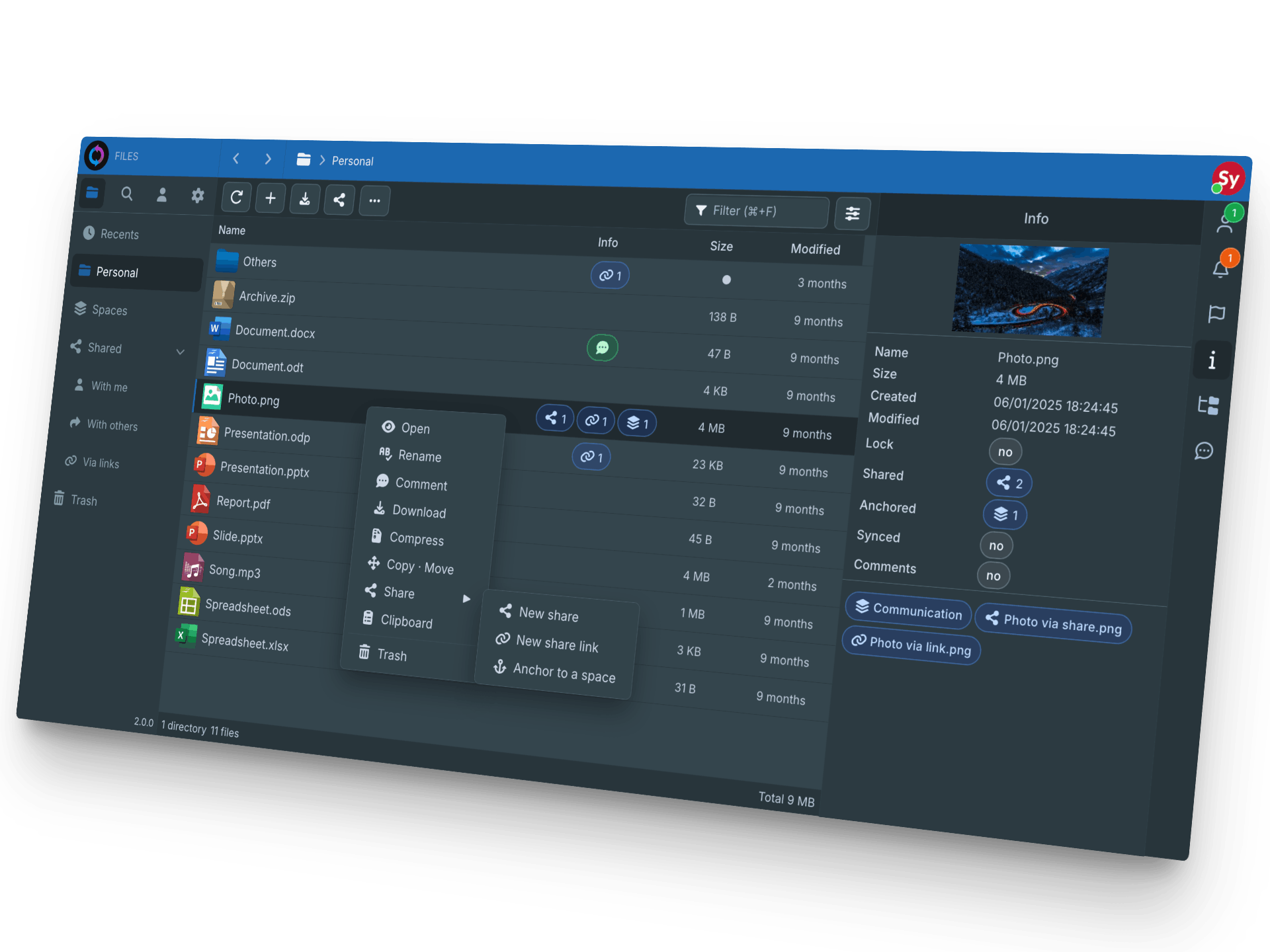
Sync-in server

Features

  • 🖥️ Modern web interface with drag and drop, smart clipboard, gallery view, sorting, filtering, and enhanced file previews
  • 🆔 Authentication with local accounts, OIDC, LDAP, MFA, recovery codes, and application passwords
  • 🔑 Spaces, shares, guests, personal groups, roles, and fine-grained permissions for controlled collaboration
  • 🔐 Protected public links with access limits, expiration dates, passwords, and full control over shared content
  • 🤝 Online document editing with Collabora Online, OnlyOffice, and Euro-Office
  • 💬 Activity tracking, comments, notifications, file locking, and recent file updates in one workflow
  • 🔎 Full-text search with deep document content indexing across common office and document formats
  • 📂 Storage quotas, trash retention, file protection tools, and folder anchoring without duplication
  • 🌍 Self-hosted by design, deployable on-premise or in a private cloud
  • 🔗 WebDAV support for file explorers, network drives, mobile apps, and third-party clients
  • 🖥️ Desktop and CLI clients for Windows, macOS, and Linux, with multi-server synchronization workflows

Sponsors

Docker SignPath
Docker-Sponsored Open Source Program Free code signing on Windows provided by SignPath.io, certificate by SignPath Foundation

Support

You can help by:


Community Guidelines


License

This project is licensed under the GNU Affero General Public License (AGPL-3.0-or-later).
See LICENSE for the full text.

Sync-in® is a registered trademark, see our Trademark Policy.

Frequently asked questions

Is Sync-in free to use?

Sync-in is open source under the AGPL-3.0 licence. There is no licence fee and no seat count — you can self-host it or, where the project offers one, pay a vendor for a managed version instead.

What does Sync-in do?

Open-source file storage with complete data sovereignty

What is Sync-in written in?

Sync-in is primarily written in TypeScript. Its source is publicly available at https://github.com/sync-in/server, and it has 1,769 GitHub stars.