【源GitHub仓库】 | 【Gitee镜像库】本文档中默认使用github.io部署的链接,如果无法访问,请直接下载仓库源码到本地然后双击打开html文件访问。
:open_book:Recorder用于html5录音
支持在大部分已实现getUserMedia的移动端、PC端浏览器麦克风录音、实时处理,主要包括:Chrome、Firefox、Safari、iOS 14.3+、Android WebView、腾讯Android X5内核(QQ、微信、小程序WebView)、Electron、大部分2021年后更新的Android手机自带浏览器、2024年后更新的Android版UC内核(UC、支付宝、钉钉);不支持:老旧国产手机自带浏览器、老旧iOS(11.0-14.2)上除Safari外的其他任何形式的浏览器。
支持在非浏览器环境中使用部分功能(如nodejs、各种使用js来构建的程序),使用RecordApp可在微信小程序、uni-app中直接录音。
支持对任意MediaStream进行音频录制、实时处理,包括:getUserMedia返回的流、WebRTC中的remote流、audio、video标签的captureStream方法返回的流、自己创建的流 等等。
提供多个插件功能支持,拥有丰富的音频可视化、变速变调处理、语音识别、音频流播放等;搭配上强大的实时处理支持,可用于各种网页应用:从简单的录音,到复杂的实时语音识别(ASR),甚至音频相关的游戏,都能从容应对;提供转码支持,允许将录制的buffers数据或任意pcm数据转码成你需要的格式(参考rec.mock方法)。
主要用于语音录制,因此仅对单声道进行支持(未适配双声道),支持超长时间录音(参考onProcess实时清理释放内存);默认输出mp3格式,另外可选wav、pcm、g711a、g711u、ogg、amr、webm(beta)格式,支持任意格式扩展(前提有相应编码器);使用recorder.mp3.min.js(150kb)即可录制mp3,使用recorder.wav.min.js(25kb)即可录制wav;均支持实时转码和实时传输。
音频文件的上传和播放:可直接使用常规的Audio HTML标签来播放完整的音频文件,参考文档下面的【快速使用】部分,有上传和播放例子;上传了的录音直接将音频链接赋值给audio.src即可播放;本地的blob音频文件可通过URL.createObjectURL来生成本地链接赋值给audio.src即可播放,或者将blob对象直接赋值给audio.srcObject(兼容性没有src高)。实时的音频片段文件播放,可以使用本库自带的BufferStreamPlayer插件来播放,简单高效,或者采用别的途径播放。
如需录音功能定制开发,网站、App、小程序、前端后端开发等需求,请加本文档下面的QQ群,联系群主(即作者),谢谢~
Recorder H5 : [ H5在线测试 ] [ H5 QuickStart ] [ H5 vue ] [ H5 ts ] [ H5 es module ] [ 旧版本测试 ]
Recorder App : [ RecordApp测试 ] [ App QuickStart ] [ App vue ] [ Android、iOS App源码 ] [ 微信小程序源码 ] [ uni-app源码 ]
工具集 : [ Recorder代码运行和静态分发 ] [ PCM转WAV播放测试和转码 ] [ 无用户操作测试 ] [ Can I Use查看浏览器支持情况 ]
手机浏览器扫一扫在线测试
Demo片段列表
- 【教程】【PCM基础】buffers转pcm、转采样率、改音量、pcm合并转mp3等格式
- 【教程】【音频流】【上传】实时转码上传-实时帧回调版
- 【教程】【音频流】【上传】实时转码上传-pcm固定帧大小
- 【教程】【音频流】【上传】实时转码上传-通用转码旧版
- 【教程】【音频流】【播放】实时解码播放音频片段
- 【教程】【播放】【可视化】实时录制处理audio、video播放流
- 【教程】【ASR】实时语音识别、音频文件转文字-阿里云版
- 【Demo库】【格式转换】-mp3等格式解码转成其他格式
- 【Demo库】【格式转换】-wav格式转成其他格式
- 【Demo库】【格式转换】-amr格式转成其他格式
- 【Demo库】【文件合并】-mp3多个片段文件合并
- 【Demo库】【文件合并】-wav多个片段文件合并
- 【教程】实时多路音频混音
- 【教程】变速变调音频转换
- 【教程】新录音从老录音接续、或录制中途插入音频
- 【教程】DTMF(电话拨号按键信号)解码、编码
- 【测试】PCM采样率转换测试
- 【Demo库】【信号处理】IIR低通、高通滤波
- 【测试】【信号处理】FFT频域分析ECharts频谱曲线图
- 【测试】WebM格式解析并提取音频
- 【测试】G711、G72X编码和解码播放
- 【Demo库】js二进制转换、基础知识-Base64/Hex/Int16Array/ArrayBuffer/Blob
- 【测试】音乐合成-用波形函数将歌曲简谱文本转成PCM
- 【测试】音频可视化相关插件测试
App Demo
Android Demo App : 下载APK(40kb,删除.zip后缀, 源码)
iOS Demo App :下载源码 自行编译
【QQ群】交流与支持
欢迎加QQ群:①群 781036591、②群 748359095、③群 450721519、④群 1027243616,纯小写口令:recorder






:open_book:快速使用
你可以通过阅读和运行QuickStart.html文件来快速入门学习,直接将QuickStart.htmlcopy到你的(https、localhost)网站中,无需其他文件,就能正常开始测试了;注意:需要在https、localhost等安全环境下才能进行录音。
https环境搭建最佳实践:建议给自己的域名申请一个泛域名通配符证书(*.xxx.com),然后线上、本地开发均可使用此证书;本地开发环境直接分配一个三级域名(dev.xxx.com、local.xxx.com、192-168-1-123.xxx.com)解析A记录到电脑局域网的IP地址(192.168.1.123、127.0.0.1),方便本地开发跨端调试(本地如何配置https请针对自己的开发环境自行搜索,很容易)。
获取泛域名通配符证书推荐:在线免费申请(ZeroSSL、Let’s Encrypt);不建议自己生成根证书来签发域名证书,一个是流程复杂,每个设备均要导入根证书,致命的是很多现代浏览器不再信任用户目录下导入的根证书(Android)。
如果必须http访问,Chrome中可尝试打开
chrome://flags/#unsafely-treat-insecure-origin-as-secure,启用Insecure origins treated as secure,把你的地址含端口配置进去,然后重启浏览器。
【1】加载框架
Recorder的所有js文件均为手动引入(内部不会自动引用),因此未被你引入的文件均可删除来精简源码大小。
方式一:使用script标签引入
在需要录音功能的页面引入压缩好的recorder.xxx.min.js文件即可(CDN:JsDelivr、unpkg)
<script src="recorder.mp3.min.js"></script> <!--已包含recorder-core和mp3格式支持, CDN不稳定仅供测试: https://cdn.jsdelivr.net/gh/xiangyuecn/Recorder@latest/recorder.mp3.min.js-->
或者直接使用源码(src内的为源码、dist内的为压缩后的),可以引用src目录中的recorder-core.js+相应类型的实现文件,比如要mp3录音:
<script src="src/recorder-core.js"></script> <!--必须引入的录音核心,CDN不稳定仅供测试: https://cdn.jsdelivr.net/gh/xiangyuecn/Recorder@latest/src/recorder-core.js-->

<script src="src/engine/mp3.js"></script> <!--相应格式支持文件;如果需要多个格式支持,把这些格式的编码引擎js文件放到后面统统加载进来即可-->
<script src="src/engine/mp3-engine.js"></script> <!--如果此格式有额外的编码引擎(*-engine.js)的话,必须要加上-->

<script src="src/extensions/waveview.js"></script>  <!--可选的插件支持项,把需要的插件按需引入进来即可-->
方式二:通过import/require引入
通过 npm 进行安装 npm install recorder-core --registry=https://registry.npmmirror.com/ ,如果直接clone的源码下面文件路径调整一下即可
//必须引入的核心,换成require也是一样的。注意:recorder-core会自动往window下挂载名称为Recorder对象,全局可调用window.Recorder,也许可自行调整相关源码清除全局污染
import Recorder from 'recorder-core' //注意如果未引用Recorder变量,可能编译时会被优化删除(如vue3 tree-shaking),请改成 import 'recorder-core',或随便调用一下 Recorder.a=1 保证强引用
    //import Recorder from 'recorder-core/src/recorder-core.js.esm.js' //ES Module内请用此方式

//引入相应格式支持文件;如果需要多个格式支持,把这些格式的编码引擎js文件放到后面统统引入进来即可
import 'recorder-core/src/engine/mp3'
import 'recorder-core/src/engine/mp3-engine' //如果此格式有额外的编码引擎(*-engine.js)的话,必须要加上

//以上三个也可以合并使用压缩好的recorder.xxx.min.js
//比如 import Recorder from 'recorder-core/recorder.mp3.min' //已包含recorder-core和mp3格式支持

//可选的插件支持项,把需要的插件按需引入进来即可
import 'recorder-core/src/extensions/waveview'

//ts import 提示:npm包内已自带了.d.ts声明文件(不过是any类型)
【2】调用录音,播放结果
这里假设只录3秒,录完后立即播放,在线编辑运行此代码>>。录音结束后得到的是Blob二进制文件对象,可以下载保存成文件、用FileReader读取成ArrayBuffer或者Base64给js处理,或者参考下一节上传示例直接上传。
//简单控制台直接测试方法:在任意(无CSP限制)页面内加载需要的js,加载成功后再执行一次本代码立即会有效果
//①加载Recorder+mp3:await import("https://unpkg.com/recorder-core/recorder.mp3.min.js"); console.log("import ok")
//②可视化插件和显示:await import("https://unpkg.com/recorder-core/src/extensions/waveview.js"); console.log("import ok"); div=document.createElement("div");div.innerHTML='<div style="height:100px;width:300px;" class="recwave"></div>';document.body.prepend(div);

var rec,processTime=0,clearBufferIdx=0,wave;
/**调用open打开录音请求好录音权限**/
var recOpen=function(success){//一般在显示出录音按钮或相关的录音界面时进行此方法调用,后面用户点击开始录音时就能畅通无阻了
    rec=Recorder({ //本配置参数请参考下面的文档,有详细介绍
        type:"mp3",sampleRate:16000,bitRate:16 //mp3格式,指定采样率hz、比特率kbps,其他参数使用默认配置;注意:是数字的参数必须提供数字,不要用字符串;需要使用的type类型,需提前把格式支持文件加载进来,比如使用wav格式需要提前加载wav.js编码引擎
        ,onProcess:function(buffers,powerLevel,bufferDuration,bufferSampleRate,newBufferIdx,asyncEnd){
            //录音实时回调,大约1秒调用12次本回调,buffers为开始到现在的所有录音pcm数据块(16位小端LE)
            //可利用extensions/sonic.js插件实时变速变调,此插件计算量巨大,onProcess需要返回true开启异步模式
            //可实时上传(发送)数据,配合Recorder.SampleData方法,将buffers中的新数据连续的转换成pcm上传,或使用mock方法将新数据连续的转码成其他格式上传,可以参考文档里面的:Demo片段列表 -> 实时转码并上传-通用版;基于本功能可以做到:实时转发数据、实时保存数据、实时语音识别(ASR)等
            processTime=Date.now();

            //可实时绘制波形(extensions目录内的waveview.js、wavesurfer.view.js、frequency.histogram.view.js插件功能)
            wave&&wave.input(buffers[buffers.length-1],powerLevel,bufferSampleRate);

            /*实时释放清理内存,用于支持长时间录音;在指定了有效的type时,编码器内部可能还会有其他缓冲,必须同时提供takeoffEncodeChunk才能清理内存,否则type需要提供unknown格式来阻止编码器内部缓冲
            //if(this.clearBufferIdx>newBufferIdx){ this.clearBufferIdx=0 } //变量改到this里面时,重新录音了,这样写可以重置this环境
            for(var i=clearBufferIdx||0;i<newBufferIdx;i++) buffers[i]=null;
            clearBufferIdx=newBufferIdx; */
        }
        ,takeoffEncodeChunk: "不设置"?null: function(chunkBytes){
            //实时编码环境下接管编码器输出,类似于onFrameRecorded,当生成了一块音频数据就会回调
            //chunkBytes为指定录音格式的二进制数据Uint8Array,提供此回调后编码器内将不会保存数据(调用stop方法获得的音频数据长度将为0),需自行保存数据
        }
    });

    rec.open(function(){//打开麦克风授权获得相关资源
        //rec.start() 此处可以立即开始录音,但不建议这样编写,因为open是一个延迟漫长的操作,通过两次用户操作来分别调用open和start是推荐的最佳流程

        //创建可视化,指定一个要显示的div
        if(Recorder.WaveView)wave=Recorder.WaveView({elem:".recwave"});
        success&&success();
    },function(msg,isUserNotAllow){//用户拒绝未授权或不支持
        console.log((isUserNotAllow?"UserNotAllow,":"")+"无法录音:"+msg);
    });
};

/**开始录音**/
function recStart(){//打开了录音后才能进行start、stop调用
    rec.start();

    //【稳如老狗WDT】可选的,监控是否在正常录音有onProcess回调,如果长时间没有回调就代表录音不正常
    var wdt=rec.watchDogTimer=setInterval(function(){
        if(!rec || wdt!=rec.watchDogTimer){ clearInterval(wdt); return } //sync
        if(Date.now()<rec.wdtPauseT) return; //如果暂停录音了就不检测:puase时赋值rec.wdtPauseT=Date.now()*2(永不监控),resume时赋值rec.wdtPauseT=Date.now()+1000(1秒后再监控)
        if(Date.now()-(processTime||startTime)>1500){ clearInterval(wdt);
            console.error(processTime?"录音被中断":"录音未能正常开始");
            // ... 错误处理,关闭录音,提醒用户
        }
    },1000);
    var startTime=Date.now(); rec.wdtPauseT=0; processTime=0;
};

/**结束录音**/
function recStop(){
    rec.watchDogTimer=0; //停止监控onProcess超时
    rec.stop(function(blob,duration){

        //简单利用URL生成本地文件地址,注意不用了时需要revokeObjectURL,否则霸占内存
        //此地址只能本地使用,比如赋值给audio.src进行播放,赋值给a.href然后a.click()进行下载(a需提供download="xxx.mp3"属性)
        var localUrl=(window.URL||webkitURL).createObjectURL(blob);
        console.log(blob,localUrl,"时长:"+duration+"ms");
        rec.close();//释放录音资源,当然可以不释放,后面可以连续调用start;但不释放时系统或浏览器会一直提示在录音,最佳操作是录完就close掉
        rec=null;

        //已经拿到blob文件对象想干嘛就干嘛:立即播放、上传、下载保存

        /*** 【立即播放例子】 ***/
        var audio=document.createElement("audio");
        document.body.prepend(audio);
        audio.controls=true;
        audio.src=localUrl;
        audio.play();
    },function(msg){
        console.log("录音失败:"+msg);
        rec.close();//可以通过stop方法的第3个参数来自动调用close
        rec=null;
    });
};


//这里假设立即运行,只录3秒,录完后立即播放,本段代码copy到控制台内可直接运行
recOpen(function(){
    recStart();
    setTimeout(recStop,3000);
});
【附】录音上传示例
var TestApi="/test_request";//用来在控制台network中能看到请求数据,测试的请求结果无关紧要
var rec=Recorder();rec.open(function(){rec.start();setTimeout(function(){rec.stop(function(blob,duration){
//-----↓↓↓以下才是主要代码↓↓↓-------

//本例子假设使用jQuery封装的请求方式,实际使用中自行调整为自己的请求方式
//录音结束时拿到了blob文件对象,可以用FileReader读取出内容,或者用FormData上传
var api=TestApi;

/***方式一:将blob文件转成base64纯文本编码,使用普通application/x-www-form-urlencoded表单上传***/
var reader=new FileReader();
reader.onloadend=function(){
    $.ajax({
        url:api //上传接口地址
        ,type:"POST"
        ,data:{
            mime:blob.type //告诉后端,这个录音是什么格式的,可能前后端都固定的mp3可以不用写
            ,upfile_b64:(/.+;\s*base64\s*,\s*(.+)$/i.exec(reader.result)||[])[1] //录音文件内容,后端进行base64解码成二进制
            //...其他表单参数
        }
        ,success:function(v){
            console.log("上传成功",v);
        }
        ,error:function(s){
            console.error("上传失败",s);
        }
    });
};
reader.readAsDataURL(blob);

/***方式二:使用FormData用multipart/form-data表单上传文件***/
var form=new FormData();
form.append("upfile",blob,"recorder.mp3"); //和普通form表单并无二致,后端接收到upfile参数的文件,文件名为recorder.mp3
//...其他表单参数
$.ajax({
    url:api //上传接口地址
    ,type:"POST"
    ,contentType:false //让xhr自动处理Content-Type header,multipart/form-data需要生成随机的boundary
    ,processData:false //不要处理data,让xhr自动处理
    ,data:form
    ,success:function(v){
        console.log("上传成功",v);
    }
    ,error:function(s){
        console.error("上传失败",s);
    }
});

//-----↑↑↑以上才是主要代码↑↑↑-------
},function(msg){console.log("录音失败:"+msg);});},3000);},function(msg){console.log("无法录音:"+msg);});
【附】js中的二进制基础知识:Uint8Array Int16Array ArrayBuffer Blob/File
更多js二进制数据基础知识请阅读:js二进制转换-Base64/Hex/Int16Array/ArrayBuffer/Blob
//XMLHttpRequest、WebSocket等一般都能直接send(TypedArray/ArrayBuffer/Blob)到服务器,服务器会收到二进制数据
//TypedArray/ArrayBuffer在绝大部分js运行环境中都支持,Blob只在浏览器中支持

//Recorder的buffers是pcm数组,单个pcm是Int16Array(TypedArray子类)
var arrayBuffer=pcm.buffer; //pcm的Int16Array转ArrayBuffer
var pcm=new Int16Array(arrayBuffer); //pcm的ArrayBuffer转成Int16Array(共享内存,arrayBuffer.slice(0)截取新的不共享)

//Recorder的takeoffEncodeChunk得到的chunkBytes是Uint8Array(TypedArray子类,类似于无符号byte[])
var arrayBuffer=chunkBytes.buffer; //chunkBytes的Uint8Array转ArrayBuffer
var chunkBytes=new Uint8Array(arrayBuffer); //任意ArrayBuffer均能转成Uint8Array

//ArrayBuffer 与 Blob/File 可以相互转换,File是Blob的一个特例(子类)
var blob=new Blob([arrayBuffer],{type:"audio/mp3"});
var file=new File([arrayBuffer],"xxx.mp3");
var arrayBuffer=reader.result; //用FileReader的readAsArrayBuffer方法读取 Blob/File 成ArrayBuffer

//多个pcm二进制拼接合并成一个,下面Int16Array换成Uint8Array等其他TypedArray也是一样的
var pcmList=[ new Int16Array([1,2]), new Int16Array([3,4,5,6]) ];
var size=0;for(var i=0;i<pcmList.length;i++) size+=pcmList[i].length;
var pcm=new Int16Array(size); //list是Uint8Array就改成new Uint8Array(size);
for(var i=0,offset=0;i<pcmList.length;i++){
    pcm.set(pcmList[i],offset); //循环写入到前一个的后面,完成拼接
    offset+=pcmList[i].length;
};
//pcm可使用rec.mock方法转码成其他任意格式,比如mp3

//二进制封装包头,比如要发送特定封包格式的数据包
var bytes=new Uint8Array(pcm.buffer); //需要封装的音频二进制数据
var header=new Uint8Array(2); //假设2字节包头
header[0]=0xEF; header[1]=0x01; //填充任意需要的内容
var packet=new Uint8Array(header.length+bytes.length); //拼接
packet.set(header,0);
packet.set(bytes,header.length); //拼接完成
【附】Android App - WebView中录音示例
app-support-sample/demo_android目录中提供了Android测试项目源码(如果不想自己打包可以用打包好的apk来测试,demo_android目录下的app-debug.apk.zip,自行去掉.zip后缀)。
在Android App WebView中使用本库来H5录音,需要在App源码中实现以下几部分:
- 在
AndroidManifest.xml声明需要用到的两个权限,第二个也必须的
<uses-permission android:name="android.permission.RECORD_AUDIO"/>
<uses-permission android:name="android.permission.MODIFY_AUDIO_SETTINGS"/>
- WebView的WebChromeClient中实现
onPermissionRequest网页授权请求
如果未实现此方法,WebView默认会拒绝H5录音权限;onPermissionRequest中需要先获取App的系统录音权限(Activity里面必须先用this.checkSelfPermission检测权限,否则直接this.requestPermissions会造成WebView触发touchcancel打断长按),然后再grant网页权限,可参考Android Demo中的MainActivity.java中的实现代码。
注:如果应用的腾讯X5内核,可能还须提供android.permission.CAMERA权限,和调用webView.setWebChromeClientExtension来重写X5的IX5WebChromeClientExtension.onPermissionRequest方法来进行权限处理
- 如需后台录音,还需要实现Android后台录音保活服务
自Android 9开始,为了保护用户隐私,锁屏或进入后台一段时间后App可能会被禁止访问麦克风、摄像头等功能,导致无法录音、或录音数据全部是静音,因此需要使用保活机制才能在后台录音,详细请参考app-support-sample/demo_android,里面专门有一个章节讲解保活。
【附】iOS App - WebView中录音示例
app-support-sample/demo_ios目录中提供了iOS测试项目源码(需自行用xcode编译运行)。
在iOS App WebView中使用本库来录音,需要在App源码 Info.plist 中声明使用麦克风 NSMicrophoneUsageDescription,无需其他处理,WebView会自己处理好录音权限;注意:iOS App需要在项目Background Modes中勾选Audio才能在后台保持录音,不然App切到后台后立马会停止录音。
iOS 14.3+以上版本才支持WebView中进行H5录音。
iOS 15+以上版本提供了静默授权支持,需要WKWebView的uiDelegate实现WKUIDelegate requestMediaCapturePermissionFor接口,可参考iOS Demo中的MainView.swift中的代码;如果未实现,会导致H5录音每次打开页面后第一次录音时、或长时间无操作再打开录音时均会弹出录音权限对话框。
iOS 11.0-14.2:纯粹的H5录音在iOS WebView中是不支持的,需要有Native层的支持,具体参考RecordApp中的app-support-sample/demo_ios测试项目源码。
【附】微信小程序中录音集成参考
RecordApp支持在微信小程序中直接进行录音,请参考小程序Demo项目:miniProgram-wx。
[不推荐] 如果仅使用Recorder的话,将只能在H5页面中使用,然后在小程序的web-view中显示这个H5,和普通浏览器没有区别。
【附】Electron程序中录音集成参考
在Electron BrowserWindow中使用本库来录音,需要程序本身先获得录音权限;在调用open打开录音前,需要先到主进程使用 systemPreferences.getMediaAccessStatus('microphone') 判断程序是否有录音权限,如果是未申请权限,需要调用 systemPreferences.askForMediaAccess('microphone') 来请求权限;程序有权限后,即可和普通网页一样正常的录音。
【附】uni-app集成参考
RecordApp支持在uni-app中直接进行录音,支持编译成:H5、Android App、iOS App、微信小程序,请参考Demo项目和文档:demo_UniApp,对应的组件可到DCloud 插件市场下载。
[不推荐] 如果仅使用Recorder的话,因为uni-app中的renderjs是直接运行在视图层WebView中的,因此可以通过在renderjs中加载Recorder来进行录音;此方法支持App、H5,但不支持小程序。同时需要注意在开发App平台的代码时,需在调用rec.open前,在原生层获取到录音权限;和上面的Android和iOS一样先配置好录音权限声明,再调用权限请求接口(iOS的WebView会自动处理可以不请求),在逻辑层中编写js权限处理代码。
:open_book:需要注意的细节和问题
本库期待的使用场景是语音录制,因此音质只要不比高品质的感觉差太多就行;1分钟的语音进行编码是很快的,但如果录制超长的录音,比如10分钟以上,不同类型格式的编码可能会花费比较长的时间,大部分编码器支持边录边转码(Worker),因此录音时转码速度极快。另外未找到双声道语音录制存在的意义(翻倍录音数据大小,并且拉低音质),因此特意仅对单声道进行支持。
浏览器Audio Media兼容性mp3最好,wav还行,其他要么不支持播放,要么不支持编码;因此本库最佳推荐使用mp3、wav格式,代码也是优先照顾这两种格式。
getUserMedia的浏览器支持情况和兼容性,可到Can I use查看。
留意中途来电话:在移动端录音时,如果录音中途来电话,或者通话过程中打开录音,是不一定能进行录音的;经过简单测试发现,iOS上Safari将暂停返回音频数据,直到通话结束才开始继续有音频数据返回;小米上Chrome不管是来电还是通话中开始录音都能对麦克风输入的声音进行录音;只是简单测试,更多机器和浏览器并未做测试,不过整体上来看来电话或通话中进行录音的可行性并不理想,也不赞成在这种过程中进行录音;但只要通话结束后录音还是会正常进行,影响基本不大。
录音时对播放音频的影响:仅在移动端,如果录音配置中未禁用降噪+回声消除(浏览器默认开启降噪+回声),打开录音后,如果同时播放音频,此时系统播放音量可能会变得很小,关闭录音后一般可恢复音量;PC上 和 禁用降噪+回声消除后 似乎无此影响,但iOS上如果禁用又可能会导致无法正常录音,详细请阅读配置文档中的audioTrackSet参数说明。
移动端锁屏录音:手机锁屏后浏览器的运行状态是一个玄学,是否能录音不可控;不同手机、甚至同一手机在不同状态下,有可能能录又有可能不能录,且无法检测;可以调用 navigator.wakeLock 来阻止手机自动锁屏,不支持的直接简单粗暴的 循环+静音 播放一段视频,来阻止锁屏,就是有点费电,具体实现可参考H5在线测试页面内的wakeLockClick方法。
特别注:如果在iframe里面调用的录音功能,并且和上层的网页是不同的域(跨域了),如果未设置相应策略,权限永远是被拒绝的,参考此处。另外如果要在非跨域的iframe里面使用,最佳实践应该是让window.top去加载Recorder(异步加载js),iframe里面使用top.Recorder,免得各种莫名其妙。
已知问题
此处已清除7个已知问题,大部分无法解决的问题会随着时间消失;问题主要集中在iOS部分版本上(不同系统版本问题不重样),好在这玩意能更新
2025-03-06 已知现有版本的Recorder.SampleData在部分条件下,录音实时转换采样率时,如果两个采样率不是倍数关系时(44100和16000互转),内部的每次转换会引入杂音,大部分情况下并不明显,有些蓝牙耳机录制的44100采样率数据(实际只有24000),经过转换后杂音会非常明显;后续版本会尝试修正这个转换错误。 260708版本已修复。
2024-09-09 #230 已知open源码中的trackSet[sampleRateTxt]=...强制设置采样率会导致部分设备无法正常打开麦克风,导致录音无声(或无法使用蓝牙等外设),需要修改源码去掉这行源码,同时设置 241020版本开始已移除此代码进行了修复,并增强了MediaRecorder的支持。Recorder.ConnectEnableWebM=false,
2024-09-09 部分iOS上(含新系统)第二次打开录音后无法正常开始录音,在开始录音前调用一次,241020版本开始将不再保留打开状态的Recorder.Ctx。Recorder.Destroy()清除掉已打开的AudioContext可能会恢复正常
2023-12-06 iOS上反复弹出的权限弹框:据QQ群内1806152243开发者反馈,进入页面打开一次录音并关闭后,如果没有在页面上进行任何用户交互操作(点击、触摸、滑动等),大约35秒左右之后,重新打开录音时,浏览器将会再次弹出录音权限对话框;iOS Safari上稳定复现;这是浏览器自己的行为,js无法控制,设计交互逻辑时应当注意。
2023-02-22 iPhone 14:有部分开发者反馈iPhone14上关闭录音后再次打开录音,会出现无法录音的情况,目前并不清楚是只有iPhone14上有问题,还是iOS16均有问题;估计是新的WebKit改了相关源码印度阿三没有测试,js没办法解决此问题,静候iOS更新,也许下一个系统更新就自动修复了;建议针对iOS环境,全局只open一次,不要close,挂在那里录音,可减少iOS系统问题带来的影响(负优化+耗电)。 2023-7-1,此问题已修复,原因出在AudioContext上,iOS新版本上似乎不能共用一个AudioContext(新版本每次open均会创建新的AudioContext),并且iOS上AudioContext的resume行为和其他浏览器不相同,如果不是通过用户操作(触摸、点击等)进行调用,将无法resume,参考 ztest_AudioContext_resume.html 测试用例。
2020-04-26 Safari Bug:据QQ群内1048506792、190451148开发者反馈研究发现,IOS ?-13.X Safari内打开录音后,如果切换到了其他标签、或其他App并且播放了任何声音,此时将会中断已打开的录音(系统级的?),切换回正在录音的页面,这个页面的录音功能将会彻底失效,并且刷新也无法恢复录音;表现为关闭录音后再次打开录音,能够正常获得权限,但浏览器返回的采集到的音频为静默的PCM,此时地址栏也并未显示出麦克风图标,刷新这个标签也也是一样不能正常获得录音,只有关掉此标签新打开页面才可正常录音。如果打开录音后关闭了录音,然后切换到其他标签或App播放声音,然后返回录音页面,不会出现此问题。此为Safari的底层Bug。使用长按录音类似的用户交互可大幅度避免踩到这坨翔。
:open_book:方法文档
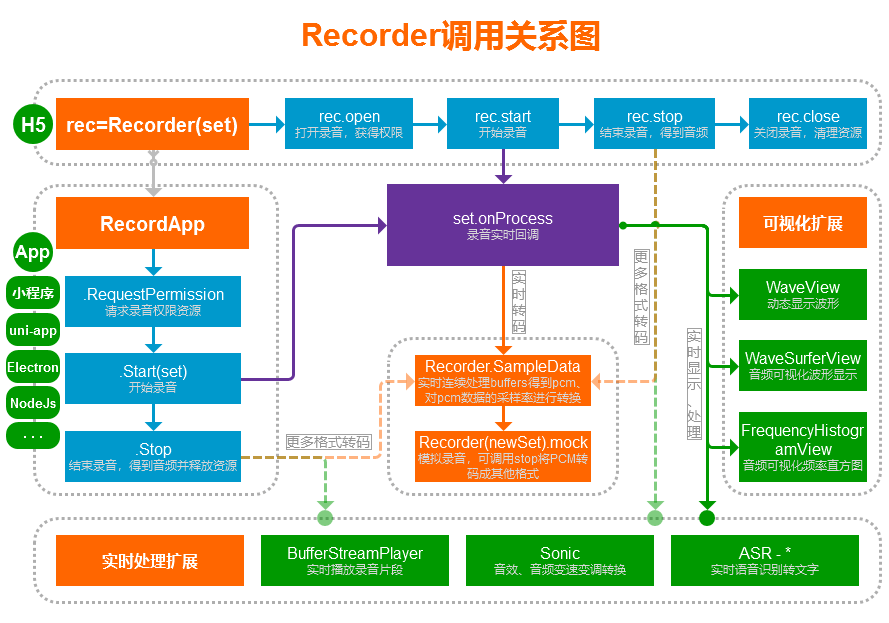
【构造】rec=Recorder(set)
构造函数,拿到Recorder的实例,然后可以进行请求获取麦克风权限和录音。
set参数为配置对象,默认配置值如下:
set={
    type:"mp3" //输出类型:mp3,wav等,使用一个类型前需要先引入对应的编码引擎
    ,bitRate:16 //比特率,必须是数字 wav(位):16、8,MP3(单位kbps):8kbps时文件大小1k/s,16kbps 2k/s,录音文件很小

    ,sampleRate:16000 //采样率,必须是数字,wav格式(8位)文件大小=sampleRate*时间;mp3此项对低比特率文件大小有影响,高比特率几乎无影响。
                //wav任意值,mp3取值范围:48000, 44100, 32000, 24000, 22050, 16000, 12000, 11025, 8000

    ,onProcess:NOOP //接收到录音数据时的回调函数:fn(buffers,powerLevel,bufferDuration,bufferSampleRate,newBufferIdx,asyncEnd)
                //返回值:onProcess如果返回true代表开启异步模式,在某些大量运算的场合异步是必须的,必须在异步处理完成时调用asyncEnd(不能真异步时需用setTimeout包裹);返回其他值或者不返回为同步模式(需避免在回调内执行耗时逻辑);如果开启异步模式,在onProcess执行后新增的buffer会全部替换成空数组,因此本回调开头应立即将newBufferIdx到本次回调结尾位置的buffer全部保存到另外一个数组内,处理完成后写回buffers中本次回调的结尾位置。
                //buffers=[[Int16,...],...]:缓冲的PCM数据块(16位小端LE),为从开始录音到现在的所有pcm片段,每次回调可能增加0-n个不定量的pcm片段。
                    //注意:buffers数据的采样率为bufferSampleRate,它和set.sampleRate不一定相同,可能为浏览器提供的原始采样率rec.srcSampleRate,也可能为已转换好的采样率set.sampleRate;如需浏览器原始采样率的数据,请使用rec.buffers原始数据,而不是本回调的参数;如需明确和set.sampleRate完全相同采样率的数据,请在onProcess中自行连续调用采样率转换函数Recorder.SampleData(),配合mock方法可实现实时转码和压缩语音传输;修改或替换buffers内的数据将会改变最终生成的音频内容(注意不能改变第一维数组长度),比如简单有限的实现实时静音、降噪、混音等处理,详细参考下面的rec.buffers
                //powerLevel:当前缓冲的音量级别0-100。
                //bufferDuration:已缓冲时长。
                //bufferSampleRate:buffers缓存数据的采样率(当type支持边录边转码(Worker)时,此采样率和设置的采样率相同,否则不一定相同)。
                //newBufferIdx:本次回调新增的buffer起始索引。
                //asyncEnd:fn() 如果onProcess是异步的(返回值为true时),处理完成时需要调用此回调,如果不是异步的请忽略此参数,此方法回调时必须是真异步(不能真异步时需用setTimeout包裹)。
                //如果需要绘制波形之类功能,需要实现此方法即可,使用以计算好的powerLevel可以实现音量大小的直观展示,使用buffers可以达到更高级效果
                //如果需要实时上传(发送)之类的,可以配合Recorder.SampleData方法,将buffers中的新数据连续的转换成pcm,或使用mock方法将新数据连续的转码成其他格式,可以参考文档里面的:Demo片段列表 -> 实时转码并上传-通用版;基于本功能可以做到:实时转发数据、实时保存数据、实时语音识别(ASR)等
                //如果需要长时间录音,比如超过1小时,需要在onProcess内实时释放清理内存,参考实时上传中有释放代码,需要自行实现数据的保存

    //*******高级设置******
        //,sourceStream:MediaStream Object
                //可选直接提供一个媒体流,从这个流中录制、实时处理音频数据(当前Recorder实例独享此流);不提供时为普通的麦克风录音,由getUserMedia提供音频流(所有Recorder实例共享同一个流)
                //比如:audio、video标签dom节点的captureStream方法(实验特性,不同浏览器支持程度不高)返回的流;WebRTC中的remote流;自己创建的流等
                //注意:流内必须至少存在一条音轨(Audio Track),比如audio标签必须等待到可以开始播放后才会有音轨,否则open会失败
                //注意:在rec.close时不会主动关闭此流,需自行管理关闭

        //,runningContext:AudioContext
                //可选提供一个state为running状态的AudioContext对象(ctx);默认会在rec.open时自动创建一个新的ctx,无用户操作(触摸、点击等)时调用rec.open的ctx.state可能为suspended,会在rec.start时尝试进行ctx.resume,如果也无用户操作ctx.resume可能不会恢复成running状态(目前仅iOS上有此兼容性问题),导致无法去读取媒体流,这时请提前在用户操作时调用Recorder.GetContext(true)来得到一个running状态AudioContext(用完需调用CloseNewCtx(ctx)关闭)

        /*,audioTrackSet:{
             deviceId:"",groupId:"" //指定设备的麦克风,通过navigator.mediaDevices.enumerateDevices拉取设备列表,其中kind为audioinput的是麦克风
            ,echoCancellation:true //回声消除(AEC)开关,不设置时由浏览器控制(一般为默认自动打开),设为true明确打开,设为false明确关闭
            ,noiseSuppression:true //降噪(ANS)开关,取值和回声消除开关一样
            ,autoGainControl:true //自动增益(AGC)开关,取值和回声消除开关一样
        }*/
                //普通麦克风录音时getUserMedia方法的audio配置参数;注意:不同浏览器的支持程度不同,提供的任何配置值都不一定会生效
                //回声消除、降噪开关这些参数浏览器一般默认自动打开,移动端未明确禁用时可能会降低系统播放音量(关闭录音后可恢复)和仅提供16k采样率的音频流(不需要回声消除时可明确配置成禁用来获得48k高音质的流)
                //由于麦克风是全局共享的,所以新配置后需要close掉以前的再重新open
                //同样可配置videoTrackSet,更多参考: https://developer.mozilla.org/en-US/docs/Web/API/MediaTrackConstraints

        //,disableEnvInFix:false 内部参数,禁用设备卡顿时音频输入丢失补偿功能,如果不清楚作用请勿随意使用

        //,allowUpsample:false 当源采样率this.srcSampleRate<set.sampleRate(如set=48000但源只有44100)时是否要提升采样率,260708版本新增
            //默认不允许,同时set.sampleRate会被重设为源采样率;比如用最高音质录,但实际只取16k的pcm,默认false不影响音质;如果确实需要提升请设为true
            //提升采样率的音质依赖重采样算法和计算复杂度,内置的SampleData+IIRFilter会引入轻微杂音

        //,engine_mp3_lowpassfreq:0 mp3专用配置,16kbps时配置成-1声音不沉闷可提升清晰度,但会增加噪声,详细请阅读文档中mp3编码器说明

        //,takeoffEncodeChunk:NOOP //fn(chunkBytes) chunkBytes=[Uint8,...]:实时编码环境下接管编码器输出,类似于onFrameRecorded,当编码器实时编码出一块有效的二进制音频数据时实时回调此方法;参数为二进制的Uint8Array,就是编码出来的音频数据片段,所有的chunkBytes拼接在一起即为完整音频。本实现的想法最初由QQ2543775048提出。
                //当提供此回调方法时,将接管编码器的数据输出,编码器内部将放弃存储生成的音频数据;如果当前编码器或环境不支持实时编码处理,将在open时直接走fail逻辑
                //因此提供此回调后调用stop方法将无法获得有效的音频数据,因为编码器内没有音频数据,因此stop时返回的blob将是一个字节长度为0的blob
                //大部分录音格式编码器都支持实时编码(边录边转码),比如mp3格式:会实时的将编码出来的mp3片段通过此方法回调,所有的chunkBytes拼接到一起即为完整的mp3,此种拼接的结果比mock方法实时生成的音质更加,因为天然避免了首尾的静默
                //不支持实时编码的录音格式不可以提供此回调(wav格式不支持,因为wav文件头中需要提供文件最终长度),提供了将在open时直接走fail逻辑
}
注意:set内是数字的明确传数字,不要传字符串之类的导致不可预测的异常,其他有配置的地方也是一样(感谢214282049@qq.com19-01-10发的反馈邮件)。
注:如果录音结束后生成的音频文件的比特率和采样率和set中的不同,将会把set中的bitRate、sampleRate更新成音频文件的。
【方法】rec.open(success,fail)
普通的麦克风录音时:请求打开录音资源,如果浏览器不支持录音、用户拒绝麦克风权限、或者非安全环境(非https、file等)将会调用fail;打开后需要调用close来关闭,因为浏览器或设备的系统可能会显示正在录音。
直接提供的流set.sourceStream时:会连接上此流进行录制,打开后同样需要调用close来断开连接,但不会主动关闭此流,需自行管理此sourceStream的关闭。
success=fn();
fail=fn(errMsg,isUserNotAllow); 如果是用户主动拒绝的录音权限,除了有错误消息外,isUserNotAllow=true,方便程序中做不同的提示,提升用户主动授权概率
注意:此方法回调是可能是同步的(异常、或者已持有资源时)也可能是异步的(浏览器弹出权限请求时);一般使用时打开,用完立即关闭;可重复调用,可用来测试是否能录音;open和start至少有一个应当在用户操作(触摸、点击等)下进行调用,原因参考runningContext配置。
另外:普通的麦克风录音时,因为此方法会调起用户授权请求,如果仅仅想知道浏览器是否支持录音(比如:如果浏览器不支持就走另外一套录音方案),应使用Recorder.Support()方法。
【方法】rec.close(success)
关闭释放录音资源,释放完成后会调用success()回调。如果正在录音或者stop调用未完成前调用了close将会强制终止当前录音。
注意:普通的麦克风录音时(所有Recorder实例共享同一个流),如果创建了多个Recorder对象并且调用了open(应避免同时有多个对象进行了open),只有最后一个新建的才有权限进行实际的资源释放(和多个对象close调用顺序无关),浏览器或设备的系统才会不再显示正在录音的提示;直接提供的流 set.sourceStream 无此问题(当前Recorder实例独享此流,会直接释放掉录制此流的相关资源),但不会主动关闭此流,需自行管理此sourceStream的关闭。
【方法】rec.start()
开始录音,需先调用open;未close之前可以反复进行调用开始新的录音。注意:open和start至少有一个应当在用户操作(触摸、点击等)下进行调用,原因参考runningContext配置。
只要open成功后,调用此方法是安全的,如果未open强行调用导致的内部错误将不会有任何提示,stop时自然能得到错误;另外open操作可能需要花费比较长时间,如果中途调用了stop,open完成时(同步)的任何start调用将会被自动阻止,也是不会有提示的。
【方法】rec.stop(success,fail,autoClose)
结束录音并返回录音数据blob文件对象,拿到blob文件对象就可以为所欲为了,不限于立即播放、上传、下载保存。blob可以用URL.createObjectURL生成本地链接赋值给audio.src进行播放,赋值给a.href然后a.click()进行下载(a需提供download="xxx.mp3"属性);或用XMLHttpRequest+FormData、WebSocket直接发送到服务器,或者用FileReader读取成ArrayBuffer或者Base64给js处理。
success(blob,duration,mime) //录音成功回调
    blob:录音二进制文件数据audio/mp3|wav...格式;
            默认是Blob对象,可设置rec.dataType="arraybuffer"改成ArrayBuffer(或全局设置Recorder.DefaultDataType="arraybuffer")
    duration:录音时长,单位毫秒
    mime:"auido/mp3" blob数据的类型,方便ArrayBuffer时区分类型

fail(errMsg) //录音出错回调

autoClose //可选,是否自动调用`close`,默认为`false`不调用
注意:当创建rec时提供了takeoffEncodeChunk后,你需要自行实时保存录音文件数据,因此stop时返回的blob的长度将为0字节。
提示:stop时会进行音频编码,根据类型的不同音频编码花费的时间也不相同。对于支持边录边转码(Worker)的类型,将极速完成编码并回调;对于不支持的10几秒录音花费2秒左右算是正常,但内部采用了分段编码+setTimeout来处理,界面卡顿不明显。
【方法】rec.pause()
暂停录音。
【方法】rec.resume()
恢复继续录音。
【属性】rec.buffers
此数据为从开始录音到现在为止的所有已缓冲的PCM片段列表(16位小端LE),buffers = [[Int16,...],...] 为二维数组;在没有边录边转码的支持时(mock调用、非mp3等),录音stop时会使用此完整数据进行转码成指定的格式。
rec.buffers中的PCM数据为浏览器采集的原始音频数据,采样率为浏览器提供的原始采样率rec.srcSampleRate;在rec.set.onProcess回调中buffers参数就是此数据或者此数据重新采样后的新数据;修改或替换onProcess回调中buffers参数可以改变最终生成的音频内容,但修改rec.buffers不一定会有效,因此你可以在onProcess中修改或替换buffers参数里面的内容,注意只能修改或替换上次回调以来新增的buffer(不允许修改已处理过的,不允许增删第一维数组,允许将第二维数组任意修改替换成空数组也可以);以此可以简单有限的实现实时静音、降噪、混音等处理。
如果你需要长时间实时录音(如长时间语音通话),并且不需要得到最终完整编码的音频文件:
- 未提供set.takeoffEncodeChunk时,Recorder初始化时应当使用一个未知的类型进行初始化(如: type:"unknown",仅仅用于初始化而已,实时转码可以手动转成有效格式,因为有效格式可能内部还有其他类型的缓冲,
unknown类型onProcess buffers和rec.buffers是同一个数组);提供set.takeoffEncodeChunk接管了编码器实时输出时,无需特殊处理,因为编码器内部将不会使用缓冲; - 实时在
onProcess中修改buffers参数数组,可以只保留最后两个元素,其他元素设为null(代码:onProcess: buffers[buffers.length-3]=null),不保留也行,全部设为null,以释放占用的内存;rec.buffers将会自动清理,无需手动清理;注意:提供set.takeoffEncodeChunk时,应当延迟一下清理,不然buffers被清理掉时,这个buffers还未推入编码器进行编码; - wav等不支持实时编码的格式录音结束时可以不用调用
stop,直接调用close丢弃所有数据即可,因为只要buffers[0]==null时wav格式调用stop永远会直接走fail回调;mp3、pcm等支持实时编码的格式无此限制,且需要调用stop来编码输出最后一段音频数据。
【属性】rec.dataType
stop时返回的录音数据类型,取值:blob、arraybuffer,默认为blob(返回Blob文件对象);非浏览器环境中一般需要设为arraybuffer(返回ArrayBuffer对象),或直接设置全局属性Recorder.DefaultDataType。
【属性】rec.srcSampleRate
浏览器提供的原始采样率,只有start或mock调用后才会有值,此采样率就是rec.buffers数据的采样率。
【方法】rec.envIn(pcmData,pcmAbsSum)
本方法是一个内部使用的最为核心方法,如果你不知道用途,请勿随意调用,配套的有私有方法envStart(mockEnvInfo,sampleRate)(私有方法请自行阅读源码),这两方法控制着录音的开启、实时音频输入逻辑,起到隔离平台环境差异的作用(Recorder、RecordApp共享使用了本机制,实现了录音过程和平台环境无关)。
通过调用本方法,会在当前正在录制的录音中追加进新的pcm数据,每次调用本方法都会触发onProcess回调,也会触发takeoffEncodeChunk回调;从而可以做到:实时转码pcm成其他格式、在录音过程中插入音频数据、在新的录音中注入之前老的录音的buffers数据可以做到接续录音 等业务逻辑,可参考上面的Demo片段列表中的新录音从老录音接续、或录制中途插入音频例子;含有envStart的完整调用例子可以参考这里面的testEnvIn方法。
pcmData:[Int16,...] 为一维数组,pcm音频数据的采样率必须是rec.srcSampleRate (如果不是,请用Recorder.SampleData()方法先转换好)
pcmAbsSum:pcmData所有采样的绝对值的和,用来传递给Recorder.PowerLevel方法计算音量百分比,最终是给onProcess使用,如果不需要计算音量百分比,直接给0即可。
【方法】rec.mock(pcmData,pcmSampleRate)
模拟一段录音数据,后面直接调用stop进行编码得到音频文件。需提供pcm数据 pcmData = [Int16,...] 为Int16Array一维数组,和pcm数据的采样率 pcmSampleRate。调用本方法后无需调用也无法调用open、close、start等方法,只能调用stop,如果之前已经开始了录音,前面的录音数据全部会被丢弃(一般不要共用一个rec,直接创建个新的再调用mock);本方法主要用于音频转码。
提示:在录音实时回调中配合Recorder.SampleData()方法使用效果更佳,可实时生成小片段语音文件。
注意:pcmData为一维数组,如果提供二维数组将会产生不可预料的错误;如果需要使用类似onProcess回调的buffers或者rec.buffers这种pcm列表(二维数组)时,可自行展开成一维,或者使用Recorder.SampleData()方法转换成一维。
//提供一个变量,用于连续转换buffers数据,注意开始新的转换时需要重置为null
var prevChunk=null;

//将onProcess回调中的buffers转成pcm   onProcess(buffers,powerLevel,duration,sampleRate)
//var chunk=Recorder.SampleData(buffers,sampleRate,sampleRate,prevChunk);

//将rec.buffers转成pcm
var chunk=Recorder.SampleData(rec.buffers,rec.srcSampleRate,rec.srcSampleRate,prevChunk);

prevChunk=chunk; //存起来,下次从当前已转换位置继续转换

//这就是上面的代码自动截取到的最新未转换pcm数据
//你也可以自行从buffers中截取出需要转码的pcm
//或者从其他地方获取到pcm数据,比如用解码其他音频文件得到pcm,即可实现不同音频格式之间转码
var pcm=chunk.data; //pcm=new Int16Array(pcmArrayBuffer) 可以使用16位pcm二进制数据直接构造
var sampleRate=chunk.sampleRate;

//调用mock方法把pcm转码成mp3或其他格式
var mockRec=Recorder({ type:"mp3",bitRate:16,sampleRate:16000 });
mockRec.mock(pcm,sampleRate);
mockRec.stop(function(blob,duration){
    console.log("pcm已转码成mp3",blob,duration);
},function(msg){
    console.error("不应该出现的错误:"+msg);
});
【静态方法】Recorder.Support()
判断浏览器是否支持录音,随时可以调用。注意:仅仅是检测浏览器支持情况,不会判断和调起用户授权(rec.open()会判断用户授权),不会判断是否支持特定格式录音。
【静态方法】Recorder.GetContext(tryNew)
获取AudioContext对象,如果浏览器不支持将返回null。tryNew=false时返回全局的Recorder.Ctx,Ctx.state可能是closed,仅限用于解码等操作。tryNew=true时会尝试创建新的ctx(不支持close的老浏览器依旧返回全局的),注意用完必须自己调用CloseNewCtx(ctx)关闭;注意:非用户操作(触摸、点击等)时调用返回的ctx.state可能是suspended状态,需要在用户操作时调用ctx.resume恢复成running状态,参考rec的runningContext配置。
本方法调用一次后,可通过Recorder.Ctx来获得全局对象,但仅可用于音频文件解码:Recorder.Ctx.decodeAudioData(fileArrayBuffer)。本方法是从老版本的Recorder.Support()中剥离出来的,调用Support会自动调用一次本方法。已知iOS16中全局对象无法多次用于录音,当前Recorder打开录音时均会尝试创建新的非全局对象,同时会保留一个全局的对象。
【静态方法】Recorder.IsOpen()
由于Recorder持有的普通麦克风录音资源是全局唯一的,可通过此方法检测是否有Recorder已调用过open打开了麦克风录音功能;注意:此方法无法检测直接提供的流 set.sourceStream 是否已打开,需自行判断。
【静态方法】Recorder.Destroy()
销毁已持有的所有全局资源(AudioContext、Worker),当要彻底移除Recorder时需要显式的调用此方法。大部分情况下不调用Destroy也不会造成问题。
【静态方法】Recorder.CLog
全局的日志输出函数,可赋值一个空函数来屏蔽Recorder的日志输出Recorder.CLog=function(){}。
【静态属性】Recorder.TrafficImgUrl
流量统计用1像素图片地址,在Recorder首次被实例化时将往这个地址发送一个请求,请求是通过Image对象来发送,安全可靠;默认开启统计,url为本库的51la统计用图片地址,为空响应流量消耗非常小,因此对使用几乎没有影响。
设置为空字符串后将不参与统计,大部分情况下无需关闭统计,如果你网页的url私密性要求很高,请在调用Recorder之前将此url设为空字符串;本功能于2019-11-09添加,点此前往51la查看统计概况。
【静态属性】Recorder.i18n
内置的简版国际化多语言支持实现,详细请参考下面的i18n章节。
【静态属性】Recorder.IsBrowser
当前环境是否是浏览器环境,260708版本新增。
【静态属性】Recorder.DefaultDataType
全局默认stop时返回的录音数据类型,取值:blob、arraybuffer,默认为blob(返回Blob文件对象),非浏览器环境中一般需要设为arraybuffer(返回ArrayBuffer对象);rec实例的dataType属性配置优先级更高。
【静态属性】Recorder.BufferSize
普通的麦克风录音时全局的AudioContext缓冲大小,默认值为4096。会影响H5录音时的onProcess调用速率,相对于AudioContext.sampleRate=48000时,4096接近12帧/s(移动端帧率可能会低一些),调节此参数可生成比较流畅的回调动画。
取值256, 512, 1024, 2048, 4096, 8192, or 16384
注意:取值不能过低,2048开始不同浏览器可能回调速率跟不上造成音质问题。一般无需调整,调整后需要先close掉已打开的录音,再open时才会生效。
如果是直接提供的流 set.sourceStream,不是默认的从麦克风录音时,这个属性可以改成由Recorder的实例提供,比如rec.BufferSize=1024,这样就不会受全局干扰。
这个属性在旧版Recorder中是放在已废弃的set.bufferSize中,后面因为兼容处理Safari上MediaStream断开后就无法再次进行连接使用的问题(表现为静音),把MediaStream连接也改成了全局只连接一次,因此set.bufferSize就移出来变成了Recorder的属性
【静态属性】Recorder.ConnectEnableWebM
音频采集连接方式:启用时尝试使用MediaRecorder.WebM.PCM,默认为true启用,未启用或者不支持时使用AudioWorklet或过时的ScriptProcessor来连接;本连接方式仅对普通麦克风录音时有效,直接提供了流(set.sourceStream)时将当做未启用处理。
使用MediaRecorder采集到的音频数据比其他方式更好,几乎不存在丢帧现象,所以音质明显会好很多,建议保持开启; 有些浏览器不支持录制PCM编码的WebM,如FireFox、低版本的Chrome,将依旧使用AudioWorklet或ScriptProcessor来连接采集。
可以额外提供一个设置Recorder.ConnectWebMOptions={}来当做MediaRecorder的options参数,支持的参数请参考此文档。
本连接实现原理:通过MediaRecorder对MediaStream进行录制,格式
audio/webm; codecs=pcm,MediaRecorder会将实时录制的PCM数据(48k+32位)回传给js,因此只需要知道WebM的封装格式就能提取出PCM数据,请参考测试代码:WebM格式解析并提取音频
【静态属性】Recorder.ConnectEnableWorklet
音频采集连接方式:是否要启用AudioWorklet (AudioWorkletNode) 来进行连接;默认为false禁用,禁用后将使用过时的ScriptProcessor (AudioContext.createScriptProcessor) 来连接;如果启用了 Recorder.ConnectEnableWebM 并且有效时,本参数将不起作用,否则才会生效。
启用后如果浏览器不支持AudioWorklet,将只会使用老的ScriptProcessor来进行音频采集连接;如果浏览器已停止支持ScriptProcessor,将永远会尝试启用AudioWorklet而忽略此配置值。
未雨绸缪,目前只需要ScriptProcessor就能做到100%兼容所有浏览器;以后就算只能用AudioWorklet时,也还是需要保留ScriptProcessor用来支持老浏览器;所以默认为禁用,现在实现AudioWorklet的目的是让代码更经得起考验。
导致浏览器崩溃:某些浏览器的AudioWorklet和AudioContext的resume一起作用时会产生崩溃现象,错误代码:STATUS_ACCESS_VIOLATION;此坑已填好,复现测试页面。
注意:由于AudioWorklet内部1秒会产生375次回调,在移动端可能会有性能问题导致浏览器回调丢失,进而导致录音数据、时长变短,PC端似乎无此影响,可通过定时1分钟录音来检测影响(如果短了1秒以上即为有问题);在无明显优势好处的前提下,暂不建议启用。
【静态方法】Recorder.SampleData(pcmDatas,pcmSampleRate,newSampleRate,prevChunkInfo,option)
对pcm数据的采样率进行转换,支持流式转换,可配合mock方法可转换成音频文件,比如实时转换成小片段语音文件。
注意: 从241020版本开始,支持任意采样率转换;之前的老版本只会将高采样率的pcm转成低采样率的pcm,老版本由低转高时不会进行转换处理。
注意: 260708之前的版本,流式转换存在缺陷会增加噪音(单次完整转换正常),此版本已修复,流式转换结果和单次完整转换结果一致
pcmDatas: [[Int16,...]] pcm片段列表,二维数组,比如可以是:rec.buffers、onProcess中的buffers;二维数组里面是Int16Array,也可传Float32Array(会转成Int16Array)
pcmSampleRate:48000 pcm数据的采样率,比如用:rec.srcSampleRate、onProcess中的bufferSampleRate
newSampleRate:16000 需要转换成的采样率,241020版本后支持转成任意采样率,之前老版本仅支持转成低采样率 本插件单次语音识别时虽长无限制,最佳使用场景还是1-5分钟内的语音识别;60分钟以上的语音识别本插件也能胜任(需自行进行重试容错处理),但太长的识别场景不太适合使用阿里云一句话识别(阿里云单次一句话识别最长60秒,本插件自带拼接过程,所以无时长限制);为什么采用一句话识别:因为便宜。
目前暂未提供其他版本的语音识别插件,比如腾讯云、讯飞等,搭配使用Recorder的onProcess实时处理,可根据自己的业务需求选择对应厂家自行对接即可,如需定制开发请联系作者。
对接流程
- 到阿里云开通 一句话识别 服务(可试用一段时间,正式使用时应当开通商用版,很便宜),得到AccessKey、Secret,参考:https://help.aliyun.com/document_detail/324194.html ;
- 到阿里云智能语音交互控制台创建相应的语音识别项目,并配置好项目,得到Appkey,每个项目可以设置一种语言模型,要支持多种语言就创建多个项目;
- 需要后端提供一个Token生成接口(用到上面的Key和Secret),可直接参考或本地运行此NodeJs后端测试程序:/assets/demo-asr,配置好代码里的阿里云账号后,在目录内直接命令行执行
node NodeJsServer_asr.aliyun.short.js即可运行提供本地测试接口; - 前端调用ASR_Aliyun_Short,传入tokenApi,即可很简单的实现语音识别功能。
ASR_Aliyun_Short文档
var rec=Recorder(recSet);rec.open(...) //进行语音识别前,先打开录音,获得录音权限

//【构造初始化】
var asr=Recorder.ASR_Aliyun_Short({
    tokenApi:"" /*必填,调用阿里云一句话识别需要的token获取api地址
            接口实现请参考本地测试NodeJs后端程序:/assets/demo-asr/NodeJsServer_asr.aliyun.short.js
            此接口默认需要返回数据格式:
                {
                    c:0 //code,0接口调用正常,其他数值接口调用出错
                    ,m:"" //message,接口调用出错时的错误消息
                    ,v:{ //value,接口成功调用返回的结果【结果中必须包含下面两个值】
                        appkey:"aaaa" //lang语言模型对应的项目appkey
                        ,token:"bbbb" //语音识别Access Token
                    }
                }
            如果不是返回的这个格式的数据,必须提供apiRequest配置,自行请求api*/
    ,apiArgs:{ //请求tokenApi时要传的参数
        action:"token"
        ,lang:"普通话" //语言模型设置(具体取值取决于tokenApi支持了哪些语言)
    }
    ,apiRequest:fn(url,args,success,fail) /*tokenApi的请求实现方法,默认使用简单的ajax实现
            如果你接口返回的数据格式和默认格式不一致,必须提供一个函数来自行请求api
            方法参数:
                url:"" == tokenApi
                args:{} == apiArgs
                success:fn(value) 接口调用成功回调,value={appkey:"", token:""}
                fail:fn(errMsg) 接口调用出错回调,errMsg="错误消息"
            */
    ,compatibleWebSocket:null /*提供一个函数返回兼容WebSocket的对象,一般也需要提供apiRequest
            如果你使用的环境不支持WebSocket(如微信小程序、uni-app),需要提供一个函数来返回一个兼容实现对象
            方法参数:fn(url) url为连接地址,返回一个对象,需支持的回调和方法:{
                    onopen:fn() 连接成功回调
                    onerror:fn({message}) 连接失败回调
                    onclose:fn({code, reason}) 连接关闭回调
                    onmessage:fn({data}) 收到消息回调
                    connect:fn() 进行连接
                    close:fn(code,reason) 关闭连接
                    send:fn(data) 发送数据,data为字符串或者arraybuffer
                }
            binaryType固定使用arraybuffer类型
            */

    ,asrProcess:fn(text,nextDuration,abortMsg) //当实时接收到语音识别结果时的回调函数(对单个完整音频文件的识别也有效)
            //此方法需要返回true才会继续识别,否则立即当做识别超时处理,你应当通过nextDuration来决定是否继续识别,避免无限制的识别大量消耗阿里云资源额度;如果不提供本回调,默认1分钟超时后终止识别(因为没有绑定回调,你不知道已经被终止了)
            //text为中间识别到的内容(并非已有录音片段的最终结果,后续可能会根据语境修整)
            //nextDuration 为当前回调时下次即将进行识别的总时长,单位毫秒,通过这个参数来限制识别总时长,超过时长就返回false终止识别(第二分钟开始每分钟会多识别前一分钟结尾的5秒数据,用于两分钟之间的拼接,相当于第二分钟最多识别55秒的新内容)
            //abortMsg如不为空代表识别中途因为某种原因终止了识别(比如超时、接口调用失败),收到此信息时应当立即调用asr的stop方法得到最终结果,并且终止录音

    ,log:fn(msg,color) //提供一个日志输出接口,默认只会输出到控制台,color: 1:红色,2绿色,不为空时为颜色字符串

    //高级选项
    ,fileSpeed:6 //单个文件识别发送速度控制,取值1-n;1:为按播放速率发送,最慢,识别精度完美;6:按六倍播放速度发送,花10秒识别60秒文件比较快,精度还行;再快测试发现似乎会缺失内容,可能是发送太快底层识别不过来导致返回的结果缺失。
});

/**asr创建好后,随时调用strat,开始进行语音识别,开始后需要调用input输入录音数据,结束时调用stop来停止识别。如果start之前调用了input输入数据,这些数据将会等到start成功之后进行识别。
建议在success回调中开始录音(即rec.start);当然asr.start和rec.start同时进行调用,或者任意一个先调用都是允许的,不过当出现fail时,需要处理好asr和rec各自的状态。
无需特殊处理start和stop的关系,只要调用了stop,会阻止未完成的start,不会执行回调。
    success:fn()
    fail:fn(errMsg)**/
asr.start(function(){//success
    rec.start();//一般在start成功之后,调用rec.start()开始录音,此时可以通知用户讲话了
},fail);

/**实时处理输入音频数据,一般是在rec.set.onProcess中调用本方法,输入实时录制的音频数据,输入的数据将会发送语音识别;不管有没有start,都可以调用本方法,start前输入的数据会缓冲起来等到start后进行识别
    buffers:[[Int16...],...] pcm片段列表,为二维数组,第一维数组内存放1个或多个pcm数据;比如可以是:rec.buffers、onProcess中的buffers截取的一段新二维数组
    sampleRate:48000 buffers中pcm的采样率

    buffersOffset:0 可选,默认0,从buffers第一维的这个位置开始识别,方便rec的onProcess中使用**/
asr.input(buffers,sampleRate,buffersOffset);

/**话讲完后,调用stop结束语音识别,得到识别到的内容文本,一般在调用了本方法后,下一行代码立即调用录音rec.stop结束录音
    success:fn(text,abortMsg) text为识别到的最终完整内容;如果存在abortMsg代表识别中途被某种错误停止了,text是停止前的内容识别到的完整内容,一般早在asrProcess中会收到abort事件然后要停止录音
    fail:fn(errMsg)**/
asr.stop(function(text,abortMsg){//success
    //text为识别到的最终完整内容;如果存在abortMsg代表识别中途被某种错误停止了,text是停止前的内容识别到的完整内容,一般早在asrProcess中会收到abort事件然后要停止录音
},fail);


//【更多的方法】
asr.inputDuration() //获取input已输入的音频数据总时长,单位ms
asr.sendDuration() //获取已发送识别的音频数据总时长,存在重发重叠部分,因此比inputDuration长
asr.asrDuration() //获取已识别的音频数据总时长,去除了sendDuration的重叠部分,值<=inputDuration
asr.getText() //获取实时结果文本,如果已stop返回的就是最终文本,一般无需调用此方法,因为回调中都提供了此方法的返回值

/**一次性将单个完整音频文件转成文字,无需start、stop,创建好asr后直接调用本方法即可,支持的文件类型由具体的浏览器决定,因此存在兼容性问题,兼容性mp3最好,wav次之,其他格式不一定能够解码。实际就是调用:浏览器解码音频得到PCM -> start -> input ... input -> stop
    audioBlob 音频文件Blob对象,如:rec.stop得到的录音结果、file input选择的文件、XMLHttpRequest的blob结果、new Blob([TypedArray])创建的blob
    success fn(text,abortMsg) text为识别到的完整内容,abortMsg参考stop
    fail:fn(errMsg)**/
asr.audioToText(audioBlob,success,fail)

/**一次性的将单个完整音频转成文字,无需start、stop,创建好asr后直接调用本方法即可。实际就是调用:start -> input ... input -> stop
    buffer:[Int16,...] 16位单声道音频pcm数据,一维数组
    sampleRate pcm的采样率
    success fn(text,abortMsg) text为识别到的完整内容,abortMsg参考stop
    fail:fn(errMsg)**/
asr.pcmToText(buffer,sampleRate,success,fail)
Sonic插件
sonic.js,38kb大小源码,音频变速变调转换,参考此demo片段在线测试使用。此插件从Sonic.java移植,并做了适当精简。
可到assets/sonic-java目录运行java代码测试原版效果。
本插件支持
Pitch:变调不变速(会说话的汤姆猫),男女变声,只调整音调,不改变播放速度Speed:变速不变调(快放慢放),只调整播放速度,不改变音调Rate:变速变调,会改变播放速度和音调Volume:支持调整音量- 支持实时处理,可在onProcess中实时处理PCM(需开启异步),配合SampleData方法使用更佳
Sonic文档
Sonic有两个构造方法,一个是同步方法,Sonic.Async是异步方法,同步方法简单直接但处理量大时会消耗大量时间,主要用于一次性的处理;异步方法由WebWorker在后台进行运算处理,但异步方法不一定能成功开启(低版本浏览器),主要用于实时处理。异步方法调用后必须调用flush方法,否则会产生内存泄露。
注意:由于同步方法转换操作需要占用比较多的CPU(但比转码小点),因此实时处理时在低端设备上可能会导致性能问题;在一次性处理大量pcm时,可采取切片+setTimeout进行处理,参考上面的demo片段。
注意:变速变调会大幅增减PCM数据长度,如果需要在onProcess中实时处理PCM,需要在rec.set中设置内部参数rec.set.disableEnvInFix=true来禁用设备卡顿时音频输入丢失补偿功能,否则可能导致错误的识别为设备卡顿。
注意:每次input输入的数据量应该尽量的大些,太少容易产生杂音,每次传入200ms以上的数据量就几乎没有影响了。
//【构造初始化】
var sonic=Recorder.Sonic(set) //同步调用,用于一次性处理
var sonic=Recorder.Sonic.Async(set) //异步调用,用于实时处理,调用后必须调用flush方法,否则会产生内存泄露。
    /*set:{
        sampleRate:待处理pcm的采样率,就是input输入的buffer的采样率
    }*/

//【功能配置调用函数】同步异步通用,以下num取值正常为0.1-2.0,超过这个范围也是可以的,但不推荐
sonic.setPitch(num)  //num:0.1-n,变调不变速(会说话的汤姆猫),男女变声,只调整音调,不改变播放速度,默认为1.0不调整
sonic.setSpeed(num)  //num:0.1-n,变速不变调(快放慢放),只调整播放速度,不改变音调,默认为1.0不调整
sonic.setRate(num)  //num:0.1-n,变速变调,越小越缓重,越大越尖锐,会改变播放速度和音调,默认为1.0不调整
sonic.setVolume(num)  //num:0.1-n,调整音量,默认为1.0不调整
sonic.setChordPitch(bool)  //bool:默认false,作用未知,不推荐使用
sonic.setQuality(num)  //num:0或1,默认0时会减小输入采样率来提供处理速度,变调时才会用到,不推荐使用

//【同步调用方法】
sonic.input(buffer)  //buffer:[Int16,...] 一维数组,输入pcm数据,返回转换后的部分pcm数据,完整输出需要调用flush;返回值[Int16,...]长度可能为0,代表没有数据被转换;此方法是耗时的方法,一次性处理大量pcm需要切片+setTimeout优化
sonic.flush()  //将残余的未转换的pcm数据完成转换并返回;返回值[Int16,...]长度可能为0,代表没有数据被转换

//【异步调用方法】
sonic.input(buffer,callback) //callback:fn(pcm),和同步方法相同,只是返回值通过callback返回
sonic.flush(callback) //callback:fn(pcm),和同步方法相同,只是返回值通过callback返回
NMN2PCM插件
create-audio.nmn2pcm.js,14kb大小源码,简单用 正弦波、方波、锯齿波、三角波 函数生成一段音乐简谱的pcm数据,主要用于测试时提供音频数据;参考此demo片段在线测试使用。
NMN2PCM文档
var pcmData=Recorder.NMN2PCM(set);
    set配置:{
        texts:""|["",""] 简谱格式化文本,如果格式不符合要求,将会抛异常
        sampleRate: 生成pcm的采样率,默认48000;取值不能过低,否则会削除高音
        timbre: 音色,默认2.0(使用音符对应频率的一个倍频),取值>=1.0
        meterDuration: 一拍时长,毫秒,默认600ms
        muteDuration: 音符之间的静默,毫秒,0时无静默,默认meterDur/4(最大50ms)
        beginDuration: 开头的静默时长,毫秒,0时无静默,默认为200ms
        endDuration: 结尾的静默时长,毫秒,0时无静默,默认为200ms

        volume: 音量,默认0.3,取值范围0.0-1.0(最大值1)
        waveType: 波形发生器类型,默认"sine",取值:sine(正弦波)、square(方波,volume应当减半)、sawtooth(锯齿波)、triangle(三角波)
    }
    其中texts格式比较复杂,请查看此插件源码中的注释

返回结果:{
        pcm: Int16Array,pcm数据
        duration: 123 pcm的时长,单位毫秒
        set: {...} 使用的set配置
        warns: [] 不适合抛异常的提示消息
    }

Recorder.NMN2PCM.GetExamples() 可获取内置的简谱
DTMF插件
dtmf.decode.js + lib.fft.js、dtmf.encode.js,两个js一个解码、一个编码,体积小均不超过10kb,纯js实现易于移植。参考此demo片段在线测试使用。
- DTMF(电话拨号按键信号)解码器,解码得到按键值:可实现实时从音频数据流中解码得到电话拨号按键信息,用于电话录音软解,软电话实时提取DTMF按键信号等;识别DTMF按键准确度高,误识别率低,支持识别120ms以上按键间隔+30ms以上的按键音,纯js实现易于移植;请注意:使用dtmf.decode.js必须同时引入
lib.fft.js(由java移植过来的)才能正常工作。 - DTMF(电话拨号按键信号)编码生成器,生成按键对应的音频PCM信号:可实现生成按键对应的音频PCM信号,用于DTMF按键信号生成,软电话实时发送DTMF按键信号等;生成信号代码、原理简单粗暴,纯js实现易于移植,0依赖。
【方法】Recorder.DTMF_Decode(pcmData,sampleRate,prevChunk)
解码DTMF只有这个一个函数,此函数支持连续调用,将上次的返回值当做参数即可实现实时音频流数据的连续解码处理。
参数:
    pcmData:[Int16,...] pcm一维数组,原则上一次处理的数据量不要超过10秒,太长的数据应当分段延时处理
    sampleRate: 123 pcm的采样率
    prevChunk: null || {} 上次的返回值,用于连续识别,或者当做额外配置对象

返回:
    chunk:{
        keys:[keyItem,...] 识别到的按键,如果未识别到数组长度为0
                keyItem:{
                    key:"" //按键值 0-9 #*
                    time:123 //所在的时间位置,ms
                }

        //以下用于下次接续识别
        lastIs:"" "":mute {}:match 结尾处是什么
        lastCheckCount:0 结尾如果是key,此时的检查次数
        prevIs:"" "":null {}:match 上次疑似检测到了什么
        totalLen:0 总采样数,相对4khz
        pcm:[Int16,...] 4khz pcm数据

        //可额外配置值,如:DTMF_Decode(.., .., prevChunk||{checkFactor:2})
        checkFactor:3 信号检查因子,取值1,2,3,默认为3不支持低于32ms的按键音检测,当需要检测时可以设为2,当信号更恶劣时设为1,这样将会减少检查的次数,导致错误识别率变高
        debug:false 是否开启调试日志
    }
【方法】Recorder.DTMF_Encode(key,sampleRate,duration,mute)
本方法用来生成单个按键信号pcm数据,属于底层方法,要混合多个按键信号到别的pcm中请用封装好的DTMF_EncodeMix方法。
参数:
    key: 单个按键0-9#*
    sampleRate:123 要生成的pcm采样率
    duration:100 按键音持续时间
    mute:50 按键音前后静音时长
返回:
    pcm:[Int16,...],生成单个按键信号
【方法】Recorder.DTMF_EncodeMix(set)
本方法返回EncodeMix对象,将输入的按键信号混合到持续输入的pcm流中,当.mix(inputPcms)提供的太短的pcm会无法完整放下一个完整的按键信号,所以需要不停调用.mix(inputPcms)进行混合。
set={
    duration:100 //按键信号持续时间 ms,最小值为30ms
    ,mute:25 //按键音前后静音时长 ms,取值为0也是可以的
    ,interval:200 //两次按键信号间隔时长 ms,间隔内包含了duration+mute*2,最小值为120ms
}

EncodeMix对象:
    .add(keys)
        添加一个按键或多个按键 "0" "123#*",后面慢慢通过mix方法混合到pcm中,无返回值

    .mix(pcms,sampleRate,index)
        将已添加的按键信号混合到pcm中,pcms:[[Int16,...],...]二维数组,sampleRate:pcm的采样率,index:pcms第一维开始索引,将从这个pcm开始混合。
        返回状态对象:{
            newEncodes:[{key:"*",data:[Int16,...]},...] //本次混合新生成的按键信号列表 ,如果没有产生新信号将为空数组
            ,hasNext:false //是否还有未混合完的信号
        }
        注意:调用本方法会修改pcms中的内容,因此混合结果就在pcms内。
:open_book:已有的音频格式编码器
所有音频格式的编码器都在/src/engine目录中(或/dist/engine目录的压缩版),每个格式一般有一个同名的js文件,如果这个格式有额外的编码引擎文件(*-engine.js)的话,使用时必须要一起加上。
pcm 格式
依赖文件:pcm.js,支持实时编码(边录边转码),pcm编码器输出的数据其实就是Recorder中的buffers原始数据(经过了重新采样),16位时为LE小端模式(Little Endian),并未经过任何编码处理;pcm为未封装的原始音频数据,pcm数据文件无法直接播放,pcm加上一个44字节wav头即成wav文件,可通过wav格式来正常播放。两个参数相同的pcm文件直接二进制拼接在一起即可成为长的pcm文件。
Recorder.pcm2wav(data,True,False)
已实现的一个把pcm转成wav格式来播放的方法,data = { sampleRate:16000 pcm的采样率 , bitRate:16 pcm的位数 取值:8 或 16 , blob:pcm的blob对象 或 ArrayBuffer(回调也将返回ArrayBuffer) },True=fn(wavBlob,duration)。要使用此方法需要带上wav格式编码器。
提示:pcm二进制数据可以直接在数据开头添加个wav头(Recorder.wav_header)即成wav文件;16位的pcm可直接通过new Int16Array(pcmArrayBuffer)来构造成Int16Array,然后通过rec.mock来转码成其他任意格式。
wav (raw pcm format) 格式
依赖文件:wav.js(或使用根目录的recorder.wav.min.js一个文件即可),不支持实时编码(因为wav文件头中需要提供文件最终长度)只能一次性将所有pcm转成wav格式,wav格式编码器是参考网上资料写的,会发现代码和别人家的差不多。源码4kb大小。wav转其他格式参考和测试
生成的wav文件内音频数据的编码为未压缩的pcm数据(raw pcm),只是在pcm数据前面加了一个44字节的wav头;因此直接去掉前面44字节就能得到原始的pcm数据,如:blob.slice(44,blob.size,"audio/pcm");注意:其他wav编码器可能不是44字节的头,要从任意wav文件中提取pcm数据,可用下面的 wav_decode 来统一提取。
Recorder.wav_decode(wavBlob,True,False)
解码wav得到pcm,结果固定为16位单声道
wavBlob: wav音频文件blob对象(异步回调) 或 ArrayBuffer(同步回调),仅支持raw pcm格式的wav,单声道、双声道,8位、16位、24位、和32位浮点数
True(pcm,sampleRate,wavInfo) pcm为Int16Array,16位单声道,采样率为sampleRate
    wavInfo:{ //wav文件原始信息
        bitRate:8 16 24 32 //wav文件位数
        numChannels:1 2 //声道数
        dataPos:44 //数据开始位置,等于wav头长度
    }
False(msg)
Recorder.wav_header(format,numCh,sampleRate,bitRate,dataLength)
生成一个wav头(Uint8Array),添加到pcm二进制数据开头即成wav文件。比如实时保存pcm时(追加写入文件),可在文件开头预留44字节的位置,等录音结束后再来生成wav头并写入到文件开头。使用例子PCM基础教程。
format: 1 (raw pcm) 2 (ADPCM) 3 (IEEE Float) 6 (g711a) 7 (g711u),比如pcm传1,numCh: 声道数,比如1,sampleRate: 音频数据采样率,比如16000,bitRate: 音频数据位数,比如16,dataLength: wav中的音频数据二进制长度,比如pcm.byteLength。
简单将多段小的wav片段合成长的wav文件
由于RAW格式的wav内直接就是pcm数据,因此将小的wav片段文件去掉wav头后得到的原始pcm数据合并到一起,再加上新的wav头即可合并出长的wav文件;要求待合成的所有wav片段的采样率和位数需一致。wav合并参考和测试+可移植源码
mp3 (CBR) 格式
依赖文件:mp3.js + mp3-engine.js(或使用根目录的recorder.mp3.min.js一个文件即可),支持实时编码(边录边转码),采用的是lamejs(LGPL License)这个库的代码,https://github.com/zhuker/lamejs/blob/bfb7f6c6d7877e0fe1ad9e72697a871676119a0e/lame.all.js这个版本的文件代码;已对lamejs源码进行了部分改动,用于精简代码和修复发现的问题。LGPL协议涉及到的文件:mp3-engine.js;这些文件也采用LGPL授权,不适用MIT协议。源码366kb大小,压缩后130kb左右,开启gzip后60来k。mp3转其他格式参考和测试
注意: mp3编码器内部默认会自动进行低通滤波处理,来保证低比特率时把有限的比特数留给更重要的中低频,主动切掉一部分人耳不敏感的超高频信号;会导致16k采样率16kbps默认低通5550hz,声音沉闷但中低频厚实干净,禁用低通滤波后满频8k 音色丰富可提升清晰度 但会增加噪声 如金属音、水声。
低通滤波行为可通过set.engine_mp3_lowpassfreq来配置,默认0动态取低通截止频率,设为-1禁用,其他值为指定低通频率;另外可通过Recorder.Set_engine_mp3_lowpassfreq来进行全局配置(优先级比set内的低);为260708版本新增。
简单将多段小的mp3片段合成长的mp3文件
由于lamejs CBR编码出来的mp3二进制数据从头到尾全部是大小相同的数据帧(采样率44100等无法被8整除的部分帧可能存在额外多1字节填充),没有其他任何多余信息,通过文件长度可计算出mp3的时长fileSize*8/bitRate(参考),数据帧之间可以直接拼接。因此将小的mp3片段文件的二进制数据全部合并到一起即可得到长的mp3文件;要求待合成的所有mp3片段的采样率和比特率需一致。mp3合并参考和测试+可移植源码
注:CBR编码由于每帧数据的时长是固定的,mp3文件结尾最后这一帧的录音可能不能刚好填满,就会产生填充数据,多出来的这部分数据会导致mp3时长变长一点点,在实时转码传输时应当留意,解码成pcm后可直接去掉结尾的多余;另外可以通过调节待编码的pcm数据长度以达到刚好填满最后一帧来规避此问题,参考Recorder.SampleData方法提供的连续转码针对此问题的处理。首帧或前两帧可能是lame记录的信息帧,本库已去除(但小的mp3片段拼接起来停顿导致的杂音还是非常明显,实时处理时使用takeoffEncodeChunk选项可完全避免此问题),参考上面的已知问题。
g711a g711u 格式
依赖文件:g711x.js,g711a: G.711 A-law (pcma),g711u: G.711 μ-law (pcmu、mu-law);支持g711的编码和解码,支持实时编码(边录边转码),编解码源码移植自:https://github.com/twstx1/codec-for-audio-in-G72X-G711-G723-G726-G729/blob/master/G711_G721_G723/g711.c;固定为8000hz采样率、16位,每个采样压缩成8位存储,音频文件大小为8000字节/秒。
Recorder.g711a_encode|g711u_encode(pcm)
编码任意采样率的pcm得到g711x数据。pcm: Int16Array,任意采样率pcm数据(标准采样率为8000,其它采样率的pcm可使用Recorder.SampleData方法来转成8000采样率)。返回Uint8Array,g711x二进制数据(采样率为pcm的采样率)。
Recorder.g711a_decode|g711u_decode(bytes)
解码g711x得到pcm,bytes: Uint8Array,g711x二进制数据,采样率一般是8000;返回Int16Array,为g711x的采样率、16位的pcm数据。
Recorder.g711a2wav|g711u2wav(g711xBlob,True,False)
已实现把g711a、g711u转成wav格式来播放的方法,g711xBlob为g711x音频文件blob对象 或 ArrayBuffer(回调也将返回ArrayBuffer),采样率只支持8000,True=fn(wavBlob,duration);要使用此方法需要带上wav格式编码器。
ogg (Vorbis) 格式
依赖文件:beta-ogg.js + beta-ogg-engine.js,支持实时编码(边录边转码),采用的是ogg-vorbis-encoder-js(MIT License),https://github.com/higuma/ogg-vorbis-encoder-js/blob/7a872423f416e330e925f5266d2eb66cff63c1b6/lib/OggVorbisEncoder.js这个版本的文件代码。此编码器源码1.2M,比较大,开启gzip后400KB左右。对录音的压缩率比lamejs高出一倍, 但Vorbis in Ogg好像Safari不支持(真的假的)。
amr (NB 窄带) 格式
依赖文件:beta-amr.js + beta-amr-engine.js,支持实时编码(边录边转码),采用的是benz-amr-recorder(MIT License)优化后的amr.js(Unknown License),https://github.com/BenzLeung/benz-amr-recorder/blob/462c6b91a67f7d9f42d0579fb5906fad9edb2c9d/src/amrnb.js这个版本的文件代码,已对此代码进行过调整更方便使用。支持编码和解码操作。由于最高只有12.8kbps的码率(AMR 12.2,8000hz),音质和同比配置的mp3、ogg差一个档次。由于支持解码操作,理论上所有支持Audio的浏览器都可以播放(需要自己写代码实现)。此编码器源码600KB,比较大,开启gzip后130KB。优点:录音文件小。
Recorder.amr2wav(amrBlob,True,False)
已实现的一个把amr转成wav格式来播放的方法,True=fn(wavBlob,duration)。要使用此方法需要带上上面的wav格式编码器。仿照此方法可轻松转成别的格式,参考mock方法介绍那节。
amrBlob: amr音频文件blob对象 或 ArrayBuffer(回调也将返回ArrayBuffer)
AMR实时编码解码
使用Recorder.AMR.GetDecoder() | .GetEncoder(12.2)可以获得amr解码器和编码器,支持实时操作(amr帧、小文件片段连续编解码);如何使用请阅读beta-amr-engine.js源码开头部分代码,Recorder.amr2wav底层调用的Recorder.AMR.decode方法有用到。
beta-webm 格式
依赖文件:beta-webm.js,不支持实时编码,这个编码器时通过查阅MDN编写的一个玩意,没多大使用价值:录几秒就至少要几秒来编码。。。原因是:未找到对已有pcm数据进行快速编码的方法。数据导入到MediaRecorder,音频有几秒就要等几秒,类似边播放边收听形。(想接原始录音Stream?我不可能给的!)输出音频虽然可以通过比特率来控制文件大小,但音频文件中的比特率并非设定比特率,采样率由于是我们自己采样的,到这个编码器随他怎么搞。只有比较新的浏览器支持(需实现浏览器MediaRecorder),压缩率和mp3差不多。源码3kb大小。
【附】其他音频格式支持办法
//比如增加aac格式支持 (可参考/src/engine/wav.js的简单实现;如果要实现边录边转码应该参考mp3的实现,需实现的接口比较多)

//新增一个aac.js,编写以下格式代码即可实现这个类型
Recorder.prototype.aac=function(pcmData,successCall,failCall){
    //通过aac编码器把pcm[Int16,...]数据转成aac格式数据,通过this.set拿到传入的配置数据
    ... pcmData->aacData

    //返回数据
    successCall(new Blob([aacData.buffer],{type:"audio/aac"}));
}

//调用
Recorder({type:"aac"})

//如仅需要得到aac格式文件,你可以尝试直接用Recorder录制wav格式,然后调用 https://github.com/salomvary/fdk-aac.js库 来将wav转码成aac,详细请参考 assets/手动测试脚本.js 里面有可用的测试代码
:open_book:国际化多语言支持(i18n)
Recorder内置的简版国际化多语言支持实现,通过设置 Recorder.i18n.lang="en-US" 可切换Recorder内所有输出文本为英文(如:错误消息、控制台日志),默认为zh-CN简体中文。
语言文件在 /src/i18n 目录内,这些语言文件是通过/src/package-i18n.js脚本从src目录内所有源码文件中提取出文本自动生成的,如果修改了源码,需要重新运行一次脚本来生成语言文件,并对新增或修改的语句进行翻译;目前采用的是google翻译+百度翻译,由中文翻译成目标语言,翻译水平有限准确度一般。
en-US.js:English, 英文,lang="en-US" 或 lang="en"es.js:Spanish, Español, 西班牙语,lang="es"fr.js:French, Français, 法语,lang="fr"Template.js:模板文件,当你需要的语言没有对应文件时,可以复制这个文件并改名,然后自行翻译成你需要的语言
切换语言
//比如切换成英文,在引入Recorder之后再进行语言文件的import
import 'recorder-core/src/i18n/en-US.js'
//<script src="src/i18n/en-US.js"></script>

Recorder.i18n.lang="en-US" //切换成对应的语言,此后Recorder的所有输出文本均为此语言的文本
i18n文档
var $T=Recorder.i18n.$T; //可以直接用变量引用$T多语言文本处理函数

//返回一个当前语言对应的文本,key必须唯一(可以用随机字符串);key如果不存在将会把文本存入当前语言实例中,存在时将返回已存在的文本;文本中可以用{1-n}提供参数;文本详细格式定义请阅读Recorder.i18n源码中的注释
$T("key-xx1::测试文本,{1},{2}",":Test Text, {1}, {2}",0,"args1","args2");

//可以直接在代码中提供多个语言文本;第一个默认zh-CN可以不写语言,第二个默认en-US可以不写语言,后面更多的必须写明是哪个语言
//Recorder.i18n.lang="ru" //设置当前语言为俄语
$T("key-xx2:zh-CN:俄语 {1}","en-US:Russian {1}","ru:Русский язык {1}",0,"args1");

//可以直接获取key对应的文本,第二个参数是文本中的参数数组,key如果不存在将返回"";$T.G这个函数主要用于一些预定义好的文本,免得多处出现相同的文本反复去翻译
$T.G("key-xx1",["v1","v2"]);
$T.G("key-xx2",["v1"], "ru"); //明确返回俄语,不管当前lang设置的是什么
:open_book:其它功能介绍
测试用的本地服务器
在 /assets/node-localServer 目录内提供了一个nodejs服务,实现了http上传接口、websocket接口。多个demo中有使用到,方便测试。
WebSocket语音通话聊天demo
在线测试Demo中包含了一个WebSocket版的语音通话聊天的测试功能,测试时需先运行上面这个本地服务器。用两个设备(浏览器打开两个标签也可以)打开demo,勾选实时语音通话聊天对讲,配置好双方标识,连接上服务器即可通话和聊天。手机上测试时,应当使用wss连接,本地服务器里面配置上ssl证书开启wss。
对应的源码在 /assets/zdemo.index.realtime_voice.js,实时传输pcm格式的音频数据(未经过任何编码),用BufferStreamPlayer插件播放。
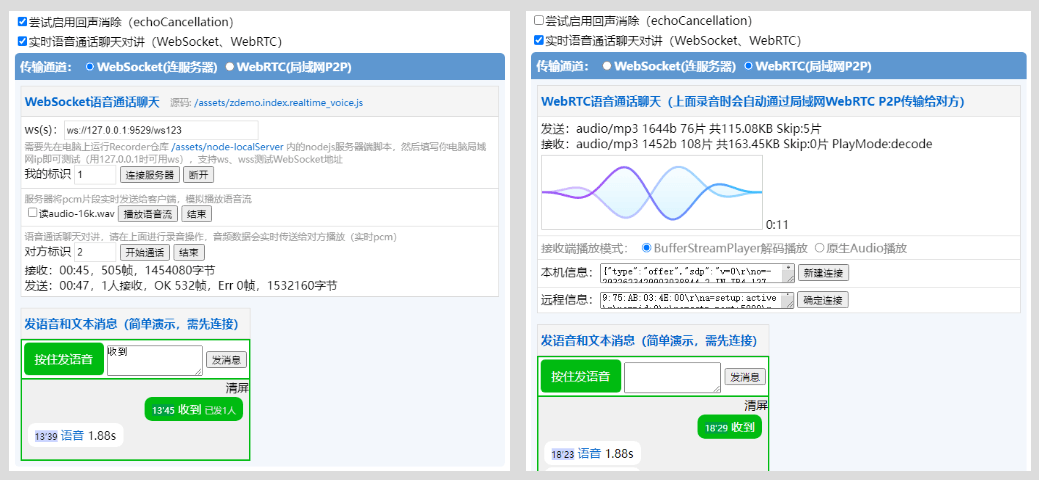
WebRTC语音通话聊天demo
在线测试Demo中还包含了一个WebRTC版的语音通话聊天的测试功能,支持局域网内一对一语音无需服务器。用两个设备(浏览器打开两个标签也可以)打开demo,勾选实时语音通话聊天对讲再切换到WebRTC,按提示交换两个设备的信息即可成功进行P2P连接,然后进行语音。实际使用时数据传输用WebSocket的会简单好多。
早期编写本语音测试的目的在于验证H5录音实时转码、传输的可行性,并验证实时转码mp3格式小片段文件接收后的可播放性。经测试发现:除了移动端可能存在设备性能低下的问题以外,录音后实时转码mp3并传输给对方是可行的,对方接收后播放也能连贯的播放(效果还是要看播放代码写的怎么样,目前没有比较完美的播放代码,用BufferStreamPlayer插件播放效果会好点)。另外(16kbps,16khz)MP3开语音15分钟大概3M的流量,wav、pcm 15分钟要37M多流量。
另外除wav、pcm外MP3等格式编码出来的音频的播放时间比PCM原始数据要长一些或短一些,如果涉及到解码或拼接时,这个地方需要注意(如果类型支持,实时处理时使用takeoffEncodeChunk选项可完全避免此问题)。
:star:捐赠
如果这个库有帮助到您,请 Star 一下。
您也可以使用支付宝或微信打赏作者: