PixImagePicker is a free, open source photo & video editors project written in Kotlin and released under Apache-2.0. It has 871 GitHub stars, 219 forks and 2 open issues, and was last pushed 5 months ago. On this registry it ranks #43 of 47 tracked projects in Photo & Video Editors, with 5 head-to-head comparisons available.

What is PixImagePicker?

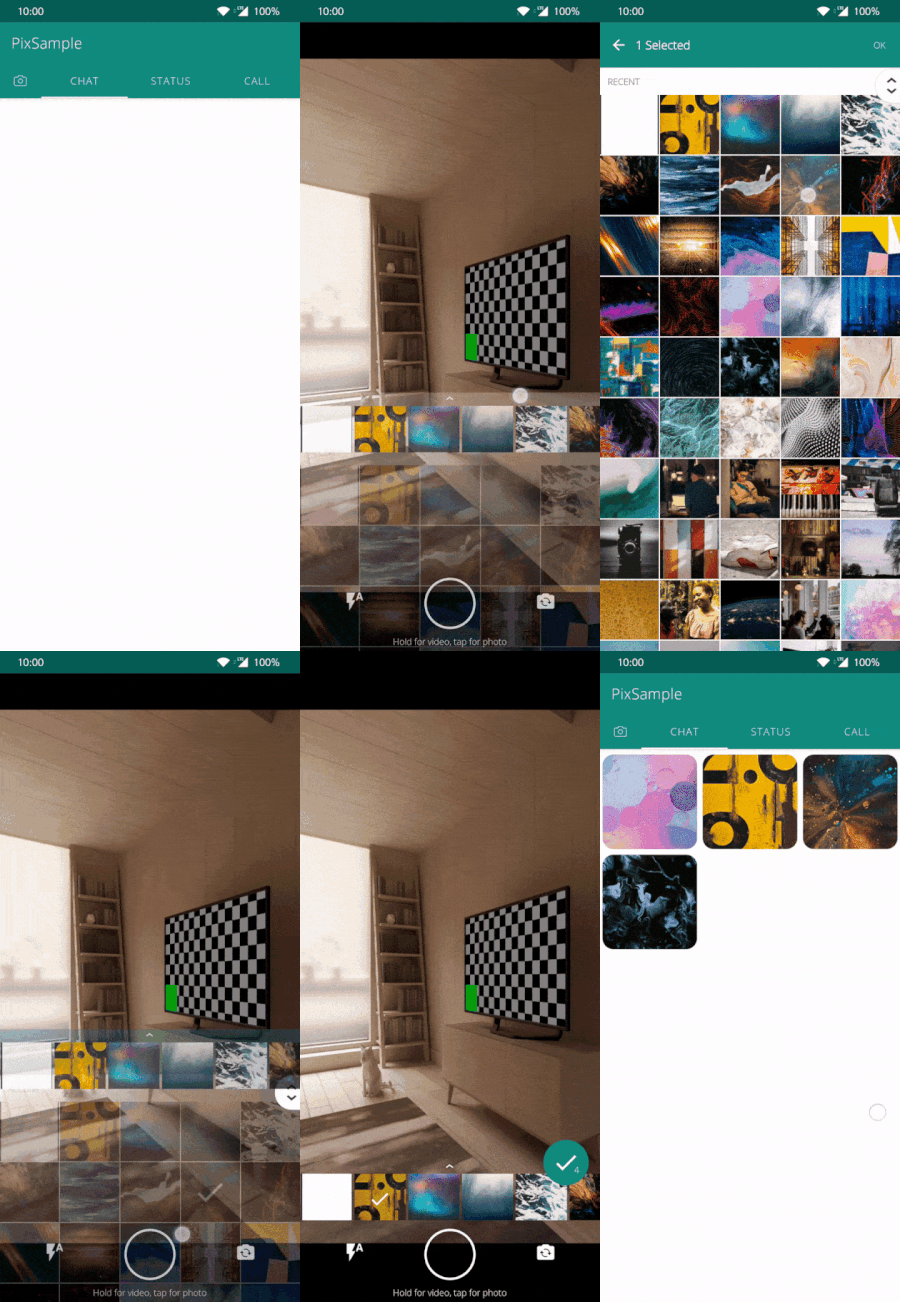
PixImagePicker (Pix) is an Apache-2.0 Kotlin library for Android that reproduces the WhatsApp image and video picker inside an existing app, aimed at Android developers who need a gallery, camera and video-selection flow without building one from scratch.

What it is

Pix, published as PixImagePicker and filed in this registry under Miscellaneous / Photo & Video Editors, is an open-source Android library written in Kotlin. It is described as a WhatsApp image picker replica: the component presents the media grid, camera capture and video recording experience associated with WhatsApp, and it is compatible with API 16 and above. The project has been featured in Android Weekly issue #476, listed in the Google Dev Library and in Android Arsenal, and carries an accompanying Medium write-up plus usage statistics on AppBrain.

The concrete problem it solves is the picker screen itself. Rather than hand-building gallery browsing, multi-select, camera capture and video recording, a developer configures an Options() object and passes it to Pix. That object carries the capture ratio (RATIO_4_3, RATIO_16_9 or RATIO_AUTO), a selection count, the grid spanCount, a custom storage path such as "Pix/Camera", front-facing camera state, a video duration limit, flash behaviour and the media mode. Pix therefore replaces the bespoke picker an Android app would otherwise have to write and maintain.

Key capabilities

  • Media type selection through Mode.All, Mode.Picture or Mode.Video, allowing photo-only, video-only or mixed picking from one integration.
  • Grid and capture configuration via Options(): spanCount sets grid columns, isFrontFacing picks the starting camera, and flash accepts values such as Flash.Auto.
  • Video recording governed by videoDurationLimitInSeconds, shown as 10 seconds in the README example, with a separate VideoOptions block for video settings.
  • Custom capture destination through the path field, illustrated by "Pix/Camera" as the storage directory for captured media.
  • Pre-selected media via preSelectedUrls, which restores an existing selection when the picker opens.
  • Two entry points: addPixToActivity(R.id.container, options) for activity containers and pixFragment(options) for a plain fragment.
  • Results delivered through PixEventCallback with Status.SUCCESS and Status.BACK_PRESSED, either from the fragment constructor callback or application-wide through the PixBus state flow event bus.

Who uses it and how

  • Android product teams that want the WhatsApp-style picking experience in their own app without writing gallery, capture and recording screens.
  • Apps that must support API 16 and above, including older devices, since the library declares that minimum level.
  • Teams using Jetpack Navigation or ViewPager2, for which the README ships NavControllerSample.kt and ViewPager2Sample.kt alongside FragmentSample.kt.
  • Projects where picker results must reach code outside the fragment, using the PixBus.results state flow event bus rather than a constructor callback.
  • Contributors, given the hacktoberfest and hacktoberfest2021 topics alongside android-library, imagepicker, photo-gallery and picker.

Getting started

Pix is integrated directly into an existing Android project in Kotlin: construct an Options() instance and pass it to addPixToActivity(R.id.container, options), or obtain the fragment with pixFragment(options). The README excerpt states no Gradle coordinate, so the reference samples and the homepage at http://ak1.io/PixImagePicker/ are the practical starting points.

How it compares

The facts provided name no comparable picker or gallery library and no paid products that Pix replaces, so a point-by-point contrast is not possible. Within this registry it stands alone as the WhatsApp-style media picker.

When to use it — and when not to

Because Pix is a client-side Android library, there is no server component, database, storage service or SMTP configuration for a team to operate, but adoption does commit the project to a Kotlin and Android codebase. The README excerpt is usage-focused: it documents the Options() configuration and callback flow but gives no dependency coordinate and no release history, so integration begins from the samples and the homepage rather than a published version. It is not the right fit for non-Android or cross-platform applications, nor for teams that require explicit versioned releases before adopting a library.

project readme (upstream, from github) — read inline

Preview image

Pix (WhatsApp Style Image and Video Picker)

Pix is a WhatsApp image picker replica. with this you can integrate a image picker just like WhatsApp.


Android Weekly Google Dev Library Codacy Badge Pix Image Picker xscode

Demo

Usage

set configuration as

    val options = Options().apply{
        ratio = Ratio.RATIO_AUTO                                    //Image/video capture ratio
        count = 1                                                   //Number of images to restrict selection count
        spanCount = 4                                               //Number for columns in grid
        path = "Pix/Camera"                                         //Custom Path For media Storage
        isFrontFacing = false                                       //Front Facing camera on start
        videoDurationLimitInSeconds = 10                            //Duration for video recording
        mode = Mode.All                                             //Option to select only pictures or videos or both
        flash = Flash.Auto                                          //Option to select flash type
        preSelectedUrls = ArrayList<Uri>()                          //Pre selected Image Urls
        videoOptions : VideoOptions                                 //Video configurations
    }

Ratio can be

  RATIO_4_3, RATIO_16_9, RATIO_AUTO

Mode to to select the media type can be as

  All, Picture, Video

Then pass this config to the pix fragment either via

     addPixToActivity(R.id.container, options) {
          when (it.status) {
              PixEventCallback.Status.SUCCESS -> //use results as it.data
              PixEventCallback.Status.BACK_PRESSED -> // back pressed called
          }
      }

or plain fragment can be retrieved via

private val pixFragment = pixFragment(options)

The results can be retrieved via the constructor callback from the fragment

    pixFragment(options){
        when (it.status) {
            PixEventCallback.Status.SUCCESS -> //use results as it.data
            PixEventCallback.Status.BACK_PRESSED -> // back pressed called
        }
    }

Or can be retrieved by anywhere in the Application from the state flow eventbus

    PixBus.results {
        when (it.status) {
             PixEventCallback.Status.SUCCESS ->  //use results as it.data
             PixEventCallback.Status.BACK_PRESSED -> // back pressed called
        }
    }

For detailed usage kindly refer to the below samples

Customise

Theme

include these items in colors.xml with custom color codes

<resources>
    <color name="video_counter_color_pix">#E53935</color>
    <color name="primary_color_pix">#075e54</color>
    <color name="primary_light_color_pix">#80075e54</color>
    <color name="surface_color_pix">#ffffff</color>
    <color name="text_color_pix">#807f7f</color>
</resources>

Thanks to

Backers

Become a backer and help us sustain our activities! 🙏🙏

Download

Download or grab via Gradle:

include in app level build.gradle

repositories {
   mavenCentral()
}
 implementation  'io.ak1.pix:piximagepicker:1.6.8'

or Maven:

<dependency>
  <groupId>io.ak1.pix</groupId>
  <artifactId>piximagepicker</artifactId>
  <version>1.6.8</version>
  <type>pom</type>
</dependency>

or ivy:

<dependency org='io.ak1.pix' name='piximagepicker' rev='1.6.8'>
  <artifact name='pix' ext='pom' ></artifact>
</dependency>
Find docs for old versions in wiki for 1.5.6 and 1.2.5
Also you can find the source for version 1.5.6 here.

Development

Code Quality Tools

This project uses modern code quality tools to maintain high standards:

  • Spotless: Automatic code formatting with ktlint
  • Detekt: Static code analysis for Kotlin best practices
  • Dokka: API documentation generation

Setup

  1. Install the pre-commit hook:

    chmod +x .git/hooks/pre-commit
    
  2. Run code formatting:

    ./gradlew :pix:spotlessApply
    
  3. Run static analysis:

    ./gradlew :pix:detekt
    
  4. Generate documentation:

    ./gradlew :pix:dokkaHtml
    

    View at: pix/build/dokka/html/index.html

Available Tasks

# Spotless
./gradlew :pix:spotlessCheck      # Check formatting
./gradlew :pix:spotlessApply      # Apply formatting

# Detekt
./gradlew :pix:detekt             # Run analysis
./gradlew :pix:detektCreateBaseline # Create baseline for existing violations

# Dokka
./gradlew :pix:dokkaHtml          # Generate HTML docs
./gradlew :pix:dokkaHtmlOpen      # Generate and open docs

# Combined
./gradlew :pix:check              # Run all checks
./gradlew :pix:build              # Full build with checks

Star History

Star History Chart

Contributing

Before submitting a PR:

  1. Ensure code is formatted: ./gradlew :pix:spotlessCheck
  2. Pass static analysis: ./gradlew :pix:detekt
  3. Add documentation to public APIs
  4. Write tests for new features

The pre-commit hook will automatically run these checks on git commit. You can bypass it with git commit --no-verify if needed (not recommended).

WIP for KMP migration.

License

Licensed under the Apache License, Version 2.0, click here for the full license.

Author & support

This project was created by Akshay Sharma.

If you appreciate my work, consider buying me a cup of :coffee: to keep me recharged :metal: by PayPal

I love using my work and I'm available for contract work. Freelancing helps to maintain and keep my open source projects up to date!

[Coroutines]:

Frequently asked questions

Is PixImagePicker free to use?

PixImagePicker is open source under the Apache-2.0 licence. There is no licence fee and no seat count — you can self-host it or, where the project offers one, pay a vendor for a managed version instead.

What does PixImagePicker do?

Pix is a Whatsapp image picker replica. with this, you can integrate an image picker just like WhatsApp.

What is PixImagePicker written in?

PixImagePicker is primarily written in Kotlin. Its source is publicly available at https://github.com/akshay2211/PixImagePicker, and it has 871 GitHub stars.