




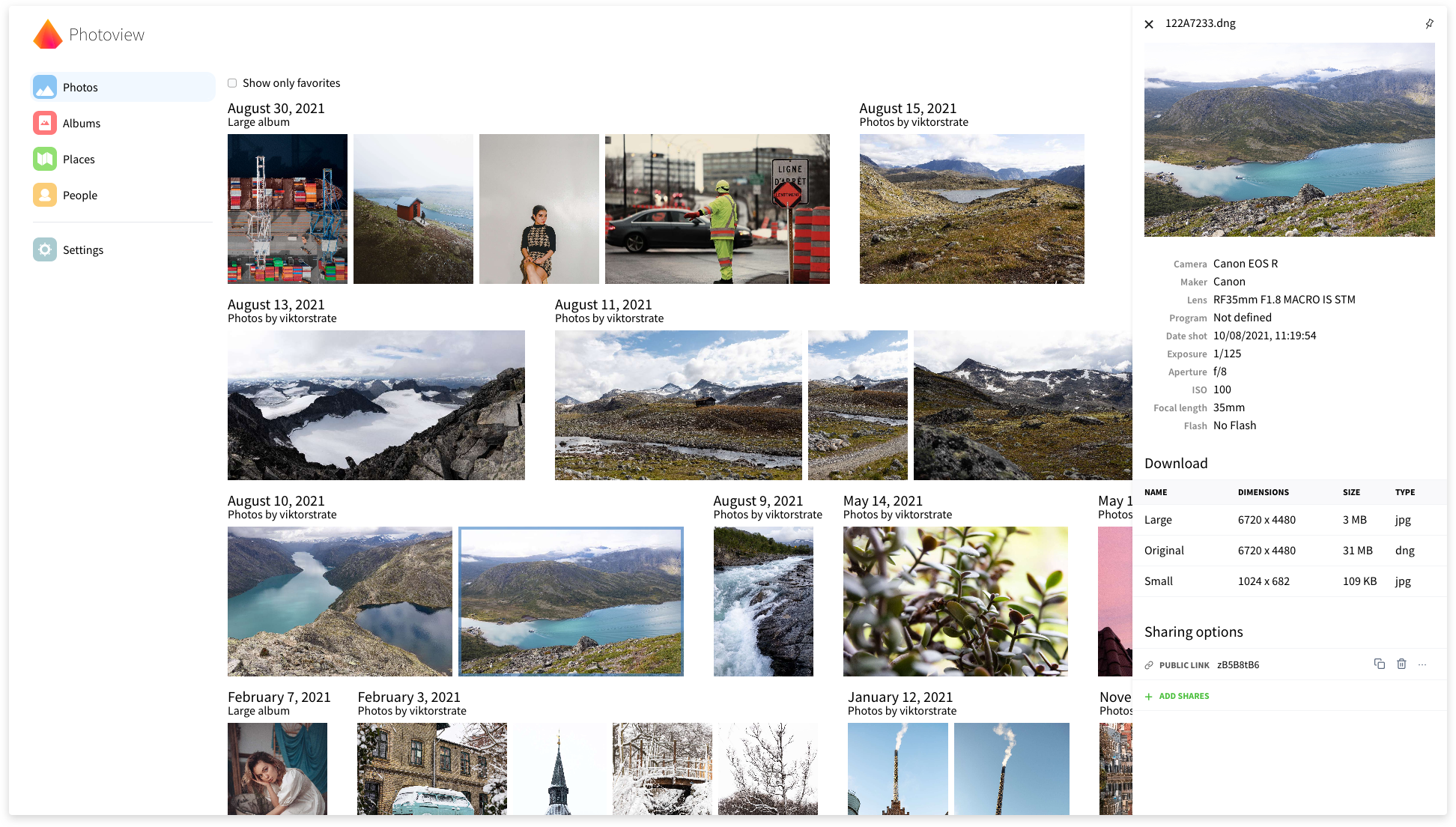
Photoview is a simple and user-friendly photo gallery that's made for photographers and aims to provide an easy and fast way to navigate directories, with thousands of high-resolution photos.
You configure Photoview to look for photos and videos within a directory on your file system. The scanner automatically picks up your media and starts to generate thumbnail images to make browsing super fast.
When your media has been scanned, they show up on the website, organised in the same way as on the filesystem.
If you have questions regarding setup or development, feel free to join the Discord server https://discord.gg/jQ392948u9
ATTENTION to Docker users !!!
We migrated to the new Docker registry , and all new images for the
master tag as well as future releases will be published there instead of the previously used registry. Old images
will still be accessible in the old registry , so if you want to
use one of those older images, revert to the old registry.
Please update your docker-compose.yml file to use the new registry for the photoview image, as shown in the
corresponding example of the compose file:
ATTENTION to PostgreSQL users !!!
We switched to PostgreSQL 18 on the master branch. PostgreSQL 18 will be the default recommended version
for the next release (PostgreSQL 17 remains supported). If you follow master, please check the
official PostgreSQL upgrade guide, and:
- For Docker users: please update your
docker-compose.ymlto match docker-compose.example.yml. - Please pay attention to the DB volume mount point change inside the container: starting from version 18, the DB is mounted to the
/var/lib/postgresql, while in earlier versions it was the/var/lib/postgresql/data. - For direct host installations or external/shared PostgreSQL instances: please upgrade your PostgreSQL server and database manually to version 18 following PostgreSQL guidance.
Don't forget to back up your database before upgrading.
Demo site
Visit https://photos.qpqp.dk/
Username: demo
Password: demo
Contents
- ATTENTION to Docker users !!!
- ATTENTION to PostgreSQL users !!!
Main features
- Closely tied to the file system. The website presents the images found on the local filesystem of the server; directories are mapped to albums.
- User management. Each user is created along with a path on the local filesystem, photos within that path can be accessed by that user.
- Sharing. Albums, as well as individual media, can easily be shared with a public link, the link can optionally be password protected.
- Made for photography. Photoview is built with photographers in mind, and thus supports RAW file formats, and EXIF parsing.
- Video support. Many common video formats are supported. Videos will automatically be optimized for web.
- Face recognition. Faces will automatically be detected in photos, and photos of the same person will be grouped together.
- Performant. Thumbnails are automatically generated and photos first load when they are visible on the screen. In full screen, thumbnails are displayed until the high-resolution image has been fully loaded.
- Secure. All media resources are protected with a cookie-token, all passwords are properly hashed, and the API uses a strict CORS policy.
Supported platforms
- Docker (Docker Engine released within the last year and a major version not older than the previous one).
[!NOTE] We don’t support Portainer or other abstraction layers on top of Docker Compose. If you encounter an issue, please reproduce it on the setup with plain Docker Compose before reporting.
- Debian Linux 12 and 13, Ubuntu Linux LTS and newer short-term releases
- Arch Linux AUR
- NixOS (PR, Nixpkgs, NixOS options)
- Unraid
- EmbassyOS: announcement, repo
- YunoHost
- TrueNAS
We provide limited support for the standard deployment scenarios on the platforms above. The project team has no testing environments for all of them, so assistance is based on user-provided logs and traces. Highly customized setups may further limit our ability to help.
Supported databases
- SQLite: built-in DBMS, no additional service or maintenance required; lowest performance and no scalability.
- MariaDB LTS version: default choice. Runs as an additional service; good balance between performance and maintenance effort.
- PostgreSQL 18 and 17: typically the best performance. Runs as an additional service; requires slightly more maintenance.
We support running Photoview with one of these DBMSs when used as a dedicated instance for Photoview only. If you share a DBMS among multiple services, our support is limited to SQL issues. DB management and connection-related issues are the user’s responsibility due to the variability of shared configurations.
Why yet another self-hosted photo gallery
There exists a lot of open-source self-hosted photo galleries already. Here are some, just to mention a few.
So why another one? I love taking photos, and I store all of them on my local fileserver. This is great because I can organize my photos directly on the filesystem, so it's easy to move them or take backups. I want to be able to control where and how the photos are stored.
The problem is, however, that RAW images are extremely tedious to navigate from a fileserver, even over the local network.
My server holds a lot of old family pictures that I would like my family to have access to as well. And some of the pictures I would like to easily be able to share with other people without the hassle of them having to make an account first.
Thus, I need a solution that can do the following:
- A scan-based approach that automatically organises my photos
- Support RAW and EXIF parsing
- Have support for multiple users and ways to share albums and photos also publicly
- Be straightforward and fast to use
All the photo galleries can do a lot of what I need, but no single one can do it all.
Getting started — Setup with Docker
This section describes how to get Photoview up and running on your server with Docker. Make sure you have Docker and docker-compose installed and running on your server.
makeshould be installed as well if you'd like to use providedMakefile, which is optional (see step 4 for more details).7zzshould be installed in case, you'd like to use it in scope of the backup scenario instead of the default .tar.xz format. Read the comment in theMakefile, located on top of thebackupsection for more details.
Download the content of the
docker-compose examplefolder to the folder on your server, where you expect to host the Photoview internal data (database and cache files).Please note that this folder contains 2 versions of the docker-compose file:
docker-compose.example.yml- the fully-functional and recommended for the most cases configdocker-compose.minimal.example.yml- the minimal and simple config for those, who find the previous one too complex and difficult to understand and manage
When downloading files, you need to choose only one of them.
Rename downloaded files and remove the
examplefrom their names (so, you need to have.env,docker-compose.yml, andMakefilefiles). If you choose thedocker-compose.minimal.example.ymlon previous step, make sure to rename it to thedocker-compose.yml.Open these files in a text editor and read them. Modify where needed according to the documentation comments to properly match your setup. There are comments of 2 types: those, starting with
##, are explanations and examples, which should not be uncommented; those, starting with#, are optional or alternative configuration parts, which might be uncommented in certain circumstances, described in corresponding explanations. It is better to go through the files in the next order:.env,docker-compose.yml, andMakefile.If your
PGSQL_PASSWORDorMARIADB_PASSWORDcontain special characters (e.g.,@), make sure to URL-encode them, e.g.,p@ss→p%40ss.Make sure that your media library's root folder and all the files and subfolders are readable and searchable by other users: run the next command (or corresponding sequence of commands from the
Makefile):make readableIf command(s) return
Permission deniederror, run them under the user owning corresponding files and folders. Alternatively, prefix them withsudo: this switches the execution context torootand typically prompts for your own password (unless configured otherwise). You must havesudoprivileges to do this.If you don't want to give required permissions to
othersgroup for your files, alternatively, you can:- create a group on your host with GID=999 and make all the files and folders inside volumes of the
photoviewservice being owned by this group; then set the appropriate permissions to thegroupsection. - create on your host a group with GID=999 and a user in this group with UID=999; then change the ownership of all the files and folders inside volumes of the
photoviewservice to this user; then set the appropriate permissions to theusersection.
If you configured other mounts with media files from other locations on the host (like HOST_PHOTOVIEW_MEDIA_FAMILY or anything else), you need to run the same commands, as in the
Makefilereadabletarget, for each media root folder on your host manually: copy each command to your shell and replace the variable with the absolute path to an additional media root folder without the trailing/. Run both commands for each additional root folder.- create a group on your host with GID=999 and make all the files and folders inside volumes of the
In case, you don't have
makeinstalled in your system or don't want to use it for the Photoview management activities, you could use the same commands from theMakefileand run them in your shell directly, or create your own scripts. Make sure to apply or replace the variables from your.envfirst in this case.Makefileis provided just for your convenience and simplicity, but is optional.Start the server by running the following command (or corresponding sequence of commands from the
Makefile):make all
If you haven’t changed the endpoint or port in docker-compose.yml file, Photoview is available now at http://localhost:8000
Initial Setup
If everything is set up correctly, you should be presented with an initial setup wizard when accessing the website the first time.
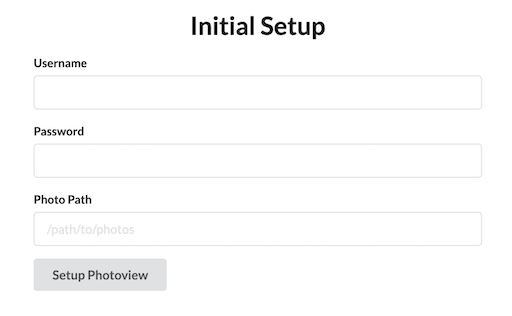
Enter a new username and password.
For the photo path, enter the path inside the docker container where your photos are located.
This can be set from the docker-compose.yml file under photoview -> volumes.
The default location is /photos.
A new admin user will be created, with access to the photos located at the path provided under the initial setup.
The photos will have to be scanned before they show up, you can start a scan manually, by navigating to Settings and clicking on Scan All
Advanced setup
We suggest securing the Photoview instance before exposing it outside your local network: even while it provides read-only access to your media gallery and has basic user authentication functionality, it is not enough to protect your private media from malicious actors on the Internet.
Possible ways of securing a self-hosted service might be (but not limited to):
- Configure a Firewall on your local network's gateway and allow only the intended type of incoming traffic to pass.
- Use VPN to provide external access to local services.
- Setting up a Reverse proxy in front of the service and forwarding all the traffic through it, exposing HTTPS port with strong certificate and cipher suites to the Internet. This could be one of the next products or something else that you prefer:
- Configure an external Multi-Factor Authentication service to manage authentication for your service (part of Cloudflare services, but you can choose anything else).
- Configure Web Application Firewall to protect from common web exploits like SQL injection, cross-site scripting, and cross-site forgery requests (part of Cloudflare services, but you can choose anything else).
- Use Content Delivery Network as an additional level of DDoS prevention: it can securely cache your media and let it be accessible from a wide list of servers on the Internet (part of Cloudflare services, but you can choose anything else).
- Configure a Rate Limit of allowed number of requests from a user during specified time range to protect against DDoS attacks.
- Set up an Intrusion Detection/Prevention System to monitor network traffic for suspicious activity and issue alerts when such activity is discovered.
Setting up and configuring of all these protections depends on and requires a lot of info about your local network and self-hosted services. Based on this info, the configuration flow and resulting services architecture might differ a lot between cases. That is why in the scope of this project, we can only provide you with this high-level list of possible ways of webservice protection. You'll need to investigate them, find the best combination and configuration for your case, and take responsibility to configure everything in the correct and consistent way. We cannot provide you support for such highly secured setups, as a lot of things might work differently because of security limitations.
Hardware Acceleration
You can run FFmpeg with hardware-acceleration–capable codecs by defining PHOTOVIEW_VIDEO_HARDWARE_ACCELERATION in your
.env file. Supported values: qsv, vaapi, nvenc.
We've verified the hardware acceleration with qsv on an Intel chip only. To enable it, map your /dev/dri devices from
the host into the photoview service and set the PHOTOVIEW_VIDEO_HARDWARE_ACCELERATION=qsv in your .env file.
See docker-compose.example.yml.
- For
vaapienvironment variable value, map/dev/drifrom the host into thephotoviewservice. - For
nvenc, install and enable the NVIDIA Container Toolkit on the host, map all NVIDIA devices from the host into thephotoviewservice, and run with the NVIDIA runtime.
If you confirm other acceleration backends, please let us know.
Contributing
🎉 First off, thanks for your interest in contribution! 🎉
This project is a result of hard work, and it's great to see you interested in contributing. Contributions are not just about code — you can help in many ways!
Before you start, please take a moment to read our Contributing guide. It includes information on our code of conduct, the process for submitting pull requests, and more.
Remember, every contribution counts. Let's make this project better together! 💪
Set up Docker development environment
Docker development environment is easy to set up. It only requires Docker and Docker Compose Plugin locally. All dependencies are installed in a container but not in the host.
It also has some shortcomings. In macOS, Docker is running in a Linux VM. The fs notification doesn't work well in this case. You can't use reflex or nodemon to relaunch servers when code changes. The compiler runs pretty slow too.
We recommend to use Docker development environment. If Docker environment doesn't work well, like on macOS, please use local development environment.
Start API and UI server with Docker Compose
It may take a long time to build dependencies when launching servers first time.
$ docker compose -f dev-compose.yaml build # Build images for development
$ docker compose -f dev-compose.yaml up # Launch API and UI servers
The graphql playground can now be accessed at localhost:4001. The site can now be accessed at localhost:1234. Both servers will be relaunched after the code is changed.
By default, it uses sqlite3 as database. To run servers with other database, please update PHOTOVIEW_DATABASE_DRIVER value in dev-compose.yaml file and run:
$ docker compose -f dev-compose.yaml --profile mysql up # Run with mysql database
or
$ docker compose -f dev-compose.yaml --profile postgres up # Run with postgresql database
Start API server with Docker
If you don't want to depend on Docker Compose but only Docker, you can launch server as below.
It may take a long time to build dependencies when launching servers first time.
$ docker build --target api -t photoview/api . # Build image for development
$ docker run --rm -it -v `pwd`:/app --network host --env-file api/example.env photoview/api \
    reflex -g '*.go' -s -- go run . # Monitor source code and (re)launch API server
The graphql playground can now be accessed at localhost:4001.
[!NOTE] The server runs on the host network as
--network hostflag. It's easy to communicate between API server and UI server. If you don't want to do that, please check Docker Network to create a new network to run servers.
Start UI server with Docker
It may take a long time to build dependencies when launching servers first time.
$ docker build --target ui -t photoview/ui . # Build image for development
$ docker run --rm -it -v `pwd`:/app --network host --env-file ui/example.env photoview/ui \
    npm install # Install dependencies
$ docker run --rm -it -v `pwd`:/app --network host --env-file ui/example.env photoview/ui \
    npm run mon # Monitor source code and (re)launch UI server
The site can now be accessed at localhost:1234.
[!NOTE] The server runs on the host network as
--network hostflag. It's easy to communicate between API server and UI server. If you don't want to do that, please check Docker Network to create a new network to run servers.
Set up local development environment
In Linux, we recommend to use Docker Compose or Docker as a local development environment.
We can't keep verifying below commands on each environment. People may need to solve dependencies by their own.
Install dependencies
- API
- Required packages:
golang>= 1.22g++libheif>= 1.15.1- go-face Requirements
dliblibjpeglibblasliblapack
libmagiclibmagickwand
- Optional tools during developing:
reflex: a source code monitoring tool, which automatically rebuilds and restarts the server, running from the code in development.sqlite: the SQLite DBMS, useful to interact with Photoview's SQLite DB directly if you use it in your development environment.
- Required packages:
- UI
- Required packages:
node= 18
- Required packages:
In Debian/Ubuntu, install dependencies:
$ sudo apt update # Update the package list
$ sudo apt install golang g++ libheif-dev libdlib-dev libjpeg-dev libblas-dev liblapack-dev libmagic-dev libmagickwand-dev # For API requirement
$ sudo apt install reflex sqlite3 # For API optional tools
In macOS, install dependencies:
$ brew update # Update the package list
$ brew install golang gcc pkg-config libheif dlib jpeg libmagic imagemagick # For API
$ brew install reflex sqlite3 # For API optional tools
Please follow the package manager guidance if you don't use apt or homebrew.
For node, recommend to use nvm. Follow Installing and Updating to install nvm locally, then:
$ nvm install 18
$ nvm use 18
You can install node with other package manager if you like.
Local setup
Rename
/api/example.envto.env- Update
PHOTOVIEW_SQLITE_PATHif you don't want to put sqlite file under/api - To set a different DBMS driver
- Comment the SQLite path variable
- Update
PHOTOVIEW_DATABASE_DRIVERwith your driver - Uncomment the corresponding connection string variable for the new driver
If your
PGSQL_PASSWORDorMARIADB_PASSWORDcontain special characters (e.g.,@), make sure to URL-encode them, e.g.,p@ss→p%40ss.
- Optional: modify other variables if needed according to the inline comments
- Update
Rename
/ui/example.envto.env
Start API server
Then run the following commands:
# Optional: Set the compiler environment in Debian/Ubuntu
$ source ./scripts/set_compiler_env.sh

# Set the compiler environment with `homebrew`
$ export CPLUS_INCLUDE_PATH="$(brew --prefix)/opt/jpeg/include:$(brew --prefix)/opt/dlib/include:${CPLUS_INCLUDE_PATH:-}"
$ export C_INCLUDE_PATH="$(brew --prefix)/opt/libmagic/include:$(brew --prefix)/opt/libheif/include:${C_INCLUDE_PATH:-}"
$ export DYLD_LIBRARY_PATH="$(brew --prefix)/opt/jpeg/lib:$(brew --prefix)/opt/dlib/lib:$(brew --prefix)/opt/libmagic/lib:$(brew --prefix)/opt/libheif/lib:${DYLD_LIBRARY_PATH:-}"
$ export LIBRARY_PATH="$(brew --prefix)/opt/jpeg/lib:$(brew --prefix)/opt/dlib/lib:$(brew --prefix)/opt/libmagic/lib:$(brew --prefix)/opt/libheif/lib:${LIBRARY_PATH:-}"
$ export CGO_CFLAGS_ALLOW=-Xpreprocessor

$ cd ./api
$ go mod download

# Update go-face dependencies
$ sed -i 's/-lcblas//g' $(go env GOMODCACHE)/github.com/\!kagami/go-face*/face.go # Linux
# Or
$ sed -i '' 's/-lcblas//g' $(go env GOMODCACHE)/github.com/\!kagami/go-face*/face.go # macOS

# Start API server
$ go run .
If you want to recompile the server automatically when code changes:
# Start API server
$ cd ./api
$ reflex -g '*.go' -s -- go run .
The graphql playground can now be accessed at localhost:4001.
Start UI server
In a new terminal window run the following commands:
$ cd ./ui
$ npm install
$ npm start
If you want to recompile the server automatically when code changes:
$ cd ./ui
$ npm run mon
The site can now be accessed at localhost:1234.