
pasteguard is a free, open source browsers & extensions project written in TypeScript and released under Apache-2.0. It has 805 GitHub stars, 44 forks and 4 open issues, and was last pushed 20 days ago. On this registry it ranks #130 of 150 tracked projects in Browsers & Extensions, with 5 head-to-head comparisons available. It gained 47 stars over the last 30 tracked days.

What is pasteguard?

PasteGuard is a local-first privacy proxy that masks personally identifiable information and secrets before prompts reach ChatGPT, Claude, Gemini, OpenAI, Anthropic, Codex, or Claude Code, built for teams that cannot send raw client data, customer records, logs, credentials, or production details directly to model providers.

What it is

PasteGuard is a TypeScript privacy layer, licensed under Apache-2.0 and published as an open-source project in the Productivity & Utilities / Browsers & Extensions category. It sits between the user or application and the AI provider, acting as a control point in front of models rather than inside them. It works across three surfaces: browser chat with ChatGPT, Claude, and Gemini through an experimental browser extension; applications, SDKs, and internal AI products through a drop-in base URL change; and coding agents such as Codex, Claude Code, Cursor, Windsurf, and Copilot.

The problem it solves is concrete. Teams that cannot send sensitive data to providers currently choose between refusing cloud AI for sensitive work, redacting client or production data manually, switching to a local model even when a cloud provider would give better results, or building one-off masking code inside every application. PasteGuard replaces all four of those workarounds with a single proxy that masks PII and secrets in the request, forwards the cleaned request upstream, and restores supported placeholders in the response. The user keeps the originals; the provider sees placeholders.

Key capabilities

  • Mask Mode replaces PII and secrets with placeholders before the request reaches the upstream AI provider, and restores supported placeholders before responses return to the user.
  • Route Mode sends requests containing sensitive data to a local LLM such as Ollama, vLLM, or llama.cpp, while requests without sensitive data can still go to the configured cloud provider.
  • Personal data detection covers names, locations, emails, phone numbers, credit cards, IBANs, IP addresses, and EU VAT numbers, and is multilingual.
  • Secret detection covers API keys for providers such as OpenAI, Anthropic, Stripe, AWS, and GitHub, plus SSH and PEM private keys, JWT tokens, bearer tokens, passwords, and connection strings.
  • Proxy endpoints mirror provider URLs: http://localhost:3000/openai/v1 in place of https://api.openai.com/v1, http://localhost:3000/anthropic in place of https://api.anthropic.com, and http://localhost:3000/codex in place of https://chatgpt.com/backend-api/codex.
  • Detection and masking run in real time, including streaming responses.
  • The dashboard at localhost:3000 logs every request with masking details, showing what was detected, what was masked, and what reached the provider.

Who uses it and how

  • Teams operating under strict privacy rules that cannot send raw client data, customer records, logs, credentials, or production details directly to model providers.
  • Browser chat users who paste customer notes, contracts, support tickets, candidate details, or internal context into ChatGPT, Claude, or Gemini, seeing the originals while the AI sees placeholders.
  • Applications, SDKs, and internal AI products that change one base URL, for example pointing the OpenAI Python client base_url to http://localhost:3000/openai/v1 so both client.chat.completions.create and client.responses.create pass through the privacy pipeline.
  • Coding agents such as Codex, Claude Code, Cursor, Windsurf, and Copilot, where agent prompts include logs, stack traces, tickets, config files, test fixtures, and codebase context that must be masked before leaving the machine.
  • Self-hosters running PasteGuard inside their own infrastructure, either as a local proxy or with Docker Compose and persistent logs.

Getting started

Run the container with docker run --rm -p 3000:3000 ghcr.io/sgasser/pasteguard:latest, then open localhost:3000 for the dashboard. Custom configuration, persistent logs, Docker Compose, and custom GLiNER models are covered in the installation and configuration documentation.

How it compares

The facts name no competing privacy proxy or paid product that PasteGuard directly replaces, so it stands alone in this registry on that axis. Its nearest named neighbours are the local LLM runtimes it routes to in Route Mode, Ollama, vLLM, and llama.cpp, which handle sensitive requests locally rather than masking them for a cloud provider. PasteGuard's distinction is that it keeps cloud providers usable for non-sensitive traffic instead of forcing a full switch to local inference.

When to use it — and when not to

A self-hoster must run and operate a Docker container, and optionally a Docker Compose deployment with persistent logs, in front of every AI provider they use. The browser extension for ChatGPT, Claude, and Gemini is explicitly experimental, so browser chat coverage should not be treated as production-grade. PasteGuard can support regulated workflows, but it does not replace a legal, security, or compliance program, and it is the wrong choice for anyone expecting it to serve as that program rather than as one control point within it.

project readme (upstream, from github) — read inline

CI License Release

AI gets the context. Not your private data.
PasteGuard masks PII and secrets before they reach ChatGPT, Claude, Gemini, your API provider, Codex, or Claude Code.

Browser Chat · Apps & APIs · Coding Agents · Documentation
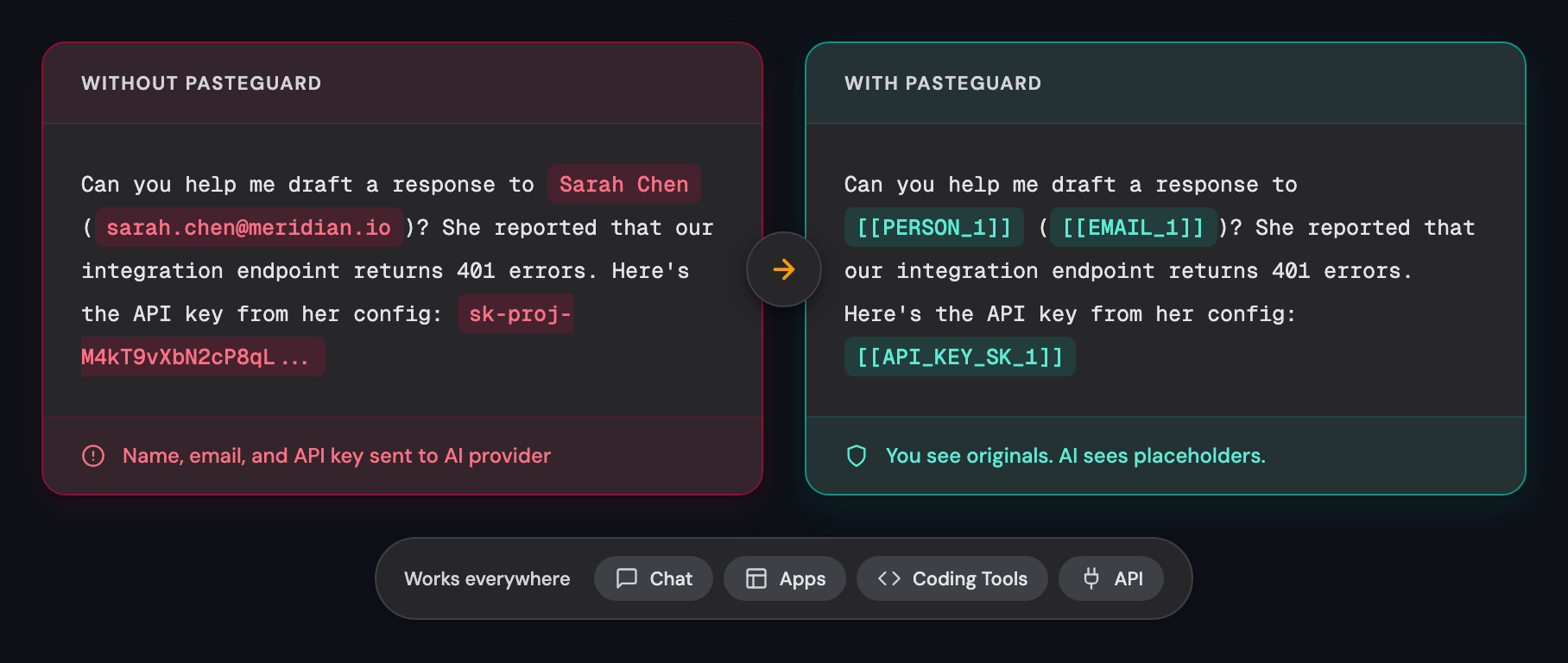

You keep the originals. Providers see placeholders.
Run it locally or self-host it in your own infrastructure.

What PasteGuard Protects

PasteGuard is a local-first privacy layer for teams that cannot send raw client data, customer records, logs, credentials, or production details directly to model providers.

It works in three places:

Browser Chat

ChatGPT, Claude, and Gemini. Paste customer notes, contracts, support tickets, candidate details, or internal context without sending the raw private values to the chat provider. You see the originals; the AI sees placeholders.

The experimental browser extension is available for ChatGPT, Claude, and Gemini.

Install the extension → · Chat docs →

Apps & APIs

Apps, SDKs, and internal AI products. Point your application to PasteGuard instead of the provider directly.

Change one base URL. PasteGuard masks the request, forwards it to the configured provider, and restores supported placeholders in the response.

Apps & APIs docs

Coding Agents

Codex, Claude Code, Cursor, Windsurf, Copilot, and other coding agents. Agent prompts often include logs, stack traces, tickets, config files, test fixtures, and codebase context. PasteGuard masks secrets and PII before that context leaves your machine.

Coding Agents docs

Built For Strict Privacy Rules

PasteGuard is a privacy control point before AI providers. It can support regulated workflows, but it does not replace your legal, security, or compliance program.

Use it when your current options are:

  • Do not use cloud AI for sensitive work
  • Redact client or production data manually
  • Switch to a local model even when a cloud provider would give better results
  • Build one-off masking code inside every app

Quick Start

Run PasteGuard as a local proxy:

docker run --rm -p 3000:3000 ghcr.io/sgasser/pasteguard:latest

Open localhost:3000 for the dashboard.

Point your app or agent to PasteGuard instead of the provider:

Target PasteGuard URL Original URL
OpenAI http://localhost:3000/openai/v1 https://api.openai.com/v1
Anthropic http://localhost:3000/anthropic https://api.anthropic.com
Codex CLI http://localhost:3000/codex https://chatgpt.com/backend-api/codex
from openai import OpenAI

client = OpenAI(base_url="http://localhost:3000/openai/v1")

Both client.chat.completions.create(...) and client.responses.create(...) pass through PasteGuard's privacy pipeline.

For custom config, persistent logs, Docker Compose, or custom GLiNER models: Read the docs.

Privacy Modes

Mask Mode

Mask Mode replaces PII and secrets with placeholders before sending the request to the upstream AI provider. Supported responses are restored before they return to the user.

Route Mode

Route Mode sends requests containing sensitive data to a local LLM such as Ollama, vLLM, or llama.cpp. Requests without sensitive data can still go to the configured cloud provider.

Route Mode docs

What It Catches

Personal data: Names, locations, emails, phone numbers, credit cards, IBANs, IP addresses, and EU VAT numbers. Detection is multilingual.

Secrets: API keys for providers such as OpenAI, Anthropic, Stripe, AWS, and GitHub; SSH and PEM private keys; JWT tokens; bearer tokens; passwords; and connection strings.

Both are detected and masked in real time, including streaming responses.

Dashboard

Every request is logged with masking details. See what was detected, what was masked, and what reached the provider.

localhost:3000

How Detection Works

The detector combines checksums and format checks for structured values with a semantic backend for names and places. GLiNER is currently the only backend. See Semantic Backends.

Tech Stack

Bun · Hono · GLiNER + python-stdnum (detector/) · SQLite or Postgres

Contributing

See CONTRIBUTING.md for guidelines on how to contribute.

License

Apache 2.0

Frequently asked questions

Is pasteguard free to use?

pasteguard is open source under the Apache-2.0 licence. There is no licence fee and no seat count — you can self-host it or, where the project offers one, pay a vendor for a managed version instead.

What does pasteguard do?

AI gets the context. Not your private data. Local-first privacy proxy for browser chat, AI APIs, and coding agents.

What is pasteguard written in?

pasteguard is primarily written in TypeScript. Its source is publicly available at https://github.com/sgasser/pasteguard, and it has 805 GitHub stars.