

libredesk is a free, open source customer support & success project written in Go and released under AGPL-3.0. It has 2,940 GitHub stars, 277 forks and 87 open issues, and was last pushed 3 hours ago. On this registry it ranks #7 of 17 tracked projects in Customer Support & Success, with 5 head-to-head comparisons available. It gained 15 stars over the last 3 tracked days.

What is libredesk?

What it is

Libredesk is an open-source, self-hosted customer support desk written in Go under AGPL-3.0. It is a lightweight alternative to Intercom, Zendesk, and Chatwoot, and it puts live chat, email, and support workflows into a single binary. It lives in the open-source Go customer-support ecosystem.

It solves the problem of scattered support channels by giving teams one omnichannel inbox for live chat and email. It also lets teams embed a chat widget, publish a knowledge base, automate routing, and track agent work in one self-managed deployment.

Key capabilities

  • The omnichannel inbox brings live chat and email into one queue, so every conversation lands in the same place regardless of the channel it came from.
  • The live chat widget can be embedded on a website, and replies go out from the same support inbox.
  • The help center publishes a searchable knowledge base with collections, articles in multiple languages, and customization for the site.
  • The AI assistant answers live chat from the knowledge base and hands off to a human, while the agent copilot drafts replies, summarizes conversations, and looks up answers.
  • Automations, macros, auto assignment, tags, custom statuses, snoozing, SLA management, granular permissions, SSO, activity logs, HTTP/JSON APIs, webhooks, CSAT surveys, analytics, custom attributes, and the CTRL+K command bar give teams routing, access control, auditing, and workflow tools.

Who uses it and how

  • Support teams use the single inbox to handle live chat and email together, so conversations from both channels are worked in one place.
  • Website teams embed the chat widget, and knowledge writers publish help center articles and collections.
  • Administrators configure automations, macros, permissions, SSO, SLA targets, activity logs, and analytics to organize queues, control access, and track response times, resolution rates, and agent activity.

Getting started

Typical installation methods are a Railway one-click deploy that provisions the app, Postgres, and Redis; Docker with the libredesk/libredesk:latest image and a compose file; or a downloaded binary configured through config.toml. For the binary path, the README says to run ./libredesk --install to set up the Postgres database, set the System user password with ./libredesk --set-system-user-password, and open http://localhost:9000.

When to use it — and when not to

Libredesk is useful when a team wants a Go-based, self-hosted support desk that combines live chat, email, a help center, and automation in one binary as an alternative to Intercom, Zendesk, and Chatwoot. It is less suitable when the team does not want to operate the application and its Postgres database, because the Railway path also provisions Redis and the binary path requires ./libredesk --install to set up Postgres. The AGPL-3.0 license, the two-year repository history, and the 87 open issues are facts that a team should review before choosing it over the listed alternatives.

project readme (upstream, from github) — read inline

Zerodha Tech Badge


LibreDesk


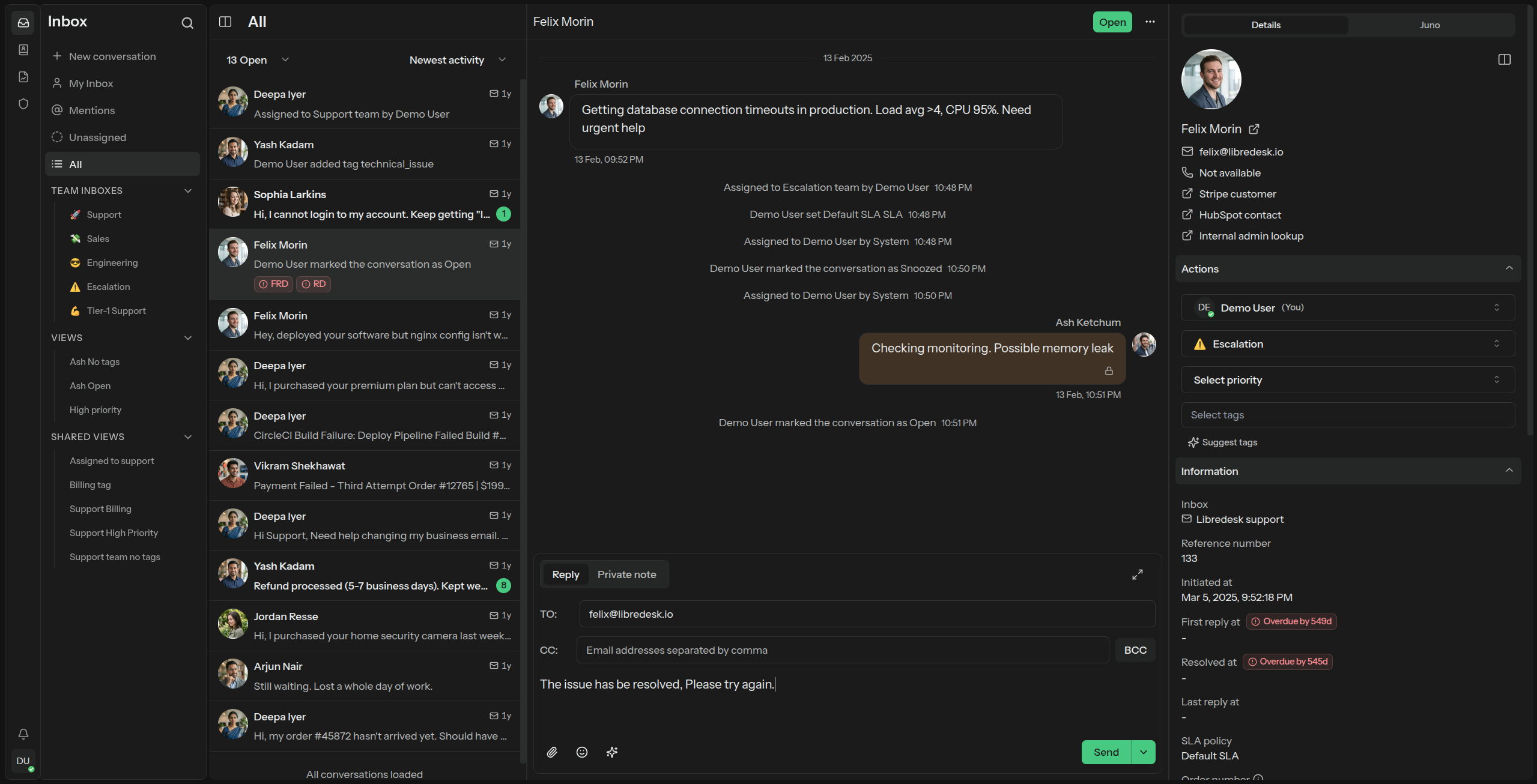
Modern, open source, self-hosted omnichannel customer support desk. Live chat, email, and more in a single binary.
image

Visit libredesk.io for more info. Check out the live demo.

Features

  • Omnichannel inbox
    Live chat and email in one inbox. Every conversation lands in the same place, whichever channel it came from.
  • Live chat widget
    Embed a real-time chat widget on your website. Replies go out from the same inbox your team already works in.
  • Help center
    Publish a searchable knowledge base with collections, articles in multiple languages, and customize it however you want.
  • AI assistant
    Answer live chat conversations automatically with an AI assistant grounded in your knowledge base. Hands off to a human when it can't help.
  • Agent copilot
    Draft replies, summarize conversations, and look up answers from the knowledge base without leaving the inbox.
  • Automations
    Rules that run on conversation events. Tag, assign, and route conversations based on conditions you define.
  • Granular permissions
    Role-based access control. Create custom roles with per-action permissions for teams and individual agents.
  • CSAT & analytics
    Send CSAT surveys automatically after a conversation closes. Track response times, resolution rates, and agent activity.
  • Custom attributes
    Create custom attributes for contacts or conversations such as the subscription plan or the date of their first purchase.
  • Macros
    Save replies you send often. One macro can send the message, set tags, and assign the conversation to a team.
  • Organization
    Tags, custom statuses, and snoozing to keep the inbox in order. Search covers every conversation.
  • Auto assignment
    Assign incoming conversations automatically, based on agent capacity or on criteria you define.
  • SLA management
    Set and track response time targets. Get notified when conversations are at risk of breaching SLA commitments.
  • SSO logins
    Google, Microsoft, and any OIDC provider are supported out of the box.
  • API
    HTTP/JSON APIs and webhooks for custom integrations and workflows.
  • Activity logs
    Track all actions performed by agents and admins, for auditing and accountability.
  • Command bar
    Opens with a simple shortcut (CTRL+K) and lets you quickly perform actions on conversations.

And more — checkout libredesk.io or try the live demo.

Installation

Railway (1-click deploy)

The fastest way to get a libredesk instance running. Railway provisions the app, Postgres, and Redis for you.

Deploy on Railway


Docker

The latest image is available on DockerHub at libredesk/libredesk:latest

# Download the compose file and sample config file in the current directory.
curl -LO https://github.com/abhinavxd/libredesk/raw/main/docker-compose.yml
curl -LO https://github.com/abhinavxd/libredesk/raw/main/config.sample.toml

# Copy the config.sample.toml to config.toml and edit it as needed.
cp config.sample.toml config.toml

# Run the services in the background.
docker compose up -d

# Setting System user password.
docker exec -it libredesk_app ./libredesk --set-system-user-password

Go to http://localhost:9000 and login with username System and the password you set using the --set-system-user-password command.

See installation docs


Binary

  • Download the latest release and extract the libredesk binary.
  • Edit config.toml as needed.
  • ./libredesk --install to setup the Postgres DB.
  • Run ./libredesk --set-system-user-password to set the password for the System user.
  • Run ./libredesk and visit http://localhost:9000 and login with email System and the password you set using the --set-system-user-password command.

See installation docs


Developers

The backend is written in Go and the frontend is Vue.js 3 with Shadcn UI.

Translators

You can help translate libredesk into your language on Crowdin.

Frequently asked questions

Is libredesk free to use?

libredesk is open source under the AGPL-3.0 licence. There is no licence fee and no seat count — you can self-host it or, where the project offers one, pay a vendor for a managed version instead.

What does libredesk do?

Open-source, self-hosted customer support desk in a single binary. A lightweight alternative to Intercom, Zendesk, Chatwoot.

What is libredesk written in?

libredesk is primarily written in Go. Its source is publicly available at https://github.com/abhinavxd/libredesk, and it has 2,940 GitHub stars.