
lazyskills is a free, open source automation project written in Go and released under MIT. It has 581 GitHub stars, 78 forks and 8 open issues, and was last pushed 24 days ago. On this registry it ranks #55 of 65 tracked projects in Automation, with 5 head-to-head comparisons available.

What is lazyskills?

LazySkills is a fast terminal user interface, written in Go and released under the MIT licence, that gives developers a single place to inspect, repair and manage the agent skills installed for coding agents such as Claude Code, OpenCode, Codex, Cursor and Gemini CLI.

What it is

LazySkills is a command-line application that puts a full-screen terminal UI over the skills installed on a machine or in a project. It collects project, global, universal and agent-specific skills into one view grouped by source, so a developer can see what came from the same repository, local folder or custom install, switch between agents to check which skills each one can actually use, and inspect metadata and rendered skill content before acting.

The problem it solves is what a skills installation looks like once it drifts. A skill can be present but unusable because its SKILL.md is missing, its frontmatter is invalid, its symlink is broken, its lock entry has vanished, or an agent-specific copy has become a ghost. Instead of debugging those conditions by hand across directories and lock files, LazySkills highlights them and points at the safe next command. It lives in the ecosystem of agent skills consumed by coding agents, and it replaces manual filesystem inspection and hand-maintained lock bookkeeping.

Key capabilities

  • Shows project, global, universal and agent-specific skills together in one TUI, grouped by source.
  • Switches agent context to report which skills are usable by Claude Code, OpenCode, Codex, Cursor, Gemini CLI and others.
  • Flags broken installs: missing SKILL.md, invalid frontmatter, broken symlinks, missing lock entries and ghost agent skills.
  • Previews actions before running them, showing skill metadata, rendered content and the exact command about to execute.
  • Performs open, reinstall or update, remove, orphaned-lock pruning and bulk update or removal, with confirmation prompts for destructive operations.
  • Scans local checkouts or GitHub skill sources for skills not yet installed, and searches skills.sh from inside the TUI to install at project or global scope.
  • Provides headless commands: lazyskills doctor for a read-only health report with --json and --cwd, lazyskills restore to recover locked skills missing from disk, and lazyskills find --json "browser automation" for registry search without the TUI.

Who uses it and how

  • Developers running several coding agents at once who need to confirm that a skill installed once is visible to each agent that should see it.
  • Teams whose skills arrive from multiple sources — repositories, local folders, custom installs — and who need to catch broken symlinks and missing lock entries after moving a workspace.
  • Script and CI authors who call lazyskills doctor --json --cwd /path/to/project for structured health output; the doctor command never changes skills or lock files.
  • Anyone rebuilding a workspace from lock files with lazyskills restore when a locked skill is absent from disk.
  • Skill hunters who browse skills.sh through the n key or through lazyskills find --json, previewing the install command before committing.

Getting started

Install with curl -fsSL https://lazyskills.sh/install | sh on macOS or Linux, brew install --cask alvinunreal/tap/lazyskills, the PowerShell script on Windows, or go install github.com/alvinunreal/lazyskills/cmd/lazyskills@latest, then run lazyskills from inside a project.

How it compares

No alternative or competing tool is named in the facts provided, so LazySkills stands alone in this registry. It does not replace the agents it serves: Claude Code, OpenCode, Codex, Cursor and Gemini CLI remain the consumers of the skills, while LazySkills sits beside them as the inspection and maintenance layer.

When to use it — and when not to

There is no server, database or SMTP configuration to operate: LazySkills is a local binary that reads and writes skill directories and lock files in the workspace, so the real operational surface is the skills themselves and the locks that record them. It suits developers comfortable in a keyboard-driven terminal, and anyone who needs a graphical dashboard or a hosted service should look elsewhere. The README excerpt also cuts off mid-sentence in its description of restore, so the documentation on recovering from lock files is only partially available and should be checked against the project's own repository.

project readme (upstream, from github) — read inline

Lazy Skills

Blazing-fast mission control for agent skills.

CI Go Report Card Release Go License Stars

"I don't debug broken skills by hand - I have a TUI to be disappointed for me."

🌴 Overview

LazySkills is a blazing-fast terminal UI for managing agent skills. It gives you one place to see what is installed, which agents can use each skill, why visibility may be broken, and what actions are safe to run next.
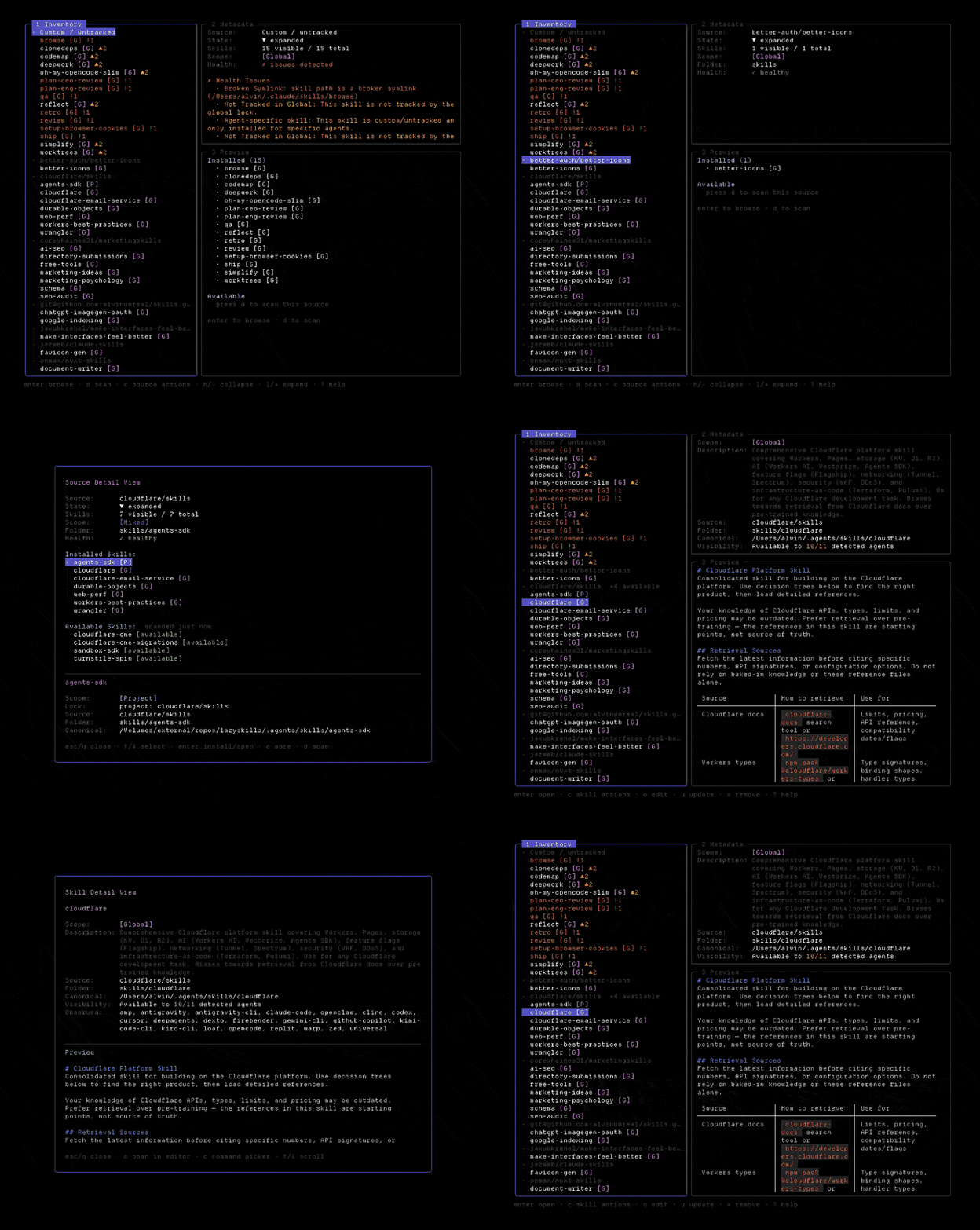
✨ Features

  • See every skill in one place - project, global, universal, and agent-specific skills in a single TUI.
  • Check agent visibility - switch agents and see which skills are actually usable by Claude Code, OpenCode, Codex, Cursor, Gemini CLI, and many more.
  • Spot broken installs fast - highlights missing SKILL.md, invalid frontmatter, broken symlinks, missing lock entries, and ghost agent skills.
  • Preview before you act - inspect metadata, rendered skill content, and the exact command LazySkills is about to run.
  • Safe skill actions - open, reinstall/update, remove, prune orphaned locks, or run bulk updates/removals with confirmation prompts.
  • Discover more from a source - scan local checkouts or GitHub skill sources to find skills you have not installed yet.
  • Find and install new skills - search skills.sh from inside LazySkills, preview the install command, then install to project or global scope with confirmation.

🛠️ Install

Recommended for macOS and Linux:

curl -fsSL https://lazyskills.sh/install | sh

Or use Homebrew:

brew install --cask alvinunreal/tap/lazyskills

Windows:

irm https://lazyskills.sh/install.ps1 | iex

Go users:

go install github.com/alvinunreal/lazyskills/cmd/lazyskills@latest

Then launch it:

lazyskills

🚀 Getting started

Run LazySkills from a project:

lazyskills

Start with the left pane. It groups skills by source, so you can quickly see what came from the same repo, local folder, or custom install.

Useful keys:

Key What it does
/ Search skills
a Cycle through agent visibility filters
f Toggle project/global/all scopes
enter Open details for a skill or source
c Show available actions
n Find new skills from skills.sh
space Select a skill for bulk actions
u Reinstall/update selected skill
x Remove selected skill
? Show the full keymap

LazySkills previews actions before running them, and destructive actions require confirmation.

For agent-friendly registry search without opening the TUI:

lazyskills find --json "browser automation"

Doctor

Run a read-only health report for the current project:

lazyskills doctor

It ranks scan errors before warnings and shows the affected skill or workspace, path, and safe next step. Use structured output in scripts or other agents:

lazyskills doctor --json
lazyskills doctor --cwd /path/to/project

Doctor never changes skills or lock files. It reports findings and points to commands such as lazyskills restore when a locked skill is missing from disk.

Restore from lock files

Restore skills that are recorded in the project or global lock file but missing from disk:

lazyskills restore --global
lazyskills restore --project
lazyskills restore --all

Pass skill names to restore only those entries, or --yes to accept the preview non-interactively:

lazyskills restore --project code-review tdd
lazyskills restore --global --yes

Without a scope flag, restore checks both scopes. Before each install it rescans and revalidates that skill’s lock identity and restore command, then aborts without running remaining commands if the skill disappeared, its lock metadata changed, or its command changed—reporting any skills already restored. That narrows races with concurrent installs; it does not make restore fully race-free.

🔄 Updates

LazySkills can check for new releases and show the command to update your installation manually.

CLI Update

Run the update command directly from your terminal to check for updates and get upgrade instructions:

lazyskills update

Options:

  • --check: Query if a newer version is available. Exits 0 if status is checked cleanly.
  • --print-command: Print the command required to upgrade on your channel (e.g. brew upgrade) and exit.

TUI Update

When a newer version of LazySkills is available, an update notification will appear in the TUI footer: · U update (vX.Y.Z available)

Press U (capital U) from the inventory view to open the update info modal, which will display the release details and the specific terminal command you need to run to upgrade manually.

⭐ Star for a chance to win stickers

There are Lazy Skills stickers. Star the repo and you're entered into a draw to win some, shipped worldwide at no cost to you.

Winners are drawn from stargazers and announced in the sticker giveaway issue, tagged by their GitHub username, so you'll get a notification if it's you. Shipping details are arranged privately from there.

📄 License

MIT - see LICENSE.

Frequently asked questions

Is lazyskills free to use?

lazyskills is open source under the MIT licence. There is no licence fee and no seat count — you can self-host it or, where the project offers one, pay a vendor for a managed version instead.

What does lazyskills do?

mission control for agent skills

What is lazyskills written in?

lazyskills is primarily written in Go. Its source is publicly available at https://github.com/alvinunreal/lazyskills, and it has 581 GitHub stars.