human-review is a free, open source collaboration & feedback project written in JavaScript and released under MIT. It has 1,268 GitHub stars, 102 forks and 28 open issues, and was last pushed yesterday. On this registry it ranks #9 of 20 tracked projects in Collaboration & Feedback, with 5 head-to-head comparisons available. It gained 2 stars over the last 3 tracked days.

What is human-review?

What it is

Human Review is an open-source JavaScript skill and local tool for visually reviewing and editing HTML and Markdown files inside AI coding agent workflows. It lets a person edit text, add comments, and send feedback to an AI agent in one batch. The project lives in the AI-agent collaboration ecosystem.

It solves the problem of giving file-level feedback through chat. Instead of describing a sentence change, a cut card, and a CTA rewrite in long instructions, the reviewer opens the file or localhost page, makes direct edits or anchored comments, and sends all changes together. The agent updates the source and refreshes the page. This helps with long plans, Markdown documents, landing pages, and multi-page websites.

Key capabilities

  • It opens HTML and Markdown files in a browser for visual review, and it can review a localhost page.
  • It lets users edit text directly, apply bold or italic formatting, create bulleted and numbered lists, and indent or outdent list items.
  • It supports adding or editing links, resizing and moving images, rearranging page blocks, and pasting images from the clipboard.
  • It lets users select a phrase and leave a comment anchored to exact text, or comment on an image, chart, or section.
  • It sends edits, comments, deletions, moves, and pasted images to the agent in one batch, and it keeps unsent feedback for restore or discard.
  • It provides undo for deletes and moves, comment editing after sending, and command-click review across multiple pages.

Who uses it and how

  • Users install the skill globally through ChatGPT, Claude Code, Codex, or another coding agent, or through npx.
  • Users run /human-review with a file or localhost URL, make edits and comments in the browser, and click Send to give the agent one feedback batch.
  • In Claude Code, the agent waits in the background and picks up feedback after Send; in Codex and other agents, it may wait during its turn or receive feedback after a message.
  • Users review AI-generated plans, update landing pages, review localhost apps, and remove extra copy that AI adds to UX.

Getting started

Install the skill globally by asking ChatGPT, Claude Code, Codex, or another coding agent to install /human-review from the GitHub repository, or run npx -y human-review setup --global. Then run /human-review with a file or localhost URL to open the local review session in the browser.

When to use it — and when not to

Use it when the reviewer wants visual, human-in-the-loop feedback inside an AI coding agent workflow, especially for HTML, Markdown, and localhost pages. Avoid it when a team needs a hosted account-based editor, because the README says everything runs on the user's computer and does not require an account. Note that Markdown and localhost edits need Send before the agent applies them, while HTML edits save automatically.

project readme (upstream, from github) — read inline

Human Review

Edit HTML and Markdown files directly, leave comments like a Google Doc, and send all your feedback to your AI agent at once.

Read the full launch post

https://github.com/user-attachments/assets/7cab09c9-eaa0-4e8b-984d-2925e810b5c2

Problem

Giving AI feedback on files in chat is painful.

Sometimes you want to change one sentence yourself. Instead, you end up typing:

In the third paragraph, change X to Y. Cut the third card because it repeats the first one. Also rewrite the CTA.

Then the agent changes the file and you have to check whether it understood every instruction. This gets even harder when you’re reviewing a long plan, Markdown document, landing page, or multi-page website.

How to install /human-review

The easiest way to install the skill is to paste this into ChatGPT, Claude Code, Codex, or your favorite coding agent:

Install the /human-review skill globally from https://github.com/petergyang/human-review

You can also install it with npx:

npx -y human-review setup --global

How to use /human-review
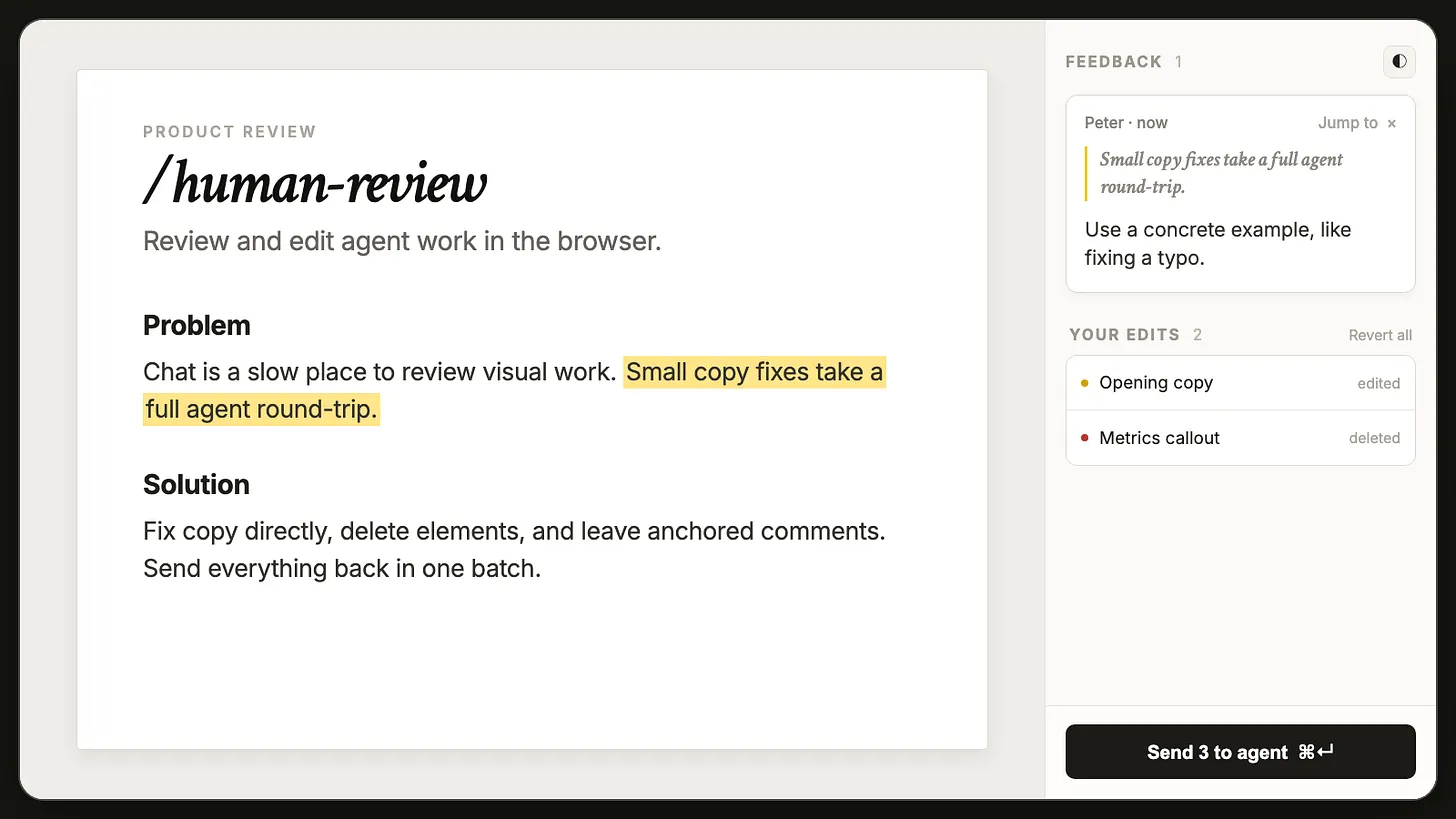
Human Review visual editor

Open an HTML or Markdown file:

/human-review (your file)

Review a page running on localhost:

/human-review (localhost URL)

Human Review opens the file in your browser. Make direct edits, leave comments, and click Send. Your agent receives all your feedback in one batch, updates the source, and refreshes the page for another review.

In Claude Code, the agent waits in the background and picks up your feedback the moment you hit Send. In Codex and other agents, it waits during its turn; if the turn already ended, send a message and it picks the feedback up. Closing the tab or clicking End review releases the agent either way. Feedback you never sent is kept, and the next time you open that page you can restore or discard it.

Note: For HTML files, direct edits and resizes save automatically, so closing the tab doesn't undo them — Discard on your next open, or Revert all during the review, puts the file back. For Markdown and localhost pages, click Send so your agent can apply them to the source.

What this skill lets you do

  • Edit text directly and tweak basic formatting (e.g., bold, italic).
  • Make bulleted and numbered lists — type - or 1. at the start of a line, or press ⌘⇧8 / ⌘⇧7. Tab and Shift+Tab indent and outdent.
  • Add links — select text and press ⌘K. ⌘K inside an existing link edits or removes it.
  • Resize images by dragging their corner, and move images by dragging them to a new spot.
  • Rearrange the page — hover any block and drag the handle on its left edge to move the whole block somewhere else.
  • Paste images from your clipboard — file reviews save them beside the document; localhost reviews stage them for the agent to place in the app source.
  • Select a phrase and leave a comment anchored to the exact text.
  • Comment on an image, chart, or section by clicking the element.
  • Remove elements without explaining the deletion in chat. Deletes and moves come with an Undo.
  • Edit a comment after writing it, even one already sent — a reworded comment reaches the agent with the next Send.
  • Command-click links to review multiple pages without losing your feedback.
  • Send every edit and comment at once instead of writing a long chat message.

I use Human Review to edit AI-generated plans, update landing pages, review localhost apps, and remove the extra copy AI likes to add to UX.

What’s inside

  • cli.js contains the human-review, poll, status, and setup commands.
  • server.js runs the local review session.
  • sdk.js handles editing, comments, highlights, and feedback.
  • chrome-client.js contains the visual review interface.
  • markdown.js renders Markdown files for review.
  • SKILL.md teaches Claude Code, Codex, and other agents how to use Human Review.

Everything runs on your computer. Human Review doesn’t require an account, cloud service, database, or API key.

Want more great AI skills?

Check out Behind the Craft, my personal AI system with over a dozen other quality skills and courses.

Subscribe to my YouTube channel and newsletter for practical AI tutorials and interviews.

License

MIT

Frequently asked questions

Is human-review free to use?

human-review is open source under the MIT licence. There is no licence fee and no seat count — you can self-host it or, where the project offers one, pay a vendor for a managed version instead.

What does human-review do?

A visual tool to edit HTML and Markdown files, leave comments like a Google Doc, and send feedback to your AI agent. Works inside your favorite AI harness.

What is human-review written in?

human-review is primarily written in JavaScript. Its source is publicly available at https://github.com/petergyang/human-review, and it has 1,268 GitHub stars.