FTPGrab is an MIT-licensed Go command-line tool and container image that pulls files from remote FTP and SFTP servers onto a NAS, server, or computer on a schedule, built for unattended transfers in seedbox, home server, and similar setups.
What it is
FTPGrab is a Go command-line tool that copies files from remote FTP and SFTP servers into local storage. It is distributed two ways: as a single executable published on the project's GitHub releases page, and as a container image, crazymax/ftpgrab, on Docker Hub. Documentation lives at crazymax.dev/ftpgrab. The licence is MIT, and the repository carries the ftp, sftp, ssh, scheduler, seedbox, nas, qnap, docker, and go topics.
The concrete problem it solves is moving files that accumulate on a remote host to local storage without manual work. Instead of an operator logging into an FTP or SFTP host, listing directories, and dragging files down again and again, FTPGrab points at one or more remote sources, runs on a schedule, filters what should be downloaded, and avoids re-downloading files that were already grabbed. It replaces that repeated manual pull, and the ad-hoc scripts written for it, with a scheduled job that knows what it has already collected and reports what each run did.
Key capabilities
- Pulls files from remote FTP and SFTP servers, including SFTP over SSH, into local storage on a NAS, server, or computer.
- Accepts one or more remote sources in the same configuration, so several hosts can feed one local destination.
- Runs on a schedule for unattended transfers rather than on-demand invocation.
- Filters which files should be downloaded, leaving unrelated content on the remote host alone.
- Avoids re-downloading files already grabbed, keeping repeat runs cheap.
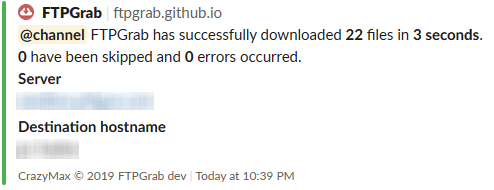
- Sends notifications after runs, covering successful downloads, failures, and other run activity.
- Ships as a single executable from the GitHub releases page and as the Docker Hub image
crazymax/ftpgrab.
Who uses it and how
- Seedbox owners who need files pulled from a remote seedbox to home storage without logging in daily.
- Home server and NAS operators, including QNAP devices, where local storage is the archive and the remote host is transient.
- Unattended setups where the job runs on a schedule and notification output replaces a person watching progress.
- Environments consolidating several remote sources onto one local machine.
- Hosts where only FTP or SFTP access exists, so no API or cloud backend is required on the remote side.
Getting started
Download the single executable from the GitHub releases page, or deploy the container image crazymax/ftpgrab from Docker Hub. Configuration, usage, and full documentation are at crazymax.dev/ftpgrab.
How it compares
The facts provide no list of paid products that FTPGrab replaces, and they name no comparable tools, so FTPGrab stands alone in this registry. Its real contrast is with the manual process it automates: hand-run FTP or SFTP transfers, or bespoke scripts, neither of which handles scheduling, filtering, de-duplication, and run notifications in one MIT-licensed binary.
When to use it — and when not to
Choose it when the job is unattended, scheduled pulling from FTP or SFTP into local storage, and when operating a small binary or container is acceptable. A self-hoster still runs the tool on a machine that stays up, holds FTP or SFTP credentials for every source, and configures notification delivery if run reports are wanted. It is the wrong pick for anyone needing two-way sync, cloud storage backends, or a hosted service with a graphical interface; the repository also carries 28 open issues, and the README is brief, with the substantive documentation held on the project site instead.