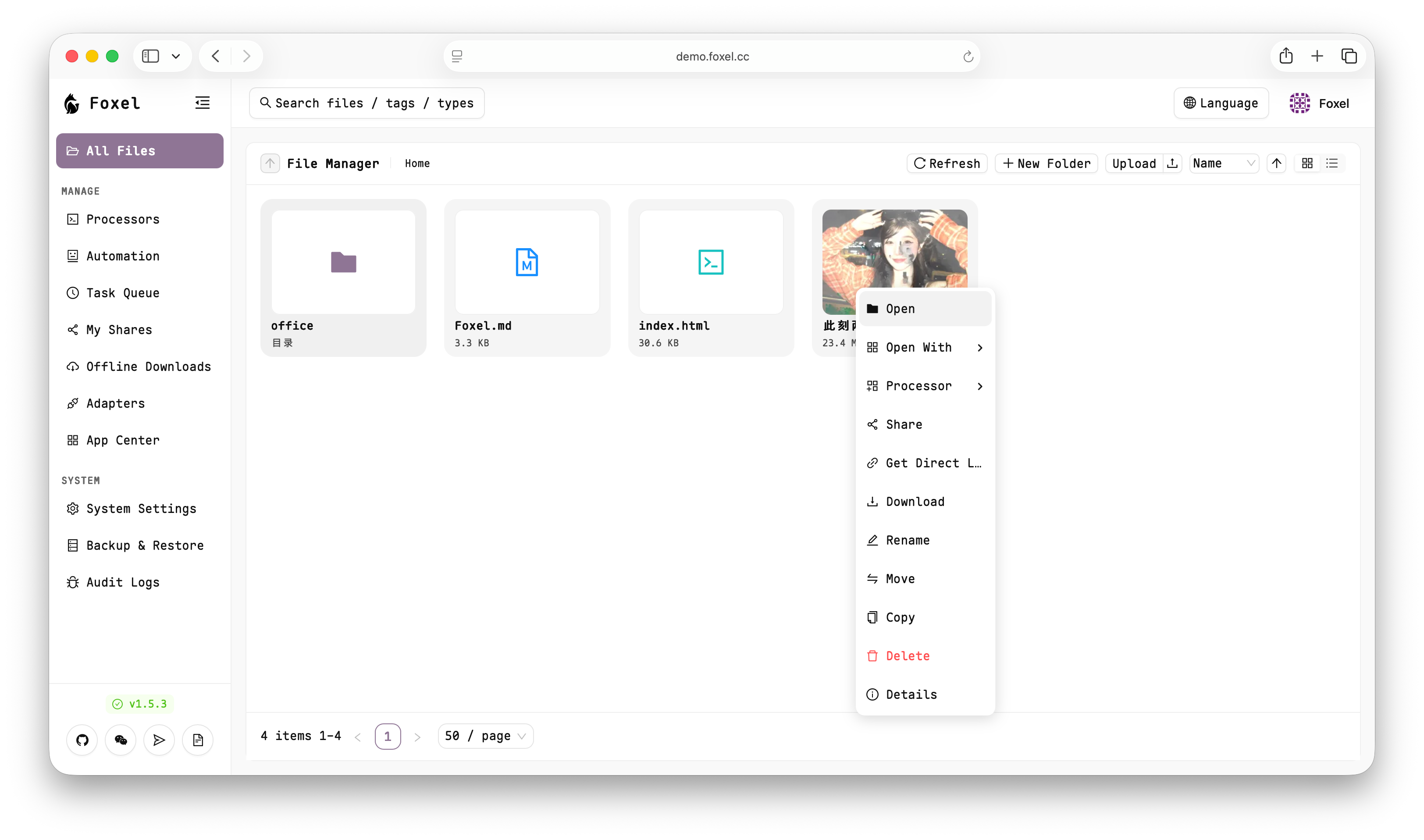
Foxel is a free, open source photo & video editors project written in Python and released under MIT. It has 1,063 GitHub stars, 92 forks and 10 open issues, and was last pushed 6 days ago. On this registry it ranks #38 of 41 tracked projects in Photo & Video Editors, with 5 head-to-head comparisons available.

What is Foxel?

Foxel is an MIT-licensed, self-hosted private cloud storage server for individuals and teams that gathers files spread across local disks, S3-compatible buckets, WebDAV, SFTP, FTP and consumer cloud drives into one interface and adds AI-powered semantic search over images, documents and other unstructured content.

What it is

Foxel is a Python application (Python 3.14+) with a FastAPI and Tortoise ORM backend on SQLite and a React 19 and TypeScript frontend built with Vite and Ant Design. It deploys with Docker under Gunicorn and Uvicorn, authenticates with JWT (OAuth2) and bcrypt, and uses Milvus Lite/Server or Qdrant for vector search. Alongside storage it provides a Task Processing Center for asynchronous jobs such as file indexing and backups, a manifest-based plugin system, and an AI agent with tools for VFS operations, web fetching and file processing. It is listed here under Miscellaneous / Photo & Video Editors, with topics including ai, cloud, filesystem, image, photo-gallery, photos, python, react, typescript and video.

The problem it solves is fragmentation. Files commonly sit across a local disk, an S3-compatible bucket, an SFTP or FTP server, a WebDAV share and consumer drives such as Google Drive, OneDrive, Dropbox and Quark, each with its own client, sharing model and search. Foxel's extensible adapter pattern replaces that patchwork with a single interface for browsing, uploading, downloading, moving, copying and deleting files, and a single permissions model to secure the result.

Key capabilities

  • Unified file management over pluggable adapters: Local, S3-compatible, WebDAV, SFTP and FTP for standard protocols; Google Drive, OneDrive, Dropbox and Quark as cloud drives; Telegram, AList and Foxel-to-Foxel for special cases.
  • AI-powered semantic search by natural language description rather than filename, covering images, documents and other unstructured data, with configurable embedding providers and Milvus (Lite or Server) or Qdrant vector databases.
  • Built-in preview of images, videos, PDFs, Office documents, text and code files in the browser, without downloading.
  • Role-Based Access Control with Admin, User and Viewer system roles, custom roles carrying fine-grained system and adapter permissions, path-based read/write/delete/share rules using wildcards, regex patterns and priority ordering, and audit logging of user, IP, method, status and duration.
  • Sharing as public or password-protected links with configurable expiration dates, browsable by recipients without logging in.
  • A manifest-based plugin system that loads React frontend components and custom backend routes at runtime without modifying the core codebase.
  • Protocol mappings for outward access: an S3-compatible endpoint, WebDAV for mounting as an operating-system network drive, and temporary signed URLs for direct file access.

Who uses it and how

  • Individuals consolidating a personal media library held across local storage and Google Drive, OneDrive, Dropbox or Quark accounts, matching the project's photo-gallery and photos topics.
  • Small teams needing a shared private cloud with governance: the three built-in roles cover common cases, custom roles and path rules handle finer splits, and audit logs record who did what from which IP.
  • Self-hosters keeping data on their own hardware, since the documented deployment is Docker Compose with persistent data/db and data/mount directories, leaving the SQLite database and mounted files under the operator's control.
  • Users needing access beyond the web interface: WebDAV presents an instance as a network drive, the S3-compatible endpoint serves programmatic clients, signed URLs allow direct downloads, and the AList and Foxel-to-Foxel adapters bridge existing deployments.

Getting started

The documented route is Docker Compose: create the data/db and data/mount directories, download compose.yaml from the project's GitHub raw path, replace the default SECRET_KEY and TEMP_LINK_SECRET_KEY with randomly generated strong keys, and start the services. A public demo runs at https://demo.foxel.cc with the credentials admin / admin.

How it compares

No set of paid products that Foxel replaces is given in the facts provided, so no licence, hosting or cost comparison can be drawn here. The comparable names that do appear, namely AList, Google Drive, OneDrive, Dropbox, Quark and Telegram, are integrated as storage adapters rather than offered as alternatives, and Foxel therefore stands alone in this registry's Miscellaneous / Photo & Video Editors category.

When to use it — and when not to

A self-hoster must operate the whole stack: Docker Compose, persistent database and mount directories, securely generated SECRET_KEY and TEMP_LINK_SECRET_KEY values, and, if semantic search is wanted, a vector database such as Milvus Lite/Server or Qdrant plus a configured embedding provider. Anyone wanting a managed service with no infrastructure work should look elsewhere, because the facts describe only self-hosted deployment, and the demo instance with admin / admin credentials is a shared demonstration rather than a production offering. The README excerpt supplied also ends mid-instruction at "Start the Services", so complete deployment steps and operational detail must be read from the repository itself.

project readme (upstream, from github) — read inline

English | 简体中文

Foxel

A highly extensible private cloud storage solution for individuals and teams, featuring AI-powered semantic search.

Python Version React License

GitHub stars


The ocean of data is boundless, let the eye of insight guide the voyage, yet its intricate connections lie deep, not fully discernible from the surface.
UI Screenshot

👀 Online Demo

https://demo.foxel.cc

Account/Password: admin / admin

✨ Core Features

📁 Unified File Management

Centralize management of files distributed across different storage backends. Browse, upload, download, move, copy, and delete — all through a single, unified interface.

🔌 Pluggable Storage Backends

Utilizes an extensible adapter pattern to easily integrate various storage types:

Category Adapters
Standard Protocols Local, S3-compatible, WebDAV, SFTP, FTP
Cloud Drives Google Drive, OneDrive, Dropbox, Quark
Special Telegram, AList, Foxel-to-Foxel

🔍 AI-Powered Semantic Search

Go beyond filename matching — search by natural language descriptions to find content within images, documents, and other unstructured data. Powered by configurable embedding providers and vector databases (Milvus, Qdrant).

👁️ Built-in File Preview

Preview images, videos, PDFs, Office documents, text, and code files directly in the browser — no downloads required.

🔐 Permissions & Access Control

A full-featured Role-Based Access Control (RBAC) system to secure your data:

  • Built-in Roles: Three system roles — Admin (full access), User (configurable access), and Viewer (read-only).
  • Custom Roles: Create tailored roles with fine-grained system and adapter permissions.
  • Path-based Rules: Define read / write / delete / share permissions per path, with support for wildcards, regex patterns, and priority-based rule ordering.
  • Audit Logging: Every user action is recorded with full traceability (user, IP, method, status, duration).

🔗 Sharing

Generate public or password-protected share links with configurable expiration dates. Recipients can browse shared files and folders without logging in.

🧩 Plugin System

Extend Foxel's capabilities through a manifest-based plugin architecture. Load React frontend components and custom backend routes at runtime, without modifying the core codebase.

⚙️ Task Processing Center

Run asynchronous background tasks — file indexing, data backups, scheduled jobs — without impacting the main application.

🤖 AI Agent

An integrated AI agent with built-in tools for VFS operations, web fetching, and file processing — bringing intelligent automation directly into your cloud storage.

🌐 Protocol Mappings

Access your files through familiar protocols:

  • S3 API — S3-compatible endpoint for programmatic access
  • WebDAV — Mount as a network drive in your OS file manager
  • Direct Links — Temporary signed URLs for direct file access

🛠️ Tech Stack

Layer Technologies
Backend Python 3.14+, FastAPI, Tortoise ORM, SQLite
Frontend React 19, TypeScript, Vite, Ant Design
Auth JWT (OAuth2), bcrypt
Vector DB Milvus Lite / Server, Qdrant
Deployment Docker, Gunicorn + Uvicorn
Package Managers uv (Python), Bun (JS)

🚀 Quick Start

Using Docker Compose is the most recommended way to start Foxel.

1. Create Data Directories

Create a data folder for persistent data:

mkdir -p data/db data/mount
chmod 777 data/db data/mount

2. Download Docker Compose File

curl -L -O https://github.com/DrizzleTime/Foxel/raw/main/compose.yaml

After downloading, it is strongly recommended to modify the environment variables in the compose.yaml file to ensure security:

  • Modify SECRET_KEY and TEMP_LINK_SECRET_KEY: Replace the default keys with randomly generated strong keys.

3. Start the Services

docker-compose up -d

4. Access the Application

Once the services are running, open the page in your browser.

On the first launch, please follow the setup guide to initialize the administrator account.

🤝 How to Contribute

We welcome contributions from the community! Whether it's submitting bugs, suggesting new features, or contributing code directly.

Before you start, please read our CONTRIBUTING.md file, which explains the development environment and submission process. A Simplified Chinese translation is available in CONTRIBUTING_zh.md.

🌐 Community

Join our community on Telegram to discuss with developers and other users!

You can also join our WeChat group for more real-time communication and support. Please scan the QR code below to join:

WeChat Group QR Code

If the QR code is invalid, please add WeChat ID drizzle2001, and we will invite you to the group.

📄 License

Foxel is open-sourced under the MIT License.

Frequently asked questions

Is Foxel free to use?

Foxel is open source under the MIT licence. There is no licence fee and no seat count — you can self-host it or, where the project offers one, pay a vendor for a managed version instead.

What does Foxel do?

A highly extensible private cloud storage solution for individuals and teams, featuring AI-powered semantic search.

What is Foxel written in?

Foxel is primarily written in Python. Its source is publicly available at https://github.com/DrizzleTime/Foxel, and it has 1,063 GitHub stars.