
Figranium
Figranium is an open-source, deterministic browser automation platform that lets you build visual browser tasks that can be called as APIs. Create scraping and automation workflows visually, pass dynamic inputs at runtime, and get structured results—without usage credits or third-party data hosting.
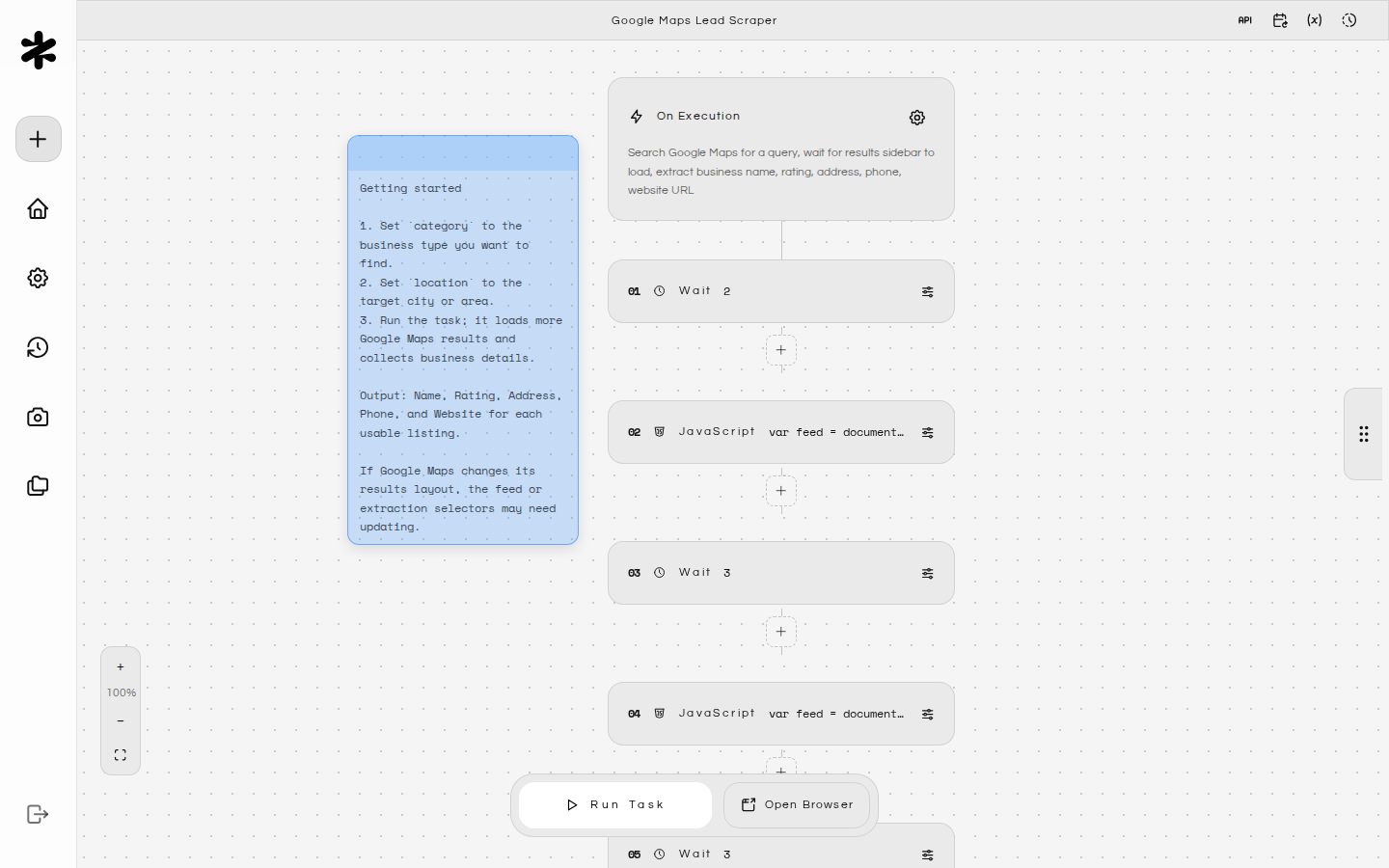
What You Get
- Block‑based automation — build flows with actions like click, type, wait, hover, and execute JavaScript against modern pages.
- Task API — trigger saved tasks via HTTP (
/api/tasks/:id/api), pass variables at runtime, and secure runs with the API key you control. - Captures & Cabinets — review screenshots and recordings in Captures, while browser downloads are routed into task-selected Cabinets for later download or upload.
- Proxy management — host, rotate, or import HTTP/SOCKS proxies, flag a default, and toggle rotation per task.
- Task Scheduling — run workflows automatically using visual interval/daily/weekly/monthly settings or advanced cron expressions.
- Security-first — session authentication, IP allowlists, secret management, and audit trails live entirely inside your environment.
Official Partners
Figranium is proudly supported by:
Featured Partner

Integration Partner

Infrastructure Backers




Getting Started
This starts the app on http://localhost:11345 and the VNC viewer on http://localhost:54311.
Docker Compose (Standard)
1. Create a Project Directory
Create a directory for your Figranium installation and navigate into it:
mkdir figranium-server
cd figranium-server
2. Create docker-compose.yml
Create a docker-compose.yml file in your project directory:
wget https://raw.githubusercontent.com/figranium/figranium/main/docker-compose.deploy.yml -O docker-compose.yml
3. Start with Docker Compose
Run the following command to start the application in detached mode:
docker compose up -d
Session Secret
Set SESSION_SECRET before any run. A quick generator:
node -e "console.log(require('crypto').randomBytes(32).toString('hex'))"
Configuration
| Variable | Purpose | Default |
|---|---|---|
SESSION_SECRET |
Signs session cookies. Required. | — |
ALLOWED_IPS |
Comma list for basic IP allowlisting. | none (open) |
TRUST_PROXY |
Honor X-Forwarded-* when behind a reverse proxy. |
0 |
ALLOW_PRIVATE_NETWORKS |
Allow scraping local/private IPs (SSRF risk). | false |
VITE_DEV_PORT |
Port for front-end dev server. | 5173 |
VITE_BACKEND_PORT |
Backend port for proxying + scripts. | 11345 |
DB_TYPE |
Optional database type overriding disk storage. Set to postgres to use PostgreSQL. |
— |
DB_POSTGRESDB_HOST |
Hostname for the PostgreSQL database (required if DB_TYPE is postgres). | — |
DB_POSTGRESDB_PORT |
Port number for the PostgreSQL database (required if DB_TYPE is postgres). | — |
DB_POSTGRESDB_USER |
Username for the PostgreSQL database (required if DB_TYPE is postgres). | — |
DB_POSTGRESDB_PASSWORD |
Password for the PostgreSQL database (required if DB_TYPE is postgres). | — |
DB_POSTGRESDB_DATABASE |
Database name for PostgreSQL. | postgres |
USE_CLOAK_ENGINE |
Set to true to run the browser engine on CloakBrowser instead of the default Playwright stealth stack. |
false |
CLOAKBROWSER_LICENSE_KEY |
CloakBrowser license key for the latest binary. | — |
CAPTCHA solving
Figranium uses Fiptcha for CAPTCHA solving. Fiptcha owns the CAPTCHA solver implementation and its configuration, supported providers, local/remote solving behavior, model setup, and platform-specific companion tooling. See the Fiptcha repository for the current CAPTCHA documentation instead of relying on duplicated configuration here.
Proxy rotation also respects data/proxies.json (see below), and data/allowed_ips.json works as an alternate allowlist format.
Advanced Configuration
PLAYWRIGHT_BROWSERS_PATH(or setPLAYWRIGHT_CHROMIUM_EXECUTABLE_PATH) when using a shared Playwright installation.NODE_ENV=productionenables the bundleddist/client and reduces console verbosity.HOST=0.0.0.0allows binding beyond localhost inside Docker containers, whilePORToverrides the Express listen port (defaults to11345).- Set
LOG_LEVELtodebugif you need more Playwright or proxy diagnostics.
Task Modes
Figranium has two task modes:
- Agent Mode — deterministic browser automation built from an ordered sequence of actions, control flow, variables, and extraction.
- Scrape Mode — lightweight HTTP-based scraping and extraction without launching a browser.
Visible browser sessions are a debugging/runtime capability, not a third task mode.
UI Walkthrough
- Dashboard — view Task and execution metrics, search and sort Tasks, and open or create Tasks.
- Task Editor — build Agent or Scrape Tasks, configure actions and extraction, test blocks, manage variables, choose a Cabinet, schedule runs, and trigger executions.
- Executions — browse and filter run history, inspect outcomes and execution details, and review returned data.
- Captures — review generated screenshots and recordings with open, download, copy, and delete controls.
- Cabinets — manage durable file queues used by Task downloads and Upload blocks, including files, ZIPs, folders, and upload status.
- Settings — manage API Keys, AI Models, User Agent, Proxies, Appearance, and About settings.
Task Capabilities
- Tasks support actions including navigation, click, type, wait, press, scroll, JavaScript, hover, screenshots, conditions, loops, variables, uploads, and error handling.
- Variable templating (
{$var}) and structured conditions make Tasks reusable with runtime inputs. - Extraction can return structured data from browser or scrape executions.
- See
AGENT_SPEC.mdfor the Task schema and action contract.
Proxies
Proxies can be defined via the UI or data/proxies.json:
[
  "http://user:pass@proxy1.example.com:8000",
  { "server": "socks5://proxy2.example.com:1080", "label": "data center" }
]
hostis always available and represents your machine’s default IP.- Rotation settings (
round-robinorrandom) live in Settings and persist through the backend endpoints. - Import/export operations live behind
/api/settings/proxies/import.
API Surface
Figranium exposes a REST API for workflow tools, applications, and custom integrations. All endpoints are hosted on your Figranium instance, typically on port 11345.
Authentication:
If enabled, provide the x-api-key header or Authorization: Bearer . For internal network use, this may be optional depending on your settings.
Task Management API
GET /api/tasks: List all saved Tasks.POST /api/tasks: Create a new Task.PUT /api/tasks/:id: Update an existing Task.POST /api/tasks/:id/api: Execute a predefined Task. Pass{"variables": {}}in the body to override execution variables dynamically.
Scheduling API
GET /api/schedules: List all scheduled Tasks and their status.POST /api/schedules/:taskId: Create or update a schedule (supports visual config or raw cron).DELETE /api/schedules/:taskId: Disable/remove a schedule.GET /api/schedules/status/all: Get an overview of all active scheduled jobs.
Execution API
GET /api/executions: Retrieve paginated history of past runs.GET /api/executions/:id: View the steps, result data, and configuration state of a specific run.
Cabinets API
GET /api/cabinets: List Cabinets.- Cabinet routes under
/api/cabinetsmanage file queues, items, downloads, upload state, ZIP creation, and extraction.
Task Scripting Tips
- Use JavaScript blocks when you need custom browser-side logic:
return document.querySelectorAll('article').length; - Keep selectors narrow and use the selector picker to generate deterministic candidates.
- Set Task variables through the API to reuse generic workflows across multiple inputs or domains.
Workflow Recipe
- Design a Task in the editor and add the actions required for the workflow.
- Use conditions, loops, variables, and JavaScript where deterministic control flow needs them.
- Add extraction or screenshot actions when you need structured output or visual evidence.
- Configure proxy rotation when the workflow needs a different egress strategy.
- Use the Schedule tab for automated runs, or trigger the Task through its API endpoint.
- Pass runtime variables such as
{"variables":{"query":"books"}}when calling the Task from another tool.
Task Scheduling
Figranium includes a built-in scheduler that handles automated Task execution without requiring external cron jobs or triggers.
- Visual Mode: Configure periodic, hourly, daily, weekly, or monthly runs.
- Advanced Mode: Use standard 5-field cron expressions (
* * * * *) for complex schedules. - Persistence: Schedules are stored with Task metadata and persist across server restarts.
- Monitoring: Next-run and previous-run information is available from the Task scheduling interface and execution history.
Testing & Validation
- Run
npm run buildbefore packaging for production; thedist/folder contains the compiled assets. - Backend logging writes to the console for debugging proxies, authentication, or browser failures.
- Use the repository's test and qualification scripts when changing execution-critical behavior.
Troubleshooting
- “Session expired” in the UI: confirm
SESSION_SECRETis consistent and cookies aren’t blocked by your browser. - Proxy import fails: inspect
data/proxies.jsonfor valid URLs; the backend validates proxy configuration before use. - API key lost: open Settings → API Keys to view or regenerate API credentials.
Data Lifecycle
- Screenshots and recordings are surfaced through the standalone Captures workspace.
- Browser downloads are stored in Cabinets. Tasks can select a Cabinet, and Upload blocks can consume queued Cabinet items.
- Browser state can persist between executions; enable a Task's stateless execution option when a run should start without persisted cookies or local storage.
- Proxy lists, user-agent preferences, and other server settings persist under
data/; back up that directory when those settings matter to your deployment.
Maintenance
- The project is governed by the GNU General Public License v3.0, which grants rights for distribution and modification as per the GPLv3 terms.
- Keep
data/backed up if you rely on persistent settings or browser state. - Release updates: Docker installations should run
docker compose pullfollowed bydocker compose up -d; source installations should pullfigranium/figraniumand follow the project setup commands. - Contributions: follow
.github/templates, respectCONTRIBUTING.md, and run available lint/test scripts if you touch critical areas.
Roadmap
- Settings shortcuts — dedicated API Keys, User Agent, Proxies, and Appearance sections let operators tune core settings without leaving the UI.
- Storage cleanup — the standalone Captures page lets you review captured media.
- IP rotation tooling — import proxies and automatically rotate them.
- API key workflow — manage API access without extra setup.
- Scoped API keys — support multiple individually revocable API keys with explicit permissions.
- Password manager & credential injector — securely store credentials and inject them into browser Tasks at runtime.
- Task proxy rotation toggle — enable rotation per Task execution.
- Spatial editor transition — spatial block-based Task editor.
- Action key combos — add modifier shortcuts for browser interactions.
- Click-and-drag block — add drag gesture automation.
- Recording controls — disable automated recording per Task.
- File downloads — download files from target pages and surface them through Cabinets.
- Cabinet-backed file workspace — route downloads into shared Cabinets and consume them from Upload blocks.
- Stateless mode — start Task runs without persisted cookies or local storage.
- Adblocking filters — optional ad/malware filtering for execution contexts.
- Extraction response mode — choose between HTML+data and data-only API responses.
- Folder organization — organize Tasks and assets into named folders.
- Stable capture retention — filtering, pinning, and archiving for captures.
- Workspace templates — reusable workspace presets.
- Geo-targeted exits — choose proxy regions for Tasks.
- Complete anti-detection coverage — anti-detection controls across browser executions.
- Session recording redaction — redact sensitive fields from recordings and logs.
- Two-factor authentication — optional TOTP/second-factor support.
- Automatic self-healing selectors — recover broken locators after page changes.
- Multilingual task pages with translate.js — optionally translate browser-rendered pages before actions and extraction.
- AI-assisted fixing — suggest fixes after failed runs for user approval.
- Companion app — lightweight notifications for important execution events.
- Community presets hub — publish and discover reusable automation presets.
- Database Tab / Local CRM — built-in interface for extracted data.
- iframe interaction support — target and interact with elements inside iframes.
- Autosave — automatically persist Task changes and editor state.
- Highlight tool — highlight elements while building workflows.
- Cron triggers — schedule Tasks with cron expressions.
- Canvas notes — add annotations alongside workflows.
- Page triggers — trigger a Task when a page changes in a specified way.
- Task-dedicated browser state & cookie buckets — isolate or intentionally share persistent browser state between Tasks.
Security Considerations
- Never commit your
SESSION_SECRETor API keys into shared repositories. - Use
ALLOWED_IPS/data/allowed_ips.jsonto gate the UI when deploying to a network-exposed host. - Rotate API keys periodically via Settings, and use Executions to review automation runs.
- Keep dependencies and the deployment environment up to date.
Community
- Report issues or request features via the GitHub repo issue tracker.
- Follow the authors on
https://github.com/figraniumfor releases. - Share automation recipes with other self-hosted users in your org, but respect the license for sharing infrastructure.
- Join the community on Discord.
Support the Project
If you find this project helpful, please consider supporting its development. Your contributions help keep the project maintained and the lights on!

Other ways to help:
- Star the repository to help others find it.
- Share the project with your network.
- Contribute to the code or documentation.