EasyLogger is an ultra-lightweight, high-performance C/C++ logging library with a footprint under 1.6 KB of ROM and 0.3 KB of RAM, aimed at embedded and resource-constrained developers who need structured, filterable logs on devices where a full logging framework will not fit.
What it is
EasyLogger is a C/C++ log library built for small embedded targets, with an MIT licence and roughly 4,749 stars and 1,316 forks on GitHub. Its defining property is size: the README states ROM under 1.6K and RAM under 0.3K, which places it in the class of libraries intended for microcontrollers rather than servers. It lives in the embedded C ecosystem and is ported by the user onto a target board; the library ships a demo under demo/os/rt-thread/stm32f10x/ and Chinese-language documentation under docs/zh/, including a kernel API document and a porting document. Log levels follow Android Logcat conventions, from level 0 (Assert) down to level 5 (Verbose), and the level set is [A], [E], [W], [I], [D] and [V].
The concrete problem it solves is that logging is normally the first thing a firmware author drops, because printf-style output through a UART is unstructured and any richer logging library costs flash and RAM that the device does not have. EasyLogger replaces ad-hoc print statements with a levelled, tagged, filterable logger that stays inside a tiny memory budget. It also decouples the logger core from the output destination, so the same library can write to a terminal, to a file system, or directly to flash memory through the EasyFlash library without a file system being present. Configuration is deliberately simple: parameters and output are a singleton, meaning exactly one global configuration applies, which keeps the software small but means it cannot support complex multi-sink output arrangements.
Key capabilities
- Filtering by tag, level, and keyword, so noisy logs can be narrowed at runtime; RAW and hexdump format logs do not support tag or keyword filtering.
- Static output levels set at compile time through macros, plus dynamic levels controlled at runtime through the API.
- Independently configurable output format per level: level, time, tag, process information, thread information, file path, line number, and method name.
- Per-level colour and font styling set in
elog_cfg.h.
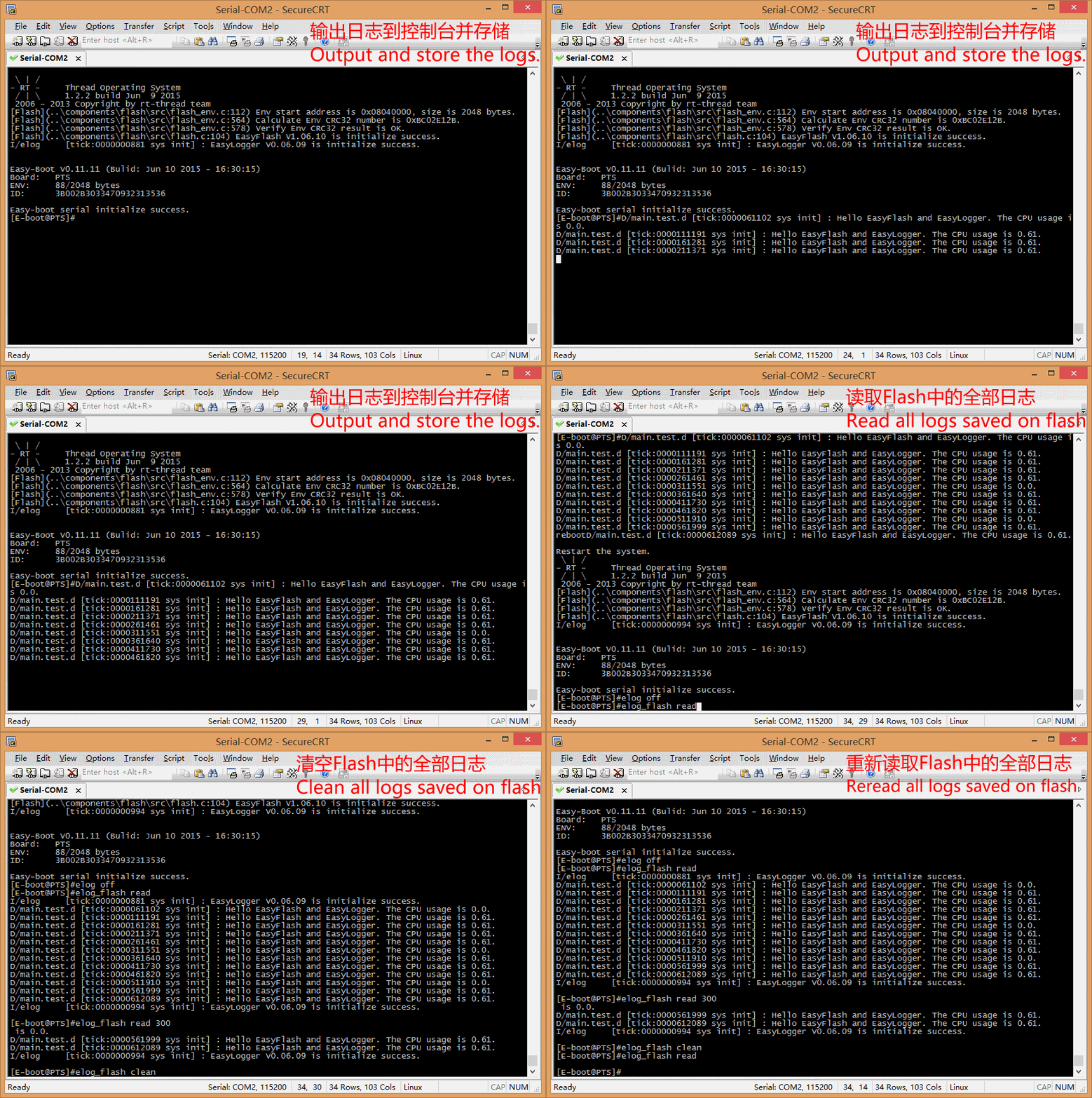
- A Flash plugin that stores logs through the EasyFlash interface with no file system required, and supports reading back historical logs after a reboot.
- A File plugin supporting file archiving and circular file storage, rolling to a new file once a configured size is exceeded.
- Async output, listed as completed in the roadmap, which removes the runtime slowdown caused by synchronous logging on slow platforms.
Who uses it and how
- Firmware developers on small embedded devices without a file system, who store logs in flash via EasyFlash and read them back after restart.
- Teams running RT-Thread on STM32F10x hardware, using the shipped demo at
demo/os/rt-thread/stm32f10x/ as the porting starting point.
- Devices with a console or terminal attached, where dynamic filtering and level switching let an engineer change log verbosity without reflashing.
- Systems with a file system, where the File plugin handles capacity-based rotation so long-running logs do not exhaust storage.
Getting started
There is no published package or container image; integration means taking the source, reading the documentation under docs/zh/ first, and porting the library to the target, with the RT-Thread STM32F10x demo as the working reference. The porting guides are docs/zh/port/kernel.md for the core and docs/zh/port/flash.md for the flash plugin.
How it compares
No alternative logging products are named in the available facts, and no list of paid products is provided. Android Logcat appears only as the reference for the numbering of log levels, not as a competing library. On the evidence given, EasyLogger stands alone in this registry.
When to use it — and when not to
A self-hoster must operate the porting work directly: there is no package manager install, the docs are written in Chinese, and the singleton configuration limits the design to one global output setup, so anyone needing several independent log sinks with different formats should look elsewhere. The flash-backed storage path also depends on porting EasyFlash separately. It remains a reasonable choice when flash and RAM are the binding constraint and structured, filterable logs are worth the porting effort.
project readme (upstream, from github) — read inline
EasyLogger
1. 介绍
EasyLogger 是一款超轻量级(ROM 名词解释:
- 1、RAW格式:未经过格式化的原始日志。
- 2、标签:在软件中可以按照文件、模块、功能等方面,对需要打印的日志设定标签,实现日志分类。
1.2 插件
- 1、Flash:使用 EasyFlash 库提供的Flash操作接口,无需文件系统,直接将日志存储在 Flash 中。
- 2、File:支持文件转档、文件循环保存等与文件日志输出相关功能。
- 3、敬请期待……
1.3 Star & Fork
后续我还会提供更多插件。也非常欢迎大家设计、开发更多实用插件和功能,一起来完善 EasyLogger (Github|OSChina|Coding) 。如果觉得这个开源项目很赞,可以点击项目主页 右上角的 Star ,同时把它推荐给更多有需要的朋友。
2. 使用
2.1 参数配置
EasyLogger 拥有过滤方式、输出格式、输出开关这些属性。
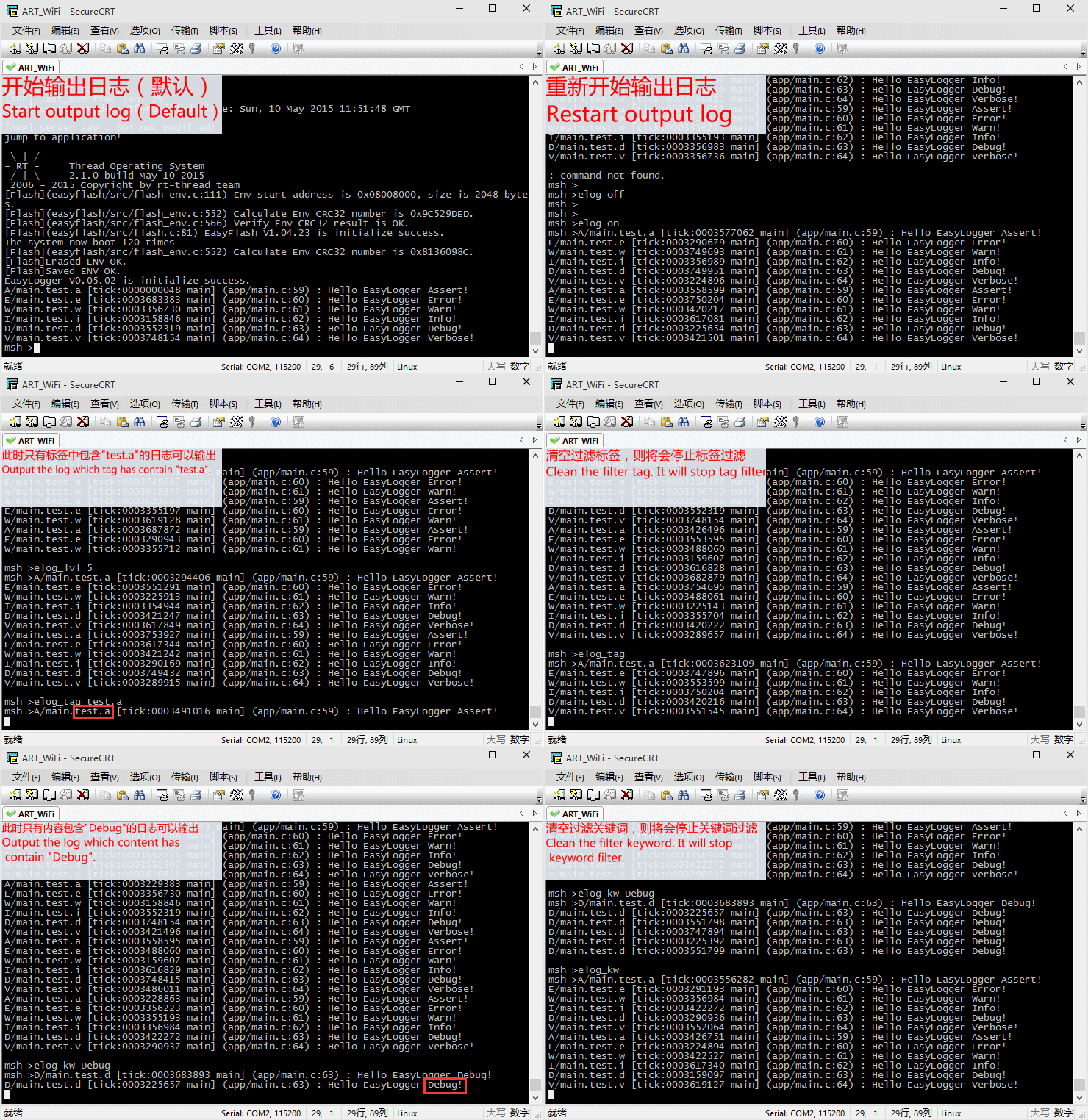
- 过滤方式支持按照标签、级别、关键词进行过滤;
- 可以动态的开启/关闭日志的输出;
- 可设定动态和静态的输出级别
- 静态:一级开关,通过宏定义,在编译阶段使用;
- 动态:二级开关,通过API接口,在运行阶段使用。
注:目前参数配置及输出方式都是单例模式,即全局只支持一种配置方式。此模式下,软件会较为简单,但是无法支持复杂的输出方式。
2.2 输出级别
参考 Android Logcat ,级别最高为 0(Assert) ,最低为 5(Verbose) 。
0.[A]:断言(Assert)
1.[E]:错误(Error)
2.[W]:警告(Warn)
3.[I]:信息(Info)
4.[D]:调试(Debug)
5.[V]:详细(Verbose)
2.2.1 输出缤纷多彩的日志
各个级别日志默认颜色效果如下。用户也可以根据自己的喜好,在 elog_cfg.h 对各个级别日志的颜色及字体风格进行单独设置。

2.3 输出过滤
支持按照 级别、标签及关键词 进行过滤。日志内容较多时,使用过滤功能可以更快定位日志,保证日志的可读性。更多的过滤功能设置方法及细节请阅读\docs\zh\api\kernel.md文档
注:RAW格式、hexdump 格式日志不支持标签、关键词过滤
2.4 输出格式
输出格式支持:级别、时间、标签、进程信息、线程信息、文件路径、行号、方法名。每种优先级别可以独立设置输出格式。
2.5 输出方式
通过用户的移植,可以支持任何一种输出方式。只不过对于某种输出方式可能引入的新功能,需要通过插件实现,例如:文件转存,检索Flash日志等等。后期会有更多的插件开源出来。下面简单对比下部分输出方式使用场景:
- 终端:方便用户动态查看,不具有存储功能;
- 文件与Flash:都具有存储功能,用户可以查看历史日志。但是文件方式需要文件系统的支持,而Flash方式更加适合应用在无文件系统的小型嵌入式设备中。
2.6 Demo
2.6.1 核心功能
下图为在终端中输入命令来控制日志的输出及过滤器的设置,更加直观的展示了 EasyLogger 核心功能。
2.6.2 Flash Log(将日志保存到 Flash 中)
下图过程为通过控制台输出日志,并将输出的日志存储到 Flash 中。重启再读取上次保存的日志,最后清空 Flash 日志。
2.6.2 File Log(将日志保存到文件中)
通过 FIle 插件,可以将日志自动保存至文件中。每个文件可以设定大小,超过规定大小后,自动新建新的文件来存储日志。
3. 文档
具体内容参考\docs\zh\下的文件。务必保证在 阅读文档 后再移植使用。
4. 后期
5. 许可
MIT Copyright (c) armink.ztl@gmail.com