Silk






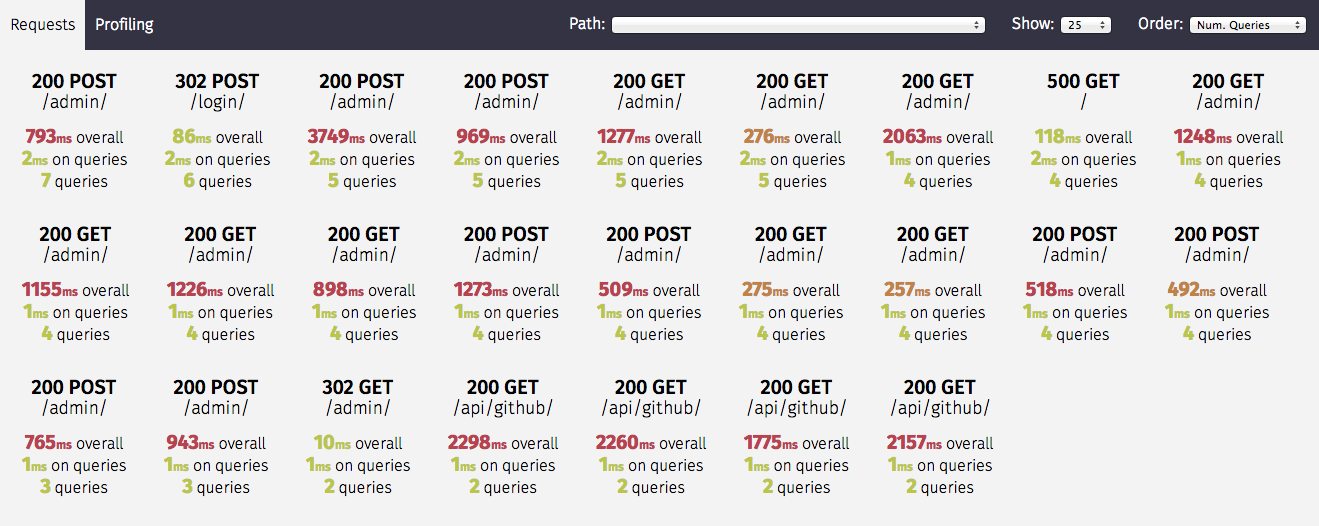
Silk is a live profiling and inspection tool for the Django framework. Silk intercepts and stores HTTP requests and database queries before presenting them in a user interface for further inspection:
Contents
Requirements
Silk has been tested with:
- Django: 5.2, 6.0, 6.1
- Python: 3.10, 3.11, 3.12, 3.13, 3.14, 3.15
Installation
Via pip into a virtualenv:
pip install django-silk
To including optional formatting of python snippets:
pip install django-silk[formatting]
In settings.py add the following:
MIDDLEWARE = [
    ...
    'silk.middleware.SilkyMiddleware',
    ...
]

TEMPLATES = [{
    ...
    'OPTIONS': {
        'context_processors': [
            ...
            'django.template.context_processors.request',
        ],
    },
}]


INSTALLED_APPS = (
    ...
    'silk'
)
Note: The order of middleware is sensitive. If any middleware placed before silk.middleware.SilkyMiddleware returns a response without invoking its get_response, the SilkyMiddleware won’t run. To avoid this, ensure that middleware preceding SilkyMiddleware does not bypass or return a response without calling its get_response. For further details, check out the Django documentation.
Note: If you are using django.middleware.gzip.GZipMiddleware, place that before silk.middleware.SilkyMiddleware, otherwise you will get an encoding error.
If you want to use custom middleware, for example you developed the subclass of silk.middleware.SilkyMiddleware, so you can use this combination of settings:
# Specify the path where is the custom middleware placed
SILKY_MIDDLEWARE_CLASS = 'path.to.your.middleware.MyCustomSilkyMiddleware'

# Use this variable in list of middleware
MIDDLEWARE = [
    ...
    SILKY_MIDDLEWARE_CLASS,
    ...
]
To enable access to the user interface add the following to your urls.py:
urlpatterns += [path('silk/', include('silk.urls', namespace='silk'))]
before running migrate:
python manage.py migrate

python manage.py collectstatic
Silk will automatically begin interception of requests and you can proceed to add profiling
if required. The UI can be reached at /silk/
Alternative Installation
Via github tags:
pip install git+https://github.com/jazzband/django-silk.git@<version>#egg=django_silk
You can install from master using the following, but please be aware that the version in master may not be working for all versions specified in requirements
pip install -e git+https://github.com/jazzband/django-silk.git#egg=django_silk
Features
Silk primarily consists of:
- Middleware for intercepting Requests/Responses
- A wrapper around SQL execution for profiling of database queries
- A context manager/decorator for profiling blocks of code and functions either manually or dynamically.
- A user interface for inspection and visualisation of the above.
Request Inspection
The Silk middleware intercepts and stores requests and responses in the configured database. These requests can then be filtered and inspecting using Silk's UI through the request overview:
It records things like:
- Time taken
- Num. queries
- Time spent on queries
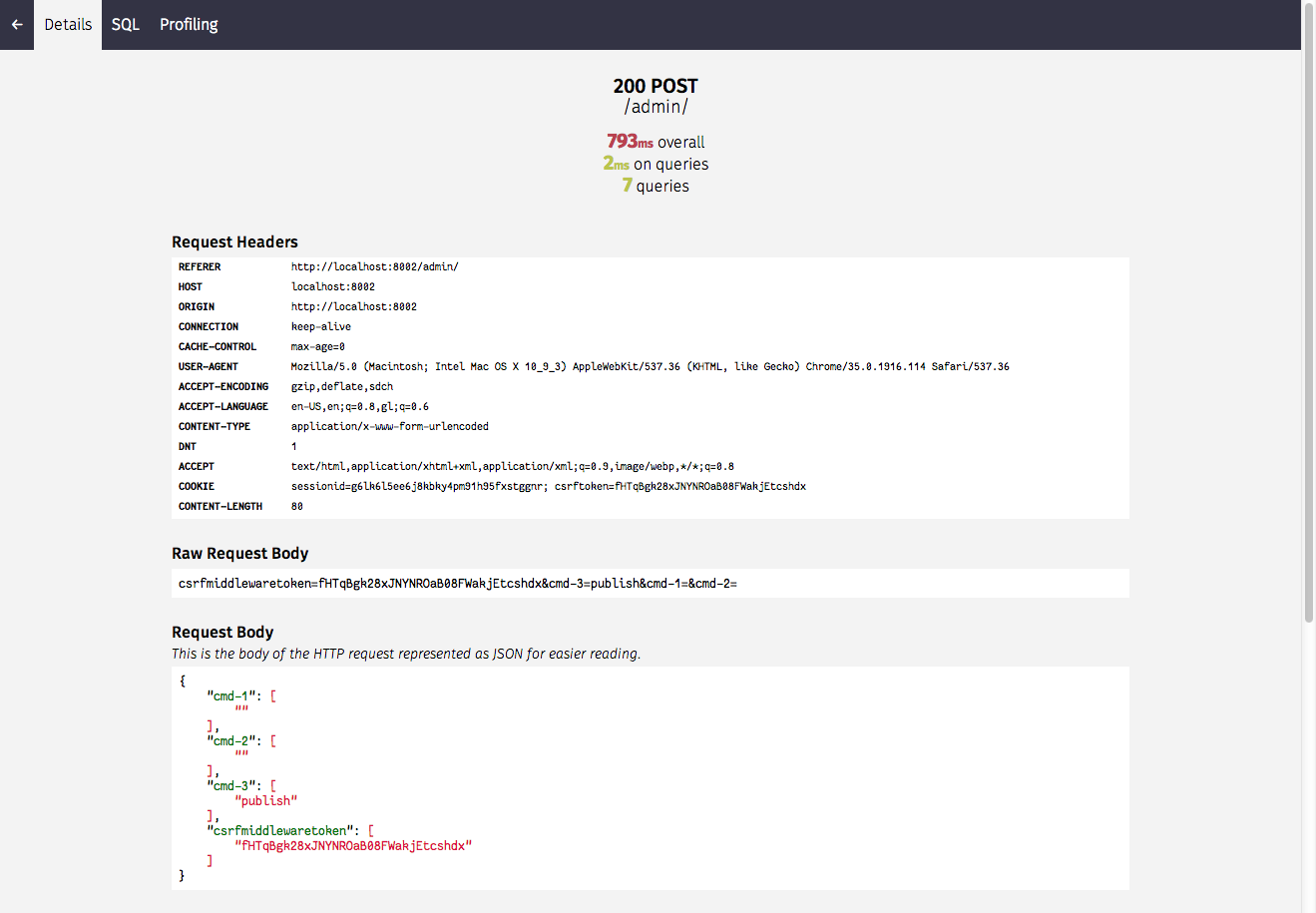
- Request/Response headers
- Request/Response bodies
and so on.
Further details on each request are also available by clicking the relevant request:
SQL Inspection
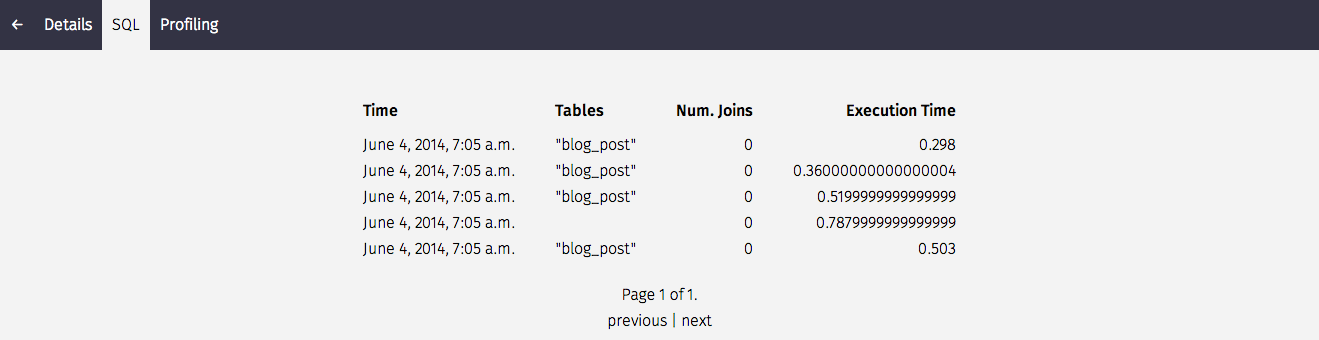
Silk also intercepts SQL queries that are generated by each request. We can get a summary on things like the tables involved, number of joins and execution time (the table can be sorted by clicking on a column header):
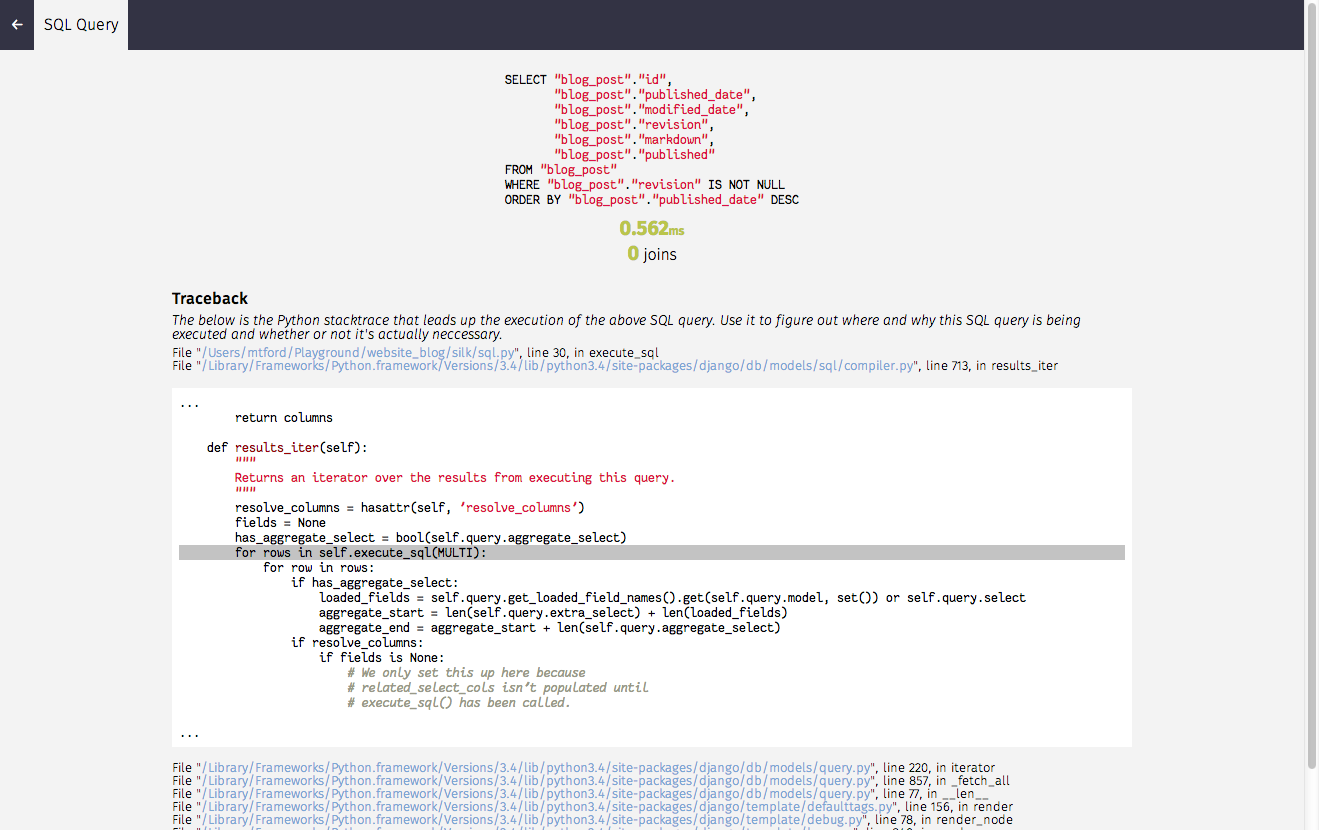
Before diving into the stack trace to figure out where this request is coming from:
Profiling
Turn on the SILKY_PYTHON_PROFILER setting to use Python's built-in cProfile profiler. Each request will be separately profiled and the profiler's output will be available on the request's Profiling page in the Silk UI. Note that as of Python 3.12, cProfile cannot run concurrently so django-silk under Python 3.12 and later will not profile if another profile is running (even its own profiler in another thread).
SILKY_PYTHON_PROFILER = True
If you would like to also generate a binary .prof file set the following:
SILKY_PYTHON_PROFILER_BINARY = True
When enabled, a graph visualisation generated using gprof2dot and viz.js is shown in the profile detail page:
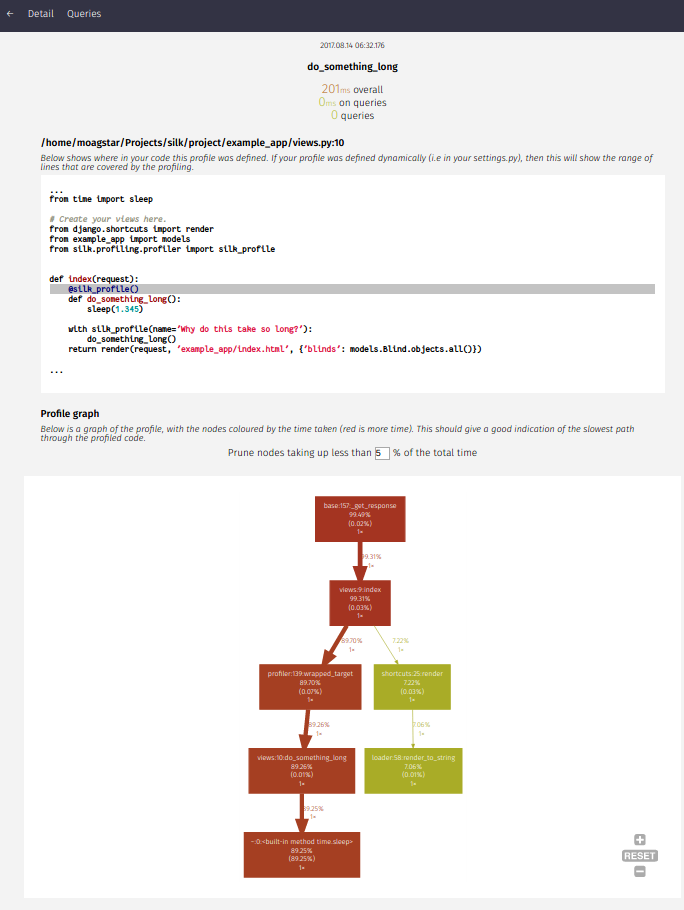
A custom storage class can be used for the saved generated binary .prof files:
# See https://docs.djangoproject.com/en/stable/ref/settings/#std-setting-STORAGES
STORAGES = {
    'SILKY_STORAGE': {
        'BACKEND': 'path.to.StorageClass',
    },
    # ...
}

# Alternatively, if STORAGES has no 'SILKY_STORAGE' entry:
SILKY_STORAGE_CLASS = 'path.to.StorageClass'
The default storage class is silk.storage.ProfilerResultStorage, and when using that you can specify a path of your choosing. You must ensure the specified directory exists.
# If this is not set, MEDIA_ROOT will be used.
SILKY_PYTHON_PROFILER_RESULT_PATH = '/path/to/profiles/'
A download button will become available with a binary .prof file for every request. This file can be used for further analysis using snakeviz or other cProfile tools
To retrieve which endpoint generates a specific profile file it is possible to add a stub of the request path in the file name with the following:
SILKY_PYTHON_PROFILER_EXTENDED_FILE_NAME = True
Silk can also be used to profile specific blocks of code/functions. It provides a decorator and a context manager for this purpose.
For example:
from silk.profiling.profiler import silk_profile


@silk_profile(name='View Blog Post')
def post(request, post_id):
    p = Post.objects.get(pk=post_id)
    return render(request, 'post.html', {
        'post': p
    })
Whenever a blog post is viewed we get an entry within the Silk UI:
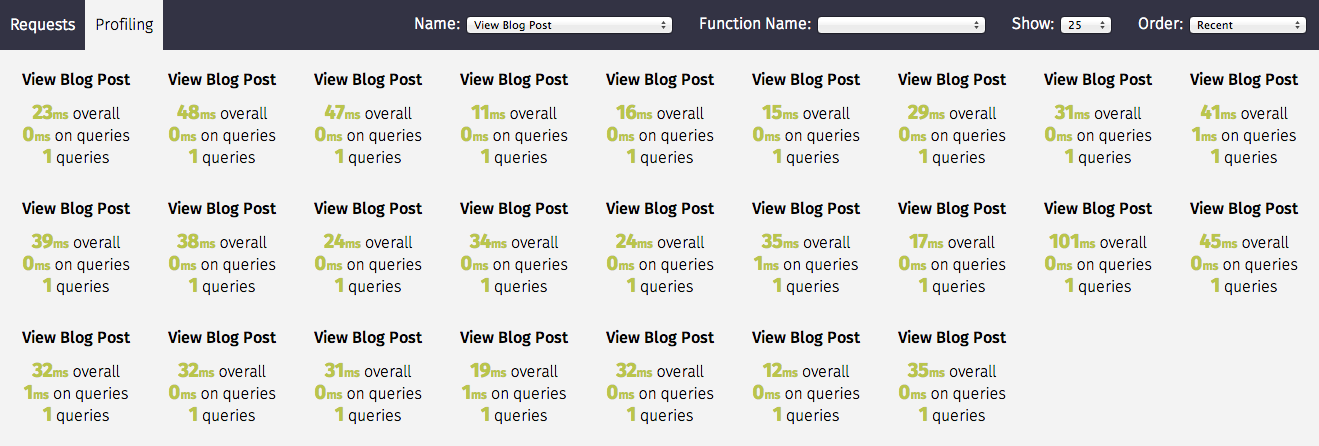
Silk profiling not only provides execution time, but also collects SQL queries executed within the block in the same fashion as with requests:

Decorator
The silk decorator can be applied to both functions and methods
from silk.profiling.profiler import silk_profile


# Profile a view function
@silk_profile(name='View Blog Post')
def post(request, post_id):
    p = Post.objects.get(pk=post_id)
    return render(request, 'post.html', {
        'post': p
    })


# Profile a method in a view class
class MyView(View):
    @silk_profile(name='View Blog Post')
    def get(self, request):
        p = Post.objects.get(pk=post_id)
        return render(request, 'post.html', {
            'post': p
        })
Context Manager
Using a context manager means we can add additional context to the name which can be useful for narrowing down slowness to particular database records.
def post(request, post_id):
    with silk_profile(name='View Blog Post #%d' % self.pk):
        p = Post.objects.get(pk=post_id)
        return render(request, 'post.html', {
            'post': p
        })
Dynamic Profiling
One of Silk's more interesting features is dynamic profiling. If for example we wanted to profile a function in a dependency to which we only have read-only access (e.g. system python libraries owned by root) we can add the following to settings.py to apply a decorator at runtime:
SILKY_DYNAMIC_PROFILING = [{
    'module': 'path.to.module',
    'function': 'MyClass.bar'
}]
which is roughly equivalent to:
class MyClass:
    @silk_profile()
    def bar(self):
        pass
The below summarizes the possibilities:
"""
Dynamic function decorator
"""

SILKY_DYNAMIC_PROFILING = [{
    'module': 'path.to.module',
    'function': 'foo'
}]

# ... is roughly equivalent to
@silk_profile()
def foo():
    pass

"""
Dynamic method decorator
"""

SILKY_DYNAMIC_PROFILING = [{
    'module': 'path.to.module',
    'function': 'MyClass.bar'
}]

# ... is roughly equivalent to
class MyClass:

    @silk_profile()
    def bar(self):
        pass

"""
Dynamic code block profiling
"""

SILKY_DYNAMIC_PROFILING = [{
    'module': 'path.to.module',
    'function': 'foo',
    # Line numbers are relative to the function as opposed to the file in which it resides
    'start_line': 1,
    'end_line': 2,
    'name': 'Slow Foo'
}]

# ... is roughly equivalent to
def foo():
    with silk_profile(name='Slow Foo'):
        print (1)
        print (2)
    print(3)
    print(4)
Note that dynamic profiling behaves in a similar fashion to that of the python mock framework in that we modify the function in-place e.g:
""" my.module """
from another.module import foo

# ...do some stuff
foo()
# ...do some other stuff
,we would profile foo by dynamically decorating my.module.foo as opposed to another.module.foo:
SILKY_DYNAMIC_PROFILING = [{
    'module': 'my.module',
    'function': 'foo'
}]
If we were to apply the dynamic profile to the functions source module another.module.foo after
it has already been imported, no profiling would be triggered.
Custom Logic for Profiling
Sometimes you may want to dynamically control when the profiler runs. You can write your own logic for when to enable the profiler. To do this add the following to your settings.py:
This setting is mutually exclusive with SILKY_PYTHON_PROFILER and will be used over it if present. It will work with SILKY_DYNAMIC_PROFILING.
def my_custom_logic(request):
    return 'profile_requests' in request.session

SILKY_PYTHON_PROFILER_FUNC = my_custom_logic # profile only session has recording enabled.
You can also use a lambda.
# profile only session has recording enabled.
SILKY_PYTHON_PROFILER_FUNC = lambda request: 'profile_requests' in request.session
Code Generation
Silk currently generates two bits of code per request:

Both are intended for use in replaying the request. The curl command can be used to replay via command-line and the python code can be used within a Django unit test or simply as a standalone script.
Configuration
Authentication/Authorisation
By default anybody can access the Silk user interface by heading to /silk/. To enable your Django
auth backend place the following in settings.py:
SILKY_AUTHENTICATION = True  # User must login
SILKY_AUTHORISATION = True  # User must have permissions
If SILKY_AUTHORISATION is True, by default Silk will only authorise users with is_staff attribute set to True.
You can customise this using the following in settings.py:
def my_custom_perms(user):
    return user.is_allowed_to_use_silk

SILKY_PERMISSIONS = my_custom_perms
You can also use a lambda.
SILKY_PERMISSIONS = lambda user: user.is_superuser
Request/Response bodies
By default, Silk will save down the request and response bodies for each request for future viewing no matter how large. If Silk is used in production under heavy volume with large bodies this can have a huge impact on space/time performance. This behaviour can be configured with the following options:
SILKY_MAX_REQUEST_BODY_SIZE = -1  # Silk takes anything <0 as no limit
SILKY_MAX_RESPONSE_BODY_SIZE = 1024  # If response body>1024 bytes, ignore
Meta-Profiling
Sometimes it is useful to be able to see what effect Silk is having on the request/response time. To do this add
the following to your settings.py:
SILKY_META = True
Silk will then record how long it takes to save everything down to the database at the end of each request:
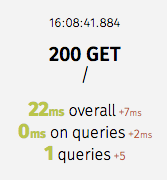
Note that in the above screenshot, this means that the request took 29ms (22ms from Django and 7ms from Silk)
Recording a Fraction of Requests
On high-load sites it may be helpful to only record a fraction of the requests that are made. To do this add the following to your settings.py:
Note: This setting is mutually exclusive with SILKY_INTERCEPT_FUNC.
SILKY_INTERCEPT_PERCENT = 50 # log only 50% of requests
Custom Logic for Recording Requests
On high-load sites it may also be helpful to write your own logic for when to intercept requests. To do this add the following to your settings.py:
Note: This setting is mutually exclusive with SILKY_INTERCEPT_PERCENT.
def my_custom_logic(request):
    return 'record_requests' in request.session

SILKY_INTERCEPT_FUNC = my_custom_logic # log only session has recording enabled.
You can also use a lambda.
# log only session has recording enabled.
SILKY_INTERCEPT_FUNC = lambda request: 'record_requests' in request.session
Recording Only Specific Response Status Codes
To keep only requests whose response has a particular status code (for example, to record server errors only), add the following to your settings.py:
SILKY_INTERCEPT_STATUS_CODES = {500, 501} # only keep requests that returned 500 or 501
Because the status code is only known once the response is ready, Silk still records each request as it comes in,
then discards it if its response status code is not in SILKY_INTERCEPT_STATUS_CODES.
The default is None, which records every request.
Ignoring specific paths
To stop silk recording particular paths entirely, list them in SILKY_IGNORE_PATHS:
SILKY_IGNORE_PATHS = ['/healthz', '/readyz']
Entries are matched exactly against request.path_info, which is the request path
without any SCRIPT_NAME prefix your front-end web server may add. So if silk is
mounted under /some-prefix/, write /healthz rather than /some-prefix/healthz.
Silk's own views are always ignored and do not need to be listed here.
Limiting request/response data
To make sure silky garbage collects old request/response data, a config var can be set to limit the number of request/response rows it stores.
SILKY_MAX_RECORDED_REQUESTS = 10**4
The garbage collection is only run on a percentage of requests to reduce overhead. It can be adjusted with this config:
SILKY_MAX_RECORDED_REQUESTS_CHECK_PERCENT = 10
In case you want decouple silk's garbage collection from your webserver's request processing, set SILKY_MAX_RECORDED_REQUESTS_CHECK_PERCENT=0 and trigger it manually, e.g. in a cron job:
python manage.py silk_request_garbage_collect
Enable query analysis
To enable query analysis when supported by the dbms a config var can be set in order to execute queries with the analyze features.
SILKY_ANALYZE_QUERIES = True
Warning: This setting may cause the database to execute the same query twice, depending on the backend. For instance, EXPLAIN ANALYZE in Postgres will actually execute the query, which may result in unexpected data updates. Set this to True with caution.
To pass additional params for profiling when supported by the dbms (e.g. VERBOSE, FORMAT JSON), you can do this in the following manner.
SILKY_EXPLAIN_FLAGS = {'format':'JSON', 'costs': True}
Masking sensitive data on request body
By default, Silk is filtering values that contains the following keys (they are case insensitive)
SILKY_SENSITIVE_KEYS = {'username', 'api', 'token', 'key', 'secret', 'password', 'signature'}
But sometimes, you might want to have your own sensitive keywords, then above configuration can be modified
SILKY_SENSITIVE_KEYS = {'custom-password'}
Clearing logged data
A management command will wipe out all logged data:
python manage.py silk_clear_request_log
Contributing

This is a Jazzband project. By contributing you agree to abide by the Contributor Code of Conduct and follow the guidelines.
Development Environment
Silk features a project named project that can be used for silk development. It has the silk code symlinked so
you can work on the sample project and on the silk package at the same time.
In order to setup local development you should first install all the dependencies for the test project. From the
root of the git repository (requires pip 25.1 or later):
pip install --group test
You will also need to install silk's dependencies. From the root of the git repository:
pip install -e .
At this point your virtual environment should have everything it needs to run both the sample project and
silk successfully.
Before running, you must set the DB_ENGINE and DB_NAME environment variables:
export DB_ENGINE=sqlite3
export DB_NAME=db.sqlite3
For other combinations, check tox.ini.
Now from the root of the sample project apply the migrations
python manage.py migrate
Now from the root of the sample project directory start the django server
python manage.py runserver
Running the tests
cd project
python manage.py test
Happy profiling!