CocoaLumberjack







CocoaLumberjack is a fast & simple, yet powerful & flexible logging framework for macOS, iOS, tvOS, watchOS and visionOS.
How to get started
First, install CocoaLumberjack via Swift Package Manager, CocoaPods, Carthage or manually.
Then use DDOSLogger for iOS 10 and later, or DDTTYLogger and DDASLLogger for earlier versions to begin logging messages.
Swift Package Manager
As of CocoaLumberjack 3.6.0, you can use the Swift Package Manager as integration method. If you want to use the Swift Package Manager as integration method, either use Xcode to add the package dependency or add the following dependency to your Package.swift:
.package(url: "https://github.com/CocoaLumberjack/CocoaLumberjack", from: "3.9.0"),
Note that you may need to add both products, CocoaLumberjack and CocoaLumberjackSwift to your target since SPM sometimes fails to detect that CocoaLumberjackSwift depends on CocoaLumberjack.
CocoaPods
platform :ios, '11.0'

target 'SampleTarget' do
  use_frameworks!
  pod 'CocoaLumberjack/Swift'
end
Note: Swift is a subspec which will include all the Obj-C code plus the Swift one, so this is sufficient.
For more details about how to use Swift with Lumberjack, see this conversation.
For Objective-C use the following:
platform :ios, '11.0'

target 'SampleTarget' do
    pod 'CocoaLumberjack'
end
Carthage
Carthage is a lightweight dependency manager for Swift and Objective-C. It leverages CocoaTouch modules and is less invasive than CocoaPods.
To install with Carthage, follow the instruction on Carthage
Cartfile
github "CocoaLumberjack/CocoaLumberjack"
Install manually
If you want to install CocoaLumberjack manually, read the manual installation guide for more information.
Swift Usage
Usually, you can simply import CocoaLumberjackSwift. If you installed CocoaLumberjack using CocoaPods, you need to use import CocoaLumberjack instead.
DDLog.add(DDOSLogger.sharedInstance) // Uses os_log

let fileLogger: DDFileLogger = DDFileLogger() // File Logger
fileLogger.rollingFrequency = 60 * 60 * 24 // 24 hours
fileLogger.logFileManager.maximumNumberOfLogFiles = 7
DDLog.add(fileLogger)

...

DDLogVerbose("Verbose")
DDLogDebug("Debug")
DDLogInfo("Info")
DDLogWarn("Warn")
DDLogError("Error")
Obj-C usage
If you're using Lumberjack as a framework, you can @import CocoaLumberjack;.
Otherwise, #import
[DDLog addLogger:[DDOSLogger sharedInstance]]; // Uses os_log

DDFileLogger *fileLogger = [[DDFileLogger alloc] init]; // File Logger
fileLogger.rollingFrequency = 60 * 60 * 24; // 24 hour rolling
fileLogger.logFileManager.maximumNumberOfLogFiles = 7;
[DDLog addLogger:fileLogger];

...

DDLogVerbose(@"Verbose");
DDLogDebug(@"Debug");
DDLogInfo(@"Info");
DDLogWarn(@"Warn");
DDLogError(@"Error");
Objective-C ARC Semantic Issue
When integrating Lumberjack into an existing Objective-C it is possible to run into Multiple methods named 'tag' found with mismatched result, parameter type or attributes build error.
Add #define DD_LEGACY_MESSAGE_TAG 0 before importing CocoaLumberjack or add #define DD_LEGACY_MESSAGE_TAG 0 or add -DDD_LEGACY_MESSAGE_TAG=0 to Other C Flags/OTHER_CFLAGS in your Xcode project.
swift-log backend
CocoaLumberjack also ships with a backend implementation for swift-log.
Simply add CocoaLumberjack as dependency to your SPM target (see above) and also add the CocoaLumberjackSwiftLogBackend product as dependency to your target.
You can then use DDLogHandler as backend for swift-log, which will forward all messages to CocoaLumberjack's DDLog. You will still configure the loggers and log formatters you want via DDLog, but writing log messages will be done using Logger from swift-log.
In your own log formatters, you can make use of the swiftLogInfo property on DDLogMessage to retrieve the details of a message that is logged via swift-log.
To use swift-log with CocoaLumberjack, take a look the following code snippet to see how to get started.
import CocoaLumberjack
import CocoaLumberjackSwiftLogBackend
import Logging

// In your application's entry point (e.g. AppDelegate):
DDLog.add(DDOSLogger.sharedInstance) // Configure loggers
LoggingSystem.bootstrapWithCocoaLumberjack() // Use CocoaLumberjack as swift-log backend
More information
- read the Getting started guide, check out the FAQ section or the other docs
- if you find issues or want to suggest improvements, create an issue or a pull request
- for all kinds of questions involving CocoaLumberjack, use the Google group or StackOverflow (use #lumberjack).
CocoaLumberjack 3
Migrating to 3.x
- To be determined
Features
Lumberjack is Fast & Simple, yet Powerful & Flexible.
It is similar in concept to other popular logging frameworks such as log4j, yet is designed specifically for Objective-C, and takes advantage of features such as multi-threading, grand central dispatch (if available), lockless atomic operations, and the dynamic nature of the Objective-C runtime.
Lumberjack is Fast
In most cases it is an order of magnitude faster than NSLog.
Lumberjack is Simple
It takes as little as a single line of code to configure lumberjack when your application launches. Then simply replace your NSLog statements with DDLog statements and that's about it. (And the DDLog macros have the exact same format and syntax as NSLog, so it's super easy.)
Lumberjack is Powerful:
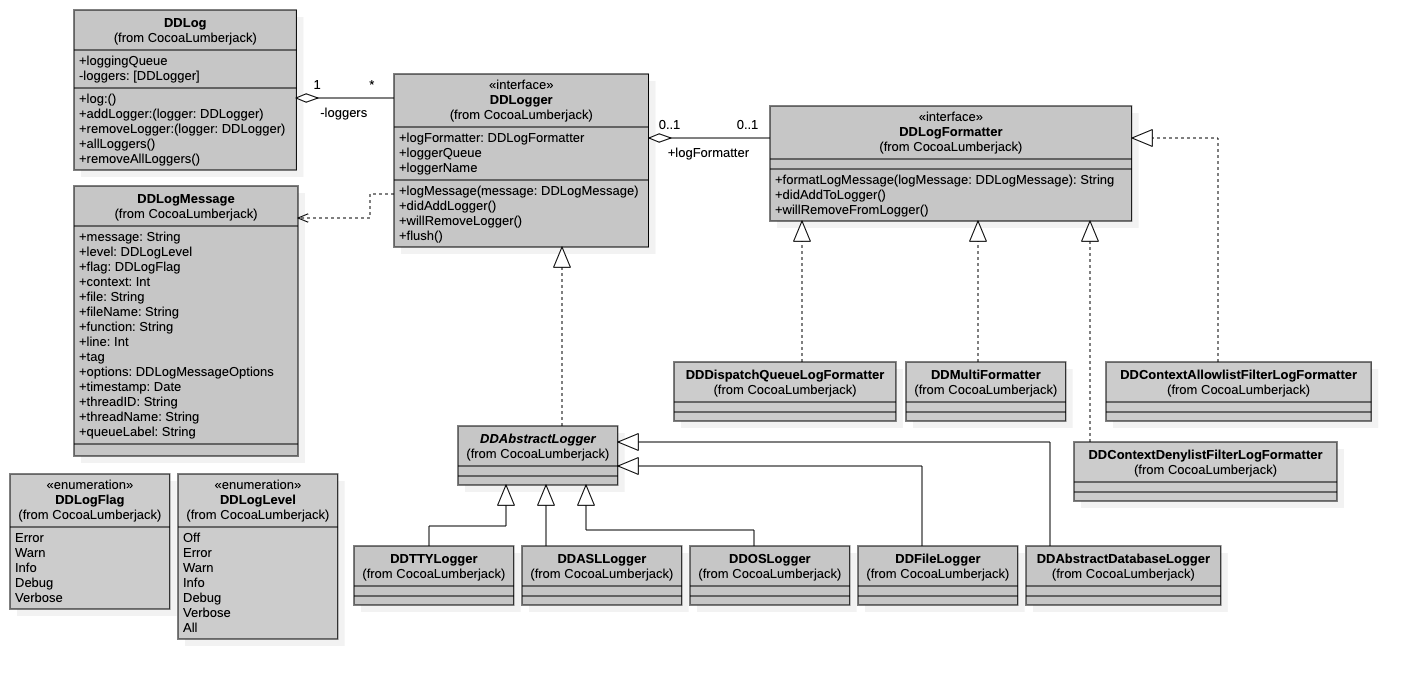
One log statement can be sent to multiple loggers, meaning you can log to a file and the console simultaneously. Want more? Create your own loggers (it's easy) and send your log statements over the network. Or to a database or distributed file system. The sky is the limit.
Lumberjack is Flexible:
Configure your logging however you want. Change log levels per file (perfect for debugging). Change log levels per logger (verbose console, but concise log file). Change log levels per xcode configuration (verbose debug, but concise release). Have your log statements compiled out of the release build. Customize the number of log levels for your application. Add your own fine-grained logging. Dynamically change log levels during runtime. Choose how & when you want your log files to be rolled. Upload your log files to a central server. Compress archived log files to save disk space...
This framework is for you if:
- You're looking for a way to track down that impossible-to-reproduce bug that keeps popping up in the field.
- You're frustrated with the super short console log on the iPhone.
- You're looking to take your application to the next level in terms of support and stability.
- You're looking for an enterprise level logging solution for your application (Mac or iPhone).
Documentation
- Get started using Lumberjack
- Different log levels for Debug and Release builds
- Different log levels for each logger
- Use colors in the Xcode debugging console
- Write your own custom formatters
- FAQ
- Analysis of performance with benchmarks
- Common issues you may encounter and their solutions
- AppCode support
- Full Lumberjack documentation
Requirements
The current version of Lumberjack requires:
- Xcode 14.1 or later
- Swift 5.5 or later
- macOS 10.13 or later
- iOS 11 or later
- tvOS 11 or later
- watchOS 4 or later
Backwards compatibility
- for iOS/tvOS up to 10, watchOS up to 3, macOS up to 10.12, Xcode up to 13 and Swift up to 5.4, use the 3.7.4 version
- for Xcode 11 and Swift up to 5.2, use the 3.6.2 version
- for Xcode 10 and Swift 4.2, use the 3.5.2 version
- for iOS 8, use the 3.6.1 version
- for iOS 6, iOS 7, OS X 10.8, OS X 10.9 and Xcode 9, use the 3.4.2 version
- for iOS 5 and OS X 10.7, use the 3.3 version
- for Xcode 8 and Swift 3, use the 3.2 version
- for Xcode 7.3 and Swift 2.3, use the 2.4.0 version
- for Xcode 7.3 and Swift 2.2, use the 2.3.0 version
- for Xcode 7.2 and 7.1, use the 2.2.0 version
- for Xcode 7.0 or earlier, use the 2.1.0 version
- for Xcode 6 or earlier, use the 2.0.x version
- for OS X