Cameradar






RTSP stream access tool
Cameradar scans RTSP endpoints on authorized targets, and uses dictionary attacks to bruteforce their credentials and routes.
What Cameradar does
- Detects open RTSP hosts on accessible targets.
- Detects the device model that streams the RTSP feed.
- Attempts dictionary-based discovery of stream routes (for example,
/live.sdp). - Attempts dictionary-based discovery of camera credentials.
- Produces a report of findings.
Table of contents
- Quick start with Docker
- Install the binary
- Install on Android (Termux)
- Configuration
- Security and responsible use
- Output
- Check camera access
- Command-line options and environment variables
- Input file format
- Build and contribute
- Frequently asked questions
- Examples
- License
Quick start with Docker
Install Docker and run:
docker run --rm -t --net=host ullaakut/cameradar --targets <target>
Example:
docker run --rm -t --net=host ullaakut/cameradar --targets 192.168.100.0/24
This scans ports 554, 5554, and 8554 on the target subnet. It attempts to enumerate RTSP streams. For all options, see Configuration reference.
Targets can be CIDRs, IPs, IP ranges or a hostname.
- Subnet:
172.16.100.0/24 - IP:
172.16.100.10 - Host:
localhost - Range:
172.16.100.10-20
- Subnet:
To use custom dictionaries, mount them and pass both flags:
docker run --rm -t --net=host \
    -v /path/to/dictionaries:/tmp/dictionaries \
    ullaakut/cameradar \
    --custom-routes /tmp/dictionaries/my_routes \
    --custom-credentials /tmp/dictionaries/my_credentials.json \
    --targets 192.168.100.0/24
Install the binary
Use this option if Docker is not available or if you want a local build.
Dependencies
- Go 1.25 or later
Steps
go install github.com/Ullaakut/cameradar/v6/cmd/cameradar@latest
The cameradar binary is now in your $GOPATH/bin.
For available flags, see Configuration reference.
Install on Android (Termux)
These steps summarize a working Termux setup for Android. Use Termux 117 from F-Droid or the official Termux site, not Google Play.
1) Set up Termux and Alpine
Install the required packages in Termux:
pkg update
pkg install mc wget git nmap proot-distro
Install Alpine and log in:
proot-distro install alpine
proot-distro login alpine
2) Install build tools in Alpine
apk add wget git go gcc clang musl-dev make
3) Build Cameradar
Create a module path and clone the repo:
mkdir -p go/pkg/mod/github.com/Ullaakut
cd go/pkg/mod/github.com/Ullaakut
git clone https://github.com/Ullaakut/cameradar.git
cd cameradar/cmd/cameradar
go install
4) Run Cameradar
Copy dictionaries and run the binary:
mkdir -p /tmp
cp -r ../../dictionaries /tmp/dictionaries
/go/bin/cameradar --targets=<target> --custom-credentials=/tmp/dictionaries/credentials.json --custom-routes=/tmp/dictionaries/routes --ui=plain --debug
Replace `` with an IP, range, host or subnet you are authorized to test.
Configuration
The default ports are 554, 5554, 8554, http, 322, and 8322.
If you do not specify ports, Cameradar uses those.
Example of scanning custom ports:
docker run --rm -t --net=host \
    ullaakut/cameradar \
    --ports "18554,19000-19010" \
    --targets localhost
You can replace the default dictionaries with your own routes and credentials files.
The repository provides baseline dictionaries in the dictionaries folder.
docker run --rm -t --net=host \
    -v /my/folder/with/dictionaries:/tmp/dictionaries \
    ullaakut/cameradar \
    --custom-routes /tmp/dictionaries/my_routes \
    --custom-credentials /tmp/dictionaries/my_credentials.json \
    --targets 172.19.124.0/24
RTSPS and TLS certificates
Use rtsps:// URLs to access RTSPS streams.
- If the stream certificate is issued by a trusted public CA, no extra setup is needed.
- If the stream certificate is self-signed or issued by a private CA, the OS trust store may reject it.
- In that case, point
SSL_CERT_FILEto the CA certificate (or server cert for a self-signed setup) when running Cameradar.
Example with local binary:
SSL_CERT_FILE=/path/to/ca-or-server.crt \
        cameradar \
        --targets localhost \
        --ports 8322 \
        --skip-scan \
        --custom-routes routes.txt \
        --custom-credentials credentials.json
Example with Docker:
docker run --rm -t --net=host \
        -e SSL_CERT_FILE=/tmp/certs/server.crt \
        -v /path/to/certs:/tmp/certs:ro \
        ullaakut/cameradar \
        --targets localhost \
        --ports 8322
If you prefer not to use SSL_CERT_FILE, add your CA certificate to the system trust
store used by your runtime environment.
Skip discovery with --skip-scan
If you already know the RTSP endpoints, you can skip discovery and treat each target and port as a stream candidate. This mode does not run discovery and can be useful on restricted networks or when you want to attack a known inventory.
Skipping discovery means:
- Cameradar does not run discovery and does not detect device models.
- Targets resolve to IP addresses. Hostnames resolve via DNS.
- CIDR blocks and IPv4 ranges expand to every address in the range.
- Large ranges create many targets, so use them carefully.
Example:
docker run --rm -t --net=host \
    ullaakut/cameradar \
    --skip-scan \
    --ports "554,8554" \
    --targets 192.168.1.10
In this example, Cameradar attempts dictionary attacks against
ports 554 and 8554 of 192.168.1.10.
Choose the discovery scanner with --scanner
Cameradar supports two discovery backends:
nmap(default)masscan
Use nmap when you want more reliable RTSP discovery: it performs service
identification and can better distinguish RTSP from other open ports.
Use masscan when scanning very large networks: it is generally faster and
more efficient at scale, but it does not provide service discovery.
docker run --rm -t --net=host \
    ullaakut/cameradar \
    --scanner masscan \
    --ports "554,8554" \
    --targets 192.168.1.0/24
[!WARNING]
--scan-speedonly applies to thenmapscanner.
Reduce false positives with --framecheck
Some cameras do not fully follow RTSP behavior and can return 200 OK even when
the route or credentials are wrong.
When you enable --framecheck, Cameradar validates each 200 OK by attempting
playback and waiting for an RTP packet.
Framecheck means:
- Cameradar only accepts
200 OKwhen it can confirm frame generation. - If no RTP packet arrives, Cameradar treats the result as a false positive and continues attacking.
- Route checks remain compatible with authentication challenges seen during probing.
--framecheck is disabled by default because it adds RTSP requests and can
significantly increase attack duration.
Example with Docker:
docker run --rm -t --net=host \
        ullaakut/cameradar \
        --targets 192.168.1.0/24 \
        --ports "554,8554" \
        --framecheck
Example with local binary and environment variable:
FRAMECHECK=true \
        cameradar \
        --targets 192.168.1.0/24 \
        --ports "554,8554"
Security and responsible use
Cameradar is a penetration testing tool. Only scan networks and devices you own or have explicit permission to test. Do not use this tool to access unauthorized systems or streams. If you are unsure, stop and get written approval before scanning.
Output
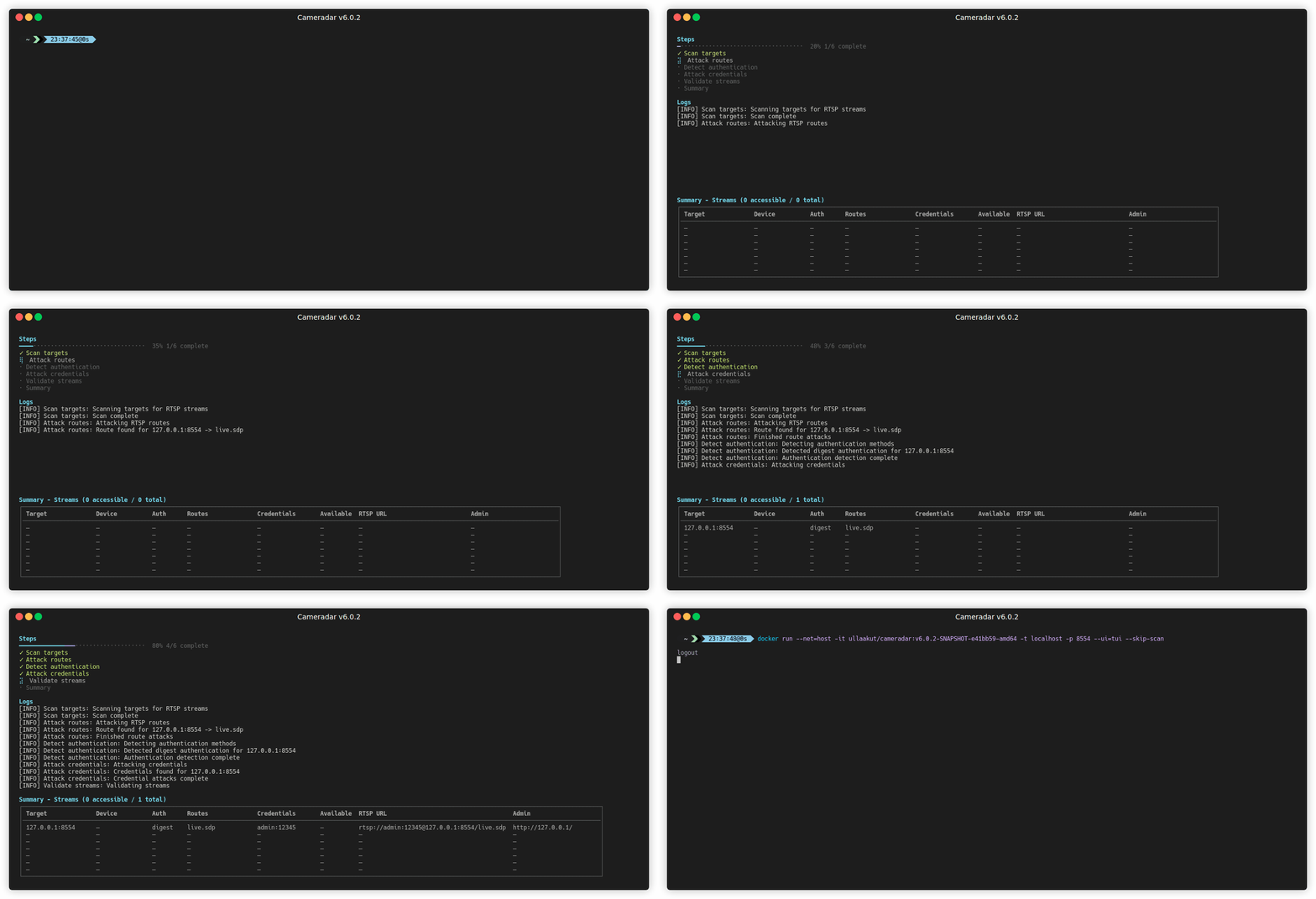
Cameradar presents results in a readable terminal UI.
It logs findings to the console.
The report includes discovered hosts, identified device models, and valid routes or credentials.
If you specify a path for the --output flag, Cameradar also writes an M3U playlist with the discovered streams.
Check camera access
Use VLC Media Player to connect to a stream:
rtsp://username:password@address:port/route
For secure RTSP endpoints, use:
rtsps://username:password@address:port/route
Input file format
The file can contain IPs, hostnames, IP ranges, and subnets. Separate entries with newlines. Example:
0.0.0.0
localhost
192.17.0.0/16
192.168.1.140-255
192.168.2-3.0-255
When you use --skip-scan, Cameradar expands each entry into explicit IP
addresses before building the target list.
Command-line options and environment variables
The complete CLI and environment variable reference is maintained in Configuration reference.
This includes all supported flags, defaults, accepted values, and env var mapping.
Build and contribute
Docker build
Run the following command in the repository root:
docker build . -t cameradar
The resulting image is named cameradar.
Go build
go install github.com/Ullaakut/cameradar/v6/cmd/cameradar@latest
The cameradar binary is now in $GOPATH/bin/cameradar.
Frequently asked questions
Examples
Running cameradar on your own machine to scan for default ports
docker run --rm -t --net=host ullaakut/cameradar --targets localhost
Running cameradar with an input file, logs enabled on port 8554
docker run --rm -t --net=host -v /tmp:/tmp ullaakut/cameradar --targets /tmp/test.txt --ports 8554
Running cameradar on a subnetwork with custom dictionaries, on ports 554, 5554, 8554, 322, and 8322
docker run --rm -t --net=host -v /tmp:/tmp ullaakut/cameradar --targets 192.168.0.0/24 --custom-credentials "/tmp/dictionaries/credentials.json" --custom-routes "/tmp/dictionaries/routes" --ports 554,5554,8554
Running cameradar with masscan discovery
docker run --rm -t --net=host ullaakut/cameradar --scanner masscan --targets 192.168.0.0/24 --ports 554,8554
License
Copyright 2026 Ullaakut
Permission is hereby granted, free of charge, to any person obtaining a copy of this software and associated documentation files (the "Software"), to deal in the Software without restriction, including without limitation the rights to use, copy, modify, merge, publish, distribute, sublicense, and/or sell copies of the Software, and to permit persons to whom the Software is furnished to do so, subject to the following conditions:
The above copyright notice and this permission notice shall be included in all copies or substantial portions of the Software.
THE SOFTWARE IS PROVIDED "AS IS", WITHOUT WARRANTY OF ANY KIND, EXPRESS OR IMPLIED, INCLUDING BUT NOT LIMITED TO THE WARRANTIES OF MERCHANTABILITY, FITNESS FOR A PARTICULAR PURPOSE AND NONINFRINGEMENT. IN NO EVENT SHALL THE AUTHORS OR COPYRIGHT HOLDERS BE LIABLE FOR ANY CLAIM, DAMAGES OR OTHER LIABILITY, WHETHER IN AN ACTION OF CONTRACT, TORT OR OTHERWISE, ARISING FROM, OUT OF OR IN CONNECTION WITH THE SOFTWARE OR THE USE OR OTHER DEALINGS IN THE SOFTWARE.