
Next-Gen ERD: Design, Explore, Document and Analyze your database schema and data
azimutt.app • roadmap • @azimuttapp



Azimutt is a full-stack database exploration tool.
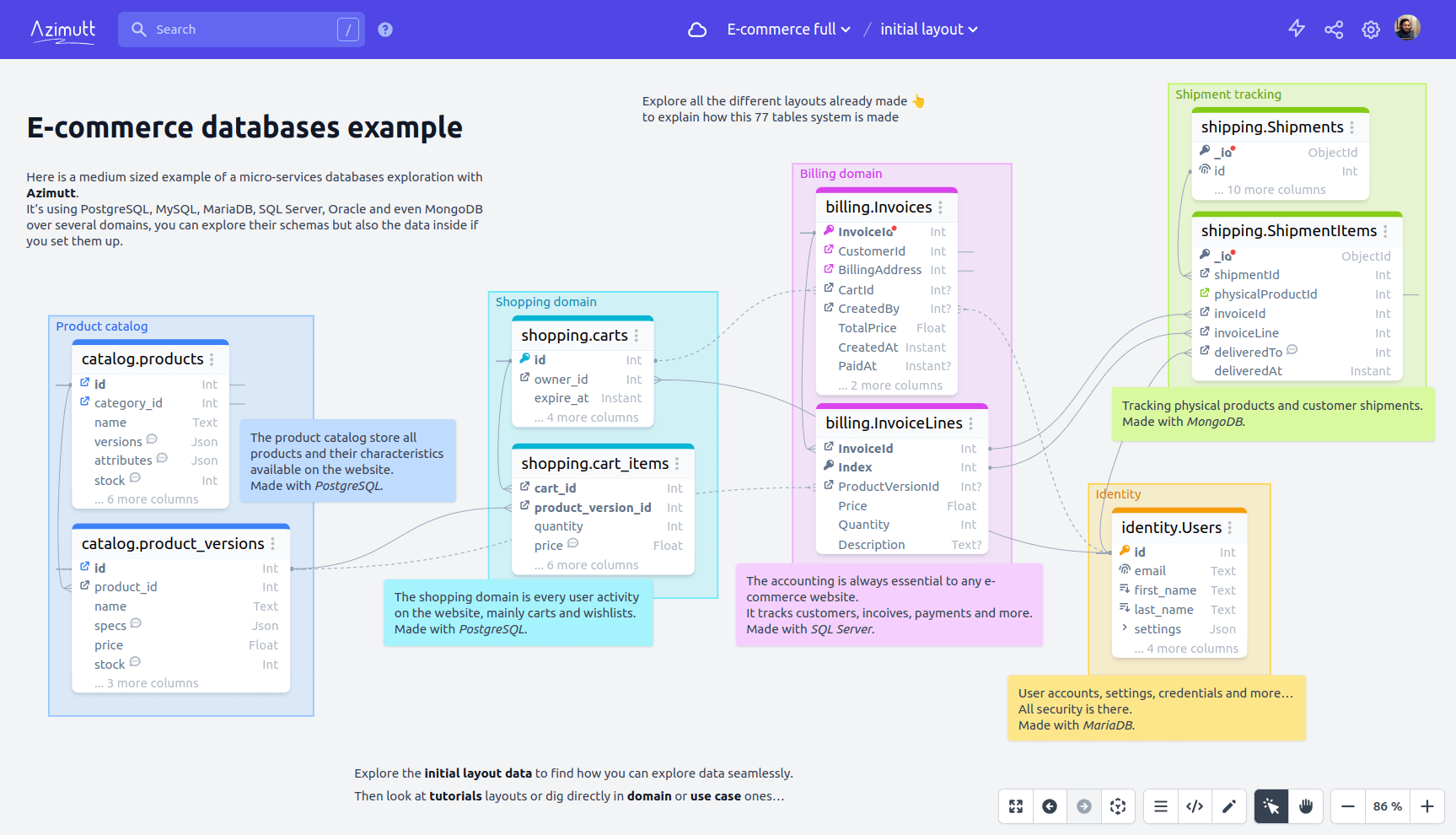
From modern ERD made for real world databases (big & messy), to fast data navigation, but also documentation everywhere and whole database analysis.
Why building Azimutt?
Databases existed for more than 40 years and despite a lot of tool around them, we couldn't find any providing a great exploration experience.
- ERDs have a great diagram UI, but fall short when schema is growing (real-world use cases)
- Data catalogs are focused on data governance and lineage, missing relational db knowledge
- Database clients focus on querying with auto-completion and table/column lists, but no visual help
So we decided to build the missing tool 💪
We started with schema exploration for databases with hundreds of tables, but now, it has grown a lot:
- Design your schema using AML for a fast diagramming
- Explore your schema using search everywhere, display only useful tables/columns and follow relations
- Query your data like never before, follow foreign keys and display entities in diagram
- Document using table/column notes and tags, layouts and memos for use cases, features or team scopes
- Analyze it to discover inconsistencies and best practices to apply
Azimutt goal is to be your ultimate tool to understand your database.
Azimutt badge
You can load any public SQL file in Azimutt with just an url parameter. So if you have a SQL file in your repo, like structure.sql, you can add a badge allowing your visitors to easily explore it:
[](https://azimutt.app/create?sql=https://raw.githubusercontent.com/azimuttapp/azimutt/refs/heads/main/backend/priv/repo/structure.sql&name=Azimutt)
Here are some examples:










Use Simple Icons to find other icon/color if needed or use our custom button image:

More details on Azimutt documentation
Self-hosted
You can use our Docker image to easily deploy it. Here is the full guide.
Deploy on Heroku
You can use our Heroku template which includes Azimutt web app, a Postgres database, Stackhero S3 storage and Mailgun.

After succeed deployment, you will need to configure config vars
# Replace with your app-name
HEROKU_APP=<app-name>

# Set PHX_HOST with the URL of the app
heroku config:set PHX_HOST=$(heroku info -s | grep "web_url" | sed 's|web_url=https://||; s|/$||')

# Copy Stackhero access key to S3_KEY_ID
heroku config:set S3_KEY_ID=$(heroku config:get S3_ROOT_ACCESS_KEY)

# Copy Stackhero secret key to S3_KEY_SECRET
heroku config:set S3_KEY_SECRET=$(heroku config:get S3_ROOT_SECRET_KEY)
Finally, you will need to create the azimutt bucket on Stackhero:
- connect to Stackhero from your Heroku dashboard
- use values of
S3_ROOT_ACCESS_KEYandS3_ROOT_SECRET_KEYto log in - create a bucket named
azimutt
Deploy on Kubernetes
Please read this guide
Local development
Azimutt is built with Elixir/Phoenix (backend & admin) and Elm/elm-spa (editor).
For local development you will need to set up the environment:
- install
pnpm, Elm & elm-spa - install Phoenix and Elixir if needed (use asdf)
- install PostgreSQL, create a user
postgreswith passwordpostgresand a databaseazimutt_dev(seeDATABASE_URLin.envlater) - install pre-commit and run
pre-commit installbefore committing - copy
.env.exampleto.envand adapt values - source your environment and install dependencies:
source .env && npm run setup - you can now start the Azimutt server:
source .env && npm start - and finally navigate to localhost:4000 🎉
- you can login with
admin@azimutt.appemail &adminpassword
Other things:
- API documentation is accessible at
/api/v1/swagger - You can use
pnpm --filter "azimutt-editor" run bookto start Elm design system & components, and access it with localhost:4002
command semantics
We have a lot of projects with a lot of commands, here is how they are structured:
- each project has its own commands (mostly npm but also elixir), the root project has global commands to launch them using a prefix
setupis a one time command to install what is requiredinstalldownload dependencies, should be run when new ones are addedstartlaunch project in dev modetestallows to run testsformatallows to run execute code formattinglintallows to run execute lintersbuildgenerate compilation outputbuild:dockersame asbuildbut in the docker image (paths are different 😕)updatebumps library versions
Development commands
pnpm --filter "azimutt-editor" run bookto launch the Elm design system
Setup Stripe
Config
- Install Stripe CLI and login with
stripe login - Run
stripe listen --forward-to localhost:4000/webhook/stripe - Copy your webhook signing secret to
STRIPE_WEBHOOK_SIGNING_SECRETvariable in your.envfile (looks likewhsec_...) - Go to your Stripe dashboard to obtain your API Key and copy it into
STRIPE_API_KEYin your.envfile (looks like:sk_test_...)
Payments
When testing interactively, use a card number, such as 4242 4242 4242 4242. Enter the card number in the Dashboard or in any payment form.
Use a valid future date, such as 12/34.
Use any three-digit CVC like 123 (four digits for American Express cards).
Use any value you like for other form fields.
See more in the stripe testing documentation
Stack
- Production & Staging
- Error logs with Sentry
- Design using TailwindCSS Framework
- Credo for static code analysis (automatically run with pre-commit)
License
The tool is available as open source under the terms of the MIT License.