English | 简体中文




Zinx is a lightweight concurrent server framework based on Golang.
Document
Note: Zinx has been widely used in many enterprises for development purposes, including message forwarding for backend modules, long-linked game servers, and message handling plugins for web frameworks. Zinx is positioned as a framework with concise code that allows developers to quickly understand the internal details of the framework and easily customize it based on their own enterprise scenarios.
Source of Zinx
| platform | Entry |
|---|---|
| Github | https://github.com/aceld/zinx |
| Gitcode | https://gitcode.com/aceld/zinx |
| Gitee | https://gitee.com/Aceld/zinx |
Website
Online Tutorial


Online Tutorial Video
| platform | online video |
|---|---|
 |
 |
|
|
 |
 |
I. One word that has been said before
Why did we create Zinx? Although there are many Golang application frameworks for servers, there are few lightweight enterprise frameworks applied in the gaming or other long-linked fields.
The purpose of designing Zinx is to provide a complete outline of how to write a TCP server based on Golang, so that more Golang enthusiasts can learn and understand this field in a straightforward manner.
The development of the Zinx framework project is synchronized with the creation of learning tutorials, and all the incremental and iterative thinking involved in the development process is incorporated into the tutorials. This approach avoids overwhelming beginners with a complete framework that they may find difficult to grasp all at once.
The tutorials will be iterated version by version, with each version adding small increments of functionality, allowing a beginner to gradually and comprehensively learn about the field of server frameworks.
Of course, we hope that more people will join Zinx and provide us with valuable feedback, enabling Zinx to become a truly enterprise-level server framework. Thank you for your attention!
II. Zinx architecture

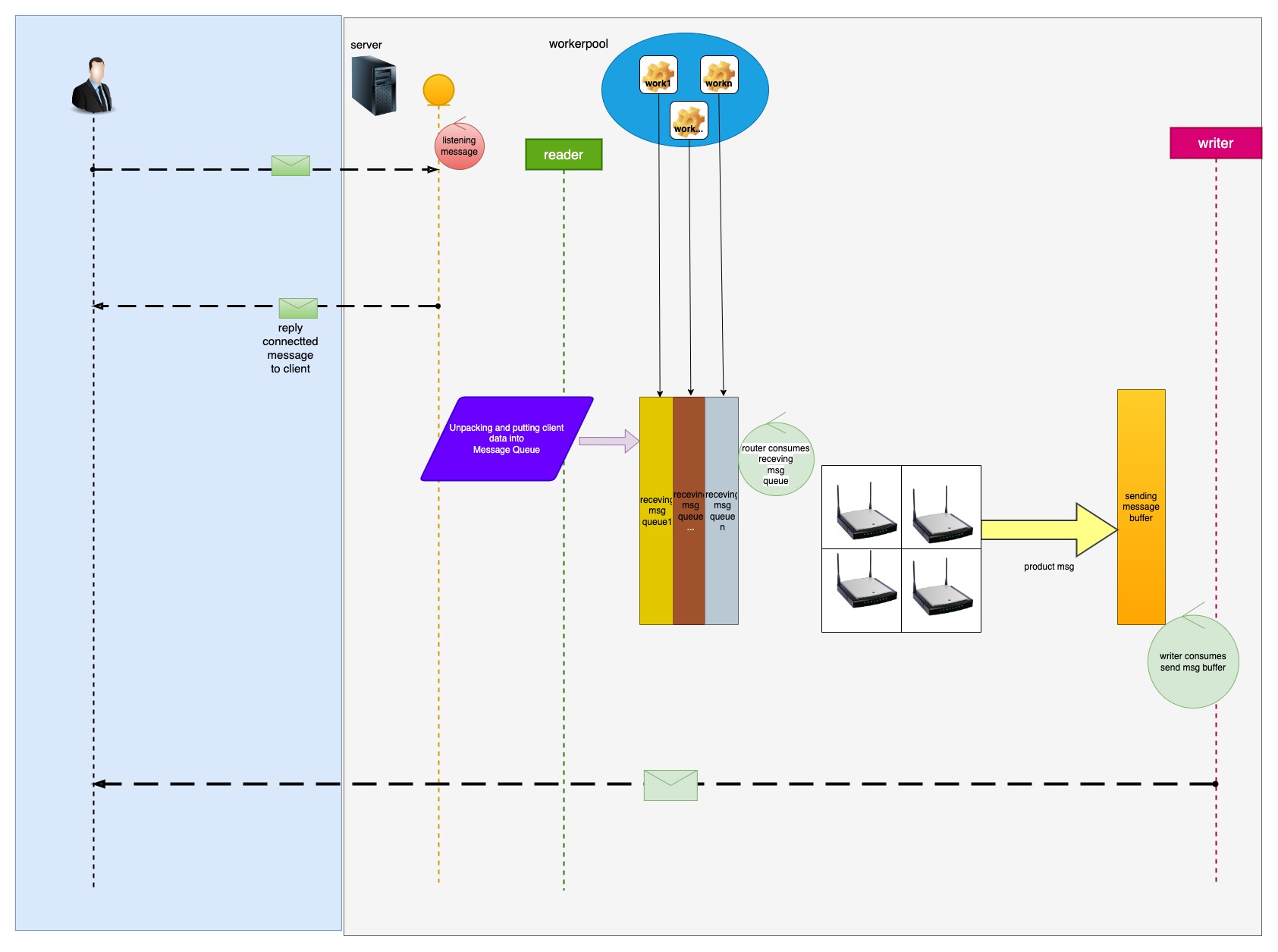

III. Zinx development API documentation
(1) QuickStart
DownLoad zinx Source
$go get github.com/aceld/zinx
note: Golang Version 1.17+
Zinx-Server
package main

import (
	"fmt"
	"github.com/aceld/zinx/ziface"
	"github.com/aceld/zinx/znet"
)

// PingRouter MsgId=1
type PingRouter struct {
	znet.BaseRouter
}

//Ping Handle MsgId=1
func (r *PingRouter) Handle(request ziface.IRequest) {
	//read client data
	fmt.Println("recv from client : msgId=", request.GetMsgID(), ", data=", string(request.GetData()))
}

func main() {
	//1 Create a server service
	s := znet.NewServer()

	//2 configure routing
	s.AddRouter(1, &PingRouter{})

	//3 start service
	s.Serve()
}
Run Server
$ go run server.go
              ██
              ▀▀
 ████████   ████     ██▄████▄  ▀██  ██▀
     ▄█▀      ██     ██▀   ██    ████
   ▄█▀        ██     ██    ██    ▄██▄
 ▄██▄▄▄▄▄  ▄▄▄██▄▄▄  ██    ██   ▄█▀▀█▄
 ▀▀▀▀▀▀▀▀  ▀▀▀▀▀▀▀▀  ▀▀    ▀▀  ▀▀▀  ▀▀▀

┌──────────────────────────────────────────────────────┐
│ [Github] https://github.com/aceld                    │
│ [tutorial] https://www.yuque.com/aceld/npyr8s/bgftov │
└──────────────────────────────────────────────────────┘
[Zinx] Version: V1.0, MaxConn: 12000, MaxPacketSize: 4096
===== Zinx Global Config =====
Host: 0.0.0.0
TCPPort: 8999
Name: ZinxServerApp
Version: V1.0
MaxPacketSize: 4096
MaxConn: 12000
WorkerPoolSize: 10
MaxWorkerTaskLen: 1024
MaxMsgChanLen: 1024
ConfFilePath: /Users/Aceld/go/src/zinx-usage/quick_start/conf/zinx.json
LogDir: /Users/Aceld/go/src/zinx-usage/quick_start/log
LogFile:
LogIsolationLevel: 0
HeartbeatMax: 10
==============================
2023/03/09 18:39:49 [INFO]msghandler.go:61: Add api msgID = 1
2023/03/09 18:39:49 [INFO]server.go:112: [START] Server name: ZinxServerApp,listenner at IP: 0.0.0.0, Port 8999 is starting
2023/03/09 18:39:49 [INFO]msghandler.go:66: Worker ID = 0 is started.
2023/03/09 18:39:49 [INFO]msghandler.go:66: Worker ID = 1 is started.
2023/03/09 18:39:49 [INFO]msghandler.go:66: Worker ID = 3 is started.
2023/03/09 18:39:49 [INFO]msghandler.go:66: Worker ID = 2 is started.
2023/03/09 18:39:49 [INFO]msghandler.go:66: Worker ID = 4 is started.
2023/03/09 18:39:49 [INFO]msghandler.go:66: Worker ID = 6 is started.
2023/03/09 18:39:49 [INFO]msghandler.go:66: Worker ID = 7 is started.
2023/03/09 18:39:49 [INFO]msghandler.go:66: Worker ID = 8 is started.
2023/03/09 18:39:49 [INFO]msghandler.go:66: Worker ID = 9 is started.
2023/03/09 18:39:49 [INFO]msghandler.go:66: Worker ID = 5 is started.
2023/03/09 18:39:49 [INFO]server.go:134: [START] start Zinx server  ZinxServerApp succ, now listenning...
Zinx-Client
package main

import (
	"fmt"
	"github.com/aceld/zinx/ziface"
	"github.com/aceld/zinx/znet"
	"time"
)

//Client custom business
func pingLoop(conn ziface.IConnection) {
	for {
		err := conn.SendMsg(1, []byte("Ping...Ping...Ping...[FromClient]"))
		if err != nil {
			fmt.Println(err)
			break
		}

		time.Sleep(1 * time.Second)
	}
}

//Executed when a connection is created
func onClientStart(conn ziface.IConnection) {
	fmt.Println("onClientStart is Called ... ")
	go pingLoop(conn)
}

func main() {
	//Create a client client
	client := znet.NewClient("127.0.0.1", 8999)

	//Set the hook function after the link is successfully established
	client.SetOnConnStart(onClientStart)

	//start the client
	client.Start()

	//Prevent the process from exiting, waiting for an interrupt signal
	select {}
}
Run Client
$ go run client.go
2023/03/09 19:04:54 [INFO]client.go:73: [START] Zinx Client LocalAddr: 127.0.0.1:55294, RemoteAddr: 127.0.0.1:8999
2023/03/09 19:04:54 [INFO]connection.go:354: ZINX CallOnConnStart....
Terminal of Zinx Print:
recv from client : msgId= 1 , data= Ping...Ping...Ping...[FromClient]
recv from client : msgId= 1 , data= Ping...Ping...Ping...[FromClient]
recv from client : msgId= 1 , data= Ping...Ping...Ping...[FromClient]
recv from client : msgId= 1 , data= Ping...Ping...Ping...[FromClient]
recv from client : msgId= 1 , data= Ping...Ping...Ping...[FromClient]
recv from client : msgId= 1 , data= Ping...Ping...Ping...[FromClient]
...
(2) Zinx configuration file
{
  "Name":"zinx v-0.10 demoApp",
  "Host":"0.0.0.0",
  "TCPPort":9090,
  "MaxConn":3,
  "WorkerPoolSize":10,
  "LogDir": "./mylog",
  "LogFile":"app.log",
  "LogSaveDays":15,
  "LogCons": true,
  "LogIsolationLevel":0
}
Name:Server Application Name
Host:Server IP
TcpPort:Server listening port
MaxConn:Maximum number of client links allowed
WorkerPoolSize:Maximum number of working Goroutines in the work task pool
LogDir: Log folder
LogFile: Log file name (if not provided, log information is printed to Stderr)
LogIsolationLevel: Log Isolation Level -0: Full On 1: Off debug 2: Off debug/info 3: Off debug/info/warn
Developers
| Zinx | Authors |
|---|---|
| zinx | 刘丹冰(@aceld) 张超(@zhngcho) 高智辉Roger(@adsian) 胡贵建(@huguijian) 张继瑀(@kstwoak) 夏小力(@xxl6097) 李志成(@clukboy)姚承政(@hcraM41)李国杰(@LI-GUOJIE)余喆宁(@YanHeDoki) |
| moke-kit(Microservices) | GStones(@GStones) |
| zinx(C++) | 刘洋(@marklion) |
| zinx(Lua) | 胡琪(@huqitt) |
| ginx(Java) | ModuleCode(@ModuleCode) |
Thanks to all the developers who contributed to Zinx!
About the author
name:Aceld(刘丹冰)
mail:
danbing.at@gmail.com
github:
https://github.com/aceld
original work:
https://www.yuque.com/aceld
Join the Zinx community
| platform | Entry |
|---|---|
 |
https://discord.gg/xQ8Xxfyfcz |
 |
加微信: ace_ld 或扫二维码,备注zinx即可。 |
 |
 WeChat Public Account WeChat Public Account |
 |