vuls is a free, open source threat detection & response project written in Go and released under GPL-3.0. It has 12,263 GitHub stars, 1,243 forks and 92 open issues, and was last pushed 19 hours ago. On this registry it ranks #5 of 12 tracked projects in Threat Detection & Response, with 5 head-to-head comparisons available.

What is vuls?

Vuls is an agent-less vulnerability scanner written in Go and licensed under GPL-3.0, aimed at system administrators and security teams that must find and track known vulnerabilities across Linux, FreeBSD, Windows and macOS hosts, containers, WordPress installs, programming language libraries and network devices without installing an agent on every machine.

What it is

Vuls is a vulnerability scanner maintained by future-architect, distributed as a Go project under the GPL-3.0 licence, with 12,263 stars, 1,243 forks, 92 open issues and a last push on 2026-09-18. Its documentation and project home live at vuls.io. It targets the system administration and cybersecurity ecosystem, sits alongside the topics security-audit, security-automation, security-hardening and security-scanner, and describes itself as agent-less, meaning the hosts it examines do not need an agent installed and maintained on them.

The concrete problem it solves is the daily burden of vulnerability analysis and software updates. In production environments it is common for an administrator to disable the package manager's automatic update option to avoid downtime and to apply updates manually instead. That choice creates three problems that Vuls exists to remove: the administrator must constantly watch NVD and comparable databases for new vulnerabilities; monitoring every installed package becomes impossible when a server carries a large number of them; and determining which servers a newly announced vulnerability affects is expensive, with the real risk of overlooking one or two machines. Vuls replaces that manual, easily-incomplete cross-referencing with automated detection, telling users both which vulnerabilities relate to their systems and which servers are affected, and producing a report on a regular schedule through CRON or a similar scheduler.

Key capabilities

  • Scans major Linux distributions including Alpine, Amazon Linux, CentOS, AlmaLinux, Rocky Linux, Debian, Oracle Linux, Raspbian, RHEL, openSUSE, openSUSE Leap, SUSE Enterprise Linux, Fedora and Ubuntu, plus FreeBSD, Windows and macOS.
  • Covers cloud, on-premise and running Docker container targets through the same scanning model.
  • Correlates findings against NVD and JVN (Japanese) databases and vendor OVAL feeds from Red Hat, Debian, Ubuntu, SUSE and Oracle Linux.
  • Consumes vendor security advisories including Alpine-secdb, Red Hat Security Advisories, the Debian Security Bug Tracker, the Ubuntu CVE Tracker and Microsoft CVRF.
  • Reads package manager output and changelogs through commands such as yum, zypper and pkg-audit, and recognises advisory identifiers including RHSA, ALAS, ELSA and FreeBSD-SA.
  • Enriches findings with exploit evidence from Exploit Database, Metasploit-Framework modules, awesome-cve-poc, PoC-in-GitHub, inthewilddb and nuclei-templates.
  • Tracks CERT alerts from US-CERT and JPCERT and the CISA Known Exploited Vulnerabilities (KEV) catalog.

Who uses it and how

  • System administrators who deliberately leave automatic package updates disabled in production to prevent downtime and need a scheduled manual review process instead.
  • Teams running servers with large numbers of installed packages, where no person can realistically watch every package for new advisories.
  • Security teams that must determine, quickly and without omissions, which servers are affected when a new vulnerability is published.
  • Operators of mixed estates spanning cloud instances, on-premise hardware and running Docker containers, who want one tool rather than one workflow per environment.
  • Organisations that need vulnerability reporting on a recurring cadence, driven by CRON or another scheduler, rather than an ad hoc scan.

Getting started

Installation and configuration are documented through the project repository and the vuls.io documentation site, and the README points readers to the supported operating system list and setup documentation. The README excerpt provided does not name a single package, Docker image or compose file, so the documentation is the correct starting point.

How it compares

No list of paid products that Vuls replaces is provided in the facts, and the README names no competing scanner. The systems it draws on, such as NVD, JVN, OVAL, Exploit Database, Metasploit-Framework modules and nuclei-templates, are vulnerability data sources rather than peer tools, so Vuls stands alone in this registry.

When to use it — and when not to

A self-hoster must run the scanner on a schedule, keep the vulnerability databases and advisory feeds updated, and accept the operational work that recurring reporting implies. The GPL-3.0 licence also means anyone embedding or extending the code inherits copyleft obligations. Note an honest gap: the repository description claims coverage of WordPress, programming language libraries and network devices, while the README feature list shown here documents Linux, FreeBSD, Windows, macOS, cloud, on-premise and Docker container scanning; verify the wider claims against the docs before relying on them.

project readme (upstream, from github) — read inline

Vuls: VULnerability Scanner


License Go Report Card Contributors

Vuls-logo

Vulnerability scanner for Linux/FreeBSD, agent-less, written in Go.
Twitter: @vuls_en
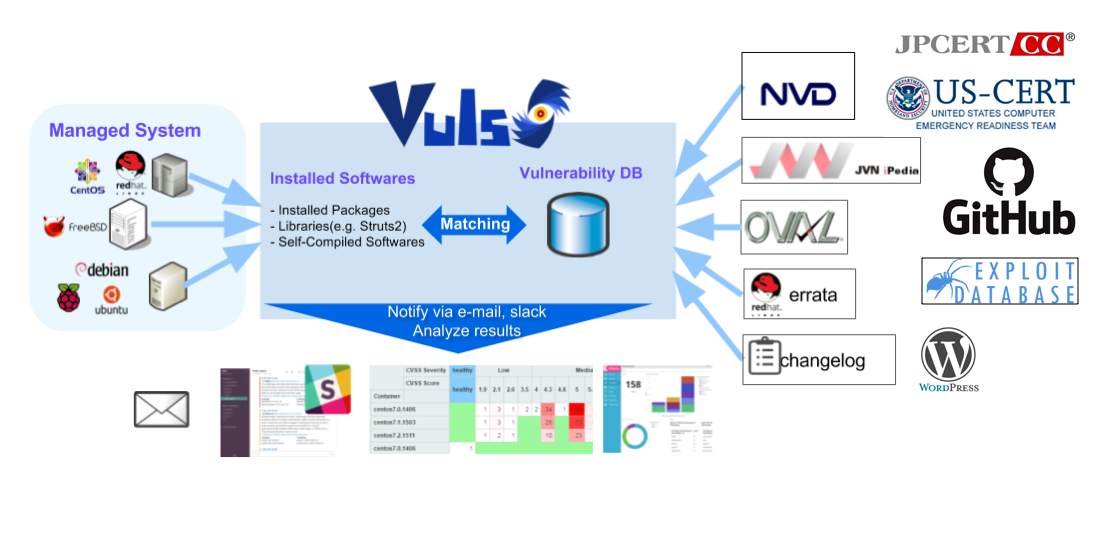
Vuls-Abstract

Vulsrepo

asciicast

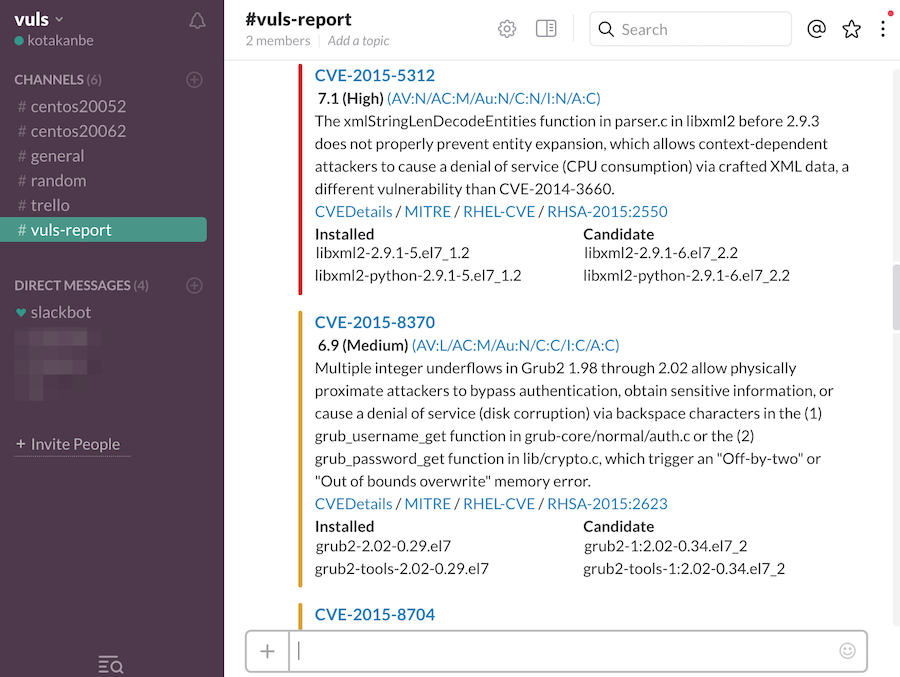
Vuls-slack


Abstract

For a system administrator, having to perform security vulnerability analysis and software update on a daily basis can be a burden. To avoid downtime in a production environment, it is common for a system administrator to choose not to use the automatic update option provided by the package manager and to perform update manually. This leads to the following problems.

  • The system administrator will have to constantly watch out for any new vulnerabilities in NVD (National Vulnerability Database) or similar databases.
  • It might be impossible for the system administrator to monitor all the software if there are a large number of software packages installed in the server.
  • It is expensive to perform analysis to determine the servers affected by new vulnerabilities. The possibility of overlooking a server or two during analysis is there.

Vuls is a tool created to solve the problems listed above. It has the following characteristics.

  • Informs users of the vulnerabilities that are related to the system.
  • Informs users of the servers that are affected.
  • Vulnerability detection is done automatically to prevent any oversight.
  • A report is generated on a regular basis using CRON or other methods. to manage vulnerability.
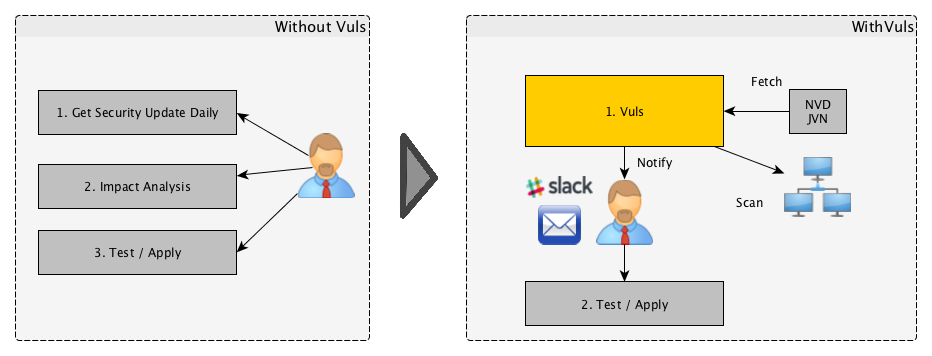
Vuls-Motivation


Main Features

Scan for any vulnerabilities in Linux/FreeBSD/Windows/macOS

Supports major Linux/FreeBSD/Windows/macOS

  • Alpine, Amazon Linux, CentOS, AlmaLinux, Rocky Linux, Debian, Oracle Linux, Raspbian, RHEL, openSUSE, openSUSE Leap, SUSE Enterprise Linux, Fedora, and Ubuntu
  • FreeBSD
  • Windows
  • macOS
  • Cloud, on-premise, Running Docker Container

High-quality scan

Scan mode

Fast Scan

  • Scan without root privilege, no dependencies
  • Almost no load on the scan target server
  • Offline mode scan with no internet access. (CentOS, Alma Linux, Rocky Linux, Debian, Oracle Linux, Red Hat, Fedora, and Ubuntu)

Fast Root Scan

  • Scan with root privilege
  • Almost no load on the scan target server
  • Detect processes affected by update using yum-ps (Amazon Linux, CentOS, Alma Linux, Rocky Linux, Oracle Linux, Fedora, and RedHat)
  • Detect processes which updated before but not restarting yet using checkrestart of debian-goodies (Debian and Ubuntu)
  • Offline mode scan with no internet access. (CentOS, Alma Linux, Rocky Linux, Debian, Oracle Linux, Red Hat, Fedora, and Ubuntu)

Remote, Local scan mode, Server mode

Remote scan mode

  • User is required to only set up one machine that is connected to other target servers via SSH

Local scan mode

  • If you don't want the central Vuls server to connect to each server by SSH, you can use Vuls in the Local Scan mode.

Server mode

  • First, start Vuls in server mode and listen as an HTTP server.
  • Next, issue a command on the scan target server to collect software information. Then send the result to Vuls Server via HTTP. You receive the scan results as JSON format.
  • No SSH needed, No Scanner needed. Only issuing Linux commands directory on the scan target server.

Dynamic Analysis

  • It is possible to acquire the state of the server by connecting via SSH and executing the command.
  • Vuls warns when the scan target server was updated the kernel etc. but not restarting it.

Scan vulnerabilities of non-OS-packages

  • Libraries of programming language
  • Self-compiled software
  • Network Devices

Vuls has some options to detect the vulnerabilities

Scan WordPress core, themes, plugins

MISC

  • Nondestructive testing
  • Pre-authorization is NOT necessary before scanning on AWS
    • Vuls works well with Continuous Integration since tests can be run every day. This allows you to find vulnerabilities very quickly.
  • Auto-generation of configuration file template
    • Auto-detection of servers set using CIDR, generate configuration file template
  • Email and Slack notification is possible (supports Japanese language)
  • Scan result is viewable on accessory software, TUI Viewer in a terminal or Web UI (VulsRepo).

What Vuls Doesn't Do

  • Vuls doesn't update the vulnerable packages.

Document

For more information such as Installation, Tutorial, Usage, visit vuls.io
日本語翻訳ドキュメント


Authors

kotakanbe (@kotakanbe) created vuls and these fine people have contributed.

Contribute

see vulsdoc


Sponsors

Tines is no-code automation for security teams. Build powerful, reliable workflows without a development team.
SAKURA internet Inc. is an Internet company founded in 1996. We provide cloud computing services such as "Saku

readme truncated — read the full docs on github

Frequently asked questions

Is vuls free to use?

vuls is open source under the GPL-3.0 licence. There is no licence fee and no seat count — you can self-host it or, where the project offers one, pay a vendor for a managed version instead.

What does vuls do?

Agent-less vulnerability scanner for Linux, FreeBSD, Container, WordPress, Programming language libraries, Network devices

What is vuls written in?

vuls is primarily written in Go. Its source is publicly available at https://github.com/future-architect/vuls, and it has 12,263 GitHub stars.