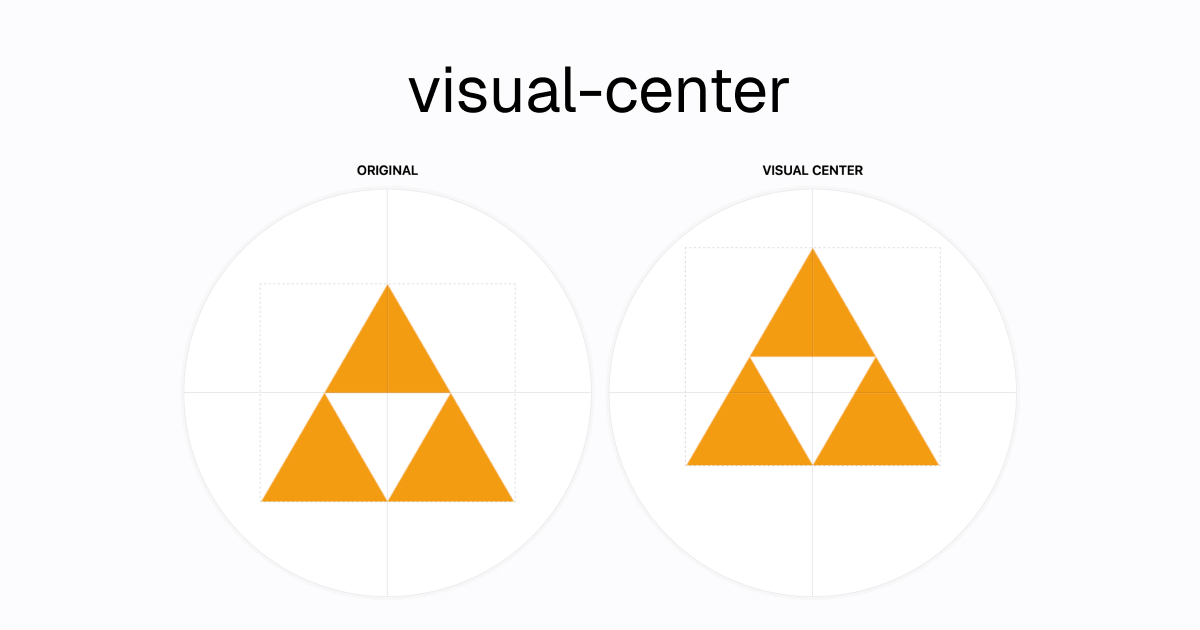
Visual Center is a JavaScript tool, published as an npm package and hosted as a web app at https://javier.xyz/visual-center, that finds the visual center of an image or logo so the mark can be placed correctly inside a container, and it is built for designers, brand teams and frontend developers who currently align logos by eye.
What it is
Visual Center is an open-source tool in the Miscellaneous / Design & Prototyping category, written in JavaScript and released under the BSD-3-Clause licence by Javier Bórquez. It has been online since 2016 and is tagged with topics that describe its scope: art, design, design-tool, frontend, javascript, pixel, tool and visual-center. It exists in two forms: a hosted web page at https://javier.xyz/visual-center, and a programmatic npm package named visual-center. The repository is small and long-lived, with 1,450 stars, 40 forks and 4 open issues at the time of writing.
The problem it solves is that the geometric center of an image is not the place where a logo looks centered. The README describes the method precisely: the tool calculates a visual weight value for every pixel on the image, defined as the square root of the difference between that pixel and the background color, and then the algorithm tries to balance that weight in all directions. That measurement replaces the manual nudging of a mark inside a container, which designers otherwise do by eye, and turns it into a repeatable numeric result that can be applied in a design file or in code.
Key capabilities
- Hosted web tool at https://javier.xyz/visual-center for one-off alignment work in the browser.
- Programmatic package, installed with
pnpm add visual-center, for use inside a JavaScript project.
- Callback API:
getVisualCenter(image, function (err, result) { ... }).
- Returns an object containing
visualTop, visualLeft, bgColor, width and height.
- Pixel-level visual weight calculation using the square root of the difference between each pixel and the background color.
- Weight-balancing in all directions, rather than relying on the bounding box of the image.
- Works on raster images and logos against a single background color.
Who uses it and how
- Designers placing a logo inside a fixed container who need the mark to read as centered rather than merely measure as centered.
- Frontend developers who require
visual-center in a Node-based asset or build step and apply visualTop and visualLeft as offsets.
- Brand and marketing teams preparing the same mark across many different container shapes and aspect ratios.
- Anyone working in the JavaScript ecosystem who wants the same result the hosted page produces, but inside their own tooling.
Getting started
Install the package with pnpm add visual-center and require it, then call getVisualCenter with the image and a callback that receives the result object. The hosted version at https://javier.xyz/visual-center needs no installation and runs in the browser.
How it compares
The README names no competing or similar tools, and no list of paid products this project replaces is provided in the facts. On the record available here, it stands alone in this registry.
When to use it — and when not to
A self-hoster operates nothing: the package is a JavaScript library with no database, storage or mail service to run, and the hosted page covers cases where no code is wanted. Skip it if the artwork has a complex or non-uniform background, because the documented algorithm compares each pixel against a background color, and skip it if you need extensive documentation, since the README is limited to the method description and one programmatic example. The licence is clear, BSD-3-Clause, and the project has been maintained online since 2016, so the main caution is sparse documentation rather than abandonment.