Syncthing for macOS




[!NOTE]
Syncthing v2 is the supported version since 23 february 2026. It needs at least macOS 12. Syncthing v1 is deprecated and will not get any updates or bugfixes. For version compatibility see README.md#macos-version-support.
Introduction
syncthing-macos project is a frugal native macOS Syncthing tray application bundle. It bundles its own Syncthing instance and wraps Syncthing background process, making it behave more like a native macOS application and less like a command-line utility with a web browser interface.
Features include:
- Open the Syncthing WebGUI from the tray in your system preferred browser.
- Optionally starts on login, so you don't need to set up Syncthing as a service.
- Tray icon syncthing status indicator.
- Retina ready icons for the Application bundle and status tray.
- Automatic updates (using Sparkle pushed from GitHub Releases).
- Open shared folders in Finder.
- Log file written to
~/Library/Application Support/Syncthing/syncthing.log, use Finder -> Go -> Go to Folder to open it.
Screenshot
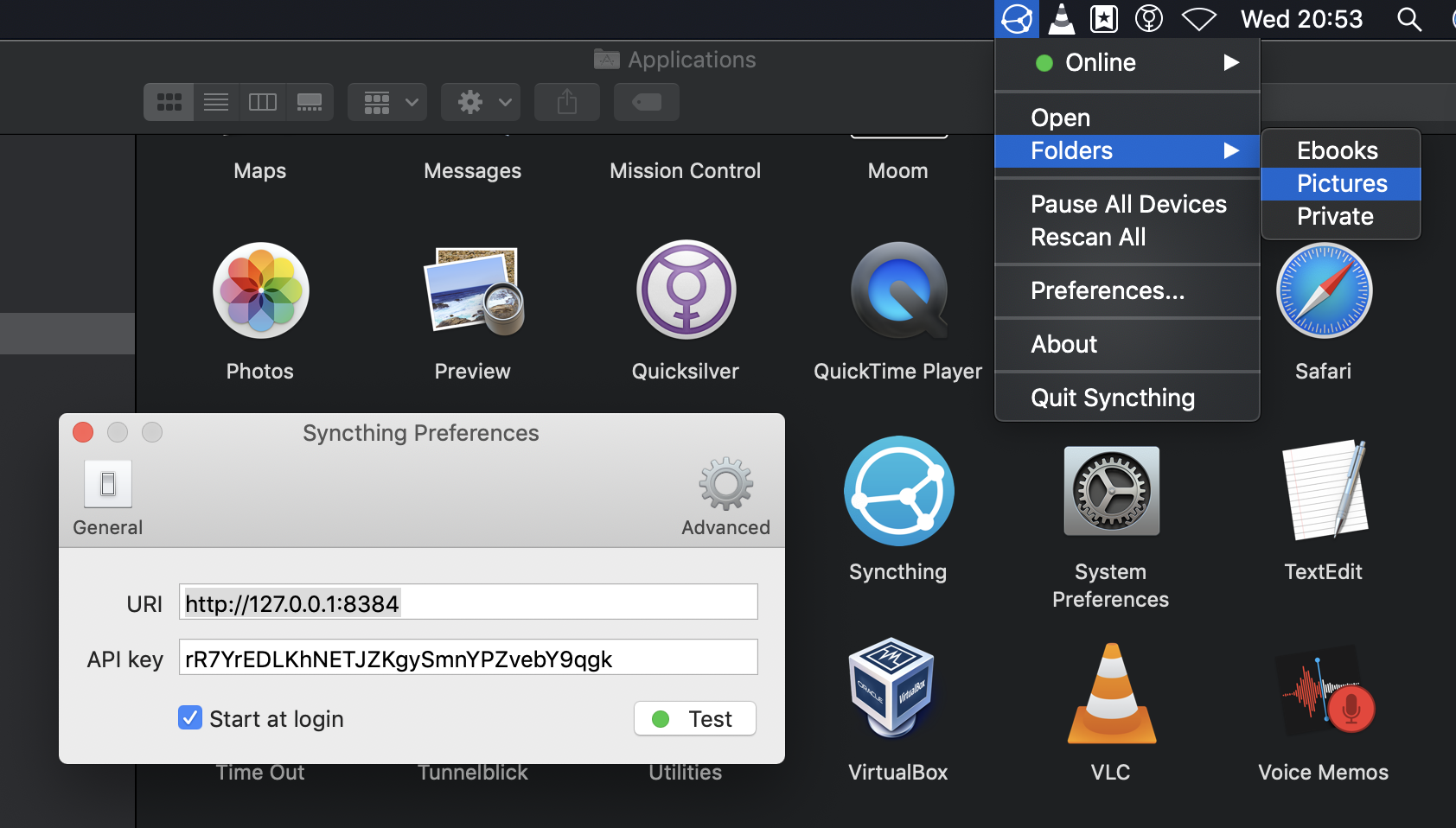
Installation
NOTICE: This is the official Syncthing macOS application bundle. Please make sure you have no other syncthing instances or wrappers running or else this application will not work!
Currently, macOS 11 or higher is necessary to run the latest version. For older version support, see the FAQ. syncthing-macos is packaged as a disk image as an application bundled with the syncthing binary.
To install just download the DMG, mount it and drag and drop the application to install. The only necessary configuration is to set the API key and URL when provisioning a remote syncthing instance, the local instance is auto-configured. The syncthing-macos application bundle disables the auto-updater of syncthing as it has its own update mechanism using Sparkle.
The latest version is available at GitHub Releases, or it can also be installed using homebrew brew install --cask syncthing-app
Why
All cross-platform approaches are not able to use all the native facilities Apple macOS provides. Including auto-updates, vector icon set (retina-ready) and creating an application bundle. GUIs are designed with XCode and everything is coded in a mix of Objective-C and Swift which is "the native approach".
Goal
The goal of this project is to keep the native macOS Syncthing tray lean but usable. No graphs, no advanced configuration windows. It provides a very simple wrapper, so users may not be aware Syncthing ships as a command line application. It strives to have a usability of good-by-default and should always follow the Apple Human Interface Guidelines to feel as much as a native application as possible.
Known bugs
See the issue tracker (bug tag filtered) for the current status.
Contributions
Contributions and issue reports are welcome.
License
FAQ: Frequently asked questions
macOS version support
- From release v2.0.14 macOS 12 is required (see issue #275)
- From release v1.27.7 macOS 11 or probably higher is required (see issue #218)
- Last v1.27.6-1 release is compatible with macOS 10.13 (see issue #217)
- From release v1.20.0-1 macOS 10.13 or higher is required
- Until release v1.19.2-1 macOS 10.12 is required (see issue #177)
- From release v1.14.0-1 macOS 10.12 is required
- Until release v1.13.1-1 macOS 10.11 or higher is supported (see issue #148 why)
Auto-update must be manually disabled for unsupported OS versions.
Preferences
syncthing-macos is designed to run its own syncthing instance and automatically detect the API key.
The preferences window is used to point to a local running instance, a remote instance is not supported.
It is possible to run your own instance and point to it for advanced/development purposes.
You should only change the settings if you know what you are doing.
The Syncthing process quality of service can be set to Normal, Utility, or Background in the preferences window. Background is the default for compatibility and reduces the process impact on foreground applications, but it can make large folder scans take longer. Changing this setting restarts the managed Syncthing process.
Setting extra Syncthing command line parameters is a hidden feature. You need to write these using the application defaults configuration. The only current limitation the parameters cannot contain spaces!. In the example below the audit log is enabled:
defaults write com.github.xor-gate.syncthing-macosx Arguments '--audit --auditfile=/Users/JohnDoe/staudit.log'
Default IP address change
When the default IP address is changed from 127.0.0.1 to a routable one like e.g 192.168.1.102 the tray application
preferences need to be set also. Or else the API cannot be accessed and will stay 'Offline'. If you broke the
configuration you can manually edit the file under the ~/Library/Application Support/Syncthing/config.xml using
Finder with Go -> Go to folder. And restart the syncthing service from the tray.
Resolve xattr sync from macOS Ventura 13.0 to /Library/Application Support/Syncthing/config.xml`. Or the location when running an
Syncthing daemon instance not managed the application bundle). Manually editing the configuration file is necessary because the web UI doesn't support xattr filter management just yet (release v1.22.1-1).
Per shared folder the xattrFilter must be configured as follows:
<folder id="..." ...>
  <xattrFilter>
    ...
    <entry match="com.apple.provenance" permit="false"/>
    <entry match="*" permit="true"/>
  </xattrFilter>
</folder>
NOTE: see the com.apple.provenance xattrFilter entry.
See also #185 and the forum post for more information.
Uninstallation
On Mac OS X you drop the application from the Application folder to your Trash.
But there are some user specific files are kept elsewhere, which are located under
$HOME/Library/Application Support/Syncthing. The files in this folder are the configuration,
encryption/profile files and the database cache. For more information see
docs.syncthing.net/users/config.html.
Disable automatic update checker
By default the Syncthing macOS application checks automatically for updates. To disable (or re-enable) the auto update check one must set the Sparkle updater parameter from the commandline:
defaults write com.github.xor-gate.syncthing-macosx SUEnableAutomaticChecks 0
This setting is un-adviced and therefor only available from the commandline. When your system is not supported anymore and don't want to get notified of unsupported updates disabling then is recommended.
Prerequisites for building/using everything in this repository
Before compiling git submodules needs to be present:
git submodule update --init
- Xcode, for the Objective-C/Swift compiler
- Python 3, for the update-release.py script
- Needs semver from pip
- Cocoapods for updating Objective-C/Swift 3th party dependencies
- Golang, only needed for Sparkle GitHub Releases to Appcast XML tool
Using XCode
The new syncthing.xcworkspace must be used when coding in XCode.
Compiling from Terminal
Build with XCode or run:
make debug
It will automaticly download syncthing universal binary and add it to the Application Bundle.
For release builds signing the application build and creating an distributable DMG:
make release-dmg
The script will select the first available Developer ID and sign the app with it. To specify the signing identity, use SYNCTHING_APP_CODE_SIGN_IDENTITY environment variable:
SYNCTHING_APP_CODE_SIGN_IDENTITY="Mac Developer: foo@bar.com (XB59MXU8EC)" make release-dmg
Design and useful information
Settings
The Syncthing settings use the NSDefaults facility. From the commandline all settings can be shown with:
jerry@Jerrys-iMac ~ % defaults read com.github.xor-gate.syncthing-macosx
{
    ApiKey = rR7YrEDLKhNETJZKgySmnYPZvebY9qgk;
    Executable = "/Applications/Syncthing.app/Contents/Resources/syncthing/syncthing";
    SUEnableAutomaticChecks = 1;
    SUHasLaunchedBefore = 1;
    SULastCheckTime = "2021-01-08 12:05:53 +0000";
    SUSendProfileInfo = 0;
    StartAtLogin = 1;
    URI = "http://127.0.0.1:8384";
}
Override Syncthing Daeomon Executable property (power-users only)
If you want to use the nice GUI but have your own executable located outside the Syncthing.app bundle,
then the Executable configuration parameter can be manually overwritten with the defaults commandline
tool using builtin Terminal or iTerm2. The last arguments should be changed to the syncthing daemon golang
application.
defaults write com.github.xor-gate.syncthing-macosx Executable /Users/jerry/develop/Syncthing/exe/syncthing
To restore it back to the bundle path just use delete of the property. It will automatically reset it back.
defaults delete com.github.xor-gate.syncthing-macosx Executable
Dependency management
With Homebrew package manager. And native XCode Swift packages (for Sparkle framework).
Versioning scheme
It uses the shipped syncthing executable version appended with a - number.
So for Syncthing 0.14.28 with first build/package it is versioned as 0.14.28-1.
Currently there is no need for having a separate version for syncthing-macos. As it also
keeps the wrapper tightly coupled with the syncthing releases.
Compilation and packaging process
- Xcode builds all sources
- Syncthing resource is fetched with
syncthing/Scripts/syncthing-resource.sh - Fancy DMG disk image is generated with
syncthing/Scripts/create-dmg.sh- The version part of the DMG name is fetched from
syncthing/Info.plist, key CFBundleShortVersionString
- The version part of the DMG name is fetched from
- Both the app bundle and the DMG are signed with the first available Developer
ID certificate, if found (or the one specified through
SYNCTHING_APP_CODE_SIGN_IDENTITYenvironment variable)
syncthing/syncthing-macos will only ship
stable releases and no release candidates
of the Syncthing Service (daemon).
Apple Application Notarize
After the dmg is created it must be send to Apple to be notarized. It can be checked with spctl
if the app is correctly verified by Apple for distribution:
spctl -a -t exec -vvv /Volumes/Syncthing/Syncthing.app
/Volumes/Syncthing/Syncthing.app: accepted
source=Notarized Developer ID
origin=Developer ID Application: Jakob Borg (LQE5SYM783)
When it is not correctly notarized the following output is seen (note the source):
spctl -a -t exec -vvv /Volumes/Syncthing/Syncthing.app
/Volumes/Syncthing/Syncthing.app: accepted
source=Developer ID
origin=Developer ID Application: Jakob Borg (LQE5SYM783)
See also the Apple Developer documentation at
Release management
Run make update-release from the toplevel Makefile to bundle latest Syncthing from GitHub.
To update the bundled syncthing the make release-update must be run from the main folder which does
basicly these steps automatically:
Update
syncthing/Scripts/syncthing-resource.sh,SYNCTHING_VERSIONUpdate
syncthing/Info.plistCFBundleShortVersionString: User readable string (e.g1.27.10-1)CFBundleVersion: Incrementing version counter (e.g102701001for1.27.10-1)
When the git branch develop or release pushed to github the Github actions CI server automatically builds debug and release
Manually download the release
.dmgfrom github.com actions which is correctly signed and notarizedManually create a new Github release with tag
v..-Run deployment of Sparkle updater appcast.xml. Which turns GitHub Releases JSON into a Sparkle appcast.xml file. (See also Sparkle documentation) to push to users.
Support for additional languages
1. Add Language in Xcode
- Open
syncthing.xcworkspace - Select project root -> Project -> Info -> Localizations
- Click + and select target language
- Select all files when prompted
2. Translate
Edit files in syncthing/[language_code].lproj/:
/* Keep key, translate value */
"Up to date" = "Actualizado";
3. Update Info.plist
Add language code to CFBundleLocalizations:
<string>es</string> <!-- New language -->
4. Test
make debug
open ./Build/Products/Debug/Syncthing.app --args -AppleLanguages '(language_code)'