swingmusic is a free, open source media & streaming project written in Python and released under AGPL-3.0. It has 2,062 GitHub stars, 135 forks and 124 open issues, and was last pushed 1 months ago. On this registry it ranks #18 of 27 tracked projects in Media & Streaming, with 5 head-to-head comparisons available. It gained 3 stars over the last 3 tracked days.

What is swingmusic?

What it is

Swing Music is a self-hosted music server and browser-based player for local audio files. It is written in Python and licensed under AGPL-3.0. It sits in the open-source self-hosted media streaming ecosystem and is positioned as a Spotify-like experience for music the user already owns.

The problem it solves is listening to a personal music library without a commercial streaming service. It organizes local files into a server-side library, exposes a web interface, supports multiple users, and adds mixes, collections, metadata cleanup, and listening statistics.

Key capabilities

  • Daily Mixes are generated from listening activity, giving a curated set of tracks each day.
  • Metadata normalization cleans the library, and album versioning keeps related releases together with labels such as Deluxe or Remaster.
  • Related artist and album suggestions help users move from one track or release to nearby local music.
  • Folder view lets users browse the collection by directory structure instead of only by artist or album.
  • Silence detection can be combined with cross-fade to make playback transitions smoother between tracks.
  • Collections group albums and artists by preference, while statistics provide insights into listening activity.
  • The server supports Last.fm scrobbling, multi-user access, and operation on Windows, Linux, arm64, and x86, with MacOS listed as coming soon.

Who uses it and how

  • Home users run it on a personal server or desktop machine to stream their own audio files through a browser.
  • Docker users deploy the ghcr.io/swingmx/swingmusic:latest image with mounted music and config directories.
  • Linux users can use the setup.swingmx.com script, while Windows users can run the portable build.
  • Android users connect to a running server with the separate swingmx/android client.
  • Households or small groups can use multi-user support, and users can send playback data to Last.fm.

Getting started

Typical setup methods are the curl install script on Linux, the portable Windows build, or Docker and Docker Compose using the ghcr.io/swingmx/swingmusic:latest image. The Docker examples map port 1970 by default and require host music and config folders.

When to use it — and when not to

Swing Music fits users who want a self-hosted, browser-accessible player for audio files they already own, rather than a paid service with a licensed catalog. It is less suitable for people who expect an out-of-the-box streaming library comparable to Spotify, because they must supply the music files and operate the server. The project has 124 open issues, and MacOS support is described as coming soon.

project readme (upstream, from github) — read inline

Swing Music

Latest GitHub Release

DownloadGet Android ClientSponsor Us ❤️DocsScreenshotsr/SwingMusicApp

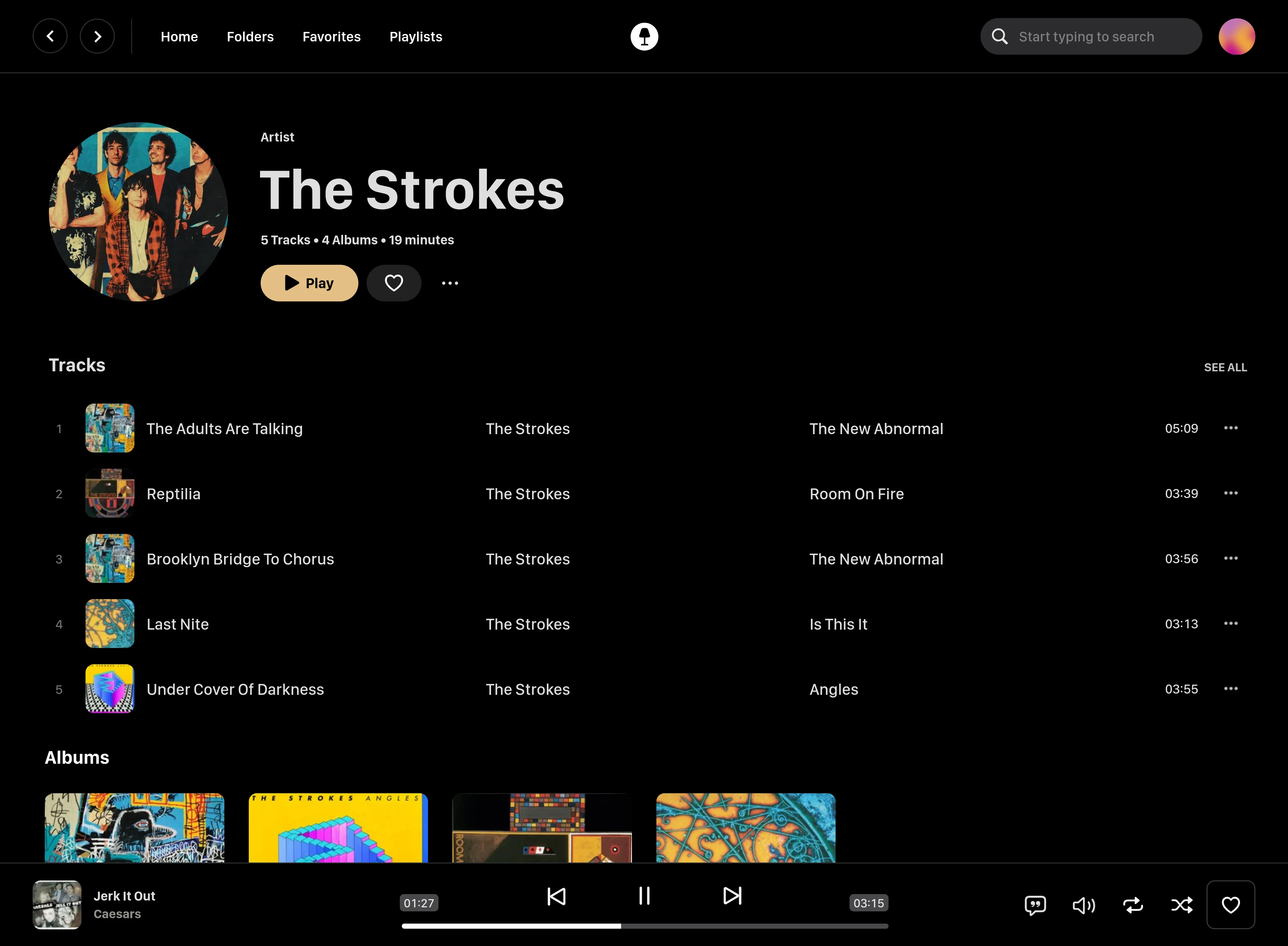
Image showing the Swing Music artist page

Swing Music is a blazingly fast and beautiful, self-hosted music streaming server. Like a cooler Spotify ... but bring your own music.

Features

  • Daily Mixes - curated everyday based on your listening activity
  • Metadata normalization - a clean and consistent library
  • Album versioning - normalized albums and association with version labels (eg. Deluxe, Remaster, etc)
  • Related artist and albums
  • Folder view - Browse your music library by folders
  • Beautiful browser based UI
  • Silence detection - Combine cross-fade with silence detection to create a seamless listening experience
  • Collections - Group albums and artists based on your preferences
  • Statistics - Get insights into your listening activity
  • Last.fm scrobbling
  • Multi-user support
  • Cross-platform - Windows, Linux, MacOS (coming soon), arm64, x86

Installation

On Linux or MacOS run the command below to install Swing Music:

curl -fsSL https://setup.swingmx.com | bash

To run Swing Music on Windows, download the portable build from the downloads page and run it.

The app should start at by default. Open the URL in your browser to configure and use Swing Music.

[!TIP] To stream your music from your Android device, download the Android mobile client.

Using Docker Compose

Here's a sample Docker compose file:

services:
  swingmusic:
    image: ghcr.io/swingmx/swingmusic:latest
    container_name: swingmusic
    ports:
      - "1970:1970"
    volumes:
      - /path/to/music:/music
      - /path/to/config:/config
    environment:
      - SWINGMUSIC_PORT=1970
      - SWINGMUSIC_DEVICE_NAME=Host name here
    restart: unless-stopped

The SWINGMUSIC_DEVICE_NAME sets the name this server reports to connected clients. To use a different port, change both SWINGMUSIC_PORT and the ports mapping to match (e.g. 2001:2001 with SWINGMUSIC_PORT=2001).

Using Docker CLI

docker pull ghcr.io/swingmx/swingmusic:latest

Then run:

docker run --name swingmusic -p 1970:1970 -e SWINGMUSIC_PORT=1970 -e SWINGMUSIC_DEVICE_NAME="Host Name Here" -v /path/to/music:/music -v /path/to/config:/config --restart unless-stopped ghcr.io/swingmx/swingmusic:latest

Replace the following with appropriate values:

  1. /path/to/music - Your music directory on the host
  2. /path/to/config - Path to create Swing Music configs on the host
  3. Host Name Here - Your host device name

You can change the Swing Music port by updating both the -p mapping and SWINGMUSIC_PORT to the same value (e.g. -p 2001:2001 -e SWINGMUSIC_PORT=2001).

Options

Options flags can be passed when starting the app in the terminal to tweak runtime settings or perform tasks. You can use the -h flag to see all supported options.

[!TIP] You can read more about options in the docs.

Contributing and Development

Swing Music is looking for contributors. If you're interested, please join us at the Swing Music Community group on Telegram. For more information, take a look at https://github.com/swing-opensource/swingmusic/issues/186.

CONTRIBUTING GUIDELINES.

License

This software is provided to you with terms stated in the AGPLv3 License or any later version. Read the full text in the LICENSE file located at the root of this repository.

Contributors

Shout out to the following code contributors who have helped maintain and improve Swing Music:

Frequently asked questions

Is swingmusic free to use?

swingmusic is open source under the AGPL-3.0 licence. There is no licence fee and no seat count — you can self-host it or, where the project offers one, pay a vendor for a managed version instead.

What does swingmusic do?

Swing Music is a beautiful, self-hosted music player for your local audio files. Like a cooler Spotify ... but bring your own music.

What is swingmusic written in?

swingmusic is primarily written in Python. Its source is publicly available at https://github.com/swingmx/swingmusic, and it has 2,062 GitHub stars.