SwarmVault
Languages: English | 简体中文 | 日本語




The local-first LLM Wiki, knowledge graph builder, and RAG knowledge base for AI agents. SwarmVault turns docs, code, transcripts, notes, and URLs into a durable markdown wiki plus a local graph you can inspect, query, and hand to agents. Start with one command, then learn the deeper graph, review, context-pack, and automation workflows when you need them.
Documentation on the website is currently English-first. If wording drifts between translations, README.md is the canonical source.
Try It in 30 Seconds
npm install -g @swarmvaultai/cli
swarmvault quickstart ./your-repo
quickstart initializes a vault in the current directory, ingests a local file, directory, or public GitHub repo, compiles the wiki and graph, writes share artifacts, and opens the local graph viewer. It is the beginner-friendly alias for swarmvault scan.
No repo handy?
swarmvault demo
After your first compile, the most useful next commands are:
swarmvault next
swarmvault query "What are the key concepts?"
swarmvault graph serve
swarmvault doctor
swarmvault candidate list
Not sure what state the vault is in? swarmvault next is read-only and tells you whether to initialize, ingest, compile, query, review, or refresh.
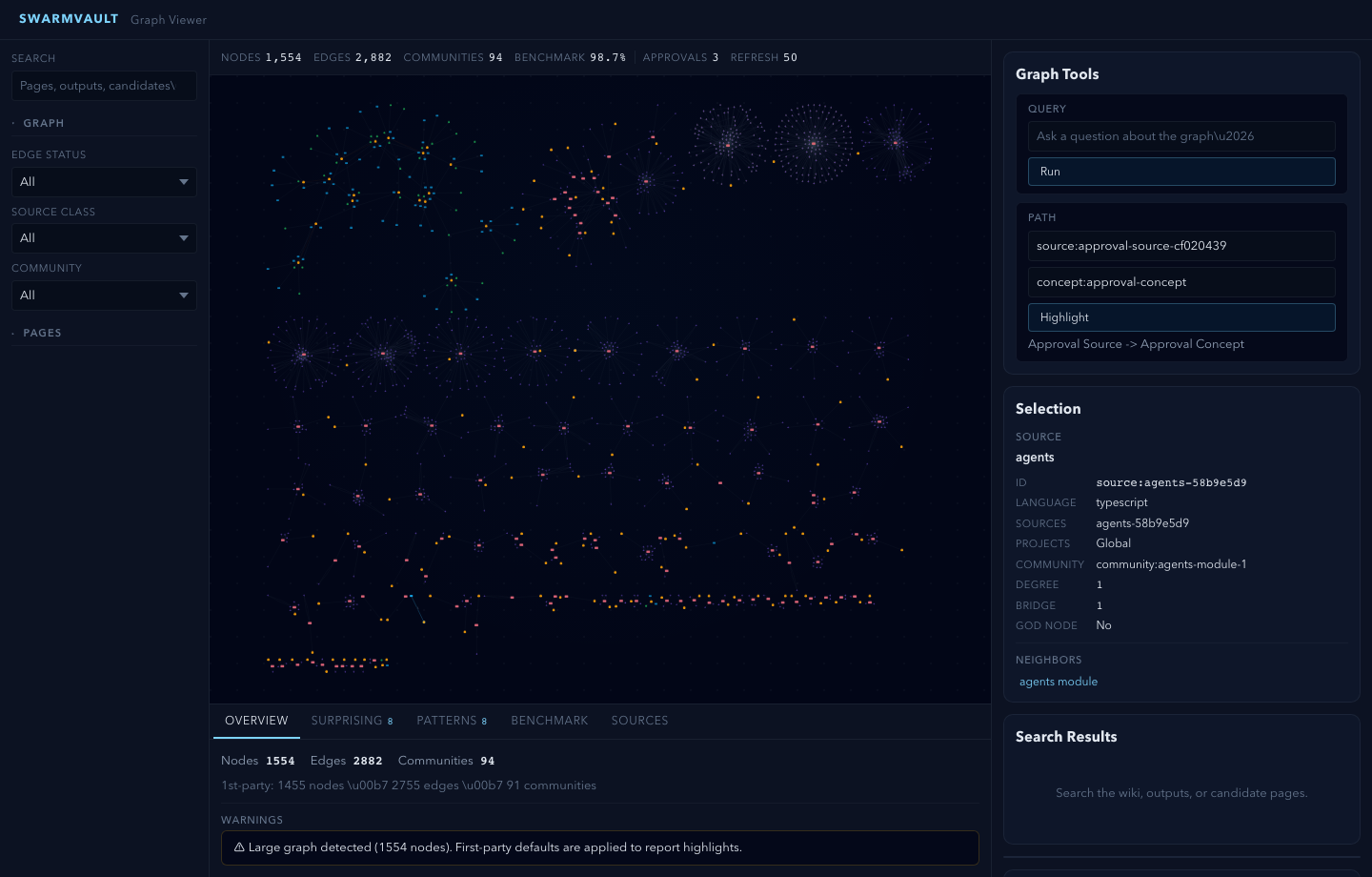
No API keys are required for the first run. The built-in heuristic provider runs locally and offline.
What you get on disk:
raw/- immutable copies of ingested materialwiki/- generated markdown pages, saved outputs, graph reports, context packs, and task notesstate/graph.json- the machine-readable knowledge graphstate/retrieval/- local search indexwiki/graph/share-card.md,wiki/graph/share-card.svg, andwiki/graph/share-kit/- copyable and visual first-run summaries
Three-Layer Architecture
SwarmVault uses three layers, following the pattern described by Andrej Karpathy:
- Raw sources (
raw/) — your curated collection of source documents. Books, articles, papers, transcripts, code, images, datasets. These are immutable: SwarmVault reads from them but never modifies them. - The wiki (
wiki/) — LLM-generated and human-authored markdown. Source summaries, entity pages, concept pages, cross-references, dashboards, and outputs. The wiki is the persistent, compounding artifact. - The schema (
swarmvault.schema.md) — defines how the wiki is structured, what conventions to follow, and what matters in your domain. You and the LLM co-evolve this over time.
In the tradition of Vannevar Bush's Memex (1945) — a personal, curated knowledge store with associative trails between documents — SwarmVault treats the connections between sources as valuable as the sources themselves. The part Bush couldn't solve was who does the maintenance. The LLM handles that.
Turn books, articles, notes, transcripts, mail exports, calendars, datasets, slide decks, screenshots, URLs, and code into a persistent knowledge vault with a knowledge graph, local search, dashboards, and reviewable artifacts that stay on disk. Use it for personal knowledge management, research deep-dives, book companions, code documentation, business intelligence, or any domain where you accumulate knowledge over time and want it organized rather than scattered.
SwarmVault turns the LLM Wiki pattern into a local toolchain with graph navigation, search, review, automation, and optional model-backed synthesis. You can also start with just the standalone schema template — zero install, any LLM agent — and graduate to the full CLI when you outgrow it.
Why SwarmVault
If you liked Karpathy's LLM Wiki gist, SwarmVault is the production-grade version. Here's how it addresses the most common concerns from the community:
"Won't hallucinations compound?" — Every edge is tagged extracted, inferred, or ambiguous. Contradiction detection flags conflicting claims. compile --approve stages all changes into reviewable approval bundles. New concepts land in wiki/candidates/ first. lint --conflicts audits for contradictions on demand.
"Does it scale past 100 pages?" — Yes. Hybrid search merges SQLite full-text with semantic embeddings, so queries work without fitting every page into context. compile --max-tokens trims output to fit bounded windows. Graph navigation (graph query, graph path, graph explain, graph callers) lets you traverse rather than search.
"Is it just for personal use?" — Git-backed workflows (--commit), watch mode with git hooks, scheduled automation, and an MCP server make it usable for teams. Agent integrations cover direct-rule targets plus the extended skill-bundle roster.
"Do I need API keys?" — No. The built-in heuristic provider is fully offline. For sharper extraction, pair with a free local LLM via Ollama. Cloud providers are optional.
From Gist to Production
| Karpathy's Gist | SwarmVault | |
|---|---|---|
| Three-layer architecture | described | implemented |
| Ingest / query / lint | manual | CLI commands |
| One-command setup | — | swarmvault quickstart |
| Typed knowledge graph | — | yes |
| Interactive graph viewer | — | yes |
| Visual + post-ready share kit | — | yes |
| Agent-ready context packs | — | yes |
| Agent task ledger | — | yes |
| Vault doctor + workbench | — | yes |
| 30+ input formats | — | yes |
| Code-aware (tree-sitter AST) | — | yes |
| Offline / no API keys | — | yes |
| Contradiction detection | mentioned | automatic |
| Approval queues | — | yes |
| Agent integrations | — | yes |
| Neo4j / graph export | — | yes |
| MCP server | — | yes |
| Watch mode + git hooks | — | yes |
| Hybrid search + rerank | index.md | SQLite FTS + embeddings |
Install
Desktop App (no Node.js required)
Download the desktop app for macOS, Windows, or Linux — bundles its own runtime:
Download Desktop App | GitHub Releases
CLI
SwarmVault requires Node >=24.
npm install -g @swarmvaultai/cli
Verify the install:
swarmvault --version
Update to the latest published release:
npm install -g @swarmvaultai/cli@latest
The global CLI already includes the graph viewer workflow and MCP server flow. End users do not need to install @swarmvaultai/viewer separately.
Quickstart
Fast Path
Run this from an empty folder or a scratch folder where you want the vault artifacts to live:
mkdir my-vault
cd my-vault
swarmvault quickstart ../your-repo
swarmvault next
That is the easiest path for a new user. It does the same work as swarmvault scan: initialize the vault, ingest a local file, directory, or public GitHub repo, compile the wiki and graph, write share artifacts, and open the graph viewer unless you pass --no-serve or --no-viz. Interactive runs show bounded ingest progress on stderr, including the active file, so large PDFs and document folders do not look silent while extraction runs.
my-vault/
├── swarmvault.schema.md       user-editable vault instructions
├── raw/                       immutable source files and localized assets
├── wiki/                      compiled wiki: sources, concepts, entities, code, outputs, graph
├── state/                     graph.json, retrieval/, embeddings, sessions, approvals
├── .obsidian/                 optional Obsidian workspace config
└── agent/                     generated agent-facing helpers
If you want to keep generated artifacts outside the source tree, run with SWARMVAULT_OUT=.swarmvault-out. swarmvault.config.json and swarmvault.schema.md stay in the project root; raw/, wiki/, state/, agent/, and inbox/ resolve under the output directory.
Learn The Main Loop
Once the fast path makes sense, the same workflow can be run step by step:
swarmvault init --obsidian --profile personal-research
swarmvault ingest ./src --repo-root .
swarmvault ingest ./meeting.srt --guide
swarmvault add https://arxiv.org/abs/2401.12345
swarmvault compile
swarmvault next
swarmvault query "What is the auth flow?"
swarmvault graph serve
Use swarmvault source add https://github.com/karpathy/micrograd, swarmvault source add https://example.com/docs/getting-started, swarmvault source list, swarmvault source reload --all, and swarmvault source session transcript-or-session-id when the same repo, folder, or docs hub should stay registered and refreshable. For public GitHub repos, swarmvault clone https://github.com/owner/repo --no-viz and swarmvault source add https://github.com/owner/repo --branch main --checkout-dir .swarmvault-checkouts/repo are the reusable checkout paths.
Common Next Commands
| Goal | Command |
|---|---|
| See the best next command for this folder | swarmvault next |
| Run the beginner path without opening the viewer | swarmvault quickstart ./path --no-serve |
| Use the older concise alias | swarmvault scan ./path --no-viz |
| Inspect graph freshness | swarmvault graph status ./src or swarmvault check-update ./src |
| Refresh code-derived graph artifacts | swarmvault update ./src |
| Recompute graph communities | swarmvault graph cluster or swarmvault cluster-only |
| Print graph counts and validate exports | swarmvault graph stats and swarmvault graph validate --strict |
| Share the first-run summary | swarmvault graph share --post, swarmvault graph share --svg ./share-card.svg, or swarmvault graph share --bundle ./share-kit |
| Export for agents or other tools | swarmvault export ai --out ./exports/ai |
| Build bounded agent context | swarmvault context build "Implement the auth refactor" --target ./src --budget 8000 |
| Record task history | swarmvault task start "Implement the auth refactor" --target ./src --agent codex |
| Keep a conversation over the vault | swarmvault chat "How should the next agent use this vault?" |
| Open health and repair guidance | swarmvault doctor --repair |
| Build graph exports | swarmvault graph export --report ./exports/report.html, swarmvault graph export --callflow ./exports/callflow.html, swarmvault graph export --obsidian ./exports/graph-vault, or swarmvault graph export --neo4j ./exports/graph.cypher |
| Merge or inspect source/module trees | swarmvault tree --output ./exports/tree.html and swarmvault merge-graphs ./exports/graph.json ./other-graph.json --out ./exports/merged-graph.json |
| Push graph data to Neo4j | swarmvault graph push neo4j --dry-run |
Want the minimal LLM-Wiki starter instead? swarmvault init --lite creates just raw/, wiki/, wiki/index.md, wiki/log.md, and swarmvault.schema.md - no config, no state, no agent installs. Normal init, quickstart, scan, and clone also avoid writing agent rule files by default; run swarmvault install --agent when you want project-local agent instructions.
When the vault lives inside a git repo, ingest, compile, and query support --commit. compile --max-tokens trims lower-priority pages for bounded context windows. swarmvault ingest ./customer-call.mp3, swarmvault ingest https://www.youtube.com/watch?v=dQw4w9WgXcQ, and swarmvault ingest --video https://example.com/product-demo.mp4 cover audio, YouTube transcript, and video workflows when the required providers or helper binaries are available.
Optional: Add a Model Provider
You do not need API keys or an external model provider to start using SwarmVault. The built-in heuristic provider supports local/offline vault setup, ingest, compile, graph/report/search workflows, and lightweight query or lint defaults.
Recommended: local LLM via Ollama + Gemma
If you want a fully local setup with sharp concept, entity, and claim extraction, pair the free Ollama runtime with Google's Gemma model. No API keys required.
ollama pull gemma4
{
  "providers": {
    "llm": {
      "type": "ollama",
      "model": "gemma4",
      "baseUrl": "http://localhost:11434/v1"
    }
  },
  "tasks": {
    "compileProvider": "llm",
    "queryProvider": "llm",
    "lintProvider": "llm"
  }
}
When you run compile/query with only the heuristic provider, SwarmVault surfaces a one-time notice pointing you here. Set SWARMVAULT_NO_NOTICES=1 to silence it. Any other supported provider (OpenAI, Anthropic, Gemini, OpenRouter, Groq, Together, xAI, Cerebras, openai-compatible, custom) works too.
Local Semantic Embeddings
For local semantic graph query without API keys, use an embedding-capable local backend such as Ollama instead of heuristic:
{
  "providers": {
    "local": {
      "type": "heuristic",
      "model": "heuristic-v1"
    },
    "ollama-embeddings": {
      "type": "ollama",
      "model": "nomic-embed-text",
      "baseUrl": "http://localhost:11434/v1"
    }
  },
  "tasks": {
    "compileProvider": "local",
    "queryProvider": "local",
    "embeddingProvider": "ollama-embeddings"
  }
}
With an embedding-capable provider available, SwarmVault can also merge semantic page matches into local search by default. tasks.embeddingProvider is the explicit way to choose that backend, but SwarmVault can also fall back to a queryProvider with embeddings support. Set retrieval.rerank: true when you want the configured queryProvider to rerank the merged top hits before answering.
Cloud API Providers
For cloud-hosted models, add a provider block with your API key:
{
  "providers": {
    "primary": {
      "type": "openai",
      "model": "gpt-4o",
      "apiKeyEnv": "OPENAI_API_KEY"
    }
  },
  "tasks": {
    "compileProvider": "primary",
    "queryProvider": "primary",
    "embeddingProvider": "primary"
  }
}
See the provider docs for optional backends, task routing, and capability-specific configuration examples.
You can also manage provider routing from the CLI without hand-editing JSON:
swarmvault provider add router --type openrouter --model openrouter/auto --api-key-env OPENROUTER_API_KEY --capability chat --capability structured --task queryProvider
swarmvault provider list
swarmvault provider show router
swarmvault provider remove router --fallback local
Provider commands preserve unknown swarmvault.config.json fields and store secret references through apiKeyEnv; they do not accept literal API key values.
Voice-first capture (local Whisper)
For audio files (voice memos, meeting recordings, interviews), install whisper.cpp and let SwarmVault drive it locally — no API keys, no network traffic:
# macOS
brew install whisper-cpp
# Debian / Ubuntu
sudo apt install whisper.cpp

swarmvault provider setup --local-whisper --apply
That command verifies the binary, downloads the base.en ggml model (~147 MB) into ~/.swarmvault/models/, and registers the provider in swarmvault.config.json under providers.local-whisper with tasks.audioProvider pointed at it. From then on, swarmvault add voice-memo.m4a (or dropping audio into raw/inbox/) transcribes end-to-end offline; the existing ingest-time redactor scrubs secrets spoken aloud before they reach raw/ or wiki/. Tune accuracy with --model {tiny.en,small.en,medium.en,large-v3}, threads with localWhisper.threads, and override binary/model discovery via localWhisper.binaryPath / localWhisper.modelPath / SWARMVAULT_WHISPER_BINARY. The local-whisper provider type is documented as experimental in STABILITY.md for 1.1.0.
Prefer a hosted transcription provider instead? Point tasks.audioProvider at any provider with audio capability (OpenAI, Groq, etc.). YouTube transcript ingest does not require a model provider.
Point It At Recurring Sources
The fastest way to make SwarmVault useful is the managed-source flow:
swarmvault source add ./exports/customer-call.srt --guide
swarmvault source add https://github.com/karpathy/micrograd
swarmvault source add https://example.com/docs/getting-started
swarmvault source list
swarmvault source session file-customer-call-srt-12345678
swarmvault source reload --all
source add registers the source, syncs it into the vault, compiles once, and writes a source-scoped brief under wiki/outputs/source-briefs/. Add --guide when you want a resumable guided session under wiki/outputs/source-sessions/, a staged source review and source guide, plus approval-bundled canonical page edits when profile.guidedSessionMode is canonical_review. Profiles using insights_only keep the guided synthesis in wiki/insights/ instead. Set profile.guidedIngestDefault: true in swarmvault.config.json to make guided mode the default for ingest, source add, and source reload; use --no-guide when you need the lighter path for a specific run. It now works for recurring local files as well as directories, public repos, and docs hubs. Use ingest for deliberate one-off files or URLs, and use add for research/article normalization.
Agent and MCP Setup
Set up your coding agent so it knows about the vault:
swarmvault install --agent claude --hook --mcp  # Claude Code + graph-first hook + MCP server
swarmvault install --agent codex --hook     # Codex + graph-first hook
swarmvault install --agent cursor           # Cursor
swarmvault install --agent copilot --hook   # GitHub Copilot CLI + hook
swarmvault install --agent gemini --hook    # Gemini CLI + hook
swarmvault install --agent trae             # Trae
swarmvault install --agent claw             # Claw / OpenClaw skill target
swarmvault install --agent droid            # Droid / Factory rules target
swarmvault install --agent kiro             # Kiro IDE + always-on steering
swarmvault install --agent kilo --hook       # Kilo project rules + plugin
swarmvault install --agent hermes           # Hermes user-scope skill
swarmvault install --agent antigravity      # Google Antigravity rules + /swarmvault workflow
swarmvault install --agent vscode           # VS Code Copilot Chat chatmode
swarmvault install status --agent kilo --hook
For hook-capable agents, the installed hooks guide graph-first reads, with enforcement as an opt-in. For Claude Code, --hook injects graph-first instructions at session start — answer code-understanding questions with the plain swarmvault graph query|explain|path commands (avoid --json, which produces much larger output), swarmvault query, swarmvault context build, or wiki/graph/report.md, and read source files only when editing them — along with a graph staleness note. swarmvault graph query "" prints the top matches with page paths plus an inline excerpt of the best-matching wiki page, so one command usually answers where-is/what-calls questions without follow-up file reads. For who-calls and impact-of-change questions, the hook guidance recommends swarmvault graph callers , which lists every caller from graph call edges with exact file:line call-site evidence — scanning only the files the graph identifies as callers — instead of a repo-wide grep. By default the hook runs in advisory mode (context): the first broad Grep/Glob/Bash search per session gets a one-time guidance note pointing at those plain graph commands, and nothing is denied. Pass --graph-first at install time to opt in to enforcement, where the first broad search per session is denied once with a guided redirect to those plain graph commands and the inline excerpt they return (repeating the same search is then allowed, so work is never blocked). The flag accepts an optional value — deny (the default when the flag is passed), context, or off — and persists the chosen mode as hooks.graphFirst in swarmvault.config.json; SWARMVAULT_GRAPH_FIRST=deny|context|off still overrides per session. After Edit/Write tools the hook spawns a background swarmvault graph update --file refresh so the graph tracks your edits. Searches scoped to vault artifact directories (wiki/, raw/, state/) or a single file are never intercepted, and search tools that merely filter piped output (e.g. some-command | grep …) do not count as broad searches. The Codex, Gemini, Copilot, OpenCode, and Kilo hooks carry the same graph-first guidance — a session note plus a one-time search redirect appropriate to each tool's hook API.
swarmvault install --agent claude --mcp also registers the SwarmVault MCP server in the project's .mcp.json ({"mcpServers":{"swarmvault":{"command":"swarmvault","args":["mcp"]}}}). Claude installs additionally write a project skill bundle at .claude/skills/swarmvault/SKILL.md, and --scope user installs the skill, hook, and settings once under ~/.claude for all repos — the hook no-ops in repos without a compiled graph report.
swarmvault install --agent also keeps the host project clean: in git repos the vault artifact directories are appended to .gitignore, strict-JSON tsconfig.json files get the artifact directories added to "exclude" so stored source copies under raw/ do not break the host typecheck (commented JSONC tsconfigs are left untouched with a warning, linter configs that still cover the artifact directories get an advisory warning, and everything is skipped when SWARMVAULT_OUT keeps artifacts outside the repo).
Recommended per-repo onboarding for token-saving agent workflows:
cd <repo>
swarmvault init && swarmvault ingest .
swarmvault install --agent claude --hook --mcp --graph-first
swarmvault hook install        # git-hook refresh on commit/checkout; accepts an optional repo path (e.g. `swarmvault hook install packages/app`) when the tracked repo lives below the vault root
SwarmVault never writes these project-local rule files during init, quickstart, scan, or clone unless you explicitly opt into configured installs. Use swarmvault install --agent [--scope project|user] for one target at a time, or list agents in swarmvault.config.json and run swarmvault init --install-agent-rules or swarmvault quickstart --install-agent-rules when you want configured targets installed together. install status reports the files SwarmVault expects for a target without mutating the workspace.
Or expose the vault directly over MCP:
swarmvault mcp
Using OpenClaw or ClawHub? Install the packaged skill with:
clawhub install swarmvault
That installs the published SKILL.md plus a ClawHub README, examples, references, troubleshooting notes, and validation prompts. Keep the CLI itself updated with npm install -g @swarmvaultai/cli@latest.
Works With Any Mix Of Input Types
| Input | Extensions / Sources | Extraction |
|---|---|---|
.pdf |
Local text extraction | |
| Word documents | .docx .docm .dotx .dotm |
Local extraction with metadata (includes macro-enabled and template variants) |
| Rich Text | .rtf |
Local RTF text extraction via parser-backed walk |
| OpenDocument | .odt .odp .ods |
Local text / slide / sheet extraction |
| EPUB books | .epub |
Local chapter-split HTML-to-markdown extraction |
| Datasets | .csv .tsv |
Local tabular summary with bounded preview |
| Spreadsheets | .xlsx .xlsm .xlsb .xls .xltx .xltm |
Local workbook and sheet preview extraction (modern, macro-enabled, binary, and legacy formats) |
| Slide decks | .pptx .pptm .potx .potm |
Local slide and speaker-note extraction (includes macro-enabled and template variants) |
| Jupyter notebooks | .ipynb |
Local cell + output extraction |
| BibTeX libraries | .bib |
Parser-backed citation entry extraction |
| Org-mode | .org |
AST-backed headline, list, and block extraction |
| AsciiDoc | .adoc .asciidoc |
Asciidoctor-backed section and metadata extraction |
| Transcripts | .srt .vtt |
Local timestamped transcript extraction |
| Chat exports | Slack export .zip, extracted Slack export directories |
Local channel/day conversation extraction |
.eml .mbox |
Local message extraction and mailbox expansion | |
| Calendar | .ics |
Local VEVENT expansion |
| Audio | .mp3 .wav .m4a .aac .ogg .webm and other audio/* files |
Local Whisper (swarmvault provider setup --local-whisper) or provider-backed transcription via tasks.audioProvider |
| Video | .mp4 .mov .m4v .mkv .avi and URL inputs with --video |
ffmpeg or yt-dlp extracts audio, then tasks.audioProvider transcribes it |
| HTML | .html, URLs |
Readability + Turndown to markdown (URL ingest) |
| YouTube URLs | youtube.com/watch, youtu.be, youtube.com/embed, youtube.com/shorts |
Direct transcript capture with extracted title and video metadata |
| Images | .png .jpg .jpeg .gif .webp .bmp .tif .tiff .svg .ico .heic .heif .avif .jxl |
Vision provider (when configured) |
| Research | arXiv, DOI, articles, X/Twitter | Normalized markdown via swarmvault add |
| Text docs | .md .mdx .txt .rst .rest |
Direct ingest with lightweight .rst heading normalization |
| Config / data | .json .jsonc .json5 .toml .yaml .yml .xml .ini .conf .cfg .properties .env |
Structured preview with key/value schema hints |
| Developer manifests | package.json tsconfig.json Cargo.toml pyproject.toml go.mod go.sum Dockerfile Makefile LICENSE .gitignore .editorconfig .npmrc (and similar) |
Content-sniffed text ingest — no plaintext dev files are silently dropped |
| Code | .js .mjs .cjs .jsx .ts .mts .cts .tsx .sh .bash .zsh .py .go .rs .java .kt .kts .scala .sc .dart .lua .zig .cs .c .cc .cpp .cxx .h .hh .hpp .hxx .php .rb .ps1 .psm1 .psd1 .ex .exs .ml .mli .m .mm .res .resi .sol .vue .svelte .jl .v .vh .sv .svh .r .R .css .html .htm .sql, plus extensionless scripts with #!/usr/bin/env node|python|ruby|bash|zsh shebangs |
AST/parser-backed analysis + module resolution where a packaged parser exists; Svelte nest-parses script blocks through the TypeScript analyzer; Julia and Verilog/SystemVerilog now use packaged WASM grammars; JavaScript and TypeScript capture static and dynamic import() edges; R is detected with an explicit parser-asset diagnostic until a safe packaged grammar is available; SQL adds table/view nodes plus read/write/join/reference edges |
| Browser clips | inbox bundles | Asset-rewritten markdown via inbox import |
| Managed sources | local directories, public GitHub repo roots, docs hubs | Registry-backed sync via swarmvault source add |
What You Get
Knowledge graph with provenance - every edge traces back to a specific source and claim. Nodes carry freshness, confidence, and community membership.
God nodes and communities - highest-connectivity bridge nodes identified automatically. Graph report pages surface surprising connections with plain-English explanations.
Contradiction detection - conflicting claims across sources are detected automatically and surfaced in the graph report. Use lint --conflicts for a focused contradiction audit.
Semantic auto-tagging - broad domain tags are extracted alongside concepts during analysis and appear in page frontmatter, graph nodes, and search.
Schema-guided compilation - each vault carries swarmvault.schema.md so the compiler follows domain-specific naming rules, categories, and grounding requirements.
Save-first queries - answers write to wiki/outputs/ by default, so useful work compounds instead of disappearing. Supports markdown, report, slides, chart, and image output formats.
Agent context packs - swarmvault context build "" --target writes a cited, token-bounded handoff for coding or research agents. Packs include graph orientation, included evidence, explicit omissions when the budget is too small, and durable artifacts under wiki/context/ plus state/context-packs/.
Agent task ledger - swarmvault task start|update|finish|resume records task goals, linked context packs, decisions, graph evidence, touched paths, outcomes, and follow-ups as git-friendly JSON plus markdown under state/memory/tasks/ and wiki/memory/tasks/. Compile includes task nodes and decisions in the graph, and the viewer exposes the task history. Existing memory commands remain compatibility aliases.
Vault doctor and workbench - swarmvault doctor [--repair] checks graph artifacts, retrieval, review queues, watch state, migrations, managed sources, source/page counts, and task state. The graph viewer workbench surfaces prioritized next actions, every check with details, copyable suggested commands, safe repair, explicit capture modes, title/tag capture fields, budgeted context-pack creation, and task-start actions.
Reviewable changes - compile --approve stages changes into approval bundles. New concepts and entities land in wiki/candidates/ first. Nothing mutates silently.
Configurable profiles - compose vault behavior with profile.presets, profile.dashboardPack, profile.guidedSessionMode, profile.guidedIngestDefault, profile.deepLintDefault, and profile.dataviewBlocks in swarmvault.config.json instead of waiting for hardcoded product modes. personal-research is a built-in preset alias.
Guided sessions - ingest --guide, source add --guide, source reload --guide, source guide , and source session create resumable source sessions under wiki/outputs/source-sessions/, stage source reviews and source guides, and route approval-bundled updates either to canonical source/concept/entity pages or to wiki/insights/, depending on the configured guided-session mode. Set profile.guidedIngestDefault: true in swarmvault.config.json to make guided mode the default for ingest and source commands; use --no-guide to override.
Deep lint defaults - set profile.deepLintDefault: true in swarmvault.config.json to make swarmvault lint include the LLM-powered advisory pass by default. Use --no-deep when you want one structural-only lint run without changing the profile.
Web-search augmented lint — lint --deep --web enriches deep-lint findings with external evidence via a configured web-search provider (http-json or custom). Web search is currently scoped to deep lint; other commands query only local vault state.
Knowledge dashboards - wiki/dashboards/ gives you recent sources, a reading log, a timeline, source sessions, source guides, a research map, contradictions, and open questions. The pages work as plain markdown first, and profile.dataviewBlocks can append Dataview blocks when you want a more Obsidian-native view.
Retrieval, hybrid search, and rerank - local retrieval stores its SQLite FTS shard and manifest under state/retrieval/. When an embedding-capable provider is available, it can merge full-text hits with semantic page matches. tasks.embeddingProvider is the explicit way to choose that backend, but SwarmVault can also fall back to a queryProvider with embeddings support. Set retrieval.rerank: true when you want the configured queryProvider to rerank the merged candidate set before query answers. Use swarmvault retrieval status|rebuild|doctor to inspect or repair the index.
Token-budgeted compile and auto-commit - compile --max-tokens trims lower-priority pages to keep generated wiki output inside a bounded token budget, and ingest|compile|query --commit can immediately commit wiki/ and state/ changes when the vault lives in a git repo.
Graph report health signals - graph report artifacts now include community-cohesion summaries, isolated-node and ambiguity warnings, and sharper follow-up questions when the graph has weakly connected or ambiguous regions.
Visual + post-ready share kit - every compile writes wiki/graph/share-card.md, wiki/graph/share-card.svg, and wiki/graph/share-kit/; swarmvault graph share --post prints concise text, swarmvault graph share --svg [path] writes a 1200x630 visual card, and swarmvault graph share --bundle [dir] writes markdown, post text, SVG, HTML preview, and JSON metadata for easy posting, linking, or screenshotting.
Graph blast radius, cycles, status, stats, validation, refresh, query filters, tree, merge, clustering, and report export - graph blast traces reverse import impact through module dependencies, graph cycles [--relation imports] finds deterministic directed cycles, graph status [path] performs a read-only stale check over graph/report artifacts and tracked repo changes, and check-update [path] is the top-level compatibility alias for the same cron-safe status check. graph stats prints lightweight counts and relation mix, graph validate [graph] --strict checks duplicate ids, dangling references, confidence bounds, and conflicted-edge evidence before export/merge/push workflows, and graph update [path] / graph refresh [path] runs the code-only repo refresh cycle for graph artifacts with a 25% shrink guard unless --force is explicit; update [path] is the top-level compatibility alias. watch [path] --once can target one repo root without persisting watch config. graph query can filter traversal by relation, context group, evidence class, node type, or language, graph tree writes an interactive source/module/symbol HTML tree with expand/collapse controls and a node inspector, and tree is the top-level alias. graph merge combines SwarmVault or node-link JSON graphs into one namespaced artifact, and merge-graphs is the top-level alias. graph cluster [--resolution ] recomputes communities, degrees, god-node flags, and graph report pages from an existing graph without re-ingesting sources, and cluster-only [vault] is the top-level compatibility alias. graph export --report writes a self-contained HTML report with graph stats, key nodes, communities, and warnings; graph export --callflow writes a compact directed relationship HTML view; graph export --neo4j is an alias for the Cypher export used before Neo4j imports.
Graph diff - swarmvault diff compares the current knowledge graph against the last committed version, showing added/removed nodes, edges, and pages so you can see exactly what a compile changed.
Worktree artifact roots - SWARMVAULT_OUT= relocates generated raw/, wiki/, state/, agent/, and inbox/ artifacts while keeping swarmvault.config.json and swarmvault.schema.md in the project root. Use it for isolated smoke tests, shared source trees, and repo worktrees where generated vault state should not sit beside source files.
Obsidian graph export - graph export --obsidian writes an Obsidian-friendly bundle that preserves wiki folders, appends graph connections with typed link frontmatter for Breadcrumbs/Juggl, emits community notes and orphan-node stubs, copies assets, generates Dataview dashboard pages, and includes a full .obsidian config with types.json, node-type color groups, and cssclasses on every page.
Adaptive graph communities - SwarmVault auto-tunes Louvain community resolution for very small or sparse graphs, then splits oversized or low-cohesion communities so graph reports stay scannable on larger repos. You can pin a specific value with graph.communityResolution in swarmvault.config.json or override one recompute with swarmvault graph cluster --resolution .
Optional model providers - OpenAI, Anthropic, Gemini, Ollama, OpenRouter, Groq, Together, xAI, Cerebras, generic OpenAI-compatible, custom adapters, or the built-in heuristic for offline/local use.
Agent integrations - explicitly install rules for Codex, Claude Code, Cursor, Goose, Pi, Gemini CLI, OpenCode, Aider, GitHub Copilot CLI, Trae, Claw/OpenClaw, Droid, Kiro, Kilo, Hermes, Google Antigravity, VS Code Copilot Chat, Devin, and the extended skill-bundle roster. init, quickstart, scan, and clone leave project-local rule files alone unless you opt into configured installs. Optional graph-first hooks guide graph reads for supported agents — session-start graph guidance with staleness notes, a one-time advisory note on the first broad search (or, with the --graph-first enforcement opt-in, a deny-once redirect where retrying the same search is always allowed), and, for Claude Code, automatic background per-file graph refresh after edits, configurable with SWARMVAULT_GRAPH_FIRST or hooks.graphFirst. Antigravity installs under .agents/rules/ and .agents/workflows/; older fully managed .agent/ files are cleaned up during reinstall.
MCP server - swarmvault mcp exposes the vault to any compatible agent client over stdio, including graph stats, read-only graph freshness (graph_status), code-only graph refresh (update_graph, optionally per-file), graph clustering refresh, community lookup, hyperedges, context-pack, task-ledger, compatibility memory-task, vault doctor, and retrieval health tools. The repository also ships Docker/registry metadata for MCP server registries that validate a stdio container entrypoint.
Built-in browser clipper - graph serve exposes a local /api/bookmarklet page and /api/clip endpoint so a running vault can capture the current browser URL, page title, selected text, markdown, HTML excerpts, and tags from the workbench or bookmarklet. URL-only bookmarklet clips use normalized add; selected text is imported through the inbox path.
Automation - watch mode, git hooks, recurring schedules, and inbox import keep the vault current without manual intervention.
Managed sources - swarmvault source add|list|reload|review|guide|session|delete turns recurring files, directories, public GitHub repos, and docs hubs into named synced sources with registry state under state/sources.json, source briefs under wiki/outputs/source-briefs/, resumable session anchors under wiki/outputs/source-sessions/, and guided integration artifacts under wiki/outputs/source-guides/. Public GitHub repo sources support --branch, --ref, and --checkout-dir for pinned branch/tag/commit scans and reusable checkouts.
Source artifact types:
| Artifact | Created by | Purpose |
|---|---|---|
| Source brief | source add, ingest (always) |
Auto summary written to wiki/outputs/source-briefs/ |
| Source review | source review, source add --guide |
Lighter staged assessment in wiki/outputs/source-reviews/ |
| Source guide | source guide, source add --guide |
Guided walkthrough with approval-bundled updates in wiki/outputs/source-guides/ |
| Source session | source session, source add --guide |
Resumable workflow state in wiki/outputs/source-sessions/ and state/source-sessions/ |
External graph sinks - export to full HTML, lightweight standalone HTML, self-contained report HTML, directed callflow HTML, SVG, GraphML, Cypher, JSON, Obsidian note bundles, or Obsidian canvas, or push the live graph directly into Neo4j over Bolt/Aura with shared-database-safe vaultId namespacing.
Interactive ingest feedback - file and directory ingest emits bounded progress on stderr with the active file and processed content size, while JSON, MCP, watch, and CI-style flows stay quiet.
Large-repo hardening - long repo ingests and compile passes stay bounded, provider-backed non-code analysis chunks long extracted text before model calls, nested .gitignore and .swarmvaultignore files are respected with .swarmvaultinclude allowlists for intentional exceptions, parser compatibility failures stay local to the affected sources with explicit diagnostics, code-only repo watch cycles skip non-code re-analysis, and graph reports roll up tiny fragmented communities for readability.
Every edge is tagged extracted, inferred, or ambiguous - you always know what was found vs guessed.
Platform Support
| Agent | Install command |
|---|---|
| Codex | swarmvault install --agent codex --hook |
| Claude Code | swarmvault install --agent claude --hook --mcp |
| Cursor | swarmvault install --agent cursor |
| Goose | swarmvault install --agent goose |
| Pi | swarmvault install --agent pi |
| Gemini CLI | swarmvault install --agent gemini |
| OpenCode | swarmvault install --agent opencode |
| Aider | swarmvault install --agent aider |
| GitHub Copilot CLI | swarmvault install --agent copilot |
| Trae | swarmvault install --agent trae |
| Claw / OpenClaw | swarmvault install --agent claw |
| Droid | swarmvault install --agent droid |
| Kiro | swarmvault install --agent kiro |
| Kilo | swarmvault install --agent kilo --hook |
| Hermes | swarmvault install --agent hermes |
| Google Antigravity | swarmvault install --agent antigravity |
| VS Code Copilot Chat | swarmvault install --agent vscode |
| Amp | swarmvault install --agent amp |
| Augment | swarmvault install --agent augment |
| AdaL | swarmvault install --agent adal |
| IBM Bob | swarmvault install --agent bob |
| Cline | swarmvault install --agent cline |
| CodeBuddy | swarmvault install --agent codebuddy |
| Command Code | swarmvault install --agent command-code |
| Continue | swarmvault install --agent continue |
| Cortex Code | swarmvault install --agent cortex |
| Crush | swarmvault install --agent crush |
| Deep Agents | swarmvault install --agent deepagents |
| Devin | swarmvault install --agent devin |
| Firebender | swarmvault install --agent firebender |
| iFlow CLI | swarmvault install --agent iflow |
| Junie | swarmvault install --agent junie |
| Kilo Code | swarmvault install --agent kilo-code |
| Kimi Code CLI | swarmvault install --agent kimi |
| Kode | swarmvault install --agent kode |
| MCPJam | swarmvault install --agent mcpjam |
| Mistral Vibe | swarmvault install --agent mistral-vibe |
| Mux | swarmvault install --agent mux |
| Neovate | swarmvault install --agent neovate |
| OpenClaw | swarmvault install --agent openclaw |
| OpenHands | swarmvault install --agent openhands |
| Pochi | swarmvault install --agent pochi |
| Qoder | swarmvault install --agent qoder |
| Qwen Code | swarmvault install --agent qwen-code |
| Replit | swarmvault install --agent replit |
| Roo Code | swarmvault install --agent roo-code |
| TRAE CN | swarmvault install --agent trae-cn |
| Warp | swarmvault install --agent warp |
| Windsurf | swarmvault install --agent windsurf |
| Zencoder | swarmvault install --agent zencoder |
Codex, Claude Code, OpenCode, Gemini CLI, Copilot, and Kilo also support --hook for graph-first read guidance (advisory by default; add --graph-first to opt in to enforcement). Claude Code additionally supports --mcp for project .mcp.json MCP-server registration and --scope user for a one-time skill/hook/settings install under ~/.claude. Project-scope installs can also write skill bundles for agents with skill directories, and --scope user writes user-level skill files where supported.
Worked Examples
Each folder has real input files and actual output so you can run it yourself and verify.
| Example | What it shows | Source |
|---|---|---|
| research-deep-dive | Papers and articles building an evolving thesis with contradiction detection across sources | worked/research-deep-dive/ |
| personal-knowledge-base | Journal entries, health notes, podcasts compiled into a personal Memex with dashboards | worked/personal-knowledge-base/ |
| book-reading | Chapter-by-chapter fan wiki with character and theme pages that compound as you read | worked/book-reading/ |
| code-repo | Repo ingest, module pages, graph reports, benchmarks | worked/code-repo/ |
| capture | Research-aware add capture with normalized metadata from arXiv, DOI, URLs |
worked/capture/ |
| mixed-corpus | Compile, review, save-first output loops across mixed input types | worked/mixed-corpus/ |
See the examples guide for step-by-step walkthroughs.
Providers
Providers are optional. SwarmVault routes by capability, not brand. Built-in provider types:
heuristic openai anthropic gemini ollama openrouter groq together xai cerebras openai-compatible custom
See the provider docs for configuration examples.
Privacy & Data Flow
SwarmVault processes your data locally by default:
- Code files are parsed on your machine via the TypeScript compiler API, tree-sitter, or the SQL parser. Source code contents are never sent to external APIs.
- Documents and text are sent to your configured provider for semantic extraction. With the built-in
heuristicprovider, everything stays local. - Images are sent to a vision-capable provider only when one is configured.
- Heuristic mode (the default) is fully offline — no API keys, no network calls.
When you add a model provider (OpenAI, Anthropic, Ollama, etc.), only non-code content is sent for LLM analysis. All graph building, community detection, and report generation happen locally.
Packages
| Package | Purpose |
|---|---|
@swarmvaultai/cli |
Global CLI (swarmvault and vault commands) |
@swarmvaultai/engine |
Runtime library for ingest, compile, query, lint, watch, MCP |
@swarmvaultai/viewer |
Graph viewer (included in CLI, no separate install needed) |
Need Help?
- Docs: https://www.swarmvault.ai/docs
- Providers: https://www.swarmvault.ai/docs/providers
- Troubleshooting: https://www.swarmvault.ai/docs/getting-started/troubleshooting
- npm package: https://www.npmjs.com/package/@swarmvaultai/cli
- GitHub issues: https://github.com/swarmclawai/swarmvault/issues
Development
pnpm install
pnpm lint
pnpm test
pnpm build
See CONTRIBUTING.md for PR guidelines, and docs/live-testing.md for the published-package validation workflow.
See STABILITY.md for the public-API contract, semver promise, and deprecation policy. Stable surfaces follow semantic versioning once 1.0.0 is cut; experimental surfaces may change in any minor release.
See SCALE.md for tested operating envelopes across small, medium, and large vaults plus knobs to tune when the defaults aren't enough. See docs/pdf-extraction.md for the 1.0 PDF extractor choice and known limitations.
Links
- Website: https://www.swarmvault.ai
- Docs: https://www.swarmvault.ai/docs
- npm: https://www.npmjs.com/package/@swarmvaultai/cli
- GitHub: https://github.com/swarmclawai/swarmvault
License
MIT