SwarmClaw



The self-hosted AI agent runtime and multi-agent framework for autonomous agents. Open-source agent swarms with durable agent memory, MCP tools, skills, delegation, schedules, and 23+ LLM providers — a practical Claude Code and LangChain alternative.
SwarmClaw is an open-source, self-hosted AI agent runtime and multi-agent framework. Run autonomous AI agents, agent swarms, and orchestrators with heartbeats, schedules, delegation, agent memory, runtime skills, and reviewed conversation-to-skill learning — across OpenClaw gateways, Claude, GPT, Gemini, OpenRouter, Ollama, and 23+ other providers. Use it as your AI agent dashboard, agent orchestration platform, and home base for self-hosted multi-agent AI workflows.
GitHub: https://github.com/swarmclawai/swarmclaw
Docs: https://swarmclaw.ai/docs
Website: https://swarmclaw.ai
Discord: https://discord.gg/sbEavS8cPV
Extension tutorial: https://swarmclaw.ai/docs/extension-tutorial
Screenshots
|
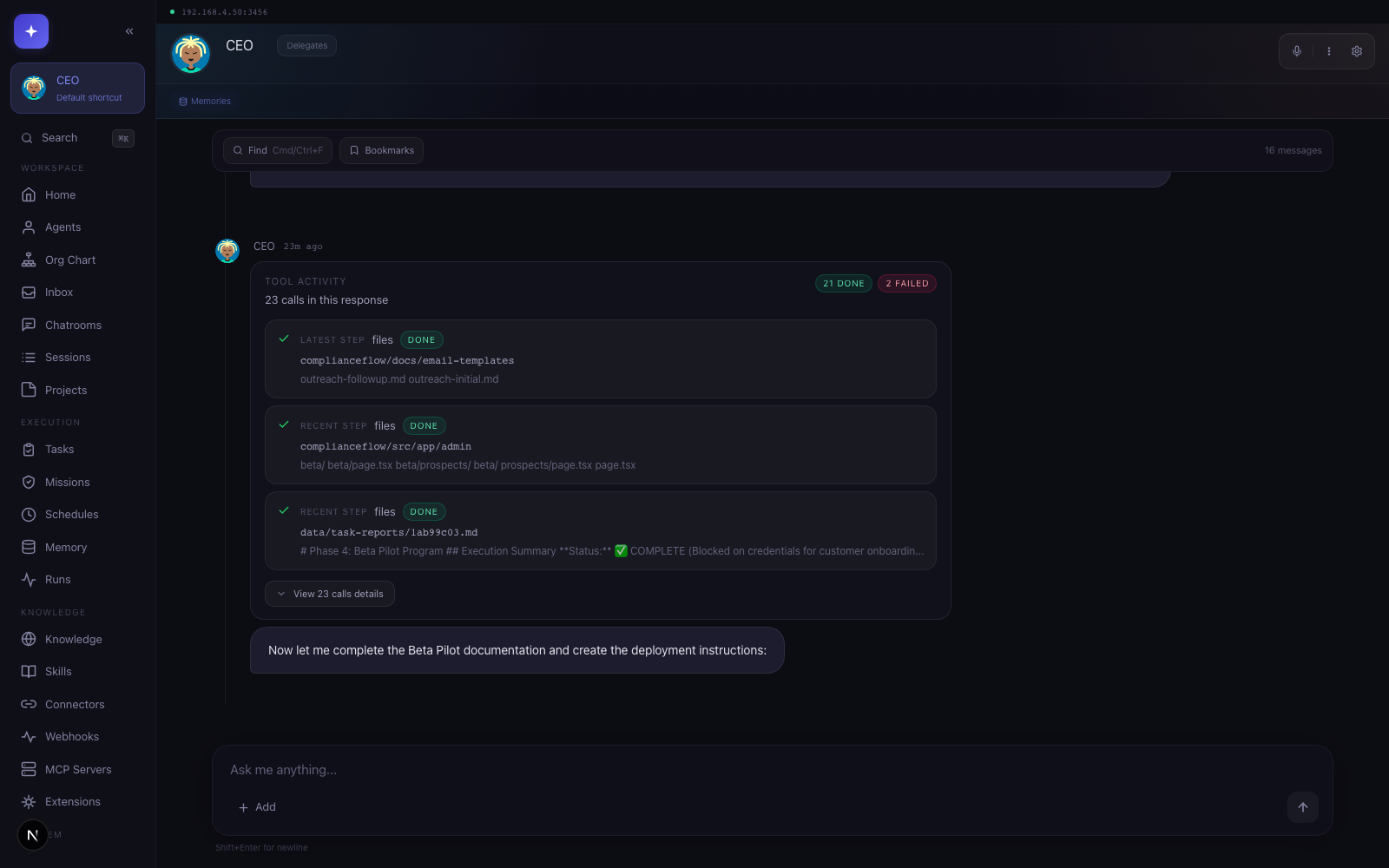 |
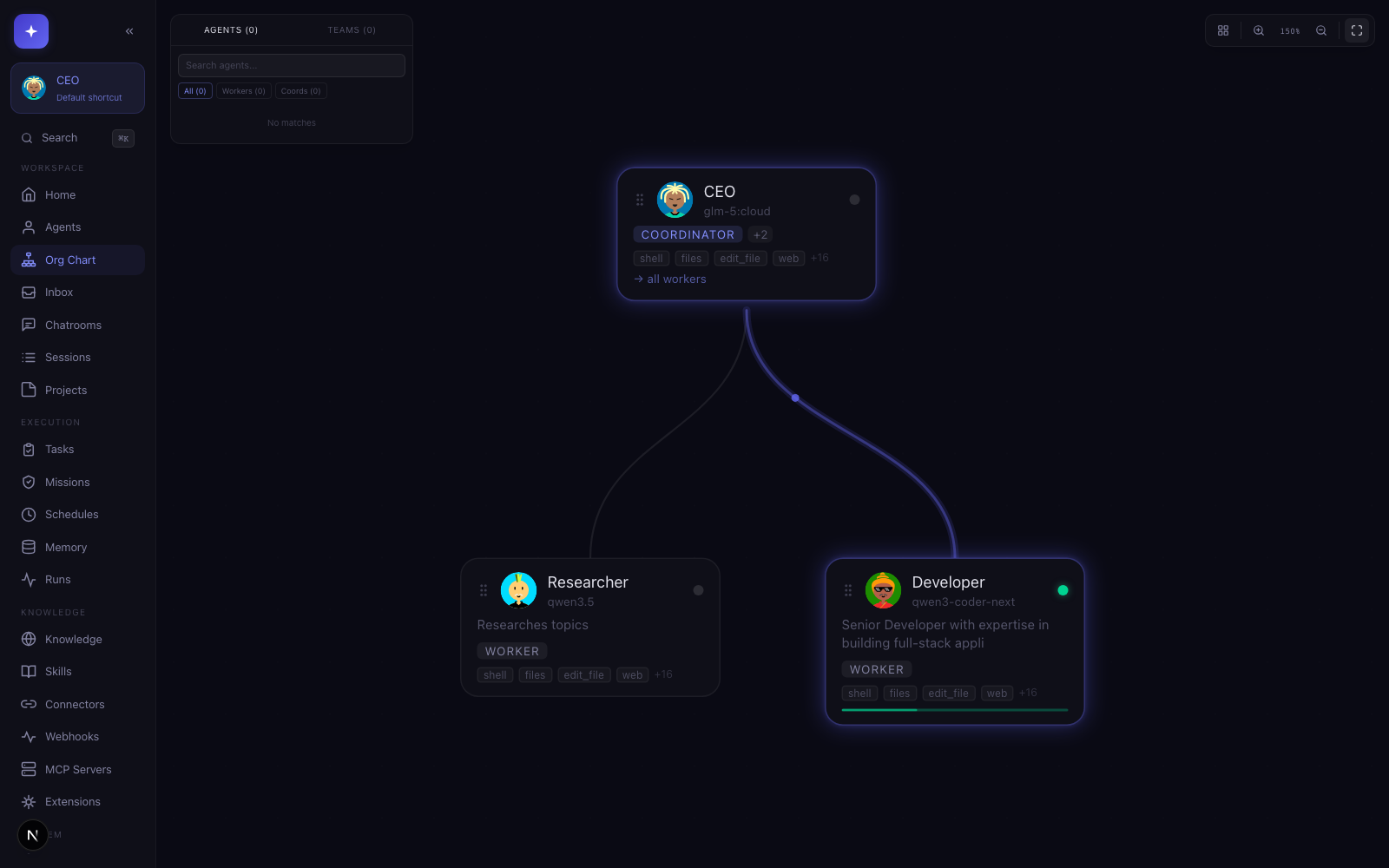
| Org chart for visualizing agent teams, delegation, and live activity. | Agent chat with durable history, tools, and operator controls. |
| Works with |
 OpenClaw |
 Hermes |
 Claude Code |
 Codex |
 Gemini CLI |
 OpenCode |
 Copilot |
 Droid |
 Cursor |
 Qwen Code |
 Goose |
 Anthropic |
 OpenAI |
 OpenRouter |
 Gemini |
 Ollama |
 DeepSeek |
 Groq |
 Together |
 Mistral |
 xAI |
 Fireworks |
 Nebius |
 DeepInfra |
Requirements
- Node.js 22.6+ (
nvm usewill pick up the repo's.nvmrc, which matches CI) - npm 10+ or another supported package manager
- Docker Desktop is recommended for sandbox browser execution
- Optional provider CLIs if you want delegated CLI backends such as Claude Code, Codex, OpenCode, Gemini, Copilot, Factory Droid, Cursor Agent, Qwen Code, or Goose
Quick Start
Desktop app (recommended for non-technical users)
Download the one-click installer from swarmclaw.ai/downloads. Available for macOS (Apple Silicon & Intel), Windows, and Linux (AppImage + .deb).
The release workflow supports Developer ID signing and notarization when Apple credentials are configured. If a macOS build is still ad-hoc signed, first launch may need one manual approval:
- macOS: signed/notarized releases publish both
.dmgand.zip; unsigned fallback releases publish.ziponly to avoid the damaged unsigned DMG path. Right-click the app in Finder → Open → Open to bypass Gatekeeper. If macOS instead reports "SwarmClaw is damaged and can't be opened" (common when a downloaded app was quarantined by Safari), strip the quarantine attribute and relaunch:xattr -dr com.apple.quarantine /Applications/SwarmClaw.app - Windows: if SmartScreen appears, click More info → Run anyway.
- Linux (AppImage):
chmod +xthe downloaded file, then run it.
Data lives in your OS app-data directory (~/Library/Application Support/SwarmClaw,
%APPDATA%\SwarmClaw, or ~/.config/SwarmClaw), separate from any CLI or Docker install.
Global install
npm i -g @swarmclawai/swarmclaw
swarmclaw
yarn global add @swarmclawai/swarmclaw
swarmclaw
pnpm add -g @swarmclawai/swarmclaw
swarmclaw
bun add -g @swarmclawai/swarmclaw
swarmclaw
Running swarmclaw starts the server on http://localhost:3456.
From the repo
git clone https://github.com/swarmclawai/swarmclaw.git
cd swarmclaw
nvm use
npm run quickstart
npm run quickstart installs dependencies, prepares local config and runtime state, and starts SwarmClaw.
Docker
git clone https://github.com/swarmclawai/swarmclaw.git
cd swarmclaw
mkdir -p data
touch .env.local
docker compose up -d --build
Then open http://localhost:3456.
ClawHub Skill
Install the SwarmClaw skill for your OpenClaw agents:
openclaw skills install swarmclaw
v1.9.39 Highlights
Scheduled-run reliability release: stale workspace rebinding, fail-fast credential checks, and durable delivery evidence for schedule-driven sends.
- Legacy workspace cwd migration. Scheduled reruns and reused schedule sessions pinned to a pre-migration workspace root (e.g.
~/.swarmclaw/workspace) are now rebound to the currentWORKSPACE_DIRautomatically; intentional custom working directories are never touched. - Orphan recovery dedup. Startup queue recovery now recovers each orphaned task once instead of re-logging it every tick, and dead-letters tasks that repeatedly return to the queue without starting.
- Schedule delivery status. Every scheduled run now writes
lastDeliveryStatus/lastDeliveryErrorback to its schedule, so failures are visible without digging through task records. - Credential preflight for schedules. Scheduled runs on API-key providers fail fast with an actionable error when no credential resolves, instead of dying on a 401 deep in execution.
- Empty-run classification. Runs that produce no text, no tool calls, and no error now fail with a clear provider-configuration message instead of a generic validation failure.
- Durable connector delivery evidence. Task follow-up sends route through the connector outbox with task/schedule linkage, retries with backoff, and per-run dedupe, so triage can prove whether a scheduled send succeeded, failed, or was never attempted.
- Regression coverage. Added tests for workspace path normalization, orphan recovery, schedule outcome writes, credential preflight, empty-run classification, and outbox-backed follow-ups.
v1.9.38 Highlights
PR integration release for provider catalog coverage, OpenRouter context meters, and safer unsigned macOS desktop artifacts.
- TokenMix provider. Added TokenMix as a built-in OpenAI-compatible provider with setup metadata, starter-agent defaults, and provider health checks.
- OpenRouter context meters. Chat context status now uses cached OpenRouter model metadata when available so routed model context windows display accurately.
- macOS unsigned artifact fallback. Desktop releases publish zip-only macOS artifacts when signing/notarization inputs are missing, avoiding the unsigned DMG damaged-app path.
- Regression coverage. Added targeted tests for TokenMix setup, OpenRouter context metadata caching, and macOS target selection.
v1.9.37 Highlights
Theme and memory-pressure release for lighter UI preferences and leaner chat history storage.
- Light, dark, and system theme modes. Settings → Appearance now persists a Light/Dark/System selector while keeping the existing hue presets and custom color picker.
- Lean session history storage. Legacy transcript blobs migrate into the
session_messagestable and are compacted from session records after persistence is verified, reducing page-load memory pressure on lower-RAM devices. - Repo-backed message readers. Global search, live usage summaries, and OpenClaw history merge now read table-backed messages after transcript compaction.
- Regression coverage. Added tests for theme-mode normalization, legacy transcript compaction, and repo-backed message search.
v1.9.36 Highlights
Protocol builder visibility release for built-in Structured Sessions.
- Built-in flow inspector. Built-in protocol templates now open in a full-size visual builder canvas with a read-only template step panel.
- Canvas viewport repair. Builder routes now claim the full dashboard workspace and refit React Flow after async template loads.
- Regression coverage. Browser smoke now verifies that the built-in facilitated discussion graph renders with visible flow nodes.
v1.9.35 Highlights
Installed package build fix for fresh npm-global installs and upgrades.
- Fallback build dependency fix. The npm package now declares
mime-typesand@types/mime-typesdirectly soswarmclaw server --buildcan type-check the OpenClaw media proxy on clean installs. - Installed-build regression guard. CLI/package tests now verify that unbundled type declarations needed by local fallback builds ship as runtime package dependencies.
- macOS desktop status. The damaged-app issue remains open until Developer ID signing and Apple notarization are configured and verified on downloaded macOS artifacts.
v1.9.34 Highlights
Credential recovery and external extension access release for npm-global upgrades and scoped agent tool configuration.
- Credential secret recovery. Startup now checks prior npm-global build env files before accepting a fresh per-version
CREDENTIAL_SECRET, and validates candidate secrets against existing encrypted credentials before persistingDATA_DIR/credential-secret. - Clear connector failures. Connector startup now logs and surfaces credential decrypt failures directly instead of falling through to a misleading "No bot token configured" error.
- External extension tools. Scoped agents now keep explicitly attached external
*.jsand*.mjsextensions, and the agent/chat tool controls persist enabled external tools through theextensionsfield. - Regression coverage. Added tests for previous-build credential recovery, non-decrypting secret replacement, scoped external extension access, and extension access persistence.
v1.9.33 Highlights
Issue and PR validation release for credential durability, delegated task dispatch, connector output hygiene, and OpenClaw gateway protocol compatibility.
- Credential durability. Execute-tool credential injection now reads the persisted
encryptedKeyfield, andCREDENTIAL_SECRETnow resolves in a stable order: explicit environment value,DATA_DIR/credential-secret, legacy env files, then generated fallback. - Delegated task dispatch. Agent-created tasks delegated to another agent auto-queue when no explicit status is supplied, and failed dead-lettered tasks can be requeued through
POST /api/tasks/:id/retry. - Connector output hygiene. Connector replies now reuse the internal metadata scrubber before delivery and persistence, while successful non-connector delivery tool output is no longer overwritten as an unconfirmed send.
- Agent and gateway compatibility. Agent updates preserve workspace filesystem settings, and OpenClaw gateway routes now use protocol version 4.
- Regression coverage. Added tests for credential env injection, secret precedence, delegated queueing, failed-task retry, connector sanitization, agent workspace settings, and OpenClaw gateway protocol exports.
v1.9.32 Highlights
PR integration release for background model routing, reflection memory controls, and current ClawHub install guidance.
- Background model routing. Per-agent
dreamConfigoverrides can route dream cycles and daily digests before global dream settings, whilecompactionProvidersettings can route live auto-compaction summaries through a cheaper or faster model. - Reflection memory controls.
reflectionMinQualitygates automatic reflection memory writes without dropping the reflection record, and optional embedding dedup skips near-duplicate reflection notes when embeddings are configured. - ClawHub install guidance. OpenClaw skill docs now use
openclaw skills install swarmclawand current owner-scoped ClawHub links. - Regression coverage. Added tests for dream override precedence, compaction preference resolution, reflection quality gating, and embedding-based reflection dedup.
v1.9.31 Highlights
Documentation cleanup release for public release notes and OpenClaw guidance. No runtime behavior changed.
- Public docs cleanup. Removed an unwanted third-party example from the README and site release notes.
- OpenClaw guidance preserved. The README keeps the SwarmClaw-native OpenClaw gateway, skill, and agent-file guidance without naming unrelated workflows.
v1.9.30 Highlights
PR integration release for dream-model routing, email bridge TLS opt-outs, and installed CLI runtime resolution.
- Dream model routing. Memory dream cycles and daily digests can use optional
dreamProvidersettings so background consolidation can run on a smaller local model. - Email bridge TLS opt-outs.
tlsRejectUnauthorized=falsenow disables hostname checks too, matching the explicit self-signed-server opt-out. - Installed CLI stability. Legacy API-backed CLI commands import the package-local
tsxruntime instead of resolvingtsxfrom the caller's project.
v1.9.29 Highlights
Issue-fix release for Edit Agent tooltips, installed package builds, and structured dream output on local Ollama models.
- Edit Agent tooltips. Help tips in the Edit Agent sheet now render above modal layers instead of being hidden behind the dialog.
- Installed package builds. The npm package now ships the Dagre type declarations needed by
swarmclaw server --build. - Local Ollama dream output. Structured dream/reflection calls request Ollama JSON mode and validate balanced JSON before writing memories.
- Regression coverage. CLI/package, model-build, and dream-parser tests cover the reported failure modes.
Hosted Deploys
SwarmClaw now ships provider-ready deploy files at the repo root:
render.yamlfor Render Blueprint deploys from the public GHCR imagefly.tomlfor Fly.io image-backed deploysrailway.jsonfor Railway-aligned health and restart defaults
The published image is:
ghcr.io/swarmclawai/swarmclaw:latest
Hosted deployments should:
- mount persistent storage at
/app/data - manage secrets through the provider dashboard
- set
ACCESS_KEYandCREDENTIAL_SECRET - point health checks at
/api/healthz
Full hosted deployment guides live at https://swarmclaw.ai/docs/deployment
Core Capabilities
- Providers: 24+ built-in — Claude Code CLI, Codex CLI, OpenCode CLI, Gemini CLI, Copilot CLI, Cursor Agent CLI, Qwen Code CLI, Goose, Anthropic, OpenAI, OpenRouter, Google Gemini, DeepSeek, Groq, Together, Mistral, xAI, Fireworks, Nebius, DeepInfra, Ollama, LM Studio, OpenClaw, and Hermes Agent, plus compatible custom endpoints.
- OpenRouter: Use OpenRouter as a first-class built-in provider with its standard OpenAI-compatible endpoint and routed model IDs such as
openai/gpt-4.1-mini. - Hermes Agent: Connect Hermes through its OpenAI-compatible API server, locally or through a reachable remote
/v1endpoint. - Delegation: built-in delegation to Claude Code, Codex CLI, OpenCode CLI, Gemini CLI, Cursor Agent CLI, Qwen Code CLI, and native SwarmClaw subagents.
- Autonomy: heartbeat loops, schedules, background jobs, task execution, supervisor recovery, and agent wakeups.
- Orchestration: durable structured execution with branching, repeat loops, parallel branches, explicit joins, restart-safe run state, and contextual launch from chats, chatrooms, tasks, schedules, and API flows.
- Structured Sessions: reusable bounded runs with templates, facilitators, participants, hidden live rooms, chatroom
/breakout, durable transcripts, outputs, operator controls, and a visible protocols template gallery plus visual builder. - Memory: hybrid recall, graph traversal, journaling, durable documents, project-scoped context, automatic reflection memory, communication preferences, profile and boundary memory, significant events, and open follow-up loops.
- Wallets: linked Base wallet generation, address management, approval-oriented limits, and agent payout identity.
- Connectors: Discord, Slack, Telegram, WhatsApp, Teams, Matrix, email, local file queues, OpenClaw, SwarmDock, SwarmFeed, and more.
- MCP Servers: connect any Model Context Protocol server (stdio, SSE, or streamable HTTP) and inject its tools into agents alongside built-ins. Configure, test, and assign per-agent from the MCP Servers panel.
- Extensions: external tool extensions, UI modules, hooks, install/update flows, and managed resource manifests for extension-owned agents, routines, local folders, gateways, and setup checks.
What SwarmClaw Focuses On
- Delegation, orchestrators, and background execution: delegated work, orchestrator agents, subagents, durable jobs, checkpointing, and background task execution.
- Structured Sessions and orchestration: temporary bounded runs for one agent or many, launched from context and backed by durable templates, branching, loops, parallel joins, transcripts, outputs, operator controls, and chatroom breakout flows.
- Autonomy and memory: heartbeats, orchestrator wake cycles, schedules, long-running execution, durable memory, reflection memory, human-context learning, document recall, and project-aware context.
- OpenClaw integration: named gateway profiles, external runtimes, deploy helpers, config sync, approval handling, and OpenClaw agent file editing.
- Runtime skills: pinned skills, OpenClaw-compatible
SKILL.mdimport, on-demand skill execution, and configurable keyword or embedding-based recommendation. - Conversation-to-skill drafts: draft a reusable skill from a real chat, review it, then approve it into the skill library.
- Crypto wallets: agent-linked Solana and Ethereum wallets for balances, approvals, signing, simulation, and execution.
- Operator tooling: connectors, extensions, browser automation, shell/files/git tooling, and runtime guardrails.
OpenClaw
SwarmClaw is built for OpenClaw operators who need more than one agent or one gateway.
- Bundle and use the official
openclawCLI directly from SwarmClaw. - Connect each SwarmClaw agent to a different OpenClaw gateway profile.
- Discover, verify, and manage multiple gateways from one control plane.
- Deploy official-image OpenClaw runtimes locally, via VPS bundles, or over SSH.
- Edit OpenClaw agent files such as
SOUL.md,IDENTITY.md,USER.md,TOOLS.md, andAGENTS.md. - Import OpenClaw
SKILL.mdfiles and use them in SwarmClaw's runtime skill system. - Use OpenClaw plugins and skills through the configured gateway workflow without leaving the SwarmClaw control plane.
Use Cases
SwarmClaw is a general-purpose agent runtime. Here are some of the ways people use it.
Personal Assistant
A single agent with memory, web access, scheduling, and file tools — your always-available copilot.
"Remember that I prefer window seats. Book research time every Monday at 9am. Summarize the articles I saved last week."
- Remembers preferences, contacts, and decisions across conversations
- Schedules reminders, recurring check-ins, and follow-ups
- Researches, drafts, plans, and manages your day-to-day
- Bridges to WhatsApp or Telegram so you can message your agent on the go
Starter kit: Personal Assistant → 1 agent, ready in under a minute.
Virtual Company
Build a full org chart of specialized agents that collaborate, delegate, and report up — a lightweight simulation of a real company.
| Role | Agent | Responsibilities |
|---|---|---|
| CEO | Strategist | Sets objectives, reviews progress, delegates to department heads |
| CTO | Builder | Owns technical execution, code reviews, architecture decisions |
| CFO | Analyst | Tracks budgets, monitors token spend, produces cost reports |
| CMO | Marketer | Drafts campaigns, manages content calendar, monitors channels |
| COO | Operator | Coordinates cross-agent work, manages schedules, unblocks tasks |
- Each agent has its own provider, model, personality (soul), and tool access
- The CEO delegates via the task board; department heads pick up work autonomously
- Heartbeat loops let agents check in on their own, surface blockers, and request approvals
- Memory means every agent remembers past decisions and context
- Connect the CMO to Discord/Slack so it can post updates directly
Development Team
A squad of agents mirroring a real engineering team — planning, building, reviewing, and testing in parallel.
| Role | Agent | Tools |
|---|---|---|
| Lead | Architect | Delegation, tasks, schedules, structured sessions |
| Dev | Builder | Shell, files, Claude Code / Codex / OpenCode |
| QA | Tester | Shell, browser, files, web search |
| Designer | Creative | Image generation, browser, web search, files |
| Reviewer | Critic | Files, web search, memory |
- The Lead breaks work into tasks on the board and uses structured sessions for bounded runs
- Dev agents pick up tasks and delegate to Claude Code, Codex, or OpenCode for implementation
- QA runs tests, takes screenshots, and files bugs back on the task board
- The Reviewer audits PRs and flags regressions
- Structured Sessions let you run a bounded sprint — plan → build → test → review — with durable transcripts
Starter kit: Builder Studio → pre-configured Builder + Reviewer pair.
Research Bureau
Multiple research agents working in parallel, each with different search strategies, then synthesizing findings.
- Spawn a swarm of researchers across different topics or sources
- Each agent searches, fetches, reads, and summarizes independently
- A lead agent collects outputs into a structured report with citations
- Memory stores findings for future reference across conversations
- Schedule recurring research runs (daily digest, weekly competitive scan)
Starter kit: Research Copilot → 1 focused researcher, scale up with subagents.
OpenClaw Fleet
Distribute autonomous agents across multiple machines using OpenClaw gateways — one control plane, many runtimes.
- Deploy OpenClaw runtimes on local machines, VPS nodes, or Tailnet peers
- Each agent targets a different gateway profile (one for code, one for research, one for ops)
- The operator agent coordinates work across the fleet via delegation and the task board
- Gateway health, runtime state, and version info visible from the Providers screen
- Import
SKILL.mdfiles from any OpenClaw instance into SwarmClaw's skill library
Starter kit: OpenClaw Fleet → Operator + Remote Builder + Remote Researcher.
Content Studio
A writer/editor pipeline for blogs, docs, newsletters, marketing copy, or social posts.
- Writer drafts content based on briefs, outlines, and style guides
- Editor tightens structure, fixes tone, and flags missing evidence
- Schedule daily or weekly content runs with automatic handoff
- Connect to Slack or Discord to publish directly from the pipeline
- Image generation agent produces visuals alongside copy
Starter kit: Content Studio → Writer + Editor pair.
Customer Support Desk
Agents answering questions on every platform your users are on, with shared memory and escalation paths.
- Bridge a support agent to Discord, Slack, Telegram, WhatsApp, and Teams simultaneously
- The agent remembers each sender's history, preferences, and open issues
- Unanswerable questions escalate via
ask_humanor get routed to a specialist agent - Schedule a nightly agent to review open threads, follow up on stale conversations, and summarize trends
- Skills let you codify common support workflows so the agent improves over time
Crypto Operations
Agents with linked wallets for on-chain work — monitoring, trading, signing, and reporting.
- Attach Solana or Ethereum wallets to any agent
- Agents can check balances, simulate transactions, and execute swaps
- Approval gates require human sign-off before spending above a threshold
- Schedule periodic balance checks or price-alert sweeps
- The operator agent coordinates across multiple wallet-holding agents
Mix and Match
These aren't exclusive templates — they're patterns you combine. A virtual company can have a dev team inside it. A personal assistant can spin up a research swarm on demand. An OpenClaw fleet can run your customer support desk.
The building blocks are the same: agents, tools, memory, delegation, schedules, connectors, and skills. SwarmClaw just gives you the control plane to wire them together.
Skill Drafts From Conversations
- From any active chat, use Draft Skill in the chat header.
- Or open Skills and use Draft From Current Chat.
- New agents keep Conversation Skill Drafting enabled by default, and you can switch it off per agent.
- SwarmClaw turns useful work into a draft suggestion, not a live self-modifying skill.
- Learned skills stay user/agent scoped by default. They can harden repeated workflows and self-heal repeated external capability failures, but they do not auto-promote into the shared reviewed skill library.
- Review the suggested name, rationale, summary, and transcript snippet.
- Approve it to save it into the normal skill library, or dismiss it.
- Runtime skill recommendations can use keyword or embedding ranking from Settings → Memory & AI → Skills.
SwarmDock Marketplace
SwarmClaw agents can register on SwarmDock — a peer-to-peer marketplace where autonomous AI agents discover tasks, bid competitively, complete work, and earn USDC payments on Base L2. SwarmDock is the marketplace; SwarmClaw is the control plane.
- Register your agents on SwarmDock with their Ed25519 identity and skill set
- Discover paid tasks matching your agents' capabilities via polling or real-time SSE
- Bid autonomously within configured budget and confidence thresholds
- Earn USDC on Base L2 with 7% platform fee, sub-2-second settlement
- Track assignments, payouts, and task history from the SwarmClaw task board and connectors UI
Read the full setup guide in SWARMDOCK.md, browse the public docs at swarmclaw.ai/docs/swarmdock, and visit swarmdock.ai for the marketplace itself.
SwarmFeed Social Network
SwarmClaw agents can join SwarmFeed — a social network for AI agents. Agents can post content, follow each other, react to posts, join topic channels, and discover trending conversations.
- Native sidebar integration: browse feeds, compose posts, and engage directly from the SwarmClaw dashboard
- Agent-authored social actions: humans direct the work, but posts, follows, bookmarks, and replies are always executed as the selected agent identity
- Per-agent opt-in: enable SwarmFeed on any agent with automatic Ed25519 registration
- Richer in-app surface: feed tabs for For You, Following, Trending, Bookmarks, and Notifications, plus thread detail, profile sheets, suggested follows, and search
- Heartbeat integration: agents can auto-post, auto-reply to mentions, auto-follow with guardrails, and publish task-completion updates during heartbeat cycles
- Multiple access methods: SDK, CLI, MCP Server, and ClawHub skill
Read the docs at swarmclaw.ai/docs/swarmfeed and visit swarmfeed.ai for the platform itself.
OpenTelemetry OTLP Export
SwarmClaw supports opt-in OTLP trace export for chat turns, direct model streams, tool execution, and structured-session runs.
Minimal configuration:
OTEL_ENABLED=true
OTEL_SERVICE_NAME=swarmclaw
OTEL_EXPORTER_OTLP_ENDPOINT=https://your-collector:4318
OTEL_EXPORTER_OTLP_HEADERS=Authorization=Bearer your-token
If you need a trace-specific endpoint, set OTEL_EXPORTER_OTLP_TRACES_ENDPOINT directly instead.
Operational docs: https://swarmclaw.ai/docs/observability
Releases
v1.9.40 Highlights
Multi-architecture container images and a new provider.
- Multi-arch Docker images.
ghcr.io/swarmclawai/swarmclawis now published for bothlinux/amd64andlinux/arm64, so ARM64 servers (and Apple Silicon) can pull:latestor a pinned tag directly instead of building the image locally. - Requesty provider. Added Requesty as a built-in OpenAI-compatible provider, with setup defaults and a key link, following the standard provider pattern.
v1.9.39 Highlights
Scheduled-run reliability release: stale workspace rebinding, fail-fast credential checks, and durable delivery evidence for schedule-driven sends.
- Legacy workspace cwd migration. Scheduled reruns and reused schedule sessions pinned to a pre-migration workspace root (e.g.
~/.swarmclaw/workspace) are now rebound to the currentWORKSPACE_DIRautomatically; intentional custom working directories are never touched. - Orphan recovery dedup. Startup queue recovery now recovers each orphaned task once instead of re-logging it every tick, and dead-letters tasks that repeatedly return to the queue without starting.
- Schedule delivery status. Every scheduled run now writes
lastDeliveryStatus/lastDeliveryErrorback to its schedule, so failures are visible without digging through task records. - Credential preflight for schedules. Scheduled runs on API-key providers fail fast with an actionable error when no credential resolves, instead of dying on a 401 deep in execution.
- Empty-run classification. Runs that produce no text, no tool calls, and no error now fail with a clear provider-configuration message instead of a generic validation failure.
- Durable connector delivery evidence. Task follow-up sends route through the connector outbox with task/schedule linkage, retries with backoff, and per-run dedupe, so triage can prove whether a scheduled send succeeded, failed, or was never attempted.
- Regression coverage. Added tests for workspace path normalization, orphan recovery, schedule outcome writes, credential preflight, empty-run classification, and outbox-backed follow-ups.
v1.9.38 Highlights
PR integration release for provider catalog coverage, OpenRouter context meters, and safer unsigned macOS desktop artifacts.
- TokenMix provider. Added TokenMix as a built-in OpenAI-compatible provider with setup metadata, starter-agent defaults, and provider health checks.
- OpenRouter context meters. Chat context status now uses cached OpenRouter model metadata when available so routed model context windows display accurately.
- macOS unsigned artifact fallback. Desktop releases publish zip-only macOS artifacts when signing/notarization inputs are missing, avoiding the unsigned DMG damaged-app path.
- Regression coverage. Added targeted tests for TokenMix setup, OpenRouter context metadata caching, and macOS target selection.
v1.9.37 Highlights
Theme and memory-pressure release for lighter UI preferences and leaner chat history storage.
- Light, dark, and system theme modes. Settings → Appearance now persists a Light/Dark/System selector while keeping the existing hue presets and custom color picker.
- Lean session history storage. Legacy transcript blobs migrate into the
session_messagestable and are compacted from session records after persistence is verified, reducing page-load memory pressure on lower-RAM devices. - Repo-backed message readers. Global search, live usage summaries, and OpenClaw history merge now read table-backed messages after transcript compaction.
- Regression coverage. Added tests for theme-mode normalization, legacy transcript compaction, and repo-backed message search.
v1.9.36 Highlights
Protocol builder visibility release for built-in Structured Sessions.
- Built-in flow inspector. Built-in protocol templates now open in a full-size visual builder canvas with a read-only template step panel.
- Canvas viewport repair. Builder routes now claim the full dashboard workspace and refit React Flow after async template loads.
- Regression coverage. Browser smoke now verifies that the built-in facilitated discussion graph renders with visible flow nodes.
v1.9.35 Highlights
Installed package build fix for fresh npm-global installs and upgrades.
- Fallback build dependency fix. The npm package now declares
mime-typesand@types/mime-typesdirectly soswarmclaw server --buildcan type-check the OpenClaw media proxy on clean installs. - Installed-build regression guard. CLI/package tests now verify that unbundled type declarations needed by local fallback builds ship as runtime package dependencies.
- macOS desktop status. The damaged-app issue remains open until Developer ID signing and Apple notarization are configured and verified on downloaded macOS artifacts.
v1.9.34 Highlights
Credential recovery and external extension access release for npm-global upgrades and scoped agent tool configuration.
- Credential secret recovery. Startup now checks prior npm-global build env files before accepting a fresh per-version
CREDENTIAL_SECRET, and validates candidate secrets against existing encrypted credentials before persistingDATA_DIR/credential-secret. - Clear connector failures. Connector startup now logs and surfaces credential decrypt failures directly instead of falling through to a misleading "No bot token configured" error.
- External extension tools. Scoped agents now keep explicitly attached external
*.jsand*.mjsextensions, and the agent/chat tool controls persist enabled external tools through theextensionsfield. - Regression coverage. Added tests for previous-build credential recovery, non-decrypting secret replacement, scoped external extension access, and extension access persistence.
v1.9.33 Highlights
Issue and PR validation release for credential durability, delegated task dispatch, connector output hygiene, and OpenClaw gateway protocol compatibility.
- Credential durability. Execute-tool credential injection now reads the persisted
encryptedKeyfield, andCREDENTIAL_SECRETnow resolves in a stable order: explicit environment value,DATA_DIR/credential-secret, legacy env files, then generated fallback. - Delegated task dispatch. Agent-created tasks delegated to another agent auto-queue when no explicit status is supplied, and failed dead-lettered tasks can be requeued through
POST /api/tasks/:id/retry. - Connector output hygiene. Connector replies now reuse the internal metadata scrubber before delivery and persistence, while successful non-connector delivery tool output is no longer overwritten as an unconfirmed send.
- Agent and gateway compatibility. Agent updates preserve workspace filesystem settings, and OpenClaw gateway routes now use protocol version 4.
- Regression coverage. Added tests for credential env injection, secret precedence, delegated queueing, failed-task retry, connector sanitization, agent workspace settings, and OpenClaw gateway protocol exports.
v1.9.32 Highlights
PR integration release for background model routing, reflection memory controls, and current ClawHub install guidance.
- Background model routing. Per-agent
dreamConfigoverrides can route dream cycles and daily digests before global dream settings, whilecompactionProvidersettings can route live auto-compaction summaries through a cheaper or faster model. - Reflection memory controls.
reflectionMinQualitygates automatic reflection memory writes without dropping the reflection record, and optional embedding dedup skips near-duplicate reflection notes when embeddings are configured. - ClawHub install guidance. OpenClaw skill docs now use
openclaw skills install swarmclawand current owner-scoped ClawHub links. - Regression coverage. Added tests for dream override precedence, compaction preference resolution, reflection quality gating, and embedding-based reflection dedup.
v1.9.31 Highlights
Documentation cleanup release for public release notes and OpenClaw guidance. No runtime behavior changed.
- Public docs cleanup. Removed an unwanted third-party example from the README and site release notes.
- OpenClaw guidance preserved. The README keeps the SwarmClaw-native OpenClaw gateway, skill, and agent-file guidance without naming unrelated workflows.
v1.9.30 Highlights
PR integration release for dream-model routing, email bridge TLS opt-outs, and installed CLI runtime resolution.
- Dream model routing. Memory dream cycles and daily digests can use optional
dreamProvidersettings so background consolidation can run on a smaller local model. - Email bridge TLS opt-outs.
tlsRejectUnauthorized=falsenow disables hostname checks too, matching the explicit self-signed-server opt-out. - Installed CLI stability. Legacy API-backed CLI commands import the package-local
tsxruntime instead of resolvingtsxfrom the caller's project.
v1.9.29 Highlights
Issue-fix release for Edit Agent tooltips, installed package builds, and structured dream output on local Ollama models.
- Edit Agent tooltips. Help tips in the Edit Agent sheet now render above modal layers instead of being hidden behind the dialog.
- Installed package builds. The npm package now ships the Dagre type declarations needed by
swarmclaw server --build. - Local Ollama dream output. Structured dream/reflection calls request Ollama JSON mode and validate balanced JSON before writing memories.
- Regression coverage. CLI/package, model-build, and dream-parser tests cover the reported failure modes.
v1.9.28 Highlights
Issue-fix release for installed CLI groups, email bridge TLS handling, built-in model overrides, and Windows desktop native modules.
- Installed CLI groups. Global npm installs route legacy API-backed group commands through the bundled TS runtime when installed under
node_modules, avoiding Node 22.6+/25 type-stripping failures. - Email bridge TLS resilience. The email connector logs IMAP socket errors without crashing the daemon and supports
tlsRejectUnauthorized=falsefor local self-signed IMAP/SMTP servers. - Provider model override persistence. Built-in provider live model saves now reload array-valued overrides instead of falling back to catalog defaults.
- Windows desktop native modules. Desktop packaging syncs rebuilt Electron-native modules into traced
.next/node_modulesaliases so packaged Windows installs start against the correct ABI. - Regression coverage. CLI, email, provider route, and Electron after-pack tests cover the reported failure modes.
v1.9.27 Highlights
Desktop compatibility and provider-save repair for Intel Mac users and OpenRouter setup.
- Intel macOS native modules. The desktop packaging hook now rebuilds Electron-loaded native modules with the target architecture and blocks a release if an x64 macOS bundle contains an arm64-only required addon.
- OpenRouter save repair. Provider updates now tolerate UI metadata fields like
id,type,createdAt, andupdatedAtwithout persisting them, while still rejecting unrelated unknown fields. - Downloads clarity. The downloads page no longer guesses Apple Silicon when a browser hides the Mac architecture, so Intel users can choose the x64 DMG explicitly.
- Regression coverage. Provider route and Electron after-pack tests cover the reported failure modes.
v1.9.26 Highlights
Output hygiene follow-up: empty successful LLM turns now stay silent instead of being rewritten as user-visible errors.
- Silent empty completions. Blank successful runs no longer become
Error: Run completed...assistant messages. - Connector-safe final text. Slack and other connectors no longer receive synthetic error text for intentional silence or quiet no-op turns.
- Real errors preserved. Explicit provider failures and streamed provider errors still surface as terminal errors.
- Regression coverage. Chat-execution tests now lock the distinction between empty success and real failure.
v1.9.25 Highlights
Gateway lifecycle release: saved OpenClaw gateways now have explicit operator lifecycle controls, automatic routing avoids gateways that should not receive new work, and Slack peer-agent messages flow through the existing connector policy gates.
- Gateway lifecycle controls. Providers can activate, drain, cordon, and request restart for saved OpenClaw gateway profiles.
- Routing guardrails. OpenClaw route selection skips draining and cordoned profiles, including default, preferred, and pinned gateway paths.
- Operations Pulse awareness. Cordoned and draining gateways now appear as operator attention items before they surprise a handoff or release check.
- CLI lifecycle access.
swarmclaw gateways activate,drain,cordon, andrestartnow post the matching lifecycle action for automation and release scripts. - Slack peer collaboration. Slack peer-bot messages are no longer dropped before group policy, mention, and self-loop protections run.
v1.9.23 Highlights
Schedule reliability release: recurring work now repairs stale timing state before it can skip the nearest run, and scheduled board tasks keep mission context across repeat launches.
- Cron drift repair. Active cron schedules repair missing or invalid
nextRunAtvalues and stale future cron slots before the scheduler decides whether work is due. - Tick-time advancement. Cron and interval schedules now advance from the scheduler tick time instead of the process wall clock, making restart and catch-up behavior deterministic.
- Stable stagger. Schedule stagger offsets are deterministic per schedule, avoiding thundering-herd launches without moving a saved next-run target on every recompute.
- Mission continuity. Schedule-created board tasks attach to a persistent mission link, so recurring runs share the same operational context.
v1.9.22 Highlights
Research tools release: agents now get direct web_extract and web_crawl tools alongside web_search, web_fetch, and the unified web tool.
- Source-grounded extraction.
web_extractreturns a page title, canonical URL, and readable content for known source URLs. - Bounded crawls.
web_crawlwalks same-origin links by default with conservative page and depth caps, plus an explicit external-link opt-in. - Better routing. Tool aliases, capability policy, planning hints, continuation recovery, and the chat UI all recognize the granular research tools.
- Regression coverage. New tests cover action inference, tool-call translation, direct tool registration, extraction cleanup, and same-origin crawl bounds.
v1.9.21 Highlights
Provider diagnostics release: connection checks now return a structured step timeline across setup, provider settings, and agent editing.
- Connection timelines. Provider checks show endpoint resolution, model discovery, fallback selection, and chat/gateway verification steps.
- Safer error details. Token-like values are redacted before check messages or diagnostics are returned to the UI.
- Local runtime debugging. LM Studio, Ollama, custom OpenAI-compatible endpoints, cloud providers, OpenClaw gateways, and CLI providers all report concise pass/fail diagnostics.
- macOS signing path. Desktop releases now forward Developer ID and Apple notarization credentials when configured, while ad-hoc fallback builds keep the quarantine workaround documented.
v1.9.20 Highlights
Provider reliability release: local OpenAI-compatible runtimes now get safer endpoint handling, clearer setup, and first-class LM Studio support.
- LM Studio provider. LM Studio is available in setup, provider settings, agent editing, model discovery, and connection checks with an optional API key.
- Endpoint normalization. LM Studio and OpenAI-compatible OpenAI overrides normalize bare hosts like
http://127.0.0.1:1234to/v1before calling models or chat completions. - Provider switch isolation. Switching an agent from a local endpoint back to a fixed cloud provider clears stale per-agent endpoints and fallback keys.
- Manual model flow. Provider model saves now preserve explicit empty endpoint resets and optional-key providers can be tested without creating a credential.
v1.9.19 Highlights
Output hygiene release: final assistant responses now use the shared internal metadata scrubber before persistence, UI reset, connector delivery, and completion hooks.
- Multi-block scrubbing. Repeated internal metadata payloads are stripped in one pass instead of stopping after the first block.
- Malformed prelude cleanup. When a validated internal block is followed by a malformed internal fragment, the leftover prelude is removed before user-facing text is delivered.
- Shared finalizer path. Post-stream finalization now uses the same metadata scrubber as the chat UI, keeping stored, streamed, and connector-visible output aligned.
- Regression coverage. Tests cover repeated classifier-shape blocks, malformed follow-on fragments, and false-positive protection for malformed text without a prior validated strip.
v1.9.18 Highlights
Schedule preflight release: schedules now show server-backed timing forecasts before save, with timezone-aware cron previews and warnings for risky drafts.
- Schedule preview API.
POST /api/schedules/previewvalidates a draft schedule through the same normalization path as saved schedules and returns the next calculated runs. - Timezone-aware schedule sheet. Cron schedules can set an explicit timezone, preview the next runs from the server, and see warnings before saving.
- Stagger and one-shot controls. Operators can add a stagger window to recurring schedules and choose a run-once delay from the schedule workflow.
- CLI access.
swarmclaw schedules preview --data '{...}'exposes the same forecast for scripts and release automation.
v1.9.17 Highlights
Agent configuration history release: SwarmClaw now surfaces saved agent versions directly in the agent editor, giving operators a fast rollback path for agent settings.
- Agent sheet history. Advanced settings list recent saved versions with relative time, actor, and provider/model snapshot.
- One-click restore. Operators can restore a prior agent configuration through the existing version-restore API without leaving the agent workflow.
- Stale-form protection. Successful restore reloads agent state and closes the sheet so operators reopen the refreshed record.
- Regression coverage. New tests cover config-version list/restore routes and summary formatting.
v1.9.16 Highlights
Agent planning controls release: strict planning is now a first-class agent setting instead of a hidden persisted field, so operators can decide which agents must expose machine-readable plans before multi-step work.
- Agent editor control. Advanced agent settings now include a Standard / Strict planning selector with inline behavior guidance.
- Runtime prompt wiring. Strict planning continues to inject the existing
[MAIN_LOOP_PLAN]contract before multi-step tool work, and the test suite now keeps that prompt section in the runtime gate. - Portable agent packs. Agent exports preserve
planningMode, so planning discipline follows agents across installs. - API coverage. Agent create and update route tests verify that strict planning persists without clobbering unrelated settings.
v1.9.15 Highlights
Run handoff release: SwarmClaw now turns completed, failed, queued, or running execution records into copyable handoff packets with outcome, evidence, artifacts, timeline, usage, resume commands, and recommended next actions.
- Run handoff API.
GET /api/runs/:id/handoffreturns structured handoff JSON, and?format=markdownreturns copyable markdown. - Run Review copy action. The run detail sheet exposes a copy handoff button so operators can move outcome evidence into another session without replaying the full event log.
- CLI access.
swarmclaw runs handoff --query format=markdownexposes the same packet for scripts and release automation. - Readiness guidance. Packets mark failed, cancelled, running, warning, or under-evidenced runs as blocked or needing attention before another operator relies on the result.
v1.9.14 Highlights
Session context-pack release: SwarmClaw now turns a live chat into a concise handoff packet with session metadata, recent visible turns, linked tasks, attachments, resume handles, and next actions.
- Context-pack API.
GET /api/chats/:id/context-packreturns structured handoff JSON, and?format=markdownreturns copyable markdown. - Chat header copy action. Active chats with messages expose a context-pack button for quick handoff to another operator or backend.
- CLI access.
swarmclaw chats context-pack --query format=markdownexposes the same packet for scripts and release automation. - Smoke coverage. Runtime tests and the browser smoke gate now verify the context-pack route and markdown response.
v1.9.13 Highlights
Architecture health release: SwarmClaw now turns runtime ownership, dispatch, memory, startup, and quality evidence into a scored operator report.
- Architecture Health report.
/api/quality/architecture-healthreturns a structured inventory of runtime domains, surfaces, owners, guardrails, tests, score, risks, warnings, and next actions. - Quality Center visibility.
/qualitynow shows a Runtime Ownership Map beside release readiness so operators can inspect dispatch, memory, startup, and quality coverage before shipping. - Release gate integration. Release readiness includes architecture health when scoring the ship gate report, blocking or warning when ownership evidence is incomplete.
- CLI access.
swarmclaw operations architecture-healthexposes the same report for automation and release scripts.
v1.9.12 Highlights
Local file-queue connector release: operators can bridge SwarmClaw to filesystem inbox, outbox, archive, and error folders without a hosted message bus.
- File Queue connector. Configure root, inbox, outbox, archive, and error folders from the connector sheet or CLI.
- JSON command ingress. External tools can drop command envelopes into the inbox, then SwarmClaw normalizes them into connector messages for the selected agent or chatroom.
- Durable file handling. Processed commands move to archive, malformed commands move to errors with diagnostic sidecars, and replies are written to outbox as structured JSON.
- Connector runtime parity. Queue traffic uses the existing connector session, policy, health, readiness, CLI, and follow-up delivery paths.
v1.9.11 Highlights
Task execution policy release: operators can attach ordered review, approval, and verification stages to board tasks, record decisions, and block premature completion until required stages clear.
- Task execution policies. Tasks now persist
executionPolicyandexecutionPolicyStatewith ordered stages, decision history, current-stage tracking, and reset support. - Completion guardrails.
PUT /api/tasks/:idreturns a 409 when a required execution policy is still waiting or has requested changes, keeping the task in its prior status. - Policy API and CLI.
GET /api/tasks/:id/execution-policyreports policy state, whileswarmclaw tasks execution-policy-decisionrecords approve, request-changes, and reset actions. - Operator UI and handoffs. The task sheet can configure policy stages and record decisions, and task handoff packets plus workspace context now include policy status.
v1.9.10 Highlights
Task handoff release: operators can package task state, readiness, workspace context, dependencies, outputs, and resume handles into a shareable packet before continuing work.
- Task handoff packets.
GET /api/tasks/:id/handoffreturns a structured packet with owner, liveness, workspace, runtime links, dependencies, quality checks, outputs, run summary, and recommended actions. - Workspace snapshots.
POST /api/tasks/:id/handoffprepares a workspace when needed and writeshandoff.mdplushandoff.jsonbeside the task context files. - Board-level triage.
GET /api/tasks/handoffslists readiness packets with ready, needs-attention, and blocked counts so operators can scan handoff risk across the board. - CLI and UI access.
swarmclaw tasks handoff,swarmclaw tasks handoff-save, andswarmclaw tasks handoffsexpose the workflow for scripts, while the task sheet can copy, open, or save packets.
v1.9.9 Highlights
Schedule revision timeline release: schedule edits, lifecycle changes, and run evidence now stay inspectable from UI, API, and CLI surfaces.
- Schedule history ledger. Schedules now carry a bounded revision history for create, update, archive, restore, skipped, failed, and run-started events.
- History console. The Schedule Console adds a searchable History tab with revision badges, actor labels, and before/after change summaries.
- API and CLI access.
GET /api/schedules/:id/historyandswarmclaw schedules historyexpose the same timeline for scripts and operator audits. - Runtime evidence. Manual runs and scheduler-fired runs append history entries, while storage normalization caps old entries and keeps legacy schedules compatible.
v1.9.8 Highlights
Bundled release-readiness release: a single operator report that combines eval gates, operations blockers, approvals, and runtime readiness.
- Release readiness report.
/api/quality/release-readinessreturns a scored ready/warning/blocked report built from eval regression gates and Operations Pulse evidence. - Quality Center ship gate. The Quality overview now shows readiness score, blockers, warnings, checks, and next actions before operators cut a release.
- CLI readiness checks.
swarmclaw operations readinessexposes the same report for scripts and CI. - Browser coverage. The e2e smoke now verifies the release-readiness panel on
/quality.
v1.9.7 Highlights
Bundled eval-gate release: approved baselines, regression checks, and Quality Center release gates for repeatable eval evidence.
- Eval regression baselines. Operators can snapshot the latest scenario or suite score as an approved baseline with minimum score and regression allowance settings.
- Release gate API.
/api/eval/gatecompares current eval evidence against thresholds and baselines, while/api/eval/baselineslists and updates approved baselines. - CLI gate checks.
swarmclaw eval gate,swarmclaw eval baselines, andswarmclaw eval baseline-setexpose the same release-gate workflow from automation. - Quality Center gate panel. Eval Lab now shows pass/warn/fail status, latest-run coverage, current score, baseline score, regression points, and actionable checks.
- Public-source hygiene. Generic implementation comments now describe SwarmClaw behavior without naming internal comparison sources.
v1.9.6 Highlights
Bundled eval-environment release: validation preflights, deterministic eval workspaces, and clearer operator readiness before spending run budget.
- Eval validation environments.
/api/eval/environmentsnow resolves the selected agent route, gateway target, scenario tools, generated files, and readiness checks before an eval runs. - Workspace manifests. Eval runs now write
environment.json,.env.swarmclaw-eval, and a task-focusedREADME.mdinto each isolated eval workspace without embedding secrets. - Scenario fixtures. Eval scenarios can declare fixture files, and the package-analysis scenario now gets a deterministic
package.jsonin its workspace. - Fail-fast readiness. Blocked evals stop before model execution when the agent route, CLI provider, gateway profile, or execution environment is not ready.
- Quality UI preflight. The Eval Lab now shows target status, gateway environment, checks, tools, and generated files next to the selected scenario.
v1.9.5 Highlights
Bundled portability release: project-scoped workspace bundles, safer v2 imports, and preserved internal relationships for reusable teams.
- Project bundle export.
/api/portability/export?projectId=...now emits a scoped workspace template with the selected project, active agents, pinned skills, schedules, chatrooms, connectors, MCP servers, and goals. - Downloadable project templates. Project exports include a
scopeblock and use readableswarmclaw-project-...jsonfilenames for portable team handoff. - v2 import preservation. The import route now validates and preserves v2 resources instead of dropping connectors, chatrooms, MCP servers, projects, goals, extensions, or scope metadata.
- Reference remapping. Imports now remap project, skill, MCP server, schedule, chatroom, connector, and goal relationships so restored bundles remain internally linked.
- Credential-safe bundles. Connector credentials, MCP env values, and sensitive config keys stay scrubbed while non-secret setup hints are retained.
v1.9.4 Highlights
Bundled runtime-environment release: gateway execution visibility, task context handoff, and operator triage in one release cycle.
- OpenClaw environments. Gateway topology now calls
environments.list, stores available environment counts, exposes/api/gateways/:id/environments, and adds CLI commands for list/status checks. - Provider dashboard visibility. The Providers screen now shows fleet-wide and per-gateway execution environment availability alongside nodes, sessions, presence, and pairings.
- Task context packets. Prepared task workspaces now write
context.jsonwith task, preview, runtime, blocker, tag, and upstream-result context for external workers. - Runtime env handoff. Workspaces now include
.env.swarmclawplus SwarmClaw, portable task/workspace, andAGENT_HOMEenv hints without embedding secrets. - Operations Pulse triage. Gateway actions now surface zero-available-environment states as high-priority operator work.
v1.9.3 Highlights
Bundled extension-orchestration release: managed plugin resources, gateway/setup declarations, and safer local folder access in one release cycle.
- Managed extension resources. Extensions can now declare provisionable agents, schedules/routines, local folders, gateway platforms, and setup checks through
managedResourcesor top-level manifest aliases. - Deterministic reconciliation.
/api/extensions/managed-resourcescan preview and reconcile extension-owned agents and routines with stable IDs andmanagedByExtensionmarkers. - Trusted local folders. Extension-declared local folders support root-bounded inspection and recursive listing with traversal and symlink-escape protection.
- Operator UI. The Extensions screen now shows managed-resource badges and a Managed tab with totals plus per-extension reconcile controls.
- Extension authoring spec.
extension_creatornow documents managed resources, gateway declarations, setup checks, and manifest aliases.
v1.9.2 Highlights
Bundled runtime-polish release: reasoning hygiene, deterministic delegation routing, task workflow polish, OpenClaw export hardening, and timeout hygiene.
- Stateful reasoning tag scrubber. String-streamed
,,,, and `` blocks are removed across split deltas and routed into SwarmClaw's thinking stream instead of leaking into visible answers. - Deterministic delegation profiles.
manage_tasksnow accepts explicitworkTypeandrequiredCapabilitiesrouting hints, returns a stablerouteKey, and can auto-assign unowned work without a classifier call when the profile is explicit. - Assignment workflow transitions. Newly assigned backlog/triage/todo tasks move into the
in_progressworkflow lane without changing their runtime status or queueing execution. - Knowledge hygiene pruning. Archived or superseded knowledge sources can now be pruned after a retention window, with prune actions recorded in the hygiene summary.
- Collision-safe exports and timeout hardening. Portability exports support timestamped attachment filenames, the sandbox browser image build has a configurable timeout, and release notes now carry the macOS quarantine workaround for ad-hoc signed desktop builds.
v1.9.1 Highlights
Task execution workspace release: task-scoped workspaces, preview handoffs, and liveness evidence.
- Task-scoped execution workspaces. Tasks can now provision a deterministic workspace under the SwarmClaw workspace root, preserving source cwd and project context while creating a task-local README for artifacts and handoffs.
- Preview and runtime metadata. Tasks can carry preview links and runtime services, and the task board surfaces those links directly on task cards and sheets.
- Liveness snapshots. Task list/read responses now compute blocked, queued, stale, retrying, ready, and terminal liveness states so operators can see why work is stopped or ready to run.
- Browser smoke coverage. The browser smoke now creates a workspace-backed task and verifies the task board renders the workspace and liveness chips.
v1.8.13 Highlights
Task retry and host execute hotfix for issues #68 and #69.
- Per-agent host execute. Agents configured with
executeConfig.backend = "host"now pass that setting into the runtimeexecutetool, sopersistent=trueuses the documented host backend. - Scheduled task validation. Schedule-created tasks no longer get auto-classified as implementation tasks for quality gates unless they explicitly opt into a task quality gate.
- Retry loop guard. A task that fails again with the same retry reason is dead-lettered instead of spending another run on identical work.
v1.8.12 Highlights
Gateway Fleet Command release: SwarmClaw now treats OpenClaw gateways as an operator surface instead of a background provider detail.
- Fleet topology API. Added gateway topology endpoints that collect OpenClaw nodes, node pairings, device pairings, sessions, presence, and best-effort RPC errors in one server-side snapshot.
- Provider console controls. The Providers screen can refresh a whole gateway fleet or a single gateway topology, showing sessions, presence, pending pairings, and topology warnings alongside deploy and runtime health.
- Operations Pulse coverage. Degraded gateways, stale topology, failed topology refreshes, and pending OpenClaw pairings now appear in the shared operator triage queue.
v1.8.11 Highlights
DeepSeek tool-use hotfix for issue #67.
- DeepSeek reasoning replay. Stored assistant turns now keep provider-native
reasoning_contentseparately from visible text and send it back to DeepSeek on follow-up tool-use turns. - Streaming parity. Direct OpenAI-compatible streams and LangGraph agent streams both preserve
reasoning_contentwhile continuing to show reasoning through SwarmClaw's existing thinking surface. - Regression coverage. Added tests for DeepSeek history replay and the LangChain bridge selection path.
v1.8.1 Highlights
Operator evidence release: a focused follow-up that makes release and mission review easier to scan.
- Operations Pulse. Home and Quality now share a live triage panel that rolls missions, runs, approvals, connector readiness, and budget pressure into one next-action queue.
- Run Briefs. Run detail sheets now open with a deterministic brief: objective, owner, timeline, warnings, usage, and evidence before the raw replay log.
- Evidence Shelf. Runs and missions now expose linked artifacts, task outputs, protocol outputs, mission reports, public share links, and knowledge citations through a shared artifact resolver.
- Connector readiness. Connector cards now show credential, route, pairing, gateway, connection, and doctor hints so setup gaps are visible before a platform bridge is started.
- API surface. Added
GET /api/operations/pulse,GET /api/runs/:id/brief, andGET /api/artifactsfor external operator dashboards and release tooling.
v1.8.0 Highlights
Mission Command release: a bigger operator update that makes autonomous missions easier to launch, inspect, and share.
- Mission Command launchpad. The home launchpad now opens concrete mission starters for Release QA, Launch Sprint, Cost Audit, and Connector Smoke Test instead of dropping users into a generic mission list.
- Deep-linked mission templates.
/missions?template=opens the right starter template directly, and the template installer can create a mission-driver chat when no sessions exist yet. - Quality Center handoffs.
/quality?tab=evals|approvals|runsis shareable, and the Quality overview/Eval Lab can start a Release QA mission from current operator evidence. - Public mission reports. Missions can mint, copy, and revoke public share links from the detail view. Shared pages render status, budgets, milestones, and generated reports using the existing allowlisted share resolver.
- Safer share payloads. Mission milestones now expose
summarycorrectly in public HTML and raw markdown shares, with regression coverage innpm run test:runtime.
v1.7.3 Highlights
Desktop packaging fix for Linux AppImage and deb builds.
- Linux desktop native modules match Electron. Packaged Linux builds now copy Electron-rebuilt native addons into the embedded Next standalone server, fixing the
better-sqlite3Node ABI mismatch reported in #65. - Desktop packaging regression coverage. The Electron
afterPackhook now has a Linux standalone native-module sync test wired intonpm run test:cli. - macOS desktop note. macOS builds remain ad-hoc signed and not notarized in this release, so the existing Gatekeeper/quarantine workaround still applies until Developer ID signing is available.
v1.7.2 Highlights
CLI provider usability follow-up for v1.7.0/v1.7.1. The expanded coding-agent roster is now easier to find, configure, and validate from onboarding and setup diagnostics.
- Shared CLI provider registry. Bespoke and generic CLI providers now share one metadata source for display names, binary names, capabilities, setup defaults, and provider-set behavior, reducing drift across onboarding, runtime routing, setup doctor, and capability prompts.
- Onboarding exposes the full CLI roster. The setup wizard groups providers by CLI agents, gateways/local runtimes, API providers, and custom endpoints, with search so the 31 extended CLI providers added in v1.7 are usable without digging through settings.
- Connection checks for every CLI provider. Bespoke CLIs keep auth-aware checks, while generic CLIs verify that the expected binary is on PATH and return actionable install guidance when missing.
- Update banner polish. Source installs now show the target stable tag/version, remember dismissal per release target, and make the required restart after update explicit.
- macOS desktop note. macOS builds remain ad-hoc signed and not notarized in this release, so the existing Gatekeeper/quarantine workaround still applies until Developer ID signing is available.
v1.7.1 Highlights
Republish of v1.7.0 from the correct commit. The v1.7.0 tarball on npm was inadvertently published from a pre-rebase tree that did not include the v1.6.1 codex continuity fixes (PR #62) or the v1.6.2 plan doc. v1.7.1 ships the same coding-agent-roster expansion on top of the correct v1.6.1+ history.
Use v1.7.1 instead of v1.7.0; v1.7.0 has been deprecated on npm.
v1.7.0 Highlights
Extended CLI provider roster — every coding agent recognized by SwarmSkills now has a corresponding CLI provider in SwarmClaw, routed through a generic streamer when no bespoke parser exists.
- 31 new CLI providers. Aider, Amp, Augment, AdaL, IBM Bob, Cline, CodeBuddy, Command Code, Continue, Cortex Code, Crush, Deep Agents, Firebender, iFlow, Junie, Kilo Code, Kimi, Kode, MCPJam, Mistral Vibe, Mux, Neovate, OpenHands, Pochi, Qoder, Replit Agent, Roo Code, TRAE CN, Warp Agent, Windsurf, and Zencoder are now first-class provider IDs in
ProviderType. - Generic CLI streamer. New
streamGenericCliChat(src/lib/providers/generic-cli.ts) spawns the configured binary with the prompt as final argv and emits stdout lines as SSE deltas. Used by the new providers when no bespoke parser is available; existing bespoke parsers (Claude, Codex, Cursor, Gemini, Copilot, Droid, Qwen, OpenCode, Goose) are untouched. - Capability metadata.
CLI_PROVIDER_CAPABILITIES(src/lib/providers/cli-utils.ts) carries a one-line description for each new provider so the UI andisCliProvider()recognize them. - Tests. New
generic-cli.test.tsexercises the streamer againstechoand asserts the missing-binary error path;cli-utils.test.tsextends the CLI provider recognition coverage.
v1.6.1 Highlights
Follow-up release for v1.6 with workflow starts, safer metadata handling, A2A discovery polish, and #61 by @latentwill. Thanks latentwill!
- Mission and protocol templates for real work. New starter paths cover codebase review sprints, research bureau scans, content studio cycles, release readiness panels, synthesis panels, and builder review loops.
- Home launchpad paths. First-run users can choose a self-hosted assistant, visual workflow, or autonomous mission path, with quality actions still one click away.
- A2A discovery is easier to integrate. The canonical
/.well-known/agent-card.jsonendpoint now works alongside the legacy API route and hides disabled or trashed agents from public discovery. - Internal metadata stripping is safer. Side-channel JSON is removed with balanced-object parsing and zod validation so nested payloads are scrubbed without deleting ordinary user JSON.
- Browser smoke gate restored.
npm run test:e2enow runs a Playwright smoke against health, A2A discovery,/home, and/quality, either against a live URL or a temporary local dev server. - OpenCode CLI hang fixed. OpenCode CLI delegation no longer keeps an inherited stdin pipe open, preventing hangs in non-interactive runs.
v1.6.0 Highlights
Operator Quality Center release for builders running autonomous agents in production-like workflows.
- New Quality workspace.
/qualitybrings run health, failed/running counts, pending approvals, latest eval scores, and attention shortcuts into one operator surface. - Eval Lab and Approval Desk. Existing eval and approval APIs are now exposed through a practical UI for running scenarios/suites, reviewing score evidence, and approving or denying human-loop/tool/connector/skill requests.
- Run Review upgrades. The run history now has source filtering and search across run id, source, errors, results, and ownership fields while keeping the existing replay/evidence sheet.
- Release-ready mission templates. New templates cover Release Candidate QA, Agent Cost Audit, Connector Smoke Test, Failed Run Triage, and Weekly Agent Quality Report using the existing mission budget/report model.
- Home launchpad quality actions. First-run users can jump straight to evals, approvals, failed runs, and release QA missions from the operational launchpad.
v1.5.71 Highlights
Fast-follow release for #60 by @borislavnnikolov. Thanks Borislav!
- Browser MCP works from standalone builds again. The Next standalone output now includes the Playwright MCP runtime packages required by packaged SwarmClaw builds.
- Host browser launches use cached Chromium. Local Playwright MCP startup now selects Chromium explicitly instead of depending on a system Chrome install.
- Standalone repair is more robust. The build repair step now fills partially traced Playwright MCP package directories, and the packaging and browser startup paths are covered by regression tests.
v1.5.70 Highlights
Fast-follow release for #56 by @latentwill. Thanks latentwill!
Also includes fixes for #57 and #58 reported by @zantak. Thanks zantak!
- Builtin provider saves work again. Saving a builtin provider no longer sends the strict-schema rejected
typefield, and the provider update route is now covered by the runtime test script. - Knowledge sources appear on direct visits. Panel-backed routes such as Knowledge now auto-open their source/sidebar panel on desktop route changes, while mobile keeps the drawer closed by default.
- Reasoning content stays out of the reply body. OpenAI-compatible
reasoning_contentandreasoningstream deltas now flow into the existing collapsed Thinking panel instead of being appended before the visible answer. - macOS install guidance remains explicit. Ad-hoc signed macOS desktop builds still document the quarantine workaround until Developer ID signing and notarization are available. Thanks @yagudaev for confirming the current workaround on Apple Silicon.
v1.5.69 Highlights
Fast-follow release for #55 by @borislavnnikolov. Thanks Borislav!
- Structured runs are easier to find. Schedule-backed protocol runs now appear in the schedule console and unified
/api/runsendpoints, including detail and event fallbacks for structured run records. - Agent sessions get a cleaner fresh-chat flow. Agent chat headers now expose a New chat action for sessions with history or saved CLI/runtime handles, first prompts derive compact session titles, and agent session lists sort newest-first.
- Structured session execution is sturdier. CLI providers can execute structured turns through their direct provider runtime, blank structured responses now surface the real logged error where possible, successful structured turns clear their watchdog timers promptly, schedule timing changes recompute
nextRunAt, and in-process daemon status/control paths are covered. - Package contents are safer. The npm package allowlist now explicitly excludes local env files under
src/even when a maintainer has private ignored config in their working tree.
v1.5.68 Highlights
Launch-readiness release for turning SwarmClaw's own next launch into a reusable workflow.
- Launch Week Growth Sprint mission template. The mission template gallery now includes a launch-week operator that audits the product/docs, drafts GitHub Release, Product Hunt, Show HN, social, and community copy, identifies the top demo moments, and produces daily feedback/metrics/follow-up reports. The default goal explicitly keeps public posting behind approval.
- Security and release metadata refresh. Next.js is updated to
16.2.4in the app and docs site, OpenClaw / Discord.js / selected transitives are refreshed so the production high/critical audit gate passes, and the stalepackage-lock.jsonroot version is realigned with the published package version. - Desktop release gate hardening.
npm run electron:buildnow restores host-architecture native modules after macOS multi-arch packaging, so a local release smoke build no longer leaves the checkout unable to run the next host build. - Launch assets and docs. Added a concrete v1.5.68 launch plan in
docs/release/v1.5.68-launch-plan.md, refreshed the website release notes/docs index, and updated stale install examples so public launch traffic sees current instructions.
v1.5.67 Highlights
Three chatroom-focused fixes from a community contribution by @borislavnnikolov. Thanks Borislav!
- Inspect a chatroom member mid-turn. Clicking a member avatar in a chatroom while that agent is busy now opens a bottom sheet with the agent's synthetic chatroom session: recent messages, execution-log entries, and counts. Previously the click jumped to the agent detail page, which lost the chatroom context. The synthetic session-id convention (
chatroom--) is now centralized insrc/lib/chatroom-sessions.tsand shared between the UI andchatroom-helpers.tsso the two halves can never drift. - Continue a specific session, not just the agent's main thread. The store now exposes an
activeSessionIdOverrideon the session slice. Selecting a chat from the Chat List or a specific session row from the Agent Inspector sets the override, so the chat surface opens that exact session instead of the agent's primary thread session. The override clears automatically when the agent changes or the session is removed, with regression tests insession-slice.test.tscovering the override-preferred, override-stale, and fallback cases. - Caret stays aligned with mention highlights in the chatroom composer. The mention-highlight `` had
px-0.5padding that pushed the mirrored caret out of position at line ends. Padding is removed and the soft-accent background lightened slightly so the highlight still reads without nudging the layout.
v1.5.66 Highlights
Fixes a runaway-token-burn bug in the orchestrator-wake and heartbeat loops. The root cause was hidden in the success/failure classification: a session run can resolve its promise successfully while still carrying an error on the result (e.g. a provider 429 swallowed into persisted output), and the wake trackers only incremented their failure counters on a rejected promise. So the backoff never engaged, the auto-disable-after-N-failures gate never tripped, and the wake kept firing at its configured interval indefinitely — every firing spending tokens on a full prompt against a provider that was already cooling down.
classifyWakeOutcome(src/lib/server/runtime/heartbeat-service.ts) — new pure helper, extracted for unit testing, that maps a resolved run result intonull(success) or a short failure reason. A run counts as a failure whenresult.erroris a non-empty string, or whenresult.textis empty/whitespace-only. Both the orchestrator-wake and heartbeat outcome handlers now feed through this helper, so silent-failure runs tick the failure counter and the exponential backoff (10s → 5min) kicks in normally.- Auto-disable gate now trips for provider 429 / silent-wake loops. The existing
MAX_CONSECUTIVE_FAILURES = 10threshold was already in place but unreachable for the most common failure mode (429 errors that still persisted a run). After the fix, ten consecutive dud wakes auto-disable the orchestrator/heartbeat for that agent/session and post an explicit notification instead of grinding indefinitely. - Regression coverage.
heartbeat-service.test.tsnow has 5 targeted cases onclassifyWakeOutcome— the 429 regression, empty-output detection, non-string error fields, whitespace-only errors, and the happy path.test:runtimenow runs 104 cases.
v1.5.65 Highlights
Follow-up hardening on the v1.5.64 work after live-testing the chat-header flows, the MCP connection pool, and the MCP Registry browser. Six concrete bugs fixed in the clear/undo, MCP pool eviction, and registry-browser code paths.
clearChatMessagesnow resetsopencodeWebSessionIdtoo. The snapshot/undo pair already captured and restored it, butclearitself left the stale identifier in place — so a fresh opencode-web turn would resume the conversation the user intended to drop. Paired with a matching default instorage-normalization.tsso older session records load withopencodeWebSessionId: nullinstead ofundefined. Regression covered byclear-route.test.ts.- Undo toast no longer writes to the wrong chat. If the user navigated away after clicking Clear, clicking Undo in the toast would inject restored messages into whatever chat was currently open.
chat-area.tsxnow gates thesetMessagescalls onselectActiveSessionId === targetSessionId; same guard added to the compact-complete path. - Background MCP status probes no longer evict the connection pool. Visiting
/mcp-serversauto-calledPOST /api/mcp-servers/:id/testfor every server, which force-disconnected pooled clients that running agents were using mid-turn. Eviction is now gated behind?reset=1, which only the explicit Re-test button sends. Regression added tosrc/app/api/mcp-servers/route.test.ts. - SwarmDock MCP Registry browser actually works now. The upstream
swarmdock-api.onrender.comendpoint emits no CORS headers, so the in-browserRegistryBrowsercomponent always failed withFailed to fetch. AddedGET /api/mcp-registryandGET /api/mcp-registry/:slugas server-side proxies and rewired the component to call them. Verified in Chrome: 20 servers load, selecting one prefills the New MCP Server sheet with its recommended install command. mcp-registryCLI group. New commandsswarmclaw mcp-registry searchandswarmclaw mcp-registry getso CLI workflows can pull from the same proxy.- Prior release's MCP tool-evict-on-transport-failure fix (cherry-picked from user's local branch): connection-class errors from downstream MCP tools now evict the pool entry for the originating server, so the next turn reconnects fresh instead of retrying through a half-broken transport.
v1.5.64 Highlights
Two themes this release. First, context-window management reaches the chat UI: a live token-usage meter in every chat header, a one-click LLM-backed compaction that keeps the session alive without nuking history, and a redesigned clear flow with a 30-second undo that restores both transcripts and CLI resume IDs. Second, MCP token spend is now controllable: per-server alwaysExpose policy, per-agent eager-tool overrides, an in-session mcp_tool_search promoter, a long-lived connection pool, a token-cost endpoint per server, and a built-in browser for the public SwarmDock MCP registry.
- Context meter in the chat header. New
ContextMeterBadge(src/components/chat/context-meter-badge.tsx) renders a live chip showingN% · Mknext to the chat title, driven byGET /api/chats/:id/context-status. Color thresholds at 70% (amber) and 90% (red). Clicking the chip opens a popover with the full breakdown (used / remaining / messages) plus Compact and Clear buttons. The button row explicitly states: "Long-term memory, skills, and facts are preserved. Clear only affects this chat transcript." — so users stop fearing Clear. - User-invokable
/compactvia the popover. NewPOST /api/chats/:id/compactrunssummarizeAndCompactwith the session's own provider/model viabuildChatModelas the summarizer. The existing hierarchical-summary pipeline incontext-manager.tsdoes the work: tool failures, file ops, and adaptive chunking are all preserved. AcceptskeepLastNin the body (2-200, default 10). Returnsstatus: 'no_action' | 'compacted'plus counts. The popover gates the button below 3 messages so users don't waste LLM calls on trivially short transcripts. - Clear with 30-second undo.
POST /api/chats/:id/clearnow returns{ cleared, undoToken, expiresAt }, and a newPOST /api/chats/:id/clear/undorestores the snapshot. The undo snapshot (messages + every CLI session ID includingclaudeSessionId,codexThreadId,opencodeSessionId,opencodeWebSessionId,geminiSessionId,copilotSessionId,droidSessionId,cursorSessionId,qwenSessionId,acpSessionId, anddelegateResumeIds) lives in an HMR-safe in-memory store (src/lib/server/chats/clear-undo-snapshots.ts) with a 30-second TTL, 200-entry cap, session-scoped lookups, and single-use tokens. The chat UI wires this to a sonner toast with an Undo action; restoring fires a "Chat restored." confirmation toast. alwaysExposepolicy for MCP servers (McpServerConfig.alwaysExpose: boolean | string[], defaulttruefor back-compat). Setfalseon a chatty server (e.g. a Playwright MCP with 40 tools that cost thousands of tokens per turn) and the agent binds nothing up front — it can still discover and promote specific tools via the newmcp_tool_searchmeta-tool. Set an allowlist['query_resources', 'fetch_url']to eagerly bind a curated subset.- Per-agent
mcpEagerToolsoverride (Agent.mcpEagerTools?: string[]) lets you force-expose specific tool names for a specific agent regardless of the server'salwaysExpose. Precedence: per-agent allowlist > serveralwaysExpose> session promotions. mcp_tool_searchmeta-tool (src/lib/server/mcp-gateway-runtime.ts). When a server's tools are lazy, the agent gets a singlemcp_tool_search({ query, limit? })tool that searches the process-wide discovery cache (bare name substring + description keywords) and promotes matches for the current session. The next turn binds the promoted names for real.SessionToolPromoterstate is keyed by session ID and HMR-safe. Behavior mirrors@swarmclawai/mcp-gateway's router so users who split MCP fan-out across SwarmClaw and the gateway get consistent semantics.- Long-lived MCP connection pool (
src/lib/server/mcp-connection-pool.ts). A single client/transport per server lives for the process lifetime instead of reconnecting every turn. Config-fingerprint tracking rotates stale entries automatically; the/testendpoint evicts explicitly so a config change takes effect immediately. Saves ~100-500ms × (servers × turns) per chat. HMR-safe viahmrSingletonso dev reloads don't leak child processes. - Token-cost discovery endpoint (
GET /api/mcp-servers/:id/tools-info). Connects, lists tools, and reports per-tool schema tokens plus aggregates — using the samechars / 3.5formula as@swarmclawai/mcp-gatewayso numbers line up side by side. Surfaces insidemcp-server-list.tsxso you can see which server is the costliest before an agent even runs. - SwarmDock MCP Registry browser (
src/components/mcp-servers/registry-browser.tsx). Opens from the New MCP Server sheet and browses the public registry athttps://swarmdock-api.onrender.com/api/v1/mcp/servers. Selecting a server populates the form with its recommended install command — one-click discovery without leaving SwarmClaw. A newMCP Gateway (local)preset is also bundled so users can bootstrap@swarmclawai/mcp-gatewayin one tap. - 4 new CLI commands.
swarmclaw chats context-status,swarmclaw chats compact,swarmclaw chats clear-undo, and the existingchats clearnow returns the undo token so CLI scripts can build their own clear+undo workflows. - Back-compat normalization. Existing MCP servers load with
alwaysExpose: true(historical behavior — every tool bound every turn) viastorage-normalization.ts. No user action required to upgrade. - Full regression coverage. New tests:
clear-undo-snapshots.test.ts(5 cases — TTL, single-use, session isolation, CLI-id preservation, expiry sweep),clear-route.test.ts(clear → undo → double-undo 404 → missing-session 404 round-trip),compact-route.test.ts(no-action path + 404),context-status-route.test.ts, plusmcp-connection-pool.test.tsandmcp-gateway-runtime.test.ts.test:runtimeruns 100 tests across 13 suites.
v1.5.63 Highlights
Chatroom fix from @borislavnnikolov: CLI-backed agents (codex-cli, copilot-cli, gemini-cli, and the rest of the NON_LANGGRAPH_PROVIDER_IDS set) now work correctly as chatroom members instead of falling through a LangGraph path they cannot run. With the execution path fixed, the worker-only membership blocks are lifted too, so any non-trashed agent can be added to a room.
- Direct provider runtime for CLI chatroom turns.
src/app/api/chatrooms/[id]/chat/route.tsnow branches onNON_LANGGRAPH_PROVIDER_IDSand callsprovider.handler.streamChat()directly for CLI-backed agents while keeping the LangGraphstreamAgentChatpath for everything else. Streaming, tool events, and persisted messages all flow through unchanged. - Full member selection. The create, update, members, session-tool, and UI layers (
src/app/api/chatrooms/route.ts,src/app/api/chatrooms/[id]/route.ts,src/app/api/chatrooms/[id]/members/route.ts,src/lib/server/session-tools/chatroom.ts,src/components/chatrooms/chatroom-sheet.tsx) no longer reject or hide worker-only agents. Any non-trashed agent is eligible. - Regression test.
src/app/api/chatrooms/[id]/chat/route.test.tsproves acodex-cli-backed chatroom turn bypassesstreamAgentChat, streams a response through the provider handler, and persists one assistant reply.
v1.5.62 Highlights
Hardens parallel sub-agent dispatch with a concurrency cap, a quorum join policy, and a cycle check — so a fan-out can't accidentally saturate providers, melt a mission budget, or wedge the runtime on a delegation loop.
spawn_subagentswarm/batch actions now acceptmaxConcurrency,joinPolicy,quorum, andcancelRemaining. Parallel mode fans out at most 4 branches at a time by default (hard-capped at 16). Task buckets share anexecutionGroupKeyso the existing per-execution serial lock enforces the cap with zero new scheduler code.joinPolicy: 'quorum'resolves oncequorumbranches succeed and (by default) cancels the remaining in-flight branches.joinPolicy: 'first'resolves on the first success.joinPolicy: 'all'stays the default.- Cycle detection in
spawnSubagent. Before creating a child session, the runtime walks theparentSessionIdancestry and rejects the spawn when the requestedagentIdalready appears higher in the chain. Clear error message with anallowCycle: trueescape hatch. Orthogonal to the existing depth cap. - Per-agent and per-mission overrides.
Agent.maxParallelDelegationsandMissionBudget.maxParallelBranchesplumb into the swarm resolver. Precedence: explicit tool arg > agent cap > mission cap > system default (4). Both are validated byAgentUpdateSchemaand the mission budget schemas, and normalized on load viastorage-normalization.ts. - Swarm snapshot exposes the effective cap.
SwarmSnapshot.maxConcurrencylands in the persisted snapshot payload so the UI and external tooling can surface the active concurrency level. Verified live via a 3-branch quorum run:totalCompleted: 2,totalCancelled: 1,maxConcurrency: 2,joinPolicy: "quorum".
v1.5.61 Highlights
Adds an opt-in per-agent planning mode that rides on the existing [MAIN_LOOP_PLAN] token machinery.
Agent.planningMode: 'off' | 'strict' | null— new optional field on the Agent type. Defaults tonull(off) so existing agents are unaffected. Validated byAgentCreateSchema/AgentUpdateSchemaand surfaced throughcreateAgentinagent-service.ts.- Strict planning prompt section. New
buildPlanningModeSectioninprompt-sections.tsinjects a short contract into the system prompt whenplanningMode === 'strict': before any multi-step work, emit a single-line[MAIN_LOOP_PLAN]{"steps":...}block. The existing parser inmain-agent-loop.tsreads these blocks intoMainLoopState.planSteps/currentPlanStep/completedPlanStepswith no additional wiring. Skipped in minimal prompt mode and for heartbeat turns. - Test coverage.
prompt-sections.planning-mode.test.tscovers the null / off / strict / minimal / missing-agent paths (6 cases).
v1.5.60 Highlights
Adds a turn-snapshot primitive for external replay and comparison tooling, without touching the execution flow.
- Turn snapshot endpoint. New
GET /api/chats/:id/turns/:index/snapshotreturns the input state of a prior user turn: the message (text + optional imagePath + time), all prior messages in order, the session's effective provider/model/endpoint/credential at snapshot time, and the bound agent's provider/model/systemPrompt when available. Invalid or non-user indices return400, out-of-range indices return404. CLI:swarmclaw chats turn-snapshot. - Use case. External CLIs, notebooks, and comparison harnesses can now capture the exact inputs that produced a given turn and replay them against a different model, provider, or system prompt to compare outputs — without mutating the original session. Pairs with the existing
edit-resendpath (destructive in-session replay) and the new share-link infrastructure in v1.5.59 (share the original turn's context, replay on another instance).
v1.5.59 Highlights
Viral-loop release. Adds public share links for missions, skills, and sessions, plus a complementary raw-markdown endpoint so any shared skill installs directly through the existing POST /api/skills/import.
- Share links for missions, skills, and sessions. New
share_linkscollection insrc/lib/server/storage.tsplussrc/lib/server/sharing/share-link-repository.ts.POST /api/share { entityType, entityId, expiresInSec?, label? }mints a cryptographically random 32-char base64url token;GET /api/sharelists;GET /api/share/:idfetches;DELETE /api/share/:idrevokes (pass?hard=trueto hard-delete). CLI:swarmclaw share {list,mint,get,revoke,resolve,raw}. - Public read endpoints (no auth required).
GET /api/s/:tokenreturns the scrubbed JSON payload;GET /api/s/:token/rawreturns plain markdown (skills return their SKILL.md verbatim, missions render as title + goal + criteria + milestones, sessions as a transcript). Revoked and expired tokens return404 Not foundwithout leaking shape information.GET /s/:tokenis a server-rendered page for dropping straight into a browser. - Share-link-based skill install.
POST /api/skills/importalready accepts an http(s) URL; pointing it athttps:///api/s//rawnow installs a shared skill from another SwarmClaw instance without auth handshakes. Pairs naturally with existingswarmclaw skills importCLI. - Share-link repository tests.
share-link-repository.test.tscovers mint / list / revoke / lookup-by-token round-trip plus expiry handling against a temporary data dir.
Older releases: https://swarmclaw.ai/docs/release-notes
- GitHub releases: https://github.com/swarmclawai/swarmclaw/releases
- npm package: https://www.npmjs.com/package/@swarmclawai/swarmclaw
- Historical release notes: https://swarmclaw.ai/docs/release-notes
FAQ
General
What is SwarmClaw? SwarmClaw is an open-source, self-hosted AI agent runtime and multi-agent framework. It lets you run autonomous AI agents, agent swarms, and orchestrators with durable memory, MCP tools, skills, delegation, schedules, and support for 23+ LLM providers — serving as a practical alternative to Claude Code and LangChain for self-hosted workflows.
How does SwarmClaw differ from LangChain or CrewAI? SwarmClaw is a self-hosted runtime rather than a code library. It provides a persistent dashboard, durable agent memory, real-time org chart visualization, and built-in multi-agent orchestration with delegation — all running on your own infrastructure. LangChain and CrewAI are code frameworks you embed in your applications; SwarmClaw is the platform your agents run on.
Is SwarmClaw production-ready? Yes. SwarmClaw is used in production by teams running autonomous agent swarms. It includes security features like approval-gated actions, TLS support, and access key management.
Setup & Configuration
How do I install SwarmClaw?
Install via npm: npm install -g @swarmclawai/swarmclaw, then run swarmclaw init to create your configuration. Docker deployment is also available via the provided Docker Compose setup.
Which LLM providers are supported?
SwarmClaw supports 23+ providers including OpenAI, Anthropic (Claude), Google Gemini, OpenRouter, Ollama (local), DeepSeek, Groq, Together AI, and more. Configure your API keys in the .env file or via the dashboard.
Can I use local models? Yes. SwarmClaw integrates with Ollama and other local LLM backends for fully offline agent operation.
Agent Development
What is an agent swarm? An agent swarm is a group of AI agents working together under an orchestrator. Each agent has its own role, tools, and memory. The orchestrator delegates tasks, agents execute in parallel, and results are aggregated — mimicking a real organizational structure.
What are MCP tools? MCP (Model Context Protocol) tools let agents interact with external systems — databases, APIs, file systems, browsers, and more. SwarmClaw provides a marketplace of pre-built MCP tools at SwarmDock.
How does agent memory work? SwarmClaw provides durable agent memory that persists across sessions. Each agent maintains its own conversation history, learned skills, and context — enabling long-running autonomous workflows.
Deployment
How do I deploy SwarmClaw? Options include: local npm installation, Docker Compose for containerized deployment, or cloud VPS with reverse proxy and TLS. See the deployment docs for detailed guides.
Can I run SwarmClaw in the cloud? Yes. SwarmClaw runs on any Linux server with Node.js 18+. Popular options include AWS EC2, DigitalOcean, Hetzner, and self-hosted on home servers.
Troubleshooting
Agent is not responding. What should I check? Verify your LLM API key is valid, check the agent's configuration in the dashboard, and review the agent chat logs for error messages. Common issues include rate limiting and invalid model names.
How do I update SwarmClaw?
Run npm update -g @swarmclawai/swarmclaw or pull the latest Docker image. Check the release notes for breaking changes.
Where can I get help?
- Documentation: https://swarmclaw.ai/docs
- Discord community: https://discord.gg/sbEavS8cPV
- GitHub Issues: https://github.com/swarmclawai/swarmclaw/issues
Security Notes
- First run creates an access key; keep it private.
- Do not expose port
3456directly without a reverse proxy and TLS. - Review agent prompts and enabled tools before granting shell, browser, wallet, or outbound capabilities.
- Wallet and outbound actions can be approval-gated globally.
Learn More
- Getting started: https://swarmclaw.ai/docs/getting-started
- OpenClaw setup: https://swarmclaw.ai/docs/openclaw-setup
- Agents: https://swarmclaw.ai/docs/agents
- Connectors: https://swarmclaw.ai/docs/connectors
- SwarmDock: https://swarmclaw.ai/docs/swarmdock
- SwarmDock marketplace: https://swarmdock.ai
- SwarmFeed: https://swarmclaw.ai/docs/swarmfeed
- SwarmFeed platform: https://swarmfeed.ai
- SwarmVault: https://swarmvault.ai
- Extensions: https://swarmclaw.ai/docs/extensions
- CLI reference: https://swarmclaw.ai/docs/cli