superfile is a free, open source file management & sync project written in Go and released under MIT. It has 23,287 GitHub stars, 855 forks and 269 open issues, and was last pushed 28 hours ago. On this registry it ranks #10 of 23 tracked projects in File Management & Sync, with 5 head-to-head comparisons available.

What is superfile?

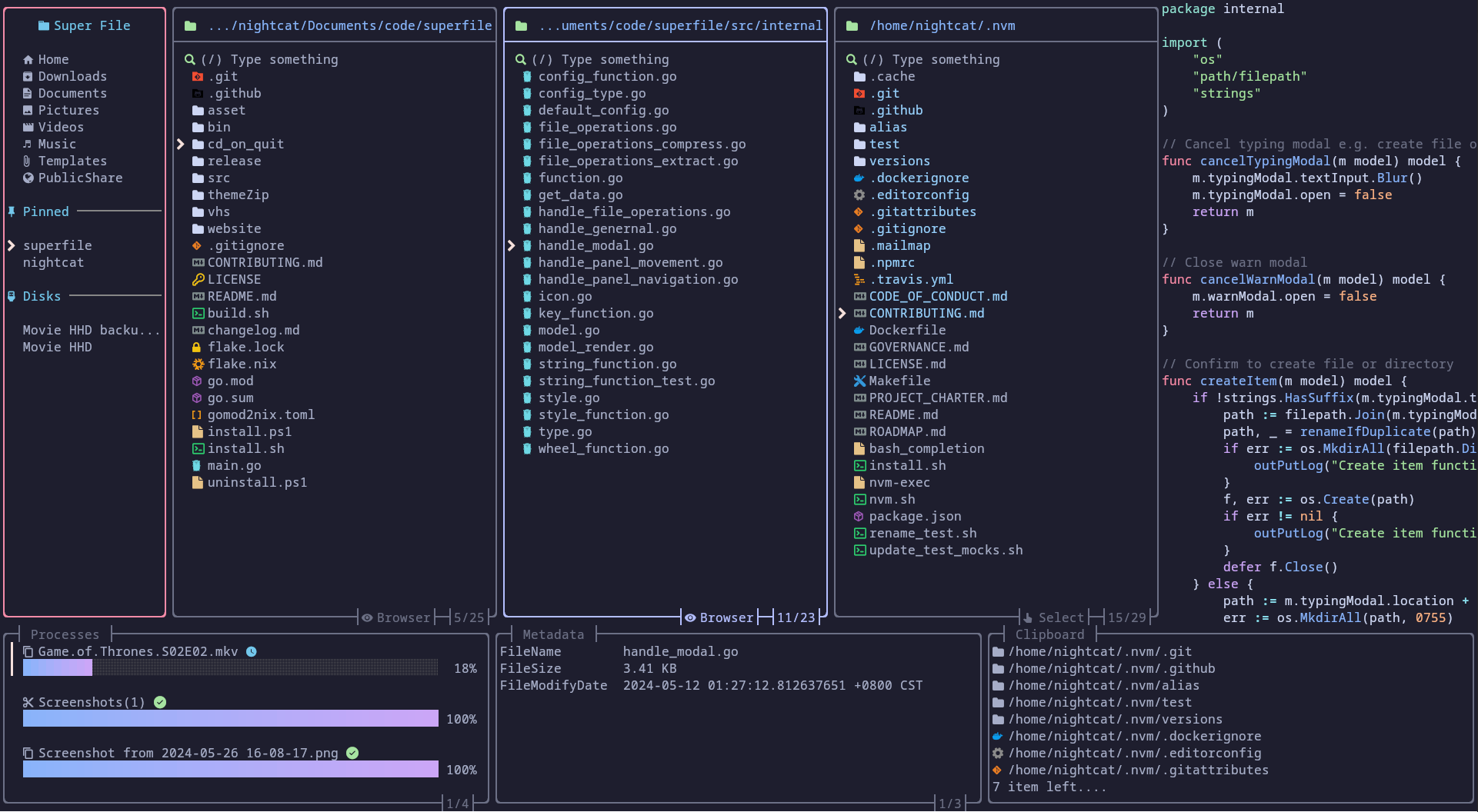
superfile is a modern terminal file manager, written in Go, that gives Linux, macOS and Windows users a full-screen text user interface for browsing and managing files, aimed at developers and command-line users who want more than typed shell commands.

What it is

superfile is an open-source file manager that runs inside the terminal. It is written in Go and built on the Bubble Tea TUI framework, and it is distributed as a single binary invoked with the spf command. The project is licensed under MIT, lives in the Go and terminal-application ecosystem, and is documented on its own site at superfile.dev, where the plugin list, custom theme guide, custom hotkey guide, tutorial and troubleshooting notes are hosted. Configuration is file-based, covering themes, hotkeys and plugins.

The concrete problem it solves is the friction of managing files from a shell prompt. Instead of chaining individual commands to look at, copy, move, rename or delete files, a user gets a full-screen interface in the same terminal session, with keybindings for common operations and a demo section in the README showing those operations performed directly. It replaces doing routine file management one shell command at a time, and it replaces leaving the terminal for a graphical file manager when a visual, keyboard-driven view of the filesystem is wanted. Plugins extend it beyond the built-in behaviour, and themes let the interface be adapted to an existing terminal colour scheme.

Key capabilities

  • Full-screen terminal UI built on the Bubble Tea framework, started by running spf.
  • Common file operations performed through keybindings rather than typed commands, as shown in the README demo.
  • Configurable hotkeys, including a dedicated vim version of the default hotkey configuration intended for vim and nvim users.
  • Custom themes through a documented theme configuration on superfile.dev.
  • A plugin system with a published plugin list maintained in the project wiki.
  • Automatic update check that fetches the latest released version from GitHub when the previous check was more than 24 hours ago.
  • Multiple installation channels: an install.sh script for macOS and Linux, an install.ps1 script for Windows, plus winget install --id yorukot.superfile and scoop install superfile.

Who uses it and how

  • Developers who work primarily in a terminal on Linux or macOS and want file management without switching to a graphical desktop application.
  • Vim and nvim users, who are advised in the README to switch the default hotkey configuration to the vim variant.
  • Windows users, who can install through Winget, Scoop or the PowerShell script, though the platform is marked as not fully supported yet.
  • Contributors and hobbyists: the repository carries the hacktoberfest topic, runs CodeRabbit pull request reviews, and has an active Discord community linked from the README.
  • Users who want a single-command install, since both the macOS/Linux and Windows paths are one-line scripts hosted at superfile.dev.

Getting started

On macOS and Linux, install with bash -c "$(curl -sLo- https://superfile.dev/install.sh)", or on Windows use the equivalent PowerShell script, winget install --id yorukot.superfile, or scoop install superfile. Once installed, start it by typing spf.

How it compares

No list of paid products that superfile replaces is provided in the available facts, and no directly comparable tools are named either, so it stands alone in this registry on the evidence at hand. The facts support only the general position that it is an MIT-licensed, self-installable terminal application rather than a commercial product.

When to use it — and when not to

Pick it if a keyboard-driven file manager inside the terminal matches the way work already happens, and accept building from source when needed, which requires the Go toolchain, ./build.sh, and moving ./bin/spf into a directory on $PATH such as /usr/local/bin. Do not pick it if a graphical file manager with pointer interaction is required, if Windows is the primary platform and full platform support matters, or if the environment cannot tolerate the automatic update check contacting GitHub roughly once a day. The project is under active development and currently carries a sizable backlog of open issues, so users should expect ongoing change.

project readme (upstream, from github) — read inline

superfile is supported by the community.


Donate to superfile on Ko-fi


License MIT Discord Link Release Homebrew downloads GitHub downloads CodeRabbit Pull Request Reviews

Demo

Perform common operations

Content

Installation

macOS and Linux

bash -c "$(curl -sLo- https://superfile.dev/install.sh)"

If you want to inspect the script, see : install.sh

Windows

Powershell
powershell -ExecutionPolicy Bypass -Command "Invoke-Expression ((New-Object System.Net.WebClient).DownloadString('https://superfile.dev/install.ps1'))"

If you want to inspect the script, see : install.ps1

Winget
winget install --id yorukot.superfile
Scoop
scoop install superfile

More installation methods

Click me to check on how to install

Build

You can build the source code yourself by using these steps:

Requirements

Build Steps

Clone this repository using the following command:

git clone https://github.com/yorukot/superfile.git --depth=1

Enter the downloaded directory:

cd superfile

For macOS/Linux

Run the build.sh file:

./build.sh

Add the binary file to your $PATH, e.g., in /usr/local/bin:

sudo mv ./bin/spf /usr/local/bin

For Windows

go build -o bin/spf.exe

Edit System Environment Variables and add superfile repo's bin directory to your PATH

Start superfile

spf

Supported Systems

  • [x] Linux
  • [x] macOS
  • [x] Windows (Not fully supported yet)

Tutorial

After you install superfile, you can go here to briefly understand how to use superfile!

Plugins

Click me to the plugins wiki

Themes

Click me to the theme wiki

Hotkeys

[!WARNING] If you are vim/nvim user please change your default hotkeys config to vim version!

Click me to see the hotkey wiki

Notes

We have an auto update functionality, that fetches superfile's latest released version from github (if last timestamp of last version check was less than 24 hours) and prints a prompt to user, if there is a newer version available.

You can turn this off, by setting auto_check_update to false in superfile config. Click me to see the config wiki

Troubleshooting

Click me to see common problem fix

Uninstalling

macOS and Linux

bash -c "$(curl -sLo- https://superfile.dev/uninstall.sh)"

If you want to inspect the script, see : uninstall.sh

Windows

To uninstall superfile on Windows, use this powershell script.

powershell -ExecutionPolicy Bypass -Command "Invoke-Expression ((New-Object System.Net.WebClient).DownloadString('https://superfile.dev/uninstall.ps1'))"

Contributing

If you want to contribute please follow the contribution guide

Click me to see changelog

Thanks

Support

  • a Star on my GitHub repository would be nice 🌟
  • You can buy a coffee for me 💖

ko-fi

Core maintainer

We welcome anyone who wants to become a core maintainer. Feel free to reach out!

Contributors

Thanks to all the contributors for making this project even greater!

Powered by

JetBrains logo

Thanks to JetBrains team for providing open-source licenses to support the maintenance of superfile.

Star History

THANKS FOR All OF YOUR STARS! Your stars are my motivation to keep updating!

Star History Chart

༼ つ ◕_◕ ༽つ Please share.

Frequently asked questions

Is superfile free to use?

superfile is open source under the MIT licence. There is no licence fee and no seat count — you can self-host it or, where the project offers one, pay a vendor for a managed version instead.

What does superfile do?

Pretty fancy and modern terminal file manager

What is superfile written in?

superfile is primarily written in Go. Its source is publicly available at https://github.com/yorukot/superfile, and it has 23,287 GitHub stars.