
super-board
Add tasks, walk away, get merged PRs with proof.
8 skills (5 you type, 3 the board runs) · 9 commands · 6 guard hooks



🌐 Live site: erictechpro.github.io/super-board
Install · Quick start · How it works · Skills · Commands · Guards
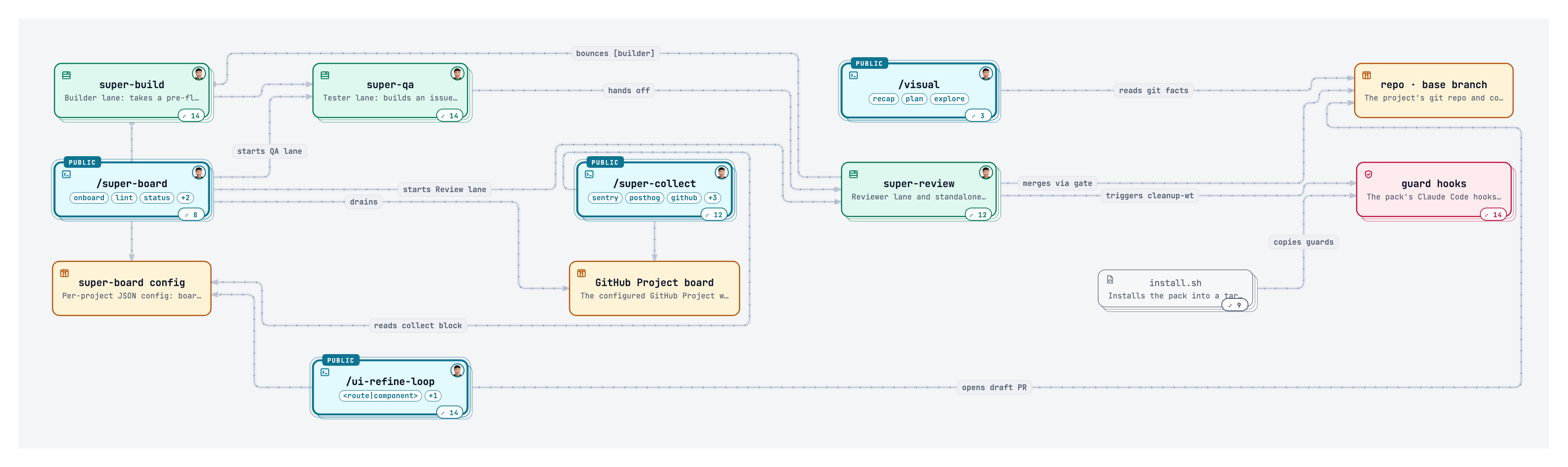
The skill map. Click it for the live version: zoom, pan, open any node.
Install
In your project folder:
curl -fsSL https://raw.githubusercontent.com/EricTechPro/super-board/main/get.sh | bash
Or as a Claude Code plugin:
/plugin marketplace add EricTechPro/super-board
/plugin install super-board@super-board
[!NOTE] The plugin ships the skills only. Run
/super-board:super-board onboardand its 🔍 Checks step adds the guard hooks, scripts and workflows. Needs Claude Code,gh,jq, bash 3.2+ and Python 3.9+; the installer checks.
Running from Codex or OpenCode? See supported hosts for tested versions, sign-in and gaps.
Optional post-run learning can delegate an already installed calibrate skill after
verified selected work completes. It applies only to explicitly permitted existing
canonical skill files; the package bundles no private skill. See
post-run calibration.
Quick start
1. Install
curl -fsSL https://raw.githubusercontent.com/EricTechPro/super-board/main/get.sh | bash
2. Onboard
/super-board onboard
Checks · GitHub · Board · Branch · AGENTS.md · Policies · Bug sources · Review. Enter takes the recommended answer.
3. Run
/super-board run my-app
Add cards to Ready. The board drains on its own.
How it works

▶ Watch on YouTube: I Built a Self-Improving Software Factory
Skills
8 skills (5 you type, 3 the board runs). Uses Matt Pocock skills, ponytail, impeccable and humanizer.
You type — 5 skills
| Skill | What it does |
|---|---|
/super-board |
Orchestrator: plans waves, runs Build → QA → Review, merges when green. |
/super-collect |
Finds problems (Sentry, PostHog, issues, PRs, architecture) and files verified Backlog cards. |
/ui-refine-loop |
Critique → refine loop that polishes one page or component. |
/visual |
One HTML page: branch recap, plan, or codebase map with diagrams. |
/git-sync |
Commit per logical change, merge-pull, push without force, report. |
The board runs — 3 lanes
| Skill | What it does |
|---|---|
/super-build |
Builder lane: worktree, smallest safe change, tests, draft PR. |
/super-qa |
Tester lane: evidence, test-gap check, screenshots, or bounce to Build. |
/super-review |
Reviewer lane: own hypotheses, remembers prior findings, merge gate. |
Each name links to that skill's README. Adding a skill? Write its SKILL.md and README.md, add a line to skills/families.json, and this table updates itself.
Commands
/super-board onboard          # 8-step setup, resumes
/super-board lint             # vague ACs?
/super-board status           # read-only snapshot
/super-board run <slug>       # drain the board
/super-board stop             # stop workers
/super-collect [source]       # file problems to Backlog
/ui-refine-loop <route>       # polish one page
/visual [recap|plan|path]     # one HTML page
/git-sync                     # commit, pull, push
Flags: run --low|--high · run --codex[=] · super-collect --since 30d
Guards & hooks
Run automatically once installed. Python stdlib, JSON in, JSON out.
| guard-worktree-path | Blocks git worktree add outside .claude/worktrees/ |
| guard-secrets | Blocks reading or piping dotenv files, SSH keys and credential files; key names via super-board-env-check.sh |
| guard-key-literals | Blocks a live-looking API key written into a file; flags one already there |
| guard-delete-outside | Blocks rm, find -delete and git clean aimed outside the project, ~ or / |
| guard-protected-push | Opt-in (onboard asks, or install.sh --protect-main): blocks direct and force pushes to main/master/base |
| README sync | Regenerates the skill table; pre-commit and PostToolUse hooks keep it fresh |
| cleanup-wt | Removes merged worktrees and branches after each merge and at session start, with a recovery file |
| merge gate | Merges only after the current base plus your non-empty project verify_commands pass (missing checks halt setup), pinned to the reviewed commit; applies merge_policy and runs allowed DB migrations |
Models
A cheap router grades each card easy, medium or hard first; the run flag picks the model for each grade. With --codex, every lane runs on Codex GPT models instead of Claude.
| Command | Router | Easy card | Medium card | Hard card |
|---|---|---|---|---|
/super-board run |
Haiku 4.5 | Sonnet 5.5 | Opus 5.5 | session model |
/super-board run --low |
Haiku 4.5 | Haiku 4.5 | Sonnet 5.5 | Opus 5.5 |
/super-board run --high |
Sonnet 5.5 | Opus 5.5 | Opus 5.5 | Opus 5.5 |
/super-board run --codex |
gpt-6-luna | gpt-6.1-sol | gpt-6.1-sol | gpt-6-astra |
/super-board run --codex --low |
gpt-6-luna | gpt-6-luna | gpt-6.1-sol | gpt-6.1-sol |
/super-board run --codex --high |
gpt-6-luna | gpt-6-astra | gpt-6-astra | gpt-6-astra |
/super-board run --codex= pins one model for every card and skips the router.
Run inside Codex? plain /super-board run switches to the Codex ladder by itself. Codex has no
/super-board command: it finds skills in .agents/skills/ (symlinks followed), so link
.claude/skills/super-board there and type $super-board run.
Writing standard
Commits, tickets, PR bodies and comments all follow one writing standard, in the pack and in every project it is installed into.
Upgrading from 2.x
- Re-run the install line.
- Run
/super-board onboard; step 1 upgrades for you and keeps a backup. - Try
board-migrate --dry-runon a copy of your board first.
Credits
MIT © Eric Tech (LICENSE). Built on obra/superpowers, mattpocock/skills, BuilderIO/skills and tt-a1i/archify.
Live site · Skill map · Writing standard · Setup simulator · Impeccable map · pstack map · Release notes · Release checks · YouTube walkthrough
Made by Eric Tech
Worker skill availability
Setup and dispatch resolve real, nonempty SKILL.md files for the actual
Claude or Codex host. Missing required skills halt before claims or workers;
lockfiles and arbitrary plugin caches do not count. The shared registry in
scripts/super-board-skills-ready.py owns lane dependencies, overrides and the
two declared ponytail fallbacks. Setup's full helper union may be red while a
selected card is runnable. Read-only checks never install; explicit onboard
repair rechecks files after installation.
The CLI accepts --home and --catalog .
Launchers accept the same inventory through SUPER_BOARD_SKILLS_HOME and
SUPER_BOARD_SKILLS_CATALOG; neither changes the actual host. Catalog shape:
{"host":"codex","skills":[{"name":"vendor:skill","path":"/exact/SKILL.md", "enabled":true,"scope":"project","project_root":"/exact/project"}]}.
User entries use scope:"user". Restart explicitly after repairing missing
skills; readiness certifies availability, not their content or external tools.