Safebucket is an open-source, self-hosted file sharing platform written in Go for teams that want to keep file storage and access on their own infrastructure rather than with a cloud provider.
What it is
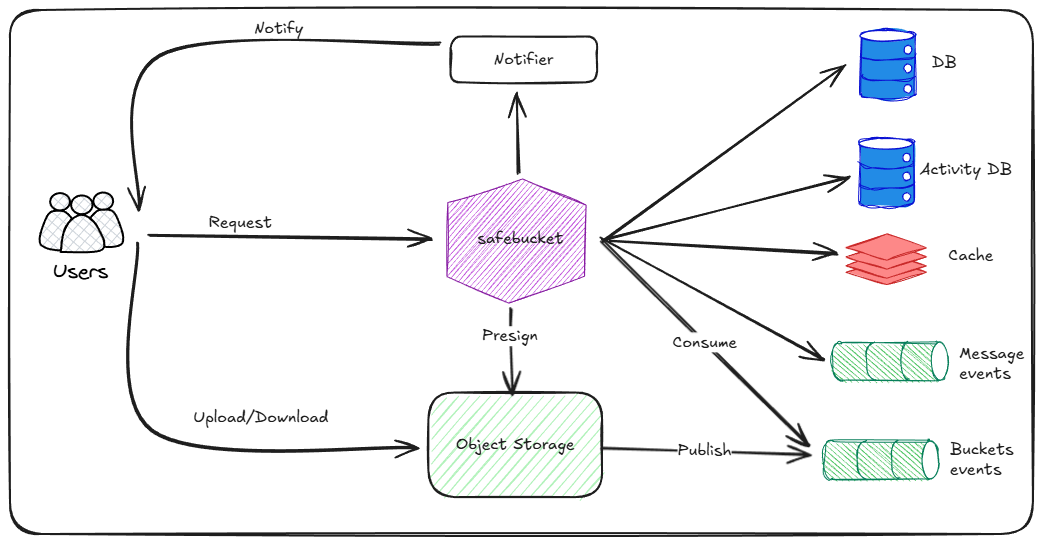
Safebucket is a file sharing and sync application built in Go with a React frontend, distributed as container images under the Apache 2.0 licence. It runs in your own environment and is designed around pluggable infrastructure: every component — storage, database, events, cache, and notifier — can be replaced with a different implementation, so the platform is not tied to a single vendor's services. The project publishes signed container images through GitHub Actions and provides a local Docker Compose deployment for trying it out.
The concrete problem it addresses is on-premise file sharing that is both fast and safe without routing file bytes through the application server. Uploads and downloads go directly via presigned URLs, so files bypass the server itself, which keeps large transfers off the application tier while still letting the platform enforce access control and audit every action. For organisations that must keep file data inside their own network — for reasons of compliance, latency, or data ownership — it replaces the need to push files to an external hosted sharing service.
Key capabilities
- Direct uploads and downloads via presigned URLs, so files bypass the server rather than passing through it.
- Swappable infrastructure, where each component — storage, database, events, cache, and notifier — can be replaced independently.
- SSO through any OIDC provider, alongside local authentication for external users, plus multifactor authentication via TOTP.
- Role-based access control applied both at platform level and at bucket level.
- Quick/reverse share links with per-share options including a password, maximum downloads, and maximum views.
- Real-time activity tracking with audit logs, and an admin dashboard showing platform-wide statistics.
- File expiration and a trash with configurable retention.
Who uses it and how
- Teams running their own storage on infrastructure such as Proxmox, where the README explicitly covers configuring
STORAGE__RUSTFS__EXTERNAL_ENDPOINT, APP__ALLOWED_ORIGINS, APP__API_URL, and APP__WEB_URL in .env for access from an external machine.
- Administrators who want single sign-on for internal staff via an OIDC provider while still onboarding external collaborators with local accounts and password-protected share links.
- Organisations that need an auditable sharing workflow, using activity tracking, audit logs, and role-based permissions at platform and bucket scope to govern who can do what.
- Operators who standardise on signed supply chains, verifying published images with
cosign keyless signing via GitHub Actions OIDC before deployment.
Getting started
Clone the repository, run docker compose up -d from safebucket/deployments/local/lite, then open http://localhost:8080 and log in with admin@safebucket.io and ChangeMePlease; published images are also available from ghcr.io/safebucket/safebucket.
How it compares
The facts provided do not name other file sharing tools for comparison, so Safebucket stands alone in this registry; what distinguishes it is that it is self-hosted under Apache-2.0 with every infrastructure component swappable and file bytes routed around the server via presigned URLs.
When to use it — and when not
Because infrastructure is pluggable, a self-hoster is responsible for operating the storage backend, database, event and cache layers, and notifier, along with the environment variables needed for external access — this is not a single-binary install for someone unwilling to run supporting services. Anyone needing a turnkey cloud service with managed uptime and support, or who is uncomfortable with a project carrying 36 open issues, should weigh the operational burden before adopting it; the project itself also points users to an external documentation site and a full feature list rather than a self-contained README.
project readme (upstream, from github) — read inline

An open source file sharing platform with pluggable infrastructure where files bypass the server



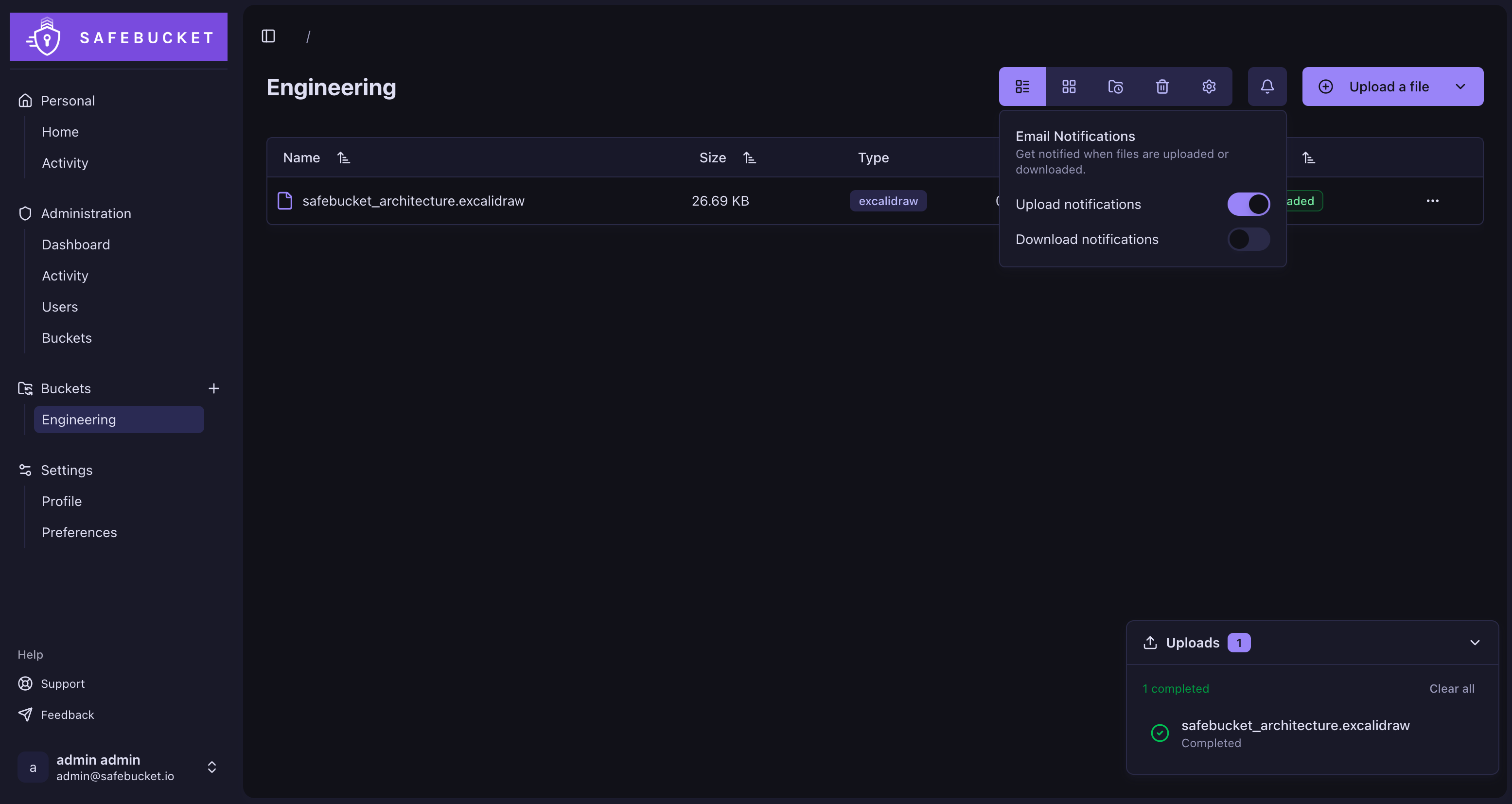
Features
- Direct uploads and downloads via presigned URLs: files bypass the server
- Swappable infrastructure: every component (storage, database, events, cache, notifier) can be replaced
- SSO via any OIDC provider, with local auth for external users
- Role-based access control at platform and bucket level
- Quick/reverse share: share file via public links with options (password, max downloads, max views, etc...)
- Real-time activity tracking and audit logs
- Multifactor authentication (TOTP)
- File expiration, trash with configurable retention
- Admin dashboard with platform-wide statistics
And more... see the full list of features.
Architecture
Quick Start
git clone https://github.com/safebucket/safebucket.git
cd safebucket/deployments/local/lite
docker compose up -d
Note: If you are accessing Safebucket from an external machine (e.g. Proxmox), you need to update the following
environment variables in the .env file with your host's IP or domain:
STORAGE__RUSTFS__EXTERNAL_ENDPOINTAPP__ALLOWED_ORIGINSAPP__API_URLAPP__WEB_URL
Verify Image Signature
All published container images are signed with cosign using keyless signing via
GitHub Actions OIDC: no manual keys are involved.
You can verify the signature of any published image using the following commands:
cosign verify \
  --certificate-oidc-issuer=https://token.actions.githubusercontent.com \
  --certificate-identity-regexp=https://github.com/safebucket/safebucket/ \
  ghcr.io/safebucket/safebucket:<tag>
Replace `` with the image tag you want to verify (e.g., latest, v1.0.0).
License
This project is licensed under the Apache 2.0 - see the LICENSE file for details.
Acknowledgments