





ReplicaDB is a high-performance, open-source command-line tool for bulk data replication between heterogeneous databases. It enables efficient ETL/ELT workflows by transferring data in parallel between Oracle, PostgreSQL, MySQL, MongoDB, SQL Server, and other databases without requiring database agents or triggers.
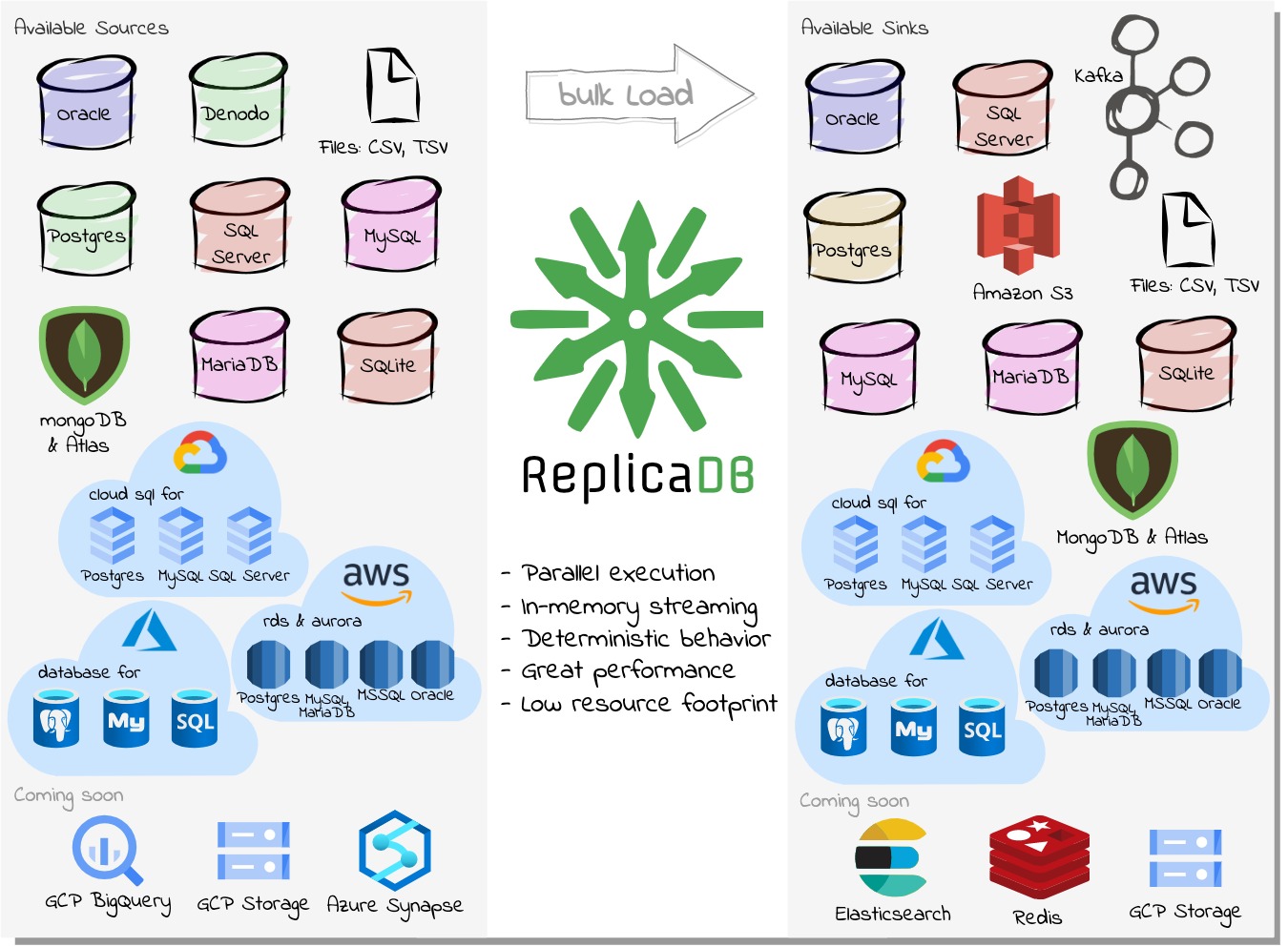
ReplicaDB supports a wide range of data sources including relational databases (Oracle, PostgreSQL, MySQL, MariaDB, SQL Server, SQLite, IBM DB2 LUW and DB2 for i), NoSQL databases (MongoDB), data virtualization platforms (Denodo), file formats (CSV), cloud storage (Amazon S3), and streaming platforms (Kafka). Any JDBC-compliant database is also supported with some limitations.
The managed server provides redacted per-run diagnostics through the runs API, including bounded multiline logs and exception stack traces. These logs are limited to 256 KiB and are separate from standalone CLI logging; treat them as sensitive operational data.
The tool is cross-platform compatible with Windows, Linux, and macOS, and leverages parallel data transfer for optimal performance and system utilization during large-scale data migrations and synchronization tasks.
Why ReplicaDB
ReplicaDB addresses common gaps in existing database replication tools by providing:
- Open Source: Transparent development and community-driven improvements
- Cross-Platform: Java-based solution compatible with Linux, Windows, and macOS
- Heterogeneous Support: Works with SQL, NoSQL, and persistent stores like CSV, Amazon S3, or Kafka
- Simple Architecture: Standalone command-line tool without requiring database agents
- High Performance: Optimized for bulk data transfer with large datasets
- Non-Intrusive: Focused on batch replication without requiring database triggers or CDC installation
Comparison with Alternatives
Common alternatives and how ReplicaDB differs:
- SymmetricDS: A comprehensive CDC solution with database triggers. While feature-rich, it requires installation and maintenance of capture tables in source databases, making it more intrusive for batch replication scenarios.
- Sqoop: Designed specifically for Hadoop ecosystems, limiting its use in other environments where Hadoop infrastructure is not available.
- Pentaho and Talend: Full-featured ETL platforms that require custom development for each replication job, increasing complexity and maintenance overhead for straightforward data transfer tasks.
Feature Comparison
| Feature | SymmetricDS | Sqoop | Pentaho/Talend | ReplicaDB |
|---|---|---|---|---|
| Database Agents Required | Yes | No | No | No |
| Triggers in Source DB | Yes | No | No | No |
| Heterogeneous Databases | Limited | No | Yes | Yes |
| Hadoop Requirement | No | Yes | No | No |
| Custom Development per Job | Low | Low | High | None |
| Parallel Transfer | Yes | Yes | Yes | Yes |
| Open Source | Yes | Yes | Yes | Yes |
Installation
Prerequisites
Before installing ReplicaDB, ensure you have:
- Java Runtime: Java JDK or JRE 17 or higher installed and configured
- Network Connectivity: Reliable network access to both source and sink databases
- Database Credentials: Appropriate permissions on both databases:
- Source database: SELECT permissions on tables to replicate
- Sink database: INSERT, UPDATE, DELETE, and CREATE TABLE permissions
- (Optional) Docker or Podman for containerized deployment
Choose a release
ReplicaDB has two separate releases:
| CLI | Server | |
|---|---|---|
| Use it for | Direct transfers from scripts or a terminal | Shared jobs, schedules, users, audit, and run history |
| Download | ReplicaDB-1.0.2.tar.gz or .zip |
ReplicaDB-server-1.0.2.tar.gz or .zip |
| PostgreSQL | Only the source and sink databases | Embedded in local; external in api and worker |
| State | REPLICADB_HOME |
REPLICADB_SERVER_HOME |
| Interface | CLI | Authenticated API/frontend and private worker health endpoint |
Use the CLI for one replication at a time. It is Spring-free and keeps its existing options-file and exit-code behavior.
Use the server for managed, shared, or distributed replication. Its
local mode is a durable single-node install; api and worker use external
PostgreSQL. It does not migrate CLI files or state.
The server package requires Java 17, but not Maven, npm, Docker, or a system PostgreSQL installation. Extract it and start the local server:
tar -xzf ReplicaDB-server-1.0.2.tar.gz
cd ReplicaDB-server-1.0.2
./bin/replicadb-server start local
./bin/replicadb-server status
The first local start downloads and verifies the platform PostgreSQL bundle.
Set REPLICADB_BOOTSTRAP_ADMIN_USERNAME and
REPLICADB_BOOTSTRAP_ADMIN_PASSWORD for automation, or answer the hidden
prompt from an interactive terminal. The server home defaults to
~/.replicadb; set REPLICADB_SERVER_HOME to change it. Keep the keyring and
data/postgresql together when backing up. Warm-cache restarts do not need
network access.
For source builds and development profiles, see
CONTRIBUTING.md and
docs/server.md.
Local single-node server without Docker
For a durable local installation, replicadb-server can manage a native
embedded PostgreSQL process. This mode uses the same PostgreSQL repositories,
Flyway migrations, Quartz scheduler, encrypted datasource catalog, and local
job execution as the api profile; it does not start a separate worker.
The extracted package is the recommended durable local installation:
export REPLICADB_BOOTSTRAP_ADMIN_USERNAME='local-admin'
export REPLICADB_BOOTSTRAP_ADMIN_PASSWORD='<local-password>'
./bin/replicadb-server start local
./bin/replicadb-server status
./bin/replicadb-server stop
The first start downloads and verifies the platform PostgreSQL bundle from
Maven Central. It does not require Docker or a system PostgreSQL installation,
but it does require network access unless the bundle is already cached. The
current release manifest covers macOS ARM64 and x64, Linux x64, and Windows
x64; unsupported operating systems or architectures fail with an actionable
startup error. By default, durable state lives under ~/.replicadb:
~/.replicadb/
  data/postgresql/       metadata database and job history
  cache/postgresql/      verified native PostgreSQL bundle and extraction
  security/master-key.json
  locks/
  run/
  logs/
Set REPLICADB_SERVER_HOME to move this complete local installation. Keep the
security/master-key.json keyring with the database backup; losing it makes
encrypted datasource credentials unrecoverable. An explicit
REPLICADB_SECURITY_KEYRING_FILE can point to a separately managed keyring;
the old REPLICADB_SECURITY_MASTER_KEY_FILE name remains a deprecated alias.
Stop the server before backing up or restoring data/postgresql and the
keyring. The cached native bundle can be recreated if it is absent. Major
PostgreSQL upgrades are not performed automatically; back up the local home
before upgrading ReplicaDB and follow the release notes for any data-directory
migration.
The embedded mode binds PostgreSQL to loopback and uses local HTTP session
cookies. Put TLS or an authenticated reverse proxy in front of it before
exposing the API beyond the local machine. It is a single-node convenience
mode, not a replacement for the external PostgreSQL plus api/worker
topology in DEPLOYMENT.md.
The distributed worker runtime uses the Phase 3.4 hybrid admission policy for approximate load distribution. The standalone CLI artifact remains Spring-free, accepts its existing options-file contract, and does not require the managed metadata database.
Stand Alone
System Requirements
ReplicaDB is written in Java and requires a Java Runtime Environment (JRE) Standard Edition (SE) or Java Development Kit (JDK) Standard Edition (SE) version 17 or above. The minimum system requirements are:
- Java SE Runtime Environment 17 or above
- Memory - 256 MB minimum, 1 GB recommended for large datasets
Install
Download the latest release from GitHub and extract the archive:
$ curl -o ReplicaDB-1.0.2.tar.gz -L "https://github.com/osalvador/ReplicaDB/releases/download/v1.0.2/ReplicaDB-1.0.2.tar.gz"
$ tar -xvzf ReplicaDB-1.0.2.tar.gz
$ ./bin/replicadb --help
JDBC Drivers
ReplicaDB already comes with all the JDBC drivers for the Compatible Databases. But you can use ReplicaDB with any JDBC-compliant database.
First, download the appropriate JDBC driver for the type of database you want to use, and install the .jar file in the $REPLICADB_HOME/lib directory. Each driver .jar file also has a specific driver class that defines the entry-point to the driver.
If your database is JDBC-compliant and not appear in the Compatible Databases list, you must set the driver class name in the configuration properties as extra JDBC parameter.
For example, to replicate a DB2 database table as both source and sink
######################## ReplicadB General Options ########################
mode=complete
jobs=1
############################# Source Options ##############################
source.connect=jdbc:db2://localhost:50000/testdb
source.user=${DB2USR}
source.password=${DB2PASS}
source.table=source_table
source.connect.parameter.driver=com.ibm.db2.jcc.DB2Driver
############################# Sink Options ################################
sink.connect=jdbc:db2://localhost:50000/testdb
sink.user=${DB2USR}
sink.password=${DB2PASS}
sink.table=sink_table
sink.connect.parameter.driver=com.ibm.db2.jcc.DB2Driver
Docker
For containerized deployments or environments without Java installed, ReplicaDB is available as a Docker image.
$ docker run \
    -v /tmp/replicadb.conf:/home/replicadb/conf/replicadb.conf \
    osalvador/replicadb
Visit the project homepage on Docker Hub for more information.
Podman
For Red Hat Enterprise Linux and Fedora environments, ReplicaDB provides a container image based on Red Hat Universal Base Image (UBI) 8, which is optimized for enterprise security and compliance.
$ podman run \
    -v /tmp/replicadb.conf:/home/replicadb/conf/replicadb.conf:Z \
    osalvador/replicadb:ubi8-latest
Note: The :Z flag relabels the volume for SELinux compatibility. See Podman documentation for details on volume mounting with SELinux.
Full Documentation
The canonical user documentation portal is ReplicaDB Documentation. The portal covers the standalone CLI, managed server workflows, connector capabilities, architecture, operations, and the generated API reference.
Configuration Wizard
You can create a configuration file for a ReplicaDB process by filling out a simple form: ReplicaDB configuration wizard
Quick Start Examples
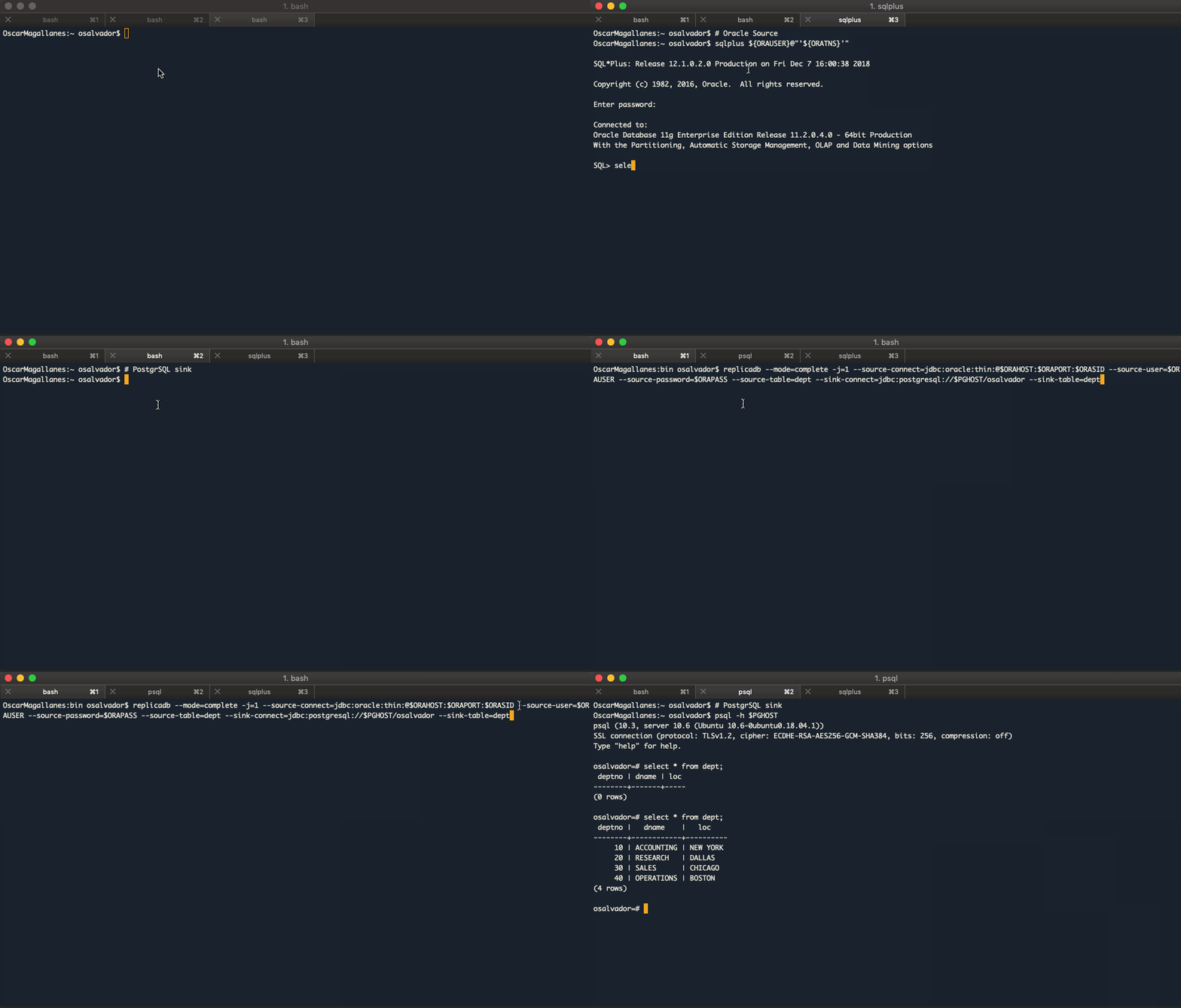
Oracle to PostgreSQL
Security Note: The examples below use environment variables for credentials. Never hard-code passwords in scripts or command history.
Prerequisites:
- Source table must exist and be accessible with SELECT permissions
- Sink table must exist with a compatible schema
- For
incrementalmode, sink table must have primary keys defined - For
incrementalmode,--incremental-watermark-column(with an optional--incremental-watermark-value) automates the--source-wherefiltering described in the CLI watermark guide
$ replicadb --mode=complete -j=1 \
--source-connect=jdbc:oracle:thin:@$ORAHOST:$ORAPORT:$ORASID \
--source-user=$ORAUSER \
--source-password=$ORAPASS \
--source-table=dept \
--sink-connect=jdbc:postgresql://$PGHOST/osalvador \
--sink-table=dept
2026-01-28 10:15:23,808 INFO  ReplicaTask:36: Starting TaskId-0
2026-01-28 10:15:24,650 INFO  SqlManager:197: TaskId-0: Executing SQL statement: SELECT /*+ NO_INDEX(dept)*/ * FROM dept where ora_hash(rowid,0) = ?
2026-01-28 10:15:24,650 INFO  SqlManager:204: TaskId-0: With args: 0,
2026-01-28 10:15:24,772 INFO  ReplicaDB:89: Total process time: 1302ms
Alternatively, use a configuration file to simplify repeated operations:
######################## ReplicadB General Options ########################
mode=complete
jobs=1
############################# Source Options ##############################
source.connect=jdbc:oracle:thin:@${ORAHOST}:${ORAPORT}:${ORASID}
source.user=${ORAUSER}
source.password=${ORAPASS}
source.table=dept
############################# Sink Options ################################
sink.connect=jdbc:postgresql://${PGHOST}/osalvador
sink.table=dept
$ replicadb --options-file replicadb.conf
Replicate multiple tables
Several source-to-sink table pairs can be declared in one options file. Each pair is executed in numeric order, and ReplicaDB completes its normal pre-tasks, parallel jobs, post-tasks, and cleanup before starting the next pair:
mode=complete
jobs=4
source.connect=${SOURCE_CONNECT}
source.user=${SOURCE_USER}
source.password=${SOURCE_PASSWORD}
sink.connect=${SINK_CONNECT}
sink.user=${SINK_USER}
sink.password=${SINK_PASSWORD}

replication.table.1.source=dbo.customers
replication.table.1.sink=dbo.customers
replication.table.2.source=dbo.orders
replication.table.2.sink=dbo.sales_orders
replication.table.3.source=dbo.products
replication.table.3.sink=dbo.catalog_products
jobs=4 controls up to four parallel tasks for the table currently being
replicated; it does not run four tables concurrently. A failure stops the
remaining pairs and returns a non-zero exit code. Indexed entries must be
contiguous and must contain both .source and .sink values.
The indexed catalog cannot be combined with source.table, sink.table,
source.query, --source-table, or --sink-table. In incremental and
complete-atomic modes, use sink.staging.schema and let ReplicaDB generate
a staging table for each pair; a fixed sink.staging.table or alias is
rejected to prevent table state from being shared. Wildcards, regular
expressions, automatic catalog discovery, and scheduling are outside this
MVP. An external query can generate the indexed entries from
information_schema before starting ReplicaDB.
PostgreSQL to Oracle
$ replicadb --mode=complete -j=1 \
--sink-connect=jdbc:oracle:thin:@$ORAHOST:$ORAPORT:$ORASID \
--sink-user=$ORAUSER \
--sink-password=$ORAPASS \
--sink-table=dept \
--source-connect=jdbc:postgresql://$PGHOST/osalvador \
--source-table=dept \
--source-columns=dept.*
2026-01-28 10:20:35,334 INFO  ReplicaTask:36: Starting TaskId-0
2026-01-28 10:20:35,440 INFO  SqlManager:131 TaskId-0: Executing SQL statement: SELECT  * FROM dept OFFSET ?
2026-01-28 10:20:35,441 INFO  SqlManager:204: TaskId-0: With args: 0,
2026-01-28 10:20:35,550 INFO  OracleManager:98 Inserting data with this command: INSERT INTO /*+APPEND_VALUES*/ ....
2026-01-28 10:20:35,552 INFO  ReplicaDB:89: Total process time: 1007ms
Compatible Databases
| Persistent Store | Source | Sink Complete | Sink Complete-Atomic | Sink Incremental | Sink Bandwidth Throttling |
|---|---|---|---|---|---|
| Oracle | :heavy_check_mark: | :heavy_check_mark: | :heavy_check_mark: | :heavy_check_mark: | :heavy_check_mark: |
| MySQL | :heavy_check_mark: | :heavy_check_mark: | :heavy_check_mark: | :heavy_check_mark: | :heavy_check_mark: |
| MariaDB | :heavy_check_mark: | :heavy_check_mark: | :heavy_check_mark: | :heavy_check_mark: | :heavy_check_mark: |
| PostgreSQL | :heavy_check_mark: | :heavy_check_mark: | :heavy_check_mark: | :heavy_check_mark: | :heavy_check_mark: |
| IBM DB2 LUW | :heavy_check_mark: | :heavy_check_mark: | :heavy_check_mark: | :heavy_check_mark: | :heavy_check_mark: |
| IBM DB2/i | :heavy_check_mark: | :heavy_check_mark: | :heavy_check_mark: | :heavy_check_mark: | :heavy_check_mark: |
| SQLite | :heavy_check_mark: | :heavy_check_mark: | :heavy_multiplication_x: | :heavy_check_mark: | :heavy_check_mark: |
| SQL Server | :heavy_check_mark: | :heavy_check_mark: | :heavy_check_mark: | :heavy_check_mark: | :heavy_multiplication_x: |
| MongoDB | :heavy_check_mark: | :heavy_check_mark: | :heavy_multiplication_x: | :heavy_check_mark: | :heavy_check_mark: |
| Denodo | :heavy_check_mark: | N/A | N/A | N/A | N/A |
| CSV | :heavy_check_mark: | :heavy_check_mark: | N/A | :heavy_check_mark: | :heavy_check_mark: |
| Kafka | :heavy_multiplication_x: | N/A | N/A | :heavy_check_mark: | :heavy_check_mark: |
| Amazon S3 | :heavy_multiplication_x: | :heavy_check_mark: | N/A | N/A | :heavy_check_mark: |
| JDBC-Compliant database | :heavy_check_mark: | :heavy_check_mark: | :heavy_multiplication_x: | :heavy_multiplication_x: | :heavy_check_mark: |
See DB2 Documentation for driver installation and platform-specific details.
Roadmap
Features:
- Automatic table discovery with wildcard or regular-expression filters
- Scheduling
- Web interface
- Server mode with API
- Kubernetes compliant
New Databases:
- Elasticsearch
- Redis
- GCP BigQuery
- Azure Synapse
Contributing
We welcome contributions to ReplicaDB! Whether you're fixing bugs, adding features, or improving documentation, your help is appreciated.
How to Contribute:
- Fork the repository: https://github.com/osalvador/ReplicaDB
- Create your feature branch:
git checkout -b feature/your-feature-name - Commit your changes:
git commit -am 'Add feature description' - Push to the branch:
git push origin feature/your-feature-name - Create a Pull Request
Contribution Guidelines:
- Follow existing code style and conventions
- Add tests for new functionality
- Update documentation to reflect your changes
- Ensure all tests pass before submitting PR
- Keep pull requests focused on a single feature or fix
For detailed guidelines, see CONTRIBUTING.md (when available).
License
ReplicaDB is open source software released under the Apache License 2.0. You are free to use, modify, and distribute this software for both commercial and non-commercial purposes, subject to the terms and conditions of the license.
Key points:
- Free for commercial and personal use
- Modification and distribution permitted
- Must include license and copyright notices
- Provided "as is" without warranty
For complete license terms, see the LICENSE file in the repository.