ProxMenux is a free, open source monitoring & observability project written in TypeScript and released under GPL-3.0. It has 2,978 GitHub stars, 155 forks and 15 open issues, and was last pushed 64 minutes ago. On this registry it ranks #136 of 271 tracked projects in Monitoring & Observability, with 5 head-to-head comparisons available.

What is ProxMenux?

ProxMenux is a menu-driven Proxmox VE toolkit, licensed GPL-3.0, that pairs an interactive terminal interface for post-install and backup/restore work with a self-hosted web dashboard for continuous health monitoring, built for homelab operators who run Proxmox on their own hardware.

What it is

ProxMenux lives in the Proxmox VE ecosystem, which itself runs on Debian, and it presents itself as an interactive toolkit for that platform: a menu-driven CLI plus a web dashboard, covering post-install configuration, backup and restore, and continuous health monitoring of a homelab. The repository is classified as TypeScript, and its topic list includes bash, tui, dashboard, pwa, monitoring, self-hosted, backup, homelab and proxmox-ve, which reflects that mix of a terminal front end and a browser-accessible service. It is distributed as a GPL-3.0 project with roughly 2,978 stars, 155 forks and 15 open issues at the time of writing.

The concrete problem it solves is the manual, scattered work that follows a Proxmox VE installation. Instead of running individual post-install and backup commands by hand and then checking node health from a terminal, an operator launches menu and works through on-screen options. The integrated ProxMenux Monitor then answers the monitoring half of that problem: it provides real-time visibility into the Proxmox infrastructure from any browser on the network, explicitly without needing a terminal, and it is installed automatically as part of the standard ProxMenux installation.

Key capabilities

  • Menu-driven terminal interface launched with the menu command after installation, built on the dialog package for interactive terminal menus.
  • ProxMenux Monitor, a web dashboard served at http://:8008 and reachable from any browser on the network.
  • The Monitor runs as a systemd service named proxmenux-monitor.service that starts automatically on boot, and its status and logs are inspected with systemctl status proxmenux-monitor and journalctl -u proxmenux-monitor -n 50.
  • Real-time monitoring of CPU, RAM, disk usage and network traffic, alongside an overview of running VMs and LXC containers with status indicators.
  • Login authentication plus Two-Factor Authentication with TOTP support.
  • Reverse proxy support for Nginx and Traefik, with a dashboard designed to work across desktop and mobile devices.
  • Backup and restore workflows as a core function, echoed by the backup topic, and a beta channel installed from the develop branch through install_proxmenux_beta.sh.

Who uses it and how

  • Homelab operators on a single Proxmox VE node use the menu for post-install setup, then keep the Monitor open for day-to-day health checks.
  • Operators who want status without a terminal open the dashboard in a desktop or mobile browser on the local network at port 8008.
  • Teams exposing the dashboard beyond the LAN place it behind Nginx or Traefik and rely on login authentication plus TOTP.
  • Beta testers run the develop branch build, accept that features may be incomplete, and file GitHub issues that include journalctl -u proxmenux-monitor -n 50 output.
  • Contributors work against CONTRIBUTING.md, which documents the two-phase dialog / whiptail UI flow, message helpers and the translation policy.

Getting started

Installation is a single command run in the Proxmox server terminal: bash -c "$(wget -qLO - https://raw.githubusercontent.com/MacRimi/ProxMenux/main/install_proxmenux.sh)". After that, launch the toolkit by running menu; a separate install_proxmenux_beta.sh script installs the beta build from the develop branch.

How it compares

The registry entry supplies no list of paid products that ProxMenux replaces, and it names no directly comparable self-hosted tool in the same space. On the facts available, it stands alone in this registry as a menu-driven Proxmox VE post-install, backup and monitoring toolkit.

When to use it — and when not to

A self-hoster takes on the operating burden of the whole stack: the setup installs dialog, curl, jq, git and python3 with python3-pip for the Flask-based Monitor, and the dashboard runs as a systemd unit that must be started and inspected. Anyone unwilling to run a curl-piped installer, or to read the installer source first as the README advises, should not pick it. The honest weaknesses are that TLS on port 8008 depends on putting a reverse proxy in front, that the beta branch is stated to contain bugs and incomplete features, and that the project is a relatively small one at 155 forks with 15 open issues.

project readme (upstream, from github) — read inline

ProxMenux Logo


Website Docs Changelog Guides

Latest release Latest beta License GitHub stars Open issues


ProxMenux is an interactive toolkit for Proxmox VE — a menu-driven CLI plus a web dashboard for post-install, backup/restore and continuous health monitoring of your homelab.


📌 Installation

To install ProxMenux, simply run the following command in your Proxmox server terminal:

bash -c "$(wget -qLO - https://raw.githubusercontent.com/MacRimi/ProxMenux/main/install_proxmenux.sh)"

⚠️ Be careful when copying scripts from the internet. Always remember to check the source!

📄 You can review the source code before execution.

🛡️ All executable links follow our Code of Conduct.


📌 How to Use

Once installed, launch ProxMenux by running:

menu

Then, follow the on-screen options to manage your Proxmox server efficiently.


🖥️ ProxMenux Monitor

ProxMenux Monitor is an integrated web dashboard that provides real-time visibility into your Proxmox infrastructure — accessible from any browser on your network, without needing a terminal.

What it offers:

  • Real-time monitoring of CPU, RAM, disk usage and network traffic
  • Overview of running VMs and LXC containers with status indicators
  • Login authentication to protect access
  • Two-Factor Authentication (2FA) with TOTP support
  • Reverse proxy support (Nginx / Traefik)
  • Designed to work across desktop and mobile devices

Access:

Once installed, the dashboard is available at:

http://<your-proxmox-ip>:8008

The Monitor is installed automatically as part of the standard ProxMenux installation and runs as a systemd service (proxmenux-monitor.service) that starts automatically on boot.

Useful commands:

# Check service status
systemctl status proxmenux-monitor

# View logs
journalctl -u proxmenux-monitor -n 50

# Restart the service
systemctl restart proxmenux-monitor

🧪 Beta Program

Want to try the latest features before the official release and help shape the final version?

The ProxMenux Beta Program gives early access to new functionality — including the newest builds of ProxMenux Monitor — directly from the develop branch. Beta builds may contain bugs or incomplete features. Your feedback is what helps fix them before the stable release.

Install the beta version:

bash -c "$(wget -qLO - https://raw.githubusercontent.com/MacRimi/ProxMenux/develop/install_proxmenux_beta.sh)"

What to expect:

  • You'll get new features and Monitor builds before anyone else
  • Some things may not work perfectly — that's expected and normal
  • When a stable release is published, ProxMenux will notify you on the next menu launch and offer to switch automatically

How to report issues:

Open a GitHub Issue and include:

  • What you did and what you expected to happen
  • Any error messages shown on screen
  • Logs from the Monitor if relevant:
journalctl -u proxmenux-monitor -n 50

💙 Thank you for being part of the beta program. Your help makes ProxMenux better for everyone.


🔧 Dependencies

The following Debian packages are installed automatically during setup:

Package Purpose
dialog Interactive terminal menus
curl Downloads and connectivity checks
jq JSON processing
git Repository cloning and updates
python3 + python3-pip ProxMenux Monitor (Flask web dashboard)

UI translations ship as pre-built JSON files per language (English, Spanish, French, German, Italian, Portuguese). There is no runtime translation dependency.


🤝 Contributing

ProxMenux is an open, collaborative project — contributions of every shape are very welcome, no matter your background. Every PR, bug report, idea, translation or kind word helps move the project forward.

📖 Before sending code, please read the Contributing Guide. It covers the project structure, the UI design policy (the two-phase dialog / whiptail flow), message helpers, translation policy and submission conventions — what reviewers will look for in your PR.

Ways to help:

  • 💻 Code — fix a bug, polish a script, add a feature. Read the Contributing Guide first, then open a pull request.
  • 🐛 Bug reports — found something broken? Open an issue with steps to reproduce, and the Monitor logs if relevant (journalctl -u proxmenux-monitor -n 50).
  • 💡 Ideas & feedback — share suggestions in GitHub Discussions. Every idea is welcome.
  • 🌍 Translations — the documentation site already supports English and Spanish; help expand it to more languages following the translation guide (one page per PR).
  • 🧪 Beta testing — run the beta build and let us know what you find.
  • Spread the word — a GitHub star or a mention in your homelab community helps others discover the project.

Before contributing, please take a moment to read our Code of Conduct.

Contributors

Thanks to everyone who has helped make ProxMenux what it is today.

ProxMenux contributors

Made with contrib.rocks.


⭐ Support the Project

If ProxMenux is useful to you, the simplest way to support it is a ⭐ on GitHub — it really helps others discover the project.

If you want to go a step further, a coffee on Ko-fi keeps development going:

Support on Ko-fi


📈 Project Growth

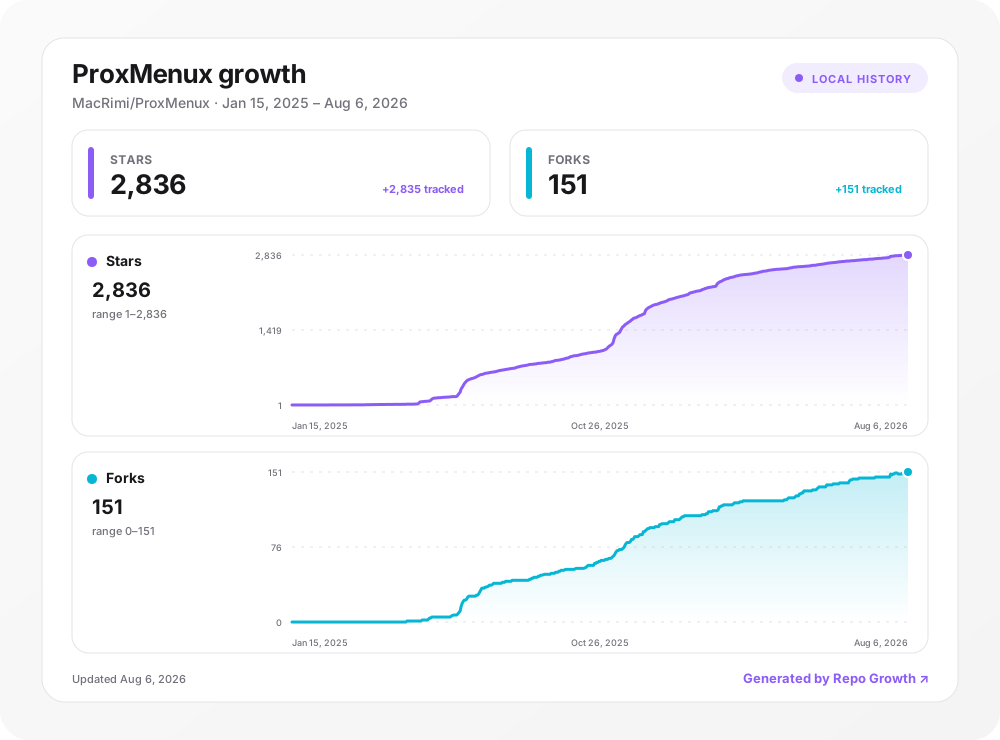
Stars, forks, and Git clones tracked with Repo Growth.

Frequently asked questions

Is ProxMenux free to use?

ProxMenux is open source under the GPL-3.0 licence. There is no licence fee and no seat count — you can self-host it or, where the project offers one, pay a vendor for a managed version instead.

What does ProxMenux do?

Menu-driven Proxmox VE toolkit — post-install, backup/restore and a live web dashboard for the homelab.

What is ProxMenux written in?

ProxMenux is primarily written in TypeScript. Its source is publicly available at https://github.com/MacRimi/ProxMenux, and it has 2,978 GitHub stars.