
pomatez is a free, open source system cleanup & optimization project written in TypeScript and released under MIT. It has 4,892 GitHub stars, 210 forks and 167 open issues, and was last pushed 4 months ago. On this registry it ranks #8 of 12 tracked projects in System Cleanup & Optimization, with 5 head-to-head comparisons available.

What is pomatez?

Pomatez is a free, open-source Pomodoro timer desktop application written in TypeScript and released under the MIT licence, built for Windows, macOS, and Linux users who want structured work-and-break cycles running locally on their own machine.

What it is

Pomatez implements the Pomodoro technique as a downloadable desktop application rather than a web service. It ships with a configurable timer, a built-in task list, break enforcement, and a set of desktop integration features such as tray behaviour, always-on-top mode, auto updates, voice assistance, and a dark theme. It lives in the desktop productivity and time-management tooling space, alongside the broader category of productivity timers listed in its topics. Windows, macOS, and Linux are all supported from the same codebase, with officially maintained packages for Snap on Linux and Homebrew Cask on macOS.

The concrete problem it solves is fragmented focus tracking: instead of running a timer in one place and a to-do list somewhere else, Pomatez combines both, and it adds enforcement that plain timers lack. Customizable rules let the default Pomodoro configuration be adjusted to personal preference, while Strict mode prevents pausing, skipping, or resetting the timer once a session has started. Special breaks allow fixed important breaks such as lunch, snack, or dinner without editing the Pomodoro configuration itself, which replaces the workaround of constantly rewriting interval settings.

Key capabilities

  • Customizable rules that modify the default Pomodoro configuration to fit personal preferences.
  • Built-in task list for creating simple todos and marking items done.
  • Full-screen breaks that occupy the whole desktop to force a stop during break time, with the documented limitation that multiple monitors are not supported.
  • Desktop notifications in three selectable types: None, Normal (every break), and Extra (60 seconds before the break starts, 30 seconds before it ends, and at the actual break).
  • Special breaks for scheduled events like lunch, snack, and dinner without changing the Pomodoro configuration.
  • Strict mode that prevents pausing, skipping, and resetting the timer once it has started.
  • Tray features including minimize to tray, close to tray, and a progress indicator on the system tray, plus auto updates downloaded in the background.

Who uses it and how

  • Individual desktop workers on Windows, macOS, and Linux who want a local timer with no account or server component.
  • Linux users installing through the Snap store, and macOS users installing through the Homebrew Cask, alongside direct downloads from the Releases Page or the project download page.
  • People who need enforced breaks: full-screen breaks combined with Strict mode remove the option to keep working through a rest period.
  • Users who step away from the computer during breaks, served by the Extra notification type and the optional male-voice assistance in desktop notifications.
  • Small-screen and low-vision users, served by Compact Mode and the dark theme.

Getting started

Install from the Snap store on Linux or the Homebrew Cask on macOS, or download the latest build for Windows, macOS, or Linux from the Releases Page or the project download page.

How it compares

No comparable products are named in the facts provided for this entry, and no list of paid products it replaces is supplied. On the available evidence Pomatez stands alone in this registry.

When to use it — and when not to

Pomatez is a self-contained desktop application, so there is no database, storage layer, or SMTP service to operate; the trade-off is that every user installs and updates their own copy. It is the wrong choice for multi-monitor setups, because full-screen breaks are documented as unsupported across multiple monitors, and for users who need remappable keyboard shortcuts, since the shortcuts are explicitly not yet customizable. The repository also carries 167 open issues and a README whose contributing and development setup section is truncated in the available excerpt, so prospective contributors should check the repository directly before assuming full developer documentation.

project readme (upstream, from github) — read inline

Pomatez

Stay Focused. Take a Break.


Features . Discord . Development . Installation . Privacy . License
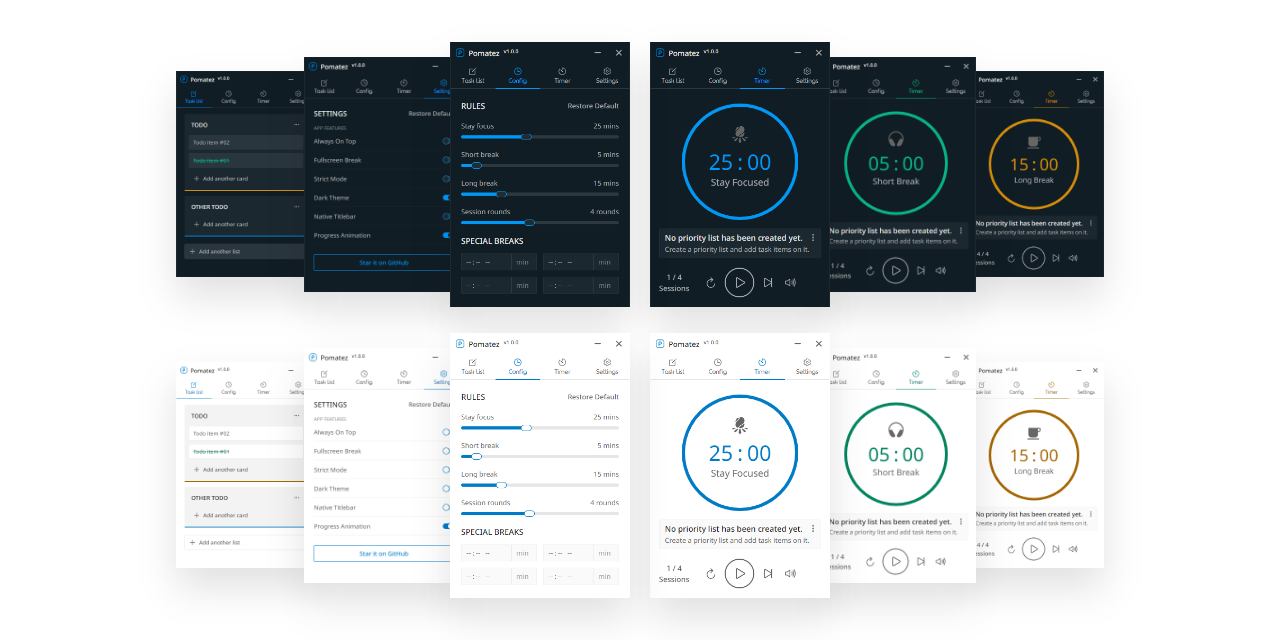
App Preview

:sparkles: Features

  • Customizable rules - it allows you to modify the default Pomodoro configuration based on your personal preferences.

  • Built-in task list - it allows you to create a simple list of todos and mark the items done when it's done.

  • Full-screen breaks - once enabled, it will force you to not continue working during break time by occupying the whole screen of your desktop, but right now it doesn't support multiple monitors.

  • Desktop notification - once enabled, you will get desktop notifications from time to time depending on the notification type you selected. Supported notification types are the following;

    • None - no notification will be shown. default
    • Normal - will show notification in every break.
    • Extra - will show notification 60 seconds before the break starts, and 30s before the break ends, and the actual break starts.
  • Special breaks - a special feature that enables you to set specific times to take important breaks like lunch, snack, dinner and etc.. without updating the Pomodoro configuration.

  • Keyboard shortcuts - might be helpful for you depending on your use case but currently, these keyboard shortcuts are not yet customizable.

  • Auto updates - the app will automatically check for updates and download them in the background. You will be notified when the update is ready to be installed.

  • Always on top - once enabled, the app will always be on top of other apps running on your Operating System.

  • Minimize to tray - once enabled, the minimize action will not minimize the app. Instead, it will be hidden and sent to the tray.

  • Close to tray - once enabled, the close action will not quit the app. Instead, it will be hidden and sent to the tray.

  • Progress on tray - the app will show a progress indicator on your system tray. This feature can be activated if minimize to tray or close to tray feature is enabled also.

  • Progress animation - by default, you will get a smooth timer progress animation but if you're worried about the app's memory consumption on your computer, you can disable it by the way.

  • Toggle native titlebar - it allows you to switch between the custom title bar of the app to a native one provided by your Operating System and vice versa, depending on your personal preference.

  • Auto-start work time - once enabled, you will no longer need to manually start the work timer again after the break ends, it will automatically start for you.

  • Voice assistance - once enabled, your desktop notification will include a male voice to inform you of things related to your Pomodoro session. Useful sometimes especially when you're away from your computer during break time.

  • Dark theme - it allows you to use dark mode and helps you reduce eye strain and improves visibility if you are the type of person with low vision and high sensitivity to bright light.

  • Strict mode - once enabled, the app will strictly follow the rules you have set and prevent you from pausing, skipping, and resetting the timer when it started.

  • Compact Mode - once enabled, the app will occupy less space on your screen and it will be useful if you're using a small-screen device.

:computer: Installation

Available for Windows, macOS, and Linux.

Download the latest version from the Releases Page or from the :point_right: Download Page .

Package Managers

While it may be available on others, here are the officially maintained ones.

Please consider starring this project to show your :blue_heart: and support. Thank you so much :bowing_man:

🛠️ Contributing & Dev Setup

If you want to contribute to this project, feel free to open an issue or a pull request. Any kind of contribution is welcome!

See the CONTRIBUTING.md for more details.

:newspaper: License

MIT © Roldan Montilla Jr

Frequently asked questions

Is pomatez free to use?

pomatez is open source under the MIT licence. There is no licence fee and no seat count — you can self-host it or, where the project offers one, pay a vendor for a managed version instead.

What does pomatez do?

Stay Focused. Take a Break.

What is pomatez written in?

pomatez is primarily written in TypeScript. Its source is publicly available at https://github.com/zidoro/pomatez, and it has 4,892 GitHub stars.
