
PentestAgent
AI Penetration Testing




https://github.com/user-attachments/assets/a67db2b5-672a-43df-b709-149c8eaee975
Requirements
- Python 3.10+
- API key for OpenAI, Anthropic, or other LiteLLM-supported provider
Install
# Clone
git clone https://github.com/GH05TCREW/pentestagent.git
cd pentestagent

# Setup (creates venv, installs deps)
.\scripts\setup.ps1   # Windows
./scripts/setup.sh    # Linux/macOS

# Or manual
python -m venv venv
.\venv\Scripts\Activate.ps1  # Windows
source venv/bin/activate     # Linux/macOS
pip install -e ".[all]"
playwright install chromium  # Required for browser tool
Configure
Create .env in the project root:
ANTHROPIC_API_KEY=sk-ant-...
PENTESTAGENT_MODEL=claude-sonnet-4-20250514
Or for OpenAI:
OPENAI_API_KEY=sk-...
PENTESTAGENT_MODEL=gpt-5
Any LiteLLM-supported model works.
Using a relay / custom API base
Point PentestAgent at any OpenAI-compatible endpoint via OPENAI_API_BASE:
OPENAI_API_KEY=your-relay-token
OPENAI_API_BASE=https://relay.example/v1
PENTESTAGENT_MODEL=openai/<model-name-on-your-relay>
For Anthropic-compatible endpoints use ANTHROPIC_API_BASE instead.
See .env.example for full provider notes and embedding options.
Run
pentestagent                      # Launch TUI
pentestagent -t 192.168.1.1       # Launch with target
pentestagent tui --docker         # Run tools in Docker container
Docker
Run tools inside a Docker container for isolation and pre-installed pentesting tools.
Option 1: Pull pre-built image (fastest)
# Base image with nmap, netcat, curl
docker run -it --rm \
  -e ANTHROPIC_API_KEY=your-key \
  -e PENTESTAGENT_MODEL=claude-sonnet-4-20250514 \
  ghcr.io/gh05tcrew/pentestagent:latest

# Kali image with metasploit, sqlmap, hydra, etc.
docker run -it --rm \
  -e ANTHROPIC_API_KEY=your-key \
  ghcr.io/gh05tcrew/pentestagent:kali
Option 2: Build locally
# Build
docker compose build

# Run
docker compose run --rm pentestagent

# Or with Kali
docker compose --profile kali build
docker compose --profile kali run --rm pentestagent-kali
The container runs PentestAgent with access to Linux pentesting tools. The agent can use nmap, msfconsole, sqlmap, etc. directly via the terminal tool.
Requires Docker to be installed and running.
Modes
PentestAgent has three modes, accessible via commands in the TUI:
| Mode | Command | Description |
|---|---|---|
| Assist | /assist |
One single-shot instruction, with tool execution |
| Agent | /agent |
Autonomous execution of a single task |
| Crew | /crew |
Multi-agent mode. Orchestrator spawns specialized workers |
| Interact | /interact |
Interactive mode. Chat with the agent, it will help you and guide during the pentesting procedure |
TUI Commands
/assist <task>    One single-shot instruction.
/agent <task>     Run autonomous agent on task
/crew <task>      Run multi-agent crew on task
/interact <task>  Chat with the agent in guided mode
/target <host>    Set target
/tools            List available tools
/notes            Show saved notes
/report           Generate report from session
/memory           Show token/memory usage
/prompt           Show system prompt
/conversations    Browse and restore saved conversations
/mcp <list/add>   Visualizes or adds a new MCP server.
/spawn [target] [--scope CIDR] [--model M] [--no-rag] [--no-mcp]
                  Manually spawn a child MCP agent from the TUI.
/despawn <server_name>
                  Terminate and remove a previously spawned child agent.
/clear            Clear chat and history
/quit             Exit (also /exit, /q)
/help             Show help (also /h, /?)
Press Esc to stop a running agent. Ctrl+Q to quit.
Playbooks
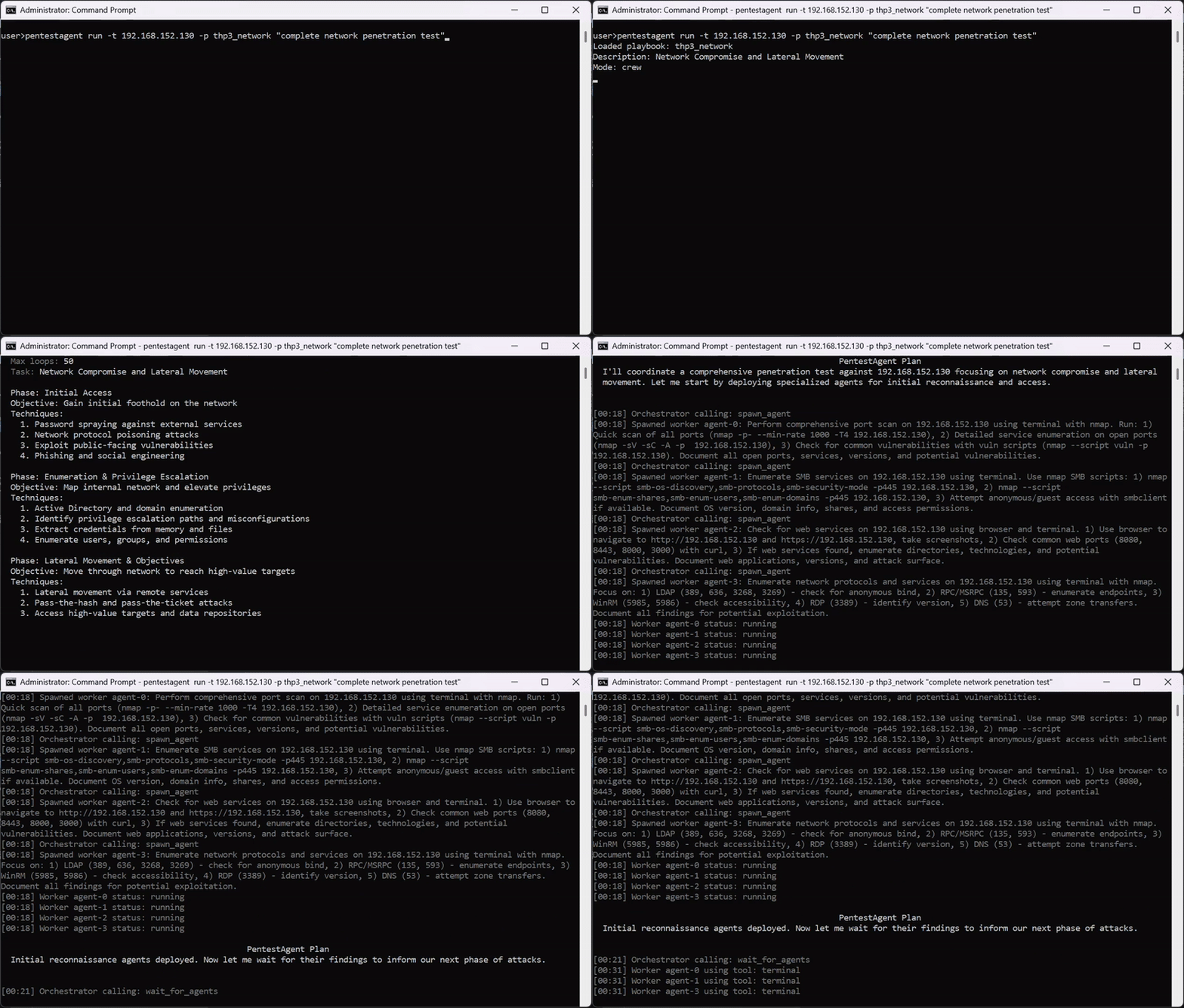
PentestAgent includes prebuilt attack playbooks for black-box security testing. Playbooks define a structured approach to specific security assessments.
Run a playbook:
pentestagent run -t example.com --playbook thp3_web
Tools
PentestAgent includes built-in tools and supports MCP (Model Context Protocol) for extensibility.
Built-in tools: terminal, browser, notes, web_search (requires TAVILY_API_KEY), spawn_mcp_agent
Agent Self-Spawning (spawn_mcp_agent)
spawn_mcp_agent is a built-in tool that allows a running agent to spawn a child copy of itself as a subordinate MCP server connected over stdio. The child process is fully isolated — its own runtime, LLM client, conversation history, and notes store — and its complete tool set is injected back into the parent agent's available tools after spawning.
This enables hierarchical, multi-agent workflows without any external orchestration: the agent self-organises by delegating scoped subtasks to children it spawns on demand.
| Argument | Type | Default | Description |
|---|---|---|---|
target |
string | — | Pentest target to pass to the child |
scope |
string[] | — | In-scope targets/CIDRs for the child |
model |
string | env var | Model identifier, overrides PENTESTAGENT_MODEL on the child |
no_rag |
boolean | false |
Skip RAG engine initialisation on the child |
no_mcp |
boolean | true |
Skip external MCP server connections on the child (recommended) |
After spawn_mcp_agent returns, the child's tools (run_task, run_task_async, await_tasks, etc.) are available on the next tool call. The child's server name is assigned automatically (e.g. child_agent_1) and returned in the result.
Example — orchestrator delegating parallel recon to two children:
# Turn 1: spawn two isolated child agents
spawn_mcp_agent  target="10.0.1.0/24"  scope=["10.0.1.0/24"]
spawn_mcp_agent  target="10.0.2.0/24"  scope=["10.0.2.0/24"]

# Turn 2: children's tools are now available — delegate work asynchronously
child_agent_1__run_task_async  task="Full port scan and service enumeration"
child_agent_2__run_task_async  task="Full port scan and service enumeration"

# Turn 3: wait and collect
child_agent_1__await_tasks  task_ids=["<id1>"]  timeout_seconds=600
child_agent_2__await_tasks  task_ids=["<id2>"]  timeout_seconds=600
child_agent_1__get_task_result  task_id="<id1>"
child_agent_2__get_task_result  task_id="<id2>"
Manual Child Agent Control (/spawn and /despawn)
Beyond the automatic spawn_mcp_agent tool, the TUI exposes two commands that let you spawn and terminate child agents manually, independently of a running agent loop.
/spawn
/spawn [target] [--scope CIDR ...] [--model MODEL] [--no-rag] [--no-mcp]
Spawns a new child MCP agent over stdio and attaches it to the current session. The child appears as a collapsible terminal panel in the TUI sidebar and its tools become available to the parent agent on the next tool call.
| Argument | Description |
|---|---|
target |
Pentest target to pass to the child (positional or --target) |
--scope CIDR |
One or more in-scope CIDRs (repeatable) |
--model MODEL |
Override the model for the child agent |
--no-rag |
Skip RAG engine initialisation on the child |
--no-mcp |
Skip external MCP server connections on the child |
Examples:
/spawn 10.0.1.1
/spawn 10.0.1.1 --scope 10.0.1.0/24 --model claude-sonnet-4-20250514
/spawn --target 10.0.1.1 --scope 10.0.1.0/24 --no-rag
/despawn
/despawn <server_name>
Terminates the child agent identified by server_name (e.g. child_agent_1), removes its terminal panel from the TUI, and disconnects its tools from the parent session. Use /mcp list to see the names of all currently active child agents.
Example:
/despawn child_agent_1
MCP RAG Tool Optimizer
When an MCP server exposes more than 128 tools, PentestAgent automatically replaces the full catalogue with a single mcp__rag_optimizer tool. This meta-tool uses embedding similarity (via LiteLLM, default text-embedding-3-small) to retrieve the most relevant tools for the task at hand and injects them into the agent's next turn — keeping the context window manageable without losing access to the full tool set.
The optimizer is transparent to the agent: it calls the RAG tool with focused natural-language queries describing what it needs, and the matching tools become available on the next turn to call directly.
Usage guidance for the agent:
| Argument | Type | Default | Description |
|---|---|---|---|
queries |
string[] | (required) | One focused query per capability needed. More specific = higher accuracy |
top_k |
integer | 20 |
Tools to retrieve per query (max 128). Results are merged and deduplicated |
Embeddings are computed once at startup and cached, so repeated queries are fast. The optimizer is built per-server, so each MCP server with a large catalogue gets its own independent index.
Tip: Pass one query per distinct capability rather than combining everything into one query.
["list open ports on a host", "get process memory usage"]retrieves better results than["list ports and memory and CPU"].
MCP Integration
PentestAgent supports MCP (Model Context Protocol) in two directions: consuming external MCP servers as tool sources, and exposing itself as an MCP server so external clients (Claude Desktop, Cursor, etc.) can drive PentestAgent programmatically.
Consuming External MCP Servers (Client Mode)
Configure mcp_servers.json to connect PentestAgent to any external MCP servers. Example config:
{
  "mcpServers": {
    "nmap": {
      "command": "npx",
      "args": ["-y", "gc-nmap-mcp"],
      "env": {
        "NMAP_PATH": "/usr/bin/nmap"
      }
    }
  }
}
Exposing PentestAgent as an MCP Server (Server Mode)
PentestAgent can run as an MCP server, allowing any MCP-compatible client to submit tasks, inspect results, and control the agent remotely. Two transports are supported:
STDIO — for local clients (e.g. Claude Desktop, Cursor):
pentestagent mcp_server --type stdio
pentestagent mcp_server --type stdio --target 192.168.1.1 --scope 192.168.1.0/24
pentestagent mcp_server --type stdio --model claude-sonnet-4-20250514 --docker
SSE (HTTP) — for remote or networked clients:
pentestagent mcp_server --type sse
pentestagent mcp_server --type sse --host 0.0.0.0 --port 8080
pentestagent mcp_server --type sse --target 10.0.0.1 --scope 10.0.0.0/24 --docker
The SSE transport exposes a single /mcp endpoint supporting POST (requests), GET (persistent SSE stream for server-initiated push), and DELETE (session teardown). Sessions are tracked via the Mcp-Session-Id header.
All mcp_server flags:
| Flag | Default | Description |
|---|---|---|
--type |
(required) | Transport: stdio or sse |
--host |
0.0.0.0 |
SSE bind host |
--port |
8080 |
SSE bind port |
--target |
none | Primary pentest target (IP / hostname) |
--scope |
[] |
In-scope targets/CIDRs (space-separated) |
--model |
env var | Model identifier, overrides PENTESTAGENT_MODEL |
--docker |
false | Use DockerRuntime instead of LocalRuntime |
--no-rag |
false | Skip RAG engine initialisation |
--no-mcp |
false | Skip external MCP server connections |
Example: Claude Desktop config (claude_desktop_config.json)
{
  "mcpServers": {
    "pentestagent": {
      "command": "pentestagent",
      "args": ["mcp_server", "--type", "stdio"]
    }
  }
}
MCP Server Tools Reference
When acting as an MCP server, PentestAgent exposes the following tools:
Server Status & Config
| Tool | Description |
|---|---|
get_server_status |
Live server status: readiness, task counts by state, primary target/scope, memory store size |
get_config |
Primary agent configuration: target, scope, max iterations, tool list |
update_config |
Update target, scope, or max iterations for all subsequent tasks |
Task Execution
| Tool | Description |
|---|---|
run_task |
Submit a task and block until it completes. Returns full result, tools used, and notes snapshot |
run_task_async |
Submit a task and return immediately with a task_id. Poll with get_task_status |
Task Inspection
| Tool | Description |
|---|---|
list_tasks |
List all tasks with status, target, and summary. Filterable by status |
get_task_status |
Poll the current status and result preview of a task |
get_task_result |
Full task result: final output, thinking steps, all tool calls and results, notes snapshot |
await_tasks |
Block until a set of async task IDs have all finished (polls every 500 ms, configurable timeout) |
Task Control
| Tool | Description |
|---|---|
cancel_task |
Cancel a running or pending task by ID |
Tool Management
| Tool | Description |
|---|---|
list_tools |
List all tools available to the agent |
enable_tool |
Enable a named tool on the primary agent |
disable_tool |
Disable a named tool on the primary agent |
Conversation History
| Tool | Description |
|---|---|
get_conversation_history |
Return message history for a task or the primary agent. Supports a limit parameter |
reset_conversation |
Clear conversation history for a task or the primary agent |
Memory
| Tool | Description |
|---|---|
store_memory |
Persist a key-value pair to the in-process memory store |
retrieve_memory |
Retrieve by exact key, search by substring, or list all keys |
clear_memory |
Delete a specific key or wipe all memory with scope='all' |
Observability
| Tool | Description |
|---|---|
get_logs |
Return recent execution logs, optionally filtered by level (info / warning / error) |
get_metrics |
Runtime metrics: task counts, success rate, total tool calls, memory and log sizes |
Async Task Workflow Example
For long-running recon tasks, use the async pattern:
# 1. Submit tasks without blocking
run_task_async  task="Enumerate subdomains of example.com"  target="example.com"
run_task_async  task="Run nmap SYN scan on example.com"     target="example.com"

# 2. Block until both finish (up to 5 minutes)
await_tasks  task_ids=["<id1>", "<id2>"]  timeout_seconds=300

# 3. Retrieve full results
get_task_result  task_id="<id1>"
get_task_result  task_id="<id2>"
CLI Tool Management
pentestagent tools list         # List all tools
pentestagent tools info <name>  # Show tool details
pentestagent mcp list           # List MCP servers
pentestagent mcp add <name> <command> [args...]  # Add MCP server
pentestagent mcp test <name>    # Test MCP connection
Conversation History Controls
Each user message in the TUI exposes two inline action buttons: rewind and fork.
Rewind
Click rewind on any user message to truncate the conversation back to just before that message — both in the UI and in the agent's in-memory history. Use it to retry a query from scratch without saving the discarded path.
Fork
Click >> fork on any user message to branch the conversation from that point:
- The current full conversation is saved to the conversation store and a short snapshot ID is shown.
- The conversation is then truncated to just before the selected message (same as rewind).
This lets you try an alternative approach from any point while keeping the original thread retrievable via /conversations.
Conversation History
PentestAgent automatically persists every conversation so you can review, compare, and restore past sessions.
Auto-save triggers after each /assist, /agent, /crew, and /interact task, and before /clear. Up to 20 conversations are kept; older ones are pruned automatically.
Storage location: workspaces//memory/conversations/ when a workspace is active, or conversations/ at the project root otherwise. Each conversation is a JSON file.
Browse & restore with /conversations:
The /conversations command opens a split-pane modal inside the TUI:
- Left panel — list of saved conversations with title and date.
- Right panel — metadata preview plus the first 5 messages (user messages in blue, agent responses in green, tool calls in yellow, tool results in grey). A count shows how many additional messages exist.
Select a conversation and press Restore to reload it into the current session, or Close to dismiss the modal.
Knowledge
- RAG: Place methodologies, CVEs, or wordlists in
pentestagent/knowledge/sources/for automatic context injection. - Notes: Agents save findings to
loot/notes.jsonwith categories (credential,vulnerability,finding,artifact). Notes persist across sessions and are injected into agent context. - Shadow Graph: In Crew mode, the orchestrator builds a knowledge graph from notes to derive strategic insights (e.g., "We have credentials for host X").
Project Structure
pentestagent/
  agents/         # Agent implementations
  config/         # Settings and constants
  interface/      # TUI and CLI
  knowledge/      # RAG system and shadow graph
  llm/            # LiteLLM wrapper
  mcp/            # MCP client and server configs
  playbooks/      # Attack playbooks
  runtime/        # Execution environment
  tools/          # Built-in tools
Development
pip install -e ".[dev]"
pytest                       # Run tests
pytest --cov=pentestagent    # With coverage
black pentestagent           # Format
ruff check pentestagent      # Lint
Legal
Only use against systems you have explicit authorization to test. Unauthorized access is illegal.
License
MIT