papermerge-core is a free, open source document management & e-signatures project written in Python and released under Apache-2.0. It has 539 GitHub stars, 110 forks and 36 open issues, and was last pushed 13 days ago. On this registry it ranks #16 of 18 tracked projects in Document Management & E-Signatures, with 5 head-to-head comparisons available.

What is papermerge-core?

Papermerge DMS (papermerge-core) is the open-source core of Papermerge, a document management system in Python that OCRs scanned documents, indexes them, and makes them searchable for anyone who needs a long-term digital archive rather than a folder full of loose files.

What it is

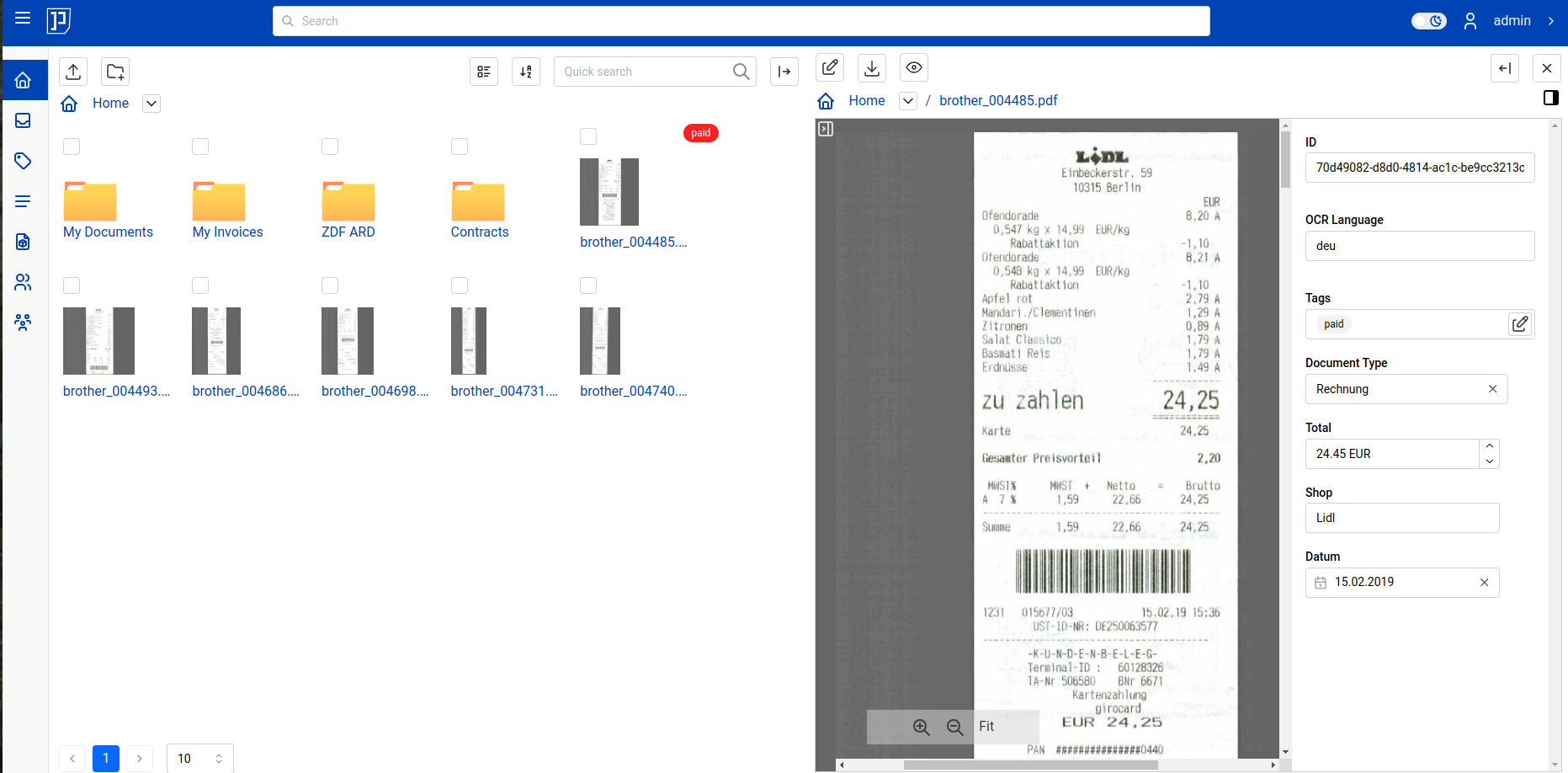
Papermerge is a document management system built for scanned documents, the kind of material often called a digital archive. It extracts text from scans with OCR, indexes that text, and prepares it for full text search. The interface borrows the look and feel of a modern desktop file browser, with a dual panel document browser, drag and drop, hierarchical folders, colored tags, and page-level management. It has been in development for nine years and lives in the Python ecosystem, distributed as an Apache-2.0 licensed project.

The concrete problem it replaces is the combination of a scanner output folder and a separate desktop search tool. Instead of dropping PDF, TIFF, JPEG, or PNG files into a shared drive and hoping filenames stay meaningful, Papermerge stores the documents themselves, keeps version history, attaches tags and typed metadata, and exposes everything through full text search over the OCRed content. It also replaces ad hoc sharing by email attachment with multi-user accounts, group ownership, and sharing of individual documents and folders between users or groups.

Key capabilities

  • Web UI with a desktop-like dual panel document browser, drag and drop, tags, and hierarchical folders.
  • OpenAPI compliant REST API for programmatic access, with Swagger docs served at /docs in a development server.
  • OCR of documents plus full text search over the extracted text, and download of documents with the OCRed text overlay applied.
  • Document versioning, so successive scans or revisions of the same record are preserved.
  • Document Types (that is, categories) with Custom Fields for per-type metadata.
  • Page management operations: delete, reorder, cut, move, and extract pages.
  • Multi-user support with group ownership and sharing of documents and folders between users and groups, plus a UI available in multiple languages.
  • pm command line tool for management commands, including pm search build to rebuild the search index from scratch and pm search stats for index statistics.

Who uses it and how

  • Individuals and small offices that scan paper records and need long-term storage with text search rather than a folder tree on a NAS.
  • Teams that need to distribute access to a shared archive, using group ownership and per-document or per-folder sharing instead of sending attachments around.
  • Organizations with heterogeneous scan output, since the same system ingests PDF, JPEG, PNG, and TIFF files rather than requiring conversion first.
  • Administrators and integrators who automate ingestion or reporting through the REST API, or who schedule index maintenance with pm search build and check it with pm search stats.
  • Deployments that need localization, because the UI ships in multiple languages.

Getting started

The README starts with Docker: run docker run -p 8000:80 -e PAPERMERGE__SECURITY__SECRET_KEY=abc -e PAPERMERGE__AUTH__PASSWORD=123 papermerge/papermerge:3.5.3 for the most basic setup. For other deployment shapes, the documentation covers additional Docker Compose scenarios.

How it compares

This registry entry lists no paid products that Papermerge replaces, and the facts name no comparable open-source tools, so it stands alone in this registry. The only adjacent product mentioned in the README is Papermerge Cloud, the managed SaaS version by the same author, which is a commercial sibling rather than a named alternative.

When to use it — and when not to

A self-hoster must operate a PostgreSQL database (configured through PM_DB_URL) and a media root for document storage (PM_MEDIA_ROOT), so this is not a drop-in file share. The project is explicitly seeking maintainers: the author has shifted focus to Papermerge Cloud and opened issue #1318 for maintainer recruitment, with 36 open issues against the repository, which means prospective adopters should weigh long-term maintenance capacity before committing. Pick it if you want a self-hosted, Apache-2.0 OCR archive with a real API; avoid it if you need a vendor-backed SLA, or if nobody on the team can run PostgreSQL and keep an index rebuilt.

project readme (upstream, from github) — read inline

⚠️ Important Notice

Papermerge DMS - Open Source Core | SEEKING MAINTAINERS

This is the open-source version of Papermerge, after 9 years of development. I'm now focusing on Papermerge Cloud (managed, SaaS version).

The code remains available for anyone who wants to self-host or contribute.


Papermerge DMS or simply Papermerge is a open source document management system designed to work with scanned documents (also called digital archives). It extracts text from your scans using OCR, indexes them, and prepares them for full text search. Papermerge provides the look and feel of modern desktop file browsers. It has features like dual panel document browser, drag and drop, tags, hierarchical folders and full text search so that you can efficiently store and organize your documents.

It supports PDF, TIFF, JPEG and PNG document file formats. Papermerge is perfect tool for long term storage of your documents.
Features Highlights

  • Web UI with desktop like experience
  • OpenAPI compliant REST API
  • Works with PDF, JPEG, PNG and TIFF documents
  • Document Versioning
  • Tags - assign colored tags to documents or folders
  • Documents and Folders - users can organize documents in folders
  • Document Types (i.e. Categories)
  • Custom Fields (metadata) per document type
  • Multi-User
  • Group ownership
  • Share documents and folders between users and/or groups of users
  • UI is available in multiple languages
  • Page Management - delete, reorder, cut, move, extract pages
  • OCR (Optical Character Recognition) of the documents
  • OCRed text overlay (you can download document with OCRed text overlay)
  • Full Text Search of the scanned documents

Start with Docker

In order to start Papermerge App with the most basic setup use following command:

docker run -p 8000:80 \
    -e PAPERMERGE__SECURITY__SECRET_KEY=abc \
    -e PAPERMERGE__AUTH__PASSWORD=123 \
    papermerge/papermerge:3.5.3

For more info about various docker compose scenarios check documentation page.

Development

Backend

$ uv sync

Make sure you have the following environment variables set (e.g. with direnv):

export PM_DB_URL=postgresql://coco:***@127.0.0.1:5432/pmgdb
export PM_MEDIA_ROOT=/home/eugen/var/pmgdata
export PM_API_PREFIX='/api'

Start BE with following command:

$ uv run task server

This command will start BE server on localhost port 8000. Access its swagger docs via http://localhost:8000/docs

Frontend

Switch to UI folder.

cd frontend/

Make sure following environment variables are defined ( adjust their values accordingly):

VITE_REMOTE_USER=admin
VITE_REMOTE_USER_ID=49e78737-7c6e-410f-ae27-315b04bdec69
VITE_REMOTE_GROUPS=admin
VITE_BASE_URL=http://localhost:8000
VITE_KEEP_UNUSED_DATA_FOR=1

Another vite variables you may consider:

  • VITE_REMOTE_ROLES

Of course, you will need to adjust user ID, username to match your BE.

VITE_KEEP_UNUSED_DATA_FOR will cache data returned from BE for one second

Start FE:

cd frontend
yarn workspace ui dev

This command will start FE server on http://localhost:5173/

To see all workspaces use:

yarn workspaces list

Run test suite

    uv sync --group dev
    uv pytest

Misc

Switch to specific python version in your virtual environment:

 uv sync --python 3.14

Command Line Commands

pm - is CLI for various management commands.

pm --help

Search

Clear the existing search index and rebuild it from scratch:

pm search build

Search index statistics

pm search stats

Frequently asked questions

Is papermerge-core free to use?

papermerge-core is open source under the Apache-2.0 licence. There is no licence fee and no seat count — you can self-host it or, where the project offers one, pay a vendor for a managed version instead.

What does papermerge-core do?

Papermerge OSS

What is papermerge-core written in?

papermerge-core is primarily written in Python. Its source is publicly available at https://github.com/papermerge/papermerge-core, and it has 539 GitHub stars.