
Paperless-ngx is a free, open source storage solutions project written in Python and released under GPL-3.0. It has 45,255 GitHub stars, 3,121 forks and 4 open issues, and was last pushed 6 hours ago. On this registry it ranks #2 of 8 tracked projects in Storage Solutions, with 5 head-to-head comparisons available. It gained 218 stars over the last 6 tracked days.

What is Paperless-ngx?

Paperless-ngx is a community-supported, GPL-3.0-licensed document management system written in Python that turns physical paperwork into a searchable, indexed online archive, and it is built for individuals, homelab operators and small teams who want to scan, index and archive their documents on infrastructure they control.

What it is

Paperless-ngx is a document management system, or DMS, that transforms physical documents into a searchable online archive so that its users can keep less paper. It is the official successor to the original Paperless and Paperless-ng projects, and it was created specifically to distribute the responsibility of advancing and supporting the project among a team of people rather than resting it on a single maintainer. The project lives in the Python ecosystem, with a Django back end and an Angular front end, and it carries topics covering archiving, document management, OCR, PDF handling, machine learning and LLM integration.

The concrete problem it solves is the accumulation of paper and scanned files that cannot be found again once they have been filed away. Paperless-ngx replaces its own predecessor projects, Paperless and Paperless-ng, and it is designed so that existing users of Paperless-ng can migrate by dropping in the new Docker image. Everything else follows from that replacement premise: documents enter the system, are indexed into a searchable archive, and stay there under the operator's own control.

Key capabilities

  • Optical character recognition and PDF ingestion, reflected in the ocr, optical-character-recognition and pdf topics, so scanned paper becomes searchable text.
  • Machine learning, AI and LLM tagging across the indexed archive, indicated by the ai, llm and machine-learning topics.
  • A Django back end paired with an Angular front end, both named in the topic list.
  • Deployment through docker compose, with the files in the /docker/compose directory configured to pull the image from the GitHub container registry.
  • An install script that configures a docker compose environment in one command: bash -c "$(curl -L https://raw.githubusercontent.com/paperless-ngx/paperless-ngx/main/install-paperless-ngx.sh)".
  • A hosted demo at demo.paperless-ngx.com using the login demo / demo for evaluation before any local setup.
  • Localization into many languages, coordinated on Crowdin at crowdin.com/project/paperless-ngx.

Who uses it and how

  • Self-hosters run the full stack through docker compose, pulling the image from the GitHub container registry rather than building from source.
  • Existing Paperless-ng users migrate by dropping in the new Docker image, a path the documentation covers directly.
  • Prospective users evaluate the interface through the hosted demo at demo.paperless-ngx.com, which is reset frequently and should not receive confidential information.
  • Translators contribute localizations through the Crowdin project, and contributors coordinate in the Matrix room linked from the README.
  • Contributors can join ongoing teams such as frontend and ci/cd, which the README names as areas needing sustained help.

Getting started

The easiest deployment is docker compose, using the compose files in the /docker/compose directory or the one-line install script that configures a compose environment. Step-by-step guides for alternative installation methods live in the documentation at docs.paperless-ngx.com.

How it compares

Among the tools named in the facts, Paperless-ngx sits directly downstream of Paperless and Paperless-ng: it is the official successor to both, and migration from Paperless-ng is treated as a simple image swap rather than a rebuild. Where the earlier projects concentrated maintenance on individual maintainers, Paperless-ngx is explicitly organized to distribute that responsibility across a team, and it remains GPL-3.0 licensed with no paid tier described in the material provided.

When to use it — and when not to

A self-hoster must be willing to operate a docker compose environment and its supporting services, since deployment is documented around that method rather than a managed offering. Anyone wanting a fully hosted, turnkey service should look elsewhere, because the project provides self-hosted deployment plus a resettable demo only. The README is deliberately sparse on features and screenshots, deferring both to the external documentation site, so anyone evaluating Paperless-ngx should expect to read docs.paperless-ngx.com rather than the repository front page.

project readme (upstream, from github) — read inline

ci Crowdin Documentation Status codecov Chat on Matrix demo

Paperless-ngx

Paperless-ngx is a document management system that transforms your physical documents into a searchable online archive so you can keep, well, less paper.

Paperless-ngx is the official successor to the original Paperless & Paperless-ng projects and is designed to distribute the responsibility of advancing and supporting the project among a team of people. Consider joining us!

Thanks to the generous folks at DigitalOcean, a demo is available at demo.paperless-ngx.com using login demo / demo. Note: demo content is reset frequently and confidential information should not be uploaded.

This project is supported by:

Features
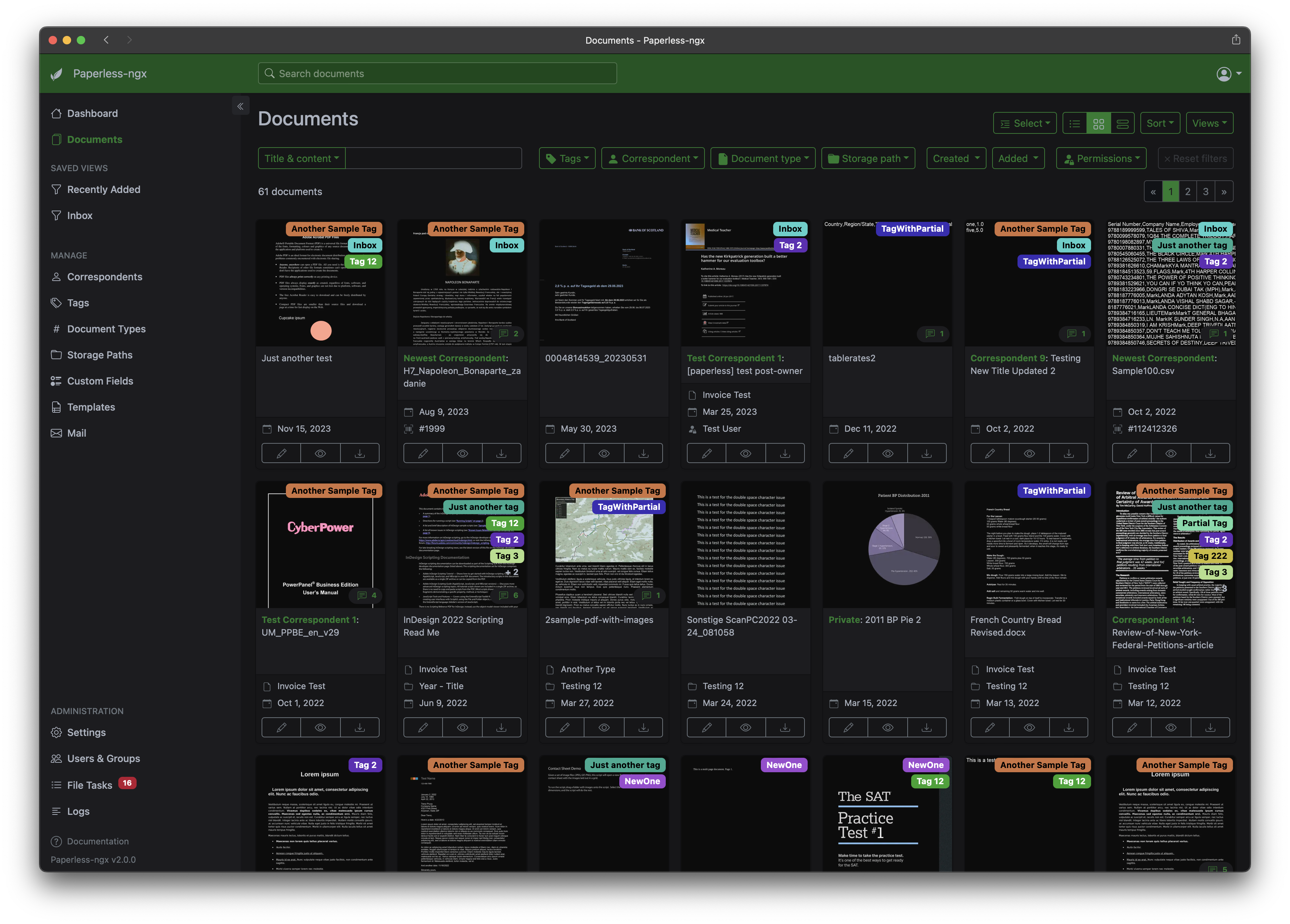
A full list of features and screenshots are available in the documentation.

Getting started

The easiest way to deploy paperless is docker compose. The files in the /docker/compose directory are configured to pull the image from the GitHub container registry.

If you'd like to jump right in, you can configure a docker compose environment with our install script:

bash -c "$(curl -L https://raw.githubusercontent.com/paperless-ngx/paperless-ngx/main/install-paperless-ngx.sh)"

More details and step-by-step guides for alternative installation methods can be found in the documentation.

Migrating from Paperless-ng is easy, just drop in the new docker image! See the documentation on migrating for more details.

Documentation

The documentation for Paperless-ngx is available at https://docs.paperless-ngx.com.

Contributing

If you feel like contributing to the project, please do! Bug fixes, enhancements, visual fixes etc. are always welcome. If you want to implement something big: Please start a discussion about that! The documentation has some basic information on how to get started.

Community Support

People interested in continuing the work on paperless-ngx are encouraged to reach out here on github and in the Matrix Room. If you would like to contribute to the project on an ongoing basis there are multiple teams (frontend, ci/cd, etc) that could use your help so please reach out!

Translation

Paperless-ngx is available in many languages that are coordinated on Crowdin. If you want to help out by translating paperless-ngx into your language, please head over to https://crowdin.com/project/paperless-ngx, and thank you! More details can be found in CONTRIBUTING.md.

Feature Requests

Feature requests can be submitted via GitHub Discussions, you can search for existing ideas, add your own and vote for the ones you care about.

Bugs

For bugs please open an issue or start a discussion if you have questions.

Related Projects

Please see the wiki for a user-maintained list of related projects and software that is compatible with Paperless-ngx.

Important Note

Document scanners are typically used to scan sensitive documents like your social insurance number, tax records, invoices, etc. Paperless-ngx should never be run on an untrusted host because information is stored in clear text without encryption. No guarantees are made regarding security (but we do try!) and you use the app at your own risk. The safest way to run Paperless-ngx is on a local server in your own home with backups in place.

Frequently asked questions

Is Paperless-ngx free to use?

Paperless-ngx is open source under the GPL-3.0 licence. There is no licence fee and no seat count — you can self-host it or, where the project offers one, pay a vendor for a managed version instead.

What does Paperless-ngx do?

Effortlessly organize your digital documents

What is Paperless-ngx written in?

Paperless-ngx is primarily written in Python. Its source is publicly available at https://github.com/paperless-ngx/paperless-ngx, and it has 45,255 GitHub stars.