
Osintgram is a free, open source threat detection & response project written in Python and released under GPL-3.0. It has 14,464 GitHub stars, 3,108 forks and 1 open issues, and was last pushed 6 days ago. On this registry it ranks #6 of 18 tracked projects in Threat Detection & Response, with 5 head-to-head comparisons available.

What is Osintgram?

Osintgram is a GPL-3.0 licensed OSINT tool for Instagram, written in Python 3.10+, that gives security researchers, penetration testers and investigators an interactive interface for profiling any public Instagram account from its nickname alone.

What it is

Osintgram is an open-source information-gathering tool that lives in the Python Instagram API ecosystem and runs entirely on the analyst's own machine. Point it at an Instagram account and it collects, cross-references and lays out everything a public profile gives away: followers, captions, hashtags, geotagged locations, posting habits and public contact details. It is driven two ways. AI mode takes a plain-language question and a local model, served through Ollama, chooses which lookups to run and summarizes the results. Base mode needs no model at all: all 28 commands are listed one line each, grouped and searchable, and the analyst ticks what to run, sets parameters and executes them in order. A username is optional in AI mode, so hashtag and place searches can be run against no account at all.

The concrete problem it solves is the reconnaissance workflow that returns a wall of raw JSON from paid third-party lookups with no warning about what a search will cost. Osintgram prices a selection up front, shows remaining credit, caches every request so the same lookup is never paid for twice, and lets a run be capped or stopped server-side rather than only in the browser. It replaces that raw output with presentation: post thumbnails in a filterable grid, geotagged locations on a map, a weekday by hour heatmap of posting activity, and side-by-side comparison of two accounts — with the underlying JSON still one click away on every card. A finished search can be turned into a standalone HTML report that opens in any browser with no server and no Osintgram installed.

Key capabilities

  • Two operating modes: AI mode using a local Ollama model that can only choose from the same command list and cannot invent lookups or data, and Base mode requiring no model.
  • Profile lookups returning bio and every link in it, follower, following and post counts, category, public email, phone and business address down to coordinates, a linked Facebook id, and Instagram's own "About this account" data: country of registration, creation date and how many times the username changed.
  • Network analysis covering followers and followings, Instagram-suggested related accounts, who tagged the target and who the target tagged, most frequent commenters, and mutual connections between two accounts.
  • Content analysis including hashtags ranked by use, captions, every comment, like and comment statistics, a photo, video and carousel breakdown with views and paid partnerships, a posting-times heatmap, geotagged locations on a map and photo alt text.
  • Target-free searches for posts published with a hashtag, top or recent, or from a place, along with who published them.
  • Media handling where stories, highlights and profile pictures come back as direct CDN links, and any card containing media offers a one-click zip of the originals.
  • A local web interface served from 127.0.0.1, so the AI runs locally with no OpenAI key, no subscription and no prompt sent to a third party.

Who uses it and how

  • Penetration testers and red teams performing information gathering during an authorized engagement against a named Instagram account.
  • OSINT analysts and investigators building a picture of a public profile through mutual connections, commenting patterns and account-comparison views.
  • Analysts who must hand results to someone else: one button turns a finished search into a standalone HTML report that needs no server and no Osintgram to open.
  • Privacy-conscious operators who cannot send prompts or queries to a hosted AI service, since inference runs through Ollama locally and the interface binds to 127.0.0.1.
  • Researchers working on a topic rather than a person, leaving the username empty in AI mode and querying a hashtag or a place instead.

Getting started

Install the dependencies with pip install -r requirements.txt, then start the interface with uvicorn src.web.app:app --host 127.0.0.1 --port 8000 --reload, or simply make run. A data backend is required: the page opens on a panel where a HikerAPI key can be pasted, and the key is verified before it is accepted and can be saved for next time.

How it compares

The facts provided name no comparable OSINT tools, only a data backend and a supporting library, so Osintgram stands alone in this registry. Any comparison against commercial profiling services would rest on licence, self-hosting and data ownership, and none of those products are described in the available material.

When to use it — and when not to

Osintgram is the right choice for an analyst who wants local inference, visible lookup costs and a shareable report rather than a hosted dashboard. A self-hoster must still operate a credit-based data backend through a HikerAPI key, because Instagram data is not free, and AI mode additionally requires a local Ollama model to be installed and running. Anyone who wants a hosted service with no local setup, or a library purely for scripted command-line automation, should look elsewhere; the vendored README material is also partly truncated, so backend setup details should be confirmed against the repository.

project readme (upstream, from github) — read inline

Osintgram 🔎📸

version GPLv3 Python3 tests local-first

Point it at an Instagram account and find out who's behind it. Osintgram collects, cross-references and lays out everything a public profile gives away — followers, captions, hashtags, geotagged locations, posting habits, public contact details — in a web interface you run on your own machine.

Ask in plain language and a local AI model figures out which lookups to run. Or don't: pick the commands yourself and skip the model entirely.

Why you might like it

It answers questions, not just commands. "How many followers do they have and which hashtags do they use most?" runs three lookups and comes back with a written answer — and the raw results underneath, so you can check the work instead of trusting the prose.

Nothing leaves your machine except the lookups themselves. The AI runs locally through Ollama: no OpenAI key, no subscription, no prompt of yours sent to anyone. The interface is served from 127.0.0.1.

It tells you what a search will cost before you run it. Instagram data isn't free, and most tools let you find out the expensive way. This one prices your selection up front, shows your remaining credit, caches every request so you never pay twice for the same lookup, and lets you cap or stop a run — server-side, not just in the browser.

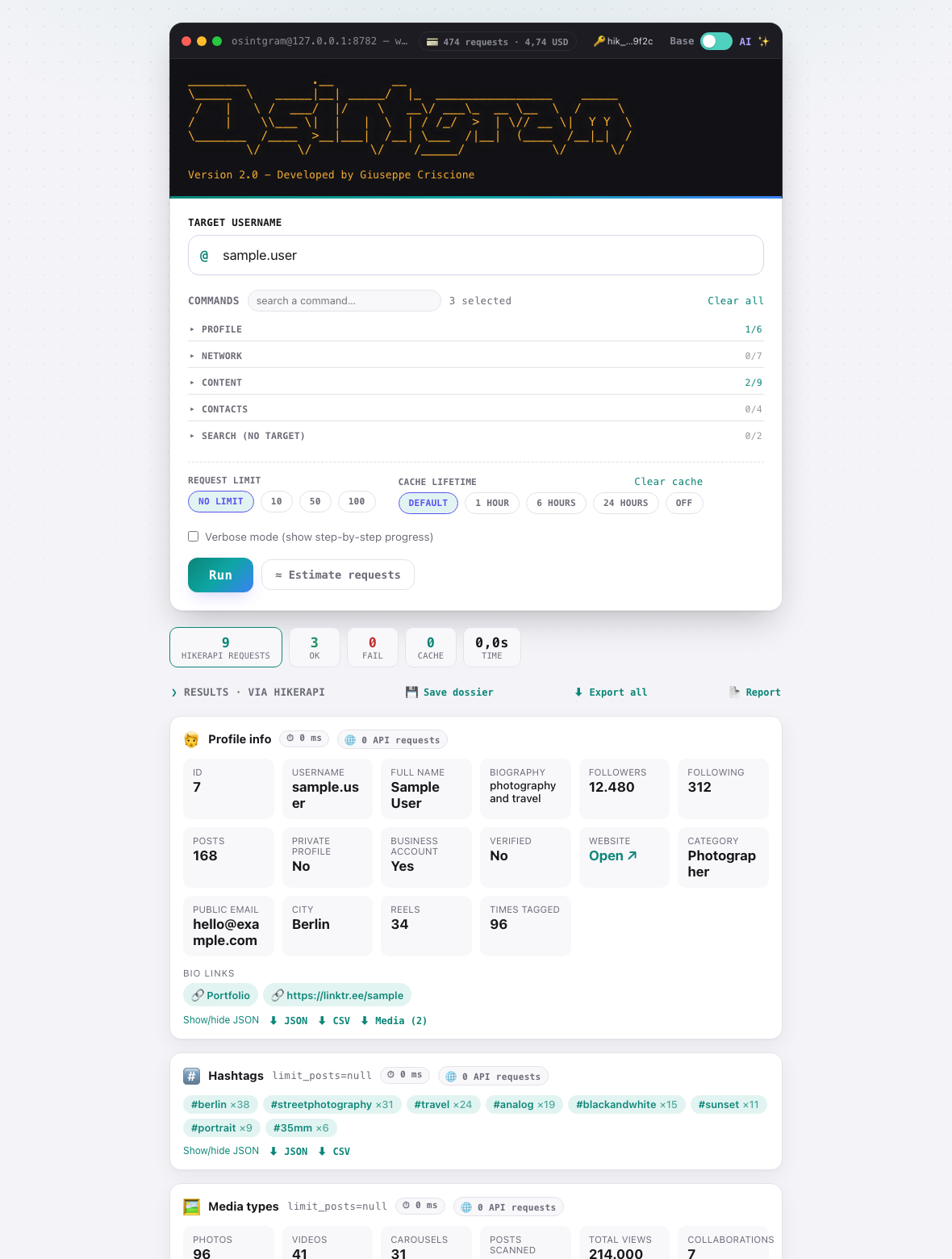
It shows you what it found, properly. Post thumbnails in a filterable grid, geotagged locations on a map, a weekday × hour heatmap of when someone posts, comparison between two accounts. Not a wall of JSON — though the JSON is one click away on every card.

You can hand the result to someone else. One button turns a finished search into a standalone HTML report that opens in any browser, with no server and no Osintgram.


Two ways to drive it
AI mode — describe what you want. A local model picks the commands, runs them and summarizes. It can only choose from the same list below; it can't invent lookups or make up data.

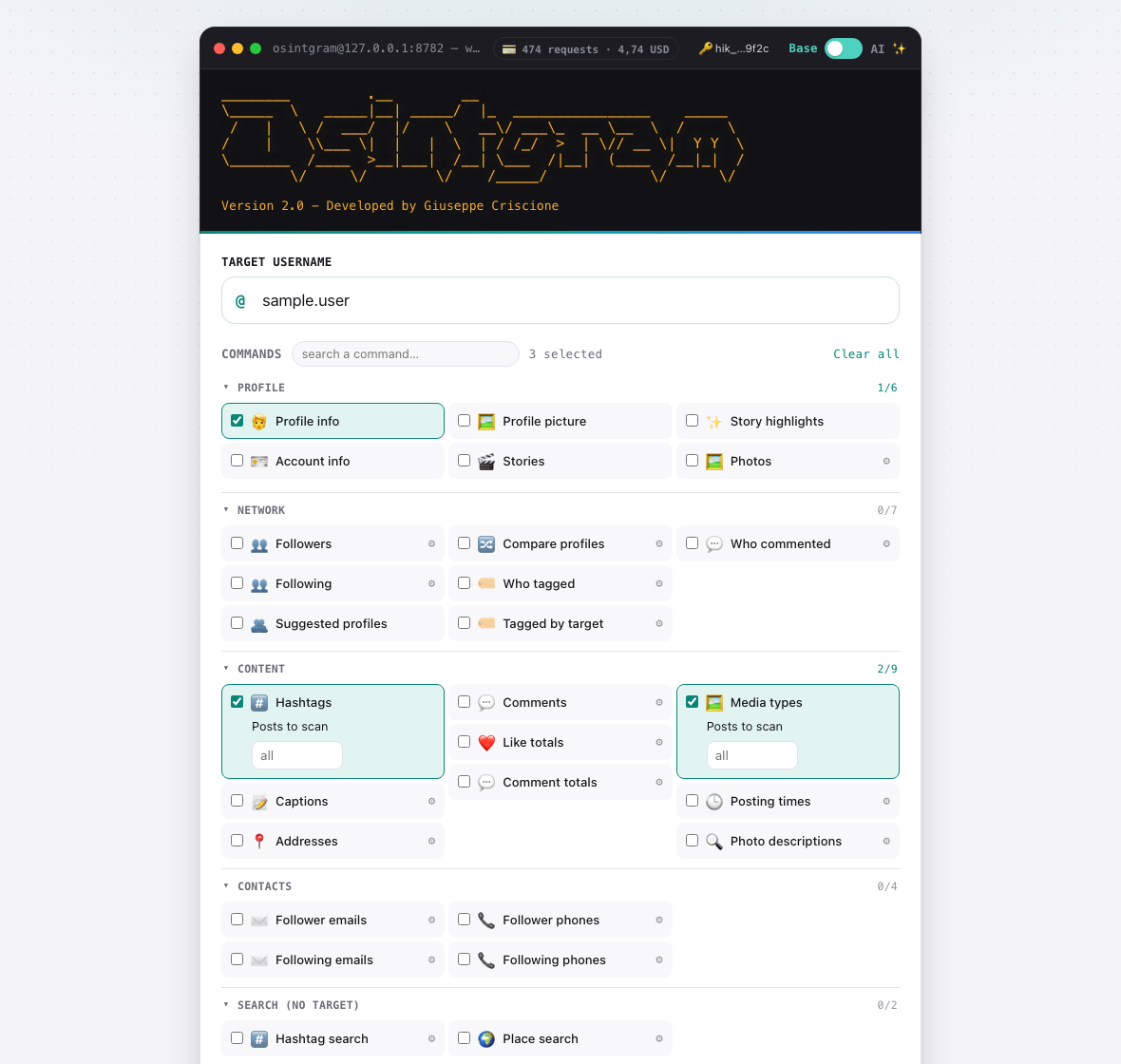
Base mode — no model, no Ollama needed. All 28 commands, one line each, grouped and searchable. Tick what you want, set the parameters, run them in order.

You can also leave the username empty in AI mode and just ask about a hashtag or a place — those searches belong to no account.


What you can find out

Profile Bio and every link in it, follower/following/post counts, category, public email, phone and business address down to the coordinates, linked Facebook id — plus Instagram's own About this account: country of registration, creation date, how many times the username changed
Network Followers and followings, accounts Instagram suggests as related, who tagged them, who they tagged, who comments most — and mutual connections between two accounts
Content Hashtags ranked by use, captions, every comment, like and comment statistics, photo/video/carousel breakdown with views and paid partnerships, posting-times heatmap, geotagged locations on a map, photo alt text
Contacts Public emails and phone numbers among a target's followers or followings
No target needed Posts published with a hashtag (top or recent) or from a place, and who published them

Stories, highlights and profile pictures come back as direct CDN links — and any card with media in it offers a one-click zip of the originals.


Quick start

pip install -r requirements.txt
uvicorn src.web.app:app --host 127.0.0.1 --port 8000 --reload   # or: make run

Open ****.

You need a data backend. The page opens on a panel where you can paste a HikerAPI key directly — it's verified before it's accepted, and can be saved for next time. (A free instagrapi login works too, using an Instagram account of your own — see the guide for the trade-offs.)

For AI mode, install Ollama and pull a tool-calling capable model:

ollama pull llama3.1:8b     # ~4.7 GB, the default

Base mode works without it.

Prefer containers?

docker compose up --build      # or: make docker

Same address, same behaviour — published on 127.0.0.1 only. Your key, cache and saved searches stay on the host in config/, cache/ and dossier/, never inside the image. AI mode reaches an Ollama running on your host.

$${\color{red}Warning:}$$ This runs on 127.0.0.1 with no authentication. It's built to run on your own machine — don't expose it beyond localhost without putting an auth layer in front of it first.

📖 Read the full guide → doc/web-ui.md

Setup for both backends, every command with its parameters and cost, how to keep spending down, exporting and sharing results, all configuration options, and troubleshooting.


Before you use it

FOR EDUCATIONAL PURPOSE ONLY. The contributors do not assume any responsibility for the use of this tool.

  • Don't use your own or primary Instagram account with it.
  • Never commit config/credentials.ini — API keys and Instagram credentials live there. It's git-ignored; keep it that way. If a key has ever been pushed, rotate it: deleting the file doesn't remove it from history.
  • Results contain other people's personal data. Handle them in line with data-protection law (GDPR and equivalents) and Instagram's Terms of Use.
  • You cannot see private profiles. Nothing can. Tools claiming otherwise are scams.

Development

pip install -r requirements-dev.txt
python -m pytest

The test suite runs entirely against synthetic fixtures — no API key, no quota, no network. It also checks that the documentation hasn't drifted away from the code.

Feature requests and pull requests are welcome — open an issue. Found a security problem? Please report it privately instead: see SECURITY.md.


Credits

Osintgram is written by Giuseppe Criscione (Datalux). Version 2.0 rebuilds it around a web interface and a reusable service layer, and adds the AI mode, the cost controls and the newer analyses — see the changelog.

It owes a great deal to everyone who has contributed since the first release:

Osintgram contributors

Instagram data comes from HikerAPI or instagrapi. Geocoding by Nominatim / OpenStreetMap. Maps by Leaflet. Local models via Ollama.

Released under the GPL-3.0 licence.

Instagram is a trademark of Meta Platforms, Inc. This project is not affiliated with, endorsed by, or approved by Meta.

Frequently asked questions

Is Osintgram free to use?

Osintgram is open source under the GPL-3.0 licence. There is no licence fee and no seat count — you can self-host it or, where the project offers one, pay a vendor for a managed version instead.

What does Osintgram do?

Osintgram is a OSINT tool on Instagram. It offers an interactive shell to perform analysis on Instagram account of any users by its nickname

What is Osintgram written in?

Osintgram is primarily written in Python. Its source is publicly available at https://github.com/Datalux/Osintgram, and it has 14,464 GitHub stars.