OpenWhispr is a free, MIT-licensed, open-source voice-to-text desktop application for macOS, Windows, and Linux that turns speech into text, notes, and actions at the cursor, and it is built for anyone who wants dictation and meeting transcription without sending audio to a third party.
What it is
OpenWhispr is a cross-platform desktop application written in JavaScript that provides voice dictation, meeting transcription, and notes with AI agents. A user presses a hotkey, speaks, and the transcribed words appear at the cursor in whatever application has focus. Transcription can run fully offline against local speech-to-text engines such as Whisper and NVIDIA Parakeet, in which case audio never leaves the device, or it can be routed to cloud providers when speed matters more than locality. The project ships no data collection and no telemetry.
The concrete problem it solves is the paid, cloud-only dictation service. OpenWhispr positions itself directly as the open-source and free alternative to WisprFlow and Granola, so it lives in the same Productivity & Utilities / Input & Dictation space while replacing the subscription model and the requirement that speech be uploaded for processing. The choice between local engines and hosted models is exposed to the user rather than fixed by the vendor, and local inference is GPU-accelerated across Metal, CUDA, and Vulkan, which covers AMD and Intel graphics as well as Apple silicon and NVIDIA hardware.
Key capabilities
- Global hotkey voice dictation that automatically pastes the transcript into the focused application, plus a separate dictation translation hotkey that dictates in one language and pastes the text in another.
- AI agent access to GPT-5, Claude, Gemini, Groq, Tinfoil, OpenRouter, or local models behind a named voice assistant.
- A dedicated Voice Assistant hotkey that sends speech directly as a command with no wake word and no cleanup pass, edits highlighted text in place, and can opt in to sending a screenshot of the current screen as context.
- Meeting transcription that auto-detects Zoom, Teams, and FaceTime calls, with live speaker diarization, voice fingerprinting, and Google, Microsoft, or Apple Calendar integration; diarization and fingerprint recognition also run on-device without cloud.
- Notes with folders, semantic search, cloud sync, and AI actions, plus team spaces and sharing through link, domain, or invite-only visibility with roles, invitations, and server-enforced membership.
- Audio import that transcribes existing audio and video via drag-in files, batch upload, or a pasted YouTube or audio URL, with optional speaker detection.
- Enterprise controls for organization policy enforcement, company SSO and SCIM, and centrally managed Amazon Bedrock or Azure OpenAI access without distributing cloud keys, alongside a Public API and an MCP server for programmatic note and transcription management.
Who uses it and how
- Individual knowledge workers who want dictation available inside every application rather than in a single dedicated editor, using one global hotkey and automatic pasting.
- People working with sensitive speech, who select local Whisper or NVIDIA Parakeet engines so that audio never leaves the machine.
- Meeting-heavy users and teams who need automatic detection of Zoom, Teams, and FaceTime calls, speaker labels, and calendar-linked transcripts, with notes searchable semantically across meetings.
- Teams that share notes through link, domain, or invite-only visibility and collaborate in team spaces with roles and invitations.
- Regulated or large organizations that enforce policy centrally and route AI calls through Amazon Bedrock or Azure OpenAI without handing out cloud keys.
Getting started
Install by cloning the repository and running npm install followed by npm run dev, which requires Node.js 24 or newer, or download a prebuilt package for the relevant platform: .dmg for macOS, .exe for Windows, and .AppImage, .deb, .rpm, or .tar.gz for Linux.
How it compares
WisprFlow and Granola are paid products, while OpenWhispr is MIT-licensed and free, so the cost model shifts from subscription to whatever local hardware or cloud API keys the user already has. Those products process speech in their own cloud, whereas OpenWhispr can keep transcription, diarization, semantic search, and AI reasoning entirely on the local machine, with no telemetry or data collection. Self-hosting and provider choice are therefore under the user's control, including the ability to point AI requests at Bedrock, Azure OpenAI, or local models instead of a vendor-fixed endpoint.
When to use it — and when not to
A self-hoster must supply the compute: local transcription and semantic search depend on running models, and GPU acceleration is the practical path to usable speed, so machines without that capacity will fall back to cloud providers or slower processing. On Intel Macs, live speaker identification and voice fingerprinting are unavailable because ONNX Runtime stopped shipping macOS x86_64 binaries in 1.24, and notes search falls back to keyword matching instead of semantic search, though meetings still record and transcribe normally. Anyone unwilling to configure engines, manage API keys, or tolerate a project carrying 341 open issues should consider a fully managed paid service instead.
project readme (upstream, from github) — read inline

OpenWhispr




The open-source and free alternative to WisprFlow and Granola.
Privacy-first voice-to-text dictation with AI agents, meeting transcription, and notes. Cross-platform for macOS, Windows, and Linux.
Website ·
Docs ·
Download ·
API ·
Changelog
OpenWhispr turns your voice into text, notes, and actions from your desktop. Press a hotkey, speak, and your words appear at your cursor. Choose between fully private offline transcription with local speech-to-text engines like Whisper and NVIDIA Parakeet — where your audio never leaves your device — or cloud processing for speed. No data collection, no telemetry, fully open source.
Download
* On Intel Macs, live speaker identification and voice fingerprinting are unavailable: they depend on ONNX Runtime, which stopped shipping macOS x86_64 binaries in 1.24. Meetings still record and transcribe normally, and notes search falls back to keyword matching instead of semantic search.
Features
- Voice dictation — global hotkey to dictate into any app with automatic pasting
- Dictation translation — dedicated hotkey to dictate in one language and paste the text in another
- AI agent — talk to GPT-5, Claude, Gemini, Groq, Tinfoil, OpenRouter, or local models with a named voice assistant
- Voice Assistant hotkey — dedicated hotkey that sends what you say straight to your AI assistant as a command, no wake word needed and no cleanup pass; highlighted text is edited in place. With auto-paste enabled, answers paste at a focused text cursor or stream into a floating panel and copy to the clipboard when no writable cursor is available. You can also opt in to sending a screenshot of your current screen as context
- Meeting transcription — auto-detect Zoom, Teams, and FaceTime calls with live speaker diarization, voice fingerprinting, and Google, Microsoft, or Apple Calendar integration
- Local speaker diarization — on-device speaker labelling with voice fingerprint recognition across meetings, no cloud required
- Notes — create, organize, and search notes with folders, semantic search, cloud sync, and AI actions
- Team spaces & sharing — free for signed-in users; share notes on the web with link, domain, or invite-only visibility, and collaborate in team spaces with roles, invitations, and server-enforced membership
- Audio import — transcribe existing audio and video: drag in files, batch-upload, or paste a YouTube/audio URL, with optional speaker detection
- Local or cloud — your choice — all core features (transcription, AI reasoning, speaker diarization, semantic search) work with local models or cloud providers — including GPU-accelerated local Whisper on Metal, CUDA, and Vulkan (AMD/Intel)
- Enterprise controls — enforce organization policy, company SSO and SCIM, and centrally managed Amazon Bedrock or Azure OpenAI access without distributing cloud keys
- Public API & MCP — manage notes and transcriptions programmatically or connect your AI assistant via the MCP server
Quick start
git clone https://github.com/OpenWhispr/openwhispr.git
cd openwhispr
npm install
npm run dev
Requires Node.js 24+. See the full documentation for setup guides, platform-specific instructions, and build details.
Documentation
Visit docs.openwhispr.com for:
Repo examples:
- Custom ASR shim for Self-Hosted transcription against non-OpenAI-compatible ASR APIs
Tech stack
React 19, TypeScript, Tailwind CSS v4, Electron 41, better-sqlite3, whisper.cpp, sherpa-onnx, shadcn/ui
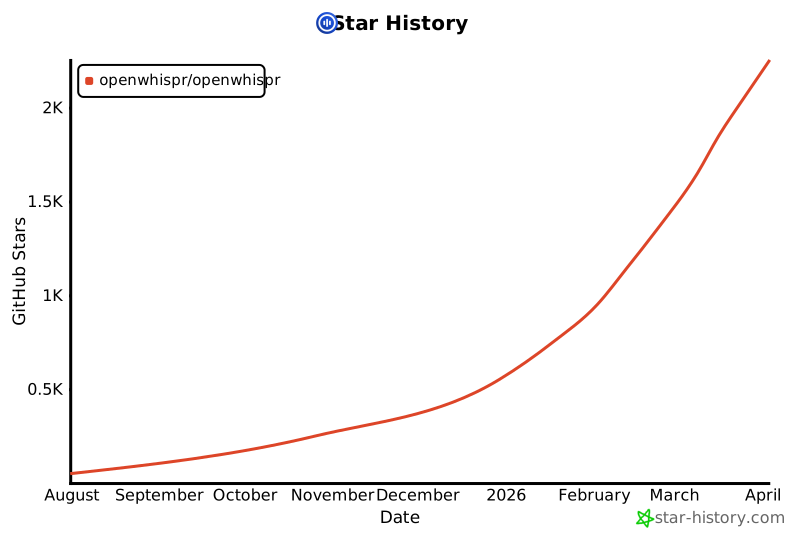
Star History
Sponsors

Neon is the serverless Postgres platform powering OpenWhispr Cloud.
Contributing
We welcome contributions. Fork the repo, create a feature branch, and open a pull request. See the contributing guide for development setup and guidelines.
License
MIT — free for personal and commercial use.
Acknowledgments
- OpenAI Whisper — speech recognition model powering local and cloud transcription
- whisper.cpp — high-performance C++ implementation for local processing
- NVIDIA Parakeet — fast multilingual ASR model
- sherpa-onnx — cross-platform ONNX runtime for Parakeet inference
- Hugging Face — model hub hosting Whisper, Parakeet, and embedding model weights
- llama.cpp — local LLM inference for AI text processing
- Electron — cross-platform desktop framework
- React — UI component library
- shadcn/ui — accessible components built on Radix primitives
- Neon — serverless Postgres powering OpenWhispr Cloud