Follow your curiosity. Build across disciplines.
OpenHarness is open-source software and hardware for building with coding agents. Use Claude Code, Codex, and others to make software, design parts and circuit boards, explore data, and create videos, with your agents, domain tools, and live viewers in one place and sessions that persist across every machine you own.
The old rule said ten thousand hours to a craft. That was the tax on curiosity, and most of us could only afford to pay it once, so we specialized and called the rest hobbies.
Coding agents become the specialists, given the tools of a craft and a way to see what they made: the geometry that becomes a part, the netlist that becomes a circuit board, the script that becomes a film. You bring the idea, the taste, and the judgment about what is worth making.
Use the desktop app on its own, or add the optional Harness device to follow your agents, answer their questions, and speak new tasks from your desk. The app, firmware, schematics, PCB layouts, and enclosure CAD files are all open source.
Who it's for · What you can make · Run it · Harness device · Architecture · Contribute

For polymaths in the making.
“I think that one kind of perspective for a lot of the world-class entrepreneurs is they’re not specialists. They’re something close to polymaths.”
Built for the curious engineer who wants to build beyond software. Get your hands on more of what you are making, from the physical product to the analysis and the launch video. Makers and creators with the same curiosity are welcome. You get there by directing a specialist in each craft and judging what comes back, not by mastering them all first.
Monday, a feature. Tuesday, the customer data. Wednesday, an enclosure for the prototype. Thursday, the launch video. You already know how to build with code, and Harness brings that way of working to CAD, circuit boards, games, videos, and documents, with agents and tools for each craft.
Your ideas can take you into unfamiliar crafts: an app, a physical product, a game, a film. This is a place to follow them. Give each job an agent with the right tools, inspect what it makes, and steer the next iteration. The code and project files are there to read, change, version, and build on.
From handoff to hands-on. You bring intent and judgment; your agents write and run code. Each harness supplies the tools and feedback for a different craft. You can get your hands on more of the product and the work of bringing it to customers.
Start with what you know and learn the next craft through the things you build. The ideal-user guide records who we're building for and how the app, community, and device serve them.
Domain-specific harnesses (DSH)
Coding agents can build far more than software. Code is the common medium: geometry scripts make parts, animation code makes videos, and analysis code turns data into charts and findings. That is what connects the dots between crafts, and a harness gives the agent the tools and feedback to work in each one.
A domain-specific harness turns a coding agent into a specialist. It brings the domain's instructions and skills, a pinned toolchain, a project template, a verdict the app can read, and a live viewer for what the agent makes. You chat on one side; the board, the part, the robot or the game takes shape on the other, and stays interactive after the agent is done.
A DSH is a folder with a harness.json. The agent does the reasoning; the harness brings the tools
and the view. Adding a domain never needs a change to the app or the daemon.
Coding and beyond
Start with a coding agent you already use. Explore 45 domain-specific harnesses when your next idea takes you further.
| Category | Agents and harnesses |
|---|---|
| Coding | Claude Code, Codex, Cursor, OpenCode, Pi, Hermes, Command Code, Devin, Muse Code, Amp, Antigravity, GitHub Copilot, Grok Build, Kilo Code |
| Design | Autonomous Workshop, Blender, Bonsai MCP, Creative Direction, Excalidraw, FreeCAD, Generative Art, OpenSCAD, text-to-cad |
| Engineering | Autonomous Circuit, CircuitJS, KiCad, Orca Slicer, Yosys |
| Media | Comfy MCP, Manim, OpenMontage, Remotion |
| Music | Ableton AI, JUCE Agent Toolkit, Music Studio, Score, Strudel |
| Productivity | Jev Sheets, Marp, Typst |
| Science & Data | autoresearch-mlx, Data Studio, marimo, RDKit |
| Simulation | DimOS, Drone Pilot, Foam-Agent, MuJoCo, SimSkill |
| Games | Game Master, Godogen, Phaser, Voxel Worlds |
| Research | Jev Browser, Roundtable |
| Local AI | Grid, MLX-LM, Ollama, vLLM |
These are the 45 harnesses currently listed in the Store catalog. They combine upstream open-source tools and original workflows, with instructions, setup, checks, and live views for each craft.
The 10 shared viewers cover CAD, 3D models, documents, games, film, video, MuJoCo, web pages, isolated web previews, and studios. Viewer packages install alongside the harnesses that need them. Experimental packages marked unlisted are not included above.
The harness we'd love to see next is the one for your craft. Bring an open-source tool you use, a workflow you know well, or your own company's toolchain. A harness can live in this repository or in yours.

Six real outputs, one at a time. Each slide includes the harness and the original prompt. Still preview · Individual images and prompts below.

Read the prompts and open individual images
Autonomous Circuit · Open harness

Design a six-key USB macropad. Start with the schematic.

Design a 3D-printable planetary gear set: a 12-tooth sun, three 18-tooth planets and a 48-tooth ring gear with mounting lugs, module 1.5 and 8 mm thick, plus a carrier on steel pins. Give each part its own colour.

Make the Unitree G1 humanoid say hello: stand, raise its right hand and wave three times, then lower it and take a small bow. Record it.

Make a cozy isometric reading nook: a cut-away corner of a room with an armchair, a floor lamp glowing warm, a bookshelf full of colourful books, a round rug and a monstera, with evening sun through the window and a cat asleep on the rug.

Make a synthwave hoverbike racer: ride down a neon grid canyon toward a striped setting sun, weave between glowing pylons, hop barriers and collect energy cores, with a boost and three shields.

Draw a chess knight using nothing but spinning circles: a Fourier series of 120 epicycles, tip to tail, tracing its silhouette in gold.
Every picture is real output from the harness's own toolchain, and the prompt is the one that made it.
Coding agents, on every machine
Keep the agents doing that work together, wherever they run.
- Real terminals that outlive the window. Every agent runs in a persistent tmux session. Close the app and the agents keep working; if tmux goes down with a reboot, the daemon brings the panes back and resumes the sessions.
- Every engine, no wrappers. Claude Code, Codex, Cursor, OpenCode, Pi, Hermes, Command Code, Devin,
Muse Code, Amp, Kilo, Grok Build, Antigravity and GitHub Copilot. OpenHarness reads the transcript each
agent already writes and installs the vendor's own hooks. Your credentials stay in
~/.claude,~/.codexand so on. See the engine list. - All your machines in one window. The laptop, the Mac mini at home, the server in the rack. Each runs a daemon with outbound connections only. Terminal traffic is end-to-end encrypted, the relay only forwards ciphertext, and it goes peer to peer over WebRTC when it can. No SSH server, VPN, or open port.
- Built for many agents at once. Split panes, a keyboard-driven layout, fuzzy search across sessions and machines (⌘O), and one shortcut to the agents waiting on you (⇧⌘I). The workspace guide and keybindings cover the rest.
Run it
- Download the desktop app for macOS or Linux.
- Sign in to a coding agent you already use, with your own subscription, API key, or local model.
- Press ⌘N, pick an agent or a harness, a machine and a project, and start.
On another machine:
curl -fsSL https://harness.autonomous.ai/cli/install.sh | bash
harness login
harness start
Then Machines → Link Machine in the app.
macOS is the primary tested platform. Linux builds exist and feature parity is in progress; Windows is work in progress. Embedded live viewers require macOS; remote viewers also need a current Harness CLI on both machines. The app and daemon still need a Harness account to start; account-free local use is tracked.
Build from source
For macOS, install Node.js 20+, tmux, Xcode, and Flutter 3.47+ / Dart 3.13+:
git clone https://github.com/autonomous-ai/openharness.git
cd openharness
(cd cli && npm ci)
make install-cli
cd desktop
flutter config --enable-swift-package-manager
flutter pub get
flutter run -d macos
make install-cli installs this checkout's CLI and restarts the local daemon. The
development guide covers tests and isolated environments.
How it fits together
flowchart LR
  device["Harness device"] -- USB --> daemon
  app["Harness app<br/>(Flutter)"] -- loopback --> daemon["harness daemon<br/>(TypeScript)"]
  daemon --> tmux["tmux"] --> agents["Claude Code · Codex · OpenCode · …"]
  daemon --> dsh["DSH toolchain<br/>+ live viewer"]
  daemon <-- "E2EE · WebRTC" --> relay["Harness relay"]
  relay <--> remote["daemons on your<br/>other machines"]
The architecture guide covers the daemon, the session model, transport and encryption.
Your first DSH in ten minutes
The Hello World example is a Codex session that edits an HTML page shown in the shared Web Viewer:
hello-world/
  harness.json
  AGENTS.md             # instructions for the agent
  template/index.html   # copied into a new project
Its manifest connects the pieces:
{
  "spec": 1,
  "id": "examples/hello-world",
  "name": "Hello World",
  "engine": "codex",
  "workspace": {
    "template": "template",
    "marker": "index.html"
  },
  "agent": { "instructions": "AGENTS.md" },
  "viewer": { "use": "autonomous/web-viewer" }
}
The CLI and the package protocol call a harness a DSH, so the commands are harness dsh …. From this
checkout, with the harness CLI installed:
harness dsh install "$PWD/store/viewers/web-viewer" --link
cp -R store/examples/hello-world ../my-first-harness
harness dsh check ../my-first-harness
harness dsh install ../my-first-harness --link
Press ⌘N → Hello World, choose a new project, and ask it to “Say hello to Ada.” The agent edits
index.html; the viewer reloads. Change AGENTS.md to try another workflow, then start a new session.
--link keeps the package connected to your source directory; Store installs resolve viewer
dependencies on their own.
The authoring guide covers the full manifest, toolchains, live progress, verdicts, store pages, and publishing; the package specification is the contract.
| Piece | Responsibility |
|---|---|
| Engine | Runs the coding agent: Claude Code, Codex, OpenCode, and the rest |
| Harness (DSH) | Packages a domain: engine, instructions, toolchain, workspace, and viewer |
| Viewer | Shows and interacts with what the agent makes; shared across harnesses |
| Session | One running agent, in one project, on one machine |
Harness device
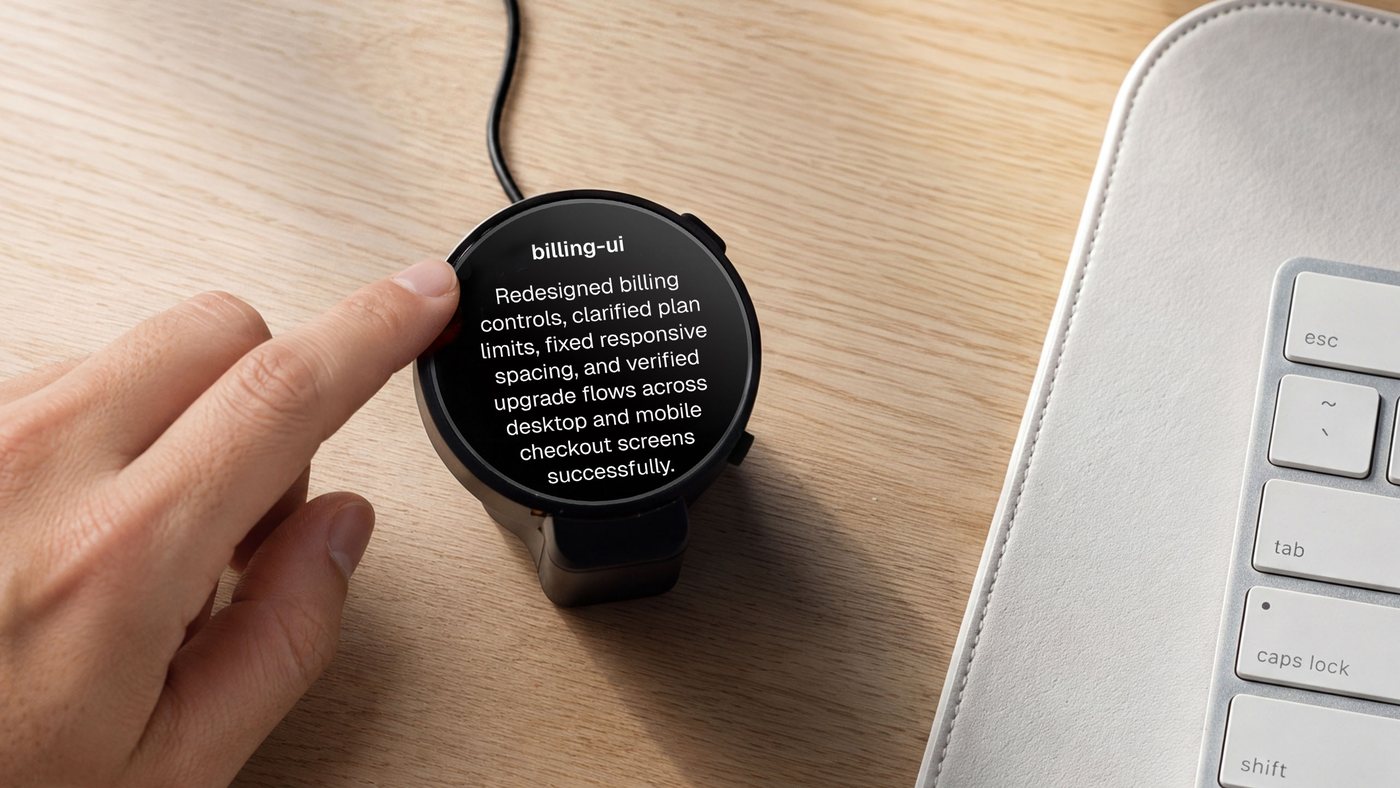
The optional Harness device is a round, always-on display that sits beside your keyboard and shows your agents at a glance: what each one is doing, which one has finished, and which one is waiting on you. Read a question and answer it on the screen, or tap and speak a new task, without switching windows.
It is open hardware, all the way down. This repository has everything it takes to build one:
| Layer | What's here |
|---|---|
| Firmware | ESP32-S3, ESP-IDF, a 466 × 466 round AMOLED with touch, microphones and audio. Connects to the host's daemon over USB — no Wi-Fi setup, no account on the device. |
| PCB | The EasyEDA Pro project, the schematic, Gerbers, the bill of materials, and pick-and-place data for assembly. |
| Enclosure | STEP for editing and STL for printing: the housing, an iron counterweight base, the USB clamp, and the button. |
Get a Harness device, or build your own from these files. The firmware guide lists the supported boards and build commands, and the hardware guide covers the design files.
https://github.com/user-attachments/assets/97848065-61c6-40df-be66-a8247f69aa4c
Contributing
There are three ways in, one for each layer of the stack.
- Make a DSH for a tool you use. Start from Hello World, make one workflow work end to end, pin the toolchain, credit the upstream project, and show something worth looking at in the viewer.
- Improve the coding workspace. Terminal behavior, engine support, the daemon, the relay, Linux and Windows.
- Hack the hardware. Port the firmware to another board, remix the enclosure, add a feature to the device.
Small fixes and notes about something that didn't work are welcome too. The contribution guide walks through each path.
Repository map
desktop/    Flutter app and terminal workspace
cli/        TypeScript CLI, daemon, engine adapters, and package runtime
backend/    Relay and control plane
store/      Domain-specific harnesses, shared viewers, registry, examples, and package spec
provider/   Provider API contract, implementations, and conformance tests
devices/    Harness device firmware, PCB, and enclosure
- Development and testing · Extension points · CLI and automation
- Desktop · Daemon · Relay · Provider API
- Security policy · License
The repository is MIT licensed unless a folder says otherwise. Upstream tools, models, and assets keep their own licenses.