AIPOCH Open-Science
AI research workbench for reproducible science — open-source, local-first, and model-agnostic.



AIPOCH Open-Science is an AI research workbench for scientists and researchers, developed by AIPOCH with an open-source, local-first, model-agnostic approach. It enables reproducible, inspectable research with scientific AI agents, Python and R execution, scientific data connectors, and cross-platform support for macOS, Windows, and Linux. Create a project, describe your research goal in plain language, and let the agents read files, search the web, run code, query scientific data sources, and produce reports, tables, and figures with traceable provenance—all in one workspace.
AIPOCH Open-Science supports computational and data-intensive research across disciplines, including machine learning, statistics, life sciences, chemistry, materials science, physics and environmental science. It supports the research process from literature review and hypothesis development to code execution, data analysis, simulation, visualization, and the production of traceable research outputs.
💡 AIPOCH Open-Science v0.31.1 released (last updated September 2026). AIPOCH Open-Science v0.31.1 broadens the scientific data you can reach from a session: ENA tools resolve a public ENA/INSDC accession to its sequencing runs with archive-generated FASTQ files, the Genes connector gains g:Profiler-powered GO and pathway enrichment with a custom statistical background, and new NCBI tools resolve taxon names, inspect versioned genome assemblies, and look up sequence aliases. Settings can optionally connect a dedicated classification model service, and remote-access pairing moves to the top of the security panel with safe revocation of trusted browsers. Stability is tighter throughout — Windows R notebooks supervise persistent kernels and guide network recovery, lost OpenCode sessions recover on startup, and approval cards, pending message previews, and the recent-session list behave more reliably. See the latest release notes for full details.
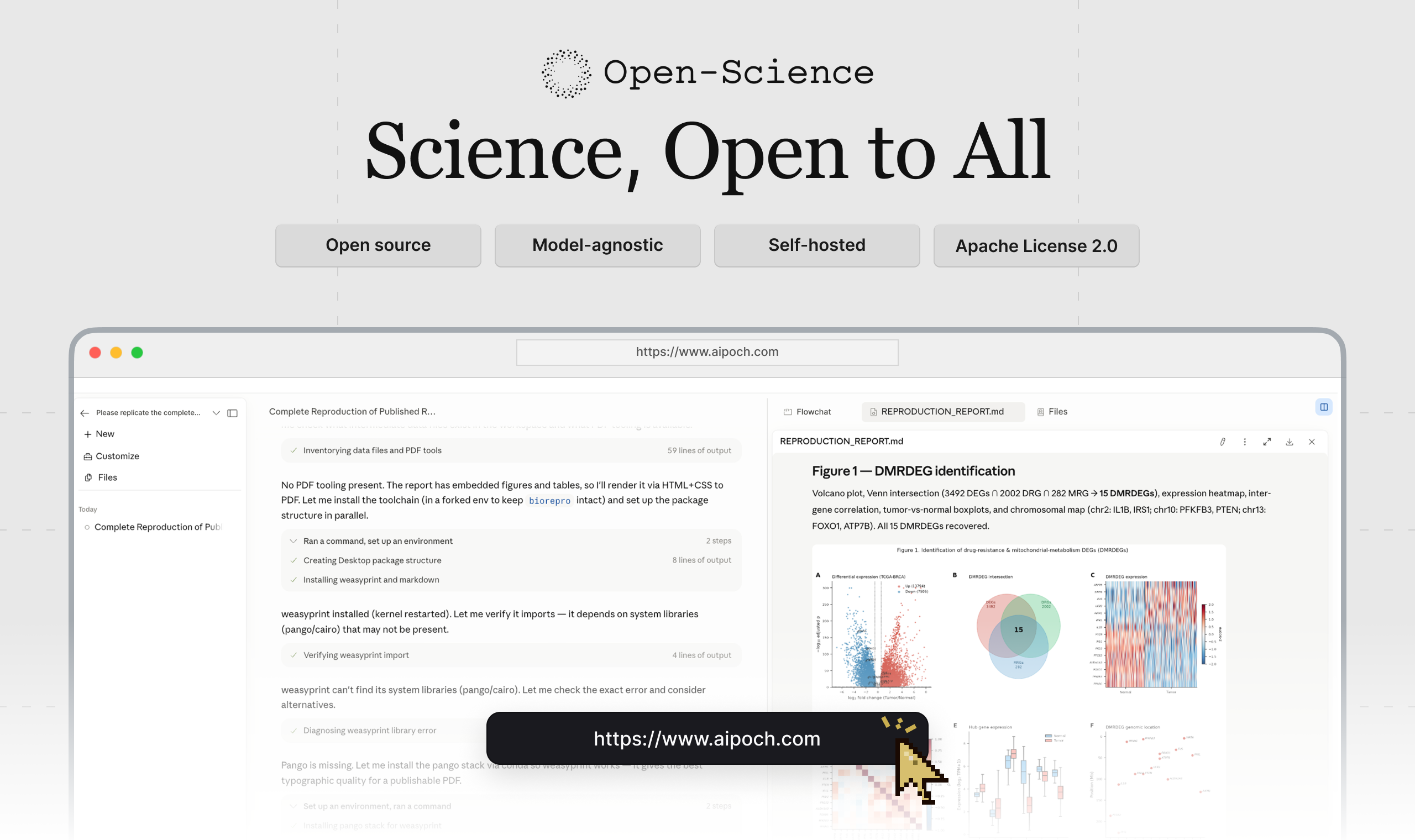
Table of Contents
- Quick Start
- Product Tour
- Benchmark Performance
- Core Capabilities
- Model Providers
- Data, Permissions, and Trust
- Development & Packaging
- Frequently Asked Questions
- Get Involved
- License
- Star History
🚀 Quick Start
1. Download the app
Open the latest release, expand Assets, and choose the installer for your computer:
| Your computer | Choose |
|---|---|
| macOS 12+ — Apple Silicon (M1 or newer) | The macOS DMG for Apple Silicon / ARM64 |
| macOS 12+ — Intel | The macOS DMG for Intel / x64 |
| Windows x64 | The Windows x64 installer |
| Linux x64 | The Linux x64 AppImage or Debian package |
Download from the official release page; see download verification if needed.
On macOS, you can also install with Homebrew:
brew install --cask open-science
Windows reinstalls preserve research data. For a full cleanup, see the data reset tool, which permanently deletes local data after confirmation.
2. Complete first-time setup
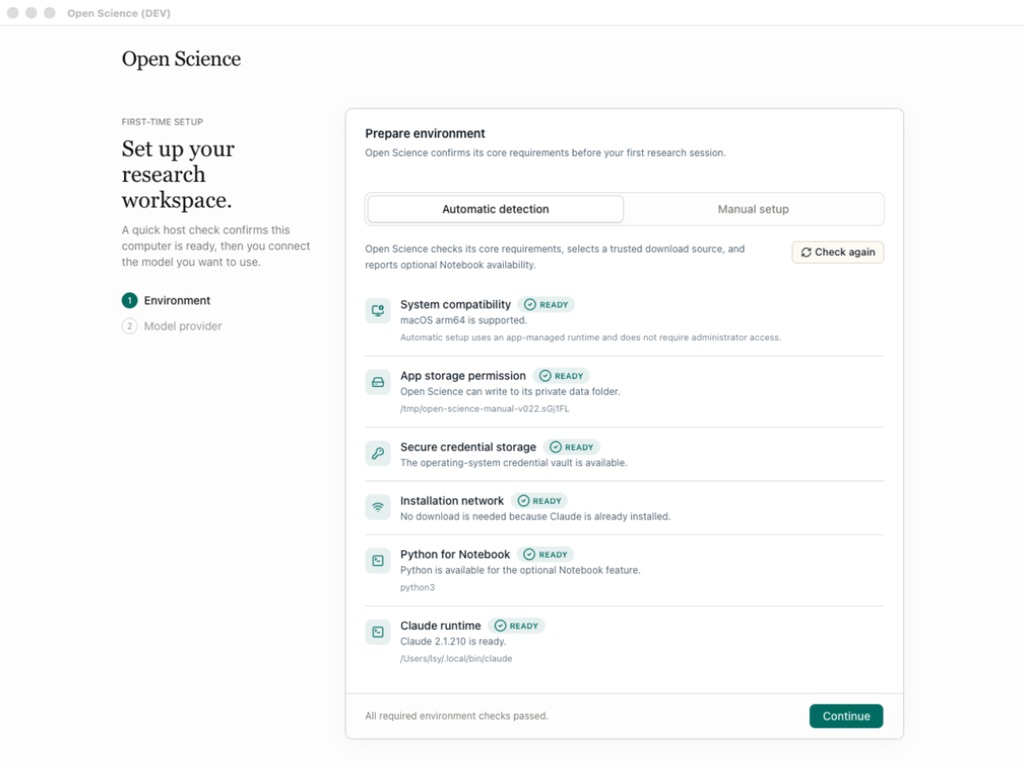
Follow the setup wizard: Environment → Data location → Agent runtime → Model provider → Notebook runtime.
Complete the required environment and agent-runtime checks and test your model connection. Python/R Notebook setup is optional; Notebook and data-location settings can be changed later.
 |
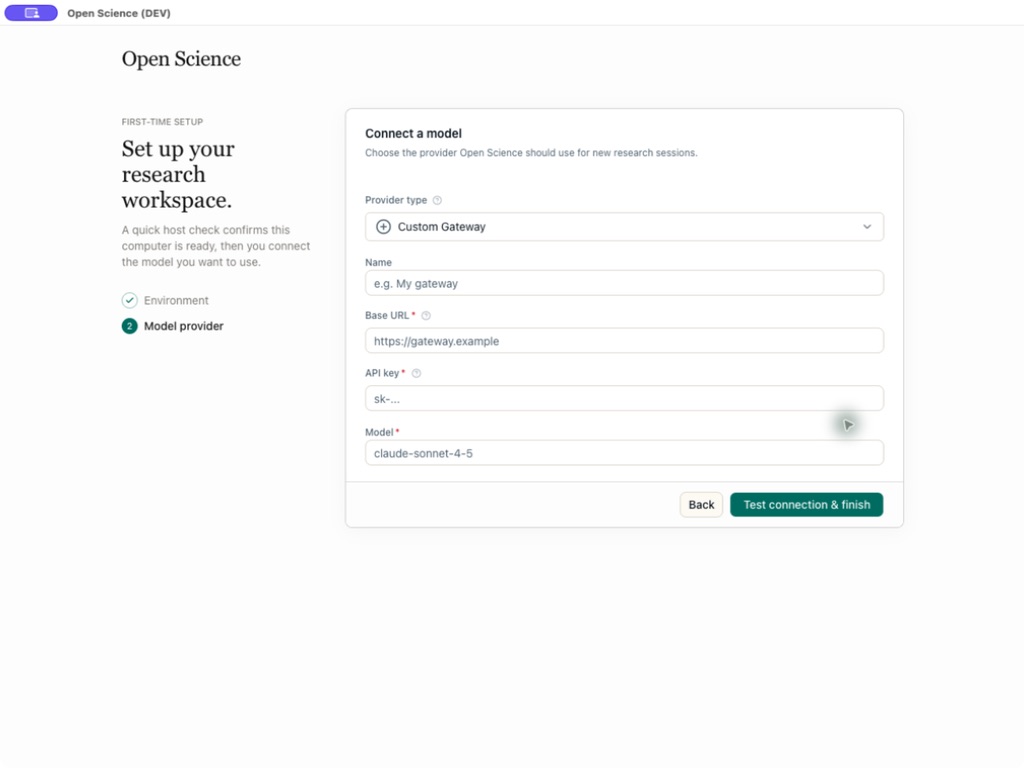 |
| Host compatibility, storage, and network checks | Provider, API Key, endpoint, and model validation |
3. Start a research project
- Click New project, open a session, and describe your research goal, inputs, and expected outputs.
- Attach files, select a model and approval mode, then send the task. Use
@to reference project files or/to choose a skill. - Review tool activity and any approval requests, preview the results, and check their available evidence in Provenance.
Screenshots in this README illustrate the workflow. Labels, catalogs, and other interface details may differ from the version you install.
Product Tour
From a research request to a traceable result
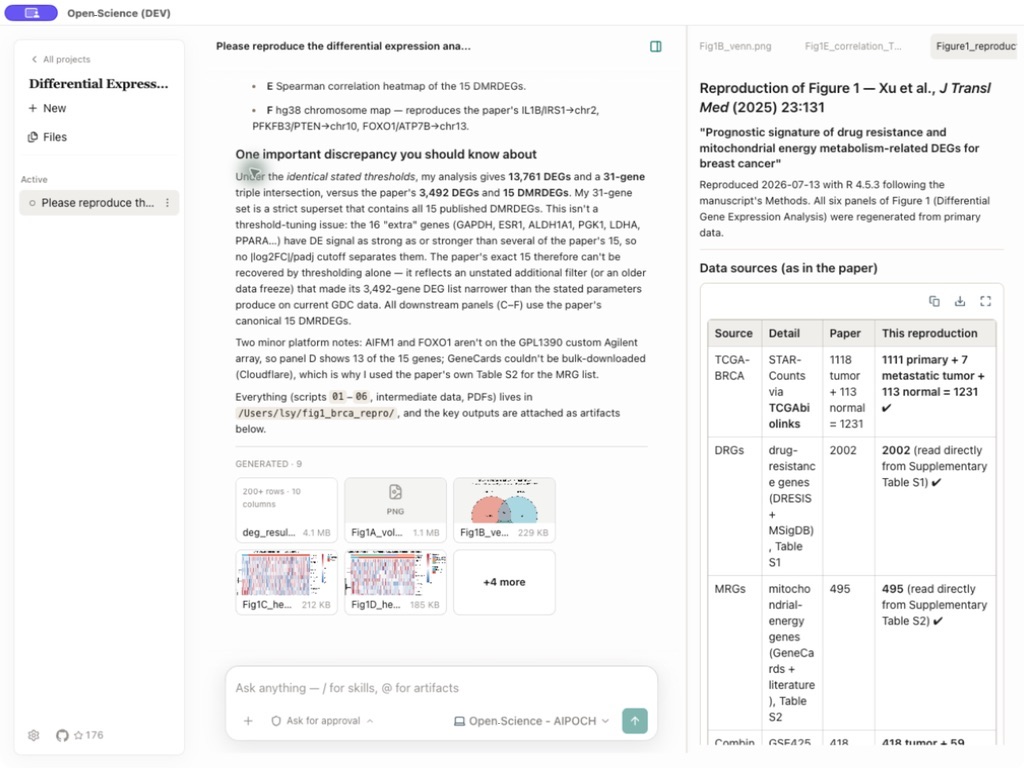
Consider a representative bioinformatics task: reproduce a published differential-expression analysis, compare the regenerated results with the paper, and deliver the report, tables, and figures needed for review. The screenshots below are representative views from documented AIPOCH Open-Science workflows; they illustrate each stage rather than one continuous session.
1. Define the research task and evidence
Describe the research question, source paper and datasets, required methods or thresholds, expected outputs, and acceptance criteria. Upload supporting files or reference an existing project artifact with @, so the agent starts from explicit inputs instead of hidden context.
2. Execute with inspectable scientific tools
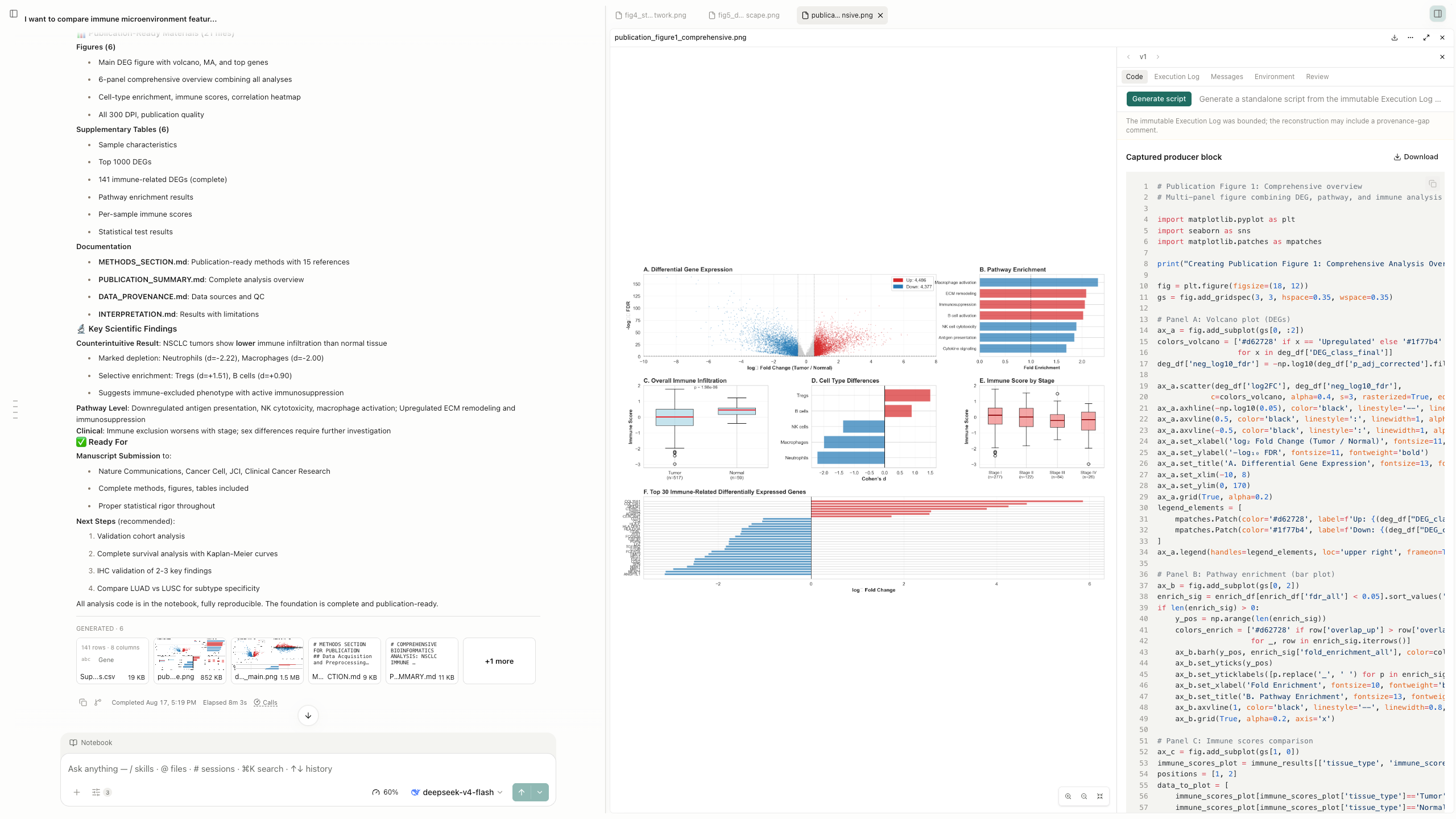
The agent can combine scientific skills, permissioned research connectors, searches, file operations, and Python or R code in the shared Notebook. Generated figures can be reviewed beside the research summary, while the artifact record exposes captured producer code and execution evidence for inspection.
3. Review reports, tables, and figures in place
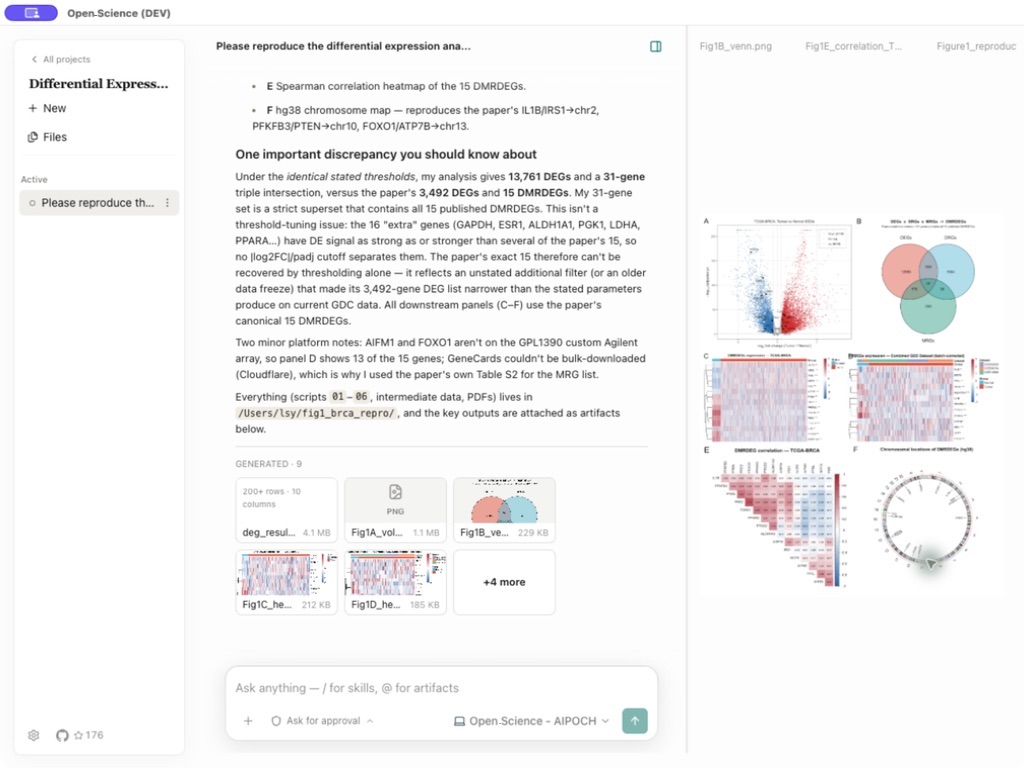
The final response summarizes what reproduced, what differed, and which limitations matter. Generated Markdown reports, CSV tables, images, and other research artifacts remain attached to the session and are collected in the project file library, where they can be previewed beside the conversation and reused in follow-up work.
4. Trace every artifact back to its evidence
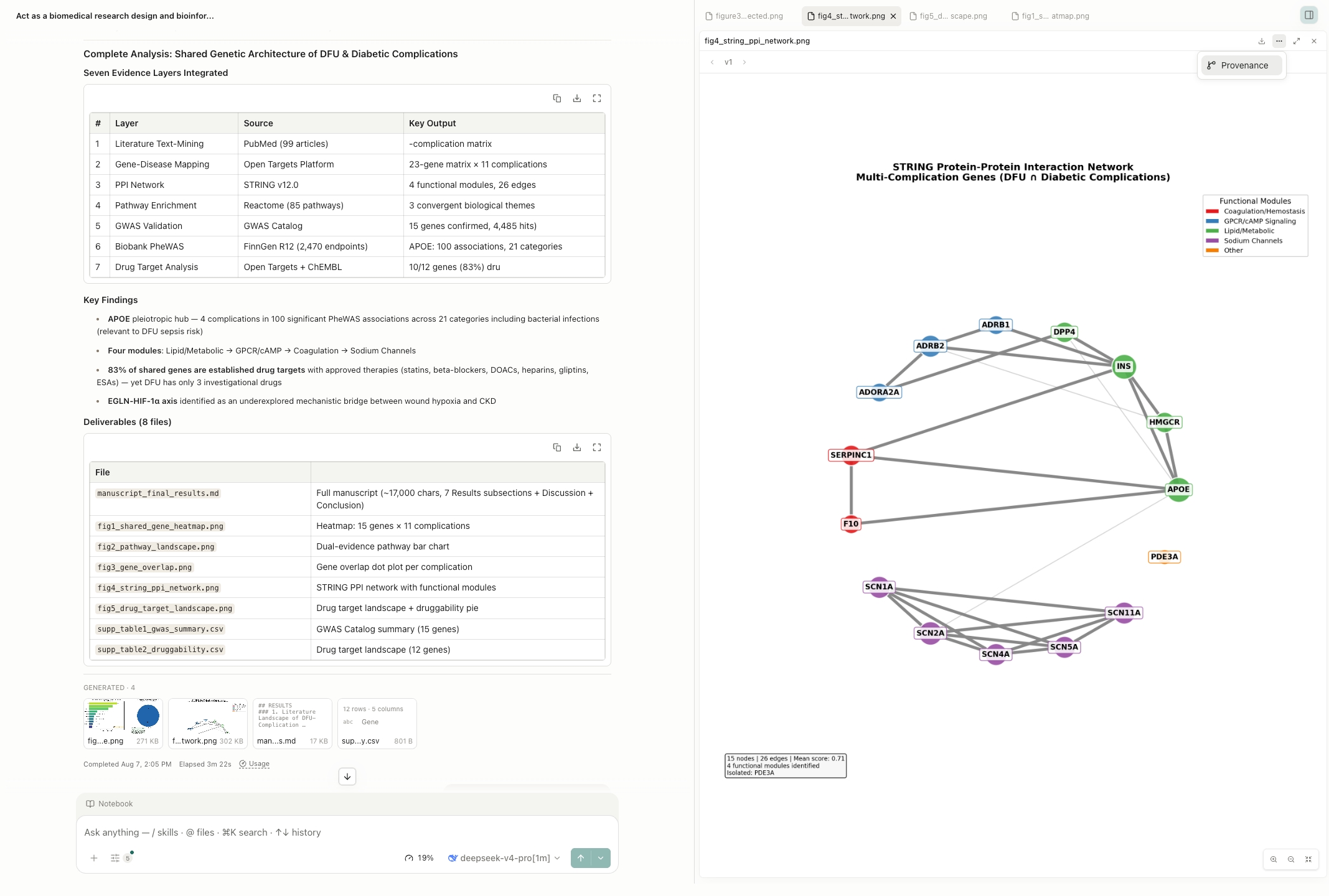
Each generated artifact is stored as an immutable, checksummed version. Its Provenance view can expose the producing code and execution history, referenced inputs, observed environment inventory, producing conversation branch, and version-scoped Reviewer findings. Evidence that could not be verified is marked unavailable rather than inferred.
Benchmark Performance
🏆 #1 on BiomniBench-DA Public 50
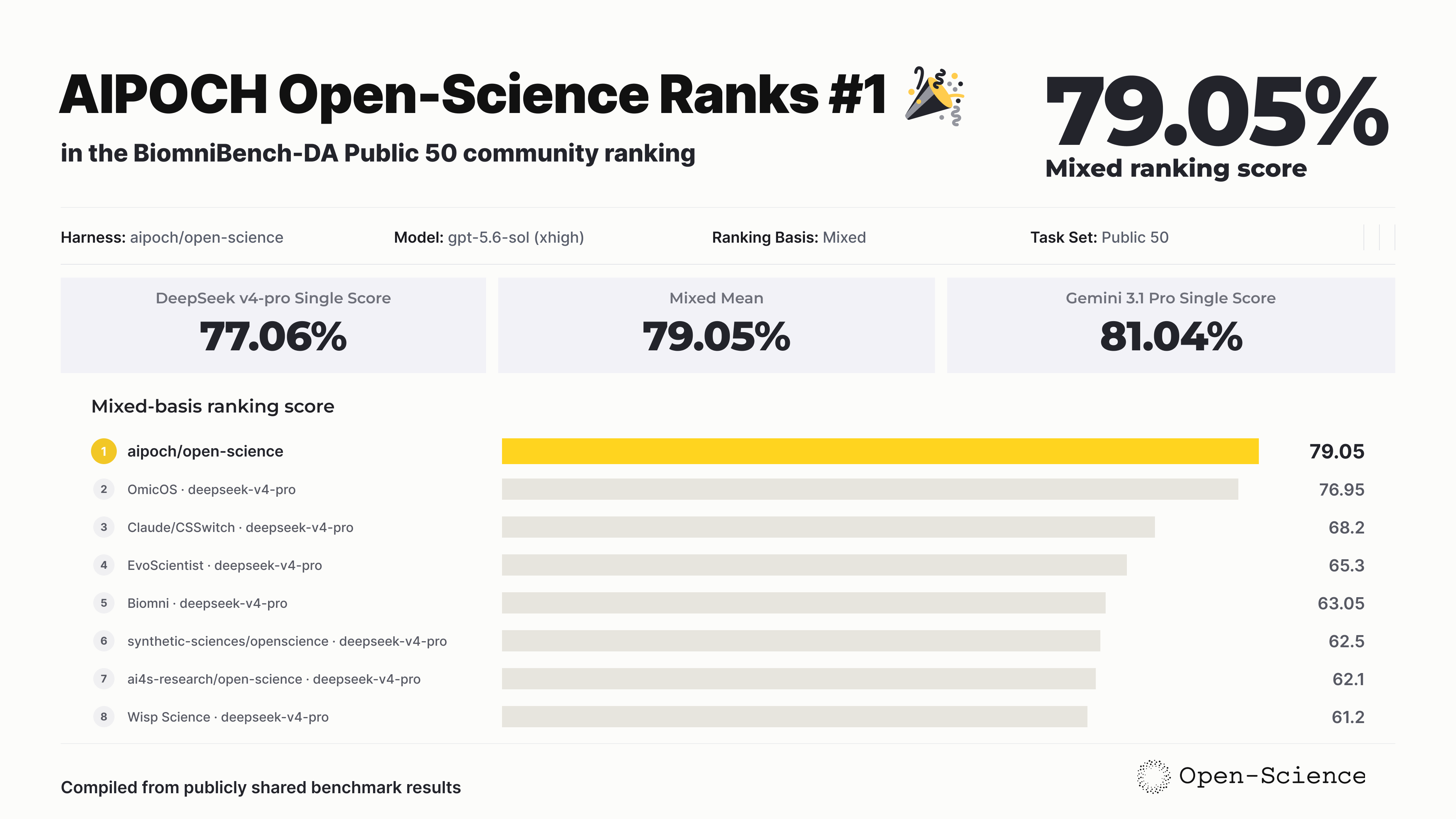
AIPOCH Open-Science achieved the highest ranking score in the compiled BiomniBench-DA Public 50 comparison, earning 79.05 with gpt-5.6-sol (xhigh). The result combines a Gemini 3.1 Pro judge score of 81.04 and a DeepSeek v4-pro judge score of 77.06 through an equal-weight mean, placing AIPOCH Open-Science #1 among the collected Public 50 results. Explore the BiomniBench-DA dataset.
Core Capabilities
AIPOCH Open-Science combines project management, multi-model agent execution, Python and R notebooks, scientific data connectors, immutable artifact versions with provenance, and permissioned human-in-the-loop control in one local workspace. The installed app and latest release notes are the source of truth for changing catalogs, packaging details, and newly added options.
| Area | Core capability |
|---|---|
| Scientific skills | Extend research workflows with 23 built-in skills and 525 skills available from the Skills Marketplace, with one-click installation and updates. Create skills through conversation or completed work, and import packages or GitHub sources. Marketplace contributions are published after review; local imports do not publish skills. |
| Connectors | Access scientific resources through 24 built-in connectors, or add custom local and remote MCP connectors. Manage tool-level permissions and import or export connector configurations. |
| Specialists and delegation | Install 10 Specialists from the Specialist Marketplace, or create and customize personal specialists for delegation from the main agent. Specialist packages support import and export; marketplace contributions are reviewed before publication, and local imports do not publish them. |
| Models and agent backends | Use cloud models, compatible custom gateways, or Claude and Codex subscription logins. Choose Claude Code, OpenCode, Codex, or CodeBuddy as the agent backend, with model connection checks, image input, and reasoning controls. |
| Projects, sessions, and research packages | Organize projects with pinned sessions, message branches, side chats, and recoverable history. Export a portable .science research package and import it into another project or computer with conversation branches, selected file versions, Notebook records, and verification evidence. Imports are read-only and do not execute code or restore credentials; side chats and bookmarks are excluded, and included files depend on the export selection. |
| Reviewer | Enable optional auto-review to check a completed agent turn's responses, execution logs, and related file evidence in a separate context. Get evidence-backed pass, warning, or failure checks, with a bounded cycle of main-agent corrections and re-review when issues are found. Review logs and issue-resolution states remain available; the review is limited to records available for that turn. |
| Python, R, notebooks, and HPC | Run Python, R, Notebook, and shell workloads locally using managed environments or your own interpreters, with background execution and recorded history. Connect to remote hosts through SSH or submit work through Slurm; remote workloads require the host, software, resources, and permissions described in the remote-compute FAQ. |
| Literature Library | Import and manage references and PDFs with collections, tags, project links, notes, and duplicate merging. Find open-access full text, read PDFs and extract figures and tables, and use library sources in conversations for AI-assisted analysis. Generate bibliographies in your chosen citation style and export references as BibTeX or RIS. |
| Scientific files and previews | Upload individual files up to 10 GiB, organize project files, and preview scientific data, PDFs, Office documents, images, code, and molecular structures. This upload limit does not guarantee that a model can read an entire file: model context, attachment parsing, and previews have separate limits. Large files usually need chunked reading or analysis with code. |
| Artifacts and provenance | Keep immutable artifact versions with available producer code, inputs, execution history, environment information, and review evidence. In the desktop app, replay eligible versions with a complete recipe, required inputs, and a usable runtime, then compare outputs and export verification records. Missing evidence may prevent verification, and replay checks do not establish scientific validity. |
Model Providers
AIPOCH Open-Science is model-agnostic at the product level: connect it to major cloud LLM providers, a custom gateway, or reuse an existing Claude or Codex subscription. Provider availability currently depends on the selected agent backend and the API protocols it supports. There are four ways to connect a model:
| Provider mode | How it works |
|---|---|
| Built-in cloud providers | Choose from the provider list shown by the installed app and authenticate with the requested key. |
| Custom Gateway | Supply a Base URL and exact model ID with an API protocol supported by the selected agent backend (Messages, Chat Completions, or Responses), then run the connection test. Remote gateways require HTTPS and an API Key. Loopback endpoints such as localhost, 127.0.0.1, or [::1] may use HTTP without a key; presets include Ollama, LM Studio, llama.cpp, and vLLM. A default API format does not guarantee server or model compatibility. |
| Codex Subscription | Select the Codex agent framework, then choose Codex Subscription as the provider type. |
| Claude Subscription | Sign in with a Claude subscription in two modes: shared (a browser login that stores credentials in your default ~/.claude profile) or isolated (an app-managed claude setup-token run under an app-owned CLAUDE_CONFIG_DIR, fully isolated from ~/.claude/, with a browser flow plus a paste-a-token fallback). |
Built-in providers include OpenAI, Anthropic, DeepSeek, NVIDIA Build, and others; available models and regional endpoints depend on the installed version and selected agent backend. Check the provider selector and connection test in the app.
Data, Permissions, and Trust
AIPOCH Open-Science stores project data, settings, artifact versions, and provenance evidence on the local computer. API Keys are kept locally and use the operating system's secure credential storage when it is available. Logs are local and are not uploaded automatically.
External data flow is still possible and should be reviewed:
- Model requests send the prompt and necessary context to the selected model provider.
- Web searches and remote connectors send their displayed parameters to external services.
- Local connectors may execute trusted commands on the computer.
- The application can also contact update servers, marketplace catalogs, and runtime or model download services.
- Attachments,
@references, logs, and generated reports may contain sensitive research data.
Choose the narrowest permission profile that fits the task:
| Mode | Behavior | Recommended use |
|---|---|---|
Ask for approval |
Requests approval for actions not already covered by scoped grants or trusted application tool policies | New workflows, sensitive data, unfamiliar scripts |
Auto-approve edits |
Uses the backend's native auto review when available; otherwise automatically allows clearly low-risk workspace operations | Trusted file-editing work with controlled external access |
Full access |
Automatically allows edits, commands, network, and connectors | Clearly scoped, fully trusted, unattended work |
The effective profile depends on the selected backend and existing grants. Connector, tool, and compute-network policies also apply; check the effective mode shown by the app.
Review connector parameters and tool activity before approving them. Never include API Keys, access tokens, patient identifiers, unpublished data, or sensitive local paths in screenshots or public issue logs.
Development & Packaging
AIPOCH Open-Science is an Electron application built with React, TypeScript, Prisma/SQLite, and an ACP-based agent runtime.
Prerequisites for source development:
- Node.js 22 (see
.nvmrc) with npm - Git
- Notebook execution optionally uses app-managed Python/R environments or a compatible interpreter you configure.
git clone https://github.com/aipoch/open-science.git
cd open-science
npm install
npm run dev
See the development command and packaging reference and contribution guide for build commands and the development workflow.
Localhost web and headless modes
The desktop backend can optionally serve the same renderer to a browser on the local computer. This
feature is off by default and binds only to 127.0.0.1.
npm run build:web
npm run dev:web
Open the authenticated URL printed by the application. Use npm run dev:headless to start the
backend, tray, agent runtime, and localhost web service without opening an Electron window.
Set OPEN_SCIENCE_WEB_PORT to choose a port (default 44100). Explicitly quitting the
application still shuts down agent and Notebook processes normally.
Mobile remote access
The same localhost web UI can be reached from a phone or tablet through Remote.It pairing. Pair a browser with a six-digit AIPOCH Open-Science code, approve it once on the desktop, and the workspace stays reachable without exposing the loopback server directly. Browser trust is revocable, and mode changes or service shutdown immediately invalidate active remote sessions.
Headless CLI and SDK
The headless CLI and zero-dependency Node.js SDK use the same local daemon, projects, sessions, credentials, and permissions as the desktop and web interfaces. Detailed usage lives with the publishable package so there is one command reference to maintain:
- CLI guide - installation, service lifecycle, task automation, artifacts, output formats, and exit codes
- SDK package overview - Node.js quick start and package entry point
Frequently Asked Questions
Why does the model connection test fail?
A: Check the API Key for missing characters or spaces, verify the Base URL and region, use the provider's exact model ID, and confirm network access and account balance. For a Claude subscription, retry the shared browser login or refresh the isolated claude setup-token credential, depending on the selected mode.
Why is Continue disabled during setup?
A: The current step has not met its required condition. Fix any environment row marked Action needed, install or repair the selected agent runtime, or validate the model provider, depending on the active step. Notebook setup is optional and only affects Notebook execution.
How do I run jobs on a remote HPC cluster?
A: Remote Compute (SSH) is always enabled and does not need to be enabled in Settings. Register an SSH compute host under Settings → Compute, make it available to the current session, and then use natural language or /remote-compute-ssh. You need a reachable SSH host, valid authentication, permission for the required directories, and the software, dependencies, and compute resources required by the workload. Direct SSH does not require a scheduler; Slurm mode requires a working Slurm environment and permission to submit jobs. “Always enabled” refers to the skill, not to the availability of every registered host.
Is there a command-line interface?
A: Yes. Install it in one click from Settings → General → Command line tool → Install command (adds open-science to your PATH; no separate Node.js needed). Initialize the local profile, then control the service and submit research tasks without opening a browser:
# Initialize the local CLI profile and start the service in the background
open-science init
open-science start --no-open

# Create a project and run a task by its exact name
open-science project create "Systematic review"
open-science run --project "Systematic review" \
  --prompt-file ./task.md \
  --approval-profile auto \
  --skill literature-review \
  --wait --json

# Download a generated artifact
open-science artifacts list <session-id> --json
open-science artifacts download <artifact-id> --output ./report.md
See the CLI guide for the full command reference, JSON/JSONL output formats, exit codes, and headless service options.
How do I inspect where a generated result came from?
A: Open the generated artifact and choose Provenance. Select a version to inspect the content identity and the available producer code, execution history, inputs, environment inventory, producing conversation context, and reviewer evidence. Evidence AIPOCH Open-Science could not verify is marked unavailable.
Can I revise an earlier request without losing the conversation that followed?
A: Yes. Edit a completed user message and resend it to create a new branch from that point. The original later turns remain available, and the revision arrows beside the message switch between the alternative paths.
Get Involved
AIPOCH Open-Science welcomes bug reports, feature proposals, design discussions, community questions, and contributions through GitHub, Discord, X, and the AIPOCH website. Choose the channel that best matches your goal, then follow the linked contribution guidance and public-posting safety reminder before sharing project details.
| Channel | Use it for |
|---|---|
| GitHub Issues | Bugs, reproducible failures, and concrete feature proposals |
| GitHub Discussions | Design questions, roadmap proposals, and longer technical conversations |
| Discord | Community help, contributor coordination, and informal discussion |
| X / @aipoch_ai | Release announcements and build-in-public updates |
| AIPOCH Open-Science website | Official product overview and downloads |
Before opening a public issue, remove API Keys, tokens, private file paths, unpublished data, patient identifiers, and other sensitive material from logs and screenshots. See CONTRIBUTING.md for the development workflow.
⭐ Star the repo: If this project has been helpful, we'd greatly appreciate a star on GitHub. Starring the repository encourages continued development. It only takes a second, but it has a meaningful impact on the project.
For shipped, partial, and planned capabilities, see the Capability Map.
License
Apache License 2.0 — see LICENSE.