Nimble Commander is a free, open-source, dual-pane file manager for macOS, aimed at Mac users who want keyboard-driven navigation and the speed of classic file managers instead of the pointer-first workflow of the Finder.
What it is
Nimble Commander is a file manager written in C++ and released under the GNU General Public License version 3. It lives in the macOS ecosystem and is built on Cocoa, the platform's native application framework. The interface follows a dual-pane model, in which two directory listings sit side by side so files can be inspected, copied, and moved between locations without opening extra windows. The project states its aim as blending the user experience of classic file managers from the 1980s and 1990s with the modern look and feel of Mac computers.
The concrete problem it solves is the friction that the standard macOS Finder creates for people who work mainly from the keyboard. It replaces that single-pane, pointer-centric workflow with paired panes and keyboard navigation, and it adds a virtual file system (VFS) layer that abstracts how storage locations are addressed. A terminal emulator is bundled as well, so shell work happens beside file browsing rather than in a separate application.
Key capabilities
- Dual-pane layout showing two directory listings at once, so copy and move operations between locations stay visible.
- Virtual file system (VFS) layer, named in the project's topic list, that abstracts how storage locations are addressed.
- Integrated terminal emulator, also a listed topic, allowing shell sessions to run alongside file panes.
- Keyboard-based navigation, which the README names as a primary design focus together with speed and flexibility.
- Native Cocoa application written in C++, packaged for macOS.
- Several distribution channels: a direct DMG download, the Mac App Store, and Homebrew through brew install nimble-commander.
- Nightly builds published as the nimble-commander-nightly artifact on GitHub Actions; downloading one requires a GitHub account.
Who uses it and how
- Mac users who prefer keyboard-driven file operations, the exact workflow the README targets.
- Developers and administrators who want a terminal session next to their file panes, since a terminal emulator ships inside the app.
- Homebrew users who manage their tooling from the command line and install with brew install nimble-commander.
- Users who want to test unreleased changes by tracking nightly builds from GitHub Actions, while the direct DMG link serves the current release.
- Mac App Store users, though that listing is titled "Files Lite", so the store build and the direct download are not necessarily identical.
Getting started
Install with Homebrew using brew install nimble-commander, or download the current release DMG from https://magnumbytes.com/downloads/releases/nimble-commander.dmg. Nightly builds arrive as the nimble-commander-nightly artifact under GitHub Actions, and build-from-source steps are documented in Docs/Building.md.
How it compares
The facts provided name no competing products and no list of paid tools that the project replaces, and the README itself makes no such comparisons. On the evidence available, Nimble Commander stands alone in this registry as a macOS-only, GPL-3.0 dual-pane file manager.
When to use it — and when not to
Nothing has to be operated on a server: Nimble Commander is a distributed desktop application under GPL-3.0, so there is no database, object store, or mail server to run and maintain. Anyone working outside macOS should look elsewhere, and anyone who needs a cross-platform or remotely hosted file manager will not find it here. The honest caveat is that the README is brief and defers most detail to Docs/Help.md, Docs/Building.md, WHATS_NEW.md, and the project website, while the repository carries 34 open issues.
project readme (upstream, from github) — read inline


Nimble Commander
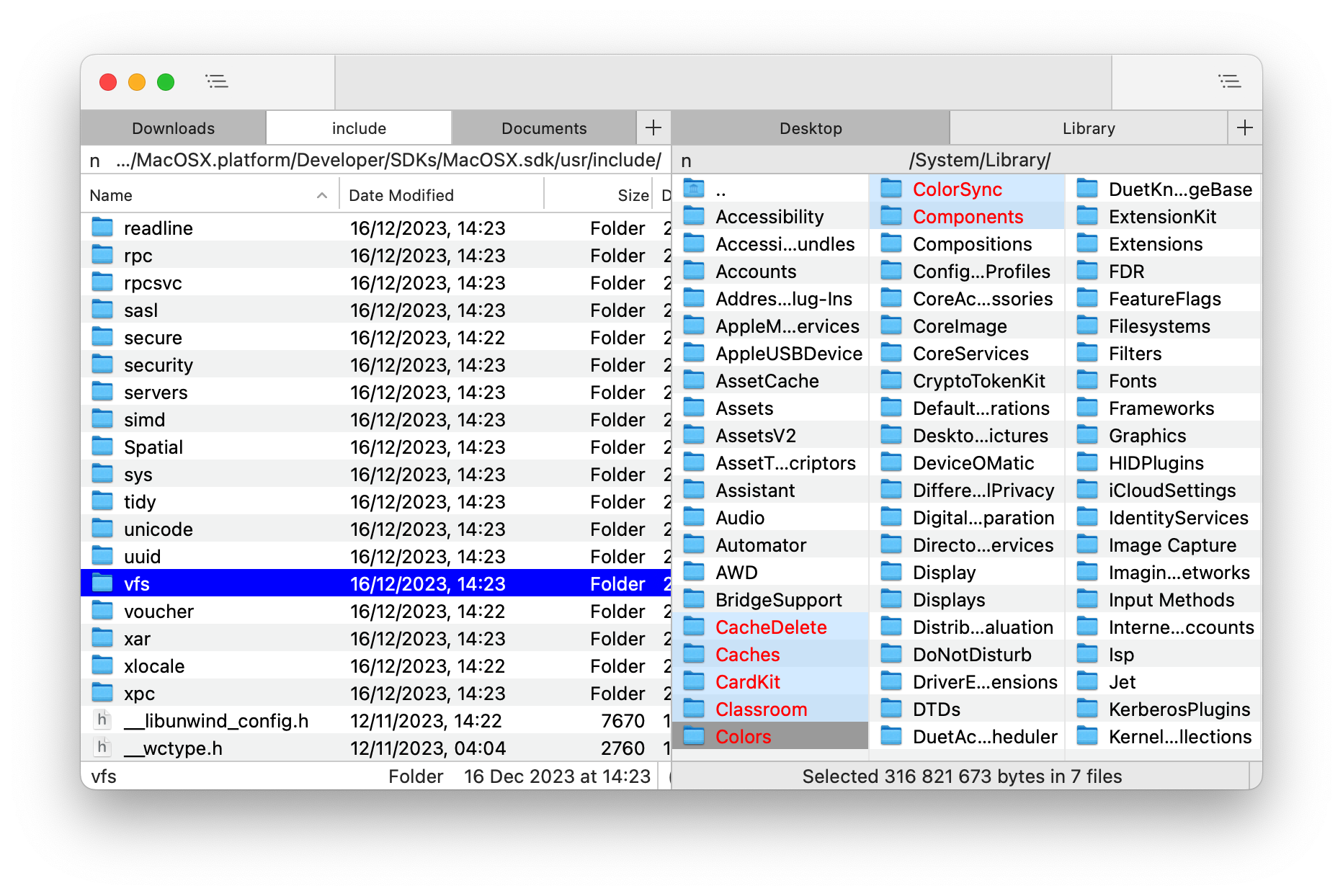 Nimble Commander is a free dual-pane file manager for macOS, designed with a focus on speed, keyboard-based navigation, and flexibility.
The project's aim is to blend the user experience of classic file managers from the '80s-'90s with the modern look and feel of Mac computers.
Visit the project's website at: https://magnumbytes.com.
Getting Nimble Commander
Nightly Builds
You can download the latest nightly build of the app from GitHub Actions.
Go to the most recent integration and select the nimble-commander-nightly in the Artifacts section (a GitHub account is required).
Current Release
Direct download link: https://magnumbytes.com/downloads/releases/nimble-commander.dmg.
Available on Mac App Store: https://itunes.apple.com/app/files-lite/id905202937?ls=1&mt=12.
Install via Homebrew: brew install nimble-commander.
Past Releases
Access all previous releases at https://github.com/mikekazakov/nimble-commander-releases.
Documentation
The user guide can be found here: Help.md.
Changelog
Details about each released version can be found in the WHATS_NEW.md file.
Building from Source
For build instructions and an overview of the source code, please refer to the Building.md document.
Contributing to the Project
Your contributions are welcome and greatly appreciated! For guidelines on how to contribute, including reporting bugs, suggesting features, and submitting code changes, please see the CONTRIBUTING.md file.
License
Copyright (C) 2013-2026 Michael Kazakov (mike.kazakov@gmail.com)
The source code is distributed under GNU General Public License version 3.