NHost is a free, open source build & deployment project written in Go and released under MIT. It has 9,294 GitHub stars, 623 forks and 164 open issues, and was last pushed 5 hours ago. On this registry it ranks #16 of 59 tracked projects in Build & Deployment, with 5 head-to-head comparisons available. It gained 4 stars over the last 6 tracked days.

What is NHost?

What it is

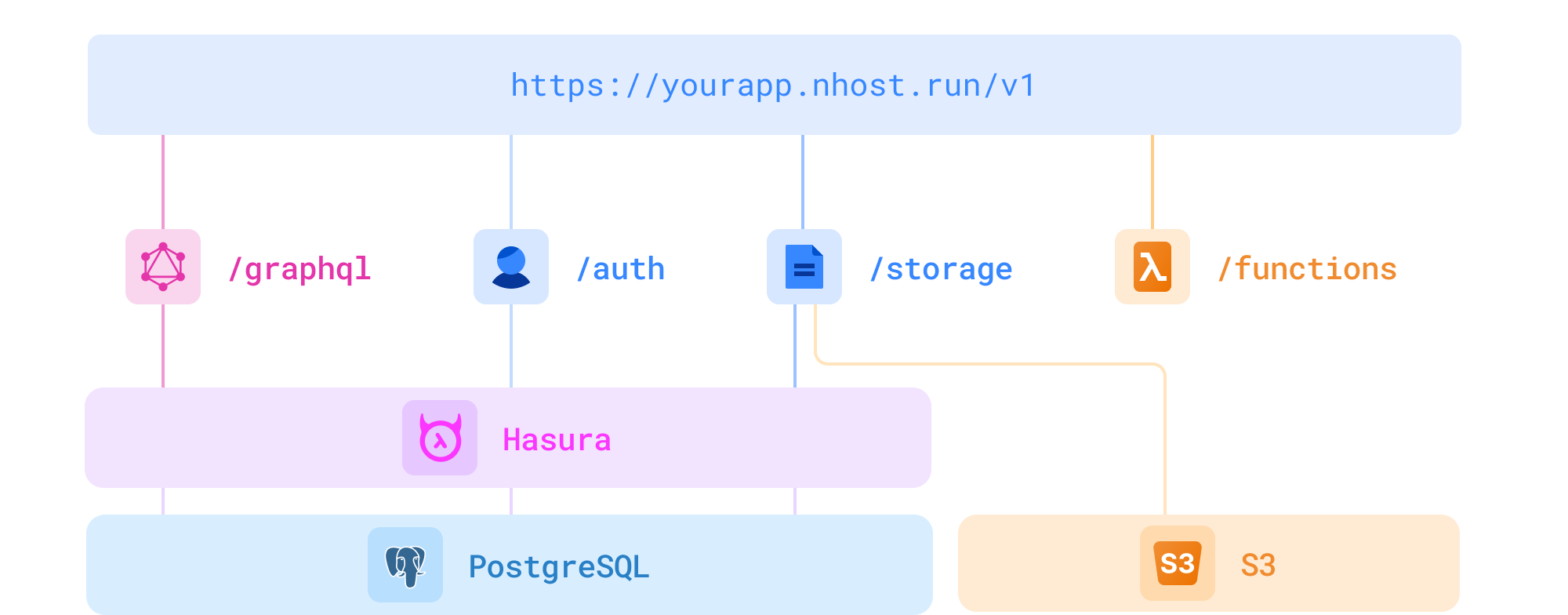
Nhost is an open-source backend-as-a-service platform for modern application development, and the project describes itself as a Firebase alternative with GraphQL. It is built around PostgreSQL for data, Hasura for an instant GraphQL API, authentication, storage, and serverless functions written in Node.js with JavaScript or TypeScript. The project is distributed under the MIT license and is positioned in the developer tools category for build and deployment.

The concrete problem it addresses is the need for a backend foundation that can be used as an open-source alternative to Firebase. Teams can create a database, expose a GraphQL API, manage sign-in, use storage, and run serverless functions from one open-source stack. The platform is frontend agnostic, and the README mentions clients for JavaScript and TypeScript as well as Dart and Flutter.

Key capabilities

  • The platform uses PostgreSQL as its database layer.
  • It provides an instant GraphQL API through Hasura.
  • It includes an authentication service that supports email and password sign-in in the example workflow.
  • It includes a storage service.
  • It supports serverless functions built with Node.js, JavaScript, and TypeScript.
  • The Nhost CLI sets up a local development environment that tracks database migrations and Hasura metadata.
  • The platform exposes GraphQL requests through client libraries for JavaScript and TypeScript, and it also references a Dart and Flutter client.

Who uses it and how

  • Application developers use Nhost to build a backend for applications without creating separate database, API, authentication, and storage services.
  • Teams can use the hosted Nhost platform by signing in, creating an app, and then connecting a client with a project subdomain and region.
  • Developers can use the CLI for local development by running login, init, and up commands after installing the CLI.
  • Operators can self-host the entire stack by using the example docker-compose file from the repository.
  • Frontend teams can connect Nhost to JavaScript, TypeScript, Dart, or Flutter applications because the README states that the platform is frontend agnostic.

Getting started

The README lists three typical paths: using the hosted Nhost platform, installing the Nhost CLI through Homebrew, curl, Nix, npm, pnpm, Yarn, or Bun, and self-hosting the stack with the example docker-compose file. Local development starts with the nhost login, nhost init, and nhost up commands.

When to use it — and when not to

Nhost is useful when teams want an open-source Firebase alternative with GraphQL and SQL, and when they are willing to operate the PostgreSQL, Hasura, authentication, storage, and serverless function components. Compared with Firebase, it exposes more infrastructure pieces to manage, especially for self-hosting. The provided metadata lists a repo age of 0 years, 0 contributors, and 164 open issues, so teams should review maintenance status before adopting it.

project readme (upstream, from github) — read inline

Nhost

Nhost

Quickstart   •   Website   •   Docs   •   Blog   •   X   •   Discord   •   Ask Nhost Guru (third party, unofficial)


Nhost is an open source Firebase alternative with GraphQL, built with the following things in mind:

  • Open Source
  • GraphQL
  • SQL
  • Great Developer Experience

Nhost consists of open source software:

Architecture of Nhost


Visit https://docs.nhost.io for the complete documentation.

Get Started

Option 1: Nhost Hosted Platform

  1. Sign in to Nhost.
  2. Create Nhost app.
  3. Done.

Option 2: Local Development (CLI)

The Nhost CLI is the easiest way to start developing locally. It sets up a local environment that tracks database migrations and Hasura metadata.

Install the CLI:

  • macOS / Linux: brew install nhost/tap/nhost or curl -sSL https://raw.githubusercontent.com/nhost/nhost/main/cli/get.sh | bash
  • Nix: nix profile install github:nhost/nhost#cli
  • npm / pnpm / Yarn / Bun: npm install -D @nhost/cli, pnpm add -D @nhost/cli, yarn add -D @nhost/cli, or bun add -d @nhost/cli

Start building:

nhost login
nhost init
nhost up

Read the full CLI Quickstart guide.

Option 3: Self-hosting

Since Nhost is 100% open source, you can self-host the whole Nhost stack. Check out the example docker-compose file to self-host Nhost.

Sign In and Make a GraphQL Request

Install the @nhost/nhost-js package and start building your app:

import { createClient } from '@nhost/nhost-js'

const nhost = createClient({
  subdomain: 'your-project',
  region: 'eu-central-1'
})

await nhost.auth.signInEmailPassword({
  email: '[email protected]',
  password: '<password>'
})

await nhost.graphql.request({
  query: `
    query GetUsers {
      users {
        id
        displayName
        email
      }
    }
  `
})

Frontend Agnostic

Nhost is frontend agnostic, which means Nhost works with all frontend frameworks.

Resources

  • Start developing locally with the Nhost CLI

Nhost Clients

Applications

Community ❤️

First and foremost: Star and watch this repository to stay up-to-date.

Also, follow Nhost on GitHub Discussions, our Blog, and on X. You can chat with the team and other members on Discord and follow our tutorials and other video material at YouTube.

Nhost is Open Source

This repository, and most of our other open source projects, are licensed under the MIT license.

ROSS Index - Fastest Growing Open-Source Startups | Runa Capital

How to contribute

Here are some ways of contributing to making Nhost better:

  • Try out Nhost, and think of ways to make the service better. Let us know here on GitHub.
  • Join our Discord and connect with other members to share and learn from.
  • Send a pull request to any of our open source repositories on Github. Check out our contribution guide for more details about how to contribute. We're looking forward to your contribution!

Contributors

A table of avatars from the project's contributors

Frequently asked questions

Is NHost free to use?

NHost is open source under the MIT licence. There is no licence fee and no seat count — you can self-host it or, where the project offers one, pay a vendor for a managed version instead.

What does NHost do?

Serverless backend platform for modern app development

What is NHost written in?

NHost is primarily written in Go. Its source is publicly available at https://github.com/nhost/nhost, and it has 9,294 GitHub stars.